
For podcasters, the line between amateur and professional is drawn by the audio interface. A noisy preamp, insufficient gain, or a confusing signal chain can ruin an otherwise great recording, turning listeners away within seconds. The right interface brings out the full potential of your microphone, delivering broadcast-ready sound straight into your DAW.
I’m Min — the co-founder and writer behind Gadgets Feed. My evaluation of these units involved hours of cross-referencing technical datasheets, customer benchmarks, and real-world use-case scenarios to isolate exactly which features matter most for podcast production.
Whether you are a solo host recording from a home office or co-hosting a multi-mic show, the quality of your preamps and the simplicity of your workflow define your final output. This guide to the best audio interface for podcasting breaks down the key specs that separate pro-level setups from frustrating beginner rigs.
How To Choose The Best Audio Interface For Podcasting
Choosing an interface for spoken-word content is different from choosing one for music. Podcasters prioritize clean gain, low noise floors, easy signal routing for guest calls, and sometimes integrated DSP for real-time effects. Understanding a few core specs will help you avoid buying more channels or features than you need.
Preamps and Gain Range
The microphone preamp is the heart of your interface. For dynamic mics like the Shure SM7B or Rode PodMic, you need at least 60 dB of gain to avoid a weak, noisy signal. Interfaces with less than 55 dB of peak gain often require an inline booster like a Cloudlifter, adding cost and complexity. Check the EIN (Equivalent Input Noise) rating — anything below -127 dBu is excellent for quiet recordings.
Input Count and Connectivity
For a solo podcast, one XLR input is enough, but a two-channel interface lets you host a guest without swapping cables. If you plan to bring in remote guests via phone or Zoom, look for a unit with built-in Bluetooth or a dedicated TRRS aux input. Dedicated headphone outputs with independent mix controls also prevent latency issues during live recordings.
Quick Comparison
On smaller screens, swipe sideways to see the full table.
| Model | Category | Best For | Key Spec | Amazon |
|---|---|---|---|---|
| Focusrite Vocaster Two | Interface | Two-person show with phone calls | 70 dB preamp gain | Amazon |
| RØDE RØDECaster Duo | Production Console | All-in-one studio control | 76 dB Revolution Preamps | Amazon |
| Universal Audio Apollo Solo | Interface | Zero-latency UAD processing | UAD SOLO Core DSP | Amazon |
| Universal Audio Volt 2 | Interface | Classic analog tone in a compact box | Vintage Mic Preamp Mode | Amazon |
| Motu M2 | Interface | Highest dynamic range & clarity | ESS Sabre32 Ultra DAC | Amazon |
| M-Audio AIR192x4 VSPro | Bundle | First-time buyer complete starter kit | 2.59ms round-trip latency | Amazon |
| Behringer FLOW 8 | Digital Mixer | Physical faders and Bluetooth control | 60 mm channel faders | Amazon |
| Shure MVX2U Gen 2 | Adapter/Interface | Ultra-portable XLR-to-USB-C | +60 dB clean gain | Amazon |
| Focusrite Scarlett Solo 3rd Gen | Interface | Proven entry-level reliability | 24-bit / 192 kHz converters | Amazon |
In‑Depth Reviews
1. Focusrite Vocaster Two

The Vocaster Two was built from the ground up for podcasters, not musicians. It delivers over 70 dB of preamp gain, which means you can drive a dynamic microphone like the Shure SM7B or Rode PodMic without needing an external booster. The Auto Gain feature sets your input level in about ten seconds, removing the most common rookie mistake of peaking or under-gaining.
Connectivity is its standout feature. It includes a dedicated Bluetooth input for taking phone calls directly into your podcast mix, plus a TRRS input for a wired phone connection. It also has a dedicated camera output with a single TRS cable, making it easy to send pro audio straight to a mirrorless camera or DSLR for video podcasters.
The Enhance button offers four voice presets (including a broadcast EQ curve) that clean up your tone before it hits the DAW. The hardware mute button on the front panel lets you kill your mic instantly. At this price point, no other interface packs this many podcast-specific tools into one box.
Why it’s great
- 70dB of preamp gain handles any dynamic mic
- Built-in Bluetooth for phone guest calls
- Camera output for video podcasters
- Auto Gain and Enhance presets simplify setup
Good to know
- Plastic chassis feels less premium than metal rivals
- Included USB cable is very short
2. RØDE RØDECaster Duo
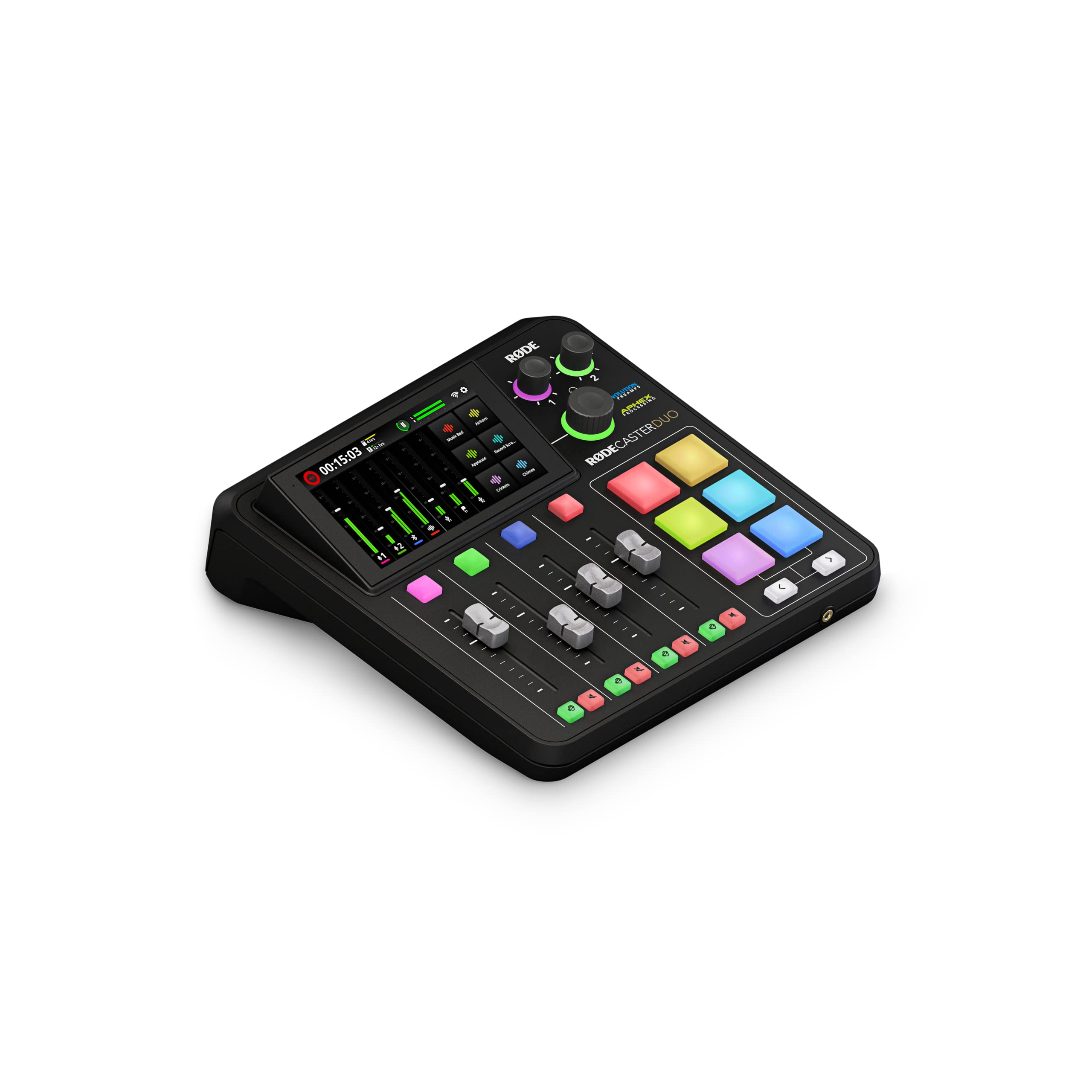
The RØDECaster Duo is not just an audio interface — it is a fully integrated broadcast console. It replaces the need for a mixer, interface, headphone amp, and soundboard by combining everything into a single desktop unit. The Revolution Preamps deliver an ultra-low -131.5 dBV EIN noise floor with 76 dB of gain, making them some of the cleanest preamps in any all-in-one device.
The 5.5-inch haptic touchscreen gives you tactile control over routing, effects, and recording. The six SMART pads can be programmed for sound effects, jingles, or even MIDI triggers, which is invaluable for live-streaming podcasters who want instant access to intro music or transition sounds without touching a mouse.
APHEX processing — including the Aural Exciter and Big Bottom — is built in and fully adjustable per channel. It records directly to a microSD card or computer via USB-C, and the four physical faders let you mix multiple audio sources in real time. This is the ultimate tool if you want to stop futzing with software and start producing.
Why it’s great
- All-in-one: mixer, interface, recorder, soundboard
- 76dB Revolution Preamps with near-zero noise
- Haptic touchscreen and SMART pads for live control
- Built-in APHEX processing and effects
Good to know
- Steep learning curve for absolute beginners
- Firmware can occasionally require a full power reset
3. Universal Audio Apollo Solo USB Heritage Edition

The Apollo Solo brings Universal Audio’s legendary UAD processing to a compact bus-powered interface. At its core is the UAD SOLO Core DSP chip, which lets you track through vintage compressor, EQ, and preamp emulations with near-zero latency. For a podcaster, this means you can record with a realistic Neve or API preamp tone baked into the signal before it hits your hard drive.
The Unison preamp technology physically changes the impedance and gain structure of the input stage to match the emulated hardware. Plug in a Shure SM7B and select the UA 610 preamp emulation, and the interface behaves electrically like the real tube unit. You cannot get this level of analog emulation anywhere else at this size or price.
The Heritage Edition includes five premium UAD plugins valued at over — including Teletronix LA-2A and Pultec EQP-1A — which run on the onboard DSP. The headphone amplifier is best-in-class, delivering loud, clean monitoring even with high-impedance headphones like the Beyerdynamic DT 990 Pro. It does require a Thunderbolt 3 or 4 connection for full functionality.
Why it’s great
- UAD SOLO Core DSP for zero-latency plugin tracking
- Unison preamps emulate vintage hardware electrically
- Includes worth of premium UAD plugins
- Excellent headphone output for high-impedance cans
Good to know
- Requires Thunderbolt 3/4 cable (not included)
- UAD driver support on Windows can be finicky
4. Universal Audio Volt 2

The Volt 2 is Universal Audio’s most accessible interface, offering a taste of their famous preamp sound without the UAD DSP price tag. The Vintage button engages an analog circuit modeled after the UA 610 tube preamp, adding a subtle warmth and harmonic richness to your voice. It is not as drastic as digital EQ — it simply makes vocals sound slightly more polished and full.
It delivers up to 24-bit/192 kHz conversion quality with crystal-clear converters, matching the same audio fidelity found in interfaces many times its price. The build quality is excellent, with a metal chassis and a large, easy-to-read gain knob. The built-in +48V phantom power is switchable per channel, which is rare at this level.
The Volt 2 comes bundled with the LUNA Digital Audio Workstation, which mimics the workflow of a real analog console. For podcasters, this means you can record, edit, and mix in an environment that feels tactile and immediate. It is also USB-C bus-powered, making it a great grab-and-go companion for a laptop and a single microphone.
Why it’s great
- Vintage Mode adds analog tube warmth to vocals
- Solid metal build feels premium
- Includes LUNA DAW for a complete recording workflow
- USB-C bus-powered for mobile setups
Good to know
- No onboard DSP for real-time effects
- Requires external power supply for iPad use
5. Motu M2 2×2

The Motu M2 punches far above its price tier by using the ESS Sabre32 Ultra DAC — the same converter found in high-end studio interfaces costing thousands. This results in a measured 120 dB dynamic range on the outputs, which means your monitoring will be incredibly clean and detailed. The mic inputs achieve -129 dBu EIN, making the noise floor practically inaudible for spoken word.
The headphone output is driven by the same ESS converter, giving you enough juice for 250-ohm headphones like the Beyerdynamic DT 990 Pro without a separate amplifier. The LCD display on the front shows real-time metering for both input channels, so you can visually confirm your levels without looking at your computer screen.
Loopback functionality is built into the drivers, allowing you to mix computer audio with your microphone input for live streaming. The USB-C connection delivers ultra-low latency, and the included software bundle (Ableton Live Lite and MOTU Performer Lite) gives you everything you need to start recording immediately.
Why it’s great
- ESS Sabre32 DAC for 120dB dynamic range
- -129dBu EIN for silent mic inputs
- Drives 250-ohm headphones directly
- Real-time LCD metering on front panel
Good to know
- Included USB-C cable quality is mediocre
- Some users report driver quirks on Windows
6. M-Audio AIR192x4 VSPro

The AIR192x4 VSPro is a complete podcast starter kit that includes the interface, a Nova black condenser microphone, shock mount, XLR cable, and HDH40 studio headphones. For a first-time buyer, this eliminates the guesswork of matching separate components. The interface itself is solid, with a claimed round-trip latency of just 2.59 ms — low enough for real-time monitoring without distracting delay.
The preamps are labeled as “Crystal” preamps and deliver transparent, clean sound with plenty of headroom. The 24-bit / 192 kHz conversion ensures high-resolution capture, and the USB-C connection provides a stable high-bandwidth link to your computer. The bundle also includes a full software suite: MPC Beats, Ableton Live Lite, and the Xpand!2 synthesiser.
The Nova condenser microphone included in the box is a budget-friendly option that requires phantom power and works best in a treated room. For raw spoken word, its sound is decent but not as refined as a dedicated dynamic mic. Still, the value of having a complete, functional recording studio in one box is hard to argue with for a beginner.
Why it’s great
- Complete kit: interface, mic, headphones, cables
- Ultra-low 2.59ms round-trip latency
- 24-bit / 192 kHz high-resolution converters
- Generous software bundle included
Good to know
- Included condenser mic is entry-level quality
- Some reports of USB detection issues over time
7. Behringer FLOW 8

The Behringer FLOW 8 is a hybrid device — part digital mixer, part audio interface. Its eight input channels (two with Midas-designed mic preamps) give you massive flexibility for multi-mic setups, and the 60 mm physical channel faders provide tactile control that a standard interface cannot match. The app-based Bluetooth control lets you adjust EQ, compression, and effects from your phone or tablet.
The EZ-Gain function automatically sets input levels for optimal headroom, which is a lifesaver for live-streaming scenarios where you cannot constantly watch meters. The two built-in FX processors include reverb, delay, and chorus, which can add polish to a dry voice during live broadcasts. The USB interface mode streams all channels back to your computer for recording.
At under 7 inches wide, it is surprisingly portable for its channel count, and it can run on batteries (USB power bank) for field recordings or live events. The main trade-off is that the headphone amplifier is not as powerful as dedicated interface units, and channels 3-4 are noisier than the first two. It is best suited for podcasters who need physical faders and remote control.
Why it’s great
- 8 inputs with 60 mm physical channel faders
- Bluetooth app control for remote adjustments
- EZ-Gain auto-sets optimum headroom
- Battery-operable via USB power bank
Good to know
- Weak headphone amp compared to dedicated interfaces
- Channels 3-8 have more noise than channels 1-2
8. Shure MVX2U Gen 2

The MVX2U Gen 2 is the smallest and most portable device in this list, functioning as a high-quality XLR-to-USB-C adapter with onboard digital audio processing. It delivers +60 dB of clean gain, enough to drive a Shure SM58 or SM7B directly, and includes +48V phantom power for condenser microphones. Its pocket-sized form factor means you can plug an XLR mic directly into an iPad, iPhone, or laptop without a bulky interface.
What makes this more than just an adapter is the built-in Shure digital signal processing. Auto Level Mode adjusts gain dynamically to prevent clipping, while the Real-Time Denoiser cuts background noise without making your voice sound artificial. The Digital Popper Stopper minimizes plosive pops without a foam windscreen. These tools are all zero-latency and can be controlled via the MOTIV app.
It is Apple MFi certified and works flawlessly with iOS devices using a standard USB-C connection. The three tone settings (Dark, Natural, Bright) let you shape your sound without a computer. The main limitation is that it is a single-channel device — ideal for solo podcasters but not for co-hosted shows. If you are a mobile journalist or a solo host who wants professional audio from an iPhone, this is the answer.
Why it’s great
- Pocket-sized XLR-to-USB-C with +60dB gain
- Onboard Auto Level, Denoiser, and Popper Stopper
- Apple MFi certified for plug-and-play iOS use
- Zero-latency monitoring and processing
Good to know
- Single channel only — no guest mic input
- Limited physical controls require the app for fine tuning
9. Focusrite Scarlett Solo 3rd Gen

The Scarlett Solo 3rd Gen is the most recognizable entry-level audio interface on the market, and for good reason. Its mic preamp delivers 56 dB of clean gain, and the switchable Air mode adds a high-frequency lift that helps vocals sound more present and detailed — similar to the effect of a transformer-based preamp. It is not the highest gain available, but it pairs well with condenser mics and moderately sensitive dynamics.
The Gain Halo metering ring around the input knob changes from green to amber to red, giving you an instant visual readout of your signal level. This makes it very hard to clip or under-gain your recording. The 24-bit / 192 kHz converters are the same generation used in pro-level Focusrite gear, ensuring your raw capture is as clean as possible.
Build quality is excellent for the price, with a full metal chassis that can survive being tossed in a backpack. The included software bundle (Pro Tools Intro, Ableton Live Lite, and the Hitmaker Expansion) is generous for beginners. The main drawback for podcasters is the lack of dedicated podcast features like mute buttons or phone inputs — it is a general-purpose interface that excels at simplicity and reliability.
Why it’s great
- Proven reliability with millions of units sold
- Air mode adds clarity to vocal recordings
- Gain Halo metering prevents clipping
- Full metal chassis for durability
Good to know
- Only 56dB gain — may need a booster for low-output dynamics
- No Bluetooth or phone integration for guest calls
FAQ
Do I need an interface with more than two XLR inputs for solo podcasting?
What is loopback audio and why do podcasters use it?
Final Thoughts: The Verdict
For most users, the best audio interface for podcasting winner is the Focusrite Vocaster Two because it combines 70 dB of gain, Auto Gain, and Bluetooth phone connectivity into one affordable package purpose-built for podcasters. If you want a complete all-in-one production console with tactile faders and onboard effects, grab the RØDE RØDECaster Duo. And for mobile recording and ultra-portable setups, nothing beats the Shure MVX2U Gen 2.