
Our readers keep the lights on and my morning glass full of iced black tea. As an Amazon Associate, I earn from qualifying purchases.
Specs are compiled from manufacturer listings and verified buyer reviews and can change over time — please confirm the key details on the product page before buying.
That thin, tinny sound in your recordings usually is not your microphone — it is the tiny built-in sound card inside your computer doing a job it was never designed for. An audio interface fixes that by turning your XLR mic and instrument signals into clean, usable audio your computer can record, and it does it with far less latency (the delay between you speaking and hearing yourself in your headphones).
I’m Min — the founder and writer behind Gadgets Feed. This guide is built by comparing the manufacturers’ published specifications and the patterns across verified customer reviews, so you get each pick’s real strengths and trade-offs instead of marketing spin.
Whether you are laying down vocals, tracking a guitar, or hosting a podcast, the right audio interface for recording hinges on preamp gain, connectivity, and how many inputs you truly need.
Our Picks at a Glance


How To Choose The Best Audio Interface For Recording
Picking an interface depends on matching the hardware to your signal chain — the mic you own, the instrument you play, and the device you record on. Most modern interfaces are plug-and-play, so setup is quick. Your real choices come down to preamp gain, input count, and bundled software.
Preamp Gain: The Heart of the Sound
Gain is how much the interface amplifies your mic’s weak signal. Look for a higher gain range (measured in dB) if you use a dynamic mic like a Shure SM7B, which needs heavy boosting. A range around 56dB is standard; 60dB or more handles quiet or ribbon mics without needing an extra booster.
Connectivity and Power
Most interfaces connect via USB-C, but how they are powered matters. Bus-powered units draw energy from your computer, making them ideal for travel. Others need a wall adapter for full performance. If you plan to use an iPad or iPhone, check for MFi certification and mobile compatibility.
Inputs and Channel Count
A solo podcaster only needs one XLR input. A duo needs two. A full band or drummer needs eight or more to record everything separately. More channels raise cost and complexity, so match input count to your regular session size.
Quick Comparison
| Model | Best For | Max Sample Rate | Mic Preamps | XLR Inputs | Amazon |
|---|---|---|---|---|---|
| Focusrite Scarlett Solo 3rd Gen★ Best Overall | Beginner solo artists | 192 kHz | 1 (56dB gain) | 1 | Amazon |
| MAONO AME2Best for Podcasts | Podcasters & streamers | — | 2 (60dB gain) | 2 | Amazon |
| MAONO P2Best on iPad | Mobile creators on iPad | 192 kHz | 2 (56dB gain) | 2 | Amazon |
| Shure MVX2U Gen 2 | Portable single-mic setups | 192 kHz | 1 (60dB gain) | 1 | Amazon |
| Behringer UMC404HD | Multi-channel on a budget | 192 kHz | 4 (MIDAS) | 4 | Amazon |
| Elgato Wave XLR MK.2 | Streamers & gamers | 192 kHz | 1 (80dB gain) | 1 | Amazon |
| Universal Audio Volt 2 | Vintage tone seekers | 192 kHz | 2 (610 preamp) | 2 | Amazon |
| Focusrite Scarlett 2i2 4th Gen | Versatile home recording | 192 kHz | 2 (Auto Gain) | 2 | Amazon |
| SSL 2 MKII | Clean, pro-grade clarity | 192 kHz | 2 (Legacy 4K) | 2 | Amazon |
| Motu M4 | Small bands & multi-instrumentalists | 192 kHz | 2 | 2 | Amazon |
| Tascam US-16×08 | Full band & drum recording | 96 kHz | 8 (56dB gain) | 8 | Amazon |
In‑Depth Reviews
1. Focusrite Scarlett Solo 3rd Gen
Our pick — over 4.5★ from 29,000+ verified ratings; the strongest balance of quality and price.
The beginner’s gold standard that delivers a brighter recording with high-performance mic preamps.
The Scarlett Solo is the default first interface for home studios. The high-performing mic preamp (with a 56dB gain range) gives you the headroom to capture vocals and acoustic instruments cleanly, and the switchable Air mode adds extra clarity to acoustic guitars when you need it. It records up to 24-bit/192kHz, so your takes retain fine detail.
Plug a guitar or bass straight into the two high-headroom instrument inputs, and the Gain Halos (halo indicators around the knobs) turn green when levels are healthy and red when you are clipping, so you can avoid distortion. Two low-noise balanced outputs feed your monitors cleanly, and there is a dedicated headphone output for private high-fidelity listening.
Setup is famously simple, and two-year owner feedback confirms it pairs well with Shure mics and is praised for ease of use. A small annoyance: a welcome folder pops up every time it is connected. It pairs with Pro Tools Intro+, Ableton Live Lite, Cubase LE, and the Hitmaker Expansion.
Why owners stick with it
- Sound quality earns the most praise — crisp, consistent, and reliable for vocals and editing
- easy for beginners over two years of use
- Three-year worldwide warranty
The trade-offs
- Only one mic input, so duos need a bigger model
- Some users hit computer compatibility hiccups
- Occasional reports of durability concerns over time
Your first studio mic preamp: This suits solo singer-songwriters and podcasters who want a reliable, straightforward first interface.
Reach beyond it if: You need to record two mics at once — this is strictly a one-mic machine.
2. MAONO AME2
A 10-channel podcast mixer that puts 11 customizable sound pads at your fingertips.
This is a streaming console rather than a bare interface, and the build quality is the first thing owners mention. Its built-in preamps support phantom power (48V) to bring condenser microphones to life, with 3-level mic gain adjustment supporting ultra-low noise gain up to 60dB. The 32-bit chipset and DENOISE function keep everything clear.
What makes it unusual is the sound pad array: 11 customizable pads, with 3 supporting up to 60 seconds of looping audio each and the other 8 holding 20 seconds. You can upload your own clips via smartphone, PC, microphone, or Bluetooth. There are six reverb modes, 12-step auto-tune, three modifiable tone knobs (treble, mid, bass), and pitch changer knobs.
Connectivity is built for live streams: USB-C for your computer, LIVE-OUTPUT 1/2 for a smartphone, MONITOR SPK for studio monitors, and an AUX-IN jack for backing tracks. The 6.35mm instrument jack handles guitar and bass without sacrificing tone. A 60dB noise level spec means the preamp stays quiet in normal use.
Built for content creators
- sturdy build and intuitive 10-channel layout
- Bluetooth plus 11 customizable sound pads
- Works well for karaoke and loading sound effects
Know before you buy
- Connectivity gets mixed feedback, with some struggling to connect
- A handful report it stops working after a few months
- Buzzing can appear if wall power is dirty while charging
Grab it for: Podcasters and streamers who want sound effects, reverb, and live controls without a separate mixer.
Look elsewhere if: You need a rock-solid dual-PC streaming setup — this is not the best fit there.
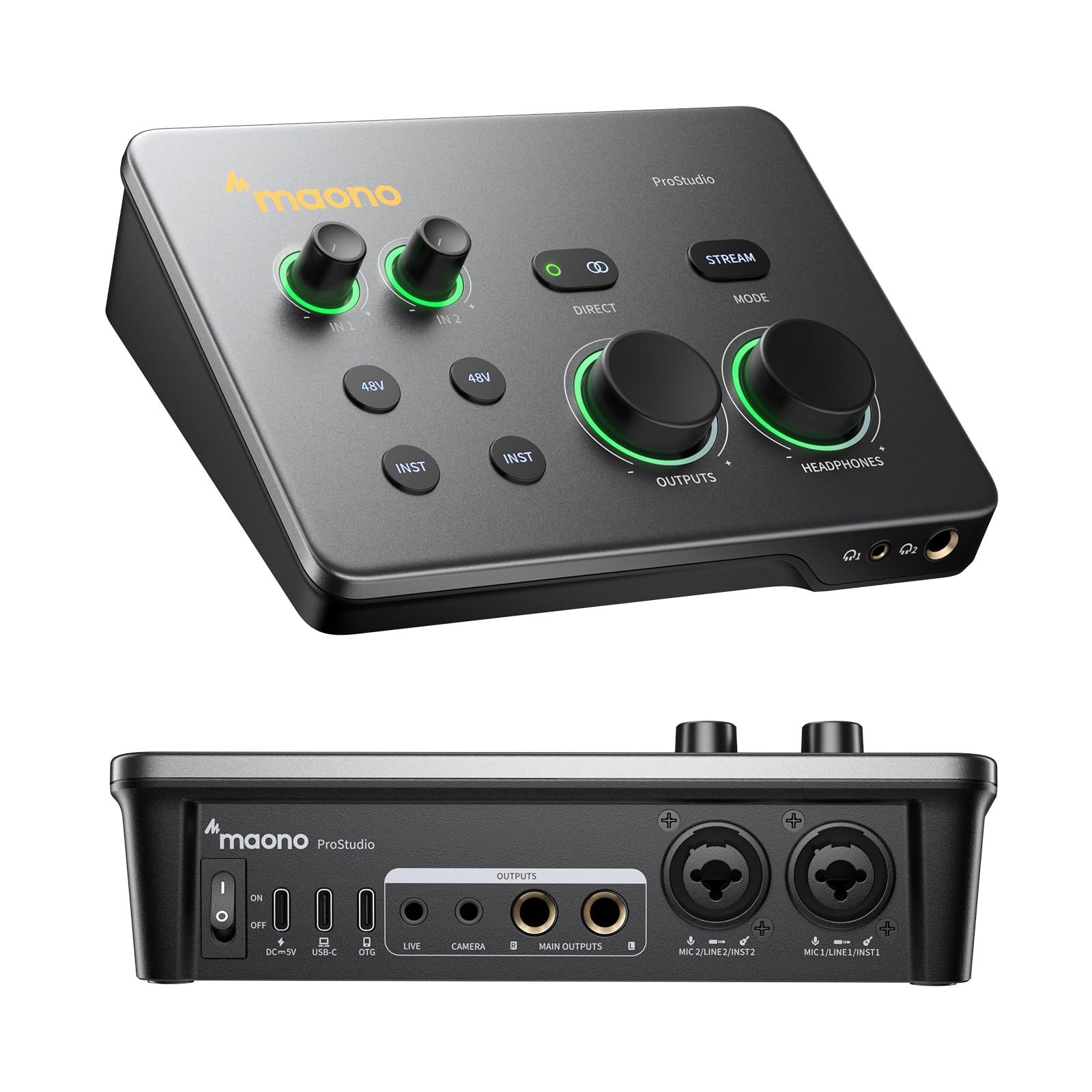
3. MAONO P2
A hybrid 56dB dual-XLR interface that records to your Mac and iPhone at the same time.
This one is built for the mobile creator. Dual USB ports with MFi certification connect your computer and phone or iPad simultaneously, so you can record in GarageBand or Logic Pro and then stream covers straight from your mobile device. The 24-bit/192kHz quality captures vocal and guitar nuance, and a class-leading -130dB EIN (equivalent input noise — how quiet the preamp is when nothing is plugged in) keeps recordings dead silent.
The aluminum-alloy housing is desk-friendly with an ergonomic 15° tilt angle that keeps controls within easy reach. Stream Mode sends your voice equally to both channels for balanced listening, and independent mute buttons prevent unwanted noise during guitar changes. Direct monitoring delivers low-latency audio so you hear yourself without distracting delays.
Owners rate the sound quality as phenomenal for the price, with mics sounding crisp and clear, and the plug-and-play macOS setup gets consistent praise. A recurring note is that dynamic mics need high gain, which can raise the noise floor — an inline preamp solves it. The bundled ProStudio 2 software is powerful (routing FL Studio, Spotify, TikTok, or browser audio to dedicated channels) but some find it unintuitive.
What wins people over
- Plug-and-play with macOS and near-zero latency
- Dual USB lets you record and stream simultaneously
- Works flawlessly with iPad Pro for vocals and acoustic guitar
Fair caveats
- Build quality gets mixed feedback on long-term durability
- Software is powerful but not the easiest to navigate
- Dynamic mics may need an extra gain boost
Ideal for: Musicians and streamers who split time between a laptop and an iPad and want one box for both.
Think twice if: You avoid software configuration — the routing tools reward patience.
4. Shure MVX2U Gen 2

A 100-gram XLR-to-USB-C adapter that brings professional Shure processing to any mic.
This 100-gram adapter turns any dynamic or condenser XLR mic into a studio-grade setup. Onboard Shure Digital Audio Processing handles Auto Level Mode, a Real-Time Denoiser, and a Digital Popper Stopper — all running with zero latency directly on the device. You can choose your preferred tone from Dark, Natural, or Bright for tailored output.
It provides up to +60 dB clean gain and 48V phantom power, which means a demanding dynamic mic like the Shure SM7B does not need an extra Cloudlifter booster. At 100 g, it adds almost no weight to a travel kit, and it is MFi-certified for iPhones as well as PCs. Owners note it works cleanly even in multi-hour sessions with no pops.
The MOTIV apps (MOTIV Mix, MOTIV Audio, and MOTIV Video) let you manage settings from desktop, smartphone, or tablet, adding EQ, compression, and a limiter. The catch: full sound shaping requires those apps, and on Linux support is limited. Gain levels get mixed feedback — some find ample gain, others want more.
Why it disappears into your bag
- Studio-level clarity in a palm-sized, USB-powered unit
- Real-time denoiser and popper stopper work on any XLR mic
- Pairs with an iPhone 16 Pro Max for on-the-go recording
Notable limits
- Gain is a point of debate — ample for some, lacking for others
- Software compatibility draws criticism, especially on Linux
- Value for money feels mixed to some buyers
Reach for this if: You record meetings, classes, or vocals in different rooms and want one adapter instead of a desktop unit.
Weigh it against: A full interface if you need instrument inputs — this is XLR-only.
5. Behringer UMC404HD

Four MIDAS-designed mic preamps in a tank-like metal chassis for multi-mic recording on a budget.
If you need to record more than two mics at once while staying affordable, this is the workhorse. Four state-of-the-art MIDAS-designed microphone preamps come with +48V phantom power, streaming 4 inputs and 4 outputs plus 1x MIDI I/O with ultra-low latency. The audiophile 24-bit/192kHz resolution keeps things professional, and the “built-like-a-tank” impact-resistant metal chassis is designed and engineered in Germany.
Reviews repeatedly highlight how quiet the preamps are — among the quietest owners have used — with a high signal-to-noise ratio and a loud headphone output. It works with Cubase, Audacity, Reaper, and Cakewalk, and it can even act as a regular sound card for PC audio. The global phantom power switch (all channels or none) is standard at this level but worth knowing for ribbon mics.
The recurring fit note is realistic: some report driver quirks with specific software like OBS, and a few find it does not play well with Apple MacBook Pro. At 2.7 pounds it is not the most portable option, but the four-input flexibility makes it a favorite for small bands and podcast panels.
What the crowd loves
- Four simultaneous mic inputs — rare at this level
- Wonderfully quiet operation with clean sound
- Dead-simple drivers that work across many DAWs
Honest fit notes
- Global phantom power can affect ribbon mics on all channels
- Some MacBook Pro users report compatibility issues
- Occasional audio dropouts with OBS specifically
Best if: You are tracking a drummer, a podcast panel, or a small band and need four independent channels.
Not if: You are a Mac-only user — check compatibility before committing.
6. Elgato Wave XLR MK.2

A massive 80dB gain with touch controls and LED feedback built for streamers and creators.
Streamers will feel at home immediately. The 80dB gain drives any XLR microphone with authority, and the powerful headphone amp output delivers loud, clear amplification. Onboard effects — a voice enhancer, compressor, and EQ — live in the Wave FX Processor, which unifies DSP effects and VST plugins in one signal chain.
The touch control with LED feedback is the standout feature: adjust levels and mute instantly with a tap, and customizable LED lighting shows levels and status at a glance. Ultra-low-latency monitoring at 24-bit/48kHz means you hear what your audience hears without delay. The included USB-C to C cable runs 150 cm, giving you slack for desktop setups.
Owners praise the mic preamp quality and note it is easy to manage with fast setup, and it works natively with Stream Decks. The Wave Link app enables precise routing, effects, and monitoring with virtual outputs. The AI noise cancellation gets mixed feedback — some report spotless noise suppression while others say it picks up fan noise. This is a 2-channel device best paired with Wave Link software.
Why streamers upgrade
- Touch mute and LED metering are instant and intuitive
- Excellent Wave Link integration with virtual outputs
- Works great for remote workers and meetings, not just streamers
Know the limits
- AI noise cancellation can pick up fan or outside noise
- LEDs stay on when the laptop is disconnected
- Best value only when paired with the Wave Link ecosystem
Choose this if: You are a streamer or remote worker who wants a focused, audio-first interface with a superb knob and LED metering.
skip it if: You need multi-mic recording — this is a single-XLR unit.
7. Universal Audio Volt 2

Classic 610 preamp emulation and a vintage tone button for warm, album-ready recordings.
The Volt 2 brings Universal Audio’s legendary 610 preamp sound to your desk. The Vintage mode engages the 610 tube emulation, giving you rich, full, album-ready sound, and the vintage tone button is a highlight for owners. It captures detail at up to 24-bit/192kHz with crisp converters.
The bundled LUNA Digital Audio Workstation delivers the workflow of a real analog studio, and you get access to the same UAD plug-ins and instruments trusted by top industry pros. Two inputs (XLR and 1/4 inch) cover vocals and direct guitar, and the USB-C connection auto-installs the driver on a Mac in about 30 minutes.
Owners deliberately replaced a Focusrite Solo with this to eliminate PC electrical interference, and the included VSTs get heavy daily use. At 650 g it is solidly built and USB-powered for portability. Setup gets mixed feedback — most find it straightforward, but a few note it requires proper configuration. It supports MacOS, Windows, iPad, and iPhone (iOS 14+), with an external Volt power supply and Apple Lightning adapter needed for phones.
The sound factor
- Vintage mode adds harmonic warmth to vocals
- Eliminates PC electrical interference cleanly
- Bundled VSTs are genuinely useful, not filler
Fair trade-offs
- Direct-in guitar is great, but some mics sound a little soft
- Setup requires some configuration for full effect
- Noise level and volume controls get mixed notes
Grab it for: Musicians who want that warm analog character and a genuinely useful plugin bundle.
Consider other options if: You need more than two simultaneous inputs.
8. Focusrite Scarlett 2i2 4th Gen
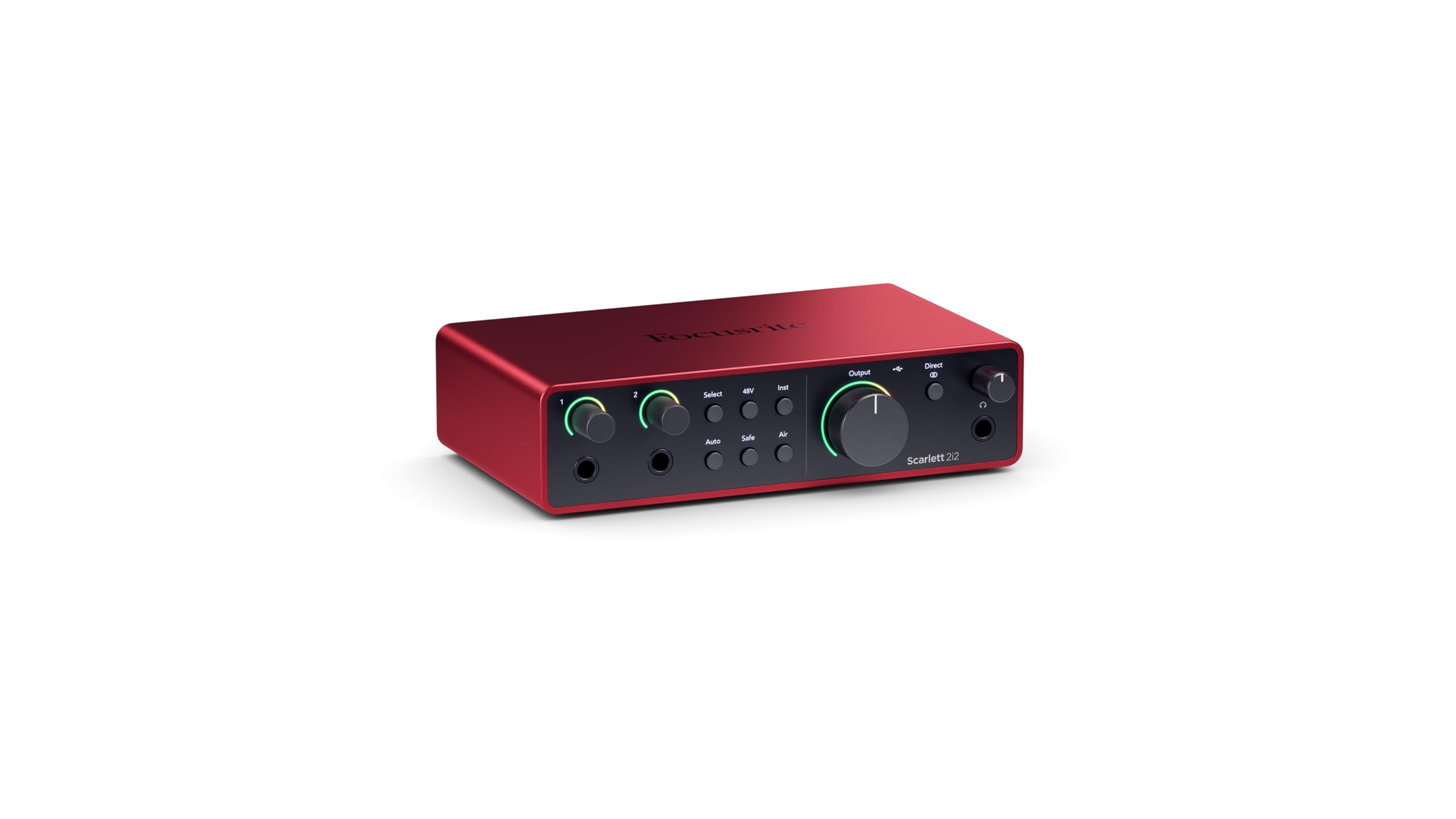
The artist’s 2×2 interface with a 120dB dynamic range and Auto Gain that saves every take.
This is the 4th Gen version of the world’s most popular home-recording interface, and it shows why it is a standard. The huge 120dB dynamic range means the converters capture the full sweep from whisper-quiet to loud without distortion — the same converters found in Focusrite’s flagship studio interfaces. Auto Gain sets the perfect level for your mic or guitar automatically, and Clip Safe prevents clipping so you can focus on the music.
Two mic preamps deliver around 70dB of gain, which powers demanding dynamic mics like the SM7B without extra gear. Air mode lifts vocals and guitars to the front of the mix, with mode 1 enhancing dark mics and mode 2 adding harmonic drive. The separate input volume controls get singled out as handy by owners.
Bedroom guitarists love running physical pedals in stereo or mono into a decent amp sim in their DAW, calling it game-changing. Owners find it easy, zero-latency, and bus-powered for gigs and home use. The main wishes: more inputs (that is why a 4i4 exists) and clearer packaging — one unit arrived with no shock protection. Sound quality itself earns mostly positive notes, though a few find it mixed, and some report noise in specific setups.
Why it is the standard
- Auto Gain and Clip Safe make simple to use recordings simple
- 120dB dynamic range matches flagship studio converters
- Easy, reliable, and reliable for gigs and home
Realistic caveats
- No monitor mix control and no gain numbers displayed
- Packaging in some deliveries lacks shock protection
- Only two inputs — a larger model is the upgrade path
Pick this if: You want a versatile two-input interface that is genuinely easy for a beginner and has room to grow.
Think bigger if: You are already sure you will record a full band — the 4i4 adds more inputs.
9. Solid State Logic SSL 2 MKII

Legendary SSL console sound in a compact desktop unit, with a Legacy 4K button for instant sheen.
This is the interface that brings Solid State Logic’s famous console character to your home studio. The 2 XLR mic preamps and 2 1/4-inch line/Hi-Z inputs feed 32-bit/192kHz AD/DA converters, and the Legacy 4K analog enhancement button adds a polished sheen to vocals and instruments. A 2×2 USB interface, it is bus-powered and works on Mac and Windows.
For voice artists, the high-pass filters are the hero — one owner with a recurring booth rumble had it eliminated instantly, with crisper vocals and less mouth noise. The build is heavy, industrial, and reassuring, with solid gain knobs and rubber feet. The headphone amp is powerful and clean with no noise floor.
The 48V phantom power works with a clear 3-second flash when toggled, and the stereo loopback is handy for streaming. Owners note it is larger and heavier than a Scarlett 2i2, and it is not actually 32-bit float recording (it is 32-bit D/A conversion), so clipping is still possible. MIDI I/O comes on 5-pin DIN jacks, and the SSL Production Pack software bundle is included.
The SSL difference
- Legacy 4K button adds clarity and presence instantly
- High-pass filters clear up room rumble and mouth noise
- Rock-solid metal build with precise knobs
Honest fit notes
- Heavier and bulkier than the 2i2
- Not true 32-bit float recording, despite the converters
- Minimal packaging — no marketing extras
Choose SSL for: Producers and voice actors who value pro-grade clarity, a superb headphone amp, and a legendary console tone.
Consider it only if: You are fine with a heavier unit that prioritizes substance over size.
10. Motu M4

A 4×4 USB-C interface with an LCD screen that delivers crisp sound and near-zero latency.
If you need more than two inputs and want a step up in build quality, the M4 is the one owners call “the Focusrite Killer.” It is a 4-in/4-out USB-C interface with 2 microphone preamps, and the LED meters plus direct monitoring mix control are standout features. The LCD screen is a nice touch that makes level checking easy.
Sound is transparent and clean, with low noise and jitter, and the preamps are quiet. It drives two KRK monitors well and works smoothly on Mac and Windows without bloatware. The 6+GB of free content — Mac/PC/iOS — adds real value for beginners. Loopback routing captures your computer’s audio alongside your mic for streaming.
Owners recommend the M2 if you need fewer inputs, but the M4’s extra I/O is worth it for small bands and multi-instrumentalists. It is USB-C bus-powered and portable at 16 ounces. The honest caveats: the headphone amp is a bit weak on USB bus power (an external amp helps), and the mix knob for channels 3-4 is sensitive. There is an occasional pitch-shift bug on Windows, fixed by disabling fast startup.
What makes it a killer
- Loud, clean preamps with LED metering and direct monitoring
- crisp, plug-and-play with Linux as well as Mac/PC
- 4×4 I/O plus loopback for streaming without extra gear
Know before you buy
- Headphone amp is weak on bus power — use an external amp
- Routing and loopback require reading the manual
- Mix knob for channels 3-4 is sensitive
Best for: Musicians who want room to grow — extra inputs, loopback, and a screen without moving to a rack unit.
Not if: You want a truly plug-and-forget experience; this rewards a little technical reading.
11. Tascam US-16×08

A rackmount powerhouse capturing 16 mic and line inputs with eight Ultra-HDDA preamps.
For full-band and drum recording, this is the serious tool. It captures 16 mic and line inputs to your computer, with eight Ultra-HDDA microphone preamps delivering up to 56dB of gain each — the cleanest, quietest operation in their class. An additional eight line inputs are included, with two switchable to instrument level for direct guitar or bass recording.
Eight balanced line outputs are available, two with a level control on the front panel for monitoring. The built-in DSP Mixer handles low-latency digital mixing, and each channel has four-band EQ and compression for polished monitor mixes. At 6.1 pounds with rack ears included, it is built to live in a studio rack.
Buyers report it records all 16 inputs as separate channels over USB, with silent mic pres and no dropouts at 96kHz/24-bit in Reaper. One user replaced two PreSonus Firestudio units with it. The honest trade-offs: driver quality gets negative feedback in a few cases, compatibility is mixed (Windows 10 needed a driver update), and the gain knobs on channels 1-10 are small and closely spaced.
The big-session advantage
- 16 separate input channels — record a full band at once
- Quiet, clean Ultra-HDDA preamps with 56dB gain
- Built-in DSP mixer with EQ and compression per channel
Serious caveats
- Driver quality draws negative feedback on some systems
- No registration link and an outdated manual hurt setup
- Gain knobs on channels 1-10 are small and crowded
This is your interface if: You are tracking drums, a live band, or a large podcast panel and need every channel separate.
Think carefully if: You are not prepared to troubleshoot driver installation on Windows.
Understanding the Specs
Sample Rate & Bit Depth
Sample rate (measured in kHz) is how many times per second your audio is captured. Higher rates like 192kHz capture more detail, though 48kHz is plenty for most recordings. Bit depth (like 24-bit) controls the dynamic range — the gap between the quietest and loudest sounds you can record before distortion. Most interfaces now hit 24-bit/192kHz as a standard.
Preamp Gain & Phantom Power
Gain (in dB) measures how much the preamp amplifies your mic’s signal. Condenser mics need 48V phantom power to operate, while dynamic mics need high gain instead. If you use a ribbon mic, be careful with interfaces that only offer global phantom power, as it can damage the ribbon. Look for at least 56dB of gain for flexibility.
Latency & Monitoring
Latency is the delay between you speaking into the mic and hearing yourself in your headphones. Direct monitoring routes your input straight to your headphones, bypassing the computer, which gives you near-zero latency. Without it, you hear a distracting echo of your own voice. This spec matters most for vocalists and live streamers.
Loopback
Loopback is a routing feature that lets you record your computer’s internal audio (like a YouTube video or a game) along with your microphone. It is essential for streamers and podcasters who react to content in real time. Not every interface has it, so if you plan to stream, make it a requirement.
FAQ
What is the difference between an audio interface and a mixer?
How many inputs do I need for podcasting?
Will an audio interface work with my iPad or iPhone?
What is phantom power and do I need it?
Is a higher sample rate always better?
Do I need a headphone amplifier with my interface?
What is the difference between bus-powered and externally powered interfaces?
Can I record my guitar directly into an audio interface?
What is latency in an audio interface?
Is an interface with software worth more money?
Final Thoughts: The Verdict
If you want one dependable pick, the audio interface for recording winner is the Focusrite Scarlett Solo 3rd Gen because it pairs the most trusted beginner-friendly design with the high-performing preamp and Air mode that genuinely brighten recordings. If you want something built for podcasting with sound pads and live controls, grab the MAONO AME2. And for a mobile setup that records to your iPhone or iPad, the MAONO P2 is the one to reach for. The Focusrite Scarlett Solo 3rd Gen holds a 4.7-star score across thousands of owners, making it the safest bet for beginners.
How We Picked
We do not accept paid placement. Every pick is matched to a real buyer and a real use-case; we do not hands-on test units.
Sources & Methodology
Specifications: manufacturer listings and product documentation. Review insights: verified customer reviews, as of August 2026. Pricing: not shown on this page (it changes often); check the current price via the retailer link.
As an Amazon Associate, Gadgets Feed earns from qualifying purchases. This does not affect which products we feature.