
Our readers keep the lights on and my morning glass full of iced black tea. As an Amazon Associate, I earn from qualifying purchases.
Specs are compiled from manufacturer listings and verified buyer reviews and can change over time — please confirm the key details on the product page before buying.
If you plug a USB microphone straight into your computer, you are leaving sound quality on the table. A dedicated interface sits between your mic and your PC, giving you a clean preamp (the circuit that boosts your mic’s quiet signal), more gain (volume boost) without hiss, and a way to monitor yourself in real time. The right interface delivers broadcast-quality vocals that a laptop’s built-in mic can’t match.
I’m Min — the founder and writer behind Gadgets Feed. This guide is built by comparing the manufacturers’ published specifications and the patterns across verified customer reviews, so you get each pick’s real strengths and trade-offs instead of marketing spin.
You want clean, clear recordings from your USB mic, and the right audio interface for usb mic makes that happen by boosting preamp quality, providing phantom power (the 48V that powers condenser mics), and keeping latency (the delay between speaking and hearing yourself) low. Each pick below converts your XLR mic’s signal into clean, studio-grade audio.
Our Picks at a Glance


How To Choose The Best Audio Interface For USB Mic
Before you scroll through specs, know this: a USB microphone already has a tiny interface built into it. Plugging that same mic into a separate interface via XLR usually sounds better because you get a higher-quality preamp and more control over gain. Focus on four things — preamp quality, phantom power, monitoring, and sample rate.
Preamps and Gain
The preamp is the first circuit your mic signal hits. A weak preamp forces you to crank the volume, which brings in noise. Better preamps deliver clean gain — some offer +60 dB of boost — so your voice stays crisp even at high levels. If you use a dynamic mic like the Shure SM58, you need more gain than a condenser, so check the preamp specs.
Phantom Power for Condensers
Condenser microphones need 48V phantom power to work. That’s a small voltage sent up the XLR cable to power the mic’s internal electronics. If you use a condenser, your interface must have a +48V button. Dynamic mics don’t need it, but having it is a safety net for future mic upgrades.
Latency and Monitoring
Latency is the delay between speaking into the mic and hearing yourself in the headphones. High latency makes you sound like you’re in a cave. Zero-latency monitoring routes your voice directly to headphones before it hits the computer, so you hear yourself instantly. This matters for podcasters and streamers who need real-time feedback.
Sample Rate and Bit Depth
Sample rate (measured in kHz) is how many times per second your audio is captured. Higher rates like 192kHz capture more detail than 44.1kHz, though most listeners can’t hear the difference beyond 48kHz. Bit depth (24-bit vs 32-bit) affects the dynamic range — 32-bit gives you more headroom before clipping. Don’t overpay for extreme rates unless you’re a producer who needs them.
Quick Comparison
| Model | Best For | Sample Rate | Inputs | Phantom Power | Amazon |
|---|---|---|---|---|---|
| Focusrite Scarlett Solo 3rd Gen★ Best Overall | Beginners & singer-songwriters | 192 kHz | 1 XLR + 1 Instrument | Yes (+48V) | Amazon |
| Behringer U-Phoria UMC204HDBest Value | Budget value with MIDI | 192 kHz | 2 XLR + 2 Instrument | Yes (+48V) | Amazon |
| BlueAVS AR013Podcast Pick | Podcasters on a budget | 192 kHz | 2 Combo XLR/TRS | Yes (+48V) | Amazon |
| Shure MVX2U Gen 2 | Mobile recording on phones/tablets | 192 kHz | 1 XLR | Yes (+48V) | Amazon |
| Audient EVO 4 | Smart auto-gain for beginners | 96 kHz | 2 XLR + 1 Instrument | Yes (+48V) | Amazon |
| Focusrite Scarlett Solo 4th Gen | Upgraded sound with Air mode | 192 kHz | 1 XLR + 1 Instrument | Yes (+48V) | Amazon |
| PreSonus AudioBox 96 Studio | Complete beginner studio kit | 96 kHz | 2 Combo XLR/TRS | Yes (+48V) | Amazon |
| Yamaha URX22C | DSP effects & MIDI integration | 192 kHz | 2 Combo XLR/TRS | Yes (+48V) | Amazon |
| Universal Audio Volt 2 | Vintage 610 preamp coloration | 192 kHz | 2 XLR + Instrument | Yes (+48V) | Amazon |
| SSL 2 MKII | Pro-grade clarity with Legacy 4K | 192 kHz | 2 XLR + 2 Line/Hi-Z | Yes (+48V) | Amazon |
| Arturia MiniFuse Recording Pack | All-in-one starter bundle | 192 kHz | 2 XLR + 2 Line | Yes (+48V) | Amazon |
In-Depth Reviews
1. Focusrite Scarlett Solo 3rd Gen USB-C Audio Interface
Our pick — over 4.5★ from 29,000+ verified ratings; the strongest balance of quality and price.
The beginner-friendly classic that delivers clean, crisp vocals right from the start.
The Scarlett Solo 3rd Gen is the crowd favorite for a reason — it captures up to 24-bit/192kHz, which means your recordings keep all their sonic detail at a sample rate many rivals can’t match. The high-performance mic preamps give you a brighter recording right from the start, and the switchable Air mode adds extra clarity to acoustic instruments when you need it.
You can be recording in minutes: plug in the USB-C cable, connect your mic via XLR, and you’re set. The two high-headroom instrument inputs let you plug in a guitar or bass without clipping (distortion from too-hot a signal), and the Gain Halo rings turn green when your levels are healthy. It works smoothly with popular DAWs (recording software) and includes Pro Tools Intro+, Ableton Live Lite, Cubase LE, and Hitmaker Expansion so you have software on day one.
The recurring gripe is reliability — a small number of buyers report pop-up folders or occasional driver quirks with certain computers. But the positives dominate: owners mention “Been using it the past two years and I love it,” and the sound quality earns the most praise by far. The three-year global warranty backs it if anything goes wrong.
solo simplicity
- Sound quality is the top praised aspect — clean, crisp vocals without hiss
- Ease of use ranked second — even total beginners get it working fast
- Air mode and Gain Halos make fine-tuning levels simple
one input only
- Some computers trigger compatibility pop-ups on connection
- Durability draws a few negative notes — treat the body gently
- Single XLR input limits you to one mic at a time
solo recording: you want the most proven, beginner-friendly interface with a huge software bundle and clean preamps.
need stereo: you need two simultaneous mics — this Solo offers just one XLR input.
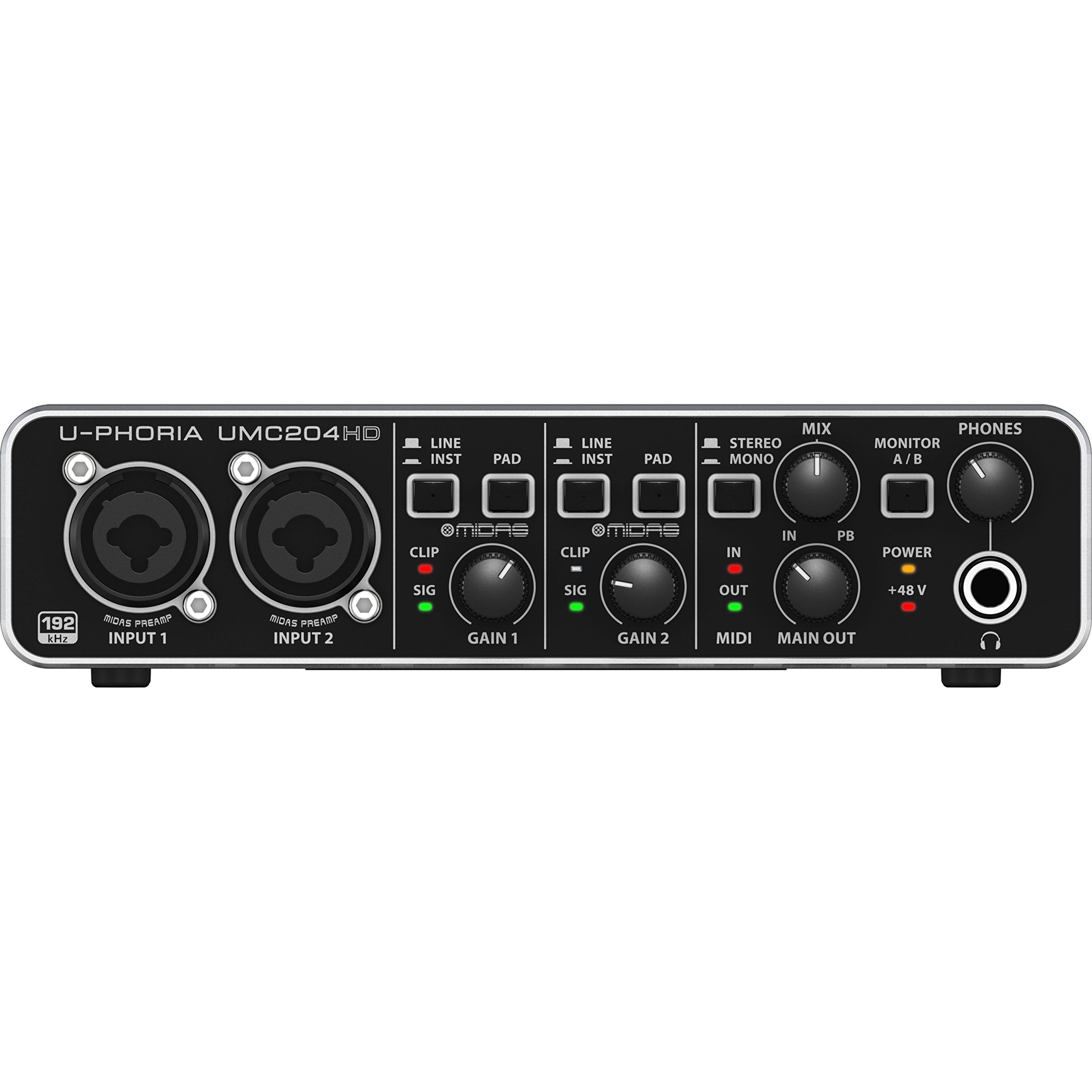
2. Behringer U-Phoria UMC204HD
The budget workhorse with MIDAS preamps, MIDI I/O, and powerful headphone output.
For the money, the UMC204HD delivers an absurd amount of gear. You get 2-in/4-out USB connectivity, two MIDAS-designed preamps (the same circuits found in Behringer’s pro mixing consoles), and full MIDI I/O for syncing keyboards and drum machines — features you’d normally pay more for. It handles up to 24-bit/192kHz recording, matching the sample rate of interfaces costing twice as much.
Customers note it “Beats Motu M2 for 250ohm headphone monitoring and 24/192 FLAC decoding” — that’s a strong claim for a unit at this tier. The sturdy metal build and quality knobs feel solid, and it’s instantly recognized as a class-compliant device on macOS and Ubuntu Linux without drivers. The preamps drive a Shure SM58 without hiss, meaning you won’t need an external booster.
The main caveat: there’s no power switch, and one owner warns that the boot-up pop can damage speakers if they’re on. A few also note inherent noise problems on their units, though most report clean sound. Value for money is the most-praised aspect, and the sound quality follows close behind.
cheap channels: you want two inputs, MIDI, and powerful headphone output without spending premium money.
warm tone: you work in Linux and need official driver support — while it works, reinstall quirks can appear after reboots on some systems.
3. BlueAVS USB Audio Interface AR013
The compact 2-in/4-out interface with four zero-latency monitoring modes for podcasters.
Podcasters and streamers will love the BlueAVS AR013’s zero-latency monitoring — you hear yourself in real time with no distracting delay, choosing from OFF, MONO, Crossfeed, or STEREO modes. It captures up to 24-bit/192kHz with a 103dB dynamic range and ultra-low THD+N (total harmonic distortion plus noise), which means clean, detailed recordings even at high volumes.
The dual XLR/¼” combo inputs handle mics, guitars, and line-level devices, with independent +48V phantom power for condenser mics and dedicated PAD switches that protect against clipping from loud instruments. It’s plug-and-play via USB-C for both Mac and Windows, and works with OBS, GarageBand, Logic Pro, Cubase, Ableton Live, and Reaper. One buyer found it “worked flawlessly with my Rode PodMic,” calling the sound clean with no hiss.
The honest trade-off: the gain settings are only visible while you’re adjusting them, and the meters share a display with the levels. That’s a minor inconvenience for the price, though one owner notes that spending -100 more gets you slightly less brittle sound quality. Still, at just 1.3 pounds with a compact angled body, it’s an easy travel companion.
tiny budget: podcasting or streaming where live monitoring and phantom power matter more than audiophile subtlety.
reliable use: you’re a critical listener who hears the difference between budget and high-end converters.
4. Shure MVX2U Gen 2 XLR-to-USB-C Audio Interface

The pocket-sized converter that turns any XLR mic into a mobile recording studio.
At just 100 grams, the Shure MVX2U Gen 2 is the lightest pick here, and it’s built for one thing: making any XLR microphone work beautifully on desktop, tablet, or smartphone. It delivers up to +60 dB of clean gain — enough to drive a dynamic mic without an external booster — plus 48V phantom power for condensers. Plug-and-play on Android, Windows, iOS, and macOS.
what separates it is onboard Digital Audio Processing: Auto Level Mode adjusts gain in real time to keep your output consistent, the Real-Time Denoiser cleans up background hum, and the Digital Popper Stopper tames plosive “p” sounds (the popping bursts on hard consonants). You can shape your tone from Dark, Natural, or Bright, and manage EQ, compression, and limiter via the MOTIV apps on your phone or computer. One user paired it with an SM7DB and says the noise suppression “works great.”
The catch: the full EQ experience requires the MOTIV app — without it, some find the sound tinny or peaky. Linux users won’t get app support either, and a few feel the value is questionable for a single-input device. But if you need studio-level sound from a device that slips into a pocket, this is the one.
podcast upgrade: mobile recording, voiceovers, and clean XLR conversion across every device you own.
tight funds: you need more than one mic input or you’re married to Linux without app access.
5. Audient EVO 4 USB Audio Interface

The tiny interface that auto-sets your input levels with a single touch.
The EVO 4’s standout feature is Smart Gain — you press the touchpoint and it automatically sets your input levels for you, which is a godsend for beginners who don’t understand gain staging. It records at 24-bit/96kHz (a step below the 192kHz units, but plenty for most vocals) through a high-performance AKM converter, and its transparent preamps are praised for staying clean and low-noise.
Inside the compact 5.5 x 2.6 x 2.6-inch body you get 2 XLR inputs with split +48V phantom power (a real advantage over the Focusrite units that switch phantom on for both channels at once), a JFET instrument input (a type of transistor input that preserves guitar tone), speaker and headphone outputs, and a Loopback function that lets you record your computer’s audio alongside your mic — perfect for streamers. It bundles Cubase and Cubasis LE so you can start recording immediately.
Honest notes: the gain is a little weak for dynamic mics, the bright LEDs can’t be dimmed, and some units arrive with a strong glue smell. The interface quality and ease of use are the most-praised aspects, though functionality draws mixed feedback — some reviewers point out distorted, harsh recordings where others find pristine sound. Know that it’s plastic-bodied, not metal.
beginners: you’re new to recording and want a device that sets your levels for you.
pro mixing: you use a low-output dynamic mic that needs maximum gain — this one comes up short there.
6. Focusrite Scarlett Solo 4th Gen USB-C Audio Interface
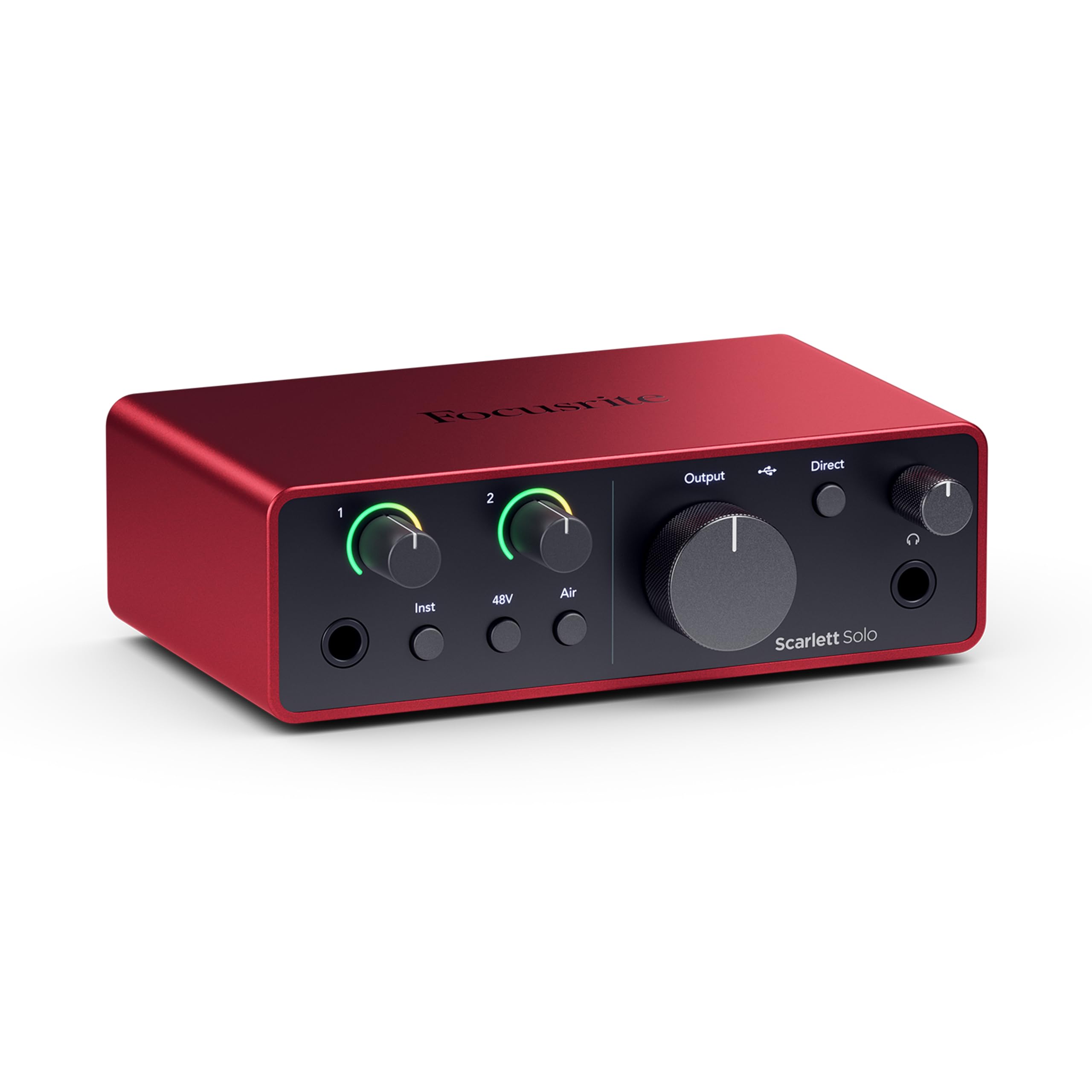
The songwriter’s upgrade with a 120dB dynamic range and enhanced Air mode.
The 4th Gen Scarlett Solo takes everything owners loved about the 3rd Gen and pushes it further. The headline spec is a huge 120dB dynamic range — the span between the quietest and loudest sound it can capture — using the same converters as Focusrite’s flagship interfaces found in top studios. It records up to 24-bit/192kHz, and the improved Air mode adds musical presence and rich harmonic drive to vocals and guitars.
An 8-year engineer called it the best interface for serious use, praising the zero latency, built-in monitoring, and instrument input. The LED gain indicators (halo lights) help you set healthy levels at a glance, the headphone amp is strong enough to drive high-impedance cans (headphones that need more power, like studio monitors), and the package includes Pro Tools Intro, Ableton Live Lite, Cubase LE, and Hitmaker Expansion. Plug in a RODE dynamic mic and it sounds clear and warm immediately.
The one recurring complaint: some owners with a Shure SM58 on Windows 10 found the volume low and needed a FetHead booster or had to upgrade to the 2i2 (the two-mic version). A minor gripe is the included USB-A to C cable rather than a modern C-to-C. Quality and sound quality are the top-praised aspects, though performance draws mixed feedback — most are thrilled, a few report it stops working intermittently.
latest solo: you want the latest generation of the most trusted beginner interface, with flagship-level converters.
need inputs: you use a gain-hungry dynamic mic on Windows and want the extra preamp headroom of the two-input model.
7. PreSonus AudioBox USB 96 25th Anniversary Studio Recording Package

Everything you need to record at home in one box — interface, mic, headphones, software.
This is the rare package that gives you a full recording studio in a single purchase. The AudioBox USB 96 interface records at 24-bit/96kHz with two combo inputs (so you can record two mics or a mic and a guitar at once), and it’s rugged enough for years of home use. Included is the M7 large-diaphragm condenser microphone, ideal for vocals and acoustic instruments.
You also get HD7 studio monitoring headphones that let you mix without bothering roommates, Studio One Artist (a full DAW) plus Studio Magic, and all the cables plus a desktop mic stand. If you’re starting from zero, this removes the guesswork of buying pieces separately. A buyer who calls themselves an art enthusiast says the setup “helped me better up my skill real quick,” praising ease of connectivity and reliability.
The trade-offs: some shoppers say buzzing issues, and the setup experience is mixed — easy for some, frustrating for others navigating the DAW. The quality is the most-praised aspect, and the value of getting a complete kit is hard to argue with, even if a few units arrive with software activation headaches.
classic bundle: you’re a complete beginner who wants everything in one box without researching parts.
modern features: you already own a mic and headphones and just need a bare interface.
8. Yamaha 2-in/2-out USB-C Audio/MIDI Interface URX22C
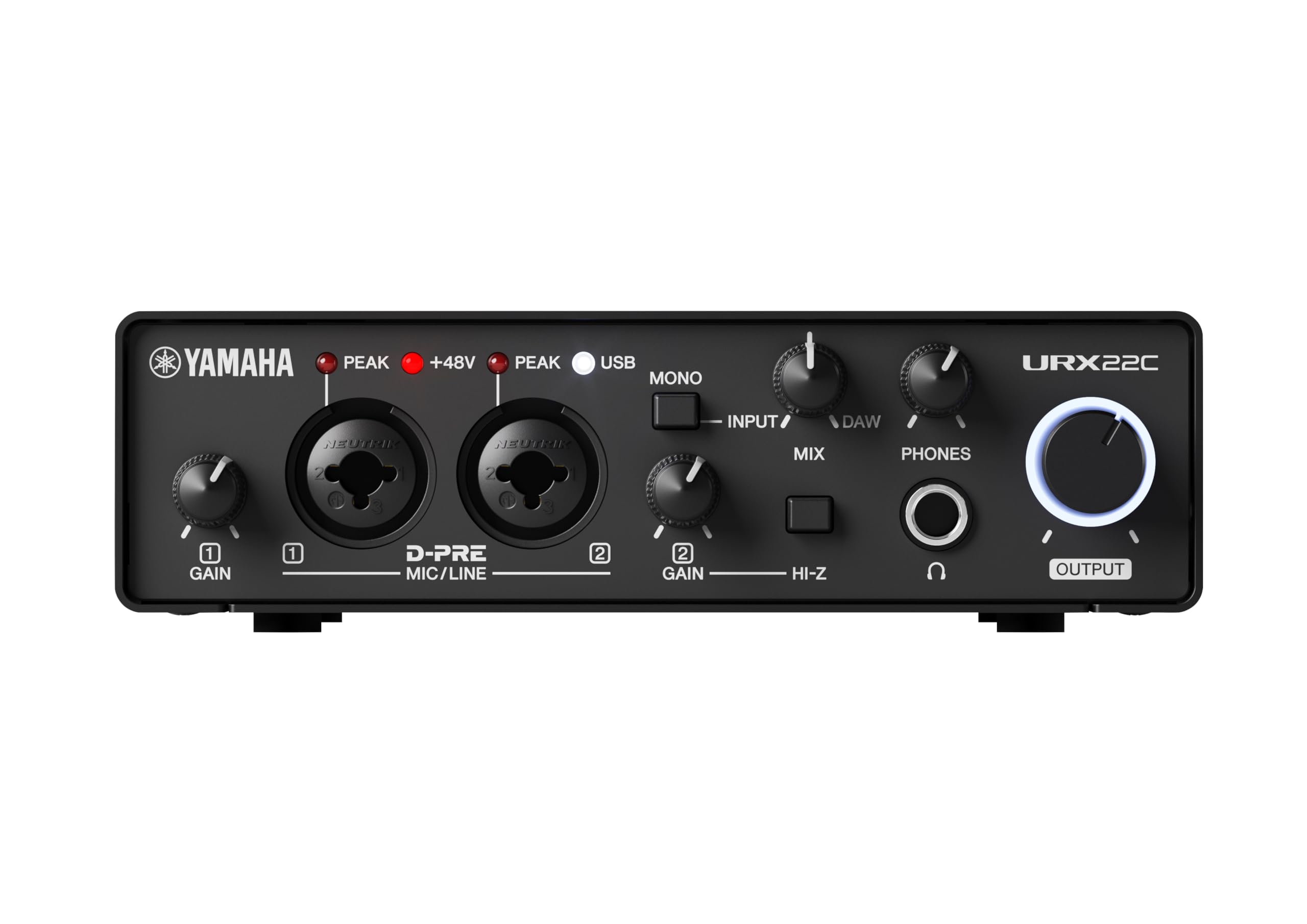
The metal-bodied interface that runs studio-grade reverb and effects without touching your computer.
The Yamaha URX22C stands out with latency-free DSP-powered monitoring — you can apply REV-X reverb, a Channel Strip, and Guitar Amp Classics directly in the hardware, so you hear effects in real time with zero delay. It records at 32-bit integer/192kHz, the highest resolution on this list, through Class-A D-PRE mic preamps that support +48V phantom power and one Hi-Z input for guitars.
The rugged full-metal housing is built for durability, and unlike the Behringer units, it works with USB 3.0 — one owner specifically chose it “because it works with usb 3.0 unlike the Beringher ones.” It’s cross-platform for Windows, macOS, and iOS, included with Cubase AI and Steinberg Plus software. One buyer switched entirely from an M-Audio interface that Windows 10/11 stopped supporting, finding this one works smoothly with their Reason DAW.
The catch: it’s a newer product with fewer reviews, and the DSP effects add complexity if you just want simple recording. A 1-year warranty applies only through authorized retailers. But for the sample rate, DSP effects, and MIDI I/O in a metal shell, this is a compelling premium option.
midi users: guitarists and producers who want hardware effects and the highest 32-bit resolution.
simple audio: you prefer the simplicity of a basic preamp without DSP features to configure.
9. Universal Audio Volt 2 USB Audio Interface

The interface that brings UA’s legendary 610 preamp sound to your home studio.
Universal Audio’s Volt 2 gives you the rich, full, album-ready sound of their classic 610 preamps with the push of a Vintage mode button. That’s the same preamp lineage behind countless hit records, and it adds a warm coloration to your vocals that neutral interfaces simply don’t have. It captures up to 24-bit/192kHz quality (a high-resolution audio standard) with crisp converters.
You get 2 XLR inputs plus instrument support, and the Volt works with MacOS, Windows, iPad, and iPhone (iOS 14+) — though mobile use requires an external power supply and a Lightning-to-USB-C adapter. The included LUNA Digital Audio Workstation gives you the workflow of a real analog studio, and you get access to the same UAD plug-ins trusted by industry pros. One owner replaced a Focusrite Solo with this and eliminated PC electrical interference entirely.
The most-praised aspects are quality and sound quality, with value for money following close behind. One musician finds it “great for direct-in guitar, but a little soft for my mic’s” — so if you’re primarily a vocalist with a low-output mic, you might want a boost. Setup is generally straightforward via USB-C, though some note it requires proper configuration to sound its best.
analog vibe: you want that classic analog warmth and plan to use the bundled UAD software.
budget audio: you need maximum gain for a quiet dynamic mic — the preamp runs a bit soft for some mics.
10. Solid State Logic SSL 2 MKII 2×2 USB Audio Interface

Legendary SSL console sound in a compact box that voice actors swear by.
SSL is a name synonymous with professional recording consoles, and the SSL 2 MKII brings that heritage home. The Legacy 4K button adds analog enhancement — a touch of that famous SSL presence and warmth — to your recordings. Inside, 32-bit/192kHz AD/DA converters deliver clean captures with plenty of headroom, so vocals come out crisp and detailed.
Voice actors specifically praise the high-pass filter (HPF), which eliminates booth rumble and low-end noise, making vocals crisper with less mouth noise. One notes it’s “clears up rumble issues” that plagued their previous interface. The metal chassis with rubber feet feels heavy and industrial, the headphone amp is powerful, and it’s plug-and-play on Mac and Windows with no driver headaches — a huge relief for anyone who’s fought with other brands.
You get 2 XLR mic preamps, 2 line/Hi-Z inputs, 2 headphone outs, stereo loopback, and full MIDI I/O on 5-pin DIN jacks. Quality and sound quality are the most-praised aspects, with reliability close behind — a stark contrast to the mixed reliability reports on some cheaper units. It’s bus-powered, so you don’t need a wall adapter. The only caveat: it’s not actually 32-bit float recording, so you can still clip if you record too hot.
studio quality: you’re a voice actor, podcaster, or musician who wants pro-grade clarity and rock-solid drivers.
midi needs: you’re on a tight budget — this sits at the higher end of the price spectrum.
11. Arturia MiniFuse Recording Pack
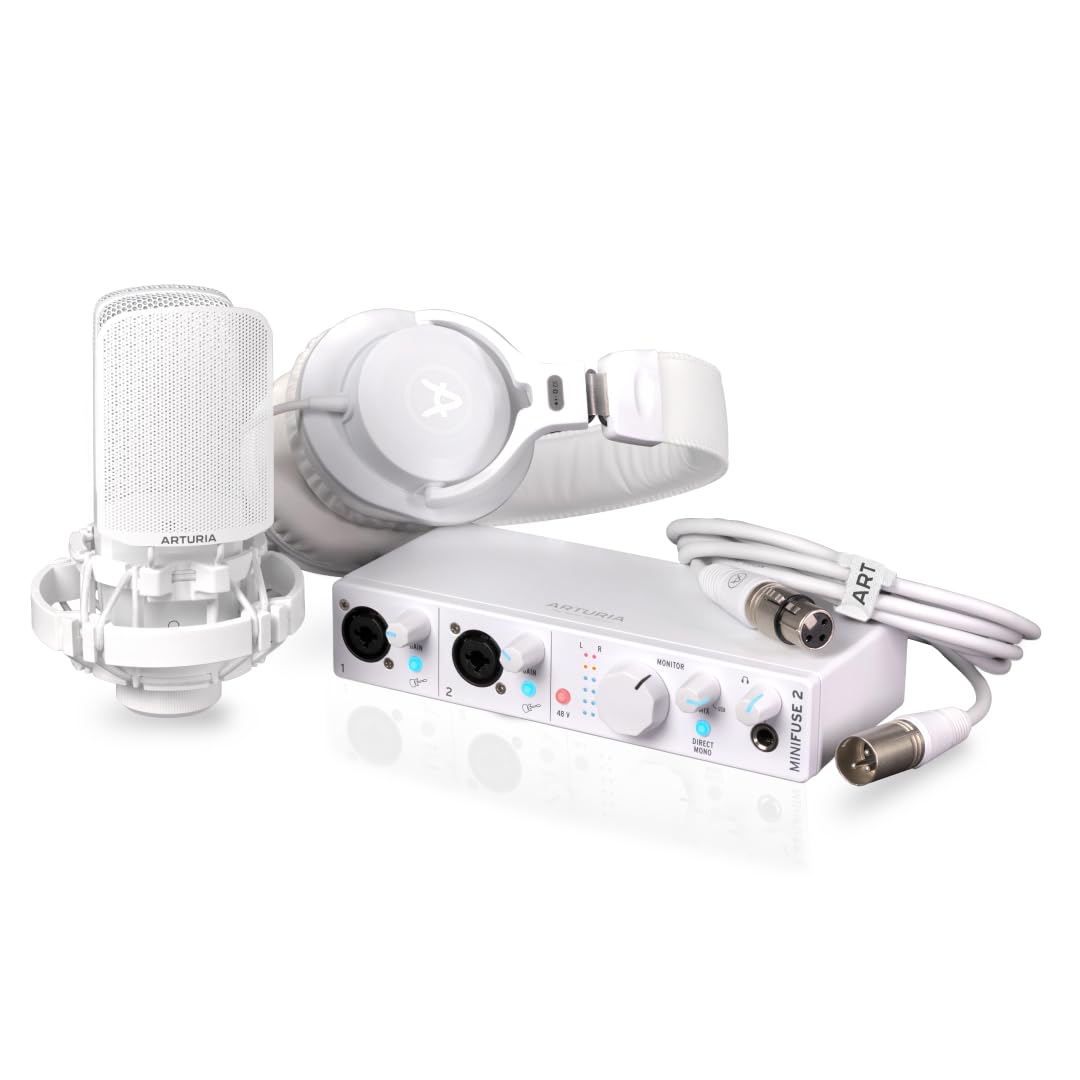
The complete audio creation kit designed for newcomers, with a 5-year warranty.
The Arturia MiniFuse Recording Pack is the most complete all-in-one here — it includes the MiniFuse interface, a microphone, headphones, an XLR cable, and premium recording software, all designed for people who are new to recording. The MiniFuse itself records at up to 192kHz, and the package’s plug-and-play design means you can go from box to recording in minutes.
You get 2 inputs (including computer audio monitor balance control), 2 outputs, a headphone out, MIDI in and out, and even a USB 2.0 hub — so you can connect a controller without using another port. The software bundle is staggering: Ableton Live Lite, Analog Lab Intro, Arturia FX, NI Guitar Rig 6 LE, Auto-Tune Unlimited, and Splice Creator Plan. A buyer said it’s “the definitive kit for production and voiceover,” praising the very low noise floor and comfortable headphones for long editing sessions.
At the highest price on this list, it competes by giving you everything rather than just an interface. The MiniFuse comes with a 5-year warranty — far longer than most rivals’ coverage. One Spanish-language buyer noted their daughter and they are “delighted” with it. It’s ideal for a beginner, but if you already own a mic and headphones, you’d be paying for duplicates.
first setup: you want one box with every piece of gear you need to start recording today.
minimalist: you already own a mic, headphones, and software — you’d just be paying for extras you don’t need.
Understanding the Specs
Phantom Power (48V)
Phantom power sends 48 volts up the XLR cable to power condenser microphones, which need electricity to operate their internal electronics. Dynamic mics like the Shure SM58 don’t need it, but having a +48V button is essential if you ever upgrade to a condenser. Some interfaces switch phantom on for all inputs at once, while higher-end units let you control each channel independently.
Zero-Latency Monitoring
Latency is the delay between speaking and hearing yourself in your headphones. Zero-latency monitoring routes your voice directly to your headphones before it goes to the computer, so you hear yourself instantly. Without it, you might hear a slight echo that throws off your performance timing. Look for a monitoring switch or mode selector if you’re recording vocals or podcasting.
FAQ
Can I plug a USB microphone into an audio interface?
Do I need 48V phantom power for my USB mic?
How many inputs do I need for a USB mic setup?
What’s the difference between 24-bit and 32-bit interfaces?
Is 192kHz sample rate worth paying extra for?
Do I need an audio interface if my USB mic works fine right now?
Will an audio interface work with my Mac or Windows computer?
Can I use an audio interface with my iPhone or tablet?
How long will an audio interface last?
Why does my interface sound like it has a lot of noise?
Final Thoughts: The Verdict
For most people, the audio interface for usb mic winner is the Focusrite Scarlett Solo 3rd Gen because it’s the most trusted, beginner-friendly interface with clean preamps and a full software bundle — the crowd favorite with the highest rating and by far the most owners. If you want premium analog warmth, grab the Universal Audio Volt 2. And for mobile recording on phones and tablets, the Shure MVX2U Gen 2 is the one to reach for.
How We Picked
We do not accept paid placement. Every pick is matched to a real buyer and a real use-case; we do not hands-on test units.
Sources & Methodology
Specifications: manufacturer listings and product documentation. Review insights: verified customer reviews, as of August 2026. Pricing: not shown on this page (it changes often); check the current price via the retailer link.
As an Amazon Associate, Gadgets Feed earns from qualifying purchases. This does not affect which products we feature.