
Our readers keep the lights on and my morning glass full of iced black tea. As an Amazon Associate, I earn from qualifying purchases.
Specs are compiled from manufacturer listings and verified buyer reviews and can change over time — please confirm the key details on the product page before buying.
If you are plugging a mic or guitar into a Windows PC and the sound is thin, noisy, or lagging, the fix is a dedicated audio interface. This guide cuts through the spec-sheet noise to show you the nine best models for Windows, from a starter unit to a pro workhorse, and what each one actually does for your recordings.
I’m Min — the founder and writer behind Gadgets Feed. This guide is built by comparing the manufacturers’ published specifications and the patterns across verified customer reviews, so you get each pick’s real strengths and trade-offs instead of marketing spin.
You need an audio interface that plugs into your Windows PC and captures your voice or guitar without fuss. This guide matches the best audio interface for windows to your setup, covering ports, preamps, and sample rates so you know exactly what you are buying.
Our Picks at a Glance


How To Choose The Best Audio Interface For Windows
Picking the right interface for your Windows machine is about matching the box to your gear and your goals. You need enough inputs for your microphones and instruments, a preamp that is quiet enough for your mic, and a driver that plays nicely with Windows 10 or 11.
Count Your Inputs First
The number of XLR mic inputs usually decides the price. A solo musician who records one mic at a time only needs a single input. A podcaster with two hosts needs two. A band tracking drums live needs eight or more. Buying extra inputs you will not use costs money; skipping inputs you need forces a frustrating upgrade later.
Understand Preamps and Phantom Power
The preamp boosts the tiny signal from your microphone up to a usable level. If you own a condenser mic, it needs 48V phantom power to operate at all. An interface that offers 48V lets you use both dynamic mics like the SM7B and studio condensers without buying extra gear.
Think About Latency and Sample Rate
Latency is the delay between when you speak and when you hear it in your headphones. Lower latency feels natural. Sample rate, measured in kHz, refers to how many times per second the audio is captured. Higher rates like 192 kHz give you more headroom for editing, though 48 kHz is plenty for most streaming and podcast work.
Quick Comparison
| Model | Best For | Max Sample Rate | Inputs | Phantom Power | Amazon |
|---|---|---|---|---|---|
| Focusrite Scarlett Solo 3rd Gen★ Best Overall | Beginner Singer-Songwriters | 192 kHz | 1 XLR + 1 Instrument | Yes | Amazon |
| Behringer U-Phoria UMC204HDBest Value | Value-Conscious Duo Recording | 192 kHz | 2 XLR + 2 Instrument | Yes | Amazon |
| Shure MVX2UCompact Pick | Traveling Streamers | 48 kHz | 1 XLR | Yes | Amazon |
| IK Multimedia AXE I/O One | Electric Guitarists | 192 kHz | 1 XLR + 1 Hi-Z | Yes | Amazon |
| Universal Audio Volt 1 | Plug-and-Play Home Studios | 192 kHz | 1 XLR + 1 Instrument | Yes | Amazon |
| Motu M2 | High-Fidelity Headphone Users | 192 kHz | 2 XLR + 2 Instrument | Yes | Amazon |
| Behringer UMC1820 | Budget Multi-Track Bands | 96 kHz | 8 XLR/Line | Yes | Amazon |
| Solid State Logic SSL 2 MKII | Voice Artists and Producers | 192 kHz | 2 XLR + 2 Hi-Z | Yes | Amazon |
| Motu M4 | Power Users Needing More I/O | 192 kHz | 2 XLR + 2 Instrument | Yes | Amazon |
In‑Depth Reviews
1. Focusrite Scarlett Solo 3rd Gen USB-C Audio Interface
Our pick — over 4.5★ from 29,000+ verified ratings; the strongest balance of quality and price.
The best-selling starter interface that pairs beginner-friendly controls with pro-grade sound.
You get a brighter recording from the high-performing mic preamp, and a switchable Air mode adds extra clarity to acoustic instruments. The Gain Halos around the two high-headroom inputs light up to help you set levels without clipping or distortion.
It captures voice and guitar at up to 24-bit/192kHz, so your recordings keep their sonic detail. Two low-noise balanced outputs give you clean playback, and the headphone jack delivers high-fidelity private listening. The box includes Pro Tools Intro+, Ableton Live Lite, Cubase LE, and the Hitmaker Expansion suite, plus a three-year warranty.
Buyers report it is “so easy to use for a beginner,” with many praising how well it works with Shure microphones after two years of daily use. The one honest caveat is reliability for a minority of owners; some Windows users mention a welcome folder popping up on connection, which is annoying but not a blocker. The 12.32-ounce body and 1.71-inch depth mean it disappears on a small desk.
What Wins People Over
- Sound quality is the thing everyone raves about — owners consistently note crisp captures.
- Setup is genuinely plug-in-and-go for most Windows machines, a huge plus for first-timers.
- The included software suite gets you recording immediately without buying anything else.
Who Should Think Twice
- It is a single-mic interface, so a two-host podcast outgrows it fast.
- A minority of owners hit driver quirks that need a quick reinstall on Windows.
Reach for this if: you are a singer-songwriter or solo podcaster wanting a proven, simple first interface that sounds great.
Look elsewhere if: you need two simultaneous mic inputs for interviews or dual-voice recordings.
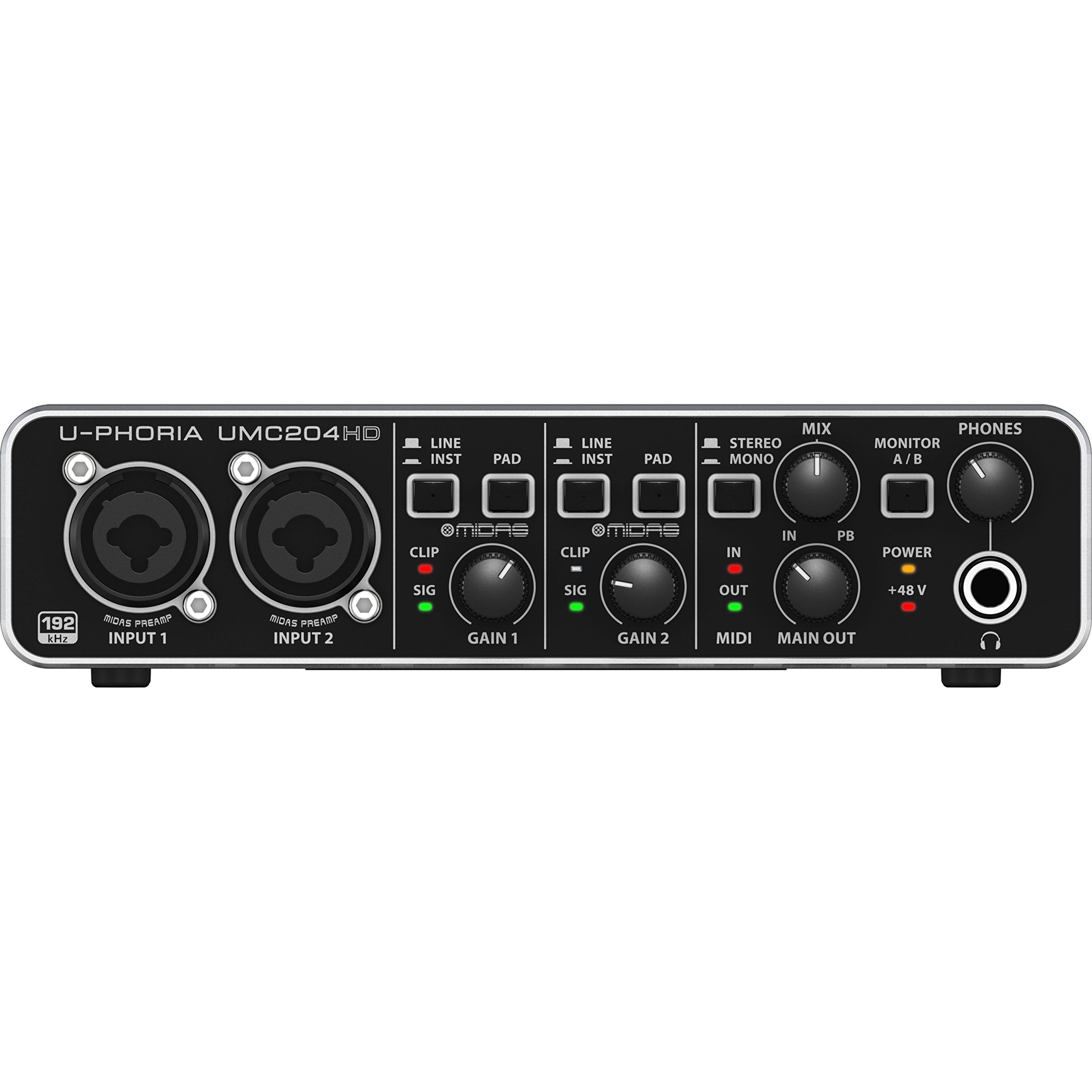
2. Behringer U-Phoria UMC204HD
The budget pick that outdrives pricier rivals on headphone output and preamp clarity.
This 2-in/4-out USB 2.0 interface pairs two MIDAS preamps with 24-bit/192kHz conversion, a combo that owners mention performs well above its price point. It adds phantom power, MIDI I/O, and inserts — features you often have to pay more for elsewhere.
One owner who compared it directly found it “Beats Motu M2 for 250-ohm headphone driving and 24/192 FLAC decoding.” The 1.4-pound metal build feels solid, and the knobs and jacks hold up. Windows users appreciate that it is class-compliant, meaning instant recognition without hunting for drivers.
Value for money is what wins people over, followed closely by sound quality. The honest trade-off is noise: most units are quiet, but a few customers note inherent noise problems. There is also no power switch, so a boot-up pop can hit your speakers — power down your monitors first. The 96 kHz frequency response is a 4.8x gap behind the Scarlett Solo’s 20 kHz spec, but in practice most owners never notice the difference.
Solid metal, better price: For a two-input setup on a budget, this delivers MIDAS-grade preamps and MIDI connectivity that cost double elsewhere.
The honest catch: The lack of a power switch means a startup pop — a minor ritual, not a dealbreaker.
3. Shure MVX2U XLR-to-USB Audio Interface with Headphone Jack
A palm-sized interface that turns any XLR mic into a broadcast-ready setup.
At just 1.1″D x 1.1″W x 3.35″H and weighing 100 g, this Shure interface is built for portability. Auto Level Mode gets you broadcasting instantly, and the 60dB of clean gain means a dynamic mic like the SM7B works without an extra booster. The 48V phantom power handles sensitive condenser mics too.
Zero-latency monitoring comes from the built-in 3.5mm headphone jack, so you hear yourself in real time. Dual mounting options let you plug it directly onto your mic or inline with an XLR cable. Reviewers point out it keeps desk clutter down and the ShurePlus MOTIV app adds EQ, compression, and limiting.
Functionality is the top praise, with connectivity close behind. The max sample rate is 48 kHz, a full 4.0x gap behind the Behringer’s 192 kHz — fine for streaming and podcasts, less ideal if you want heavy editing headroom. Gain feedback is mixed: some want more, some find it ample. The software app is Windows-friendly, though Linux users miss out.
Studio sound, travel size: For a streamer or podcaster who moves between desks, this is the most portable way to get pro vocal clarity.
Know the limit: The 48 kHz ceiling and app-dependent EQ mean it is built for broadcast, not deep studio editing.
4. IK Multimedia AXE I/O One – Professional USB Audio Interface

The guitar-focused interface with a unique Z-Tone circuit for shaping your tone.
This 24-bit/192 kHz USB-C interface is built around the Z-Tone impedance-adapting circuit, with an Active/Passive pickup selector that lets you dial in your exact guitar tone. Owners find it fixes a common guitar artifact that plagues some competing interfaces — a direct win for electric players.
The huge software bundle is the real story: AmpliTube 5 SE and TONEX SE give you over 16,000 guitar tones and amp captures. An onboard mixer blends direct signal with your DAW return for zero-latency monitoring. The JFET input is tune for electric guitar, and the combo XLR preamp / Hi-Z input covers vocals when needed.
Value for money leads the praise, with features and sound quality close behind. The plastic housing is lighter than metal rivals but owners say it feels sturdy, and it reduces electrical interference. A 1.5-ounce weight and 3-channel design make it a desktop-friendly option. The one caveat: Z-Tone shines with passive pickups but is less useful if your guitar has active electronics.
Made for guitarists: If your main job is tracking electric guitar at low latency, this beats anything near its price for tone shaping.
Pass on it if: You rarely record guitar and just need a simple vocal interface — the guitar-centric features would go unused.
5. Universal Audio Volt 1 USB Audio Interface

Classic 610 preamp warmth and a free DAW in a sturdy metal chassis.
The Volt 1 gives you the warm, punchy tone of UA’s classic 610 preamps (the input stage that shapes your mic’s sound) with a Vintage mode switch. You can record at up to 24-bit/192 kHz resolution (a high-quality audio format that preserves fine detail), so your tracks stay clear. The 544 g metal body feels solid on your desk, and shoppers say the sound is clean and quiet with low noise.
It ships with the LUNA Digital Audio Workstation and UAD plug-ins, giving you a complete recording package. Compatibility spans MacOS, Windows, iPad, and iPhone (iOS 14+) — though mobile users need a separate power supply and adapter. The direct-drive headphone output gets specific praise for its clarity.
Overall quality is the top praise, followed by sound quality and compatibility. It is a plug-and-play device that works right from the start. The honest limits: it uses two USB ports for power, there is no pad switch, and Vintage mode can distort at high gain if you are not careful. It is a 2-channel device, so multi-mic setups need a bigger sibling.
Plug-in and record: For a home studio owner who wants legendary preamp character and a free DAW, this is a standout entry into the Universal Audio ecosystem.
Before you buy: Remember it needs two USB ports and external power for mobile use — plan your cable layout.
6. Motu M2 2×2 USB-C Audio Interface with XLR-XLR Cable Bundle

The ESS Sabre32 DAC that delivers pristine sound to headphones and monitors.
Inside the M2 sits the ESS Sabre32 Ultra DAC, the same converter technology used in interfaces costing thousands. It delivers a measured 120 dB dynamic range on outputs and -129 dBu EIN on mic inputs — numbers that translate to an exceptionally quiet, detailed sound floor. The ESS-driven headphone output is powerful enough to drive 250-ohm cans like the DT990 Pro.
Owners who use it purely for gaming and music praise its latency-free mic monitoring and clear voice pickup, noting it beats gaming DACs and the Scarlett. It solves GPU electrical interference that plagues some PC setups. The 1.46 kg build feels solid, and the bundled XLR cable is a nice bonus.
The 2-channel design covers most home studios, and buyers report the sound quality is better than dedicated HiBy, Shanling, and FiiO dongles. The recurring advice: use a quality USB-C cable and keep your PC sample rate at 48k to avoid pops. Compatibility is generally good, though a minority report random audio loss.
Pick this for: serious headphone listeners and home recordists who want transparent, high-headroom sound without paying flagship prices.
skip it if: you are a beginner on a tight budget — the Scarlett offers simpler setup for less.
7. Behringer U-PHORIA UMC1820 Audiophile 18×20 USB Audio/MIDI Interface

Eight mic preamps and 18×20 I/O for bands on a budget.
This is the interface for serious multi-track work. It offers 8 microphone preamps with 18 inputs and 20 outputs, and it lets you use all analog, coaxial S/PDIF, optical ADAT, and MIDI signals simultaneously. At 24-bit/96 kHz, it handles a full drum kit or a room full of radios without choking.
Buyers who compare it directly to the Focusrite Scarlett 18i20 say it delivers for a fraction of the cost. The drivers are lightweight and unobtrusive on Windows. One owner has used it for two years with zero problems, calling it “everything it offers on the tin, reliably.” Ham radio operators and scanner hobbyists love routing multiple audio sources into it.
There is no Amazon summary of customer sentiment provided, but the individual reviews are consistently strong on value and reliability. The 24.17-inch height means it takes up serious rack space, so measure your desk or rack first. The 96 kHz max sample rate lags the 192 kHz units on this list, but that rarely matters for tracking live sources.
Built for expansion: If you are building a home studio that will grow, this gives you room for a full band without a second mortgage.
Plan your space: It is a large, heavy 1.8 kg unit — not a desktop afterthought.
8. Solid State Logic SSL 2 MKII – 2×2 USB Audio Interface

The legendary SSL sound with a Legacy 4K button for studio-grade vocal clarity.
SSL brings its famous console sound home with the 2 MKII. Two XLR mic preamps and two 1/4″ line/Hi-Z inputs feed 32-bit/192 kHz AD/DA converters. The Legacy 4K analog enhancement button adds a high-frequency presence that voice artists and producers rave about. Built-in high-pass filters clear up room rumble.
Voice-over artists specifically praise the high-pass filter for eliminating booth rumble and mouth noise, delivering crisper vocals. The 2.25-pound stainless steel build feels industrial and heavy, with solid gain knobs. It includes 48V phantom power, zero-latency monitoring, stereo loopback for streaming, and MIDI I/O on 5-pin DIN jacks.
Quality and sound quality lead the praise. Windows 11 users report zero driver issues — a rare and welcome claim. The included SSL Production Pack software bundle adds value. The one caution: it is not 32-bit float recording, so you can still clip if you push levels too hard. It is larger and heavier than a Focusrite 2i2, so plan your desk space.
Choose this for: voice artists, podcasters, and producers who want pro-grade clarity and a proven brand name on their desk.
Be aware: The 32-bit converters do not mean 32-bit float recording — you still need to set levels carefully.
9. Motu M4 4×4 USB-C Audio Interface

The 4-in/4-out workhorse with an LCD screen that rivals — some say beats — the Focusrite line.
This 4-in/4-out USB-C interface adds two extra inputs over the M2, plus an LCD screen for level metering. It delivers 192 kHz conversion with low latency monitoring, loopback for streaming, and MIDI I/O. The 16-ounce build and 4.25-inch depth keep it compact for a 4-channel unit.
Buyers call it “the Focusrite Killer,” saying it beats the Scarlett 4i4 on ease of use, audio quality, and build. The LED meters (lights that show your input level) and a physical knob for direct monitoring (hearing your mic without delay) are standout features. It powers two KRK studio monitors with no extra software, and works on Mac, Windows, and even Linux for some users.
Functionality is the top praise by a wide margin, with value for money and sound quality close behind. The recurring quirks are worth knowing: an occasional pitch-shift bug that a Windows fast-startup disable fixes, and a headphone amp that is weaker on USB bus power, though it can feed an external amp. Reliability is mixed for a minority who report dropouts after years of use.
The all-rounder: For podcasters, multi-instrumentalists, or streamers wanting room to grow, the M4 delivers pro features at a fair price.
If you only need two inputs: The M2 gives you the same converters for less — grab the M4 only when you will actually use those extra channels.
Understanding the Specs
Preamps and Gain (dB)
A preamp boosts your mic’s weak signal. The amount of boost is measured in dB of gain. More gain, like 60dB on the Shure MVX2U, means you can use quiet dynamic mics like the SM7B without an extra inline booster. Gain Halos or LED rings on some interfaces help you avoid clipping — when the signal gets too hot and distorts.
Sample Rate (kHz)
This tells you how many times per second the audio is captured. 48 kHz is plenty for streaming and podcasts. 192 kHz, offered by the Focusrite Scarlett Solo, gives you more headroom for heavy editing and pitch-shifting without artifacts. Higher rates use more computer power and disk space, so match the rate to your actual work.
Phantom Power (48V)
Condenser microphones need a burst of power delivered through the XLR cable to work. That is what the 48V phantom power switch does. Every interface on this list has it, which means you can use both dynamic mics like the SM7B and sensitive studio condensers on the same unit.
Zero-Latency Monitoring
Latency is the delay between when you speak and when you hear it in your headphones. Zero-latency monitoring routes your input signal directly to your headphones, bypassing the computer entirely. This is essential for recording vocals or voiceovers — you hear yourself instantly, with no echo or delay.
FAQ
What is the difference between a USB audio interface and a USB microphone?
Will these audio interfaces work with Windows 11?
What is a good gain level for a microphone?
How many inputs do I really need?
What is the best audio interface for a beginner on Windows?
What does phantom power do and do I need it?
Is a higher sample rate always better?
Why is my audio interface producing a pop or static noise?
Can I use these interfaces for gaming or just music?
What is the difference between MIDI I/O and audio I/O?
Final Thoughts: The Verdict
For most people, the audio interface for windows winner is the Focusrite Scarlett Solo because it nails the beginner experience with proven sound quality and a full software suite. If you want the best headphone power and transparent converters, grab the Motu M2. And for multi-track band recording on a budget, the Behringer UMC1820 is the one to reach for. The crowd favorite — nearly 30,000 owners back the Focusrite — makes it the safest first purchase for anyone starting out on Windows.
How We Picked
We do not accept paid placement. Every pick is matched to a real buyer and a real use-case; we do not hands-on test units.
Sources & Methodology
Specifications: manufacturer listings and product documentation. Review insights: verified customer reviews, as of September 2026. Pricing: not shown on this page (it changes often); check the current price via the retailer link.
As an Amazon Associate, Gadgets Feed earns from qualifying purchases. This does not affect which products we feature.