
Our readers keep the lights on and my morning glass full of iced black tea. As an Amazon Associate, I earn from qualifying purchases.
Specs are compiled from manufacturer listings and verified buyer reviews and can change over time — please confirm the key details on the product page before buying.
Choosing an audio interface USB is the single most important decision for anyone recording vocals, guitar, or podcasts at home. A quality interface captures clean, noise-free audio with minimal latency, while budget models often introduce hiss and distracting delays. A poor choice can dull a great microphone’s tone and force you to wrestle with driver issues instead of recording.
I’m Min — the founder and writer behind Gadgets Feed. This guide is built by comparing the manufacturers’ published specifications and the patterns across verified customer reviews, so you get each pick’s real strengths and trade-offs instead of marketing spin.
Whether you are a musician, podcaster, or streamer, this breakdown of the top audio interface usb models focuses on preamp quality, connection types, and software bundles to match your exact workflow.
Our Picks at a Glance


How To Choose The Best Audio Interface USB
An audio interface is the bridge between your microphone or instrument and your computer. It converts analog sound waves into digital data your recording software can use, and it also sends audio back out to your speakers or headphones. The converter’s quality and preamp strength directly shape your recordings’ clarity and warmth.
Match the Inputs to Your Gear
Before anything else, count what you want to plug in. A solo podcast host needs one XLR input for a microphone. A singer-songwriter needs an XLR input plus a separate instrument input for guitar or bass. A band or multi-instrumentalist might need two or more microphone preamps and additional line inputs for synths or drum machines. Overbuying inputs wastes budget, while underbuying forces an early upgrade.
Prioritize Preamps and Headroom
Preamps are the circuitry that boosts the tiny signal from your microphone to a usable level. Good preamps add clarity and warmth, while weak ones introduce hiss when you turn up the gain. Dynamic microphones like the Shure SM57 need a lot of gain, so a preamp with clean headroom matters for vocals and acoustic guitar. Some interfaces include features like Air mode or Legacy 4K that add a high-frequency boost for extra presence.
Think About Latency and Connection Type
Latency is the delay between when you play a note or speak and when you hear it in your headphones. High latency makes recording feel sluggish and unresponsive. USB-C connections generally offer more bandwidth and lower latency than older USB 2.0 types, though many modern interfaces work flawlessly with either. Look for direct monitoring features that let you hear your input signal instantly, without any digital delay, which is a lifesaver for recording vocals.
Quick Comparison
| Model | Best For | Max Sample Rate | Channels | Mic Preamps | Amazon |
|---|---|---|---|---|---|
| Focusrite Scarlett Solo 3rd Gen★ Best Overall | Beginners and singer-songwriters | 192 kHz | 2-in / 2-out | 1 | Amazon |
| Behringer UMC202HDBest Value | Budget-conscious musicians | 192 kHz | 2-in / 2-out | 2 | Amazon |
| Pyle PMUX6The Workhorse | Podcasters on a tight budget | 48 kHz | 2-in / 2-out | 2 | Amazon |
| MAONO P2 | Streamers and mobile creators | 192 kHz | 2-in / 2-out | 2 | Amazon |
| PreSonus AudioBox USB 96 Studio | Beginners who want a full kit | 96 kHz | 2-in / 2-out | 2 | Amazon |
| Universal Audio Volt 2 | Home producers wanting vintage tone | 192 kHz | 2-in / 2-out | 2 | Amazon |
| Solid State Logic SSL 2 MKII | Voice artists and audio purists | 192 kHz | 2-in / 2-out | 2 | Amazon |
| Motu M4 | Multi-device home studios | 192 kHz | 4-in / 4-out | 2 | Amazon |
| Focusrite Scarlett 4i4 4th Gen | Serious producers with multiple synths | 192 kHz | 4-in / 4-out | 2 | Amazon |
In-Depth Reviews
1. Focusrite Scarlett Solo 3rd Gen
Our pick — over 4.5★ from 29,000+ verified ratings; the strongest balance of quality and price.
The entry-level standard that thousands have used daily for two years.
The Scarlett Solo is the interface everyone recommends to new musicians, and the reason is simple: it makes high-quality recording genuinely easy. The high-performance mic preamp delivers a brighter recording, and a switchable Air mode adds extra clarity to acoustic instruments when you engage it. It records and mixes at up to 24-bit/192kHz, so your recordings retain their sonic qualities without the harsh digital edge.
Your guitar or bass will sound clean through the two high-headroom instrument inputs, which prevent clipping or distortion even when you play hard. The Gain Halos — the ring of light around the gain knob — turn green when your level is healthy and red when you are about to clip, so beginners get a simple to use visual guide. Buyers report “Been using it the past two years and I love it,” which captures the lasting appeal of this unit.
The software bundle is a big part of the value. You get Pro Tools Intro+, Ableton Live Lite, Cubase LE, and the Hitmaker Expansion with effects, software instruments, and mastering tools. The 2 low-noise balanced outputs provide clean playback, and the headphone output is high-fidelity for private listening. The main complaint in the review pages is that it pops up a welcome folder every time you connect it, a minor annoyance, and some owners mention occasional computer compatibility quirks depending on their system. The three-year warranty covers hardware faults wherever you are in the world.
Why It Wins
- Sound quality is the top praise, with over 260 owners highlighting clean, crisp recordings.
- Ease of use is the second-most mentioned strength, making it ideal for singer-songwriters.
- Air mode is a genuine tool that adds clarity to vocals and acoustic instruments.
The Fit Notes
- Some users report compatibility quirks with specific computers and operating systems.
- The welcome folder pop-up on connection is a minor recurring annoyance.
- Durability gets flagged in a small number of reviews, so treat the plastic casing with care.
Reach for this if: you want the most proven, beginner-friendly path to studio-quality vocals and guitar recordings with a generous software bundle.
Think twice if: you need more than one mic preamp — this is a single-mic interface, and two-microphone podcast setups need a different model.
2. Behringer UMC202HD
Two Midas-designed preamps and latency figures that embarrass far pricier rivals.
The UMC202HD is the value king because it packs two genuine Midas-designed mic preamps — the same circuitry lineage used in world-famous touring consoles — into a compact black box. That gives you two combination XLR/TRS inputs for recording microphones and instruments with 24-Bit/192kHz high-resolution converters. Recording two mics to separate channels is a capability the single-input Scarlett Solo cannot match.
Latency is the headline stat here. Customers note this unit delivers “6.08ms round-trip latency at 64-sample buffer vs Scarlett’s 15ms+ at 424 samples,” which translates to near-instant response when you play or sing. The zero-latency direct monitoring switch lets you hear your performance with no delay in the returning signal, and the powerful phones output has its own level control. The rear panel offers a USB 2.0 port, ¼” TRS output jacks, and a +48V switch for phantom power to run condenser mics.
What wins people over is the combination of clean sound and value for money, with over 100 owners praising each. One reviewer noted the near-identical sound quality to the pricier Focusrite Scarlett 2i2, calling it “top of its class” in its price range. The trade-off is honesty about reliability — a segment of reviewers point out units failing with little use, and a few had driver installation hiccups on Windows 10 that required downloading drivers from the website. It also lacks a headphone adapter in the box, so grab a ¼” to 3.5mm adapter if your headphones use the smaller plug.
Clean and quiet: The preamps deliver clean signal with a condenser mic via phantom power, and recording with a Shure SM57 comes out clean with zero noise or ground loops.
The honest trade-off: Reliability is the recurring fit note — some shoppers say units that break with little use, so a longer warranty would be welcome.
3. Pyle PMUX6
A rugged metal box that treats podcasters to plug-and-play simplicity on a shoestring.
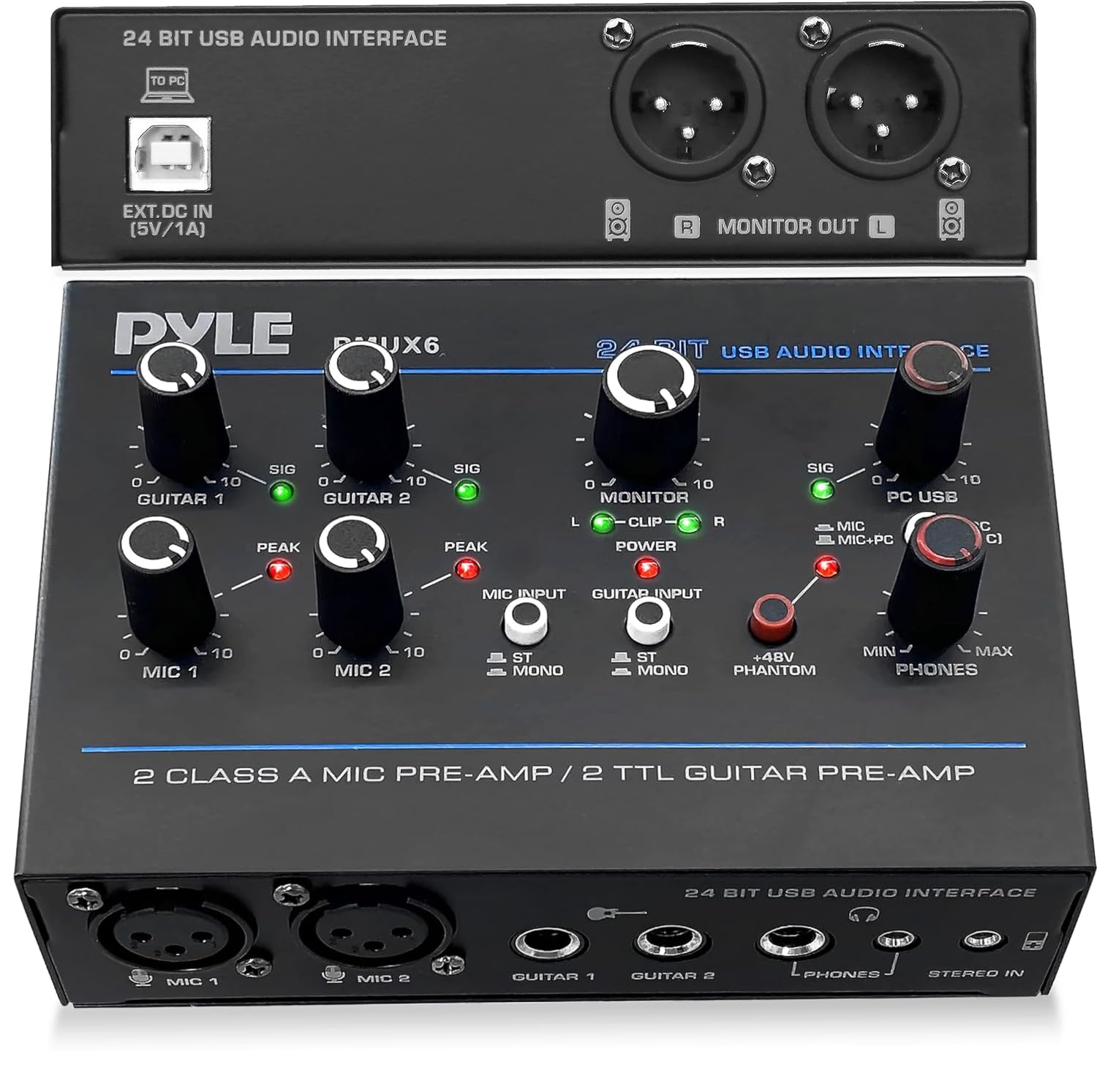
The PMUX6 is the budget podcasting weapon. It is built around a compact rugged metal housing that gives it a reassuringly solid feel, and its claim to fame is pure simplicity. It offers a 24-bit/48kHz resolution, which is lower than the 192 kHz flagships above, but for spoken-word podcasting and voiceover work through two dynamic mics, the sound quality is more than sufficient. Owners describe it as “very straightforward and simple to operate,” working “perfectly without any fiddling” to record two dynamic mics to Audacity on a Windows laptop.
Connectivity is the defining feature. For input, you get two XLR jacks, two 6.35mm jacks, and one AUX 3.5mm jack. For output, there is a 6.35mm jack and a 3.5mm jack for phones, plus a pair of L/R monitor jacks. The 48V phantom power supply with its indicator LED lets you use condenser microphones reliably. A 3W power consumption with a USB 2.0 type-B connection keeps things efficient.
Functionality is the top praise, with 35 owners noting it exceeds expectations for the price. The controls are clearly indicated, and the LED lights and multiple output knobs let you adjust audio from different sources and switch from mono to stereo. It is not perfect — a few note that it does not work well with bass guitar, and general value for money earns mixed reactions, with some calling it amazing for the price and others wanting more. It is best understood as a reliable utility tool, not a high-end recording instrument.
Plug and play: Owners love that it links and controls two dynamic mics instantly, with solid metal casing and clearly marked controls.
Know the limit: Recording bass guitar is a weak spot, and some buyers view the value as mixed rather than outright amazing.
4. MAONO P2
The hybrid that records to your iPhone and your PC at the same time.
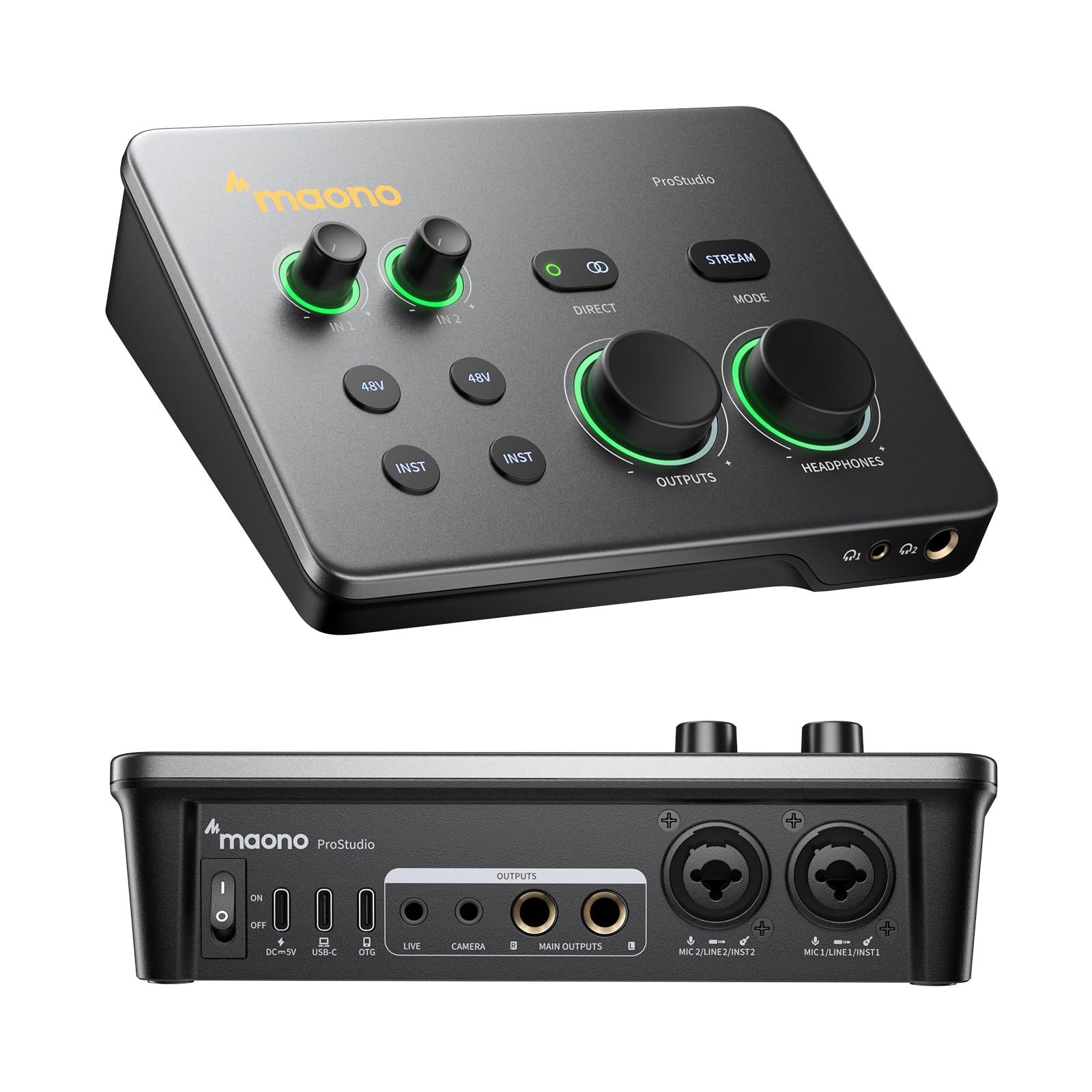
The MAONO P2 breaks the desktop-only mold with hybrid connectivity that lets you plug into a computer and a phone or iPad simultaneously. The dual USB ports with MFi-certified connectivity mean you can record in GarageBand or Logic Pro on your iPad, then stream or upload guitar and vocal covers directly from your mobile device with no workflow interruptions. It works with Mac, PC, iPhone, Android, or cameras, making it the most flexible connectivity option here for creators who record anywhere.
Audio quality is studio-grade on paper and in practice. It captures vocals and guitar in 24-bit/192kHz quality with dual XLR inputs that work with most condenser and dynamic microphones. The class-leading -130dB EIN (a measure of the preamp’s self-noise, where lower is better) delivers dead-silent recording in home studios. ASIO support ensures clean recordings and lower-latency monitoring. The ergonomic 15° tilt angle keeps controls within easy reach, and the aluminum-alloy housing is built for daily streaming.
The bundled Creator Software PROSTUDIO 2 is a genuine differentiator. It lets you route FL Studio, Spotify, TikTok, or browser audio directly to dedicated channels without digging through complex PC settings, and built-in loopback captures your instrument, voice, backing tracks, and desktop audio in one workflow. Stream Mode sends your voice equally to both channels for balanced listening. The trade-off is that the bundled software has a learning curve, with some owners finding it difficult and switching to alternatives, and dynamic mics need high gain that can raise the noise floor. Buyers report the preamp quality is average for the price, and initial crackle issues were solved by reinstalling drivers and using the USB-C port.
Total workflow freedom: The dual USB and mobile compatibility make this the only pick where recording to an iPad and streaming to TikTok in one session feels natural.
The learning curve: The software can frustrate, and dynamic mics demand an inline preamp to keep the noise floor low.
5. PreSonus AudioBox USB 96 25th Anniversary Studio

A full studio in one box, from the interface to the mic to the mastering software.
The PreSonus AudioBox USB 96 25th Anniversary Studio Package is the answer for the buyer who wants everything in a single purchase and does not want to research components separately. The rugged AudioBox USB 96 interface records vocals and instruments at 24-bit/96kHz with 2 combo inputs and low latency. But the real story is what comes in the box: the versatile M7 large-diaphragm condenser microphone, the HD7 studio monitoring headphones, a desktop mic stand, and all required cables.
What wins people over is the sheer completeness of the package and the build quality, with 42 owners praising the professional-grade quality. Beginners love that they can unbox it, plug it in, and start recording immediately — one art enthusiast noted it “helped me better up my skill real quick” despite being above their skill level. The honest fit notes are about setup and reliability: a few report buzzing issues, some find the software difficult to learn without one-on-one help, and reliability and value get mixed feedback, with a minority reporting units that do not work. The DAW also has a steep learning curve for true novices, though it is a professional tool worth mastering.
Open the box and record: The M7 mic, HD7 headphones, cables, stand, and Studio One Artist make this the only true all-in-one starter kit here.
Set realistic expectations: The DAW has a learning curve and some owners hit buzzing issues or setups that frustrate, so it rewards patience.
6. Universal Audio Volt 2

Classic UA 610 preamp mojo in a compact box that travels from Mac to iPhone.
The Volt 2 is the choice for producers who want that classic analog character. At its heart is a Vintage mode that emulates UA’s classic 610 preamp, delivering the rich, full album-ready sound that made those old consoles famous. Flipping that switch adds a warm, musical thickness to vocals and instruments that is hard to find at this level. It records at up to 24-bit/192kHz with crisp converters that capture every detail of a performance.
The bundled software is a major draw. It includes the award-winning LUNA Digital Audio Workstation, giving you the sound and workflow of a real analog studio, plus a suite of UAD plug-ins and instruments trusted by top industry pros. Owners find themselves using the included VSTs (virtual studio technology plug-ins) more than anything else they own, and the free effects pedals bundle is excellent for direct-in guitar recording. Setup takes about 30 minutes via USB-C with auto-detect, and it eliminates PC electrical interference that plagues cheaper setups.
Portability is a genuine advantage. The Volt 2 works with macOS, Windows, iPad, and iPhone (iOS 14+), so you can take it anywhere. Note that it requires an external Volt power supply and an Apple Lightning to USB Camera Adapter for iPhones (except iPads with USB-C). What wins people over is the overall quality and sound, with 71 owners praising the build and 43 highlighting the superior sound quality. The recurring honest notes: it runs a little soft for some microphones, and setup is mixed, with some finding it straightforward and others needing proper configuration. It is worth the price to owners who care about quality and do not want to wonder where to turn next.
The Vintage Advantage
- Vintage mode delivers the classic 610 preamp sound for instant analog character.
- Works with Mac, Windows, iPad, and iPhone for mobile and desktop recording.
- Bundled LUNA DAW and UAD plug-ins are a genuine creative toolkit.
Before You Buy
- Needs an external power supply and a Lightning adapter for older iPhones.
- Some mics sound a little soft, and initial setup can require proper configuration.
Grab it for: the distinctive analog color and the creative software ecosystem that will make you want to record more.
Look elsewhere if: you expect a completely easy out-of-box experience with every microphone, or you need more than two inputs.
7. Solid State Logic SSL 2 MKII

Legendary SSL console sonics and studio-grade converters for the discerning home recordist.
The SSL 2 MKII brings the famous Solid State Logic sound — the same brand trusted in the world’s biggest studios — into a compact, heavy, industrial-feeling box. The headline spec is the 32-Bit/192 kHz AD/DA converters, a step above the 24-bit competition. While 32-bit recording here refers to the converter’s digital resolution rather than 32-bit float recording, the vocal clarity is a step change. One buyer notes that “32-bit vocal recordings come out very clean,” and a voice artist reported the high-pass filter cleared a five-year rumble issue in their booth.
The Legacy 4K analog enhancement button is the signature feature, adding sheen and harmonic character to your signal — owners describe it as adding a subtle brightness that livens up tracks. It is bus-powered, so it runs off your computer’s USB connection without a wall adapter, and it works with Mac and Windows. The two XLR mic preamps and two ¼” line/Hi-Z inputs handle both microphones and direct guitar, and it includes 48V phantom power, zero-latency monitoring, stereo loopback, and high-pass filters. MIDI I/O on 5-pin DIN jacks lets you connect keyboards and drum machines, and the two headphone outputs are powerful and clean.
What wins people over is the professional-grade clarity and solid build, with 27 owners praising the quality and 21 highlighting the sound. Owners describe it as “legendary SSL sound in my HOME,” and it rivals far pricier gear. It is larger and heavier than the Focusrite Scarlett 2i2, which some see as a positive sign of build quality. The included SSL Production Pack software bundle provides the essential tools, and the noise-level meter with numerical values is praised as easier to read than color-coded LEDs on rivals. There is no real downside from owners beyond the size and weight, making this the choice for serious home hobbyists who want the SSL signature.
Built like a tank: The heavy, industrial feel with rubber feet and solid gain knobs screams quality, and the noise gauge with values beats any color-coded LED.
No real compromises: It is larger and heavier than some rivals, and those expecting true 32-bit float recording should know this is a 32-bit D/A converter, not a float recorder.
8. Motu M4

The four-input hub for growing studios that want metering and loopback without bloatware.
The Motu M4 is the interface for the home studio that has outgrown two inputs. It provides 4-in/4-out connectivity over a single USB-C cable, with 2 high-quality microphone preamps for vocals and two additional line inputs for synths, drum machines, or external effects. The stand-out hardware feature is the LCD screen, which shows clear level metering for all four inputs — a huge help when setting gain and avoiding clipping, and something no other pick here offers in real-time.
It runs on USB-C bus power, meaning one cable to your Mac or PC delivers both data and power. Owners praise the clean preamps, low noise, and near-zero latency, with one calling it “the Focusrite Killer” for beating the Scarlett 4i4 in ease, audio, and build quality. It works smoothly on Mac and Windows without bloatware, and one owner confirmed plug-and-play compatibility with Linux. The hardware monitoring mix control lets you blend your input signal with the computer playback directly, which is essential for low-latency recording. It even includes 6+GB of free content, plus Performer Lite and Live Lite production software.
What wins people over is the functionality and value, with 105 owners praising its capability and 50 highlighting value for money. The thing everyone raves about is the transparent, clean sound and the LED meters. The honest fit notes are technical: the rear line inputs can be too weak for keyboard signals, so you will use the front inputs, and the headphone amp is a bit weak when running on USB bus power, though it can feed an external amp. One owner reported a pitch-shift quirk fixed by disabling Windows fast startup, and some mention reliability issues after years of use. This is a capable but technical tool that rewards a little patience.
Why It Expands Well
- Four inputs handle mics, synths, and drum machines simultaneously.
- The LCD screen gives clear, real-time level metering not found elsewhere.
- USB-C bus power means a single cable for data and power.
The Technical Bits
- Rear line inputs are weaker than front inputs for keyboard signals.
- The headphone amp is modest on bus power; an external amp helps.
- Requires some technical knowledge to get it all humming.
Choose this if: you are adding synths or a second mic to your setup and want pro-grade metering and clean preamps.
skip it if: you want a truly simple plug-and-play box or you only ever record one microphone at a time.
9. Focusrite Scarlett 4i4 4th Gen

The 4th-gen studio hub that sets your levels for you and refuses to let you clip.
The Scarlett 4i4 4th Gen is the grown-up version of the Solo, built for producers connecting mics, guitars, synths, and drum machines. It offers two Scarlett 4th Gen mic preamps, two Hi-Z instrument inputs, four line inputs, four line outputs, and MIDI I/O — the same converter technology found in Focusrite’s flagship interfaces used in the world’s biggest studios. The headline number is the huge 120dB dynamic range, which means a vast difference between the quietest and loudest sound you can capture without distortion.
The smart features are the real story. Auto Gain sets the perfect level for your mic or guitar automatically, so you never have to guess. Clip Safe prevents clipping even if you push the input hard, which means you can focus on the music and never lose a great take. Air mode lifts vocals and guitars to the front of the mix, adding musical presence and rich harmonic drive. Owners praise the clear sound for vocals and acoustic guitars, and the ability to control everything via a phone app is a standout connectivity feature.
Routing is flexible and powerful. It handles two-person recording with zero latency, provides ASIO per-input tracks (a driver protocol that lets each input record separately), and creates virtual channels for live VST effects processing. MIDI capability connects keyboards smoothly. The software bundle includes Pro Tools Intro+, Ableton Live Lite, Cubase LE, and the Hitmaker Expansion. One owner calls it “a very nice upgrade from the old Behringer,” and another says it is “easily the best interface and total value for money.” The honest notes: only two of the four inputs are XLR — the others are TRS line inputs, which need balanced cables for less noise — and it needs high-impedance headphones, plus occasional driver crashes in some games requiring a reboot.
Pro studio features: Auto Gain and Clip Safe eliminate the two biggest beginner recording mistakes, and the 120dB dynamic range is flagship-grade.
The small print: You get two XLR inputs, not four — the rest are balanced line inputs, and the headphone amp prefers high-impedance cans.
Understanding the Specs
Sample Rate
Sample rate, measured in kHz, is how many times per second your interface captures a snapshot of the sound. The most common rates are 48kHz, 96kHz, and 192kHz. Higher rates capture more detail and give you more headroom when you pitch-shift or time-stretch audio, but they create larger files and need more computer power. For most podcasts and vocals, 48kHz is plenty. For music production where you might manipulate audio heavily, 96kHz or 192kHz gives you more flexibility.
Preamps and Gain
The preamp is the first circuit your microphone signal hits. It boosts the tiny electrical signal from a mic up to a level your interface can convert to digital. A good preamp does this quietly, adding very little hiss. Dynamic microphones need a lot of gain, so a preamp with clean headroom matters. Features like Air mode or Legacy 4K add a high-frequency lift for extra presence and clarity on vocals and acoustic instruments.
Latency and Direct Monitoring
Latency is the delay between when you make a sound and when you hear it back in your headphones. High latency makes recording feel laggy and unresponsive. This usually depends on your computer’s speed and the driver software. Direct monitoring routes your input signal straight to your headphones, bypassing the computer entirely, so you hear yourself with zero delay. This is essential for recording vocals while playing along to a track.
Connectivity and Inputs
Most modern interfaces use USB-C, which offers more bandwidth and lower latency than older USB 2.0. For inputs, XLR is the standard 3-pin connection for professional microphones. Instrument inputs (often labeled Hi-Z) are designed for electric guitar and bass. Line inputs accept the stronger signal from keyboards, synths, and external preamps. Check what gear you own and buy an interface with the matching connections, plus a little room to grow.
FAQ
What is the difference between USB-C and USB 2.0 on an audio interface?
Can I connect an audio interface to my iPhone or iPad?
How many inputs do I actually need for a podcast?
Is a higher sample rate like 192 kHz better than 48 kHz?
What does phantom power do and when do I need it?
What is the difference between an XLR input and a line input?
Will an audio interface work with my recording software?
What is loopback and why do streamers want it?
Final Thoughts: The Verdict
For most people, the audio interface usb winner is the Focusrite Scarlett Solo 3rd Gen because its combination of clean preamps, Air mode, and a generous software bundle makes it the easiest path to professional-quality recordings. If you want two microphone inputs without spending much more, grab the Behringer UMC202HD. And for the mobile streamer recording to a phone and laptop at once, the MAONO P2 is the one to reach for.
How We Picked
We do not accept paid placement. Every pick is matched to a real buyer and a real use-case; we do not hands-on test units.
Sources & Methodology
Specifications: manufacturer listings and product documentation. Review insights: verified customer reviews, as of August 2026. Pricing: not shown on this page (it changes often); check the current price via the retailer link.
As an Amazon Associate, Gadgets Feed earns from qualifying purchases. This does not affect which products we feature.