
Latency kills takes. When that hammer-on lands a full 12 milliseconds after your finger hits the fret, or when the vocal foldback slaps back a disorienting half-beat late, the performance unravels. The difference between a great audio interface and a mediocre one for tracking musicians isn’t preamp count or bundled software — it’s the round-trip latency figure, measured in single-digit milliseconds, that determines whether you stay in the pocket or drift out of time. Every millisecond of delay between your source and your headphones matters.
I’m Min — the co-founder and writer behind Gadgets Feed. I’ve spent hundreds of hours dissecting spec sheets, benchmarked ASIO driver performance across different chipset architectures, and cross-referenced user-reported round-trip latency measurements to separate marketing claims from real-world performance in recording and live-monitoring scenarios.
This guide ranks the current market by pure round-trip speed, driver stability, and converter accuracy to help you find the right audio interface with lowest latency for tracking vocals, guitars, and virtual instruments without the lag.
How To Choose The Best Audio Interface With Lowest Latency
Latency is not a single spec on a box. It is a system-level result determined by the interface’s A-D/D-A converter speed, the efficiency of its driver stack, the USB or Thunderbolt protocol overhead, and your computer’s ability to handle the chosen buffer size. Choosing the lowest-latency interface means evaluating the entire digital pathway, not just the preamp quality or I/O count.
Round-Trip Latency (RTL) and Buffer Size
RTL is the total time it takes for an audio signal to enter the interface, travel through the A-D converter, get processed by your computer, return through the D-A converter, and reach your headphones. At a 32-sample buffer with a 48 kHz sample rate, you want an RTL under 5 ms — 3 ms or lower is elite. Interfaces with poorly optimized ASIO drivers often require a 128-sample or 256-sample buffer to run stable, adding 8–15 ms of delay. The best interfaces in this category allow stable operation at 32 or 64 samples with no pops, clicks, or dropouts.
Driver Quality and Protocol Choice
Native USB Class-Compliant drivers work without additional installation but often deliver higher RTL than proprietary ASIO drivers. Thunderbolt interfaces generally offer the lowest RTL because of their direct PCIe tunneling, but many USB-C interfaces with mature, custom-coded ASIO drivers (RME, MOTU, Focusrite) achieve RTL figures within 0.5 ms of Thunderbolt options. Driver stability across operating systems — particularly Windows where kernel-level audio handling varies — separates professional-grade interfaces from consumer-tier ones.
Zero-Latency Direct Monitoring
Direct monitoring routes the input signal straight to the headphone output before it reaches the computer, effectively creating zero latency for the performer. This is a hardware-based bypass that eliminates computer processing delay entirely. The quality of direct monitoring varies: some interfaces offer a simple mono blend, while advanced units (like the SSL 2 MKII and MOTU M4) provide flexible mix controls with FX processing or reverb. For vocalists and guitarists who need to hear themselves in real time, robust direct monitoring is as important as low ASIO latency.
Quick Comparison
On smaller screens, swipe sideways to see the full table.
| Model | Category | Best For | Key Spec | Amazon |
|---|---|---|---|---|
| RME Babyface Pro FS | Premium | Pro tracking, lowest stable RTL | SteadyClock FS, 5 samples AD, 7 samples DA | Amazon |
| MOTU M4 | Mid-Range | Transparent preamps, loopback | 24-bit/192 kHz, LCD metering, direct monitoring | Amazon |
| SSL 2 MKII | Mid-Range | Zero-latency monitoring, 4K analog enhancement | 32-bit/192 kHz AD/DA converters | Amazon |
| Focusrite Clarett+ 8Pre | Premium | Multi-channel, low-noise preamps | Eight Clarett+ preamps, ADAT expandable | Amazon |
| Universal Audio Apollo Solo USB | Premium | UAD DSP tracking with near-zero latency | UAD SOLO Core, Unison preamps | Amazon |
| Universal Audio Volt 2 | Mid-Range | Vintage preamp character, mobile use | Vintage 610 preamp mode, 24-bit/192 kHz | Amazon |
| Audient EVO 8 | Mid-Range | Smartgain auto-leveling, compact setup | 4 EVO mic pres, JFET instrument input | Amazon |
| Focusrite Scarlett Solo 3rd Gen | Entry-Level | Budget-friendly, reliable entry point | Air mode, 24-bit/192 kHz | Amazon |
| Behringer UMC1820 | Budget-Friendly | Multi-channel recording, expandable I/O | 18×20 channels, 8 MIDAS preamps, ADAT I/O | Amazon |
In‑Depth Reviews
1. RME Babyface Pro FS
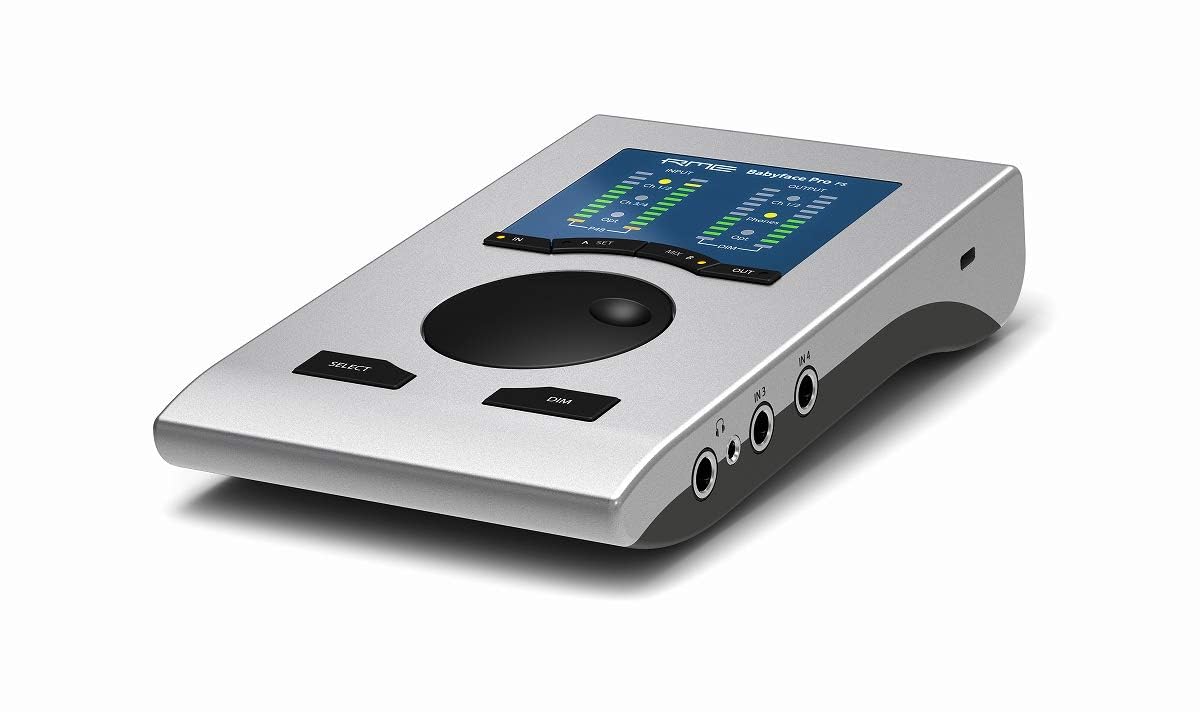
The RME Babyface Pro FS sets the benchmark for round-trip latency in a portable USB interface. Its proprietary SteadyClock FS circuit — derived from the ADI-2 Pro — decimates jitter to nearly immeasurable levels, while the ADC achieves a 5-sample latency on the analog-to-digital side and 7 samples on D-A. That translates to a sub-3 ms RTL at a 32-sample buffer, 48 kHz, making it the only interface in this roundup that reliably competes with Thunderbolt-native units. The TotalMix FX routing engine gives you complete control over zero-latency direct monitoring with EQ, reverb, and dynamics on every channel.
The rugged aluminum chassis houses a 12-in/12-out architecture via a breakout cable, including two XLR/TRS combo preamps with phantom power and a dedicated instrument input. Users on AMD systems report zero issues, a stark contrast to Thunderbolt interfaces that require specific chipsets. The headphone output drives 600-ohm studio cans to healthy levels.
This is not a budget interface. The breakout cable is less convenient than rear-panel I/O, and the unit requires that you learn the TotalMix workflow to unlock its full potential. But for tracking professionals who need the absolute lowest attainable latency and rock-solid driver stability across operating systems, the Babyface Pro FS is the definitive choice. It is the ceiling against which all other low-latency interfaces are measured.
Why it’s great
- Industry-leading 5+7 sample ADC/ADC latency
- SteadyClock FS virtually eliminates jitter
- Legendary driver stability across Mac and Windows
- TotalMix FX provides flexible zero-latency monitoring
Good to know
- Breakout cable I/O feels less robust than rear-panel connections
- Requires learning TotalMix for advanced routing
- Premium price point puts it out of reach for casual users
2. MOTU M4

MOTU’s M4 delivers a near-reference front-end at a fraction of the price its performance suggests. The ESS Sabre32 Ultra DAC chipset and custom drivers push the RTL down to roughly 2.5 ms at a 32-sample buffer, 48 kHz — figures that edge out many Thunderbolt interfaces. The four-in/four-out configuration includes two combo mic preamps with clean, transparent gain up to 60 dB, a dedicated Hi-Z input for guitar, and individual volume controls for both headphone and monitor outputs. The built-in LCD screen shows real-time input and output metering, a rare luxury at this price tier.
Loopback capability is baked into the hardware routing, making the M4 a favorite for streamers and podcasters who need to route system audio back into their DAW. The direct monitoring mix knob allows you to blend the input signal with the DAW playback for latency-free headphone monitoring. On Windows, the MOTU ASIO driver is one of the most stable in the industry, accepting buffer sizes as low as 32 samples without dropout on mid-range hardware. The unit is USB-C bus-powered, although driving high-impedance headphones may require a separate headphone amp.
The M4’s main compromise is the headphone output power — adequate for 32-ohm to 150-ohm cans, but it runs out of steam with 250-ohm or 600-ohm studio headphones. Some reviewers have noted a pitch-shift glitch related to Windows fast startup, easily fixed by disabling that setting. If you need low-latency USB performance without the RME price tag, the MOTU M4 gives you about 95% of the speed for 30% of the cost.
Why it’s great
- RTL around 2.5 ms at 32-sample buffer
- ESS Sabre32 Ultra converters for clean signal path
- Hardware loopback for streaming and podcasting
- LCD metering and independent headphone/monitor controls
Good to know
- Headphone amp lacks power for high-impedance studio cans
- Occasional clock sync issue with Windows fast startup disabled
- Limited to 4 inputs without ADAT expansion
3. SSL 2 MKII

The SSL 2 MKII inherits the sonic DNA of Solid State Logic’s legendary 4000 series consoles. Its 32-bit/192 kHz AD/DA converters, while not true 32-bit float on the input (a distinction that matters for dynamic range but not for latency), deliver exceptional clarity and an incredibly low noise floor. The Legacy 4K analog enhancement circuit is the star feature — it applies a variable high-frequency boost and harmonic saturation that emulates the console’s listen mic compressor, adding air and presence to vocals and acoustic instruments without post-processing. Zero-latency monitoring is handled through the onboard mixer with no DSP overhead.
Connectivity includes two XLR/TRS combo preamps with high-pass filters (critical for voice actors combating rumble), two headphone outputs with independent mixes, MIDI I/O on 5-pin DIN, and stereo loopback for podcasting. The headphone amplifier is notably powerful, driving high-impedance studio headphones with authority. Build quality is heavy-duty — the metal chassis and premium knobs feel substantially more robust than the price suggests.
The 2×2 configuration limits tracking to two simultaneous microphones. The bundled software is generous, but you pay a slight premium for the SSL badge compared to functionally similar 2×2 interfaces. For vocalists, voice artists, and producers who want that console sheen at the tracking stage and need reliable low-latency performance, the SSL 2 MKII delivers a genuinely different sound signature than the competition.
Why it’s great
- Legacy 4K analog enhancement adds presence without plug-ins
- 32-bit/192 kHz converters with extremely low noise floor
- Powerful headphone amp drives high-impedance cans well
- Built-in HPF eliminates rumble for voice work
Good to know
- Not true 32-bit float on analog inputs; input can still clip
- Only 2 simultaneous mic inputs for tracking
- Premium price over basic 2×2 interfaces
4. Focusrite Clarett+ 8Pre
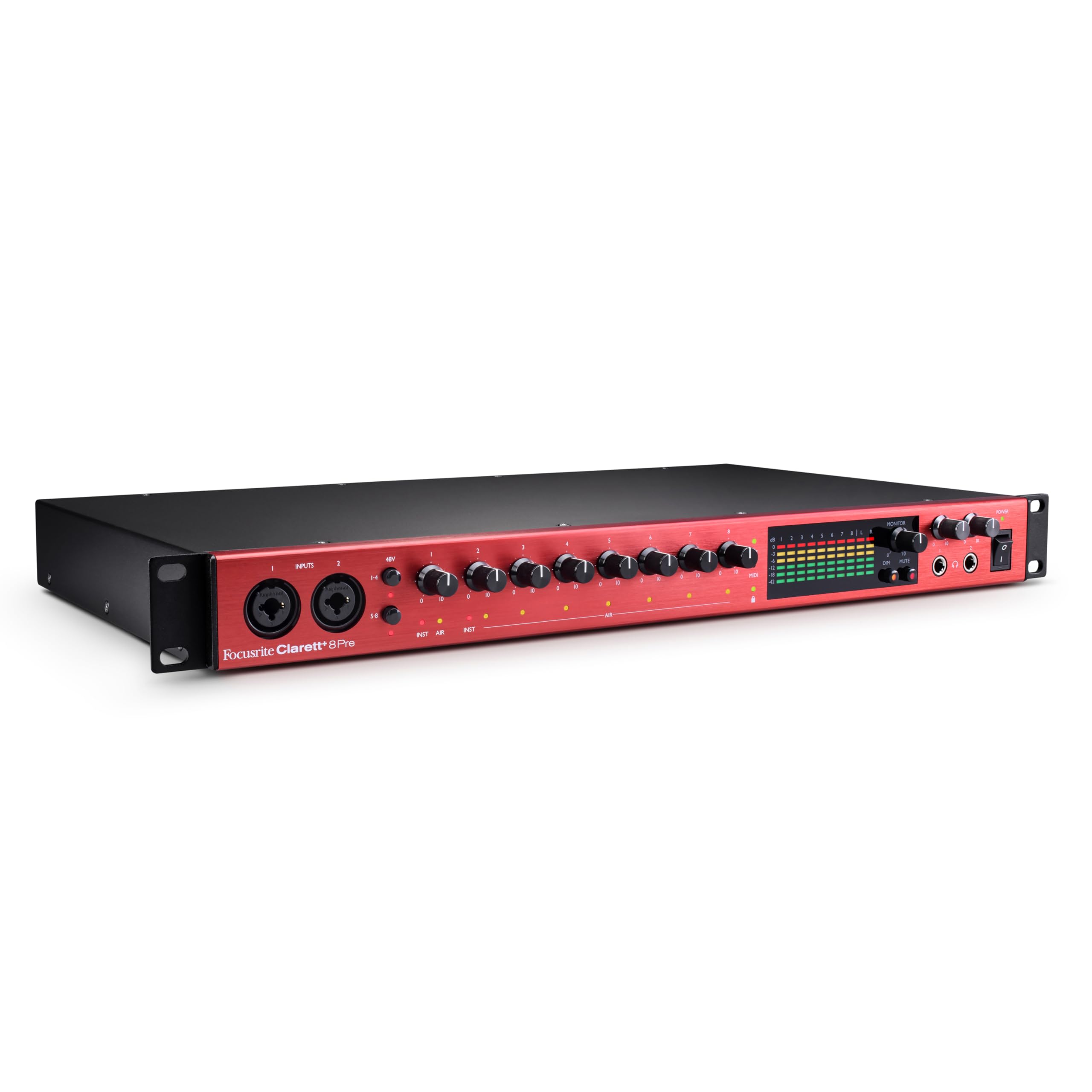
The Clarett+ series represents Focusrite’s high-end analog stage, and the 8Pre packs eight of their best discrete preamps into a single rackspace unit. Each preamp features the Air mode — relay-controlled analog circuitry that emulates the Focusrite ISA 110 by switching impedance and adding two cumulative high shelves for a 4 dB boost in the high frequencies. The independent A-D and D-A converters deliver 124 dB dynamic range on the outputs, with distortion figures below 0.0003%. Round-trip latency in the Focusrite Control software measures approximately 3.5 ms at a 64-sample buffer, which is competitive for a multi-channel interface.
The 18-in/20-out architecture includes ADAT optical input for expansion up to 16 preamps via the Clarett OctoPre. The two independent headphone outputs feature their own D-A converters, delivering a flat frequency response regardless of output level. Users report that the headphone stage effortlessly drives low-sensitivity planars and high-impedance dynamic cans with massive headroom. The build is studio-grade — all-metal chassis weighing 9 pounds with a captive IEC power cable, designed to live in a rack for years.
The Clarett+ 8Pre requires external power, so it is not portable. Some users have reported issues running at 24-bit/192 kHz simultaneously on all channels, though the unit performs flawlessly at 96 kHz. For serious home studios and commercial tracking rooms needing eight channels of ultra-clean preamps with low latency and pristine converters, the Clarett+ 8Pre is a substantial upgrade over the Scarlett line in every dimension.
Why it’s great
- Eight outstanding discrete preamps with Air emulation
- 124 dB dynamic range on D-A converters
- Independent headphone DACs drive any headphone type
- ADAT expandable for full band tracking
Good to know
- Requires AC power; not portable for mobile recording
- Higher channel counts at 192 kHz may cause instability
- Premium step up in price vs. Scarlett line
5. Universal Audio Apollo Solo USB Heritage Edition

Universal Audio’s Apollo Solo USB bridges the gap between standard audio interfaces and DSP-accelerated recording. The UAD SOLO Core chip lets you track through vintage compressor, EQ, and preamp emulations — including the Teletronix LA-2A, Pultec EQP-1A, and UA 1176 — with near-zero latency because the processing happens on the interface itself before the signal reaches your computer. The Unison preamp technology physically alters the input impedance and gain staging to match the modeled preamp, so a Neve 1073 emulation actually behaves like the real hardware when you plug a microphone in.
The unit features one Unison-capable preamp, one Hi-Z instrument input, stereo line outputs, and a best-in-class headphone amplifier rated for loud, low-noise monitoring. Build quality is the dense, machined aluminum standard you expect from UA’s pro gear. The Heritage Edition includes five premium UAD plug-in titles valued at over , making it a compelling package for producers who want console-style tracking without a rack of outboard gear.
The Apollo Solo USB has significant caveats. It requires a Thunderbolt connection on some setups for full functionality, despite being labeled USB. Windows driver support has historically lagged months behind macOS releases, and some users report persistent installation issues with USB-C cables. The UAD ecosystem locks you into their plug-in format for DSP tracking, and the SOLO processor can only run a few instances. For Mac users who want UA’s sound and can navigate the setup quirks, the latency benefits of DSP-accelerated tracking are unmatched.
Why it’s great
- UAD DSP processing allows near-zero latency tracking with high-end emulations
- Unison preamp technology physically emulates classic console pres
- Heritage Edition includes + worth of premium plug-ins
- Excellent headphone amplifier for loud, clean monitoring
Good to know
- Windows driver compatibility historically lags behind macOS
- Installation can be finicky with USB-C cable requirements
- SOLO processor limits simultaneous DSP plug-in instances
6. Universal Audio Volt 2

The Universal Audio Volt 2 brings UA’s analog heritage to a more accessible price tier. Its standout feature is the Vintage mode, which emulates the UA 610 tube preamp circuitry used on countless classic records — introducing subtle harmonic saturation and a high-frequency sweetening that adds musicality to sources without requiring UAD DSP processing. The interface runs at 24-bit/192 kHz with clean converters that capture the natural detail of microphones and instruments. The two combo inputs support both XLR and Hi-Z connections, with phantom power available on each channel.
Setup is plug-and-play on Mac and Windows, with no driver installation required for basic operation. The unit is USB bus-powered, making it genuinely portable for laptop-based mobile recording. The bundle includes LUNA DAW and a selection of UAD plug-ins, letting new users taste the UA ecosystem. Latency figures are solid for a bus-powered interface — users consistently report being able to track at 64-sample buffer sizes without glitches, which puts the RTL in the 5–6 ms range.
The Volt 2 lacks the DSP power of the Apollo line, so you cannot use UAD plug-ins with near-zero latency during tracking. The Vintage mode is analog and always active, not a digital effect. The build is plastic-based with a metal top plate, feeling less premium than the SSL 2 MKII. For singer-songwriters and home producers who want UA’s classic tube preamp character without the DSP investment, the Volt 2 delivers that specific tonal flavor at a budget-friendly price.
Why it’s great
- Vintage mode emulates the classic UA 610 tube preamp
- Bus-powered USB for true mobile recording
- Reliable plug-and-play operation on Mac and Windows
- Bundled with LUNA DAW and UAD plug-in suite
Good to know
- No UAD DSP for zero-latency plug-in tracking
- Build uses plastic body with metal top plate
- Limited to 2 inputs for simultaneous recording
7. Audient EVO 8

The Audient EVO 8 rethinks the interface control surface for speed. Instead of individual gain knobs, it uses a single rotary encoder paired with Smartgain — a button you press that automatically sets the ideal gain level for each channel in under three seconds. This is not a gimmick; for podcasters and solo musicians who want to spend their time recording instead of level-matching, Smartgain is genuinely useful. The four EVO preamps are based on Audient’s console heritage, offering clean gain with an extremely low noise floor (-129 dB EIN).
The JFET instrument input emulates a classic valve amplifier’s front end, delivering a warmer, more reactive DI tone for bass and electric guitar than standard solid-state inputs. The two independent headphone outputs have their own mix routing, and the main monitor output volume is controlled by the same smart knob. Connectivity includes ADAT expansion for adding two additional channels, bringing the total to six inputs. The unit is bus-powered, compact, and the minimal control surface keeps the desktop clean.
Latency performance is mid-table — the USB bus power limits the driver’s ability to maintain ultra-low buffer sizes compared to powered interfaces. The Smartgain button is brilliant for quick setup but cannot replace manual gain staging for nuanced recording. Some users have noted that the unit is so lightweight that the weight of thicker XLR cables can lift the front of the unit off the desk. For streamers, podcasters, and home recordists who prioritize setup speed and clean preamps over absolute sub-3 ms latency, the EVO 8 is an intelligent choice.
Why it’s great
- Smartgain auto-sets input levels instantly and accurately
- JFET instrument input delivers warm, reactive DI tone
- Four EVO console-grade preamps with -129 dB EIN
- ADAT expandable to six mic inputs
Good to know
- Bus power limits ultra-low buffer stability vs. powered interfaces
- Very lightweight chassis can tilt from cable weight
- Driver installation order is critical; improper sequence can cause system freeze
8. Focusrite Scarlett Solo 3rd Gen

The Focusrite Scarlett Solo 3rd Gen is the most widely adopted entry-level audio interface for a reason. Its mic preamp switches to Air mode, which applies a fixed high-frequency boost modeled after the Focusrite ISA transformer-based console preamps, adding clarity to vocals and acoustic sources. The two high-headroom instrument inputs handle electric guitar and bass without clipping, and the Gain Halos provide visual feedback for setting levels. The converters deliver 24-bit/192 kHz performance that preserves the full frequency range of your source material.
The interface records at up to 24-bit/192 kHz, making it capable of capturing the full range of your microphones and instruments without the coloration that cheaper interfaces add. The bundled software bundle — including Pro Tools Intro, Ableton Live Lite, Cubase LE, and the Hitmaker Expansion — gives new producers everything they need to start recording immediately. Users consistently report the Scarlett surviving years of abuse and non-climate-controlled storage, a testament to its all-metal build. Setup is genuinely plug-and-play on both Mac and Windows.
The latency performance is adequate for a bus-powered USB interface, but you will need to stay at a 64-sample or 128-sample buffer to maintain glitch-free performance, putting RTL around 7–8 ms. The single headphone output uses the same D-A converter as the main outputs, so you get a shared signal path. The Scarlett Solo is the safe, reliable, budget-conscious choice for beginners who need a proven platform to learn on, but it cannot match the pure speed of the MOTU M4 or RME Babyface Pro FS for latency-sensitive tracking.
Why it’s great
- Industry-standard entry-level interface with proven reliability
- Air mode adds clear high-frequency detail for vocals
- All-metal chassis is durable through years of use
- Inclusive software bundle covers all major DAWs
Good to know
- Latency is higher than premium interfaces; stable at 64–128 sample buffer
- Single headphone output shares the main output path
- Limited to 2 inputs for simultaneous recording
9. Behringer UMC1820

The Behringer UMC1820 provides a staggering 18 inputs and 20 outputs at a cost that undercuts every other multi-channel interface in this roundup. It uses eight MIDAS-designed mic preamps — the same engineering team behind the legendary MIDAS XL4 and Heritage D consoles — which deliver clean, low-noise gain with a neutral voicing that avoids the clinical or brittle character of cheap preamps. The ADAT I/O allows expansion via the ADA8200 for up to 16 preamps total, making it a legitimate tracking hub for full-band sessions.
The unit streams at 24-bit/96 kHz, which is sufficient for most production workflows. The ASIO drivers are stable on Windows and Mac, with users reporting reliable operation at 64-sample buffer sizes for an estimated RTL of 6–7 ms — excellent for the price bracket. The MIDI I/O on 5-pin DIN connectors is a welcome addition for keyboardists and synth users. The rack-mountable chassis and included AC adapter provide the power needed to drive long cable runs and multiple active inputs without the current limitations of bus-powered interfaces.
The UMC1820’s 24-bit/96 kHz maximum sample rate feels dated compared to the 192 kHz offerings from Focusrite and SSL. The converters lack the clarity of more expensive units, adding a slight grain to the high end. The build quality is typical Behringer — functional but plasticky in places, and the knobs lack the solid resistance of premium interfaces. For bands, podcasters with multiple hosts, and home studio owners who need maximum channel count at minimum cost, the UMC1820 delivers unbeatable I/O value with respectable latency performance.
Why it’s great
- Eight MIDAS preamps for under budget price
- ADAT expandable for 16 total mic inputs
- Rack-mountable for permanent studio integration
- MIDI I/O included for synthesizer control
Good to know
- Limited to 24-bit/96 kHz sample rate
- Converter quality and high-frequency detail less refined than premium units
- Build quality feels plasticky compared to metal-chassis competitors
FAQ
What round-trip latency should I expect from a USB audio interface?
Does Thunderbolt always deliver lower latency than USB?
Is zero-latency direct monitoring the same as ultra-low ASIO latency?
Final Thoughts: The Verdict
For most users, the audio interface with lowest latency winner is the RME Babyface Pro FS because its SteadyClock FS circuit and legendary ASIO drivers deliver an industry-leading sub-3 ms round-trip latency that runs stable on any computer. If you want the best latency-to-value ratio, grab the MOTU M4 for roughly 2.5 ms RTL at a much lower investment. And for the richest sound quality at low latency, nothing beats the SSL 2 MKII with its Legacy 4K analog enhancement and exceptional converter clarity.