
Our readers keep the lights on and my morning glass full of iced black tea. As an Amazon Associate, I earn from qualifying purchases.
Specs are compiled from manufacturer listings and verified buyer reviews and can change over time — please confirm the key details on the product page before buying.
You plug a microphone, an instrument, or a laptop into an audio mixer board, and it blends all that raw sound into a clean mix you can send to speakers, a recorder, or a livestream. The trick is picking one that matches your gear — enough inputs for everyone, but not so many channels that you waste space and money.
I’m Min — the founder and writer behind Gadgets Feed. This guide is built by comparing the manufacturers’ published specifications and the patterns across verified customer reviews, so you get each pick’s real strengths and trade-offs instead of marketing spin.
You need phantom power (48V sent through the XLR cable to power condenser microphones) for studio mics, built-in effects for a live gig, or a USB connection to record direct to your computer. The right audio mixer board gives you clean, controlled sound instead of a frustrating feedback loop.
Quick Picks
- Zoom LiveTrak L-12 — Best Overall
- Behringer X AIR XR18 — Pro Digital
- Mackie ProFX12v3+ — Stream Ready
- Tascam Model 12 — All-In-One
- Yamaha MG12XU — 4-Bus Workhorse
- Yamaha MG10XU — Studio Value
- Behringer FLOW 8 — Bluetooth Digital
- Mackie Mix12FX — Budget Analog
How To Choose The Best Audio Mixer Board
Start by counting the channels you need to match your gear. Count every mic, every guitar DI (direct input), and every stereo source like a keyboard or phone. You want enough inputs to plug everything in at once without swapping cables.
Channel Count and Input Types
Mono channels with XLR inputs handle microphones. They need phantom power (48V sent down the mic cable) for condenser mics, which require electricity to work. Stereo line channels accept keyboards, drum machines, or media players. A good rule: buy one or two more channels than you think you need so you have room to grow.
Built-in Effects vs. External Processing
Built-in effects like reverb (adds space and ambience), delay (echo), and chorus save you from buying separate processors. The quality varies. Digital mixers often offer more editable presets, while analog boards give you simpler knobs and fewer options, which some users prefer for live speed.
Connectivity and Recording
USB connectivity turns a mixer into an audio interface, letting you record straight to a computer or DAW (digital audio workstation software like Ableton or Logic). Look for class-compliant USB if you want plug-and-play with an iPad. Bluetooth input is handy for playing backing tracks from a phone.
Quick Comparison
| Model | Best For | Channels | Weight | Effects | Amazon |
|---|---|---|---|---|---|
| Zoom LiveTrak L-12 | Band Recording + 5 Headphone Mixes | 12 | 5.7 lbs | 16 onboard effects | Amazon |
| Behringer X AIR XR18 | iPad/Tablet Digital Control | 18 | 7.05 lbs | Built-in rack effects | Amazon |
| Mackie ProFX12v3+ | Streaming + USB-C Recording | 12 | 7.9 lbs | GigFX+ (12 presets) | Amazon |
| Tascam Model 12 | Multitrack + DAW Controller | 12 | 13.3 lbs | Built-in (not specified) | Amazon |
| Yamaha MG12XU | 4-Bus Routing + D-PRE Preamps | 12 | 9.3 lbs | SPX digital effects | Amazon |
| Yamaha MG10XU | Studio Recording via USB | 10 | 7.3 lbs | SPX (24 effects) | Amazon |
| Behringer FLOW 8 | Portable Digital with Bluetooth | 8 | 3.1 lbs | 2 FX processors | Amazon |
| Mackie Mix12FX | Compact Analog with Effects | 12 | 3.7 lbs | 12 built-in effects | Amazon |
In‑Depth Reviews
1. Zoom LiveTrak L-12

A recording studio and live mixer rolled into one battery-powered box.
This board gives you 12 inputs and 14 channels of recording at 24-bit/96kHz (studio-grade audio quality) directly to an SD card — no computer required. The -128dBu EIN preamps (Equivalent Input Noise, measured in dBu — lower numbers mean quieter preamps so you hear less background hiss) keep the signal clean even when you crank +60dB of gain on a quiet mic. That means you can record a full band rehearsal or a podcast without hearing that underlying hiss.
The standout feature here is five separate monitor mixes with dedicated headphone outputs. Every performer on stage can dial in exactly what they want to hear in their ears without affecting anyone else’s mix. Buyers report it is an excellent multi-purpose tool for practice, rehearsal, and songwriting, though they describe the preamps as “mediocre” compared to higher-end boards and the built-in compressor is always on during recording.
At 5.7 pounds with battery power, you can take this to a park, a rehearsal space, or a small venue and run the whole show off AA cells. Unlike the Mackie ProFX12v3+ below which needs wall power for everything, the L-12 keeps working when the outlet is miles away.
Five-way monitor advantage: Five independent headphone mixes let each performer hear their own blend, while the SD card records the master mix plus individual tracks for post-gig editing.
Grab it if: you are a band that wants to record rehearsals and gigs without hauling a laptop, or a podcaster who needs multiple headphone feeds.
Think twice if: you need pristine per-channel compression or a fanless chassis; the L-12 has a small cooling fan and the compressor is baked into the recorded signal.
2. Behringer X AIR XR18

An 18-input digital mixer you control entirely from an iPad or Android tablet.
The XR18 packs 16 MIDAS-designed programmable mic preamps — the same preamp circuitry found in high-end consoles — into a rack-mountable metal box that weighs 7.05 pounds. With 18 channels and 12 buses (signal pathways that let you route audio to different outputs), you can send sound anywhere you want. The built-in tri-mode Wi-Fi router lets you connect directly to a tablet without an external network, so you can walk the room and adjust the mix from anywhere. One reviewer sums it up: “Delivers professional-grade features at a price that undercuts comparable digital consoles.”
Unlike the Zoom LiveTrak L-12, which relies on physical faders and knobs, the XR18 is all digital touch control. The trade-off is that your iPad becomes the mixer — if the tablet dies or the Wi-Fi glitches, you lose hands-on control in a live setting. Owners mention the Wi-Fi can be “flaky” at times, so keeping a wired Ethernet backup is a smart move for serious gigs.
The 18×18 USB audio interface lets you multitrack record directly into a DAW on a laptop, giving you a full 18 channels of recording from a single device. It fits in a standard rack case, making it easy to integrate into an existing live sound setup.
Studio-Grade Routing
- 16 MIDAS mic preamps with programmable gain
- 18 inputs and 12 buses for complex routing
- Built-in Wi-Fi for wireless tablet control
- 18×18 USB audio interface for multitrack recording
The Wi-Fi Catch
- No physical faders or knobs — full reliance on tablet app
- Wi-Fi stability can be inconsistent in congested venues
- Some users report software differences between iPad and PC control apps
Best fit: live sound engineers or bands that want a compact, powerful rack mixer and are comfortable mixing from a tablet. skip it if you need instant hands-on fader control for quick adjustments mid-song — an analog board or a hybrid like the Tascam Model 12 might suit you better.
3. Mackie ProFX12v3+
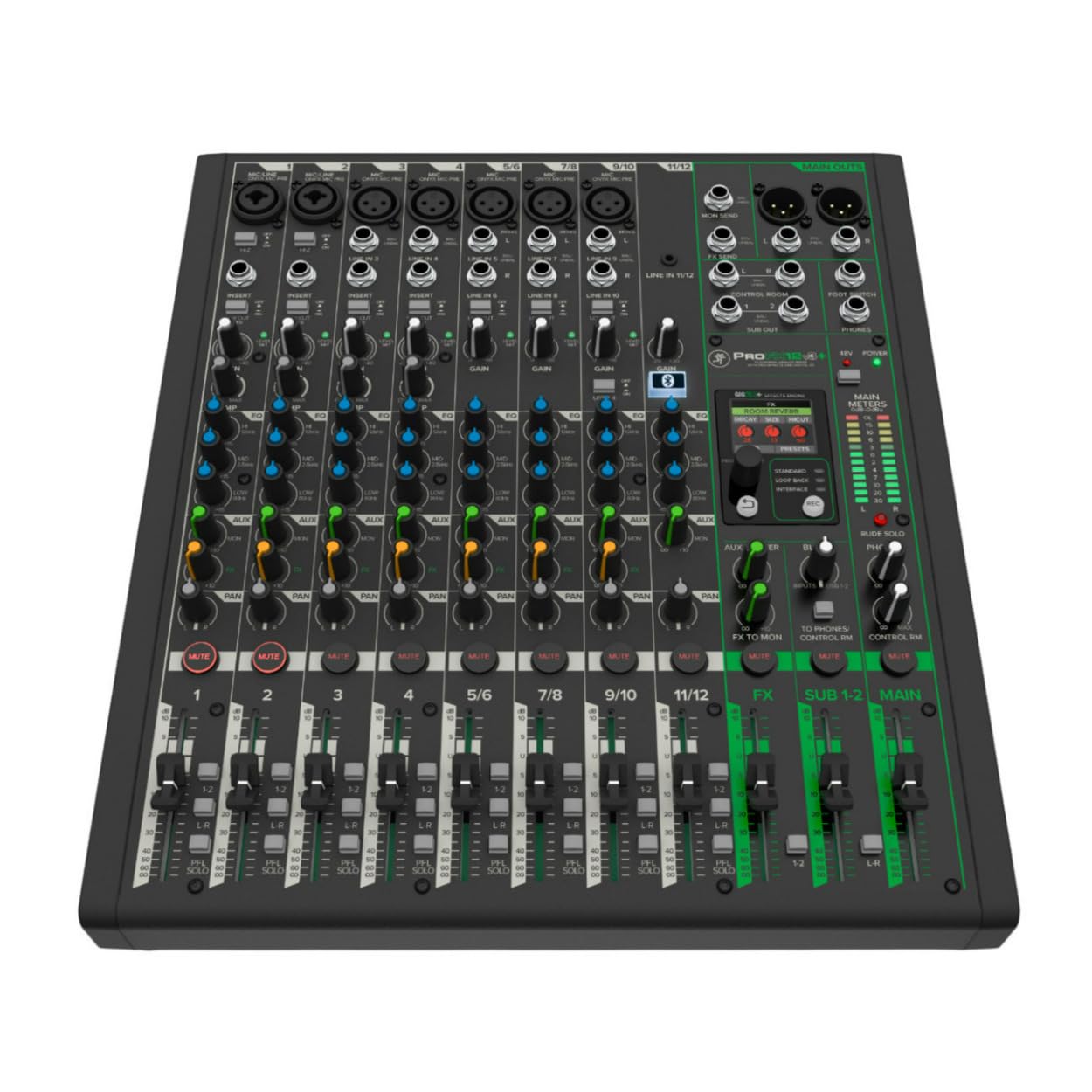
An analog mixer that doubles as a 24-bit/192 kHz USB-C streaming hub.
The ProFX12v3+ combines 12 channels with Onyx mic preamps and a built-in 2×4 USB-C audio interface. The three recording modes give you flexibility: Standard captures the full mix with effects, Loopback blends computer audio with your mixer signal for streaming, and Interface records channels 1-2 dry without effects. That means a podcaster can run a live show with phone calls via Bluetooth while recording clean vocal tracks — all from one board.
The GigFX+ effects engine offers 12 presets you can edit and save on the color LCD screen. But customers note mixed feelings: one reviewer noted the effects are “a little lacking,” while others praise the fast Bluetooth connection and great range. The catch is reliability — one buyer mentioned the power failed after only a handful of uses, a concern given this is a premium model at 7.9 pounds.
Compared to the Behringer FLOW 8, which offers 8 channels and digital app control, the Mackie gives you more analog channels and a physical interface that streamers and podcasters prefer for quick mic muting and gain adjustments. The bidirectional Bluetooth with Mix Minus (a feature that removes the mixer’s output from the Bluetooth send so a caller on a video call does not hear their own voice echoed back) is a feature the cheaper FLOW 8 lacks.
Streamer’s choice: The Loopback USB mode and Bluetooth Mix Minus make this the best pick for podcasters and live streamers who need to blend Skype calls, game audio, and mic feeds into a single clean output — but the power-reliability reports mean you want a backup plan for serious shows.
Reach for this if: you stream or record daily and want a single box that handles mixing, effects, and USB interface duties. Look elsewhere if you need a second output bus for separate monitor mixes — the ProFX12v3+ lacks a dedicated sub-group bus, so larger productions may require the ProFX16v3+ or a digital rack unit.
4. Tascam Model 12

A multitrack recorder, USB audio interface, and DAW controller in one 13.3-pound chassis.
The Model 12 gives you 12 inputs with 1-knob compressors and 3-band EQ on every channel. You can record up to 12 tracks directly to an SDXC card up to 512 GB — one reviewer confirmed it works with a SanDisk 128 GB card without issue. The real differentiator is the onboard MIDI I/O (a connection that lets the mixer talk to synthesizers and sequencers), which lets you sync the mixer with groove boxes for synchronized recording, a feature you won’t find on any other mixer in this lineup.
As a DAW controller, the faders and knobs send MIDI data to your computer, giving you tactile control over software like Ableton or Logic. The dual headphone outputs each have independent source selection and volume, so a podcast host and guest can hear their own mixes. However, the phantom power is global — flipping the switch powers all eight XLR inputs, so you cannot individually switch 48V for specific mics.
At 13.3 pounds, this is the heaviest mixer on the list — 5.6 pounds heavier than the Zoom LiveTrak L-12. That weight comes from the built-in PSU and rugged construction, but it makes the Model 12 less portable for regular gigging. Reviewers point out it is “An excellent multi-use mixer with MIDI sync for synths and sequencers.” and praise the clean, silent preamps.
Studio hub potential: The combination of MIDI sync, multitrack SD recording, and DAW control makes the Model 12 a genuine nerve center for a home studio — keep a synth, a mic, a guitar, and a drum machine all plugged in and ready to hit Record at any moment.
Best for: home studio producers who want a single device that mixes, records, and controls their DAW without opening a laptop for basic tasks. The 13.3-pound weight and bulky 18 x 16 x 6-inch dimensions make this a stay-at-home board, so gigging musicians should look at the Zoom LiveTrak L-12 instead.
5. Yamaha MG12XU

A durable analog board with four subgroup buses for serious live mixing.
The MG12XU features D-PRE mic preamps using an inverted Darlington circuit — a design that delivers clean, transparent gain with low noise. The four buses (signal pathways that let you group channels, like all drum mics, onto a single fader) is a feature you typically find on larger consoles. At 16 x 20 x 8 inches, it is a full-size board with a metal chassis, balanced XLR outputs, and an internal universal power supply that handles any voltage worldwide.
Built-in SPX digital effects and one-knob compressors give you quick processing without external gear. The bidirectional USB port allows you to record and play back audio from a computer. But here is the honest catch: at 4.2 kilograms (about 9.3 pounds), it is a stationary desk mixer — unlike the Behringer FLOW 8 at 3.1 pounds, you are not throwing this in a backpack for a quick outdoor show.
Shoppers say mixed feelings on packaging: one reviewer deducted stars for a missing power cable, calling it “absurd and ridiculous.” Another noted the MG12XU is “Rated the best among several used analog mixers for its clean preamps and intuitive layout.” and praised the sensible, well-labeled controls and controllable USB signal levels. The lack of EQ on individual bus outputs is a limitation — if you want EQ on the MG12XU’s subgroup outputs, the console does not offer it at this price tier.
Live-Sound Ready
- 4 subgroup buses for grouped channel control
- D-PRE preamps with inverted Darlington circuit for quiet gain
- Metal chassis with internal universal power supply
- Built-in SPX effects and bidirectional USB
Size and Setup Gripes
- Large footprint (20 inches wide) for a 12-channel board
- No EQ on bus outputs
- Some buyers reported missing power cable in the box
Ideal for: live bands or houses of worship that route several microphone groups and need bus submixing on a reliable analog board. Not for mobile setups where every pound counts — the MG12XU is built to sit on a desk or rack, not to travel in a bag.
6. Yamaha MG10XU

A compact analog mixer that replaces separate mic preamps and audio interfaces for your home studio.
The MG10XU gives you 10 channels with D-PRE mic preamps that deliver clean, natural sound — the same preamp technology Yamaha uses in its larger consoles. The 3-band EQ on all mono channels lets you shape vocals and instruments quickly. The built-in SPX effects processor offers 24 effects, from plate reverb to delay, so you do not need a rack unit for basic ambience. One buyer shared they “hooked up my smart TV with speaker out on the TV and RCA to the mixer” for a simple home theater bypass.
Class-compliant USB 2.0 means you can plug this into a Windows PC, Mac, or iPad without installing drivers — a huge convenience for podcasters who switch between devices. The one-knob compressors on the first four channels provide straightforward dynamics control: turn the knob until the sound sits right without diving into menus. At 3300 grams (about 7.3 pounds), it is lighter than the MG12XU, making it easier to slide into a gear bag.
The trade-off versus the Behringer FLOW 8 is input flexibility. The FLOW 8 has Bluetooth input, app control, and programmable Midas preamps in a 3.1-pound package, but only 8 channels. The MG10XU offers more traditional channel count with physical knobs and dedicated compressors, which many musicians prefer for speed during live performance.
Drivers-not-needed simplicity: Class-compliant USB 2.0 is the killer feature here — plug a single cable into a computer or tablet and start recording in seconds, no driver installation, no latency troubleshooting.
Buy this if: you are a solo podcaster, singer-songwriter, or small-band performer who wants a reliable analog mixer that also works as a USB interface without any driver headaches. Consider a digital mixer if you need Bluetooth streaming, app-based remote mixing, or more than 4 microphone preamps — the MG10XU has only 4 XLR mic inputs.
7. Behringer FLOW 8

An ultraportable digital mixer you control from your phone via Bluetooth.
The FLOW 8 packs 8 channels, two Midas microphone preamps, and 60 mm channel faders into a chassis that is only 6.5 x 9.7 x 1.1 inches and 1400 grams (3.1 pounds). The FLOW App for iOS and Android lets you control everything — gain, EQ, compression, effects — from anywhere in the room. The EZ-Gain function automatically sets optimal gain levels, taking the guesswork out of soundcheck for beginners.
Two FX processors (digital effects units) provide reverb and delay, while the programmable Midas preamps deliver the same low-noise performance found in higher-end Behringer consoles. The Bluetooth audio input lets you stream backing tracks from a phone, and you can EQ the Bluetooth signal separately so the track sits right in the mix. Reviewers praise the “Provides excellent clarity and headroom for clean live sound.” and call it “Essential for mobile DJs who need a compact, app-controlled mixer..”
The honest trade-offs: only channels 1 and 2 have the high-quality Midas preamps — channels 3 and 4 are noisier, as one owner reported. The headphone amp is weak, and the Micro USB port for data is fragile; multiple owners recommend using a right-angle extension cable. Compared to the Mackie Mix12FX at 3.7 pounds, the FLOW 8 is 1.7 pounds lighter but gives you digital features the Mackie lacks, like app control and programmable effects.
Backpack-Ready Digital Rig
- Fits in a laptop bag at 3.1 pounds and 1.1 inches thin
- Bluetooth app control for remote mixing
- EZ-Gain auto-sets levels for quick setup
- Two Midas preamps with programmable gain on channels 1-2
Small Mixer Compromises
- Channels 3-4 are noticeably noisier
- Weak headphone output amp
- Fragile Micro USB port — right-angle extension recommended
Ideal traveling companion for: mobile DJs, solo musicians, or content creators who need a compact digital mixer for park gigs, beach parties, or small venue shows. Pass on this if you need more than 6 usable channels with quiet preamps, or if you rely on a sturdy headphone monitor mix — the FLOW 8’s weak headphone amp will leave you wanting.
8. Mackie Mix12FX

A compact 12-channel analog workhorse that fits in a laptop bag.
The Mix12FX gives you 4 mic/line inputs with high-headroom, low-noise performance, 4 stereo 1/4-inch line inputs with +4/-10 dB operation, and dedicated RCA inputs and outputs for playback or recording. The 12 built-in effects include reverbs, choruses, and delays — enough variety for most open-mic or small-venue applications without needing external processors. At 3.7 pounds and 11.7 x 9.6 x 2.1 inches, it is the same weight class as the Behringer FLOW 8 (a 0.6-pound gap) but offers 12 channels versus the FLOW 8’s 8
Buyers love the portability and build quality: one reviewer uses it with a Samson XP150 PA and Mackie SRM150s for a portable jazz PA setup. Another called it “A big hit at open-mic nights for its easy setup and reliable performance.” at a brewpub open mic, noting easy setup with 2-3 mics and 1-2 guitars. But one customer observed “Channel 4 hisses at volume, unusable” on their first unit — a quality control issue that Mackie replaced. There is no power switch either; the mixer is always on the moment you plug it in.
Unlike the Tascam Model 12, which records multitrack to SD, the Mix12FX is purely analog — no USB interface, no recording. The 75 Hz low-cut filter on each mic channel is a nice touch for reducing rumble and handling noise, a feature often missing on entry-level boards. The phantom power switch provides 48V for condenser mics on all 4 XLR inputs simultaneously.
No-frills reliability: If you need a simple analog mixer with effects for a coffee shop open mic or a community hall event, the Mix12FX checks every box at a price that leaves room in your budget for better microphones.
Grab it for: small live gigs where you need multiple channels and built-in effects without spending on a digital mixer. Look elsewhere if you want to record to a computer, need Bluetooth input, or require silent operation — the Mix12FX has no USB interface and no power switch, so it leaves a faint hum if left plugged in.
Understanding the Specs
Mic Preamps and Phantom Power
Mic preamps boost the weak signal from a microphone up to a level the mixer can work with. Good preamps add very little noise (measured in dBu EIN — Equivalent Input Noise, a lower number means quieter preamps). Phantom power sends 48 volts through the XLR cable to power condenser microphones, which need electricity to work. Most mixers have a global phantom switch that powers all XLR inputs at once, while premium boards let you switch it per channel.
USB Audio Interface
A mixer with a built-in USB audio interface lets you record the mix (or individual channels) directly to a computer, and play computer audio back through the mixer. The quality is measured in bit depth and sample rate — 24-bit/96 kHz is the standard for studio-grade recording. Class-compliant USB means you can plug into a Mac or iPad without installing drivers, which is a huge time-saver for podcasters and mobile musicians.
Built-in Effects and EQ
Built-in effects like reverb (adds space and ambience) and delay (echo) save you from buying external processors. The number and quality of presets vary — digital mixers often let you edit and save custom settings. EQ (equalization) lets you cut or boost low, mid, and high frequencies to shape the sound. A 3-band EQ (low, mid, high) is the standard on most analog boards, while digital mixers may offer more bands or parametric controls.
Channel Count and Routing
Each channel on a mixer accepts one input source (a microphone or instrument). Mono channels are for mics and have XLR inputs; stereo channels are for keyboards, phones, or drum machines with 1/4-inch or RCA jacks. Some mixers have buses, which let you group multiple channels and route them to a separate output — useful for sending all drum mics to a subwoofer or creating a separate monitor mix for the stage.
FAQ
What does phantom power do and do I need it?
How many channels do I really need for a small band?
What is the difference between analog and digital mixers?
Can I use a mixer for podcasting or streaming?
What does “EIN” mean in mic preamp specs?
Can I connect studio monitors or powered speakers to a mixer?
What is a subgroup bus and why would I use one?
Can I record individual tracks from a mixer to a DAW?
How does Bluetooth audio work on a mixer?
What is the 75 Hz low-cut filter and when should I use it?
Final Thoughts: The Verdict
If you want one dependable pick, the audio mixer board winner is the Zoom LiveTrak L-12 because it combines multitrack SD recording, five independent headphone mixes, and battery power in a package that suits bands, podcasters, and mobile performers equally well. If you want wireless tablet control with 18 channels and MIDAS preamps, grab the Behringer X AIR XR18. And for streamers who need a reliable analog board with USB-C recording and Bluetooth Mix Minus, the Mackie ProFX12v3+ is the top choice.
How We Picked
We do not accept paid placement. Every pick is matched to a real buyer and a real use-case; we do not hands-on test units.
Sources & Methodology
Specifications: manufacturer listings and product documentation. Review insights: verified customer reviews, as of July 2026. Pricing: not shown on this page (it changes often); check the current price via the retailer link.
As an Amazon Associate, Gadgets Feed earns from qualifying purchases. This does not affect which products we feature.