
Our readers keep the lights on and my morning glass full of iced black tea. As an Amazon Associate, I earn from qualifying purchases.
Specs are compiled from manufacturer listings and verified buyer reviews and can change over time — please confirm the key details on the product page before buying.
Every live show, podcast, or studio session runs on one thing: a clean, loud, and reliable audio mix. Picking the wrong console means muddy sound, feedback loops, or a signal that drops out mid-set. This roundup compares six very different mixing consoles—from a lightweight digital tablet-controlled board to a 20-pound analog workhorse—so you can match the right feature set to your actual setup.
I’m Min — the founder and writer behind Gadgets Feed. This guide is built by comparing the manufacturers’ published specifications and the patterns across verified customer reviews, so you get each pick’s real strengths and trade-offs instead of marketing spin.
If you are equipping a rehearsal space, a church sound booth, or a touring rack, this guide cuts through the noise to help you find the right audio mixing console for your setup.
Quick Picks
- Allen & Heath CQ-18T Digital Mixer with 7″ Touchscreen WiFi and Bluetooth Connectivity — Digital Powerhouse
- Zoom LiveTrak L-20 Mixer/Multitrack Recorder for Musicians, 20-Input/22-Channel, 6 Headphone/Monitor Outputs, USB Audio Interface, Wireless iOS Control — Recording Studio
- Behringer X AIR XR18 18-Channel, 12-Bus Digital Mixer for iPad/Android Tablets with 16 Programmable Midas Preamps — Digital Swiss Army
- Mackie ProFX10v3+ 10-Channel Professional Analog Mixer with USB, Onyx Mic Preamps, GigFX Effects Engine, and Bluetooth — Analog Workhorse
- Mackie VLZ4 Series, 16-channel, 4-Bus Compact Mixer with Ultra-wide 60dB gain range and 16 Onyx Mic Preamps (1604VLZ4) — Analog Legend
- Pyle 12-Channel Console Style Audio Mixer with Bluetooth – DJ Sound Controller, 8 XLR / Combo Inputs, Sub Out, +48V Phantom, USB-A In, 16 DSP Effects, 7-Band EQ, MP3 Player – PMXU128BT — Budget Champion
How To Choose The Best Audio Mixing Console
An audio mixing console sits at the center of your sound chain—it takes all your microphones, instruments, and playback devices, lets you adjust each one’s level and tone, and sends a final balanced mix to your speakers or recorder. Buying the right one means focusing on four core decisions: how many inputs you need, if you want analog simplicity or digital flexibility, what connectivity keeps your gear talking, and how much you value onboard effects.
Count Your Channels Honestly
Channel count is the single biggest capacity number on any mixing console. Each channel handles one input source. If you need to plug in four vocal mics, two acoustic guitars, a keyboard, and a backing track, that is eight channels minimum. It is smart to leave a couple of spares for guest musicians or future needs. The consoles here range from 10 channels (Mackie ProFX10v3+) all the way up to 20 channels (Zoom LiveTrak L-20). Count your inputs first, then check the console’s channel count.
Analog vs. Digital Workflow
Analog consoles give you a physical knob and fader for every function—you reach out and turn a dial, and the sound changes instantly. They are simple, reliable, and require no menu diving. Digital consoles (like the Behringer X AIR XR18 or Allen & Heath CQ-18T) let you control the entire mixer from a tablet or a touchscreen. You get features like saving and recalling scenes, programmable presets for each channel, and built-in multi-track recording. The trade-off is a learning curve: you will navigate on-screen menus instead of reaching for a knob. For touring acts and complex shows, digital is the norm. For a fixed installation or a straightforward band practice, analog often wins on speed.
Connectivity: USB, Bluetooth, and Beyond
Nearly every modern mixing console acts as a USB audio interface, letting you record directly to a computer or stream your mix live. Look at the USB standard: a USB-C connection (Mackie ProFX10v3+) transfers data faster and is more durable than older USB-B. Bluetooth adds the ability to stream backing tracks or phone calls wirelessly into the mix—handy for podcasts and one-person shows. For digital consoles, built-in Wi-Fi is common so you can control the mixer from a tablet, but some users report instability, so a fallback wired Ethernet connection is a good safety net. Check the output connectors too: most consoles use XLR for main outputs, balanced 1/4-inch TRS for aux sends, and often RCA for a simple two-track recording output.
Built-in Effects and Processing
Onboard effects like reverb, delay, chorus, and compression can save you the cost and rack space of external outboard gear. Analog consoles typically offer a handful of built-in DSP effects you select with a knob (the Mackie ProFX10v3+ has 12 presets editable on a small LCD). Digital consoles go much further—the Behringer XR18 gives you compression, gating, parametric EQ, and effects per channel, plus 16-track recording. The Zoom LiveTrak L-20 has 20 onboard effects. If you do not want to carry a separate effects processor, look for a console with at least a dozen usable presets. If you already own external reverb delays and compressors, prioritize the number of aux sends (the pathways out to that gear and back in).
Quick Comparison
On smaller screens, swipe sideways to see the full table.
| Model | Best For | Channels | Weight | Connectivity | Amazon |
|---|---|---|---|---|---|
| Allen & Heath CQ-18T | Touchscreen digital mixing | 16 | 10.31 lbs | Wi-Fi, Bluetooth, USB | Amazon |
| Zoom LiveTrak L-20 | Multi-track recording | 20 | — | USB, iOS app | Amazon |
| Behringer X AIR XR18 | Tablet-controlled digital | 18 | 7.05 lbs | Wi-Fi, USB | Amazon |
| Mackie ProFX10v3+ | Compact analog/USB-C | 10 | 4.9 lbs | USB-C, Bluetooth, XLR | Amazon |
| Mackie 1604VLZ4 | Analog studio/commercial | 16 | 20 lbs | XLR, TRS, RCA | Amazon |
| Pyle PMXU128BT | Budget multi-input model | 12 | 10.6 lbs | Bluetooth, USB, XLR | Amazon |
In‑Depth Reviews
1. Allen & Heath CQ-18T Digital Mixer with 7″ Touchscreen WiFi and Bluetooth Connectivity

You can set levels faster than any other digital mixer here because the CQ-18T lets you tap and swipe a 7-inch touchscreen instead of scrolling through tiny menus.
You get a 7-inch capacitive touchscreen (a large, bright color display you tap and swipe like a phone) that makes adjusting levels, effects, and routing feel intuitive. The CQ-18T packs 16 mic or line inputs—eight of those are combo jacks that accept both XLR and 1/4-inch plugs—plus a stereo line input, 4 built-in FX engines (reverb, delay, modulation effects), and built-in 2.4GHz/5GHz Wi-Fi with automatic channel selection to keep your connection stable. The 24×22 USB interface and the 24×22 SD card recorder mean you can record every channel to a memory card while simultaneously streaming the mix to your computer, all without external adapters.
Buyers report that the Auto Gain feature is “invaluable for live adjustments,” setting input levels automatically so you avoid clipping during a set. The CQ-18T has 6 aux outputs for sending individual monitor mixes to in-ear monitors on stage. At 10.31 pounds and with dimensions of 13.6 by 9.6 by 3.5 inches, it slides into a small rack bag or a backpack for gigs. The only real trade-off is that onboard effects are solid but not as deep as a dedicated outboard processor—you get 4 FX engines versus the 20 on the Zoom L-20. For small-to-mid venues and portable digital mixing, this is the most modern-feeling console in the roundup.
Touchscreen edge: The tactile, responsive display and Auto Gain make this console unusually fast to set up compared to other digital mixers that require scrolling through menus on a much smaller screen.
USB interface depth: At 24×22 channels of USB audio, it records more simultaneous tracks than the Behringer XR18 (18×18) and the Mackie ProFX10v3+ (2×4).
Best for mobile pros: Musicians, rental companies, and sound engineers who need a compact digital mixer with multi-track recording and a fast touchscreen for small-to-medium venues.
Consider the alternative: If you need 20 channels and 20 onboard effects, the Zoom LiveTrak L-20 offers more in those departments, though without the large touchscreen interface.
2. Zoom LiveTrak L-20 Mixer/Multitrack Recorder for Musicians, 20-Input/22-Channel, 6 Headphone/Monitor Outputs, USB Audio Interface, Wireless iOS Control

Record every instrument and microphone separately while the show runs—the L-20 captures 22 tracks at once to an SD card.
The L-20 records 22 tracks simultaneously direct to an SD card at 24-bit/96kHz—that is a higher resolution than CD quality, capturing every microphone and direct input as a separate file for later editing. On the live side, it delivers six independent monitor mixes, each with its own volume knob, so a drummer can hear more click and a bass player can hear more kick without affecting anyone else’s mix. The preamps are rated at -128dBu EIN, meaning they introduce very low self-noise even when you crank the gain up to +60dB. Twenty onboard effects (reverbs, delays, choruses) are ready to go without external pedals.
Owners mention the 20-channel audio interface and six monitor mixes are the standout features—”20-channel audio interface, 6 monitor mixes,” one verified owner notes. Unlike the Behringer XR18, which relies entirely on an external tablet for control, the L-20 has physical faders and a screen on the unit itself, so you are not helpless if your iPad battery dies. The real catch is that it records 18 individual channels plus a stereo mix (20 channels total claimed, but two are summed to stereo), and its frequency response caps at 48 KHz in some specs, which is standard but not as high as the Allen & Heath’s 20000 Hz range. A few buyers wished for modulation effects (flanger, phaser) that are not onboard. For recording ensembles and live shows where you need to hand everyone a custom mix, this is the most versatile all-in-one console here.
Multi-track recording
- Records 22 tracks simultaneously to SD card at 24-bit/96kHz
- Six independent headphone/line outputs for personalized monitor mixes
- 20 onboard effects and -128dBu EIN preamps for clean, low-noise gain
Trade-offs to know
- 20 channels claimed, but two are stereo sum, giving 18 individual tracks
- Frequency response spec stops at 48 KHz; no modulation effects onboard
- Larger footprint (17.5 x 15.3 x 3.25 inches) than the compact CQ-18T
Ideal for band recording: Musicians and engineers who record live rehearsals or shows and need multi-track capture plus flexible stage monitoring on a budget that beats renting studio time.
skip it if: You are mainly doing one-person podcast or streaming—the Mackie ProFX10v3+ offers simpler USB-C workflow at a lower weight and price.
3. Behringer X AIR XR18 18-Channel, 12-Bus Digital Mixer for iPad/Android Tablets with 16 Programmable Midas Preamps

At just 7.05 pounds with 16 Midas preamps, the XR18 delivers premium sound quality in a rack-mount box that needs zero knobs—only a tablet.
This console has no physical faders—it is a small black box that mounts in a 3U rack space (about 5.25 inches tall) and is controlled entirely through an iPad or Android tablet via its built-in Tri-mode Wi-Fi router. The headline spec here is 16 programmable Midas-designed mic preamps, which are known in the industry for their clean, musical sound and high headroom, meaning they handle loud inputs without distortion. The XR18 offers 18 simultaneous input channels, 8 XLR aux outputs for monitor mixes, and an 18×18 bidirectional USB interface for multi-track recording. It packs compression, gate, parametric EQ (PEQ), and effects per channel, plus DCAs (digital control groups) that let you raise or lower a whole subgroup of channels with one fader on the screen.
Buyers praise the “16 combo TRS/XLR inputs, small footprint, rugged housing, solid built-in wireless with 3 connection options, 16-track recording, extensive rack effects.” The biggest caution from the community is that the built-in Wi-Fi can be flaky in crowded RF environments—a wired Ethernet connection is recommended for mission-critical shows. Unlike the Allen & Heath CQ-18T with its onboard touchscreen, the XR18 requires a tablet or laptop to operate; if the tablet dies or disconnects, you lose control. At 7.05 pounds and without any user-facing controls, it is the lightest and most compact full-featured digital mixer here, perfect for fly-in gigs where gear space is tight. The catch is that the iPad app, while solid, lacks the real-time analyzer (RTA) that some competitors offer on their screens.
Preamps worth the hype: Those 16 Midas preamps genuinely elevate the sound quality above the Pyle and even the standard Mackie Onyx preamps, delivering a quieter noise floor and more gain before feedback.
Wi-Fi reliance is the weak link: Unlike the CQ-18T’s redundant Wi-Fi and Ethernet connection, the XR18’s built-in router can drop out—buyers recommend carrying a dedicated travel router as a backup plan.
Best for tablet-centric engineers: Sound techs and bands comfortable with digital workflows who want a lightweight, rack-mount mixer with premium preamps and deep per-channel processing.
pass on it if: You prefer physical faders and knobs—the Mackie 1604VLZ4 or the Zoom L-20 give you tactile control without needing a screen.
4. Mackie ProFX10v3+ 10-Channel Professional Analog Mixer with USB, Onyx Mic Preamps, GigFX Effects Engine, and Bluetooth

At 4.9 pounds with USB-C and Bluetooth, the ProFX10v3+ is the most portable console here—ideal for a solo artist who records and streams from one bag.
The ProFX10v3+ has 4 XLR mic inputs with Mackie’s Onyx preamps (known for clean, quiet gain), plus two 1/4-inch line inputs and a dedicated Bluetooth channel for streaming backing tracks or phone calls. It records at 24-bit/192 kHz quality through a 2×4 USB-C audio interface—that is a newer, more durable connector than the older USB-B found on many mixers, and it passes high-resolution audio. The GigFX+ effects engine offers 12 presets you can edit and save on the color LCD screen, combining the hands-on feel of analog controls with editable digital reverbs, delays, and choruses. The mixer has three recording modes: Standard (full mix with effects), Loopback (includes computer audio with your mixer signal for streaming), and Interface (records individual channels 1-2 without effects).
One reviewer noted: “Only used this item for a handful of times and the power went out.” That is a single failure report, but it underscores a reliability concern that surfaced among a small subset of users. Meanwhile, other buyers describe it as having “great punch and latest tech” with “fast Bluetooth, great range.” At 4.9 pounds versus the 10.6-pound Pyle PMXU128BT, it is the lightest console here at 10.7 inches deep by 11.9 inches high. Unlike the Pyle, which offers 12 XLR combo inputs, the ProFX10v3+ has only 4 XLR inputs and no second output bus, which limits it to simpler setups. For podcasters, solo performers, and home studio owners who want USB-C convenience and Bluetooth streaming in a small, carry-friendly package, this is the most portable analog console.
Portable and feature-rich
- Lightest console at 4.9 pounds and compact 10.7 x 3.3 x 11.9 inches
- USB-C interface records at 24-bit/192 kHz with three selectable recording modes
- Bluetooth streaming with Mix Minus avoids echo on phone calls
Limited I/O
- Only 4 XLR mic inputs versus the Pyle’s 12 combo jacks
- No second output bus; limited routing flexibility for monitor mixes
- One verified report of power failure after a few uses
Reach for this if: You are a solo streamer, podcaster, or singer-songwriter who needs a lightweight mixer with USB-C recording and wireless Bluetooth for backing tracks.
Look elsewhere if: Your setup requires more than 4 XLR microphones or you need multiple aux send outputs for stage monitors—the Mackie 1604VLZ4 or Zoom L-20 fills those roles better.
5. Mackie VLZ4 Series, 16-channel, 4-Bus Compact Mixer with Ultra-wide 60dB gain range and 16 Onyx Mic Preamps (1604VLZ4)
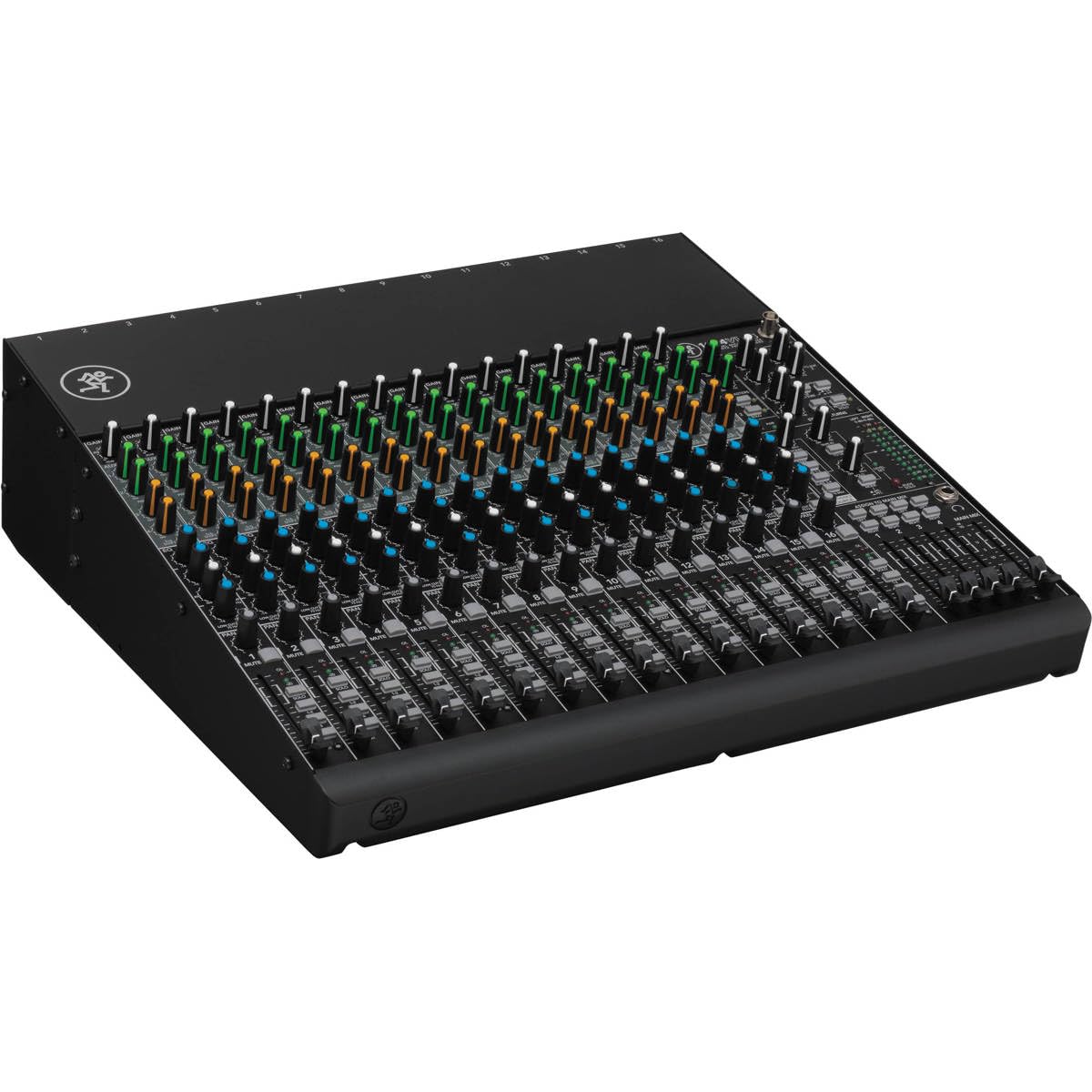
No menus, no apps, no tablet battery to worry about—the 1604VLZ4 gives you a physical knob for everything inside a 20-pound all-metal chassis.
The 1604VLZ4 is built for the kind of reliability that comes from a chassis that weighs 20 pounds and measures 17 inches deep by 17.3 inches wide. It offers 16 boutique-quality Onyx mic preamps with an ultra-wide 60dB gain range, meaning you can get a clean signal from a quiet ribbon microphone or a loud snare drum without distortion. The four-bus design gives you four separate signal paths to route groups of channels to different outputs—handy for sending all drums to one bus, all vocals to another, and so on. The console has improved RF rejection (resistance to radio-frequency interference) for broadcast environments, plus phantom power for condenser microphones on all 16 channels, and a noise level rated at just 60 Decibels, which is very quiet for an analog board.
Buyers describe it as “solid all-metal construction” with “clean, powerful mic preamps,” and many note that the headphone output works cleanly for recording at any volume. Unlike the Behringer XR18 which is controlled via tablet, the 1604VLZ4 has a physical knob for almost every function—no menus, no lag, just instant tactile control. The downside is that it lacks built-in effects and Bluetooth: if you want reverb or delay, you need external outboard gear. It also uses a 12V external power supply (not the 18V some buyers expected), so double-check your power source if you are building a rack. This is a specialized tool for studios, broadcast booths, and live sound engineers who prefer a fixed analog setup over a digital menu system.
4-bus routing advantage: Unlike the Pyle PMXU128BT which has a single stereo output plus a sub out, the 1604VLZ4 lets you assign channels to any of four independent buses, giving you much more flexibility for complex monitor and recording feeds.
Weight is a real consideration: At 20 pounds versus the 4.9-pound Mackie ProFX10v3+, it is a dedicated studio or fixed-rack console rather than a carry-on mixer.
Best for installed racks: Sound techs, broadcasters, and studios that want a durable, fully-analog console with 16 premium preamps and reliable four-bus routing without any digital complexity.
Not ideal if: You need built-in effects or USB recording—both are absent here. The Zoom L-20 or Allen & Heath CQ-18T offer those features in a similarly-priced range.
6. Pyle 12-Channel Console Style Audio Mixer with Bluetooth – DJ Sound Controller, 8 XLR / Combo Inputs, Sub Out, +48V Phantom, USB-A In, 16 DSP Effects, 7-Band EQ, MP3 Player – PMXU128BT

With 12 XLR combo inputs and a 7-band graphic EQ, the Pyle PMXU128BT gives you the most microphone inputs per dollar in this roundup.
The PMXU128BT gives you 12 XLR combo inputs (8 on the main bank plus 4 stereo line inputs), versus 4 XLR mic inputs on the Mackie ProFX10v3+. The console has 16 built-in DSP effects (reverb, delay, chorus, flanger, etc.) for adding ambience to vocals or instruments, plus +48V phantom power to run condenser microphones. Bluetooth streaming is built in for wireless music playback from any phone or tablet, and there is a USB-A port for playing MP3 files directly from a flash drive.
Customers note it has “excellent headroom with FetHeads; crisp, clear audio with zero preamp noise,” and that it is built “like a tank” with a previous Pyle mixer lasting years of heavy use. At 21.4 inches deep by 12.5 inches wide by 3.66 inches high, versus the 10.7-inch depth of the Mackie ProFX10v3+, it needs a deeper table or rack. The mixer has a single stereo recording output (no multi-track), and some reviewers point out that the USB connection sometimes needs to be reinserted. This is not a digital powerhouse; it is a straightforward analog board with surprisingly good sound for the price. For church groups, classrooms, or entry-level bands that need lots of mic inputs, a graphic EQ, and Bluetooth without spending over, this is far and away the most channels per dollar.
Value-packed features
- 12 XLR combo inputs—more than any other console in this roundup near this price range
- 7-band graphic EQ on the main output for precise room-tuning
- 16 DSP effects and Bluetooth streaming included
Reality check
- Mono recording output only—no multi-track or individual channel recording
- USB connection can be finicky and may need reseating
- Deep chassis (21.4 inches) requires a larger desk or rack than the compact Mackie ProFX10v3+
Ideal for budget-minded groups: Schools, houses of worship, and hobbyist musicians who need a high channel count, basic effects, and Bluetooth in one affordable box.
Skip if: You need USB multi-track recording or professional-grade preamps—the Mackie 1604VLZ4 or Zoom L-20 deliver those at a higher price point.
Understanding the Specs
Channel Count vs. Usable Inputs
The number of channels listed (e.g., 10, 12, 16, 18, 20) tells you how many separate signal paths the mixer can handle at once, not necessarily how many physical XLR jacks are on the back. A 10-channel mixer might have 4 XLR inputs and 6 line inputs (for keyboards, backing tracks, etc.). Always check the “inputs” section to see how many XLR combo jacks (the ones that accept both a professional microphone cable and a 1/4-inch instrument cable) are actually present. 12 XLR combo inputs means you can plug in 12 microphones simultaneously; 4 XLR inputs means only 4 microphones. The distinction matters hugely if you are miking up a full drum kit plus vocalists.
USB Audio Interface vs. Recording Modes
Nearly every modern mixing console includes a USB audio interface that lets you send your mix to a computer for recording or streaming. The key spec is the number of channels the USB interface can send (written as “2×4” or “18×18” or “24×22”). A “2×4” interface records only the stereo master mix to your computer (2 channels in, 4 channels out), while an “18×18” records every individual channel as a separate track for later editing. Some consoles also have “Loopback” recording mode, which mixes computer audio (like a Zoom call or streaming game sound) with your microphone inputs—essential for podcasters and streamers who want to avoid complicated software routing.
FAQ
How many channels do I actually need for a full band?
What is the difference between analog and digital mixing consoles?
Will a mixing console work with my studio monitors and powered speakers?
What is phantom power and do I need it?
Can I use a mixing console as a USB audio interface for streaming?
What is the advantage of having aux sends on a mixing console?
How important is the effects processor on a mixing console?
Can I control a digital mixer from my phone?
Final Thoughts: The Verdict
For most buyers, the audio mixing console worth starting with is the Allen & Heath CQ-18T, because its bright 7-inch touchscreen and Auto Gain let you dial in a digital mix faster than any other console in this roundup. If you need 20 channels and multi-track SD recording for live shows, the Zoom LiveTrak L-20 is the one to grab. And for an all-analog workhorse with 16 channels of bulletproof routing that never needs a tablet, the Mackie 1604VLZ4 is the clear choice.
How We Picked
We do not accept paid placement, and we did not hands-on test every unit. Instead, we match each pick to a real buyer and use-case by comparing the manufacturers’ published specifications against the patterns in verified customer reviews — so you get each pick’s real strengths and trade-offs instead of marketing copy.
Sources & Methodology
Specifications: manufacturer listings and product documentation. Review insights: verified customer reviews, as of July 2026. Pricing: not shown on this page (it changes often); check the current price via the retailer link.
As an Amazon Associate, Gadgets Feed earns from qualifying purchases. This does not affect which products we feature.
Product prices and availability are accurate as of the date/time indicated and are subject to change. Any price and availability information displayed on Amazon at the time of purchase will apply to the purchase of this product. As an Amazon Associate I earn from qualifying purchases.
CERTAIN CONTENT THAT APPEARS ON THIS SITE COMES FROM AMAZON. THIS CONTENT IS PROVIDED "AS IS" AND IS SUBJECT TO CHANGE OR REMOVAL AT ANY TIME.
Amazon and the Amazon logo are trademarks of Amazon.com, Inc. or its affiliates.