
Our readers keep the lights on and my morning glass full of iced black tea. As an Amazon Associate, I earn from qualifying purchases.
Specs are compiled from manufacturer listings and verified buyer reviews and can change over time — please confirm the key details on the product page before buying.
You need a box that switches between cameras and blends their audio into one clean live stream or recording. Your choice hinges on your video input count and audio control needs, whether you’re a solo streamer, church, or band. Some mixers are video-first switchers with a basic audio section, while others are deep audio consoles that happen to record video. Avoid buying a unit that claims to do everything but excels at only video or audio.
I’m Min — the founder and writer behind Gadgets Feed. This guide is built by comparing the manufacturers’ published specifications and the patterns across verified customer reviews, so you get each pick’s real strengths and trade-offs instead of marketing spin.
For a church service, a podcast, or a live gig, you need an audio video mixer that matches your camera count, audio needs, and skill level. This guide breaks down the best options for each scenario.
Our Picks at a Glance


How To Choose The Best Audio Video Mixer
Start by counting your video sources to choose the right mixer. Match inputs to your actual cameras first—a single-camera podcast needs fewer than a four-camera church service—then consider audio.
Video inputs: HDMI vs SDI
HDMI inputs are what you find on most consumer cameras, webcams, and gaming consoles, making them the easiest to connect. SDI inputs are the broadcast standard found on professional camcorders, offering longer cable runs and more rugged connections. If you mix both types of cameras, you need a switcher that accepts both, or you will be stuck buying converters.
Audio mixing depth
Some switchers treat audio as an afterthought with just a stereo input, while others have full mic preamps, phantom power for condenser microphones, and multi-band EQ. If you are plugging in XLR microphones directly, you need a mixer with proper preamps and enough channels for every mic and instrument you plan to run. Channel count indicates how many microphones or instruments you can connect simultaneously.
Quick Comparison
| Model | Best For | Video Inputs | Channels | Key Feature | Amazon |
|---|---|---|---|---|---|
| Blackmagic ATEM Mini Pro ISO★ Best Overall | Pro streaming & recording | 4x HDMI | 6-Channel Audio | 5x H.264 recording | Amazon |
| Pyle PYD1964B.5Vintage DJ | Analog DJ mixing | — | 6 | Bluetooth & 10-band EQ | Amazon |
| FEELWORLD LIVEPRO L1Solo Operator | Compact live switching | 4x HDMI | — | Built-in monitor | Amazon |
| Mackie ProFX10v3 | Live sound & recording | — | 10 | GigFX effects | Amazon |
| osee GoStream Duet | Multi-format switching | 4x HDMI + 4x SDI | — | Mix HDMI & SDI | Amazon |
| Rockville RPM1470 | Powered PA mixing | — | 14 | 6000W peak power | Amazon |
| Roland BRIDGE CAST X | Gaming & streaming | 2x HDMI | 3 | Dual audio busses | Amazon |
| FoMaKo KC800 | PTZ camera control | 4x 4K HDMI | 6-Channel Audio | Built-in 4D joystick | Amazon |
| Zoom LiveTrak L-20 | Multi-track recording | — | 20 | 22-track recording | Amazon |
| RØDE RØDECaster Video | Podcast production | 4x HDMI + 2x USB | 6 | ISO recording | Amazon |
| BEHRINGER X32 COMPACT | Professional live sound | — | 40 | Motorized faders | Amazon |
In-Depth Reviews
1. Blackmagic Design ATEM Mini Pro ISO HDMI Switcher
Our pick — over 4.5★ from 300+ verified ratings; the strongest balance of quality and price.
The studio-in-a-box that records every camera angle while you stream live.
If you are serious about multi-camera streaming, this unit does it all without a computer. It accepts 4x HDMI inputs and records up to 5 separate H.264 video streams in real time — that means a single ISO file for each camera plus the final program, so you can edit angles later. The built-in Ethernet jack lets you stream directly to the internet, and the USB Type-C 3.1 Gen 1 port handles webcam output and external drive recording, so your PC only has to power the software, not process the video.
For audio, you get a built-in 6-input 2-channel audio mixer with 2x 3.5mm stereo analog inputs, plus transitions (Cut, Mix, Dip, Wipe, DVE) and Upstream keys like Luma, Linear, Chroma, and Pattern for that broadcast look. This is deep gear, and buyers report the learning curve is real — the manual runs to roughly 2,000 pages, so it is not for casual users. They also note that if you use a Rodecaster, you must select “line” input in its audio settings or the audio quality suffers.
The crowd behind this unit is clearly professional — it is popular enough that many owners buy a second one, and churches pick it up for their own broadcast upgrades. The only recurring complaint is there is no physical off button, which is a minor quirk on an otherwise superb unit. It is heavier on video than pure audio, so if your priority is a deep audio console, you may want to pair it with a separate mixer.
Broadcast-grade power
- Records 5 separate H.264 streams at once for editing flexibility
- Built-in Ethernet streaming and USB-C recording mean no PC required
- Full button controls replace a Stream Deck for live switching
Know before you buy
- Steep learning curve with a massive manual
- No physical power button
- ATEM software cannot add a webcam as an input without external OBS
Your best bet if: you are building a portable multi-camera production rig and want studio-quality recording without a PC in the chain.
Think twice if: you want a plug-and-play box — this one rewards time invested in learning its workflow.
2. Pyle 6 Channel Mixer DJ Controller with Bluetooth
An analog throwback that brings scratch, fade, and vintage sliders to your rack.
This Pyle is a 5U rackmount DJ controller that leans hard into old-school analog control — smooth sliders and dials for that classic mixing feel. It gives you a 10-band graphic equalizer plus echo, delay, repeat, and digital sound effects, and it moves any source to any channel or even the same source to multiple channels for quick remixing. For voice work, you get bass, mid, and high mic EQ adjustments, and a kill switch to cancel specific frequencies on your two microphone inputs for special effects.
Most owners highlight value for money — it is a budget-friendly way to get a proper 6-channel mixer with Bluetooth connectivity for wireless streaming. A veteran 80s club DJ praised the sound quality and how easy it is to set up for two turntables, and a DJ who plays for special needs audiences loves that it fits a rack perfectly and plays songs without needing to spin records.
The honest trade-off here is sound quality. The most-discussed aspect is the mixed feedback on audio, with several owners reporting a loud background hum, static, or hissing noises, and some finding the build quality less solid than they hoped. A few have had the echo function arrive broken, and the lights are reported as blinding and non-adjustable in one account. This is a capable budget mixer, but if pristine audio is your absolute priority, you may want to spend more.
Our read: Perfect for basic DJing, karaoke, or a home rack where Bluetooth streaming and a classic feel matter more than audiophile-grade silence.
Reach for this if: you are a casual DJ or host who wants an affordable, easy-to-use 6-channel mixer with Bluetooth for playing songs.
Look elsewhere if: you are recording critical audio where any background hum or static would ruin the take.
3. FEELWORLD LIVEPRO L1 V1 Multi Camera Video Mixer
A tiny, tripod-mountable switcher built for one person to run a full live show.
This FEELWORLD is smaller and simpler by design — it wants to make live streaming and multi-signal control easy enough for a single person. It takes 4x HDMI inputs and 1x SDI input, all supporting 1080p, with a USB3.0 output that connects to any computer and looks like a built-in webcam, so all your streaming software works instantly. A screw hole lets you fix the switcher right onto a tripod, keeping your whole rig in one place.
The big advantage is its built-in monitor — it can preview real-time monitoring on 6 pictures, including PGM, PST, and the 4-channel HDMI inputs, so you see everything before it goes live. Owners consistently call out the easy setup and flawless week-long operation, and the value for money at this price point gets strong praise. You can also control it remotely via the LAN port using the XPOSE software on your computer, with no extra installation needed.
What wins people over is the quality and the convenience of that integrated screen, which is a rarity in this price tier. The recurring gripe is heat — owners mention the device runs hot and recommend a laptop cooler, and the instruction manual is genuinely vague, with some users having to dig into undocumented commands to get advanced features working. The fader-only switching (no separate take button) and analog audio that can fall out of sync are minor quirks for a unit this compact.
Why it fits: It is a compact, budget-friendly 4x HDMI switcher with an integrated monitor that punches above its weight for small live jobs. The trade-off is heat and a manual that leaves you guessing.
Best suited for: a solo streamer or small production crew that wants a portable 4-camera switcher with preview without spending premium money.
Not for: users who want deep documentation or who push a unit hard in a hot rack without extra cooling.
4. Mackie ProFX10v3 10-Channel Mixer
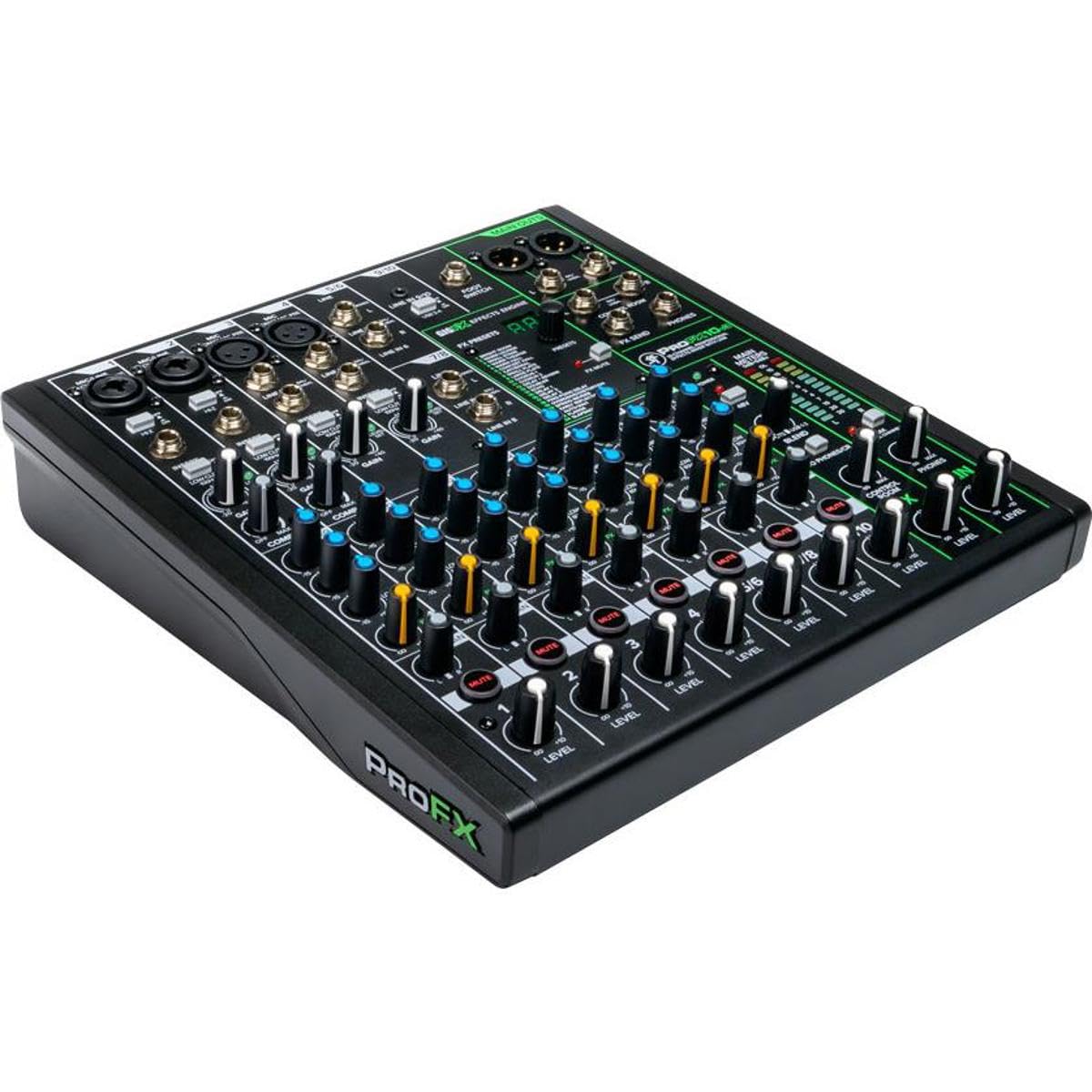
The 10-channel console that handles live sound, home recording, and streaming with equal ease.
If your focus is audio-first, this Mackie is built for maximum versatility across live sound, home recording, content creation, and live streaming. It packs 4 Onyx mic preamps offering up to 60dB of gain with ultra-low noise, which is exactly what popular content-creator microphones need. Recording hits an impressive 24-bit/192kHz quality, and the 2×4 USB I/O lets you create two custom mixes on your computer to send back into the mixer — great for monitoring specific tracks during playback.
The effects section is a genuine highlight with 24 different FX options, from reverbs to delays, all accessible with a single knob. Owners talk about quality most, and the sound earns strong praise for handling multiple DJs and bands smoothly. It is described as built like a tank, and the USB in and out works very well once you download the proper drivers from the Mackie website.
The practical catch is the included USB cable — customers note it disconnects on Macs, and the easy fix is replacing it with a quality USB-B to USB-C cable. One owner also had a first unit with dead Main Meter LEDs, though the replacement worked fine. This is an audio mixer, not a video switcher, so if you need to switch HDMI cameras, you will pair this with a separate video device, but for pure sound control it is a rock-solid mid-range pick.
Sound-first strengths
- 24-bit/192kHz recording quality for clean tracks
- 24 FX options from reverbs to delays with one-knob blending
- 4 Onyx preamps with 60dB gain for high-demand mics
Keep in mind
- Stock USB cable can disconnect on Macs — swap it out
- It is audio only; video switching needs a separate unit
- Free Pro Tools First offer ended
Grab it if: you want a versatile audio console for recording, streaming, and live sound with pro-grade preamps and effects.
skip it if: you need to switch camera video sources — this board does not do HDMI switching.
5. osee GoStream Duet Video Switcher
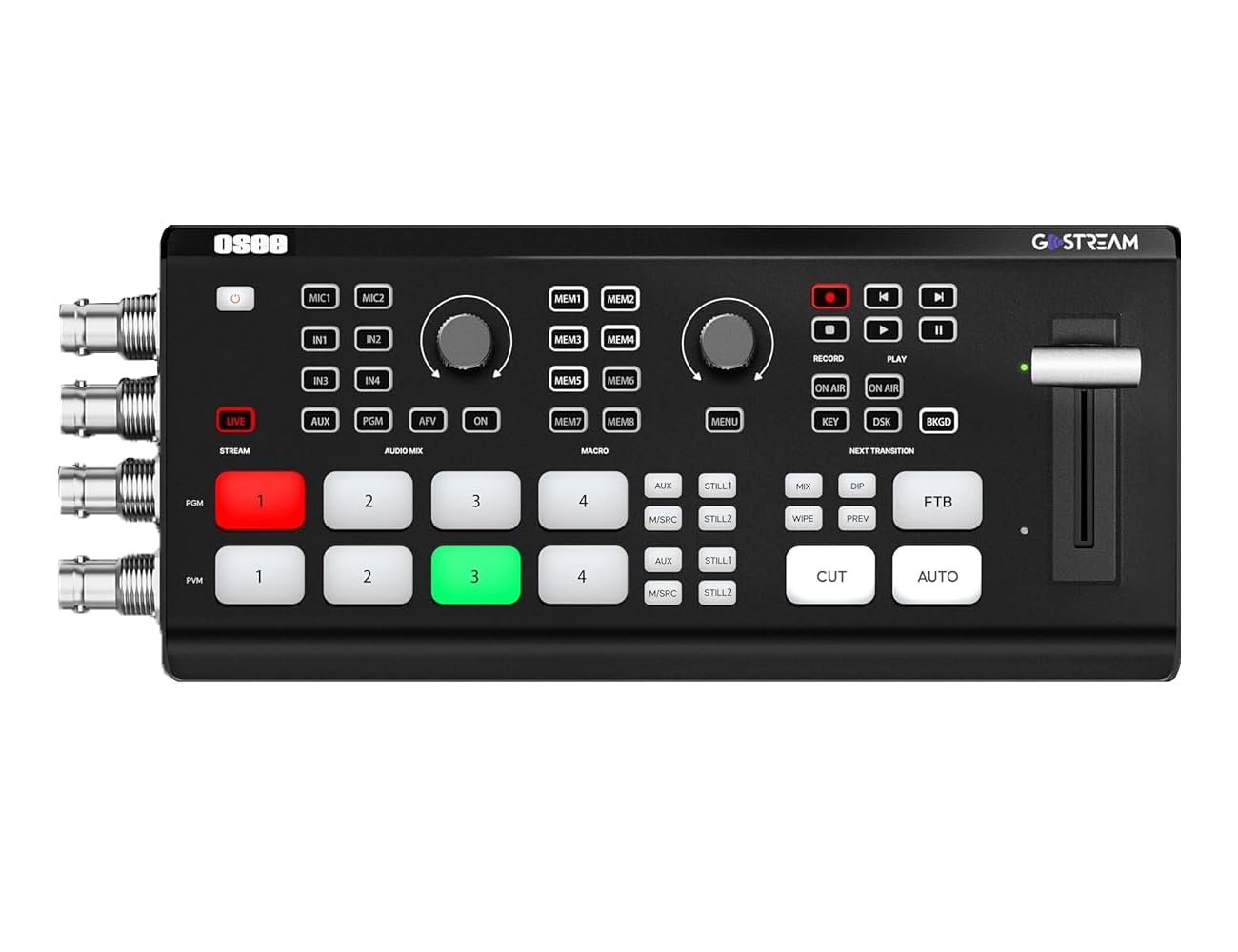
The five-source switcher that plays nice with both HDMI and SDI cameras at once.
The osee GoStream Duet stands out because it mixes both worlds: you get 4x SDI and 4x HDMI inputs, plus USB-C, NDI HX sources, and SD/SSD playback, so you are never forced to choose between consumer and broadcast cameras. For monitoring, it offers PGM/PVW, 5-channel preview, STILL 1-2 with source labels (UMD), tally, markers, audio meters, fade level, and AFV.
Control is flexible — you can run it via the built-in GUI, the GoStream computer software for both Mac and Windows, or Bitfocus Companion. Transitions include Supersource, Luma Key, Chroma Key, Pattern Key, PIP, and DSK, with MIX, DIP, WIPE, and T-Bar options. For streaming, it pushes to up to 3 platforms at one time directly via Ethernet or a smartphone hotspot through USB, or you can connect it to OBS or vMix.
The owner base is small but enthusiastic — one switcher owner who also owns an ATEM Mini and ATEM Mini Pro says this unit made them forget those, citing better price, features, and value. The learning curve exists for advanced features, but a basic 3-or-4-source live test is quick to get running to an HDMI monitor and OBS simultaneously. One tip from the field: keep sources at no higher than 1080p.
The edge: Few switchers in this tier let you mix SDI and HDMI sources together, and this one does it with a clean GUI and multi-platform streaming built in.
Choose this if: your camera kit mixes HDMI and SDI and you want one box to switch, monitor, and stream to multiple platforms.
Pass if: you need a huge brand ecosystem — the community here is small, so support comes mostly from the maker.
6. Rockville RPM1470 14 Channel Powered Mixer

A 6000-watt board with 14 channels that pushes sound to a crowd of 500-plus.
This Rockville is a powered mixer, meaning the amplifier is built right in, and it delivers 6000W peak power (750W RMS x 2 @ 4 Ohm) to drive large speaker systems for events with over 500 guests. It is a serious step up for bands playing small-to-medium venues, and reviewers point out the power really does push the sound out loud. You get 14 XDR2 low-noise, low-distortion mic preamps with +48V phantom power, so condenser mics are fully supported.
Connectivity is generous: a built-in USB port plays MP3/WAV/WMA files from thumb drives, Bluetooth streams audio wirelessly, and you can record your mixes straight to a USB drive or SD card. The 24-bit digital effects processor includes 16 presets — reverb, chorus, delay, phaser, flanger, and multi-effects — and owners say the effects are actually better than the ones on a Mackie mixer they compared it against. Dual 7-band graphic EQs with kill switches let you fine-tune main and monitor outputs to deal with feedback frequencies.
Owners are amazed by the crisp, clear sound and the value for money, with one running 4 passive speakers plus 2 powered speakers as mains. Sound quality is described as warm and clear, and the dual graphic EQ is called practical and very useful for controlling feedback. This is a heavy 28.9-pound professional unit, so it is built for a permanent rack or a venue, not a backpack — but if you need to drive passive speakers without a separate amp, this is exactly the tool.
The power play: A 14-channel powered mixer with 6000W peak, clean preamps, and on-board recording that genuinely handles a live band. The weight and size are the trade-off for that built-in amp.
Perfect for: live bands and venues that want one box to mix, amplify, and record without separate external amps.
Not ideal for: portable setups where 28.9 pounds and a 22.44-inch depth are too much to haul around.
7. Roland BRIDGE CAST X Dual Bus Gaming Mixer

An all-in-one desktop deck that unifies your gaming, mic, and camera audio into one stream.
Designed specifically for online gamers, podcasters, and vloggers, the BRIDGE CAST X is a compact desktop mixer that replaces a pile of separate gadgets. It gives you two USB-C ports for computers and mobile devices, two HDMI inputs for gaming consoles and cameras, and an HDMI Thru for connecting an external video monitor. The core of the unit is a powerful 32-bit hardware DSP, which handles all your sources without taxing your gaming PC.
The defining feature is dual audio busses — you can create one mix for yourself and an entirely different mix for the online audience, so you can hear the game loudly while viewers get a balanced broadcast. It supports broadcast-quality XLR mics with phantom power, and shoppers say it can power a Shure SM7B and DT 1990 Pro headphones without extra preamps, which saves real money. It also includes voice processing, royalty-free music and sound effects, and assignable control pads.
The build quality is excellent and it is less bulky than the competing GoXLR, which owners say it outperforms in sound and build. The realistic catch is the setup — buyers report the HDMI passthrough can be finicky and sometimes needs tech support to fix, and the initial setup requires a Windows PC, with some units unrecognized by macOS until a firmware update. The instructions are minimal, so plan to watch YouTube guides, but once it is running, owners describe it as a definite upgrade to their stream workflow.
Our take: A powerful all-in-one for streamers who want dual mixes and pro XLR support without a stack of separate gear. Just set aside time for the initial configuration.
Get this if: you are a gamer or podcaster who wants console, camera, and mic audio merged with dual bus control in one clean box.
Be cautious if: you are on a Mac and cannot borrow a Windows PC for the initial firmware setup.
8. FoMaKo KC800 4K HDMI Multi-Cam Streaming Mixer
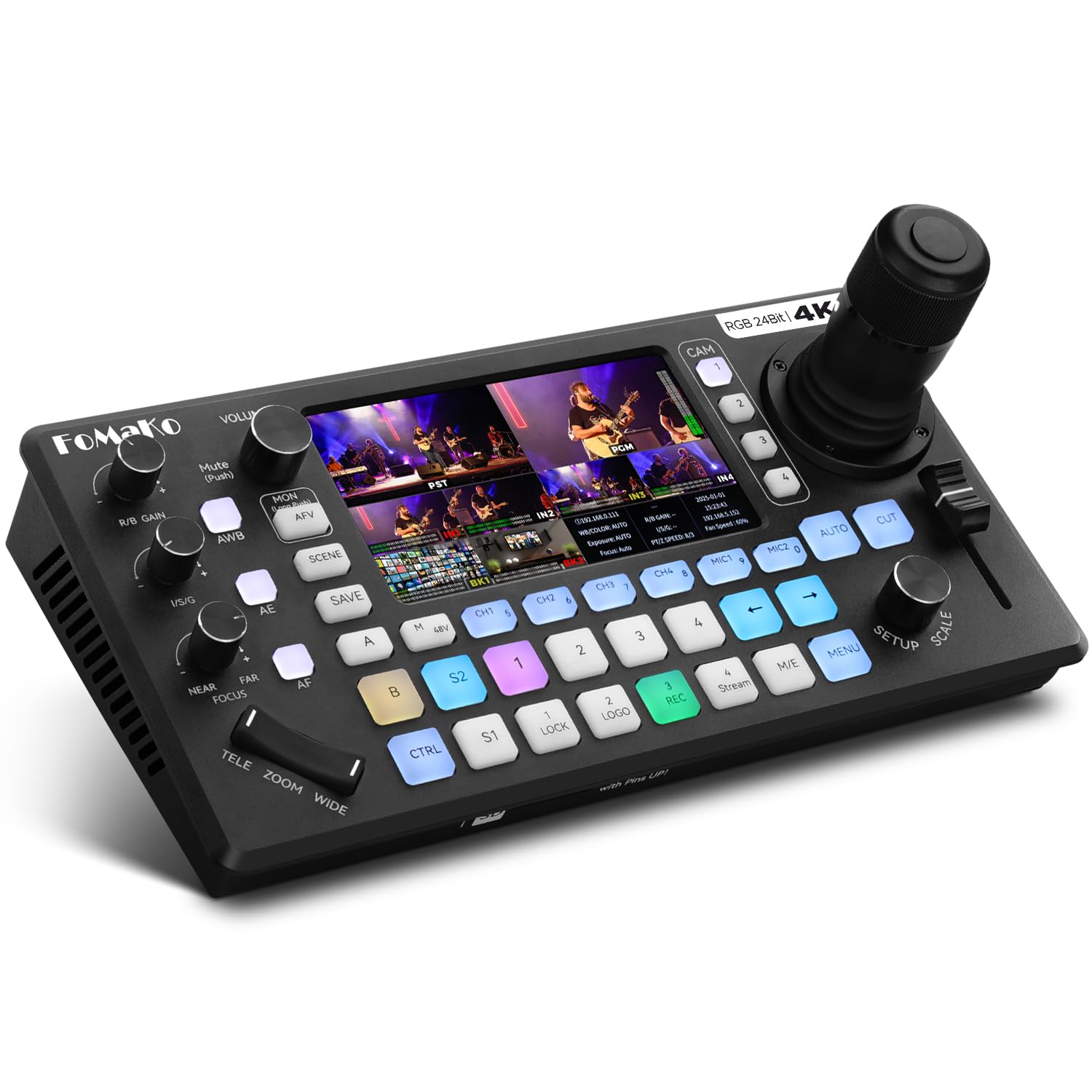
The all-in-one that controls up to four PTZ cameras and switches 4K video from one desk.
This is a hybrid — a video switcher and a PTZ camera controller in one unit, so you do not need a separate PTZ controller. It smoothly controls up to 4 PTZ cameras via VISCA or VISCA-over-IP using the integrated 4D joystick, with one-touch AI tracking, 10 programmable presets, and adjustable pan/tilt/zoom speeds. For a solo operator, this is huge: you can move cameras and switch between them without leaving your seat.
It takes 4x 4K HDMI inputs with RGB 24-bit color tech, delivering 16.7 million hues for cinema-grade accuracy, and offers 3x HDMI outputs (including 4K loop-through, MVR, and PGM). The audio section is a professional 6-channel real-time mixing system with 2 XLR inputs (48V phantom power), 2x 3.5mm MIC/Line inputs, and 4 HDMI digital audio channels, with AFV mode and dedicated volume knobs per channel. Recording is flexible too — you can record directly to USB Disk or SD card (up to 2TB) in MP4/TS format at up to 16Mbps with no PC required.
Owners find the signal switch works great, and the XLR connections work nicely with church sound systems, making this a favorite for houses of worship and corporate events. The functionality earns the most praise, with buyers noting it works like pricier systems and offers excellent video across a 4-camera setup. The honest caveats are that low-light performance is limited despite max iris, and one owner had a unit fail from overheating after about 7 months — though the maker arranged a replacement quickly, and the 1-year warranty with free replacement covers quality defects.
Why it stands out: Merging a 4K switcher with a PTZ joystick controller is rare, and this does both while streaming to 3 platforms and recording to SD. Heat management is the one thing to watch.
Ideal for: a church, wedding, or corporate production that needs PTZ camera control and 4K switching in one budget-friendly box.
Consider carefully if: you are shooting in very low light — the small sensor side is not its strength.
9. Zoom LiveTrak L-20 Mixer/Recorder

A 20-channel board that records 22 tracks straight to an SD card — a full studio on its own.
The Zoom LiveTrak L-20 records 22 tracks at 24-bit/96kHz to an SD card, replacing a full studio for bands and podcasters. It simultaneously records 22 tracks at 24-bit/96kHz directly to an SD card, which for many owners replaces most of their studio gear entirely. You get 20 channels for your biggest shows, with -128dBu EIN preamps and up to +60dB of gain, plus 20 onboard effects for clean, powerful signal handling.
The killer feature is six independent monitor mixes — each with individual volume control — so every performer gets their own personalized headphone mix during rehearsals and live shows. One horn band used four of them at once and loved it. It is also a full-featured audio interface you can use to record directly to your DAW or live stream, with wireless control available through a free iOS app via Bluetooth, which owners say works intuitively.
Functionality is what owners praise most, with the input options and sound quality close behind. Buyers describe it as easy to mix channels separately, with clean, transparent preamps and usable onboard effects. The learning curve is real but worth it — owners note you need to know which mix you have selected — and the practicality of analog knobs for EQ and effects keeps it from feeling menu-heavy. The connectivity gets mixed feedback, with some owners flagging the Bluetooth via the iPad app as the weak point, but for recording a full live set with individual tracks for every instrument, this is the one.
The standout: 20 channels plus 22-track SD recording and six independent monitor mixes make this a complete live-recording studio. The trade-off is the learning curve and a few menu quirks.
Best for: bands, live venues, and podcasters who want to record every channel separately and give each performer their own monitor mix.
Skip if: you need HDMI video switching — this is an audio mixer/recorder, not a video switcher.
10. RØDE RØDECaster Video — Video Switcher & Audio Interface

The podcast powerhouse that switches six video sources and layers pristine audio on top.
The RØDECaster Video is built for serious studio production, switching between up to six video sources (4x HDMI and 2x USB) and seven fully customizable multi-source scenes at the press of a button. What makes it special is the audio — it has two studio-grade Neutrik combo jacks with ultra-low-noise, high-gain Revolution Preamps for capturing pristine audio from XLR microphones, instruments, or anything else. Owners praise the Audio Interface, with one replacing an ATEM Extreme and building it into a 3D-printed travel case.
You get media playback, graphic overlays, automatic chroma keying, transitions, and multi-source scene creation all from the front panel with dedicated buttons, so you are not hunting through menus mid-show. Streaming goes directly to all major platforms via Wi-Fi or Ethernet, or to streaming software via USB, and you can record to an external USB storage device — including isolated (ISO) recording for post-editing flexibility. Innovative touches like Inspect Mode let you safely preview an input, and the intelligent auto-switching can swap scenes based on audio inputs.
Build quality is what owners rave about most, calling it excellent and noting how it improve the overall quality of their creations. The mixed feedback is on ease of use — some find it easy to set up and learn, while others flag a major learning curve. The most serious caveat comes from one report that it is incompatible with many cameras and webcams, even some of the same brand, which can mean costly extra cables or cameras. This is worth confirming against your exact camera list before buying, but for a serious podcaster or streamer it is a formidable all-in-one.
The pro pick: Six video sources, ISO recording, and broadcast-grade XLR preamps in a front-panel-driven box. Just verify your cameras are compatible before you commit.
Choose this if: you run a professional podcast or stream studio and want clean XLR audio and multi-camera switching in one premium unit.
Think twice if: you rely on an unusual camera or webcam — compatibility is the biggest reported headache.
11. BEHRINGER X32 COMPACT

The 40-input digital console with motorized faders that anchors professional venues and studios.
For the most demanding audio setups, the BEHRINGER X32 COMPACT is a professional digital mixing console with 40 input channels and 25 buses, built for both studio and live application. It features 16 MIDAS-designed, fully programmable mic preamps for audiophile sound quality — owners consistently call the preamps warm and clean, and excellent for a 5-piece live band. The 17 fully automated motorized 100mm faders give you instant overview, powerful scene management, and DAW control, so you can recall an entire mix at the push of a button.
Connectivity is extensive with 8 XLR outputs plus 6 additional line in/outputs, 2 phones connectors, and a talkback section with an integrated or external mic. Individual and dynamic LCD Scribble Strips on all channels and buses make assignment and channel distinction intuitive even in a dark venue. Owners say the onboard effects are excellent, and you can get accurate 16-channel recording via an X-Live card, so it doubles as a live recorder.
Quality is what owners praise most, with strong value for money noted across the board — one owner calls it the best mixer to this day, and it is a favorite for venues and performances, especially with stage boxes. The honest limitations are that there is no touchscreen, and channels 1-16 lack 1/4″ inputs, so you will need adapters for some gear. This console is also discontinued, so buyers are grabbing the remaining stock before the replacement arrives at a likely higher price.
The professional’s choice: A 40-input, 25-bus digital console with 16 MIDAS preamps and motorized faders that handles entire venues. It is a workhorse, not a toy — expect a learning curve and expect it to last.
Best for: churches, venues, and serious home studios that need deep digital control, recallable scenes, and professional-grade preamps.
Watch out for: the lack of touchscreen and 1/4″ inputs on channels 1-16 — and act fast if you want one, since the model is no longer being manufactured.
Understanding the Specs
Video inputs and outputs
The number and type of video inputs decide how many cameras you can connect. HDMI is standard on consumer gear, while SDI is the broadcast format for pro cameras. Check the output count too — you need at least one program (PGM) output for your stream or screen, and a preview output is a huge bonus for seeing the next shot before you switch.
Channels and preamps
The channel count tells you how many microphones or instruments you can plug in at once. Preamps boost the weak signal from a microphone to line level, and gain like 60dB means they can handle quiet or demanding mics. Phantom power (+48V) is essential if you use condenser microphones, which need that voltage to operate.
FAQ
What is the difference between a video switcher and an audio mixer?
How many HDMI inputs do I need for a multi-camera stream?
What does phantom power do and do I need it?
Can I use an audio mixer with my video switcher together?
What is ISO recording and why does it matter?
What is the difference between HDMI and SDI inputs?
How many channels do I need for a live band?
Can I stream directly from the mixer without a computer?
What is a multiview monitor and why do I want one?
Do I need a PTZ camera controller separately?
Final Thoughts: The Verdict
If you want one dependable pick, the audio video mixer winner is the Blackmagic ATEM Mini Pro ISO because it balances pro-grade video switching, built-in streaming, and multi-track recording in a compact unit. If you want deep audio mixing for a live band, grab the Zoom LiveTrak L-20. And for a solo operator controlling PTZ cameras at a church or corporate event, the FoMaKo KC800 is the one to reach for.
How We Picked
We do not accept paid placement. Every pick is matched to a real buyer and a real use-case; we do not hands-on test units.
Sources & Methodology
Specifications: manufacturer listings and product documentation. Review insights: verified customer reviews, as of August 2026. Pricing: not shown on this page (it changes often); check the current price via the retailer link.
As an Amazon Associate, Gadgets Feed earns from qualifying purchases. This does not affect which products we feature.