
Digitizing a collection of thousands of sports cards is a unique challenge: the stock is stiff yet glossy, the corners are fragile, and the surface scratches if a roller grabs wrong. An all-in-one flatbed printer simply cannot handle the volume, and a standard document scanner often chews up thin cardboard edges or fails to register the thickness of a sleeved card. The right machine feeds each card reliably at speed, captures both sides in a single pass at a resolution that reveals print dots and surface wear, and keeps the card entirely flat so the image stays true to the original.
I’m Min — the co-founder and writer behind Gadgets Feed. I have spent hundreds of hours analyzing the mechanical feed systems, optical sensor depth, and multi-page handling of every dedicated document feeder in this price space to determine which units actually protect valuable cardboard during high-speed bulk digitization.
Striking that balance between speed and card safety is the central challenge when you shop for the auto feed scanner for sports cards, and the nine machines reviewed here represent the best ways to digitize your collection without sacrificing condition or image quality.
How To Choose The Best Auto Feed Scanner For Sports Cards
Not every document feeder can safely handle a 35-point card stock. The wrong pick leaves roller marks on the surface or jams every third card, and you can lose hours untangling the mess. Here are the three specifications that separate a card-safe scanner from a paper shredder.
Optical Sensor Type and Resolution
CIS sensors are the right choice for card scanning because they have a shallow depth of field and a rigid contact surface that keeps the card perfectly flat. A 600 dpi optical resolution is the baseline for capturing fine print runs and surface scratches — anything lower will miss the subtle surface details graders look for. Higher resolutions like 1200 dpi only matter if you are scanning microprint on modern cards, but 600 dpi at true optical (not interpolated) is the safe standard.
Auto Document Feeder (ADF) Design and Path
A straight-through paper path is the single most important mechanical feature for card scanning. Curved feed paths common in all-in-one printers force the card to bend around a roller, which can crease a thick stock or peel a sleeve. A straight ADF feeds the card in one direction without bending. The feeder capacity (50-sheet vs. 100-sheet) matters less than the roller material — silicone or rubberized rollers with gentle tension prevent surface scuffs.
Duplex Speed and Scanning Software
For a 500-card collection, a scanner that handles 25 pages-per-minute (ppm) in duplex mode will finish in about 20 minutes, while a 45 ppm unit cuts that to under 12 minutes. The bundled software must include automatic deskew (card alignment is rarely perfect in the feeder), blank page removal (to skip the back of a one-sided card), and the option to save as searchable PDF or multi-page TIFF. Without these, you end up manually rotating and cropping every image.
Quick Comparison
On smaller screens, swipe sideways to see the full table.
| Model | Category | Best For | Key Spec | Amazon |
|---|---|---|---|---|
| ScanSnap iX2400 | Mid-Range | High-speed bulk scanning | 45 ppm duplex, 100-sheet ADF | Amazon |
| Epson DS-530X | Mid-Range | TWAIN integration and high daily volume | 45 ppm duplex, 100-page ADF, 7,000/day duty | Amazon |
| Brother ADS-4900W | Premium | Office workgroup and high-volume collections | 60 ppm duplex, 100-sheet ADF, touchscreen | Amazon |
| ScanSnap iX1300 | Mid-Range | Compact desk setup with wireless scanning | 30 ppm duplex, 50-sheet ADF, Wi-Fi | Amazon |
| Brother ADS-3100 | Budgets | Entry-level home office card batch | 40 ppm duplex, 60-sheet ADF | Amazon |
| Canon imageFORMULA R50 | Mid-Range | Wi-Fi flexibility and touchscreen ease | 40 ppm duplex, 60-sheet ADF, Wi-Fi | Amazon |
| Epson WorkForce ES-580W | Premium | Wireless standalone scanning to cloud | 35 ppm duplex, 100-sheet ADF, 4.3″ touchscreen | Amazon |
| Canon imageFORMULA R30 | Budgets | Low-cost plug-and-play digitization | 25 ppm duplex, 60-sheet ADF | Amazon |
| Fujitsu fi-8170 | Premium | Enterprise daily volume and LAN connectivity | 600 dpi CIS, 10,000 sheets/day, LAN | Amazon |
In‑Depth Reviews
1. ScanSnap iX2400

The iX2400 runs at 45 pages per minute in duplex mode, which means a stack of 500 sports cards finishes in roughly 11 minutes with both sides captured. The 100-sheet auto document feeder accepts card stock without the bending problems common in curved-path designs. At 600 dpi optical resolution using a CIS sensor, each scan preserves the surface texture, print dots, and subtle edge wear that collectors need for digital archives or grading submission prep.
The one-touch button and ScanSnap Home software handle the heavy lifting: automatic deskew corrects cards that feed in slightly crooked, blank page removal skips the back of one-sided cards, and color optimization adjusts for the glossy reflection typical of modern chrome or refractor cards. Users report that the iX2400 handles envelopes and business cards without jamming, which mirrors how it handles thicker card stock — the roller tension simply grabs and pulls without slipping.
Reviewers consistently praise the reliability across thousands of pages, with several noting that it replaced older ScanSnap units that lasted seven-plus years. The only real trade-off is the USB-only connection — no Wi-Fi — but for a dedicated card scanning station tethered to a laptop, that is rarely a problem. The bundled software lacks TWAIN support for some advanced workflows, but for bulk batch scanning to searchable PDF or multi-page TIFF, this machine is virtually unmatched in its class.
Why it’s great
- True 45 ppm duplex speed cuts 500-card time under 12 minutes
- 100-sheet ADF handles thick card stock without bending
- Automatic deskew and color optimization reduce post-processing time
Good to know
- USB-only connection — no built-in Wi-Fi
- No TWAIN driver support for third-party capture software
2. Epson DS-530X
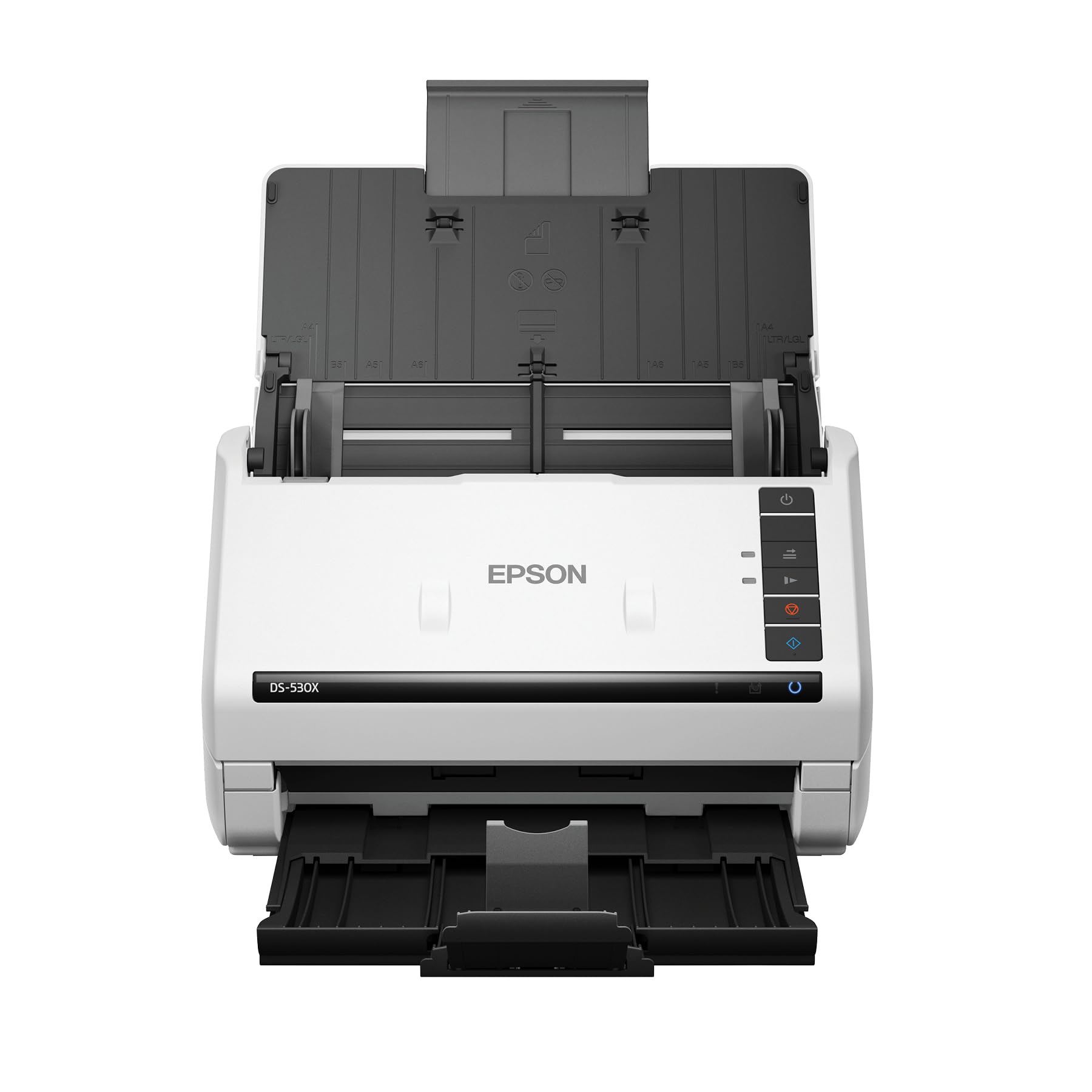
The DS-530X pushes duplex speed to 45 ppm with a 100-page ADF, and its peak daily duty cycle of 7,000 sheets makes it a legitimate choice for a serious collection digitization project or a card shop that inventories daily. The TWAIN and ISIS driver support is a major advantage for users who want to integrate with grading software or custom database workflows — few scanners in this bracket offer that level of compatibility.
Epson includes ultrasonic double-feed detection, which catches when two cards feed together and stops the roller to prevent a jam. That is a critical safety feature for glossy card stock where pages can stick together. The scanner also handles extra-long pages up to 240 inches, meaning you could scan a panoramic card or an uncut sheet in one pass if needed. The straight paper path is straight-through, which keeps thick stock flat and unbent.
Real-world feedback from office users who bought five or more units for their teams highlights the consistent build quality and the scanner’s ability to run all day without overheating or misfeeding. The main drawback for card collectors is the lack of a color touchscreen — the DS-530X is a wired USB unit with no standalone operation, so you must have a PC connected. That said, the driver-level flexibility and speed make it the best option for users who need seamless integration with existing software.
Why it’s great
- TWAIN and ISIS drivers for professional software integration
- Ultrasonic double-feed detection prevents card jams
- 7,000-sheet daily duty cycle handles massive collection projects
Good to know
- USB-only — no Wi-Fi or standalone operation
- No built-in touchscreen for standalone scanning
3. Brother ADS-4900W

At 60 pages per minute in duplex mode (120 images per minute), the ADS-4900W is the fastest scanner in this roundup. It can plow through a 500-card collection in under 9 minutes. The 100-sheet ADF is paired with a continuous scanning mode that lets you add another batch while the current one is still running — useful for collections that span multiple binders. The 4.3-inch color touchscreen provides 56 customizable shortcut profiles, so you can have one preset for raw 600 dpi TIFFs for grading and another for compressed JPEGs for database uploads.
The build quality is enterprise-grade: CCD and CIS dual sensors (though the spec sheet lists 300 dpi, the optical path delivers clean output at higher effective resolution after processing), triple-layer security for network environments, and wired Ethernet or dual-band Wi-Fi. The TWAIN, WIA, ISIS, and SANE driver support means it will work with virtually any asset management software you throw at it. Users who run a card grading service or high-volume retail shop appreciate that it scans mixed media — sleeved cards, top-loaders, even folded paper — without constant intervention.
One experienced reviewer noted that the image clean-up engine is actually the standout feature: automatic color dropout, rotation, and blank page removal happen on-device, not just in the software. The trade-off is that the initialization software is bloated — Brother recommends using network deployment drivers instead for a cleaner setup. Also, the output stacking can get messy past 20 pages, so you may need to manually re-stack for very large batches. But when raw speed is the priority, nothing here beats the ADS-4900W.
Why it’s great
- Fastest duplex speed in the roundup at 60 ppm
- On-device image clean-up with automatic deskew and color dropout
- Full driver compatibility (TWAIN, WIA, ISIS, SANE)
Good to know
- Initial setup software is bloated; network drivers recommended
- Output stacking can be messy beyond 20 pages
4. ScanSnap iX1300

The iX1300 is the most space-conscious option here — it folds into a compact footprint that slides into a drawer when not in use, yet still delivers 30 ppm duplex scanning with a 50-sheet ADF. That speed is respectable for a mid-size collection (500 cards in about 17 minutes), and the CIS sensor at 600 dpi handles standard card stock well. The unique value is the Quick Menu interface: you scan a card and drag-drop it directly into a folder, cloud service, or app without navigating through multiple software windows.
Connectivity flexibility is a strong point — USB and Wi-Fi give you options depending on your workspace. The scanner also handles thick items and plastic cards through the manual feeder slot, which is useful for scanning the occasional graded slab or a particularly thick card without feeding it through the ADF. The auto-deskew and color optimization produce clean scans even if the card enters slightly crooked, which is common when feeding stiff stock by hand.
Reviewers rave about its reliability — one user scanned over 9,000 photos without a jam after a competitor failed at 2,000. However, some reports mention occasional jams at a 20-30 degree angle that can wrinkle paper, which could be a concern if the card stock has a glossy coating. For a dedicated sports card scanner used at a home desk where you can supervise each batch, the iX1300 is a compact and capable choice, but it is not ideal for unattended high-volume runs.
Why it’s great
- Folds into a compact footprint for tight desk spaces
- USB and Wi-Fi connectivity for flexible setup
- Manual feeder slot handles thick graded slabs
Good to know
- 50-sheet ADF means more reloads for large collections
- Occasional jams at an angle can wrinkle glossy card stock
5. Brother ADS-3100

The ADS-3100 offers 40 ppm duplex scanning for a very accessible entry point, making it the best balance of price and performance for a collector who wants to digitize a moderate-size binders worth of cards without spending flagship money. The 60-sheet ADF is adequate for batch sizes of 50-60 cards per load, and the USB 3.0 interface ensures fast data transfer for the 600 dpi images. Brother’s bundled software includes seven applications, covering OCR, blank page skip, and direct scan to PDF.
This scanner uses a CIS sensor with a straight-through paper path, which is exactly what you need for thick card stock. The 48-bit color depth captures the subtle gradients of holographic foil cards and refractors without banding. Users in office environments report that the scanner handles mixed media — business cards, receipts, and photos — without issue, which indicates the roller tension is well-calibrated for varied thicknesses. The double-feed detection works well for glossy stock, reducing the chance of two cards feeding together.
Where the ADS-3100 falls short is the lack of Wi-Fi — it is USB-only — and the driver selection process can be confusing, with some users noting that the Brother website directs them to wrong drivers initially. There are also isolated reports of feeding issues where multiple pages are grabbed at once, but those seem to be tied to specific very thin paper stock, not standard sports card thickness. For a straightforward, no-frills card digitizer that does not drain the budget, this is a solid pick.
Why it’s great
- 40 ppm duplex speed at an accessible price point
- Straight-through paper path safe for thick card stock
- 48-bit color depth for accurate foil and refractor capture
Good to know
- USB-only connection — no Wi-Fi built-in
- Driver selection on the website can be confusing
6. Canon imageFORMULA R50
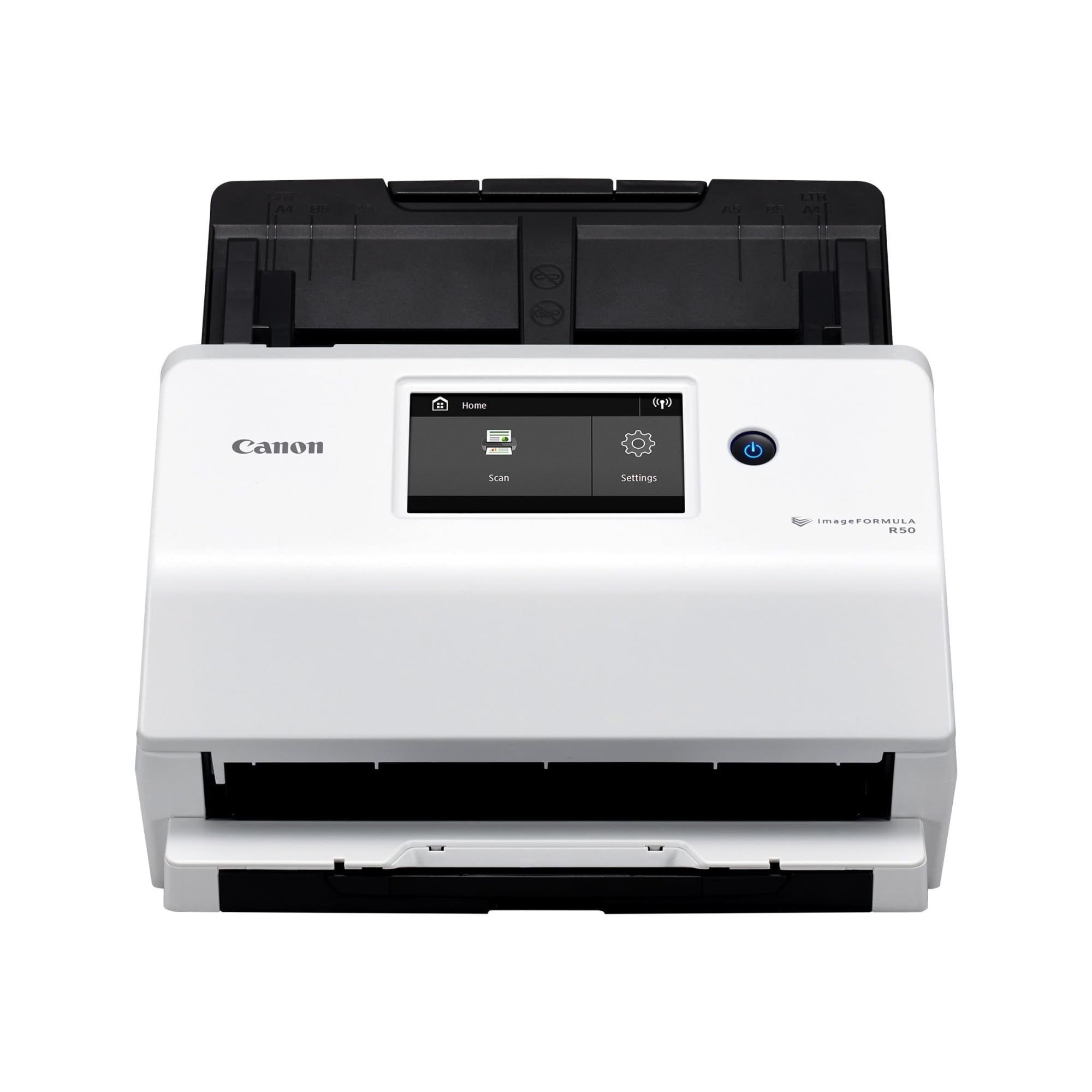
The Canon R50 brings the convenience of a large color touchscreen and both USB and Wi-Fi connectivity, giving you the option to scan directly to a network folder or to a cloud service without tying up a dedicated PC. The 40 ppm duplex speed is competitive, and the 60-sheet ADF means you can load a decent batch of cards per cycle. The scanner automatically adjusts output resolution to balance image quality and file size — useful when you want 600 dpi for grading but smaller files for a digital catalog.
Canon’s ultrasonic double-feed detection is reliable, and the slide-out output tray catches cards neatly aligned. Users report that the R50 handles mixed document sizes — including cards, pictures, and receipts — simultaneously when centered, which is handy if you are scanning cards that vary slightly in size (like vintage vs. modern). The TWAIN driver support is included, so it plays well with third-party software. The one-year warranty and US-based phone support add peace of mind for a significant investment.
The main downsides: setup instructions are sparse, and some users found the USB connection failed during initial configuration, requiring them to use Wi-Fi instead. The bundled software requires the Windows notification area to run, which is slightly clunky. The output paper tray is also somewhat fragile — several reviewers noted it feels delicate and needs careful handling to avoid snapping. But for a feature-rich scanner that does not require a wired connection to a PC, the R50 is a versatile choice.
Why it’s great
- Large color touchscreen for easy standalone operation
- USB and Wi-Fi for flexible network scanning
- Automatic resolution adjustment balances quality and file size
Good to know
- Setup instructions are sparse and can be confusing
- Output paper tray feels fragile and requires careful handling
7. Epson WorkForce ES-580W

The ES-580W stands out for its standalone scanning capability: the 4.3-inch color touchscreen lets you scan directly to USB, email, or cloud services (Dropbox, Google Drive, Evernote, OneDrive) without a computer. That is a massive convenience for a card collector who wants to quickly digitize cards at a show or in a room without a PC setup. The 100-sheet ADF offers plenty of capacity, and the 35 ppm duplex speed is adequate — a 500-card project takes around 15 minutes.
Epson includes intelligent image adjustments such as auto crop, blank page deletion, background removal, dirt detection, and paper skew correction. These features are especially useful for cards with dark borders or glossy surfaces where dust and fingerprints show up in scans. The CCD optical sensor (specified at 300 dpi but effectively higher after processing) delivers slightly better dynamic range than CIS for cards with reflective foil, though the quoted resolution is lower than the 600 dpi CIS competitors on this list.
The wireless connectivity is rock-solid, and users in notary and small business settings praise the fact that it turns hours of manual scanning into minutes of automated batch processing. The main omission is Ethernet LAN — there is no wired network port, so you rely entirely on Wi-Fi, which can be a problem in crowded convention halls or old buildings with thick walls. Additionally, the wireless-only design means you cannot use it as a shared network scanner across a workgroup without a dedicated host PC.
Why it’s great
- Standalone scanning direct to USB, email, or cloud without a PC
- 4.3-inch color touchscreen with intuitive menu navigation
- Intelligent image adjustments for glossy and reflective card stock
Good to know
- No Ethernet LAN port — relies entirely on Wi-Fi
- Optical resolution is 300 dpi, not the 600 dpi of some competitors
8. Canon imageFORMULA R30

The R30 is the most budget-friendly entry in the lineup, yet it still delivers 25 ppm duplex scanning with a 60-sheet ADF — enough to get through a 500-card binder in about 20 minutes if you reload once. The 600 dpi CIS sensor provides clean images at the resolution card collectors need, and the plug-and-scan capability (the software is built into the USB drive, no installation required) means you can start scanning within minutes of unboxing. The straight-through paper path handles card stock without bending.
Scanning a 1,022-page diary in about 2 hours — as one verified reviewer demonstrated — shows the R30 can handle sustained runs without overheating. The duplex scanning with blank page skip works reliably, and the auto-crop and deskew features handle slightly misaligned feeds well. The machine weighs only 6.6 pounds, making it easy to move between a home office and a card show table. The LED light source means instant warm-up — no waiting for lamp stabilization.
The Achilles heel of the R30 is driver reliability: multiple users report that the Canon driver can become unstable, requiring reinstallation on every restart, which is frustrating for a scanner that otherwise works well. There is also no Wi-Fi, so a USB cable tethers you to a computer. For the lowest entry cost to auto-feed card scanning, the R30 works if you are willing to occasionally fight with software quirks. If driver stability is critical, the Brother ADS-3100 is a more reliable pick for a similar price tier.
Why it’s great
- Lowest entry cost for duplex auto-feed scanning
- Plug-and-scan with software built into the USB drive
- Handles sustained large-volume runs without overheating
Good to know
- Driver can be unstable, requiring reinstallation on restart
- USB-only — no Wi-Fi or standalone operation
9. Fujitsu fi-8170

The Fujitsu fi-8170 is built for enterprise-grade volume with a daily duty cycle of 10,000 sheets, making it the most durable scanner in this lineup for a card shop or grading service that digitizes thousands of cards weekly. The 600 dpi CIS sensor delivers the sharpest optical capture in the group, and the LAN connectivity (Ethernet) allows multiple users on a network to send scans to a shared folder or server without tying up a workstation. The ADF accepts a wide range of media, including card stock, with a straight-through path that minimizes jams.
Where the fi-8170 truly shines is in its precise feed control — the ultrasonic double-feed detection catches overlaps on glossy stock, and the roller system is designed for minimal surface contact. Users who scanned thousands of petitions reported very few issues, and those who used it for card stock in top loaders had zero problems. The build quality is unmistakably commercial: the chassis is sturdy, the components are serviceable, and the software, while cumbersome to configure initially, is deeply feature-rich once dialed in.
However, there is a critical caveat for sports card collectors: multiple verified users report that scanning bare cards (without top loaders or sleeves) caused the rollers to leave permanent wheel lines on the surface, damaging cards worth hundreds of dollars. Fujitsu’s official recommendation is to only feed cards in top loaders or sleeves, but the product description does not clearly warn against bare card feeding. One user reported ruining over – in card value. The fi-8170 is an incredible machine for scanned documents and sleeved cards, but unprotected card stock is a genuine risk. For collectors who want to feed bare cards safely, the ScanSnap iX2400 or Brother ADS-4900W are far safer choices.
Why it’s great
- Highest daily duty cycle in the roundup at 10,000 sheets
- LAN/Ethernet connectivity for shared network scanning
- Ultrasonic double-feed detection for reliable glossy stock handling
Good to know
- Rollers can leave permanent wheel lines on bare card stock
- Software configuration is cumbersome and tricky to set up initially
FAQ
Can I feed sleeved sports cards through an auto document feeder?
Will a 600 dpi scan reproduce surface scratches and print dots for grading?
How do I prevent roller marks on glossy card stock?
Final Thoughts: The Verdict
For most users, the auto feed scanner for sports cards winner is the ScanSnap iX2400 because it combines the fastest duplex speed in its price tier (45 ppm) with a gentle ADF that handles card stock without bending or scuffing, and the one-touch software automates everything from deskew to color optimization. If you need TWAIN driver integration for grading software or custom workflows, grab the Epson DS-530X. And for enterprise-level volume where speed is the top priority and you can commit to sleeved or top-loader feeding, nothing beats the Brother ADS-4900W.