
Our readers keep the lights on and my morning glass full of iced black tea. As an Amazon Associate, I earn from qualifying purchases.
Specs are compiled from manufacturer listings and verified buyer reviews and can change over time — please confirm the key details on the product page before buying.
If you sell on Amazon FBA, run a small business shipping orders, or manage a warehouse, you already know the pain: peeling labels one by one by hand is slow, tires your fingers, and eats hours every week. An auto label machine fixes that by feeding, peeling, and advancing labels for you, so you just grab and stick. The real question is which style fits your workflow — a handheld applicator, a benchtop dispenser, or a full thermal printer that prints and peels in one step.
I’m Min — the founder and writer behind Gadgets Feed. This guide is built by comparing the manufacturers’ published specifications and the patterns across verified customer reviews, so you get each pick’s real strengths and trade-offs instead of marketing spin.
Whether you ship dozens of boxes a day or run an industrial line, the right auto label machine pays for itself in saved time and spared frustration.
Our Picks at a Glance

How To Choose The Best Auto Label Machine
Before you click buy, you need to match the machine to your actual labeling job. A handheld applicator is a different tool than a motorized dispenser, and both differ from a thermal printer. Understanding which “auto” you need is the first step.
Applicator vs. dispenser vs. printer
A manual applicator like the Towa relies on your pull to advance the label — it peels and presents it, so you apply faster. A motorized dispenser feeds and peels labels automatically using a photo sensor, ideal for high-volume, hands-free workflows. A thermal printer prints your labels first, then dispenses or cuts them. If you already have printed FBA labels, an applicator or dispenser is enough; if you need to print and apply, a printer is the whole solution.
Label size and roll compatibility
Every machine has limits on label width, label length, and roll core diameter. Check your roll’s inner core (commonly 1″, 1.5″, or 3″) against the machine’s spec before buying. If your labels are wider than the machine accepts, it simply won’t work — this is the most common mismatch buyers hit.
Speed and sensor quality
The photo sensor is what tells the machine the previous label was removed, so the next one feeds. A reliable sensor means no double feeds and no jams. Speed ratings like labels per minute or meters per minute matter most if you’re processing thousands of labels — but a sensor that misses beats a fast one that misfeeds.
Quick Comparison
| Model | Best For | Label Width | Speed | Power | Amazon |
|---|---|---|---|---|---|
| Towa APN-60★ Best Overall | Handheld FBA barcode application | — | Up to 1000 units/hr | Manual (lever) | Amazon |
| lucky sticker DispenserBest Value | Cordless countertop sticker dispensing | 1.5″ | 1 label/sec | Rechargeable battery | Amazon |
| CGOLDENWALL 1150DTop Performer | Industrial benchtop dispensing | 0.16″–5.5″ | Up to 8m/min | Corded electric | Amazon |
| Frifreego 1150D | Budget benchtop dispensing | 0.16″–5.5″ | 1–8m/min | Corded electric | Amazon |
| Brother QL-800 | High-speed thermal label printing | Up to 3 ft continuous tape | 93 labels/min | USB (corded) | Amazon |
| U.S. Solid Dispenser | Multi-row industrial dispensing | 0.4″–4.52″ | Up to 1.77 in/s | Corded electric | Amazon |
| CGOLDENWALL Rewinder | Automatic label rewinding | Up to 4.72″ | 0–200mm/s | Corded electric | Amazon |
| DYMO LabelWriter 550 | Direct thermal label printing | Multi-format | High-speed | USB / LAN | Amazon |
| Brother PT-P950NW | Industrial networked labeling | Up to 36mm | Up to 3.1 ips | Wi-Fi / wired / USB | Amazon |
In-Depth Reviews
1. Towa APN-60 Label Applicator
Our pick — 4.5★ from 100+ verified ratings; the strongest balance of quality and price.
The hands-down FBA favorite that peels 10,000 labels without a single double feed.
If you live and breathe Amazon FBA, this 15.3-ounce handheld applicator is the pick that shows up in review after review as the answer to barcode labeling. Its patented label edge sensor catches each label edge precisely, so you pull the lever and the next sticker is presented — no misses, no feeding two at once. Buyers report 10,000+ labels applied with zero double feeds., which is exactly the reliability that keeps a packing line moving.
Speed is the headline here. Owners mention applying labels at up to 1000 units per hour, and one describes labeling 100 boxes in about 12 minutes total versus an hour by hand — a dramatic jump. The Easy Grip Handle and Adjustable Carriage make it comfortable to use for long stretches, and the included waste tear blade keeps the backing clean as you go.
The honest trade-off: it’s manual, not motorized. You supply the pull, and over-pulling the lever can jam the backing — though the flow resumes immediately. Thicker labels work better than flimsy ones, and an occasional jam requires disassembly to clear, about once every six months of heavy use. For someone applying retail stickers or FBA labels in volume, It recoups its cost through hours saved on bulk labeling tasks..
Why sellers love it
- Up to 1000 units/hr — roughly 80% faster than hand peeling
- Patented edge sensor means zero double feeds over thousands of labels
- Light at 15.3 oz, so wrist fatigue stays low during long runs
Know before you buy
- Manual lever action, not hands-free motorized feed
- Thicker labels feed more reliably than thin ones
- Over-pulling can jam the backing, though it clears fast
The verdict: If you’re an FBA seller or anyone applying barcodes in bulk, this is the dependable workhorse — It consistently earns 5-star reviews as an essential FBA tool..
The catch: It’s a pull-driven tool, so if you want fully hands-free dispensing, look at a motorized benchtop model instead.
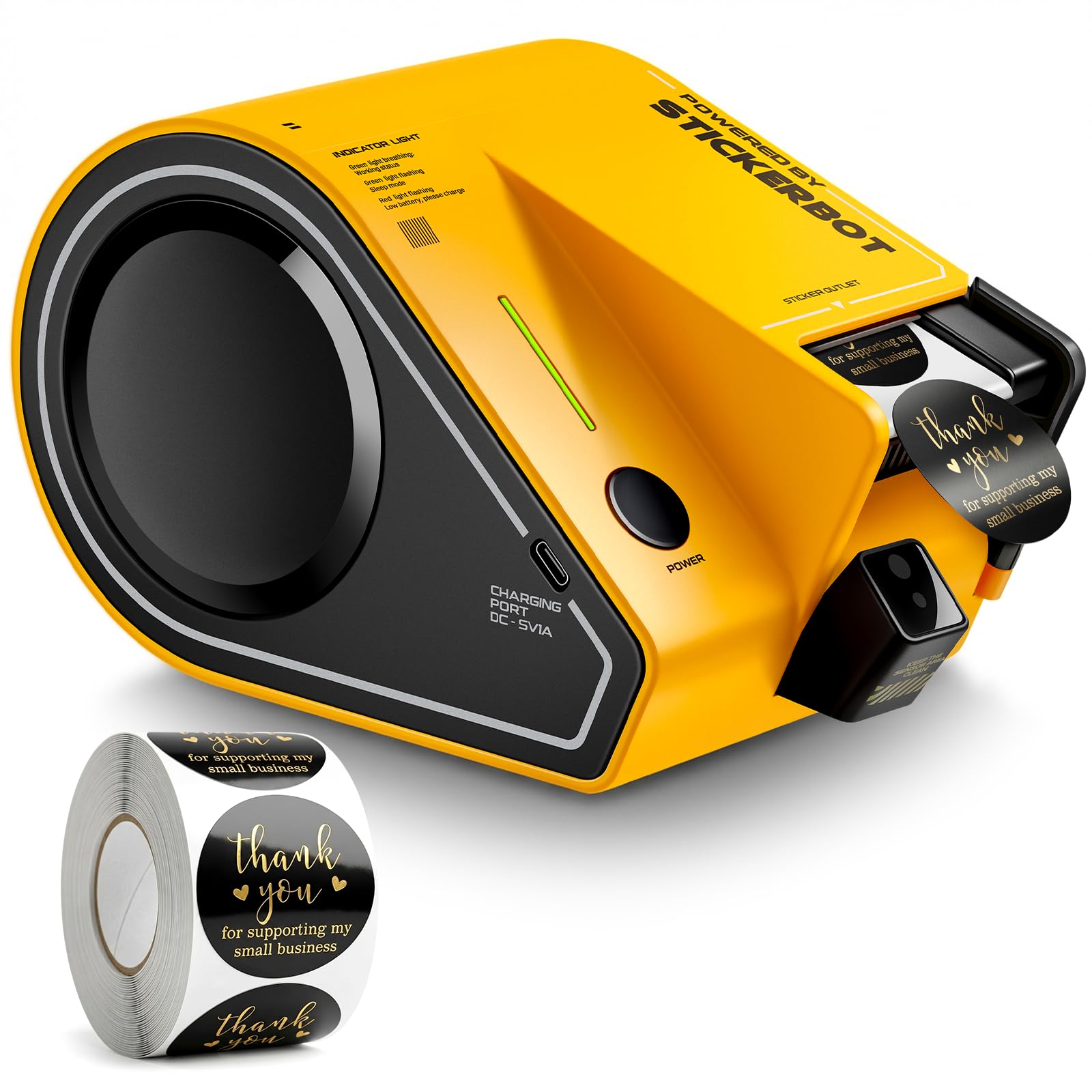
2. Smart Automatic Sticker Dispenser for 1.5 Inch Labels
A cordless one-touch dispenser that hands you one sticker per second, no plug needed.
This is the machine for bakeries, coffee shops, and wedding planners — anyone putting “Thank You” stickers on takeout bags, jam jars, or envelopes. The optical sensor delivers one label per second and instantly presents the next sticker the moment you grab the last one, so two hands can work at a rapid rhythm. It arrives pre-loaded with a snap-in cartridge of 750 “Thank You” stickers, and the tool-free snap-in design means reloading takes seconds, not fiddly threading.
Being cordless is the standout feature. The built-in rechargeable battery handles roughly 6,000 stickers per charge, and an auto sleep mode protects battery life between bursts. The durable ABS housing with non-slip pads stays put on any counter, and a clear LED shows power status at a glance. Customers note days of casual use on a single accidental charge.
The catch is the proprietary ecosystem. It’s designed for 1.5″ opaque stickers whose roll core fits the brand’s spindle — you can use your own labels, but they must match that core. It’s also on the pricey side for a sticker dispenser, so casual users may balk; high-volume businesses, though, find it earns its keep. Reviewers point out it works exactly as advertised: dispenses one sticker, auto-advances the next.
Why it wins: Cordless freedom plus one-touch speed makes it the easiest countertop dispenser here — built for people who label in short, frequent bursts.
The fit: Brilliant for small businesses and event prep; overkill if you label only a handful of items a week.
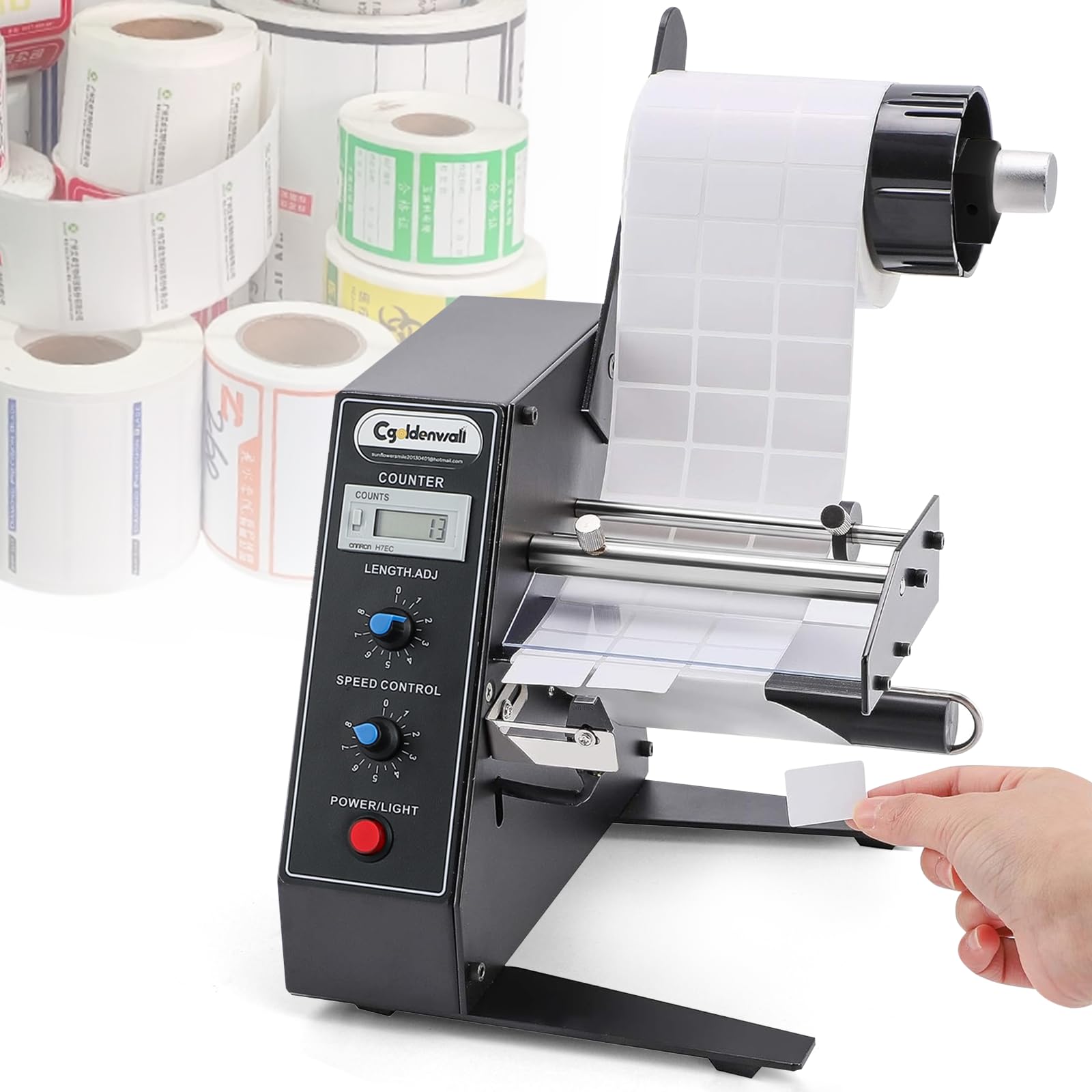
3. CGOLDENWALL Automatic Label Dispenser
The benchtop motorized dispenser that counts every label up to 999,999 while you work.
For packaging assembly lines and logistics rooms, this corded electric dispenser is the serious tool. Its intelligent photosensor detects each label and peels it automatically, so you remove one and the next advances on its own — no pulling the backing paper by hand. The rollers rewind the liner scrap to keep your work area tidy. It handles a wide range of labels, from 0.12″ to 5.9″ long and 0.16″ to 5.5″ wide, in single or multiple rows, though transparent and perforated labels won’t work.
Speed and counting are what set it apart. Turn the speed knob up to 8m/min, and the 6-digit LED counter tracks processed labels from 0 to 999,999, resettable at the push of a button — perfect for tracking production runs. The heavy-duty steel construction keeps it solid and stable, yet owners note it weighs very little for its size and is compact enough for multiple people to use simultaneously.
The main caveat: the U-shaped buckle is plastic and flimsy — one owner broke it on first attachment, though the machine itself sailed on. Another buyer reported a sensor issue and a counter that wouldn’t reset, but praised the customer service that sent a replacement. For high-volume lines needing three labels per package, owners call it essential to maximum productivity.
Built for volume: The auto counter and up-to-8m/min speed make it the choice for production floors that need throughput and tracking together.
The trade-off: The flimsy plastic buckle is the weak link on an otherwise sturdy machine — treat it gently.
4. Frifreego Automatic Label Dispenser

A plug-and-play benchtop stripper that costs less and still hits 8m/min speed.
You get the benchtop dispenser experience on a tighter budget with this Frifreego model, which does the same core job: its photo cell sensor (a light-based detector) spots each label and automatically feeds the next one after you remove the first, so labels come off neatly peeled. Two knobs — one for speed from 1–8m/min, one for label length from 3–150mm — let you dial in the exact feed for your roll. It handles trademark labels, barcode labels, colorful labels, and more, just not transparent ones.
Setup is genuinely simple: plug it in and it’s ready, with no delicate maintenance needed thanks to the simple structure. Owners who got the tension right report it’s about 40% faster than manual labeling and makes the job much easier. The mounting bracket has snaps that fix the label roll firmly for widths within 4–140mm.
The honest reality: it can take some tweaking. Shoppers say paper backing tearing with 3″ labels on 9″ rolls, usually fixed by adding a corrugated spacer to relieve tension, and the machine can feel top-heavy with a big roll. The durability picture is mixed — it works well for 3–4 months of daily use, but one owner’s electronics failed after that window with no parts or warranty available. It’s a fine entry point if you’re willing to fiddle.
The value play: It brings motorized auto-dispensing and counting to a budget price point, so you test the workflow before committing to industrial gear.
Who should pass: Daily 6–8 hour users who need years of dependability should budget for a sturdier build.
5. Brother QL-800 High-Speed Professional Printer

The beloved 93-labels-per-minute thermal printer that thousands of offices swear by.
When you need to print labels — not just peel them — the QL-800 is It’s the most popular thermal printer in its class.. It cranks out 93 labels per minute at crisp 300 dpi resolution, and Thousands of reviews confirm its reliability and speed.: clean, sharp labels at genuinely fast speed. It’s a direct thermal printer, so it needs no ink or toner, just the DK label rolls, and the built-in auto-cutter finishes each label precisely.
Versatility is a big draw. It handles shipping labels, file folder labels, name badges, and postage labels, and supports continuous-length DK tapes up to 3 ft long for custom banners. A genuinely unique feature is dual-color printing: Brother Genuine technology lets you print in black and red to make certain labels pop. The Plug & Label feature prints straight from Microsoft Word, Excel, and Outlook with no extra software, and it works with both Windows and Mac.
The software is the sore spot. Owners consistently report the hardware is fast, reliable, and easy to set up, but the P-Touch Editor software (the companion app for designing labels) can be buggy — a persistent “cannot print – Black/Red on white paper installed” error left some stuck despite correct settings. One fleet owner with 7 units reported only one issue in 5 years of store inventory use, calling it solid design. The label quality and ease of use win people over; just be ready for software quirks.
Why offices rave
- 93 labels/min at 300 dpi for fast, sharp output
- Black and red dual-color printing for standout labels
- Works without ink or toner — thermal only
The software catch
- P-Touch Editor can throw confusing errors
- Editor margins prevent full-label printing in some cases
- Mac compatibility can be finicky for some owners
Reach for it if: You need to print high volumes of barcodes, shipping labels, or file labels at speed and don’t mind the occasional software hiccup.
Look elsewhere if: You want a purely mechanical dispenser for already-printed labels — this prints, it doesn’t just peel.
6. U.S. Solid Automatic Label Dispenser

An industrial aluminum dispenser that handles multi-row labels at 1.77 inches per second.
For shops that dispense thousands of labels daily, this U.S. Solid unit is a step up in build quality. Its main aluminum body — spool, stripping platform, feed rod, and stop bar — sits on an iron base plate, and at 5.5 lb it’s substantial enough to stay planted on a production bench. It peels self-adhesive labels from 0.4″ to 4.52″ wide and 0.32″ to 5.11″ long, in single or multiple rows, at up to 1.77 inches per second (130 cycles per minute), driven by a 15W motor on AC 100–240V for worldwide use.
One of its standout conveniences is tool-free label loading — you change rolls without any tools, and the adjustable photoelectric sensor peels the next label automatically after you remove the last. Owners who tested it found short 0.5″ x 3″ labels fed “as fast as I could peel,” which is exactly the point, and one shop loved it so much they ordered a second unit. It works on both translucent and opaque stock, covering barcode, anti-counterfeit, security, and chrome-paper labels.
The trade-offs are minor but real. The empty backing winds a little tight, making it harder to remove the used liner, and in an industrial setting one owner found dispensing slow with a peeling part that bends easily. The one-year warranty from date of purchase offers some confidence. For most operations, the aluminum build and multi-row capability make it a premium, dependable choice.
Standout spec: The aluminum and iron construction plus 130-cycles-per-minute speed make it the most industrial-grade dispenser on this list.
The fit: Ideal for labeling departments that move serious volume; the tight backing wind is the small quirk to expect.
7. CGOLDENWALL Automatic Label Rewinder

The quiet partner that winds printed labels into tidy rolls while your printer runs.
This isn’t a label dispenser — it’s the piece you pair with a thermal printer to catch printed labels before they pile up on the floor. The CGOLDENWALL rewinder winds labels into neat rolls automatically, and it’s a genuine time-saver for long print runs. Its standout a neat extra is auto-sync: a stainless steel induction lever with gravity self-sensing automatically matches the printer’s speed, so it stops rewinding when the printer stalls and resumes when it feeds, protecting the print head and freeing you from babysitting the machine.
Flexibility is built in. It comes with three core holders — 1″, 1.5″, and 3″ — plus an L-rod for core-free rewinding of fabrics and elastic bands, and it handles rolls up to 7.8″ in diameter and 4.72″ wide. A bidirectional one-button switch flips the direction for privacy protection, and the brushless motor reaches 180 RPM with low noise. Buyers report it prevents labels from falling on the floor and keeps the work area clean on large print runs.
The durability picture has a red flag, though: one unit stopped working a month after delivery, and spare parts availability is a worry. Most owners find it easy to set up and quiet, and it eliminates entirely the manual rolling chore. If you print continuously and hate wrangling loose labels, It eliminates the manual rolling chore for continuous print runs..
Why it exists: Auto-sync with your printer turns a messy print run into clean, stacked rolls — no more chasing labels.
The risk: A single report of a unit dying in a month means the warranty and return window matter; test it hard early.
8. DYMO LabelWriter 550 Turbo Label Printer

A direct thermal printer with automatic label recognition and LAN connectivity for shared offices.
For offices that want fast, ink-free label printing with network access, the DYMO 550 Turbo delivers. Direct thermal printing means no ink or toner to replace, cutting operational costs and maintenance — just plug in via USB or LAN and print. The automatic label recognition instantly identifies label size, type, and how many remain, eliminating manual settings and reducing errors. It prints shipping labels, file folder labels, name badges, and barcode labels for a wide range of business tasks.
The catch here is significant and well-documented: this model is locked to genuine DYMO LW labels. Owners mention it simply will not work with generic labels from Amazon, even though older DYMO models did — the manual explicitly says to use genuine DYMO LW labels, and compatibility returns the moment you switch.
On Mac Silicon, the software is unstable, making it hard to cancel print jobs without wasting labels. That’s a lot of friction for a printer, and it explains the polarized feedback. If you’re willing to commit to DYMO’s label ecosystem and you’re on a solid Windows setup, it works well; one library found it better than their old unit. Otherwise, the Brother alternatives are less restrictive.
The real story: Great hardware concept hampered by a locked label ecosystem and software instability — know this before you commit.
Who fits: Offices happy to use only DYMO labels on Windows; anyone wanting generic-label freedom should look at Brother.
9. Brother P-Touch PT-P950NW Industrial Label Printer

The networked industrial printer that prints 360 dpi laminated labels and lets your whole team connect.
At the top of the range sits the PT-P950NW, a serious industrial label printer for environments where labels face chemicals, UV, abrasion, and water. Brother’s laminated labels up to 36mm wide resist all of that, and the printer itself delivers high-speed printing up to 3.1 inches per second at high-resolution 360 dpi. It’s built for harsh conditions — labels work on a variety of surfaces and in dirty, demanding settings.
Connectivity is the defining feature. Built-in Wi-Fi and wired network support let multiple devices print from several stations at once, including tablets and smartphones, which makes it ideal for multi-employee teams. The built-in auto cutter and easy-peel function speed up workflow, while the drop-in tape cartridge design makes media replacement simple. Owners call it a favorite among multiple Brother printers, praising the half-cut chain printing that saves time and produces professional square cuts.
The package is nearly complete from the start: printer, starter pack of Extra Strength Adhesive Tape, AC adapter, power cord, and USB cable. The P-touch Editor 5 software lets you customize barcodes and labels exactly how you want. The one flaw owners hit is chain printing failing on Mac, which wastes label material on each print — roughly a cartridge a day for one heavy user. For a workplace needing rugged, network-shared labeling, this is the serious tool worth the cost.
Built for industry
- Laminated labels resist chemicals, UV, abrasion, and water
- Wi-Fi plus wired network for multi-device printing
- 360 dpi resolution with auto cutter and easy-peel
Watch out for
- Chain printing can fail on Mac, wasting tape
- Premium investment meant for serious users
The decision: This is the pick for factories, labs, and IT teams needing durable labels printed from anywhere on the network.
Who should pass: Casual home labelers paying for industrial features they won’t use — a simpler Brother model will do.
Understanding the Specs
Photo sensor
The photo sensor is the brain of any automatic dispenser. It detects when you’ve removed the previous label and signals the machine to advance the next one. A reliable sensor means no double feeds and no missed labels — the difference between a smooth workflow and constant babysitting. The Towa’s patented edge sensor and the benchtop models’ photoelectric sensors all do this job; the quality of that detection is what separates good from frustrating.
Speed ratings
Speed is measured differently across machine types — labels per minute for printers, meters per minute for benchtop dispensers, and inches per second or cycles per minute for industrial units. A printer hitting 93 labels per minute is fast for printing; a dispenser at up to 8m/min is fast for peeling. Match the speed metric to your volume: high throughput needs a machine rated for it, but a sensor that misfeeds at speed is worse than a slower, reliable one.
Label and roll compatibility
Every machine has limits on label width, length, and roll core diameter. The Frifreego takes labels 0.16″–5.5″ wide, while the U.S. Solid handles 0.4″–4.52″ wide; the lucky sticker is locked to 1.5″ stickers on its proprietary core. Roll core sizes commonly run 1″, 1.5″, or 3″ — the CGOLDENWALL rewinder covers all three plus core-free. Always check your roll’s core and label dimensions against the spec before buying.
Power source
Decide between cordless and corded. The lucky sticker dispenser runs on a rechargeable battery handling roughly 6,000 stickers per charge, perfect for moving around. Benchtop dispensers from CGOLDENWALL and Frifreego are corded electric, meaning constant power but a fixed spot on your counter. Printers are typically corded via USB or network. Your workspace layout determines which makes sense.
FAQ
What is the difference between a label dispenser and a label printer?
Will an auto label machine work with my existing label rolls?
Can these machines handle transparent or clear labels?
How fast can these machines actually work?
Do I need a label rewinder if I have a dispenser?
Is a manual applicator or motorized dispenser better for FBA labeling?
What maintenance do these machines need?
Can multiple people use one machine?
Final Thoughts: The Verdict
For the majority of shoppers, the auto label machine winner is the Towa APN-60 because it solves the FBA labeling pain with proven reliability — A 10,000-label run with zero double feeds earns its Best Overall badge.. If you want a fully motorized, hands-free benchtop dispenser that tracks every label, grab the CGOLDENWALL 1150D. And for printing plus dispensing in one networked package, the Brother QL-800 is the one to reach for — It has a loyal following among office and shipping users..
How We Picked
We do not accept paid placement. Every pick is matched to a real buyer and a real use-case; we do not hands-on test units.
Sources & Methodology
Specifications: manufacturer listings and product documentation. Review insights: verified customer reviews, as of August 2026. Pricing: not shown on this page (it changes often); check the current price via the retailer link.
As an Amazon Associate, Gadgets Feed earns from qualifying purchases. This does not affect which products we feature.