
Our readers keep the lights on and my morning glass full of iced black tea. As an Amazon Associate, I earn from qualifying purchases.
Specs are compiled from manufacturer listings and verified buyer reviews and can change over time — please confirm the key details on the product page before buying.
Manually leveling a print bed with a piece of paper is the single fastest way to lose your patience with 3D printing. Auto bed leveling removes that ritual entirely — the printer probes the build surface and compensates for any tilt, so your first layer sticks every time. This guide breaks down the best auto-leveling machines across every budget, from beginner-friendly workhorses to industrial-scale giants, so you can pick the one that matches how you actually print.
I’m Min — the founder and writer behind Gadgets Feed. This guide is built by comparing the manufacturers’ published specifications and the patterns across verified customer reviews, so you get each pick’s real strengths and trade-offs instead of marketing spin.
We dug through specs like acceleration, nozzle temperatures, and build volumes to separate genuine upgrades from gimmicks. Here is our curated lineup of the auto leveling 3d printer models worth your money today, ranked by real-world value and owner satisfaction.
Our Picks at a Glance


How To Choose The Best Auto Leveling 3D Printer
Auto bed leveling means the printer itself measures the build plate and adjusts the nozzle height across the surface, so you never fiddle with thumbscrews or paper. It is the difference between hitting “print” and actually getting a print. But the feature alone does not decide which machine is right for you — speed, build size, and material support matter just as much.
Match the Build Volume to Your Projects
Build volume is the largest object you can print in one piece. A compact printer with a 220x220x220mm build area handles most figures, brackets, and phone stands easily. If you plan to print helmets, large planters, or functional parts in one go, look for machines at the 260mm or even 390mm range so you avoid splitting models into glued pieces.
Speed and Acceleration Are Real, Not Just Numbers
A CoreXY motion system lets the print head move faster while staying stable. Many modern printers hit 500-600mm/s with acceleration around 20,000mm/s², which turns a multi-hour wait into a much shorter one. Just remember that the fastest speed setting often trades a little surface quality for time, so look for vibration compensation to keep details sharp at pace.
Nozzle Temperature Decides Your Materials
Standard PLA only needs about 200°C, but engineering materials like ASA, polycarbonate, or carbon-fiber nylon need much hotter nozzles — sometimes 300°C or more — plus an enclosed or heated chamber to prevent warping. Check both the maximum nozzle temperature and whether the printer has an enclosure before you commit to printing advanced filaments.
Quick Comparison
| Model | Best For | Build Volume | Max Speed | Max Nozzle Temp | Amazon |
|---|---|---|---|---|---|
| Bambu Lab A1★ Best Overall | Beginners wanting reliability | — | 10,000 mm/s² accel | — | Amazon |
| FLASHFORGE Adventurer 5MBest Value | First-timers on a budget | 220x220x220mm | 600mm/s | 280°C | Amazon |
| FLASHFORGE AD5MTop Performer | Easy maintenance printing | 220x220x220mm | 600mm/s | — | Amazon |
| Anycubic Kobra X | Native 4-color printing | 260x260x260mm | 600mm/s | 300°C | Amazon |
| Creality K1C | Carbon fiber filaments | — | 600mm/s | 300°C | Amazon |
| Bambu Lab P1S Combo | Enclosed multi-color printing | — | 500mm/s | — | Amazon |
| QIDI PLUS4 | High-temp engineering materials | 12x12x11in | — | 370°C | Amazon |
| FLASHFORGE Creator 5 | Zero-waste toolchanging | — | 600mm/s | — | Amazon |
| Snapmaker U1 | Professional multi-color parts | 270x270x270mm | 500mm/s | — | Amazon |
| QIDI Max4 Combo | Industrial-size builds | 390x390x340mm | 800mm/s | — | Amazon |
In-Depth Reviews
1. Bambu Lab A1 3D Printer
Our pick — over 4.5★ from 600+ verified ratings; the strongest balance of quality and price.
Full-auto calibration and fast prints make this the most reliable pick for first-time users.
Full-auto calibration handles Z-offset and bed leveling before every print, eliminating manual adjustments. Its 10,000 mm/s² acceleration finishes prints in under 5 hours that once took a full day. Buyers report flawless out-of-the-box operation, with one family noting their 10-year-old can run it solo.
Compared to Prusa and Creality models, owners call the A1 a better daily driver for its lower maintenance and user-friendly design. The 1-Clip quick-swap nozzle simplifies upkeep to 30 seconds, and active noise canceling keeps it desk-friendly. Multi-color printing requires the separately sold AMS lite or the Combo bundle.
A 4.6-star rating from over 600 owners confirms its reputation for dependable performance. The main note of caution is assembly: most find it easy, but a small group reports assembly errors, so give yourself room to follow the steps carefully. There is also a documented quirk where a loose USB-C connector in the base module caused an initial Z-axis error — fixed simply by reseating it.
What wins people over
- Performance and reliability are the two most-praised traits by far
- Full-auto calibration and flow-rate compensation deliver clean first layers
- Quiet operation and tool-free nozzle swaps for easy upkeep
Worth knowing before you buy
- Multi-color requires the separately-sold AMS lite
- Some owners hit assembly errors, so patience helps
- The software is closed-source, which matters to tinkerers
Reach for this if: you want a reliable, fast, low-fuss printer that a total beginner — even a 10-year-old — can run successfully.
Look elsewhere if: you are a tinkerer who wants total open-source control over every firmware detail.
2. FLASHFORGE Adventurer 5M 3D Printer
You can be printing within 10 minutes thanks to one-click leveling, making this the easiest start for beginners.
The headline feature is full-auto one-click leveling that calibrates the bed for a perfect first layer on every print — no manual fiddling. It runs on a CoreXY structure with up to 20,000 mm/s² acceleration and a max speed of 600mm/s, going from zero to 600 mm/s in just 0.025 seconds. Unbox to first print in only 10 minutes, which owners confirm is genuinely achievable.
This printer is lighter and more compact than the Bambu A1 — 23.8 pounds versus 22 pounds — but it is a bit boxier in footprint, so measure your desk before committing. The 280°C quick-detachable nozzle handles PLA, PETG, and TPU, and vibration compensation keeps ghosting away. A filament run-out sensor pauses printing when the spool empties, and power-loss recovery lets you resume from where it stopped after a cut — both lifesavers for long overnight prints.
Quality and ease of use are what owners praise most, and the one-year update sums it up: “still flawless.” The honest caveats are a small build volume, occasional firmware freezes, and WiFi that can struggle on 5G networks. One owner reported a sensor failure that FLASHFORGE support fixed within days — a good sign for after-sales care.
Where it shines
- 10-minute setup and one-click auto leveling for total beginners
- Fast 600mm/s CoreXY with vibration compensation
- Run-out sensor and power-loss recovery for low-maintenance prints
The trade-offs
- Small 220x220x220mm build volume limits big projects
- Firmware can freeze; WiFi is picky about 5G networks
- No auto shutoff after prints complete
The bottom line: the cheapest route to a genuinely reliable auto-leveling printer that a first-timer can run the same afternoon it arrives.
Think twice if: you need to print large single-piece parts, or you rely entirely on 5G WiFi.
3. FLASHFORGE AD5M 3D Printer
A tool-free nozzle swap in 3 seconds makes this the easiest machine to maintain.
You get a flawless first layer without any tools because the one-click automatic leveling measures the nozzle-to-build-plate distance and sets accurate offsets. It prints at the same 600mm/s CoreXY speed (a fast motion system where the print head moves on two belts) as the Adventurer 5M, but the AD5M adds a patent quick-release nozzle with four diameter options — 0.25, 0.4, 0.6, and 0.8 mm — so you can switch between high-precision and high-efficiency printing in seconds. At 22 pounds, it matches the Bambu A1’s weight and shares the same 220x220x220mm print size as its FLASHFORGE sibling.
The dual-sided PEI steel plate is a standout: one side for standard prints, the reverse designed specifically for PETG. Power-loss recovery saves the current layer and resumes automatically after an outage. The Orca-flashforge slicer handles batch file transfer and multi-printer monitoring, while the Flash Maker app gives remote control and live status from anywhere.
Owners call it a “dream machine” that is fun to watch, with quality and usability as the top praises. The realistic picture: it is not point-and-click — long print times, occasional failures, and the need to dial in filament settings are part of the hobby, and you will want a dry box for your filament. An occasional unit arrives with a connectivity issue in the monitor cable, so test early.
Why it stands out
- Tool-free nozzle swap in 3 seconds with four diameter options
- Dual-sided PEI plate tune for PETG on the reverse side
- Remote monitoring and multi-printer control from your phone
Keep in mind
- Requires research and patience on filament settings, not a pure plug-and-play
- Single-color only from the start
- Some report connectivity problems with the monitor cable
Grab it for: the maker who wants fast prints plus the easiest possible nozzle maintenance and remote app control.
Pass if: you want an appliance that works with zero tinkering, or if multi-color is a must.
4. Anycubic Kobra X Multicolor 3D Printer

The most affordable way into true 4-color printing without buying a separate filament system.
Native 4-color capability is the whole story here — the Kobra X comes born with four colors built in, and you can expand to an impressive 19 colors by adding four ACE 2 Pro units. The LeviQ 3.0 auto bed leveling system uses a 49-point calibration to chase 100% bed flatness, so your first layer is solid even on a big 260x260x260mm build surface. Owners say it is ready to print 15 minutes after unboxing.
Speed is another differentiator: 600mm/s maximum with a hardened steel nozzle and vibration compensation, and it finishes a Benchy in 14 minutes. The 300°C nozzle temperature opens up PLA, PETG, TPU, PVA, and ASA in mixed rigid-flexible prints. A clever top-mount spool holder frees up desk space, and dual-band WiFi on 2.4G/5G plus LAN gives you remote monitoring through the Anycubic app.
Quality, ease of use, and value are the consistent praise, with one owner running 265 hours with a single user-caused failure. The mixed notes are real but sizeable: some report first prints failing and bed adhesion issues, and there are occasional clogging complaints. One owner had a poor experience with AI-only support after a jam, so keep the return window in mind.
The big wins
- Native 4-color printing at a price no rival matches
- 49-point LeviQ 3.0 leveling for reliable first layers
- Large 260mm build volume with 300°C nozzle
Honest caveats
- Bed adhesion and reliability get mixed owner feedback
- Occasional clogging issues reported
- Support is AI-based, which frustrated some owners
Best suited for: the budget-conscious maker who wants multi-color prints now — not after buying expensive add-ons later.
Not ideal if: you need absolute reliability for business use and cannot tolerate occasional clogs.
5. Creality K1C 3D Printer

A heated 300°C hotend and hardened nozzle make carbon-fiber filaments actually practical.
This is the machine for owners who want to print carbon-fiber reinforced materials. The K1C’s clog-free direct extruder pairs a steel-tipped copper nozzle with a titanium alloy heatbreak — the “Unicorn” design — and hits 300°C, so it handles wear-resistant PLA-CF, PA-CF, PET-CF, and ASA. The enclosed chamber is a genuine asset: it traps heat so high-temp filaments do not warp, and the activated carbon air purification keeps odors down.
It inherits the CoreXY system with 600mm/s max speed and 20,000mm²/s acceleration — about 12 times faster than a standard printer. Hands-free auto-calibration handles leveling in a single tap, and dynamic balancing of the printhead fans reduces wobble and ghosting. The included AI camera watches for foreign objects or malfunctions and enables time-lapse photography. Silent mode cuts noise to 45dB, quiet enough to run while you sleep.
Quality and setup lead the owner praise, and one convert says it “made me like 3D printing again” after coming from an Ender 3. The reliability picture is mixed: some report failures within weeks, and a rare unit arrives with a preexisting blockage in the Teflon filament tube that blocks feeding. Newbies should heed the advice to change the voltage setting before powering on — a step that has tripped up more than one owner.
What it does best
- 300°C hotend and hardened nozzle for carbon-fiber and high-temp filaments
- Enclosed chamber with air purification for better ABS and ASA prints
- AI camera with real-time monitoring and time-lapse
Watch out for
- Reliability and durability get genuinely mixed feedback
- An occasional unit arrives with a blocked filament tube
- Cooling fans are loud on standard mode
Choose this if: carbon-fiber reinforced parts are your goal and you want a sealed chamber plus an AI camera as standard equipment.
skip it if: you want maximum reliability from day one, or if a near-silent printer is non-negotiable.
6. Bambu Lab P1S Combo

The fully enclosed multi-color system that handles advanced filaments without babysitting.
The P1S Combo pairs the P1S printer with Bambu’s AMS unit, open up up to 16 colors and multi-material printing straight from the start. Auto bed leveling is baked in, and the fully enclosed body improves print performance for advanced filaments like PETG, ABS, and ASA. Owners repeatedly call it the printer that makes 3D printing “feel like magic” — set up in 15 minutes and producing clean, detailed prints with zero tinkering.
Speed is genuinely fast at 500mm/s with 20,000 mm/s² acceleration. The enclosed design means you do not need a separate enclosure for ABS and ASA, which normally warp without a heated, sealed environment. The supported filament list is broad — PLA, PETG, TPU, PVA, PET, ABS, ASA as ideal, with PA and PC capable, though carbon or glass-fiber reinforced polymers are not recommended.
Quality and value are what owners praise most, with one long-term user comparing its output favorably to a professional Ultimaker S5 and praising tolerances around ±0.003″. The gripes are smaller: some report units arriving with broken front handles, the touchscreen is primitive by modern standards, and WiFi binding can take a while. It is heavier than the A1 at 40.8 pounds, so plan for a sturdy table.
The highlights
- Comes complete with AMS for up to 16-color printing
- Enclosed body handles ABS and ASA without added hardware
- Fast 500mm/s speed with auto bed leveling
The small stuff
- Some units arrive with broken front handles
- Primitive screen and slow WiFi binding frustrate some
- Heavy at 40.8 pounds
The verdict: the best turnkey multi-color experience for beginners who want advanced materials to just work.
Only skip if: you want carbon-fiber printing — this machine explicitly does not recommend it.
7. QIDI PLUS4 3D Printer

A 370°C nozzle and active chamber heating tame the hardest engineering filaments.
This is the printer for serious material experiments. The second-generation active chamber heating system pumps 400W of heat with air circulation and dual-layer insulation to hold a consistent temperature, dramatically reducing warping and cracking on high-temp filaments. The upgraded 80W hotend with a multi-metal integrated throat hits 370°C, open up PPS-CF, PPA-CF/GF, ABS, ASA, PC, PA, and PET. A large 12x12x11in print area lets you run multiple models in one session.
Build quality stands out: an independent dual motor-driven Z-axis (two motors move the print bed up and down separately for stability), a 6mm thickened aluminum hot bed, and upgraded linear shafts and lead screws at 10mm diameter add rigidity and flatness. Owners mention a flawless 22-minute test print right after a simple 10-20 minute assembly, and many run it as a “set and forget” machine — one bought a second unit after 100+ trouble-free hours with ASA, ABS-GF, and PA12-CF. At 59.4 pounds, it is a substantial, non-portable piece of equipment.
The HD camera adds remote monitoring and time-lapse via the QIDI app, and filament wrap and break detection reduces waste. The honest trade-off: the chamber takes over 10 minutes to reach temperature, and a small minority report defective units — z-offset digging into the plate, bent rails, and z-banding. The strong positive majority, though, makes this a reliable high-temp workhorse for those who need it.
Where it leads
- 370°C nozzle handles PPS-CF and other exotic engineering filaments
- Active 65°C chamber with 400W heating prevents warping
- Reinforced Z-axis and 6mm bed for precision
What to expect
- Chamber takes 10+ minutes to reach temperature
- A minority report serious defects — test within return window
- Heavy at 59.4 pounds
Made for: the filament collector who wants to print PPS-CF and PPA parts at home without an industrial setup.
Not for: impatient beginners who want instant prints, given the long pre-heat.
8. FLASHFORGE Creator 5 3D Printer
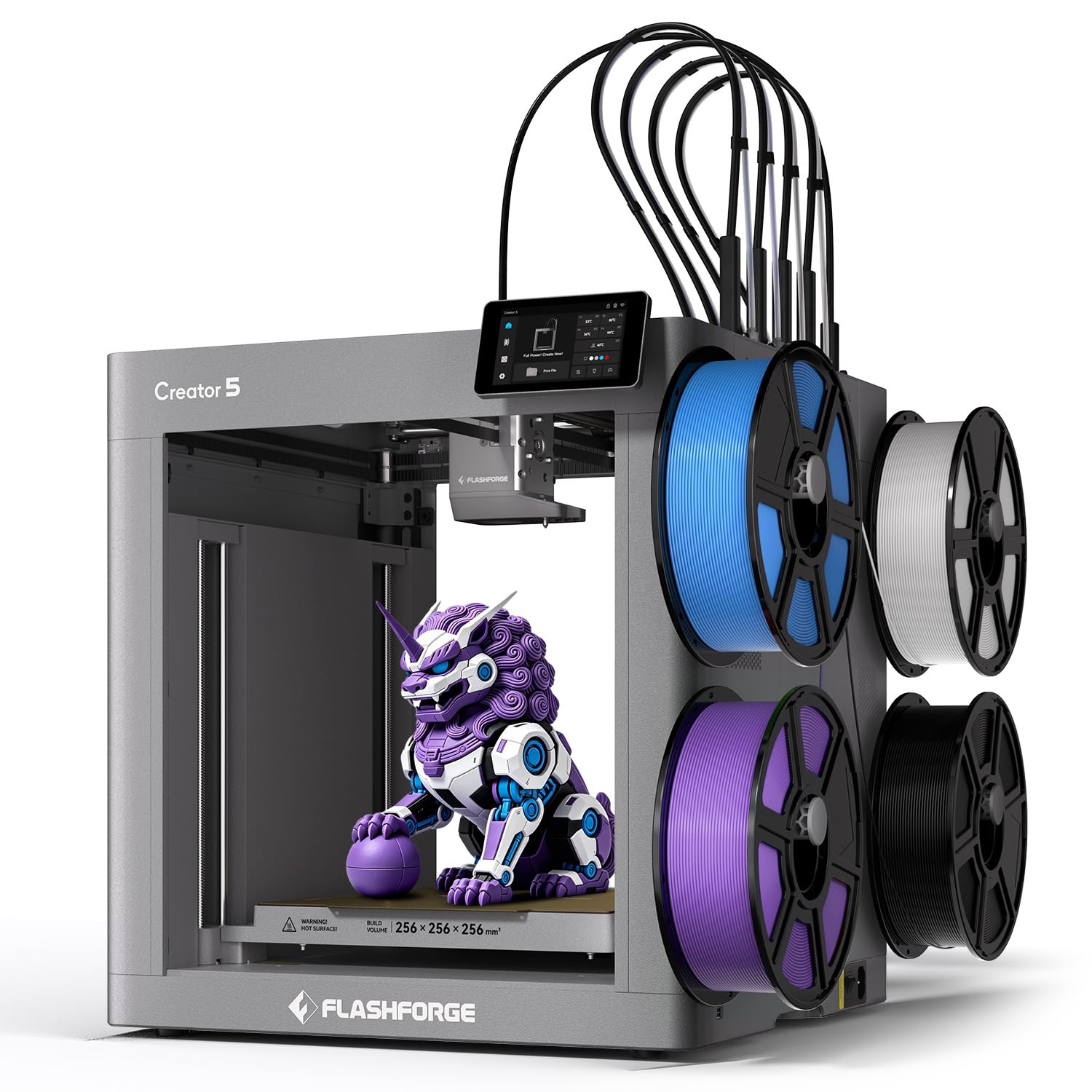
Four preheated toolheads swap in 7 seconds, nearly eliminating wasted filament.
The Creator 5 attacks the two biggest multi-color frustrations: wasted filament and slow color changes. The FlashSwap system keeps four toolheads loaded, preheated, and ready, cutting changeover time from about 2 minutes down to just 7 seconds. Because it swaps heads instead of purging filament between colors, it achieves up to 5X faster multi-color and multi-material workflows with a near-zero waste system.
It combines rigid model materials with PETG, PVA, and BVOH support filaments for better stability and clean separation after printing. Advanced compensation algorithms keep every toolhead synchronized, suppress vibrations, tune extrusion, and automatically level the build surface — delivering dimensionally accurate prints comparable to a premium single-head machine. At 600mm/s CoreXY speed with intelligent vibration cancellation, ghosting and ripples stay out of your layers.
This is a niche tool aimed at makers, workshops, and small businesses that print multi-material parts all day. The learning curve is real, and the toolchanger concept needs a deliberate approach to slicing. It is the right pick when wasted filament is costing you real money, not a casual hobby purchase.
The advantage
- 7-second toolhead swap versus 2-minute purge cycles
- Near-zero waste system with up to 5X faster multi-color workflows
- Four toolheads with dedicated support filament options
The complexity
- Designed for workshops and pros, not casual hobbyists
- Requires deliberate slicing strategy per material
- Premium toolchanger niche pricing
Built for: small businesses and production makers who print multi-material parts in volume and hate wasting filament.
Overkill for: the weekend hobbyist printing one-color figures — a single-nozzle printer does the job.
9. Snapmaker U1 3D Printer

A 5-second toolchanger validated over a million swaps brings true multi-color printing home.
The SnapSwap system offers four independent toolheads with preloaded, preheated filaments, cutting tool change time from about 2 minutes to just 5 seconds. The locking mechanism is validated through over 1,000,000 swaps with zero failures — durability engineered for serious use. A rigid CoreXY motion system with lightweight carbon fiber X-axis rails reaches 500 mm/s while keeping accuracy across a full 270x270x270mm build volume.
What sets this apart is true multi-material printing in one session: rigid and flexible materials, water-soluble supports, and engineering plastics with no manual intervention. Owners have printed full-color articulated models and even TPU shoes with different Shore hardness ratings. Compatible with PLA, PVA, TPU, PETG, PCTG, ABS, ASA, PA, PC, and more, it reduces filament waste by up to 5X versus traditional purge-based systems — no poop chute required.
Setup is genuinely beginner-friendly at under 20 minutes with detailed instructions and a touchscreen guide featuring QR-based troubleshooting. Owners praise the near-zero waste, with one reporting a 4-color print finished in 32 hours versus about 58 on a single-nozzle machine, saving roughly 350g of filament. The noise is moderate — quieter than some rivals but louder than a Bambu P1S — and a thicker glass door keeps things contained.
Why it impresses
- 5-second toolchanger validated over a million swaps
- True multi-material with zero purge waste
- Large 270mm build volume with 500mm/s speed
Consider this
- Less beginner-friendly than Bambu — manual model import required
- Power supply fan is loud
- Open top needs a lid for full enclosure
Perfect for: the multi-color enthusiast who wants print quality and near-zero waste without a poop chute.
Read carefully if: you want an utterly beginner-friendly interface — Snapmaker Orca takes more hands-on effort than Bambu Studio.
10. QIDI Max4 Combo 3D Printer

A 390mm build volume that prints industrial parts in one go — no splitting, no gluing.
The build volume is the headline: 390x390x340mm, which is 55% larger than its predecessor the MAX3, letting you print large industrial parts, complex molds, and custom prototypes as single pieces. A full-surface silicone heated bed keeps temperature even across that huge surface for strong first-layer adhesion and no warping. Closed-loop motors on the X and Y axes push speed to 800mm/s with 30,000 mm/s² acceleration, while a 2mm lead screw and anti-backlash nut on the Z-axis eliminate vertical gaps.
This is one of the few printers that genuinely handles abrasive industrial materials. The 40mm³/s high-flow hotend with a hardened steel nozzle runs standard PLA and ABS plus carbon-fiber reinforced nylon, and the active 65°C heated chamber creates ideal conditions for ABS-CF, PC, and even PPS-CF. A built-in AI camera detects spaghetti failures and pauses prints instantly to save materials. Connect the optional QIDI BOX for up to 16-color multi-material printing with real-time filament level monitoring.
Owners describe it as oven-sized and working flawlessly from the start, with one printing 20 parts with no issues and another running a benchy successfully on the first attempt. At 120 pounds, this is a permanent workstation fixture, not a desktop toy. The minority complaints involve reliability and a sticky bed that needs a release agent, plus wet filament from the 4-spool magazine causing tangles. For production-scale printing, though, no other pick here matches its size.
The heavy hitters
- Huge 390x390x340mm volume prints parts in one piece
- Closed-loop motors push 800mm/s with 30,000 mm/s² acceleration
- 65°C heated chamber handles industrial carbon-fiber filaments
The realities
- 120 pounds — a permanent station, not portable
- Sticky bed needs a release agent; occasional tangles
- Polar Cooler sold separately despite the name
Choose it if: you print large functional parts or run a small production shop that needs one-piece builds.
pass on it if: you lack dedicated floor space or print mostly small hobby models — the size is overkill.
Understanding the Specs
Acceleration vs. Max Speed
Max speed tells you the top velocity the print head can reach, but acceleration matters more for real-world speed — it measures how quickly the printer reaches that velocity. A machine with 20,000 mm/s² acceleration can hit top speed fast, so short moves between details don’t waste time. For everyday prints, high acceleration usually delivers more visible speed than a high top speed number.
Heated Chamber and Nozzle Temp
The nozzle temperature sets which filaments you can melt, and the chamber temperature controls how well parts stay flat while printing. A 280°C nozzle handles PLA, PETG, and TPU; 300°C opens up ASA and carbon-fiber blends; 370°C open up PPS-CF and other exotic engineering materials. Heated chambers and enclosed bodies prevent ABS and ASA from warping as layers cool unevenly.
FAQ
How does auto bed leveling actually work?
Do I still need to level the bed manually with an auto-leveling printer?
What build volume do I need for large prints?
Is a heated chamber necessary for printing ABS?
What is the difference between multi-color toolchangers and filament switchers?
Which filaments need a hotter nozzle?
How fast can these printers actually print?
Why does my first layer keep failing even with auto leveling?
Is a multi-color printer worth the extra cost?
How much maintenance do these printers need?
Final Thoughts: The Verdict
For the majority of shoppers, the auto leveling 3d printer winner is the Bambu Lab A1 because it delivers true plug-and-play reliability, genuinely fast printing, and beginner-friendly operation at a price that undercuts older workhorses — all backed by the strongest owner satisfaction in this lineup. If you want a complete multi-color system without buying add-ons, the Bambu Lab P1S Combo is the turnkey pick. And for large industrial parts printed in one piece, the QIDI Max4 Combo is the one to reach for.
Whichever you choose, the auto-leveling feature is the single upgrade that will save you the most hours — no more paper, no more failed first layers, no more frustration. The printers above are ranked by how well they pair that core feature with speed, materials support, and real owner satisfaction, so match the build volume and nozzle temperature to your actual projects and you will land on the right machine.
How We Picked
We do not accept paid placement. Every pick is matched to a real buyer and a real use-case; we do not hands-on test units.
Sources & Methodology
Specifications: manufacturer listings and product documentation. Review insights: verified customer reviews, as of August 2026. Pricing: not shown on this page (it changes often); check the current price via the retailer link.
As an Amazon Associate, Gadgets Feed earns from qualifying purchases. This does not affect which products we feature.