
That shoebox of old family photos has been gathering dust for years, and the thought of sitting at a flatbed scanner for an entire weekend feels like a punishment. The real bottleneck isn’t your willingness to preserve memories — it’s the hardware. A dedicated auto photo scanner changes the game by feeding stacks of glossy prints through in seconds rather than minutes, using specialized rollers and software that understands how to handle photographic paper without jamming or scratching.
I’m Min — the co-founder and writer behind Gadgets Feed. I’ve spent hundreds of hours researching the document and photo scanning category, breaking down the differences between CIS and CCD sensors, sheet-feed versus flatbed mechanisms, and the software ecosystems that make or break a bulk-digitization workflow.
This guide is built to help you cut through the noise and find the best best auto photo scanner for your specific pile of prints, receipts, and documents.
How To Choose The Best Auto Photo Scanner
Not every document scanner is built to handle the delicate surface and varied thickness of photographic prints. The wrong feeder mechanism can scratch your originals or fail to pull through a stack of mixed glossy 4x6s and matte 5x7s. You need a machine that balances speed with gentle handling, high optical resolution with smart software corrections, and batch capacity with reliable jam prevention.
Feed Mechanism and Photo Handling
The most critical difference between a general-purpose scanner and a photo-capable one is the feed path. Photo-specific models use straight or nearly straight paper paths to prevent bending, and their rollers are calibrated to grip photo paper without leaving pressure marks. Look for models with a dedicated photo carrier sheet or an adjustable feeder that can handle Polaroids, panoramas, and thick cardstock without slipping.
Resolution, Bit Depth, and Sensor Type
True optical resolution of at least 600 dpi is the baseline for archival-quality photo scans. Higher color depth — 24-bit minimum, 48-bit ideal — preserves subtle gradients in skies and skin tones. CIS (Contact Image Sensor) scanners are thinner and faster but may lack the depth of field for slightly curled photos; CCD (Charge-Coupled Device) sensors produce superior dynamic range and shadow detail at the cost of size and power consumption.
Software Ecosystem for Corrections and Organization
The bundled software is as important as the hardware itself. Features like automatic color restoration, red-eye removal, dust scratch reduction, and de-skew turn a raw scan into a shareable image without manual editing. Integration with cloud services (Dropbox, Google Drive, OneDrive) and searchable PDF creation with OCR (Optical Character Recognition) determine whether your digitized archive is usable or just a stack of unsearchable JPEGs.
Quick Comparison
On smaller screens, swipe sideways to see the full table.
| Model | Category | Best For | Key Spec | Amazon |
|---|---|---|---|---|
| Epson FastFoto FF-680W | Premium | Bulk Photo Digitization | 1 second/photo at 300 dpi | Amazon |
| Canon imageFORMULA RS40 | Mid-Range | Mixed Photo and Document Batches | 40 images per minute | Amazon |
| ScanSnap iX2400 | Premium | High Speed Document Archiving | 45 ppm duplex, 100-sheet ADF | Amazon |
| Epson Workforce ES-580W | Premium | Wireless Cloud Workflow | 4.3-inch touchscreen | Amazon |
| Brother ADS-4300N | Mid-Range | Networked Office Scanning | Ethernet, 80-page ADF | Amazon |
| Brother ADS-3100 | Mid-Range | Small Office USB Scanning | 40 ppm, 60-page ADF | Amazon |
| ScanSnap iX1300 | Mid-Range | Photo and Card Handling | Compact, Wi-Fi, 30 ppm | Amazon |
| HP Compact Desktop Duplex | Value | Portable Travel Scanning | Lightweight, 3.14 lbs | Amazon |
| Doxie Pro | Value | Simple Desktop Workflow | 600 dpi optical resolution | Amazon |
In‑Depth Reviews
1. Epson FastFoto FF-680W
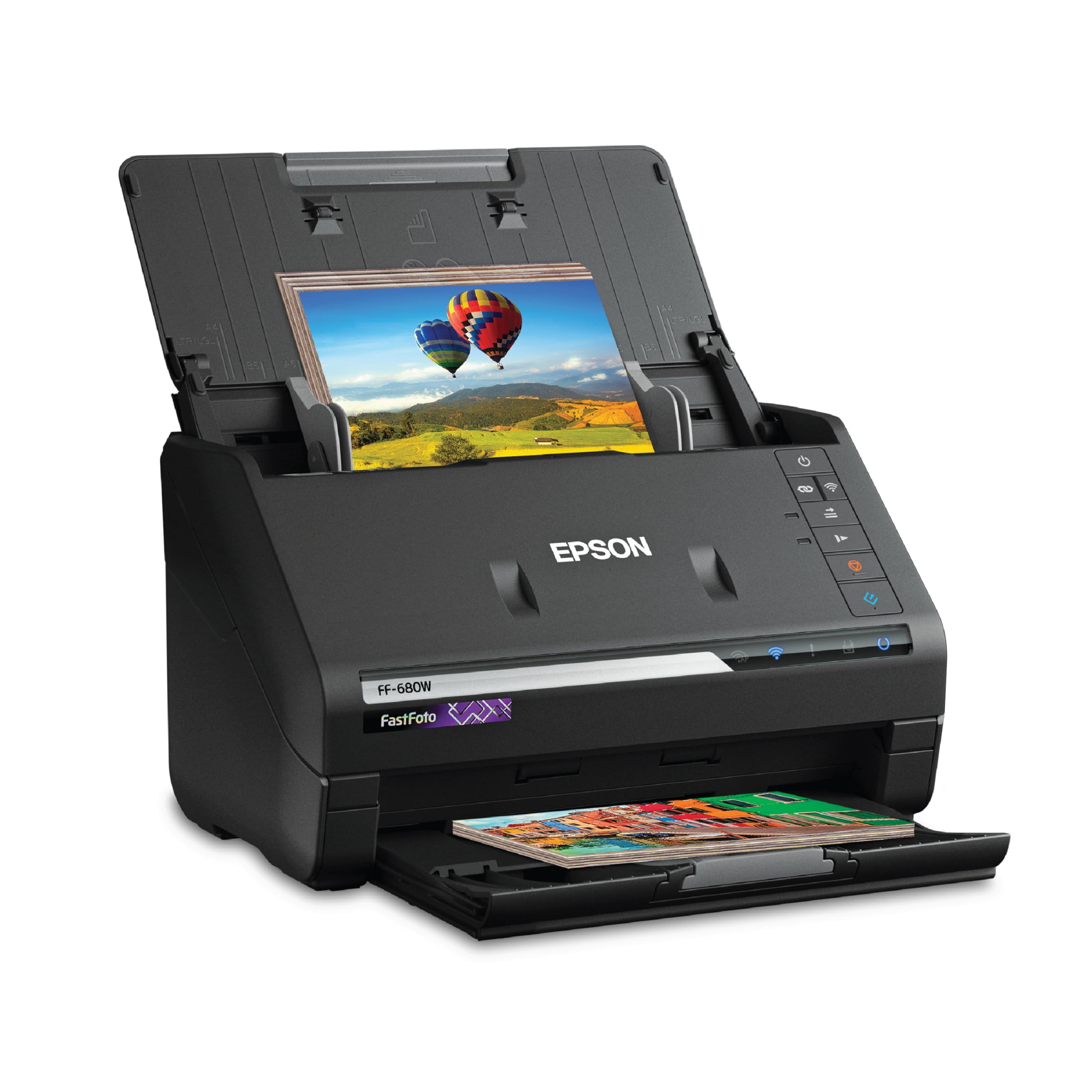
The Epson FastFoto FF-680W sets the gold standard for high-volume photo digitization. Its dedicated photo feed system can scan a 4×6 print in one second at 300 dpi, and the 36-photo batch feeder means you can load a small stack and walk away. The included carrier sheet protects delicate or irregularly shaped items like Polaroids or panoramas from roller marks and jams.
The bundled FastFoto app offers automatic color restoration, red-eye reduction, and de-skew tools that dramatically improve faded prints without manual intervention. In duplex mode, it captures handwritten notes on the back of photos in a single pass. At 600 dpi the scan speed drops to roughly two seconds per photo, but the detail captured is archival-grade, making this the go-to machine for family historians and estate organizers.
The scanner also pulls double duty as a document scanner, hitting 45 pages per minute (90 images per minute in duplex) with a 100-sheet auto document feeder. Its Wi-Fi and USB connectivity give flexibility, though some users report that glossy photo stock can acquire faint vertical streaks from the feed rollers over extended runs, which requires periodic cleaning. For pure photo-centric bulk scanning, nothing in this lineup competes on sheer throughput and image enhancement.
Why it’s great
- Scans one standard photo per second at 300 dpi
- Built-in color restoration and red-eye reduction software
- 36-photo batch feeder handles mixed sizes
Good to know
- Glossy photo stock may show faint roller streaks after extended use
- Auto-enhancement can add graininess to some originals
2. Canon imageFORMULA RS40

The Canon imageFORMULA RS40 is a dedicated photo and document scanner that hits a sweet spot between speed and price. It scans both sides of a photo or document simultaneously at up to 40 items per minute through its automatic feeder, and the CaptureOnTouch software includes red-eye correction, face smoothing, and color enhancement tools that are specifically tuned for photographic prints from the last fifty years.
The hardware handles a wide variety of media types — from 4×6 Polaroids to driver’s licenses to 8.5×14 documents — without requiring a carrier sheet for most items. The RGB LED light source provides consistent illumination across the scan area, and the adjustable contrast and brightness settings help recover detail from underexposed or faded prints that default auto settings tend to blow out. Users who have scanned over 2,000 photos report few jams and reliable feeding.
The main caveats involve software quirks: the CaptureOnTouch application does not automatically delete temporary files, which can fill the system drive and crash the program after roughly 800 scans unless manually cleaned. The software interface also has a steeper learning curve than some competitors. For users willing to establish a workflow, the RS40 delivers strong photo scan quality at a mid-range budget.
Why it’s great
- 40 images per minute duplex scanning
- Dedicated photo enhancement features (red-eye, face smoothing)
- Handles varied media sizes without a carrier sheet
Good to know
- Temp file accumulation can crash the app after ~800 scans
- Software interface has a moderate learning curve
3. ScanSnap iX2400

The ScanSnap iX2400 is the latest generation of Fujitsu’s legendary document scanner, redesigned for speed and reliability. Its 100-sheet auto document feeder and duplex scan speed of up to 45 pages per minute (90 images per minute) make it the fastest USB-connected model in this roundup for document-heavy workflows. The one-touch button sends pages through the software’s automatic de-skew, blank page removal, and color detection without any driver configuration.
The iX2400 handles business cards, receipts, envelopes, and standard photo prints with consistent feeding, and users who upgraded from older ScanSnap models report noticeably fewer misfeeds. The ScanSnap Home software organizes scanned files into searchable PDFs with OCR and integrates directly with cloud services like Dropbox, Evernote, and OneDrive. The build quality is robust, with a metal chassis and a 7.1-pound weight that stays planted on a desk.
The trade-off is that this scanner uses USB-only connectivity with no Wi-Fi option, which limits placement flexibility. It also lacks TWAIN driver support, so it cannot be used with generic scanning software or some enterprise document management systems. For users who primarily digitize documents and occasional photo batches at high speed, the iX2400 is a proven workhorse that justifies its premium positioning.
Why it’s great
- 45 ppm duplex speed with 100-sheet ADF
- Automatic image cleanup (de-skew, blank page removal)
- ScanSnap Home software with integrated cloud support
Good to know
- USB-only connection, no Wi-Fi or Ethernet
- No TWAIN driver for third-party software
4. Epson Workforce ES-580W

The Epson Workforce ES-580W differentiates itself with a 4.3-inch color touchscreen that lets you initiate scan jobs without touching a computer. The interface supports customizable presets, so you can tap one icon to scan a stack of photos directly to a Google Drive folder or email a PDF of receipts. Its 100-sheet ADF handles both documents and photo prints at speeds up to 35 pages per minute (70 images per minute in duplex).
The ES-580W uses a CCD sensor, which provides superior depth of field and color accuracy compared to CIS sensors — a meaningful advantage when scanning slightly curled or textured photo prints. The Epson ScanSmart software includes auto crop, blank page deletion, and background removal, and the TWAIN driver compatibility means it works with a broad range of third-party document management tools. The wireless connectivity is robust, with both Wi-Fi Direct and infrastructure mode support.
Some users note the lack of an Ethernet port as a limitation for office networks that prefer wired connections. The software suite, while feature-rich, can feel bloated compared to the more streamlined ScanSnap ecosystem. For users who want a standalone scanning station with a bright touchscreen and strong photo image quality, the ES-580W is a compelling choice.
Why it’s great
- 4.3-inch color touchscreen for computer-free scanning
- CCD sensor for superior photo depth and color accuracy
- TWAIN compatibility with third-party software
Good to know
- No Ethernet port for wired networking
- Software suite can feel bloated
5. Brother ADS-4300N

The Brother ADS-4300N is engineered for shared office environments where multiple users need access to a single scanning station. Its built-in Ethernet port and support for AirPrint and Brother Mobile Connect allow any device on the local network to initiate scans without a dedicated host computer. The 80-page ADF and continuous scanning mode enable large batch jobs with minimal operator intervention.
The ADS-4300N uses a CCD sensor — rare in this price bracket — and offers 48-bit color depth, which produces scans with noticeably better shadow detail in dark areas of photos compared to CIS-based competitors. The software bundle includes Kofax VRS Elite and Kofax Express compatibility, which are professional-grade tools for image cleanup and batch processing in enterprise workflows. The browser-based management interface allows IT administrators to configure scan destinations, security settings, and user permissions remotely.
At 6.1 pounds, it is not the most portable scanner, and the setup instructions for the network configuration can be sparse. Some users report occasional jams with heavily creased or wrinkled paper, though this is less frequent than with all-in-one devices. For a workgroup needing network scanning with strong photo quality, the ADS-4300N offers professional features at a mid-range price.
Why it’s great
- Ethernet networking for shared access
- CCD sensor with 48-bit color depth for better photo quality
- Kofax VRS Elite compatibility for pro image processing
Good to know
- Network setup instructions could be more detailed
- Heavier and bulkier than portable alternatives
6. Brother ADS-3100

The Brother ADS-3100 is a straightforward, no-nonsense desktop scanner aimed at small offices and home workers who need reliable duplex scanning without Wi-Fi complexity. It connects via Hi-Speed USB 3.0 and delivers up to 40 pages per minute in both simplex and duplex modes, with a 60-page ADF that handles business cards, receipts, and 4×6 photo prints without issue. The direct scan-to-USB feature allows saving files to a flash drive without a connected computer.
Brother bundles seven software applications including OCR, PDF creation, and document management tools that cover the basics of digitizing paper archives. The CIS sensor achieves true 600 x 600 dpi optical resolution, which is adequate for most document and standard photo scanning needs. Users report the scanner feeds reliably with mixed media types, and the blank page skip feature saves time when scanning stacks with intentional or accidental empty inserts.
The ADS-3100 lacks a network port or wireless connectivity, so it cannot be shared across a workgroup without a host PC. Brother’s driver selection process online can be confusing for first-time setup, and the instruction manual is thin on troubleshooting. For a dedicated USB-connected scanner that prioritizes speed and reliability at a mid-range price, the ADS-3100 delivers consistent performance.
Why it’s great
- 40 ppm duplex with 60-page ADF
- USB 3.0 for fast data transfer
- Includes 7 bundled software applications
Good to know
- No Wi-Fi or Ethernet connectivity
- Driver installation process can be confusing
7. ScanSnap iX1300

The ScanSnap iX1300 is the most space-conscious scanner in the ScanSnap lineup, measuring just 4.5 inches deep when folded flat — small enough to slide into a desk drawer or carry in a laptop bag. Despite its compact footprint, it includes both an auto document feeder for batch scanning and a manual feeder slot for scanning thick items like plastic ID cards or folded photos. Its 30 ppm duplex speed is respectable for a device this size.
The scanner supports both USB and Wi-Fi connectivity, and the Quick Menu software allows scan-drag-drop workflow to commonly used applications. The automatic image processing suite — including de-skew, color optimization, and blank page removal — works without user intervention, making it a strong choice for users who want to digitize stacks of paper with minimal effort. Users who have scanned over 9,000 photos with this unit report no mechanical failures, which speaks to its build quality.
Some users experience a higher-than-expected jam rate — roughly once every four to five uses — where paper feeds at an angle and wrinkles. The auto-sizing feature can occasionally cut off up to half an inch from document edges. For users who prioritize a tiny footprint and Wi-Fi flexibility over absolute mechanical perfection, the iX1300 is a capable and portable option.
Why it’s great
- Ultra-compact fold-flat design
- USB and Wi-Fi dual connectivity
- Dedicated manual feeder for thick or delicate items
Good to know
- Jam rate can be higher than expected on some batches
- Auto-sizing may crop edges inconsistently
8. HP Compact Desktop Duplex USB Scanner

The HP Compact Desktop Duplex USB Scanner (model HPPS200) packs professional-grade resolution claims into a lightweight 3.14-pound chassis that fits into a standard laptop bag. It advertises 1200 dpi optical resolution and a 25-sheet auto feeder with duplex scanning at 25 pages per minute. The slim profile and fold-down rear tray make it an appealing option for commuters, tax preparers, and small business owners who need to digitize documents on the go.
The bundled HP WorkScan software provides auto-scan, size detection, and basic image editing tools like cropping and background cleanup. The scanner handles a range of media including business cards, receipts, and documents. Users who primarily need a travel companion for batch document scanning report that the setup is straightforward and the scan quality is solid for text and standard receipts.
Critical reviews, however, raise serious concerns about the scanner’s performance with photos and the accuracy of its resolution claims. Multiple users report that the maximum achievable scan resolution is effectively capped at 200 dpi rather than the advertised 1200 dpi, and the auto-cropping function on photos cuts off edges incorrectly. Some units have developed ADF bulb errors after just a few days of use, and HP’s support has been described as unhelpful. For budget-seeking users who accept these risks, the HPPS200 may suffice for casual document needs, but it is not recommended for photo preservation.
Why it’s great
- Very lightweight at 3.14 pounds for travel
- Fold-down tray for compact storage
- HP WorkScan software with auto-scan features
Good to know
- Effective scan resolution may be limited to 200 dpi
- Auto-cropping of photos can cut off edges
9. Doxie Pro

The Doxie Pro is a compact, USB-powered duplex scanner designed for simplicity and ease of use. It features a 20-sheet auto document feeder and a direct feed slot for scanning thick or delicate paper — including single photo prints — without bending. The bundled Doxie software includes OCR, automatic cropping, rotation, and contrast boost, and it can export directly to Dropbox, Evernote, OneNote, or iCloud without installing additional drivers.
The scanner measures just 12 x 4 x 3 inches and weighs 3 pounds, making it easy to store when not in use. Users report fast scanning at 300 dpi with good image quality, and the ability to scan wrinkled or folded pages that would jam in larger feeders. The direct feed slot is particularly useful for photos, business cards, and other single items that require careful handling. Doxie includes a one-year warranty and responsive customer support.
The Doxie Pro lacks an SD card slot and external battery for cordless use, and there is no dedicated Chromebook application. The software has no Linux support, limiting its compatibility. At its price point, the Doxie Pro offers a budget-friendly entry into dedicated scanning, but users who need high-volume batch photo scanning or wireless connectivity will quickly outgrow its capabilities. It is best suited for light home office use and occasional photo digitization.
Why it’s great
- Compact and lightweight for easy storage
- Direct feed slot for photos and thick paper
- Intuitive software with cloud export
Good to know
- No SD card slot or external battery
- No Linux or Chromebook software support
FAQ
Can I use a standard document scanner to digitize old photos?
What dpi should I scan my family photos at for archival purposes?
How long does it take to scan a stack of 200 photos?
Can an auto photo scanner handle Polaroid or instant film photos?
Final Thoughts: The Verdict
For most users, the best auto photo scanner winner is the Epson FastFoto FF-680W because it is purpose-built for bulk photo digitization — one second per image, automatic color restoration, and a 36-photo batch feeder that turns a weekend project into a single afternoon. If you want a versatile workhorse that balances document speed with photo quality, grab the Canon imageFORMULA RS40. And for a compact network-ready scanner for shared office use, nothing beats the Brother ADS-4300N.