
Our readers keep the lights on and my morning glass full of iced black tea. As an Amazon Associate, I earn from qualifying purchases.
Specs are compiled from manufacturer listings and verified buyer reviews and can change over time — please confirm the key details on the product page before buying.
Tapping the same button dozens or hundreds of times a day — whether for a game, a live stream, a timer-based app, or an office task — is the kind of repetitive motion that wastes your time and wears out your patience. An automated button pusher takes over that physical work, pressing a switch or tapping a screen exactly as many times as you need, at the speed you set, while you do literally anything else.
I’m Min — the founder and writer behind Gadgets Feed. This guide is built by comparing the manufacturers’ published specifications and the patterns across verified customer reviews, so you get each pick’s real strengths and trade-offs instead of marketing spin.
This guide covers nine different devices — from a super-fast screen tapper to a smart Bluetooth finger robot — so you can find the best automated button pusher for games, home automation, or productivity without wasting time on one that does not fit your setup.
Our Picks at a Glance

How To Choose The Best Automated Button Pusher
The right button pusher depends entirely on what you are pushing: a smartphone screen, a physical wall switch, a keyboard key, or a mouse button. Each job needs a different type of device, so matching the form factor to your task is the first decision you need to make.
Screen tapper versus mechanical finger robot
A screen tapper sits on or over a touchscreen and uses a conductive tip to simulate a real finger tap. It works on phones and tablets running Android or iOS. A mechanical finger robot uses a small motor and arm to physically push a button or flip a rocker switch — it is built for physical controls, not touchscreens. Choosing the wrong type means the device simply will not work for your task.
Click speed and adjustable settings
If you are gaming or farming clicks in an app, a high click speed per second matters — faster devices finish repetitive taps in far less time. For turning a light switch on and off once a day, speed is irrelevant; reliability and a good adhesive matter more. Many devices offer adjustable speed control, letting you set fast clicks or a slow interval between pushes.
Smart features and hub compatibility
Bluetooth and app control let you trigger presses from your phone, while built-in timers run on a schedule without needing your phone nearby. Voice control via Alexa or Google Assistant requires a separate hub (sometimes sold separately). If you want remote access from outside your home, make sure the device explicitly supports a hub — otherwise it is strictly local Bluetooth within range.
Quick Comparison
| Model | Best For | Type | Max Speed | Power Source | Amazon |
|---|---|---|---|---|---|
| Yakboman A2 Auto Clicker★ Best Overall | Fast screen tapping | Physical screen tapper | 33 clicks/sec | USB (corded) | Amazon |
| SwitchBot Smart Switch (B07B7NXV4R)Smart Home Star | Smart home switches | Bluetooth fingerbot | — | Battery | Amazon |
| SwitchBot Fingerbot (B0F37Z1132)Simple & Effective | Rocker switch automation | Bluetooth fingerbot | — | Battery (CR2 included) | Amazon |
| MOES Fingerbot Plus | Smart app integration | Bluetooth fingerbot | — | Battery (CR2 included) | Amazon |
| Ne Fashion Physical Click | Keyboard/mouse clicking | Mechanical arm | Adjustable | USB (corded) | Amazon |
| Pankia Box Auto Clicker (B081CMX53L) | Game screen tapping | Physical screen tapper | 3 ports adjustable | USB (corded) | Amazon |
| Sesame Bot 2 | Customizable smart scripts | Bluetooth fingerbot | — | Battery (included) | Amazon |
| SENCKIT Smart Switch | Multi-arm compatibility | Bluetooth fingerbot | — | Battery | Amazon |
| Pankia Box Physical Click (B0CPPHTBNX) | Keyboard/mouse gaming | Mechanical arm | 3 ports adjustable | USB (corded) | Amazon |
In‑Depth Reviews
1. Yakboman A2 Auto Clicker
Our pick — over 4★ from 350+ verified ratings; the strongest balance of quality and price.
A dedicated physical tapper that slaps a screen faster than any human finger ever could.
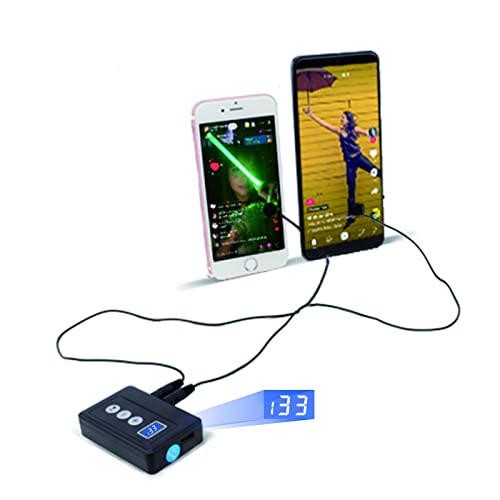
This auto clicker attaches to your phone or tablet — either by sticking the click head directly onto the screen or by using the included screen clip — so it taps automatically without any app that a game anti-cheat system could detect. The speed dial offers 31 gears, with a top end that hits 33 times per second, the opposite end slows to one click every 60 seconds for gentler tasks like refreshing an app every few minutes. The last speed you set is saved even after power-off, so you do not have to re-dial it each time.
It runs on USB power, so you need an external battery or wall adapter nearby — a short USB-C cord means it works best on a tabletop rather than a couch lap. The crowd favorite feature here is the autoclicking itself, which owners call reliably fast and solidly built for the long haul. The included nano-stickers are washable and reusable, though some users find the adhesion mixed; the clip can be fiddly, so most prefer the stickers. The durability trade-off appears in a few long-term reports of the device breaking after extended use, and the thin wiring gets a mention as a minor weak point. On the whole, this is the fastest physical screen tapper in the group and easily the top pick for sheer tapping speed.
Speed demon: 31-speed gears hitting 33 taps per second mean it finishes repetitive screen tasks in a fraction of the time you would need.
Real-world catch: It needs USB power at all times, so it stays tethered to a cord — not ideal for pure wireless portability.
Reach for this if: You need blistering-fast screen taps for gaming or app tasks and can keep it plugged in.
Look elsewhere if: You want a wireless, app-controlled button pusher for physical switches around the house.
2. SwitchBot Smart Switch Button Pusher (B07B7NXV4R)
A Bluetooth-powered finger robot that turns any rocker switch or button into a smart device in seconds.
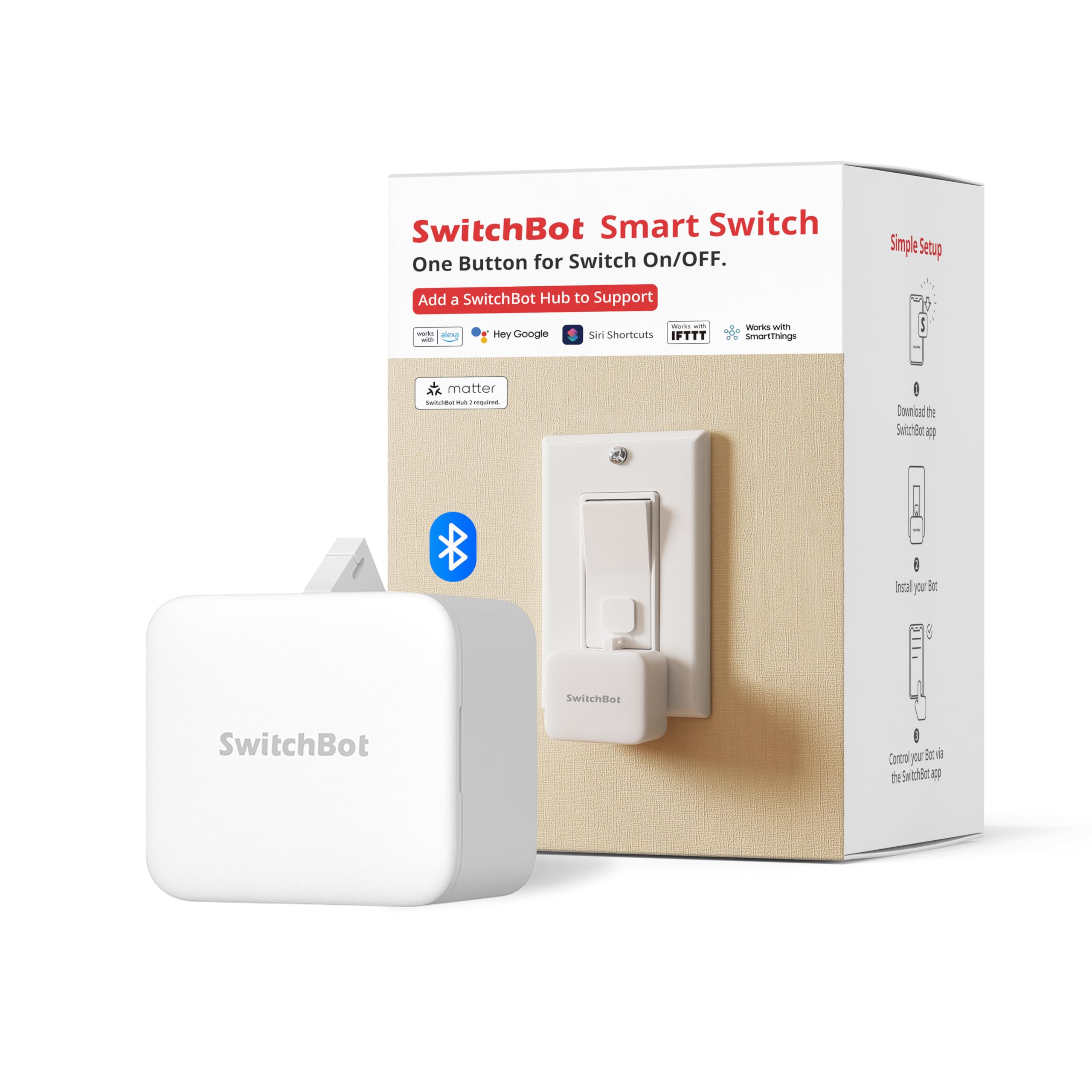
This is the crowd favorite by a wide margin — tens of thousands of owners use it to control bedroom lights, fans, coffee makers, and older appliances that a smart plug cannot handle (like an analog amp or a button-start humidifier). It sticks on with the included adhesive (clean the surface and let it bond for 24 hours for best hold) and connects to the SwitchBot app, where you set on/off schedules that run even without your phone nearby. You do not need a hub for local timer control.
The quality and ease of installation win the most praise by far, with hundreds of buyers calling it simple and reliable. For rocker switches, Switch Mode requires a separately sold add-on accessory. The biggest practical catch is the hub situation: if you want voice control through Alexa or Google Assistant, or remote control from outside Bluetooth range, you have to add a SwitchBot Hub Mini (sold separately). Some owners find the app’s basic functionality frustrating without the hub, calling it an upsell. The adhesive is generally strong on clean surfaces, though a few report it shifting over time on less-than-ideal mounting spots. Once set up properly, it is among the most dependable smart button pushers you can buy.
What owners praise
- Simple app timer control that runs without your phone nearby
- Built-in Bluetooth with optional hub for Alexa and Google voice control
- Tool-free adhesive install mounts in seconds
What to plan for
- Remote control and voice commands require a separate hub
- Not for toggle switches, touch panels, or stiff buttons
- Adhesive needs 24 hours to fully bond before heavy use
Perfect for: Automating lights, fans, and appliances you want on a daily schedule without any wiring.
Not for you if: You need to control a toggle switch or insist on full voice control without buying extra gear.
3. SwitchBot Fingerbot (B0F37Z1132)
A compact Bluetooth fingerbot that turns a rocker switch into a remote-controlled device — no wiring at all.
This is the newer sibling in the SwitchBot family, built for the same core job: sticking next to a standard rocker switch or push button and pressing it on command. The app setup is what owners note most — it takes little time to configure schedules or manual presses. The button responsiveness gets solid marks, with owners saying it works well on light-touch switches and even a fan remote. Like the larger SwitchBot model, Bluetooth range is local (within roughly 50 to 100 feet), and a Hub Mini is required for any control beyond that or for voice commands.
Where the reviews split is on reliability: about half say it works as advertised for months, while a few report it stopped working entirely. The CR2 battery is included, so you are ready to go right from the start. The small size and low profile make it less obtrusive than bulkier button pushers on a wall plate. If you only need simple, close-range button automation and prefer the smallest possible footprint, this is a tidy choice — just know that the reliability pattern is less proven than the older, more-reviewed SwitchBot model above.
Quick setup, small package: The app configuration takes minutes, and the compact body blends into a wall switch — the most discreet option here.
Honest limitation: Reliability is a coin toss for some owners, so this is best for a low-risk, single-switch automation project rather than a whole-home rollout.
Grab it if: You want a tiny, battery-powered button pusher for one or two switches nearby your phone.
skip it if: Reliable multi-switch whole-home automation is your goal — the older SwitchBot model has a much longer track record.
4. MOES Fingerbot Plus

A Tuya-based finger robot that adds a built-in touch button so you can control the arm directly without opening the app.
The Fingerbot Plus stands out because it has a physical touch sensor on the device itself — one tap on the bot powers its arm on or off, which is handy when you are standing right by the switch. It works with the Smart Life and Tuya apps, and if you add a Tuya Bluetooth hub (sold separately), it connects to Alexa and Google Assistant for voice and remote control. Owners use it for everything from AC units to garage doors to remote boiler resets, and the quality and ease of setup are the two most-praised aspects.
The bigger caveats are in reliability and connectivity: a number of buyers report trouble connecting the device to Wi-Fi, with some finding the app finicky or non-functional. The device arrived with a dead battery in at least one case, and the included 3M sticker sometimes needs replacing with stronger tape. The Tuya ecosystem is broad, but the app and Bluetooth handshake are not as polished as the SwitchBot experience for many owners.
The strengths
- Built-in touch button for on-device arm control without the app
- Compatible with Smart Life/Tuya ecosystem and Alexa/Google (with hub)
- CR2 battery powered — replaceable and lasts months
Common frustrations
- Reliability and Bluetooth connectivity are hit or miss according to many owners
- Tuya hub required for voice and remote control (not included)
- Some units arrive with low or dead battery
Best for: Existing Tuya/Smart Life users who want a local touch button plus app control for a single switch.
Pass if: You need rock-solid reliability and easy setup from the start without tinkering.
5. Ne Fashion Physical Click Auto Keyboard Clicker

An adjustable mechanical arm that clicks your keyboard or mouse automatically — perfect for repetitive desktop tasks.
This is a different breed from the smart fingerbots above: it is a physical arm that sits over a keyboard key or mouse button and clicks it continuously. The arm has adjustable height and position so you can aim it precisely at whatever key or button needs pressing. It offers adjustable click speed and includes a random timer mode that can go beyond 009 using the Shift key to set a decimal, with a maximum value of 999. The device runs on USB power, so it does not need batteries. Setup requires a small Allen wrench (the brass piece needs a smaller size than you might expect), and there are no written instructions — you rely on the product thumbnail image for guidance.
The quality is considered decent by most owners, with several noting it works well for months once you get through the initial assembly confusion. The biggest negative is the instructions — or lack of them — which many call confusing. A few owners mention defective units, though the vendor replaced one on request. For work-from-home setups where you need to keep a keyboard active or click a button at random intervals, this is a cheap, no-frills solution. Just be prepared for a frustrating first setup if you are not patient with trial-and-error assembly.
Desktop workhorse: Once assembled, the random timer mode keeps your computer active without any software — better than a mouse jiggler for many.
The assembly tax: No written instructions and a fiddly brass piece mean you will likely spend the first 20 minutes figuring out how to put it together.
Choose this if: You need an always-on physical clicker for a keyboard or mouse at your desk and do not mind a learning curve during setup.
pass on it if: You want an app-controlled smart device — this is purely mechanical and USB-tethered.
6. Pankia Box Auto Clicker Device (B081CMX53L)

A box-style screen tapper with three independent ports — each with its own speed setting — for multi-tap setups on a phone or tablet.
This is a physical screen tapper like the Yakboman, but with a twist: it has three separate ports, each adjustable independently. You could set one to tap fast, one at medium speed, and one slow, all at the same time, if your game or app needs different touch points at different intervals. It supports any Android or iOS phone, uses a simple tabletop mount, and runs on USB power. The quality gets good marks, with several owners calling it well-made for the price.
The reliability story is mixed: some units work perfectly for months, while others stop working shortly after the warranty period. At least one owner reported a USB connection unsoldered from the control board, and there were a few complaints about missing pieces on arrival (though customer service replaced them quickly). The 3-month warranty window is short, so any latent defect is likely to surface after the coverage ends.
What stands out
- Three adjustable-speed ports on one device for multi-point tapping
- Simple tabletop setup works with any Android or iOS touchscreen
- Good build quality reported by owners
Reliability to watch
- Some units fail after a few months — USB solder joint is a known weak spot
- Short 3-month warranty means issues after that are on you
- Missing or broken pieces reported by a few on arrival
Best for: Gamers who need multiple simultaneous tap points on a touchscreen and can accept some longevity risk.
Not ideal for: Anyone who needs a long-term, daily-driver button pusher with strong support.
7. Sesame Bot 2, Smart Button Pusher
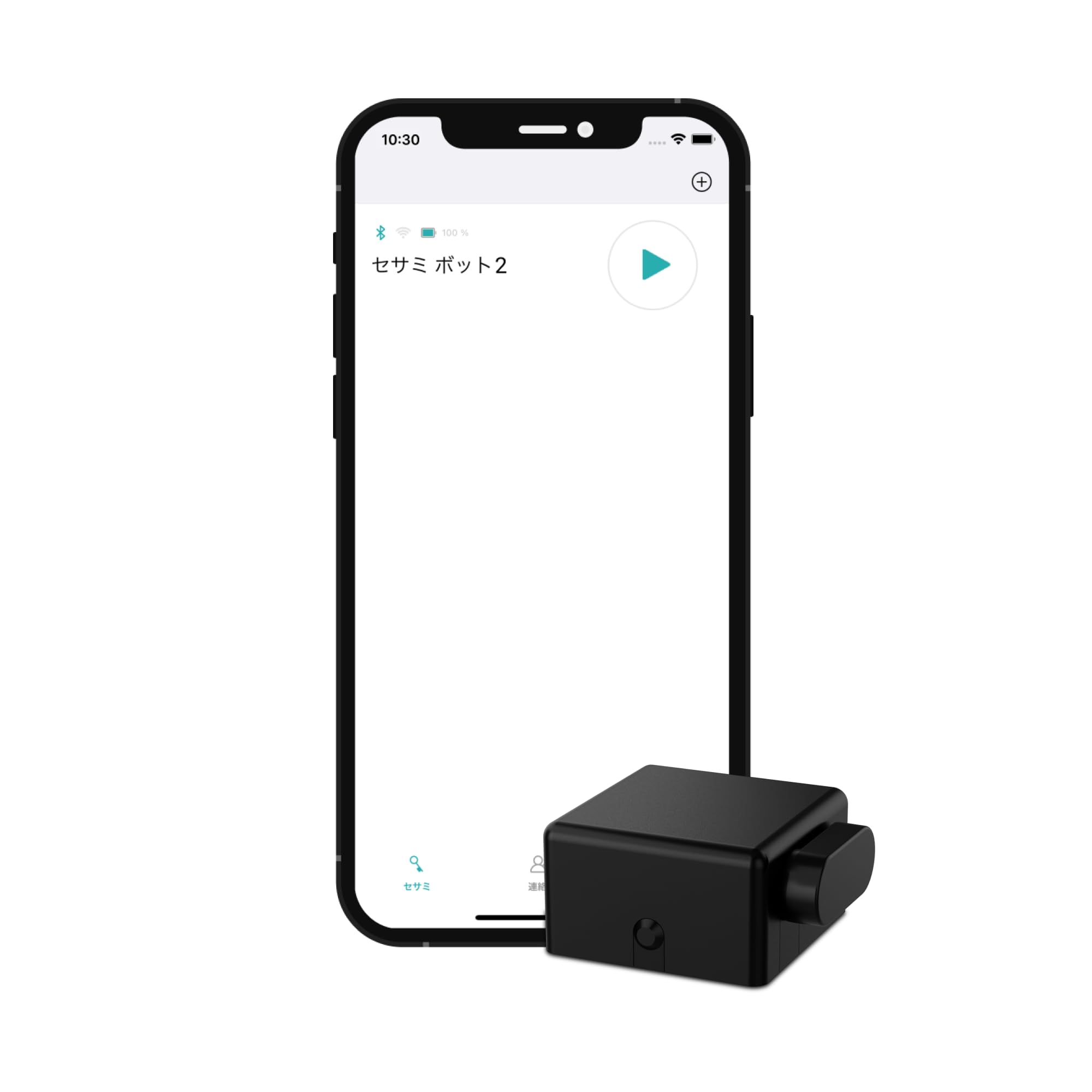
A Bluetooth finger robot that can run up to 10 custom scripts, each with up to 20 actions — essentially a tiny robotic finger with its own programming logic.
Sesame Bot 2 is built for more than just a single button press. Each script can include clockwise arm rotations, counterclockwise movements, sleep pauses (during which you can manually move the arm), and stop commands (where the arm locks in place). It works with the CANDY HOUSE ecosystem, integrating with Touch, Touch Pro, Remote, and Open Sensor accessories. The Bluetooth range is limited to 5 meters (about 16 feet), so your phone needs to be in the same room for live control. The app setup is easy, and the build feels compact and sturdy.
The main problem is a mechanical one that multiple owners hit: after calibration, the pressing strength weakens drastically after the first press, and by the fourth press it may fail to push the button at all. The instruction manual is also minimal — some owners found it too confusing to set the arm position correctly for their specific switch. For users who get it working, it is a versatile scripting tool. That pressing-strength degradation is a genuine design flaw worth knowing about before you buy.
Scripting powerhouse: 10 scripts of 20 actions each give you multi-step automation that simpler button pushers cannot match.
Critical weakness: The pressing force fades after a few presses — customers note it failing to push a button by the fourth press — making it unreliable for regular switch duty.
Ideal for: Enthusiasts who want multi-script automation and can work around the pressing-strength drop-off.
Better avoided if: You need a daily, dependable button pusher for a single switch that must work every single time.
8. SENCKIT Smart Switch Button Pusher

A Bluetooth fingerbot that comes with five different tool arms, so you can handle rocker switches, toggle switches, and push buttons out of one box.
This SENCKIT device has a key advantage over most competitors: the box includes five different arm attachments, meaning you are not locked into one switch type. It works with rocker switches, toggle switches, push buttons, and more. It also supports forward and reverse operation modes, plus click and press modes. Battery life is quoted at more than one year before replacement needed, with the app pushing a notification when the battery runs low. The 24-month warranty is the longest in this roundup by a wide margin.
The real-world experience is less rosy. The Bluetooth range is poor even within a home, and getting Wi-Fi or Alexa control to work is a struggle — multiple reviewers point out Alexa recognizes the device but does not respond. The app itself limits you to managing one device at a time, which is impractical if you have multiple switches. The instructions are reportedly not in English. For Bluetooth-only use at close range, it is a decent deal; for the smart-home integration it promises, it largely fails to deliver according to most owners.
Good aspects
- Five different tool arms included fit rocker, toggle, and push-button switches
- Impressive 24-month warranty covers you for two years
- Forward/reverse and click/press modes offer flexibility
Major drawbacks
- Wi-Fi and Alexa integration largely non-functional for most owners
- Bluetooth range is poor even within the same house
- App allows only one device at a time, frustrating for multi-switch setups
Buy this if: You strictly need Bluetooth local control for one switch and want the flexibility of five different arms plus a long warranty.
Do not buy this if: You expect reliable voice or remote control — that feature is essentially broken according to owner reports.
9. Pankia Box Physical Click Keyboard Auto Clicker (B0CPPHTBNX)

A three-port mechanical clicker designed for keyboards and mice that can run at independently adjustable speeds on each arm.
Like the Ne Fashion clicker above, this is a physical arm setup for desktop peripherals, not a screen tapper. It has three ports, each with its own independent speed dial, so you can have one arm clicking fast on a mouse button while another presses a keyboard key at a different rate. The clicking arm has three adjusting parts to help you position it precisely over the target key or button. Pankia warns not to exceed 5 clicks per second, as faster speeds can cause heat damage to the mechanism. It works with any computer keyboard or mouse and powers via USB.
The functionality and simplicity of setup are the most praised points — owners say it works well for automating repetitive game clicks (1,200 fertilizer clicks in one survival game, for instance). The adjustable speed gets positive mentions, though the suction cup does not hold as firmly as some would like. The reliability picture includes several reports of units stopping working entirely after a couple of months, plus intermittent behavior where the clicker halts mid-task. It needs a 5V2A power adapter (or higher) according to the instructions, and some powerbanks with LCD screens trigger a sleep mode after 10 seconds, killing the clicker. It is a functional tool for dedicated gaming macros, but longevity is a real question mark based on owner experiences.
Macro-focused multi-tool: Three independently adjustable arms let you automate different keyboard and mouse actions at different speeds simultaneously.
Durability question marks: Several shoppers say the unit stops working after a few months, and the 5 clicks/sec speed limit is a hard ceiling to avoid heat damage.
Pick this for: Game macro automation where you need multiple clicking arms on your keyboard and mouse at once.
Skip this if: You need a long-term daily driver — the reliability is inconsistent, and a powerbank with an LCD screen will cause it to fail mid-task.
Understanding the Specs
Clicks per second versus interval timing
A fast click rate (measured in clicks per second) matters for gaming or app tasks where every millisecond counts — the highest screen tappers hit 33 times per second. For smart switches and finger bots, you rarely need speed; you need reliable interval timing (like pressing a light switch once every evening at 7pm). Make sure the device you choose matches the pace you need: fast clicking for repetitive screen work, or scheduled single presses for home automation.
USB corded versus battery powered
Physical screen tappers and keyboard clickers generally run on USB power, meaning they need a wall adapter or power bank nearby at all times — great for a stationary desk setup but useless on the go. Smart finger robots like SwitchBot and MOES run on a battery (usually a CR2 cell), so they stick on a wall and run for months without cables. If you need a permanent fixture, go battery-powered; if you need raw speed at a desk, USB corded is the way.
FAQ
Will an automated button pusher work with a touchscreen phone?
Can I use a button pusher without an internet connection?
How long does the battery last on a smart finger robot?
Will a smart button pusher work with a toggle switch or a dimmer?
Can I control multiple button pushers from one app?
What does a hub actually do for a button pusher?
Are physical screen tappers detectable by game anti-cheat software?
How do I mount a finger robot next to a wall switch?
Can an automated button pusher press a button too fast and damage it?
Will a button pusher work on a computer keyboard or mouse?
Final Thoughts: The Verdict
Across the board, the best automated button pusher is the Yakboman A2 Auto Clicker because it delivers the highest click speed — 33 times per second — with 31 speed gears and a simple setup that works with any touchscreen device. If you want a smarter, battery-powered button pusher for home switches and appliances, grab the SwitchBot Smart Switch Button Pusher with its proven reliability and simple app timer control. And for a budget-friendly mechanical arm that clicks your keyboard or mouse at adjustable speeds, the Ne Fashion Physical Click does the job for a few dollars less — just be patient with the assembly.
How We Picked
We do not accept paid placement. Every pick is matched to a real buyer and a real use-case; we do not hands-on test units.
Sources & Methodology
Specifications: manufacturer listings and product documentation. Review insights: verified customer reviews, as of July 2026. Pricing: not shown on this page (it changes often); check the current price via the retailer link.
As an Amazon Associate, Gadgets Feed earns from qualifying purchases. This does not affect which products we feature.