
Our readers keep the lights on and my morning glass full of iced black tea. As an Amazon Associate, I earn from qualifying purchases.
Specs are compiled from manufacturer listings and verified buyer reviews and can change over time — please confirm the key details on the product page before buying.
Ditching your house keys for a fingerprint or app-controlled lock means never fumbling in your bag again, and it lets you let in a dog walker from the grocery store. But with connections that drop, batteries that die, and fingerprint readers that fail on the first try, a bad smart lock turns a convenience into a daily headache. This guide cuts through the guessing so you pick an automated door lock that actually works every single time.
I’m Min — the founder and writer behind Gadgets Feed. This guide is built by comparing the manufacturers’ published specifications and the patterns across verified customer reviews, so you get each pick’s real strengths and trade-offs instead of marketing spin.
Whether you prioritize a near-instant fingerprint or a lock that lasts a year on a charge, the right best automated door lock makes your home both more accessible and more secure without complicating your daily routine.
Our Picks at a Glance

How To Choose The Best Automated Door Lock
The smart lock market is full of specs that sound good on paper but fail at the door. Here are the three things you actually need to check.
Connection: Built-in Wi-Fi vs. Gateway
A lock with built-in Wi-Fi connects directly to your home network — you can lock or open up from anywhere without any extra box. Locks that require a separate gateway won’t let you manage the lock from the app remotely unless you buy that add-on hub. Read the fine print: if the spec says “WiFi (Gateway Required)”, remote access is not a feature you get from the start.
Fingerprint Recognition Speed
The difference between a 0.42-second reader and a 0.5-second reader matters more than you think when you are holding bags of groceries in the rain. The best sensors also learn your fingerprint over time, rejecting failed scans from dry or dirty fingers. Look for AI learning mentioned in the review data — it means the lock gets faster, not slower, as you use it.
Battery Life and Backup Power
Battery life is the number one pain point in this category. A lock that lasts twelve months on a set of AAs is very different from one that needs recharging every two months. Also check how the lock handles a dead battery: a USB-C emergency power port lets you tap a power bank to get in, while a physical backup key is the simplest failsafe. Some locks use a rechargeable battery pack instead of disposables.
Quick Comparison
| Model | Best For | Fingerprint Speed | Battery Life | Wi-Fi Type | Amazon |
|---|---|---|---|---|---|
| Tapo DL110★ Best Overall | Overall Value & Battery Life | 0.42 sec | 1 Year (Rechargeable) | Built-in Wi-Fi | Amazon |
| Philips DDL240XPremium Pick | Handle + Lock Combo | Instant | ~2 Months (8x AA) | Built-in Wi-Fi | Amazon |
| Schlage Encode Smart Lever | Premium Brand & Reliability | — | 6 Months (4x AA) | Built-in Wi-Fi | Amazon |
| Wyze Lock Bolt v2 | Budget-Friendly & Fast Setup | 0.5 sec | 8 Months (8x AA) | Built-in Wi-Fi | Amazon |
| Philips DDL242X | Deadbolt Simplicity | Fast | 8x AA (not included) | Built-in Wi-Fi | Amazon |
| Veise VE07-H | Handle Lock with Quick Fingerprint | 0.3 sec | 12 Months (4x AA) | Gateway Required | Amazon |
| Veise VE07-L | Multi-Property & Tenant Management | 0.2 sec | 12 Months (4x AA) | Gateway Required | Amazon |
In‑Depth Reviews
1. Tapo Smart Wi-Fi Door Lock, Deadbolt DL110
Our pick — over 4.5★ from 700+ verified ratings; the strongest balance of quality and price.
The rare smart lock that traded no battery life for its Wi-Fi connection.
Most Wi-Fi smart locks eat through batteries in two or three months, but the Tapo DL110 uses a removable rechargeable battery that the data says lasts a full year. Buyers report that after a month, the battery was still above 95%, which confirms the lock is not draining power every time you check the app. The fingerprint reader open up in 0.42 seconds — that is a 19% faster gap compared to the 0.5-second Wyze Lock Bolt v2 further down this list, so you get noticeably quicker entry when your hands are full.
The lock feels its weight at 2.09 Kilograms, which is about 42% heavier than the 1.47-Kilogram Wyze. That extra heft comes from the BHMA Grade 2 deadbolt (a Builders Hardware Manufacturers Association rating that certifies it for daily residential use). It offers six ways in: fingerprint, keypad code, app, Bluetooth, voice, and the included backup keys. The one catch buyers flagged is that direct sunlight washes out the touchscreen numbers, so you might need to learn the keypad position by feel if your door faces south.
One-year run and run: The Tapo DL110 is the pick for anyone who wants built-in Wi-Fi, fast fingerprint entry, and a battery that genuinely lasts a year — no separate gateway required.
The sun factor: A screen that can be hard to read in direct glare means you’ll rely more on the fingerprint sensor when the sun hits the lock.
Your best value fit: Homeowners who want a reliable, low-maintenance deadbolt and prefer recharging a battery once a year to swapping AAs every few months.
Look elsewhere if: You need a lock-and-handle set rather than a standalone deadbolt, or your door gets direct afternoon sun on the keypad.
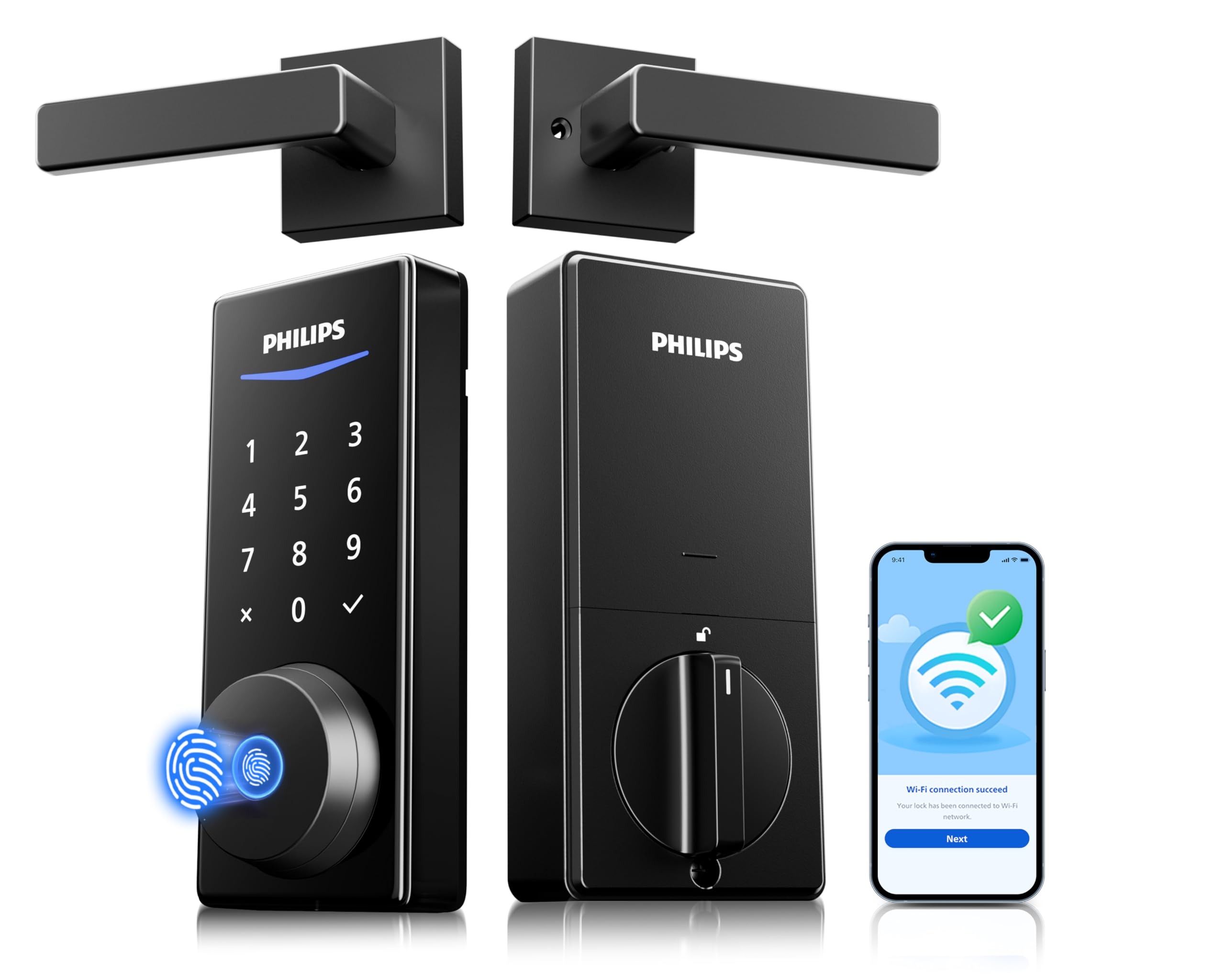
2. Philips Wi-Fi Smart Lock with Handles DDL240X
A lock-and-handle set that saves you a second install step.
The Philips DDL240X comes as a complete kit with two lever handles and a smart deadbolt, so you upgrade your door’s look and its security in one shot. It has built-in Wi-Fi (no extra hub needed), and owners mention the fingerprint reader works 100% of the time on the first try. The trade-off is battery life: the 8 AA batteries last about two months with frequent use — a significant difference from the one-year rechargeable battery in the Tapo DL110 above.
Philips ships the lock with 8 AA batteries in the box, and the lock supports voice control through Alexa and Google Assistant. You can set an auto-lock timer, create unlimited one-time PIN codes (temporary codes you share with a visitor), and get push notifications each time someone enters. One reviewer noted that the strike plate (the metal piece on the door frame the bolt locks into) did not fit their steel door and needed a separate replacement, so make sure your door frame is standard before you unbox it. The lock is rated 4.7 out of 5 stars from 186 reviews, making it the highest-rated unit in this group.
Faster entry, more battery swaps: This Philips set is ideal for someone who wants a matching handle-and-lock look with built-in Wi-Fi, but plan for monthly battery changes.
Flawless fingerprint, no door sensor: The reader works every time, but the auto-lock engages regardless of whether the door is fully closed, which means you must push the door shut.
Reach for this if: You are replacing both your handle and deadbolt, and you want a sleek, Wi-Fi connected setup controlled from the Philips app.
Not ideal for: Anyone who wants a set-and-forget battery that lasts longer than a couple of months, or doors with non-standard steel frames.
3. Schlage Encode Smart Wi-Fi Lock with Lever Handle
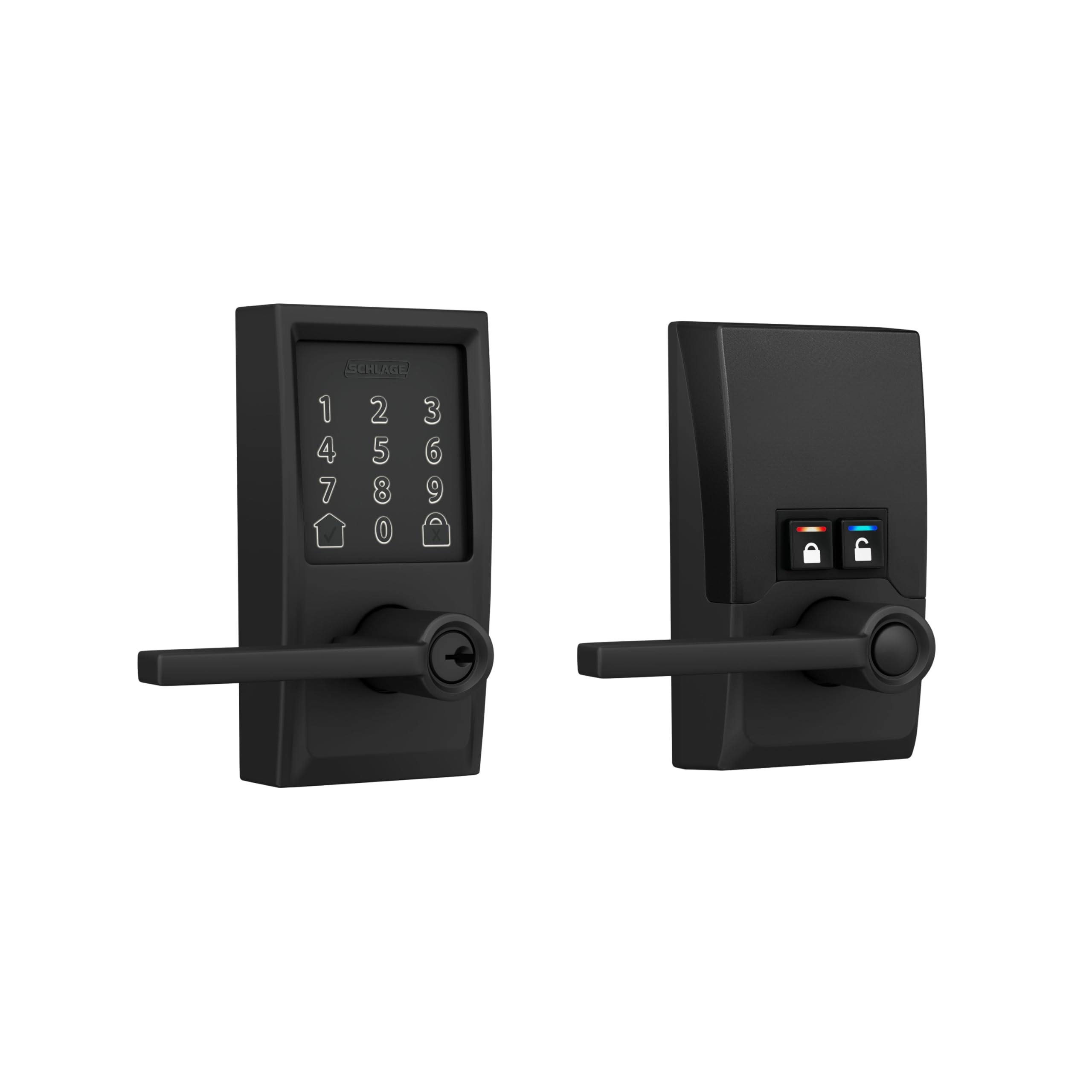
Top-tier security in a lever format from the most trusted name in door hardware.
Schlage holds the highest residential Security, Durability, and Finish rating from BHMA (Builders Hardware Manufacturers Association — this is the highest standard for home door locks), which means this lock is built to withstand daily slams and weather exposure better than most. It is a silent lever lock — it does not make the deadbolt thud noise, so it is a good fit for a door you open often, like one to a garage or patio. It uses built-in Wi-Fi and the Schlage Home app to manage up to 100 access codes, view lock history, and set auto-lock timers.
The lock runs on four AA batteries that the brand claims last up to six months. That is a shorter cycle than the one-year rechargeable Tapo DL110, but Schlage users consistently report the batteries drain slowly and predictably, hitting about 80% after three months. One significant missing feature for a lock at this level is a fingerprint reader (the Encode Smart Lever is code-only, so you cannot open up with your finger). Some users also reported occasional Wi-Fi connectivity issues, and the keypad is flat and non-illuminated, which makes it harder to use at night.
Schlage Security Credentials
- Highest BHMA residential rating for security, durability, and finish.
- Built-in customizable alarm detects door movement and forced-entry attempts.
- Silent lever operation — no loud deadbolt thud on lock/open up.
What’s Missing vs. Others
- No fingerprint reader; keypad and app entry only.
- Wi-Fi setup can require disabling the 5 GHz band on your router.
- Flat, unlit keypad is harder to use at night.
Best for: Homeowners who prioritize a proven brand and the highest security rating and are fine using codes or an app instead of a fingerprint.
Consider a different pick: If you want biometric entry (fingerprint) or need an illuminated keypad for dark entryways.
4. Wyze Auto-Lock Bolt v2
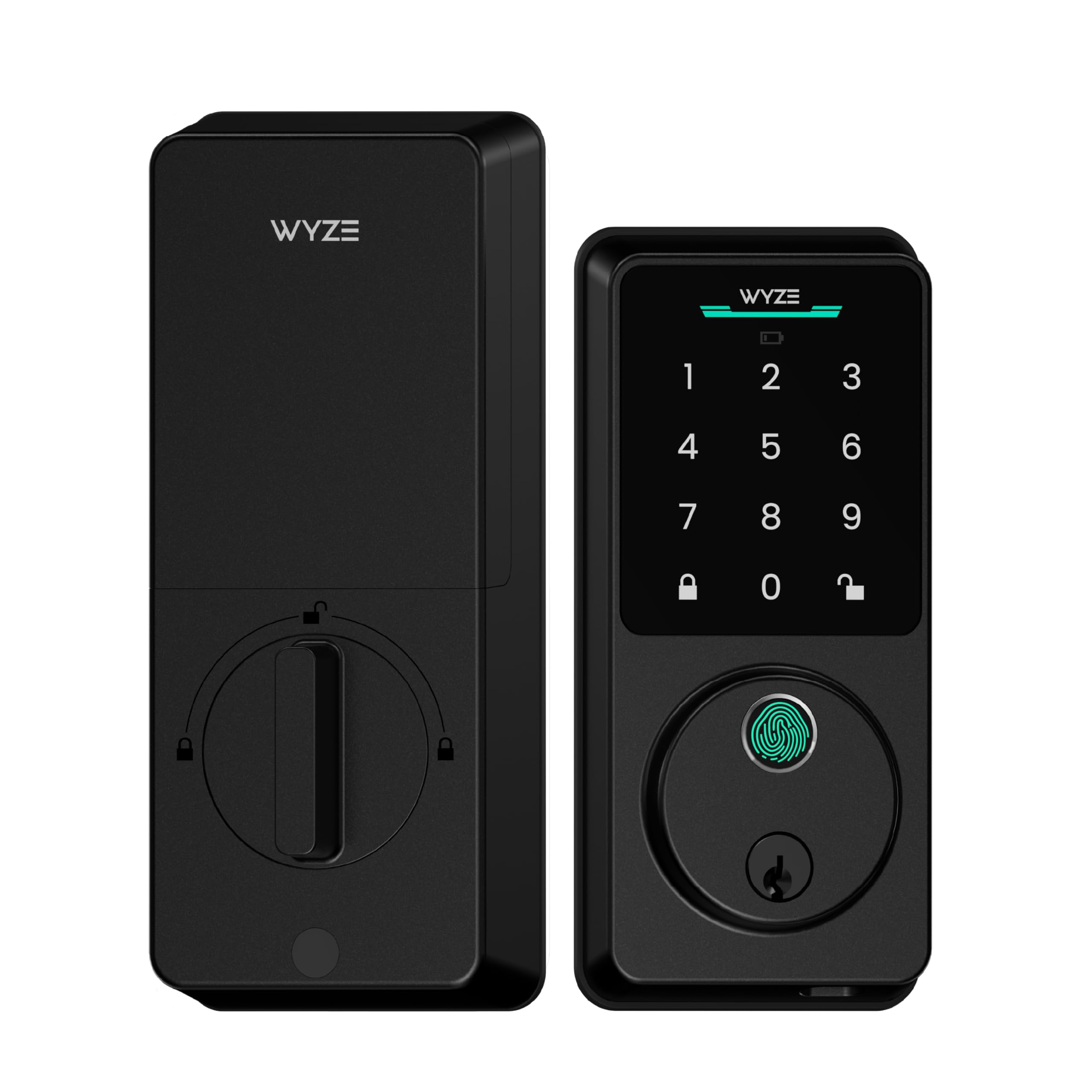
A ten-minute installation and a fingerprint that learns your finger.
Customers note that the Wyze Lock Bolt v2 took about 10 minutes to install using just a Phillips screwdriver — the easiest setup of any lock in this guide. It uses an AI learning scanner that improves fingerprint recognition over time, so the more you use it, the fewer failed scans you get. The fingerprint open up in 0.5 seconds, which is a touch slower than the Tapo’s 0.42 seconds, but the lock compensates with a USB-C emergency power port and a physical backup key in case the 8 AA batteries (included) die.
At 1.47 Kilograms, it is lighter than the Tapo and physically smaller overall — its dimensions are 7.09 x 2.93 x 1.41 inches versus the Tapo’s 5.91 x 2.69 x 1.29 inches. The Wyze app gives you remote lock/open up, instant notifications, and the ability to see live view and open up directly from a Wyze Video Doorbell feed. The lock carries an IP53 weather-resistance rating (an Ingress Protection rating where “5” means dust-protected and “3” means it can handle light sprays of water), so it handles rain splashes and dust, but it is not fully waterproof. A few reviewers noted the lock body is larger than a traditional deadbolt, so check the space around your door before buying.
Ten-minute install, smart learning: The Wyze is the fastest reliable path to a smart lock, with an AI fingerprint reader that improves with each use.
Not built for direct rain: The IP53 rating means it handles splashes but not sustained heavy rain, so keep it on a covered porch.
Your budget-friendly winner: A fast-installing, feature-rich smart lock with biometric entry and the security of two backup methods for under.
Look elsewhere: If you need a full-year battery cycle or a smaller lock profile that fits tight door frames.
5. Philips Wi-Fi Door Lock DDL242X

A straightforward Wi-Fi deadbolt with a 2-year warranty and fast fingerprint that one reviewer called better than an Ultraloq.
The Philips DDL242X is a simpler version of the DDL240X — a standalone deadbolt without the included handles. It has built-in Wi-Fi, so no hub or gateway is needed, and you can lock or open up it remotely from the Philips app. One reviewer who had owned an Ultraloq lock (another brand of smart lock) said this Philips was superior, specifically noting its fast fingerprint, tactile keypad, and hidden keyhole for the backup key. The lock supports up to 100 user passcodes plus unlimited one-time codes, and you can set auto-lock from 10 to 180 seconds.
The catch is that the lock takes 8 AA batteries, which are not included, and there is no included battery pack or USB-C emergency port if they die — you need the backup physical key. The touchscreen is the same one found on the DDL240X, and reviewers describe it as tactile and responsive. One detail to note: the lock only supports 2.4 GHz Wi-Fi networks, so if you have a mesh router that mixes 5 GHz and 2.4 GHz, you may need to set up a separate 2.4 GHz network for the lock.
The deadbolt-only path: A solid, Wi-Fi-connected deadbolt at a mid-range price with the best warranty in this group (2 years).
No battery and no USB-C: You need to supply 8 AA batteries and rely on the backup key if they run out, so keep spares ready.
It beats the Ultraloq: The Philips DDL242X is a strong upgrade for anyone who is already familiar with smart locks and wants a reliable built-in Wi-Fi deadbolt with a 2-year warranty.
skip it if: You want a rechargeable battery pack, a USB-C emergency port, or the convenience of having lever handles in the box.
6. Veise VE07-H Fingerprint Smart Lock
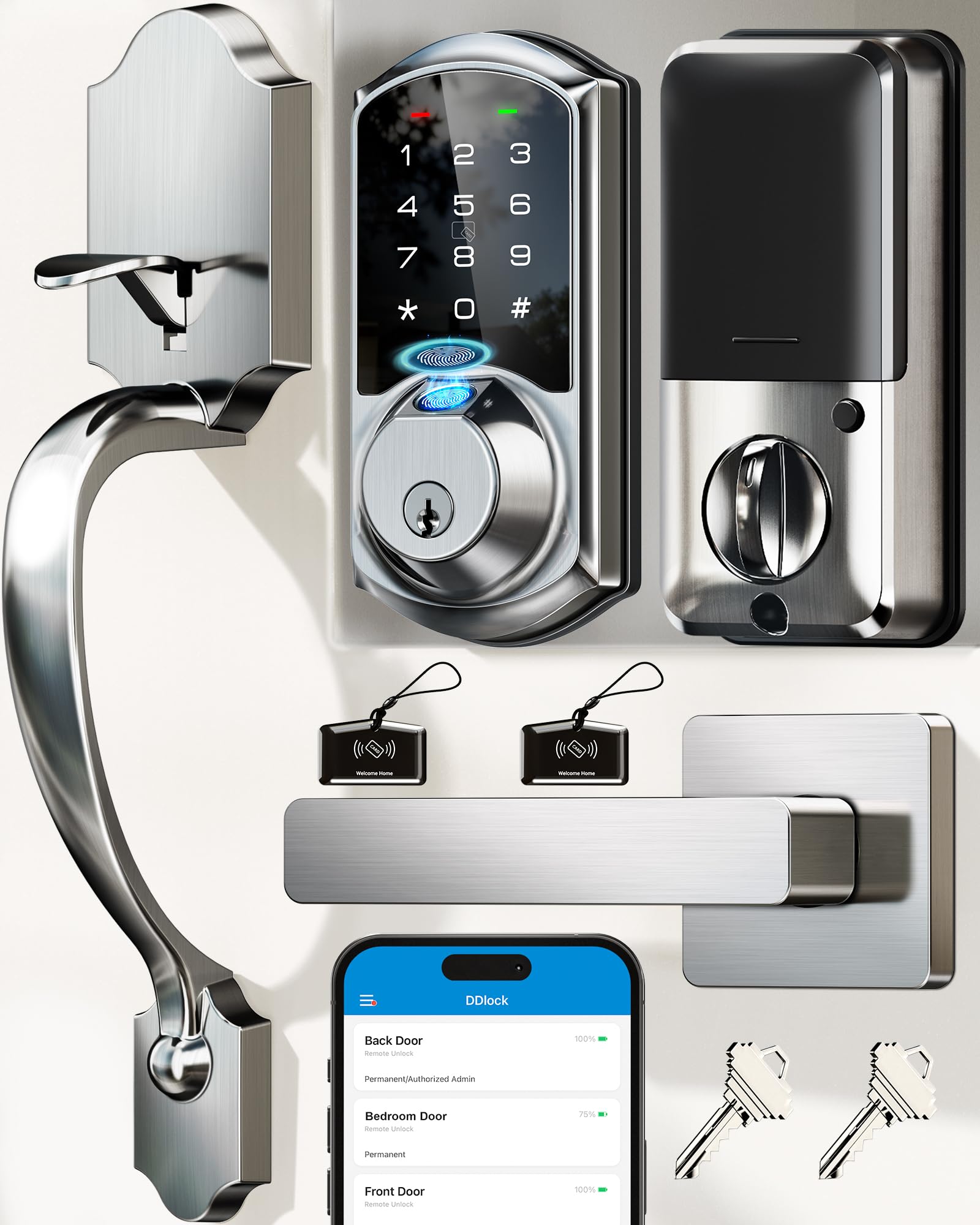
Sub-0.3-second fingerprint open up in a complete handleset — at a price that undercuts most competitors.
The Veise VE07-H is a full door handle set with an integrated smart lock, meaning you replace both the handle and the deadbolt in a single installation. The fingerprint reader open up in 0.3 seconds with 99.99% claimed accuracy, making it one of the fastest in this guide. It supports eight open up methods, including app, Apple Watch, web portal, eKeys (digital keys sent to guests), fobs, RFID cards, and a mechanical key. The auto-lock timer is adjustable from 5 to 900 seconds through the app, which gives you a lot of control over how quickly the door secures itself.
The lock runs on 4 AA batteries with a claimed 12-month battery life. However, remote app management requires the Veise G2 gateway, which is sold separately — without it, you can only control the lock via Bluetooth (a short-range wireless connection) within about 33 feet. Some reviewers noted installation can be tricky on metal doors that require drilling extra holes, and the door must be perfectly flush for the deadbolt to function smoothly. The finish is satin nickel, and the lock carries an IP54 weatherproof rating (protection from limited dust and splashing water), so it is fine for a covered front door but not for full exposure to rain.
Fast entry, handles included: For the price, the VE07-H delivers the fastest fingerprint reader and a complete handleset, though the gateway requirement is a hidden cost.
Works best on standard wood doors: Installation gets complicated on non-standard doors, and the deadbolt can bind if the door is even slightly misaligned.
Reach for this if: You need a fast-fingerprint handleset and are comfortable buying the separate gateway to enable remote app control.
Skip this if: You have a metal door or want built-in Wi-Fi without any extra hardware — this lock needs the G2 gateway for remote access.
7. Veise VE07-L Fingerprint Smart Lock
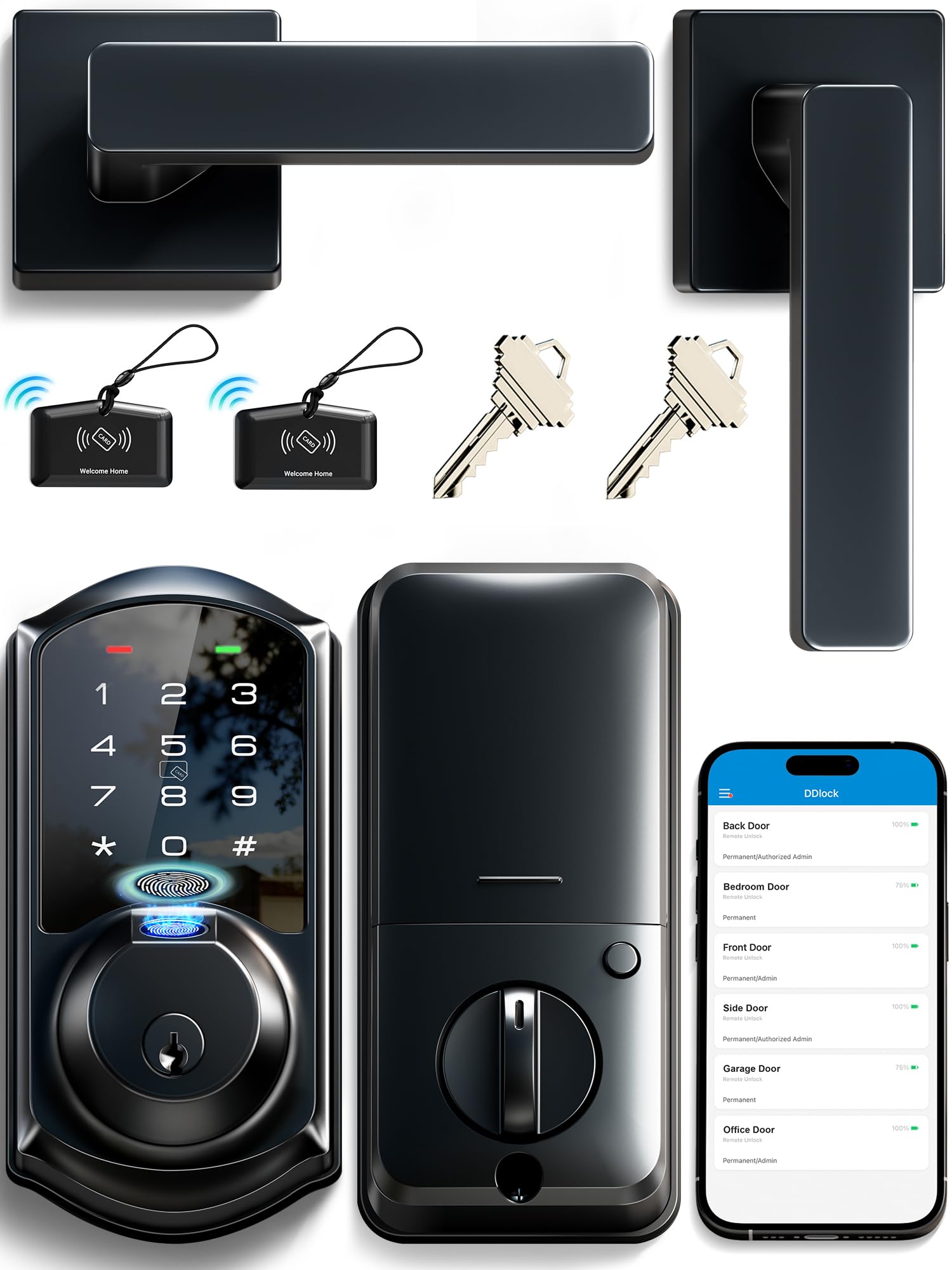
The fastest fingerprint of any lock here with a web portal perfect for landlords and property managers.
The Veise VE07-L open up in 0.2 seconds with a 99.9% accuracy rating from an AI self-learning fingerprint sensor. It offers eight ways in — including fingerprint, app, Apple Watch, web portal, codes, eKeys, fobs, and a mechanical key — but the standout feature is the web portal and app system designed for managing multiple properties. You can generate eKeys, create up to 250+ timed, recurring, or one-time codes, and view access logs for every door, all without a subscription fee. That makes it the only lock in this group designed specifically for tenants and rental management.
The lock uses 4 AA batteries and claims a 12-month battery life. It is built with heavy-duty zinc alloy handles and carries a BHMA/ANSI Grade 3 rating with an IP55 weatherproof seal (protection from limited dust ingress and low-pressure water jets), which means it resists rain better than the IP53 Wyze Lock Bolt v2. Like the VE07-H, remote app management requires the separate Veise G2 gateway. One buyer mentioned that Bluetooth connectivity dropped within 2 meters, so Bluetooth pairing can be unreliable if you are close to the door. The keypad needs to be manually tapped to wake up, and there is no auto-awake feature.
Landlord-Ready Portal
- Web portal designed for multiple-property and tenant management with no subscription fees.
- Unlimited one-time codes and up to 250+ scheduled codes for guests and cleaners.
- IP55 weatherproof and BHMA Grade 3 rated for exterior use.
Connectivity Hurdles
- No built-in Wi-Fi — requires the Veise G2 gateway (sold separately) for remote control.
- Bluetooth range is weak, with reviewers reporting drops within 2 meters.
- Keypad requires a manual tap to wake; no auto-awake when you approach.
Best for: Landlords or Airbnb hosts who need to manage multiple doors and guest access through a single web portal without paying monthly fees.
Not for: Anyone who wants built-in Wi-Fi from the start or needs reliable Bluetooth connectivity at close range.
Understanding the Specs
Fingerprint Recognition Speed
This number (like 0.2 sec or 0.42 sec) measures how fast the lock reads your fingerprint and disengages the bolt. Faster speeds mean you spend less time standing at your door — the gap between 0.5 sec and 0.2 sec is more than half the wait, which adds up when you arrive home with arms full of groceries.
Battery Life and Backup Methods
Battery life is stated in months, but the real difference is whether the lock uses disposable AAs or a rechargeable battery pack. Locks with USB-C emergency ports let you power the lock with a portable battery if the main batteries die, while physical backup keys are the simple mechanical failsafe. Always check what backup methods are included before you buy.
FAQ
Will any of these locks work with a metal or steel door?
What is the difference between built-in Wi-Fi and a lock that needs a gateway?
How long do the batteries really last in these locks?
Can I use these locks with Alexa or Google Assistant?
What happens if the lock’s battery dies completely while I am outside?
Are these smart locks secure enough for a front door?
Can I share temporary access with a dog walker or cleaner?
Will these locks work if the power goes out?
Final Thoughts: The Verdict
Across the board, the best automated door lock winner is the Tapo DL110 because it combines a 0.42-second fingerprint reader with a rechargeable battery that lasts a full year and built-in Wi-Fi — no extra gateway needed. If you want a complete handle-and-lock set with flawless fingerprint entry, grab the Philips DDL240X. And for a fast, budget-friendly setup with AI learning and USB-C backup, the standout is the Wyze Lock Bolt v2.
How We Picked
We do not accept paid placement. Every pick is matched to a real buyer and a real use-case; we do not hands-on test units.
Sources & Methodology
Specifications: manufacturer listings and product documentation. Review insights: verified customer reviews, as of July 2026. Pricing: not shown on this page (it changes often); check the current price via the retailer link.
As an Amazon Associate, Gadgets Feed earns from qualifying purchases. This does not affect which products we feature.