
Our readers keep the lights on and my morning glass full of iced black tea. As an Amazon Associate, I earn from qualifying purchases.
Specs are compiled from manufacturer listings and verified buyer reviews and can change over time — please confirm the key details on the product page before buying.
An automatic deadbolt throws its own bolt, so you never have to double-check the door. You walk out with your hands full, the bolt throws itself, and you never lie in bed wondering whether you actually locked up. This guide walks through the nine automatic deadbolts worth your attention, sorted by how they actually behave on a real door, not by how loud their spec sheets are.
I’m Min — the founder and writer behind Gadgets Feed. This guide is built by comparing the manufacturers’ published specifications and the patterns across verified customer reviews, so you get each pick’s real strengths and trade-offs instead of marketing spin.
Some models hide a fingerprint reader, some run on a keypad alone, and a few want a separate hub before they can talk to your phone. Below you’ll find the real differences between them, including which locks keep working when the internet drops, so you can choose the one that fits your door in a single read. Each pick below is judged on bolt hardware, entry method, and connectivity, covering the best automatic deadbolt lock options.
Our Picks at a Glance

How To Choose The Best Automatic Deadbolt Lock
An automatic deadbolt does one job no traditional lock can: it throws the bolt for you. That single behavior changes how you leave the house, how you go to bed, and how often you wonder whether the door is actually secured. The catch is that “auto-lock” means different things across brands, and a few models need a hub or bridge before they do what the box implies.
Decide your entry method first
A fingerprint reader is the fastest option for most people — touch the pad and the bolt retracts. But fingerprint reads get unreliable for kids under 6 and adults over 65, and cold or dirty hands make them worse. A palm vein reader scans blood-vessel patterns under the skin, which you don’t have to keep as clean. A plain keypad with physical buttons or a touchscreen works with nothing but a code, which is the most forgiving method in bad weather.
Check your auto-lock timer range
A shorter auto-lock window isn’t always better. Some locks can be set to throw the bolt as quickly as 30 seconds after the door closes, while others let you stretch it to 180 seconds. If you’re constantly carrying groceries in, a longer window saves you from the door locking behind you mid-trip. Some locks let you switch auto-lock off completely and use a one-touch lock button instead.
Know whether the lock needs a bridge for remote access
Bluetooth-only locks reach your phone from roughly 10 to 12 feet away, which covers standing in your driveway and not much else. If you want to open up the door from work or hand a delivery driver a one-time code while you’re out, you need either built-in Wi-Fi or a separate hub. Read the connectivity line on the spec sheet, because “app control” often means Bluetooth-only, not control from anywhere.
Quick Comparison
Every lock here throws the bolt on its own, so the real differences are entry method and connectivity. What separates them is how you get in, and what you need before your phone can reach them.
| Model | Best For | Entry Methods | Connectivity | Security Rating | Amazon |
|---|---|---|---|---|---|
| Yale Assure Deadbolt Lock with Touchscreen★ Best Overall | Everyday keyless front doors | Keypad code, back-up key | Bluetooth, Wi-Fi (upgrade kit needed) | — | Amazon |
| Fingerprint Smart Deadbolt with KeypadBest Value | Rentals and shared homes | Fingerprint, keypad, app, fob, key | Bluetooth (gateway for remote) | — | Amazon |
| Philips Fingerprint Keyless Entry Door LockBest Offline Pick | Offline privacy seekers | Fingerprint, touchscreen PIN, key | None | — | Amazon |
| Wyze Auto-Lock Bolt v2 | Budget Wi-Fi control | Fingerprint, keypad, app, key | Built-in Wi-Fi | BHMA2, IP53 | Amazon |
| Kwikset SmartCode 270 | Long battery stretches | Touchpad code, key | None | Grade 2 BHMA | Amazon |
| Yale Assure Lock 2 Key-Free Deadbolt | Keyless-door households | Keypad code, optional Auto-open up | Bluetooth (module upgradeable) | ANSI/BHMA Grade 2 | Amazon |
| Schlage Arrive Smart WiFi Deadbolt | Remote management | Push-button keypad, app, key | Built-in Wi-Fi, Bluetooth | BHMA residential certified | Amazon |
| eufy Security Smart Lock FamiLock E34 | Hands-free palm entry | Palm vein, keypad, app | Built-in Wi-Fi, Matter | ANSI/BHMA Grade 1, IP65 | Amazon |
| Lockly Secure Pro Smart Deadbolt | Code privacy and security | Fingerprint, PIN Genie keypad, app, key | Wi-Fi hub included | ANSI Grade 1 | Amazon |
In‑Depth Reviews
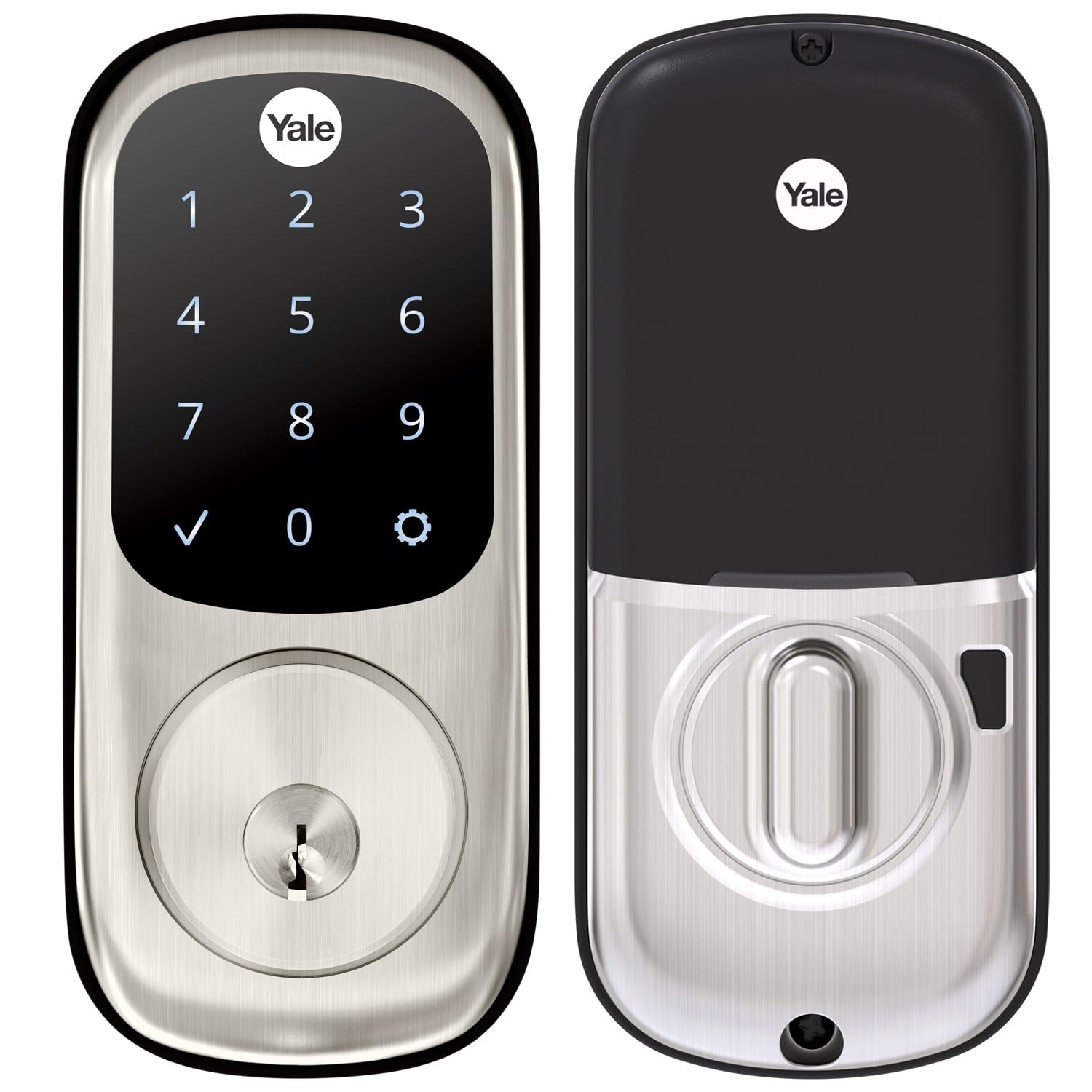
1. Yale Assure Deadbolt Lock with Touchscreen, Satin Nickel
Our pick — over 4.5★ from 700+ verified ratings; the strongest balance of quality and price.
The touchscreen deadbolt that proved itself worth buying twice over
Start with the shape of the thing. It measures 5.5 x 5.5 x 10 inches as a package, and it weighs 3 pounds, so it feels like a solid chunk of metal in your hand rather than a plastic shell. It runs on 4 AA batteries that come in the box, along with two physical keys for backup — so you’re never stuck outside if the electronics quit.
The built-in behavior is the selling point. The bolt throws itself after you leave or when you head to bed, and you can adjust that delay anywhere from 0 to 180 seconds, or switch it to manual if you’d rather control it. You can program multiple passcodes, hand a temporary code to a cleaner or a dog walker, and tap the touchscreen to wake it before you punch in your digits. It’s the crowd favorite here — 4.6 stars.
Owners consistently rate the build quality as the standout, and installation as the runner-up. As buyers report: “Owned a few months, no issues; install manageable for 24yo female but needed dad’s help as deadbolt hole wasn’t deep enough; ~30-60 min install; may need help if not handy/tech-savvy.” That’s the honest picture — it fits standard doors between 1-¾” and 2-¼” thick, and anything under 1-⅜” needs a thin door kit. The auto-lock feature draws more mixed feedback than anything else on this lock, with a handful of owners running into issues when the door doesn’t swing all the way open. Compare it to the Sifely pick further down and the Yale is the more polished product; the Sifely covers more ground on entry methods for a budget-tier buyer.
Where It Earns Its Place
- Adjustable auto-lock window from 0 to 180 seconds, so it fits a slow door swing or a quick exit
- Ships with 4 AA batteries and 2 backup keys, so you’re not buying a keypad to hang a spare key under the mat
- You can share temporary codes with guests, service people, or family without handing over a key
Worth Knowing Before You Buy
- Phone and smart home control need the Yale Access Upgrade Kit, sold separately
- Standard doors 1-¾” to 2-¼” thick fit fine; anything under 1-⅜” needs a thin door kit
- Some owners mention the auto-lock acting up when the door doesn’t fully open
Made for: a front door where you want a reliable keypad lock without paying for smart features you’ll never pair.
Move on if: you need to open up from your office tomorrow, since that requires the separately sold upgrade kit.
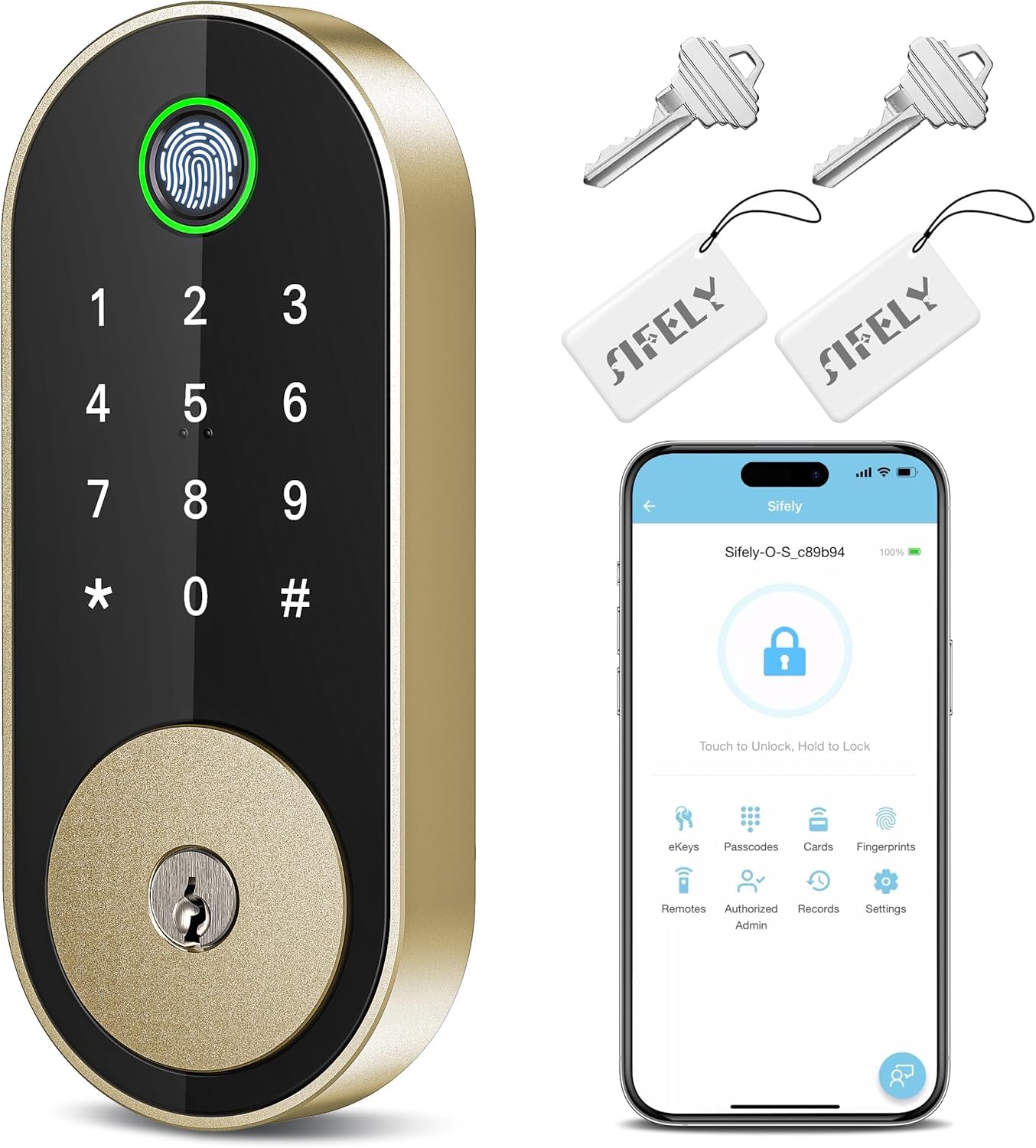
2. Fingerprint Smart Deadbolt with Keypad – Keyless Entry Lock
Five ways in, one small body, and enough code capacity to run a rental
This one measures 6.3 x 2.6 x 1.9 inches, which makes it noticeably more compact on the door than the Yale Assure above at 5.5 x 5.5 x 10 inches. If your entryway hardware is tight or you just don’t want a brick bolted to your door, that footprint difference is the first thing you’ll notice.
The Sifely Model O deadbolt gives you a fingerprint reader, a keypad, the app, a fob, and a physical key — five routes through the same door. It stores up to 100+ fingerprints and 100+ codes, which is genuinely useful if you’re running an Airbnb, a rental, or a busy household where the kids and grandparents all come and go. Setup is screwdriver-only, it handles both left- and right-handed doors, and the app handles eKeys, schedules, and access logs.
The quality of the hardware is what buyers talk about most, with the feature set right behind it. As owners put it: “This product install instructions are the best I’ve ever had the pleasure to use. It only took me 15 to install and set up. Great options.” The trade-offs are real, though — fingerprint reads can be finicky and sometimes want a second tap, the app can’t tell you whether the door is currently locked or open up, and Bluetooth only reaches 10 to 12 feet unless you buy the Sifely Gateway for remote access. Only one device can hold a login at a time, which gets awkward in a house with several phones.
Value math: the code and fingerprint capacity here is the highest in this list, and it lands in the budget tier — the Philips lock below costs a little more and gives up both the fingerprint count and the fob entry.
The practical snag: remote open up, voice control through Alexa or Google, and door-status readouts all need the separately sold gateway, so budget for that if “control from anywhere” is the feature you actually wanted.
Pick this for: a rental, an Airbnb, or a busy multi-person home that needs a lot of codes and a fingerprint reader without paying premium-tier money.
Think twice if: you need remote control from day one and don’t want to add a gateway.
3. Philips Fingerprint Keyless Entry Door Lock, Matte Black
No Wi-Fi, no app dependency, and a speaker that talks you through setup
Some people don’t want their front door on a network at all. This Philips deadbolt has no connection protocols — nothing to hack remotely, nothing to lose when your router drops. The aluminum and zinc body comes in matte black, and you get a fingerprint reader rated for recognition in 0.3 seconds, plus a touchscreen keypad and a mechanical key as the third fallback.
The fingerprint sensor carries a stated accuracy rate of up to 99.99%, and Philips flags two honest limits on it: recognition may be less effective for children under 6 and adults over 65, and the sensor wants clean, dry fingers and a dust-free pad. The one-time PIN feature is unlimited, so you can hand a delivery driver or a contractor a single-use code and never think about it again. Auto-lock is adjustable from 30 to 180 seconds, and there’s a one-touch lock — press and hold any number for 2 seconds and the bolt throws immediately.
The detail that separates this lock from the cheaper options is the setup. Voice-guided programming walks you through the whole thing in English, French, or Spanish, so you’re not squinting at a manual. As owners put it: “Very easy install and really appreciate the voice prompt programming. Even the fingerprint pad works, and my fingerprint never registers on anything.” Installation is a screwdriver job on standard doors, and it swaps an existing deadbolt without new drilling.
Two things to plan for: auto-lock is switched off from the start and has to be turned on manually, and the lock has no way of knowing whether your door is actually shut — if the door is standing open, the bolt will still extend, which Philips states plainly is not a malfunction.
Suits you if: you want fingerprint and code entry on a lock that never touches the internet, and you’d rather be talked through programming than read a booklet.
Look elsewhere if: you want to check or open up your door from another city.
4. Wyze Auto-Lock Bolt v2 Fingerprint Smart Lock

Where the Philips lock needs no network, this one puts Wi-Fi right inside the bolt
Built-in Wi-Fi is the whole argument for the Wyze Lock Bolt v2. There’s no bridge, no hub, no sold-separately module — the lock talks straight to your router, so you can check on it or open up it from anywhere the internet reaches. Pair it with a Wyze Video Doorbell and you can open up straight from the live feed.
The power story is the part that sticks. Wyze includes 8 AA batteries rated for up to 8 months of use, and if they ever die while you’re standing outside, there’s a USB-C port on the lock that lets you hold any common power bank against it to wake the door open. That’s a real answer to the locked-out scenario that scares people away from keyless locks entirely. The fingerprint scanner reads in 0.5 seconds through tempered glass that resists scratches and smudges, and Wyze says the AI learns from every touch to improve recognition over time.
Functionality is the thing buyers rate highest, with installation right behind it — most setups land around 10 minutes per unit, and the app usually auto-detects the lock and walks you through it. The recurring honest note is the fingerprint reader itself, which can be hit or miss. That lines up with a 95-year-old’s fingers failing to enroll due to poor circulation — a hand issue, not a lock issue — while a younger owner’s print added flawlessly on the first try.
The Wins That Matter Day To Day
- Built-in Wi-Fi means remote control from the start, no hub purchase required
- USB-C port lets a power bank revive a dead lock, so you’re never stuck outside
- 8 AA batteries ship in the box, rated for up to 8 months of use
- Auto-locks in 5 to 10 seconds with a custom timer you can stretch
The Honest Catch
- Fingerprint enrollment can be inconsistent, especially on dry or aged fingers
- The confirmation beep is quiet — you won’t hear it from across the house
The lock for: anyone who wants real Wi-Fi control without buying a separate bridge, and who values a physical escape hatch when batteries quit.
Skip if: fingerprint entry is your one and only way in and your hands tend to run dry.
5. Kwikset SmartCode 270 Keyless Entry Touchpad Deadbolt

The battery-first deadbolt that trades smart features for a year of silence
No Wi-Fi, no fingerprint reader, no app. The Kwikset SmartCode 270 gives you a touchpad, a code, and a bolt that throws itself after 30 seconds, 1 minute, 3 minutes, 5 minutes, or 10 minutes — your pick. In exchange you get a battery rated to last at least 12 months on 4 AA alkalines, which is the thing most smart-lock owners end up complaining about.
Kwikset rates the security, durability, and finish as Grade 2 BHMA certified, which the manufacturer states is up to 2.5x stronger than Grade 3 BHMA certified lock sets. The keypad takes 50 user codes, 10 one-time user codes, and 1 programming code for editing and deleting them. After three wrong code entries in a row, the lock sounds an alarm and shuts the keypad off for a minute. Tap the pad to light it up so you can read the buttons at night.
Installation is where this lock wins people over, with the matte black rectangular look close behind. As owners put it: “Good lock easy to set up. Opens quick and does multiple codes. I’d buy again.” It goes onto a standard steel door in about 30 minutes with a screwdriver, and the SmartKey system lets you re-key the cylinder yourself to any KW1 key in seconds — genuinely useful if you’ve just moved in.
Long-term caveat: the reliability and durability line on this model is more mixed than the installation praise. Owners generally report years of smooth service, though the occasional unit has misaligned and needed realigning, so it’s worth keeping the receipt and reading the install guide closely.
Best fit for: a door you lock with a code and want to leave untouched — no apps, no charging, no notifications, just a year of battery.
Don’t choose it if: remote open up, fingerprints, or smart-home voice control are on your must-have list.
6. Yale Assure Lock 2 Key-Free Deadbolt with Bluetooth Keypad
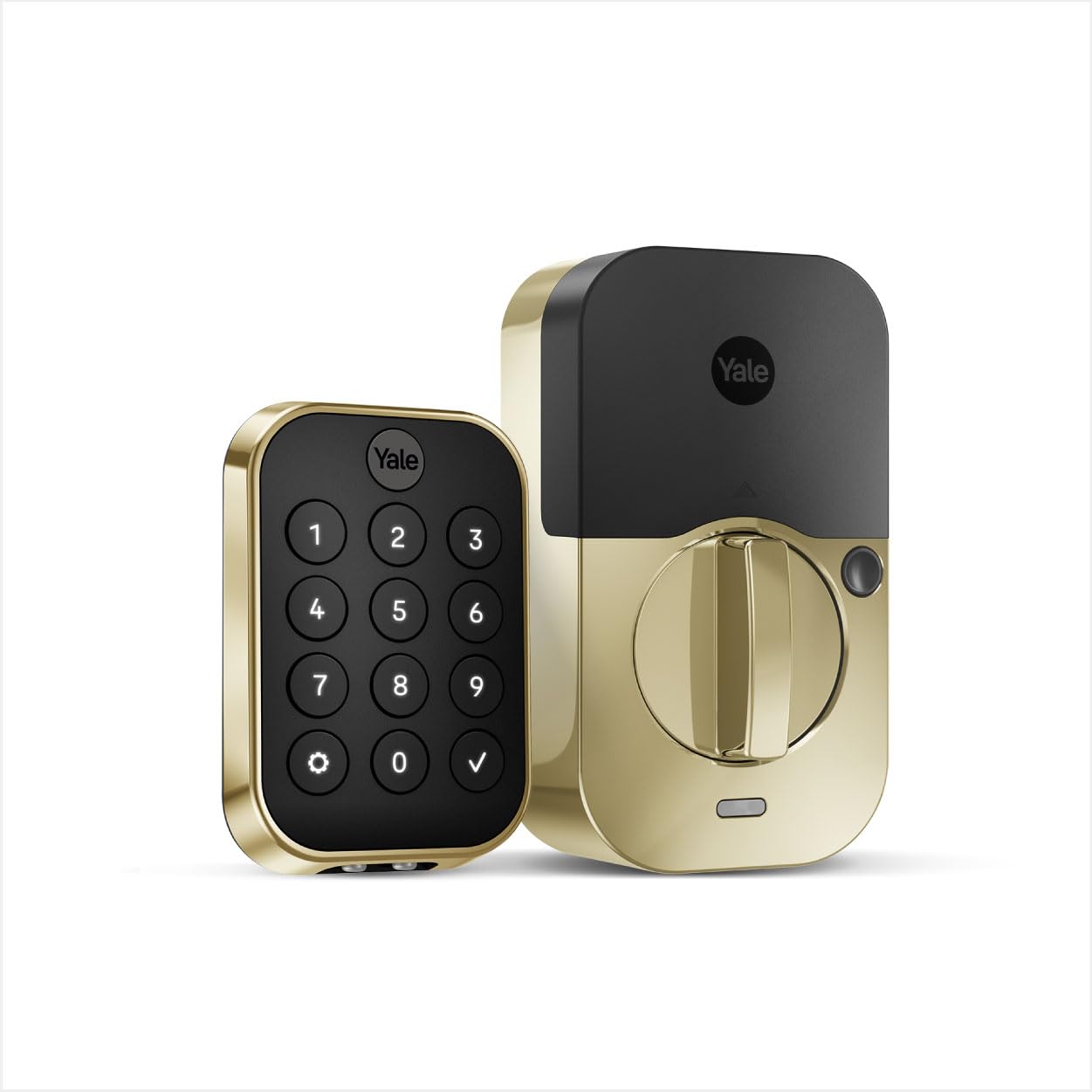
A deadbolt with no keyhole at all, and a sensor that knows when the door shuts
Notice what’s missing: there’s no key cylinder on this version. The exterior is keypad only, which means nobody can pick it, bump it, or drill it. Auto-open up handles the other end — walk up with your hands full and the door opens without touching the lock or your phone. It’s aimed at the sort of household that has genuinely stopped carrying keys.
Yale pairs it with DoorSense, a sensor that detects when the door has actually closed before the auto-lock fires. That’s a meaningful difference from locks that throw the bolt on a timer regardless of door position. Security ratings: ANSI/BHMA Grade 2 certified, Bluetooth encryption, codes stored locally on the lock rather than in the cloud, and a matte keypad designed to resist showing fingerprint smudges. You can share unlimited entry codes through the Yale Access App within Bluetooth range, and the lock is upgradeable with a Wi-Fi or Z-Wave module later if you want to add remote access.
Installation is rated the strongest thing about this lock, with the finish right behind it. Fit matters here, though: the deadbolt needs the correct backset, and one owner ran into real trouble because the trim required a 2.5″ backset workaround. It’s built for standard door thicknesses, so measure before you commit.
Upgrade path: this is the only pick here that lets you start with Bluetooth-only control and add Wi-Fi or Z-Wave later without replacing the lock — useful if you’re not sure whether remote access is worth the cost.
What the fence-sitters hit: the design’s keyless exterior is a real security win, but the lack of an on-lock keyhole means there’s no key-based way in if the batteries die unexpectedly, and the trim is bulky at the door jamb.
Ideal owner: someone who wants the cleanest possible deadbolt — no key, no cylinder, and an auto-lock that waits for the door to actually close.
Consider a different pick if: you’d rather keep a physical key slot as a safety net.
7. Schlage Arrive Smart WiFi Deadbolt Lock with Camelot Trim
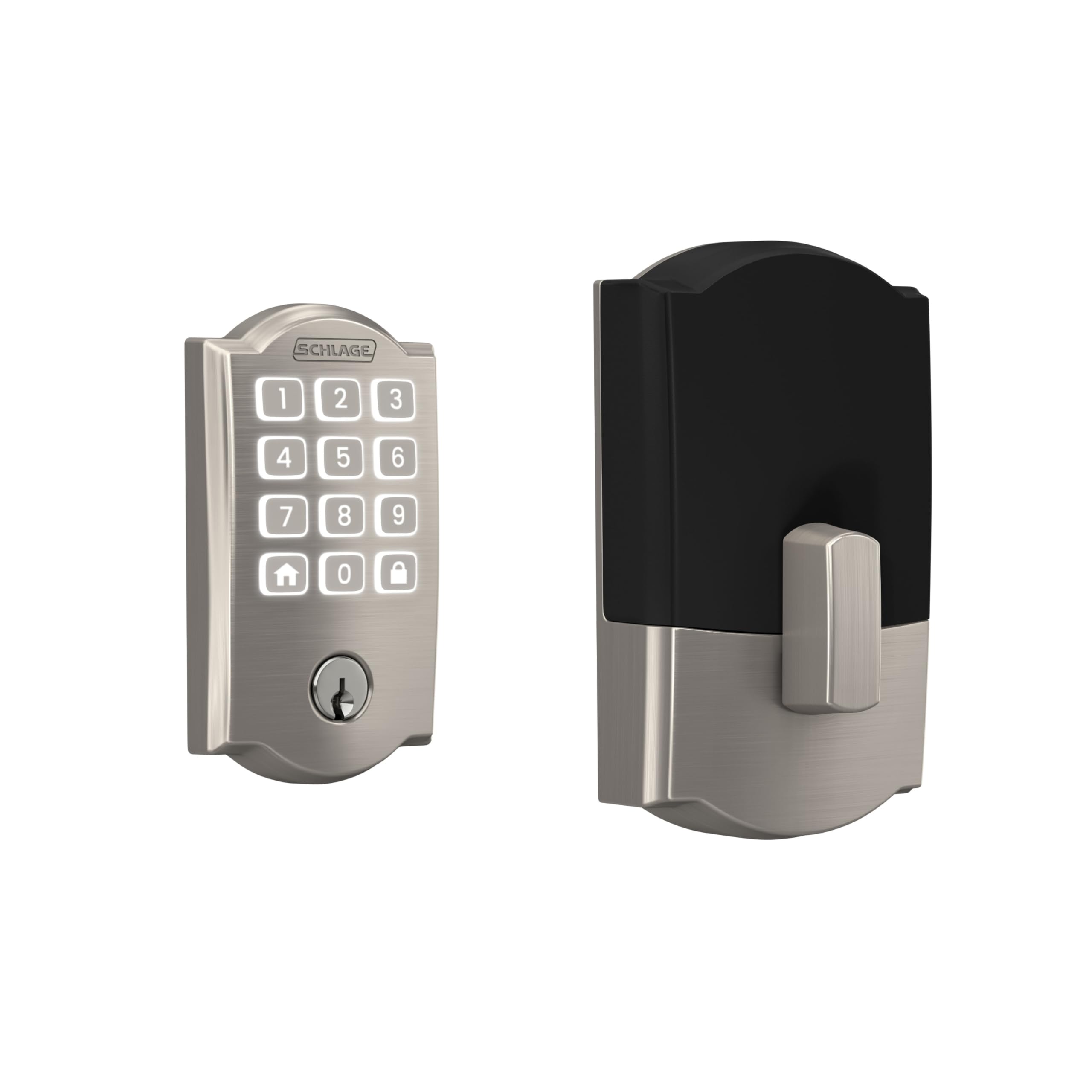
Built-in Wi-Fi, a keypad that forgives wet fingers, and app management for a whole property
Wi-Fi is inside the lock itself here, so you connect it straight to your home network through the Schlage Home app and control it from anywhere — no adapter, no dongle, no second box hunting for an outlet. The app handles up to 250 access codes, so if you’re managing a rental or a full household, you’re covered for a very long time.
The keypad uses all-weather silicone push-button keys with backlighting, which is a practical difference from touchscreens the moment your hands are wet or the temperature drops. It also gives you a satisfying click as feedback. Auto-lock relocks the door for you with several time delay options, or you can turn it off completely and rely on one-touch locking from the exterior keypad. Alexa, Google Home, and Ring integrations are supported, so voice routines and video doorbell automations are on the table.
The weight comes in at 2.4 pounds, which puts it in the chunkier category of locks — a sign of the metal construction rather than a problem. Installation takes a screwdriver and around an hour with the in-app guidance, and the finish is rated to match the lock’s mechanical hardware. Schlage is a name you’ll recognize, and buyers rate the overall quality of this lock highly, with the setup process right behind it.
Strengths Worth Paying For
- Built-in Wi-Fi means remote lock, open up, and history from anywhere with no extra hardware
- Up to 250 access codes, useful for guest lists, rentals, or a large family
- All-weather silicone buttons with backlight make code entry easier with cold or wet hands
- Alexa, Google Home, and Ring compatibility opens the door to voice routines and doorbell integration
What The Hard Users Report
- Wi-Fi connection quality draws some mixed reports — most connect quickly, but a few find it finicky
- No fingerprint reader, so entry is keypad or app only
- The inside handle is lighter aluminum and can feel rattly when locking
Built for: landlords, hosts, or busy households who need to issue, manage, and revoke a lot of access codes without touching the lock.
Think twice if: you’d rather have fingerprint speed than a keypad, or your home Wi-Fi is notoriously unreliable.
8. eufy Security Smart Lock FamiLock E34 with Palm Vein Recognition

Hold your palm near the sensor and the deadbolt gives way in under a second
Palm vein recognition is the feature here — the lock scans the vein pattern under the skin of your hand, stated at 99.9% accuracy and recognition in just 0.6 seconds. That beats fingerprints on paper because your vein pattern sits below the surface, so dirty hands, cold fingers, and surface wear don’t interfere with it the way they can with a print reader. All the palm data is stored locally on the lock, not the cloud.
The power system is unusually thoughtful. There’s a 10,000mAh rechargeable lithium battery rated for up to 8 months of use, plus a 750mAh non-removable backup battery that keeps the lock running while you swap the main pack. The main battery charges the backup automatically, so there’s no window where the door is dead. Connectivity is built-in Wi-Fi — no bridge required — and the lock works with Apple Home, Google Home, Alexa, and SmartThings through Matter.
What buyers praise most is how well the whole thing works day to day, with installation right behind the palm reader. The lock is rated ANSI/BHMA Grade 1 and IP65 waterproof, and it fits standard US and Canada doors with no drilling. The recurring gripe centers on the bolt not fully closing in some door alignments, so a properly hung door matters here more than on most picks.
The palm reader in practice: hands-free is genuinely hands-free — you don’t set a finger on anything, which matters when your arms are full of groceries or a toddler.
Where it fumbles: an occasional scan fails on the palm reader too, and if the door isn’t hung level, the bolt can have trouble seating fully in the strike plate.
Choose this if: you want the most advanced entry method on this list, backed by dual batteries and Matter-based smart-home support.
Skip if: your door is old and out of square — this lock is least forgiving of a poor door fit.
9. Lockly Secure Pro Smart Deadbolt Lock with WiFi Hub
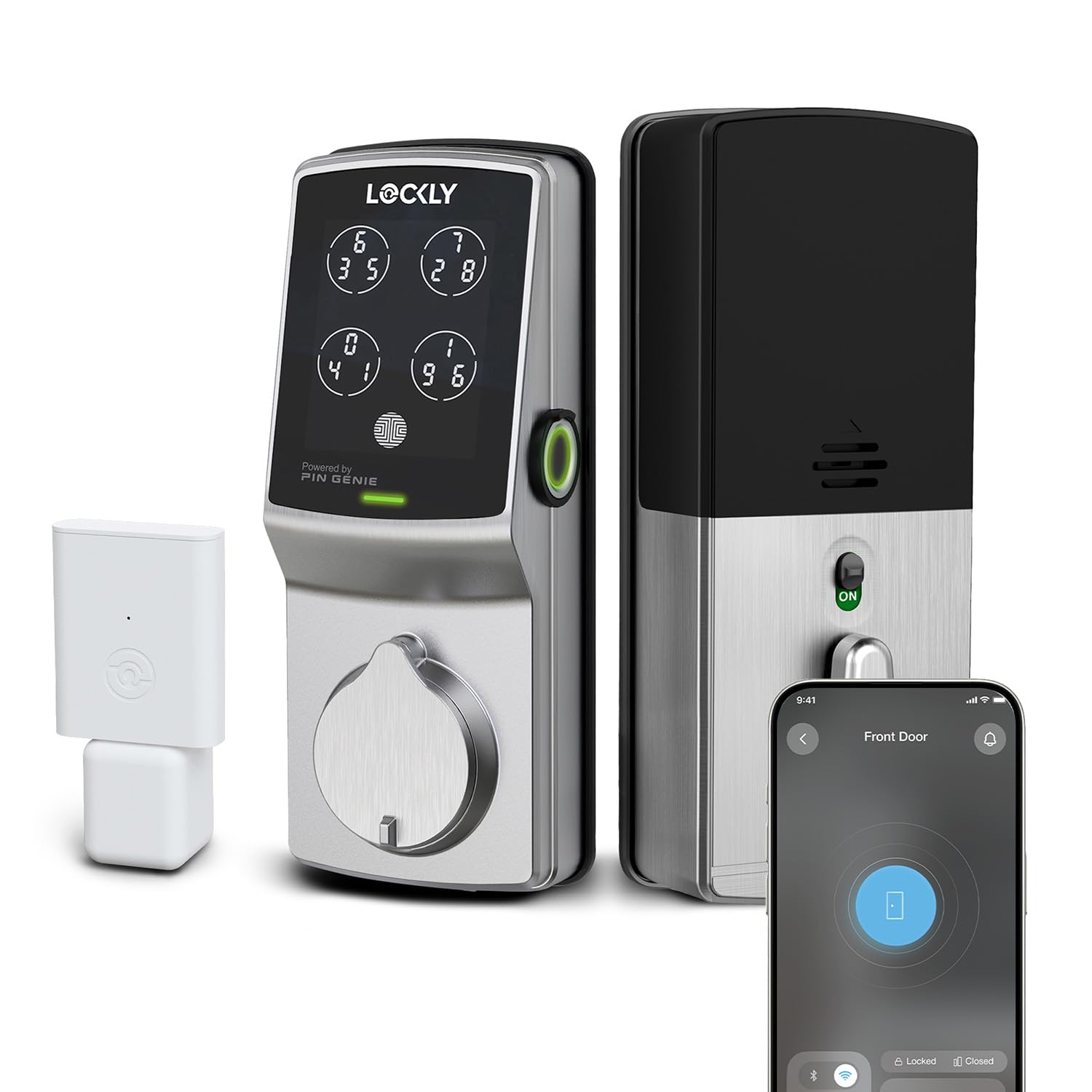
The keypad that shuffles its own digits every time you look away
The PIN Genie pad is the headline. It rearranges the digit positions every time the keypad lights up, so even someone standing right behind you while you enter a code sees a layout that won’t work next time. For anyone who’s ever worried about a stranger memorizing their code from a distance, that’s a specific and unusual answer. It stores up to 99 fingerprints locally, reads them in 0.3 seconds, and manages up to 33 free PIN codes with no subscription.
What really separates it, though, is what’s in the box. The Secure Link Wi-Fi Hub ships with the lock — plug it in, connect it to your router, and you’ve got remote lock, open up, and access history through the Lockly app. Alexa and Google Assistant support comes along with it. The lock is ANSI Grade 1 rated for residential security, paired with a rekeyable 6-pin cylinder you can rekey yourself, no locksmith. Installation is a 15 to 30 minute DIY job on standard door prep, and an extension screw kit is included for thicker doors.
Customers note the functionality as the strength here, with ease of use right behind it — the app handles everything without any on-lock programming. As owners put it: “Long-time Lockly user (7 yrs). Scramble keypad prevents code theft.” The recurring honest note is that the app occasionally can’t find the lock, and on rare occasions the lock will re-lock itself immediately after a manual open up.
Security-first design: a Grade 1 rating and a code-scrambling keypad put this above every other lock here on the spec sheet. If break-in resistance matters more than smart-home integration, this is the one.
Right for: anyone who wants the security rating and code-loading features to be the loudest thing about their deadbolt, and wants the Wi-Fi hub included rather than upsold.
Look past it if: you keep a minimalist smart-home setup and would rather not deal with a wall plug for the hub.
Understanding the Specs
The three numbers that decide whether an automatic deadbolt feels easy or annoying are entry method, auto-lock timing, and how the lock reaches the internet. Here’s what each one actually means for your front door.
Entry Methods Explained
Fingerprint scanners read the ridge pattern on your fingertip and open up in roughly 0.3 to 0.5 seconds. The catch: kids under 6 and adults over 65 often have skin that reads inconsistently, and most manufacturers tell you to keep fingers clean and dry. Palm vein scanning goes deeper — it reads vein patterns under the skin, so surface moisture and wear matter far less. Plain keypad entry is the most forgiving method in every condition, which is why you’ll still find it on almost every lock here as a backup route.
Auto-Lock Timers
Auto-lock fires the bolt on a delay after the door closes or after you lock it manually. Shorter windows — 30 seconds or a minute — are safest for a front door on a busy street. Longer windows up to 180 seconds give you room to carry things in and out without the lock chomping at your heels. Some locks let you disable auto-lock and use a one-touch button instead, and at least one pick here uses a door sensor to confirm the door is actually shut before the bolt fires.
Connectivity and Remote Access
Bluetooth-only locks reach your phone from roughly 10 to 12 feet, so they’re fine standing in your driveway but useless from an office. Built-in Wi-Fi removes the middleman — you connect the lock straight to your home router. A hub setup puts a small bridge device between the lock and your router, which usually adds remote control and voice-assistant compatibility but requires an outlet and a bit more setup. Check which one a lock uses before you buy, because “app control” often means Bluetooth-only unless Wi-Fi is spelled out.
Security Ratings and Door Fit
ANSI/BHMA ratings — Grade 1, Grade 2, Grade 3 — compare a lock’s resistance to attack, with Grade 1 being the highest residential rating and Grade 3 the entry level. IP ratings like IP53 and IP65 describe water and dust protection; higher numbers mean better sealing against weather. Then there’s the door itself: the lock has to match your door’s thickness (commonly 1-3/8″ to 2-1/4″) and backset. Measure before you buy, because a lock that doesn’t fit means a return trip and a hole in your door.
FAQ
Will an automatic deadbolt fit my existing front door without new drilling?
How fast does fingerprint entry actually work?
Does an automatic deadbolt work if my Wi-Fi goes down?
How long do the batteries last on these locks?
Do I need a hub or bridge to open up from another city?
Can I use a fingerprint lock if I have dry hands or am older?
What happens if the auto-lock fires while my door is still open?
How many codes can I hand out to family, guests, or contractors?
Do automatic deadbolts come with a physical key as a backup?
Can I use these locks on a door that gets rained on?
Which entry method is fastest for someone carrying grocery bags?
Final Thoughts: The Verdict
For most people the pick is the Yale Assure Deadbolt Lock with Touchscreen — the auto-lock fires on its own, the codes are easy to manage, and the build quality is what owners bring up most. The Sifely Fingerprint Smart Deadbolt with Keypad costs less and adds fingerprint, fob, and key entry, which suits a rental or shared house. And if security ratings and code privacy are your top priorities, the Lockly Secure Pro with its scrambling PIN Genie keypad and included Wi-Fi hub is the one to reach for. Whichever you choose, measure your door thickness and backset first, because a lock that doesn’t fit your door is a return trip.
How We Picked
We do not accept paid placement. Every pick is matched to a real buyer and a real use-case; we do not hands-on test units.
Sources & Methodology
Specifications: manufacturer listings and product documentation. Review insights: verified customer reviews, as of September 2026. Pricing: not shown on this page (it changes often); check the current price via the retailer link.
As an Amazon Associate, Gadgets Feed earns from qualifying purchases. This does not affect which products we feature.