
Our readers keep the lights on and my morning glass full of iced black tea. As an Amazon Associate, I earn from qualifying purchases.
Specs are compiled from manufacturer listings and verified buyer reviews and can change over time — please confirm the key details on the product page before buying.
You have a pile of paper on your desk that just will not shrink. The whole point of an automatic document feeder scanner is to turn that stack into searchable files in minutes, not hours, so you can get back to the work that actually matters. The catch is that not every ADF scanner handles the job the same way — some choke on a staple, others force you to flip pages by hand, and a few keep jamming at exactly the wrong moment.
I’m Min — the founder and writer behind Gadgets Feed. This guide is built by comparing the manufacturers’ published specifications and the patterns across verified customer reviews, so you get each pick’s real strengths and trade-offs instead of marketing spin.
After looking at the feeding mechanisms, scan speeds, and software polish across four models, the lineup below sorts the real workhorses from the frustrating time-sinks so you can pick the right automatic document feeder scanner for your workflow.
Quick Picks
- Epson WorkForce ES-580W — Best Overall
- Fujitsu fi-7160 — Pro Workhorse
- Epson WorkForce ES-500W II — Wireless Value
- Xerox Visioneer Xerox D35 — Budget Compact
How To Choose The Best Automatic Document Feeder Scanner
Before you buy, focus on the three specs that separate a smooth workflow from a daily headache: the ADF sheet capacity, the scan speed, and whether it scans both sides at once. A machine with a 100-sheet feeder buys you ten minutes of freedom while it chews through a stack; a 50-sheet feeder means one reload halfway through. Duplex scanning (capturing both sides in a single pass) literally cuts your time in half compared to a single-sided model. Speed is measured in ppm (pages per minute) for one side and ipm (images per minute) for duplex — look for at least 35 ppm if you handle more than a few dozen pages a week.
ADF Capacity: The Hands-Off Factor
The sheet capacity of the automatic document feeder is the single biggest predictor of whether you can multitask. A 50-sheet feeder is fine for a small home office where you scan one client file at a time. A 100-sheet feeder lets you load a full expense report or a thick contract and walk away. The Epson ES-580W holds 100 sheets; the Xerox D35 and the Fujitsu fi-7160 hold 50 sheets. That difference alone changes how often you have to get up from your chair.
Duplex Scanning: One Pass vs Two
Duplex means the scanner reads the front and back of a page in one pass using two optical sensors. If you scan double-sided documents — and who does not — a duplex scanner is mandatory. Without it, you scan the front side of your stack, flip every page manually, then scan the back side. Every model on this list is duplex, but the quality of the software that keeps the pages aligned varies. The Fujitsu’s PaperStream software, for example, is powerful but buyers report it has a steep learning curve.
Connectivity and Software
Wireless connectivity (Wi-Fi) lets you scan directly to cloud services like Google Drive or Dropbox without a computer. The Epson models have Wi-Fi built in; the Xerox D35 and the Fujitsu fi-7160 are USB-only, meaning they need to be tethered to a PC or Mac. Software matters just as much — searchable PDFs created with Optical Character Recognition (OCR) turn your paper into text you can search, copy, and edit. Some models come with TWAIN drivers that let you scan directly into programs like Quicken or your medical records software, which reviewers for the Epson ES-580W praised for working with eClinicalWorks.
Quick Comparison
| Model | Best For | ADF Sheet Capacity | Duplex Scan Speed | Weight | Amazon |
|---|---|---|---|---|---|
| Epson ES-580W | High-volume wireless workflow | 100 | 35 ppm / 70 ipm | 3.7 kg | $399.99$449.99Amazon |
| Fujitsu fi-7160 | Mission-critical daily reliability | 50 | — | 9.3 Pounds | $1,239.49Amazon |
| Epson ES-500W II | Wireless scanning on a mid-range budget | 50 | 35 ppm / 70 ipm | 8.1 Pounds | $386.99$419.99Amazon |
| Xerox D35 | Budget-conscious compact office | 50 | 45 ppm / 90 ipm | 5.1 Pounds | $299.99Amazon |
In‑Depth Reviews
1. Epson WorkForce ES-580W

Load a 100-page contract and walk away — the feeder buys you real freedom.
The ES-580W is the pick for anyone who scans regularly and values being untethered from a computer. Its 100-sheet Auto Document Feeder (ADF) holds 100 sheets, while the Xerox D35 holds 50, so you can load a full stack and not come back until it is done. It scans both sides in one pass at up to 35 pages per minute (70 images per minute), and the built-in Wi-Fi lets you send scans straight to Dropbox, Google Drive, or OneDrive without booting up a PC. The 4.3-inch touchscreen on the scanner itself lets you pick a destination with a tap.
Owners mention that the customizable presets for emailing organized PDFs are a genuine time-saver, and that clearing a jam is quick thanks to an auto-resume feature that picks up where it left off rather than making you re-scan the whole batch. The 30-bit color depth (the amount of color information the sensor captures) means photos and shaded documents reproduce with more smooth gradation than an 8-bit or 24-bit machine. A few owners noted it lacks an Ethernet port — if you need a wired network connection rather than Wi-Fi, this is a limitation to weigh.
Unlike the Fujitsu fi-7160, which relies on a USB cable, the ES-580W works fully wirelessly and even supports scanning straight to a USB drive plugged into the scanner, so you never have to touch a cable for daily use.
Why It Leads
- 100-sheet ADF is the largest capacity on this list
- Wireless scanning to cloud or USB without a computer
- CCD sensor (captures sharp images from wrinkled or imperfect originals)
The Trade-Off
- No Ethernet port — Wi-Fi only for network connection
- Weighs 3.7 kg; the compact Xerox D35 weighs 5.1 lbs
The Daily Driver: If you scan stacks of paper every week and want to skip the computer step, this is the one.
The One Caveat: If your office requires a wired LAN connection for security, you will need to look at a USB model or add a wireless bridge.
2. Fujitsu fi-7160

The tank that handles thousands of pages weekly with barely a misfeed.
The fi-7160 is built for volume. It weighs 9.3 pounds, while the Xerox D35 weighs 5.1 pounds, and that weight comes from a CCD sensor (a charge-coupled device that uses a lens system, similar to a good digital camera) plus a paper path designed to minimize jams over tens of thousands of pages. Reviewers report a reliability figure that is rare to see in print: roughly two misfeeds per 5,000 pages scanned. It scans a single-sided page per second in duplex mode at 300 dpi (dots per inch, the standard resolution for readable text).
The 50-sheet ADF is the same capacity as the Xerox D35, but the fi-7160 is in a different league for daily endurance. Its PaperStream software handles image cleanup — removing blank pages, straightening crooked scans, and adjusting contrast — but multiple customers note the software is powerful yet poorly documented and requires creating profiles to get the most out of it. The scanner itself is USB-only, so there is no Wi-Fi option here; you connect it directly to a PC.
The Epson ES-500W II weighs 8.1 pounds, while the Fujitsu weighs 9.3 pounds, and the Fujitsu is built for an office where the scanner sits on a desk and runs all day. If your volume is sporadic or light, the extra weight and premium price may not make sense.
Built to Last
- Industry-leading reliability — 2 misfeeds per 5,000 pages
- CCD sensor delivers crisp image quality even on crumpled paper
- Fast duplex scanning at roughly 1 page per second
Worth Knowing
- No wireless connectivity — USB cable only
- PaperStream software has a steep learning curve and requires profile setup
For the Heavy Lifter: This scanner earns its spot if you feed it thousands of pages a month and cannot tolerate jams.
skip it if: You need wireless scanning or just scan a few documents a week — the Epson models deliver that flexibility for less.
3. Epson WorkForce ES-500W II

The wireless duplex scanner that does not make you reinstall drivers every month.
The ES-500W II hits the balance for a home office or small business that wants Wi-Fi scanning but does not need the 100-sheet feeder of the ES-580W. Its 50-sheet ADF is enough for a client file or a batch of receipts, and it scans duplex at 35 ppm (70 ipm) — the same per-minute speed as the flagship ES-580W. You can email scans or upload to cloud services using the Epson Smart Panel mobile app without being at the scanner.
One point buyers mention is that a memory overflow issue with legal-size color scans at high resolution was resolved by a 2025 driver update, so the early-adopter headache is gone. The ultrasonic double-feed detection (a sensor that uses sound waves to catch two pages going through together) prevents missing pages and protects against stapled pages damaging the rollers — a feature the Xerox D35 lacks. However, some reviewers point out that switching from Wi-Fi to USB mode requires a full software reinstall, which is inconvenient.
At 8.1 pounds it is heavier than the Xerox D35 (5.1 pounds) but lighter than the Fujitsu fi-7160 (9.3 pounds). If you want wireless scanning without paying for the top-tier ES-580W, this is the logical middle step.
Balanced Pick
- Wireless duplex scanning at the same ppm speed as the flagship model
- Ultrasonic double-feed detection prevents missed pages and staple damage
- Memory overflow issue from early units has been fixed via driver update
Small Annoyances
- Switching from Wi-Fi to USB mode requires a full software reinstall
- 50-sheet ADF means reloading on larger batches
Mid-Range Winner: This is the choice if you want wireless scanning today and do not need a 100-sheet tray.
Look Elsewhere If: You scan more than 50 pages at a time regularly — stretch to the ES-580W for the larger feeder and the touchscreen interface.
4. Xerox Visioneer Xerox D35
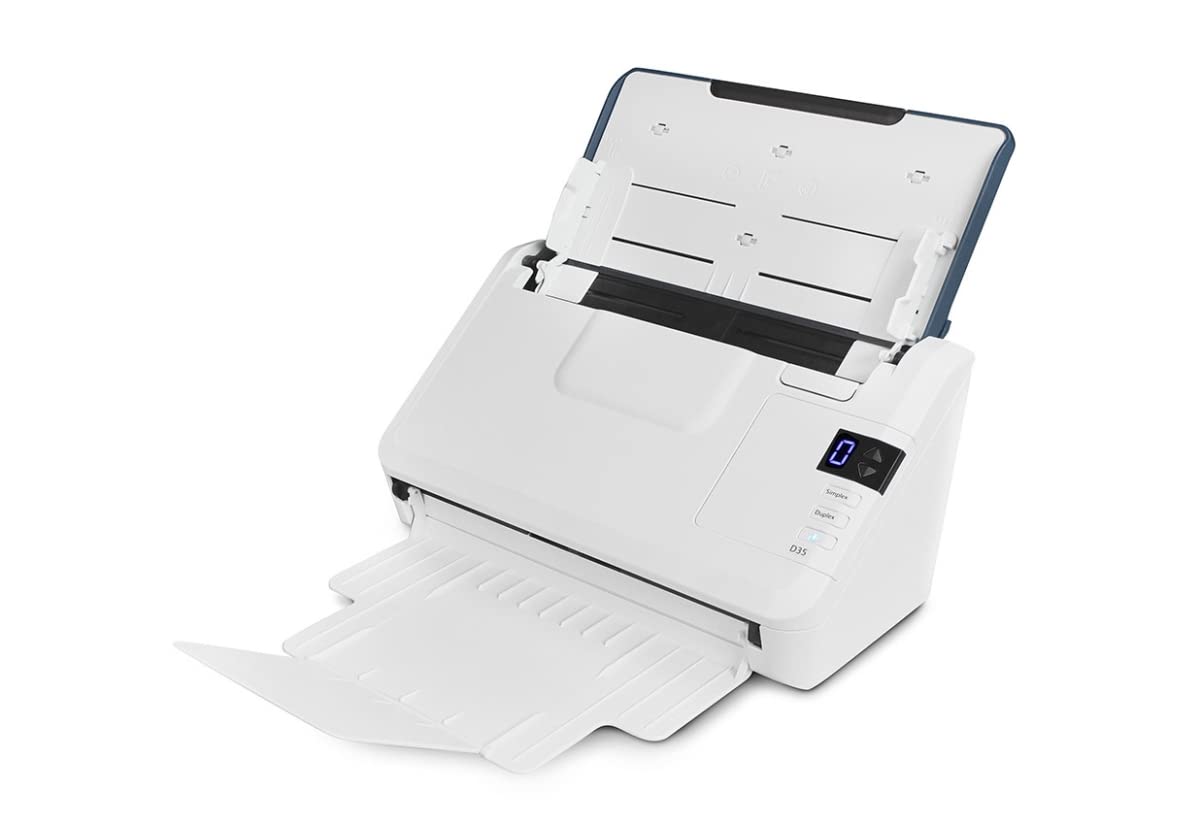
The fastest listed speed in a light chassis that fits on a cramped desk.
The Xerox D35 is the lightest scanner here at 5.1 pounds and the one with the highest claimed scan speed: 45 pages per minute (90 images per minute) at 200 to 300 dpi. That beats the Epson models (35 ppm) on paper, but some buyer experiences reveal the reality is less smooth. Multiple reviewers mention an occasional “problem scanning” message on the first attempt, then a successful second try, and one noted that multi-page batches of more than 10 pages can be finicky — a significant limitation for an ADF scanner.
The 50-sheet ADF capacity matches the Epson ES-500W II and the Fujitsu fi-7160, but the D35 is a USB-only device. There is no Wi-Fi, so you are tethered to a computer. The Visioneer VAST cloud technology is included for saving files online, but that still requires a host PC. The Visioneer Acuity image enhancement technology (software that sharpens and cleans up the scan) helps produce readable scans from wrinkled receipts or faded thermal paper.
One buyer described the included software as “antique” and frustrating, with poor file-storage defaults and many pre-scan setup steps. If you are on a tight budget and can tolerate a little user interface friction, the D35 delivers fast raw scan speed in a small footprint — but the Epson ES-500W II adds Wi-Fi and a smoother software experience for a moderate step up.
What Stands Out
- Fastest listed raw speed at 45 ppm / 90 ipm
- Lightest unit at 5.1 pounds — easy to move or store
- Visioneer Acuity cleans up imperfect originals automatically
Real Frustrations
- Occasional “problem scanning” error on first attempt
- Software described by users as outdated and frustrating to navigate
- Multi-page batches over 10 pages can be unreliable
Price-Conscious Pick: Grab this if you need the fastest possible scans on a small desk and do not mind working through some software quirks.
Better Options: If you scan more than ten pages at a time or want wireless freedom, the extra spend on the Epson ES-500W II removes the biggest pain points.
Understanding the Specs
ADF Sheet Capacity
The Automatic Document Feeder (ADF) is the tray that holds the stack of paper. The sheet capacity (50 or 100) is how many pages the feeder can pull through without you reloading. A 100-sheet feeder like the one on the Epson ES-580W lets you load a thick report and walk away; a 50-sheet feeder requires you to come back halfway through if you are scanning more than 50 pages. For anyone who regularly scans stacks, the larger tray is the single biggest time-saver.
Duplex Speed (ppm / ipm)
PPM stands for pages per minute — how many single sides the scanner reads in sixty seconds. IPM stands for images per minute — each side of a page counts as one image, so a duplex scanner that captures both sides in one pass lists a higher ipm number (for example, 35 ppm / 70 ipm). A faster speed matters most when you are scanning a large batch; the Xerox D35 claims 45 ppm / 90 ipm, while the Epson models run at 35 ppm / 70 ipm, but real-world software and feeding reliability affect the actual throughput.
Optical Sensor: CCD vs CIS
CCD (charge-coupled device) sensors use a lens and mirror system, similar to what is inside a standalone digital camera. They produce sharper images from wrinkled, creased, or imperfect paper because they capture more light detail. CIS (contact image sensor) sensors are flatter, cheaper, and lighter, but they struggle with textured or curled paper. The Epson ES-580W and the Fujitsu fi-7160 use CCD sensors; the Xerox D35 uses a CIS sensor, which partly explains its lighter weight.
Duty Cycle
The duty cycle is the maximum number of scans the manufacturer says the machine can handle in a day without wearing out. The Xerox D35 has a stated duty cycle of 8,000 pages per day. This number is more of a peak design limit than a daily recommendation — for regular heavy use, you want a scanner built to that volume, like the Fujitsu fi-7160, which is known as the world’s most popular business scanner precisely because it survives high daily loads.
FAQ
What does ADF mean on a scanner?
Is 50-sheet ADF enough for a home office?
Can I scan to cloud storage without a computer?
What is the advantage of a CCD sensor over CIS?
Will a duplex scanner automatically scan both sides?
How fast should my scanner be for occasional use?
Why does my ADF scanner sometimes misfeed or jam?
Can I scan plastic ID cards or embossed cards with an ADF scanner?
Do I need a TWAIN driver for scanning into business software?
Is OCR included with all document scanners?
Final Thoughts: The Verdict
Across the board, the automatic document feeder scanner winner is the Epson WorkForce ES-580W because its 100-sheet ADF and direct wireless scanning handle the highest daily volume with the fewest interruptions. If you want the proven reliability that survives thousands of pages without jamming, grab the Fujitsu fi-7160. And for wireless duplex scanning on a budget, the Epson ES-500W II delivers the same per-minute speed as the flagship without the premium price.
How We Picked
We do not accept paid placement. Every pick is matched to a real buyer and a real use-case; we do not hands-on test units.
Sources & Methodology
Specifications: manufacturer listings and product documentation. Review insights: verified customer reviews, as of July 2026. Pricing: not shown on this page (it changes often); check the current price via the retailer link.
As an Amazon Associate, Gadgets Feed earns from qualifying purchases. This does not affect which products we feature.
Product prices and availability are accurate as of the date/time indicated and are subject to change. Any price and availability information displayed on Amazon at the time of purchase will apply to the purchase of this product. As an Amazon Associate I earn from qualifying purchases.
CERTAIN CONTENT THAT APPEARS ON THIS SITE COMES FROM AMAZON. THIS CONTENT IS PROVIDED "AS IS" AND IS SUBJECT TO CHANGE OR REMOVAL AT ANY TIME.
Amazon and the Amazon logo are trademarks of Amazon.com, Inc. or its affiliates.