
Our readers keep the lights on and my morning glass full of iced black tea. As an Amazon Associate, I earn from qualifying purchases.
Specs are compiled from manufacturer listings and verified buyer reviews and can change over time — please confirm the key details on the product page before buying.
If your check engine light just came on, the fastest way to stop guessing is to plug a diagnostic tool into your car’s OBD2 port and read the actual fault code yourself. The right scan tool tells you what the computer already knows — a misfiring cylinder, a lazy oxygen sensor, a loose gas cap — before you pay anyone to look at it.
I’m Min — the founder and writer behind Gadgets Feed. This guide is built by comparing the manufacturers’ published specifications and the patterns across verified customer reviews, so you get each pick’s real strengths and trade-offs instead of marketing spin.
Some tools here just read and clear codes; others talk back to your car’s modules and run factory-level tests. The one that fits your driveway depends on how deep you want to go with an automotive diagnostic scan tool.
Our Picks at a Glance


How To Choose The Best Automotive Diagnostic Scan Tool
Not every scan tool does the same job. A basic OBD2 code reader pulls engine fault codes and clears the check engine light. A bidirectional scan tool goes further — it can command a module to run a test, like firing an ABS pump or cycling a radiator fan, so you confirm a fault instead of guessing at it. Figure out which camp you need before you spend.
Start with your diagnostic goal, not the price tag
If you just want to know why the check engine light is on, a plug-and-play reader covers it. If you plan to bleed brakes, reset a steering angle sensor, or chase an intermittent electrical gremlin, you need a tool with service functions and bidirectional control. Decide that first, then shop within that tier.
Check OBD2 port compatibility before you buy
Every gas vehicle sold in the U.S. from 1996 onward has a 16-pin OBD2 port, but the depth of what a tool can read varies by brand and year. Some modules — like ABS, SRS, or transmission — only open up on certain makes. Manufacturers publish coverage checkers for exactly this reason, so run your VIN through one before checkout.
Weigh software updates against subscription costs
A scan tool is only as current as its software. Free lifetime updates keep new model-year coverage without extra fees. Some pro-grade tools bundle a couple of years free, then charge an annual renewal to keep the full feature set alive. Ask what stays active after any trial or free window ends.
Match the screen and connection style to how you work
You get easier-to-read live graphs from a tablet-style tool with a large display, but it tethers you to the OBD2 cable (the plug under your dash that connects to your car’s computer). A Bluetooth dongle pairs to your phone and frees you from the driver’s seat — handy when you need to watch a sensor while revving the engine. Neither is “better”; it depends on if you want a dedicated screen or your own phone.
Quick Comparison
| Model | Best For | Connection | Service Functions | Screen Size | Amazon |
|---|---|---|---|---|---|
| Autel MaxiCOM MK900BT★ Best Overall | Shops and serious DIY | Bluetooth (VCI dongle) | 40+ | 8 inches | Amazon |
| FOXWELL NT301Budget Champion | Beginners and budget buyers | Wired | — | 2.8 inches | Amazon |
| GEARWRENCH GWSMARTBTPhone-Powered Pro | Free-updates value hunters | Bluetooth dongle | 23 | Phone screen | Amazon |
| Innova SD35 | DIY all-system coverage | Bluetooth tablet | Oil reset, TPMS, battery test | 3.5 inches | Amazon |
| BlueDriver | Easy phone-based diagnostics | Bluetooth dongle | — | Phone screen | Amazon |
| MUCAR CS6 | 6-system scanning on a budget | Wired | 7 | 5 inches | Amazon |
| TOPDON AD600S | Wide vehicle coverage | Wired | 9 | 5 inches | Amazon |
| BLCKTEC 460T | All-system resets and repair app | Wired | 12+ | 4.3 inches | Amazon |
| TOPDON ArtiDiag Pro | ECU coding and pro-level work | Wired | 35+ | Tablet display (1024×600) | Amazon |
In‑Depth Reviews
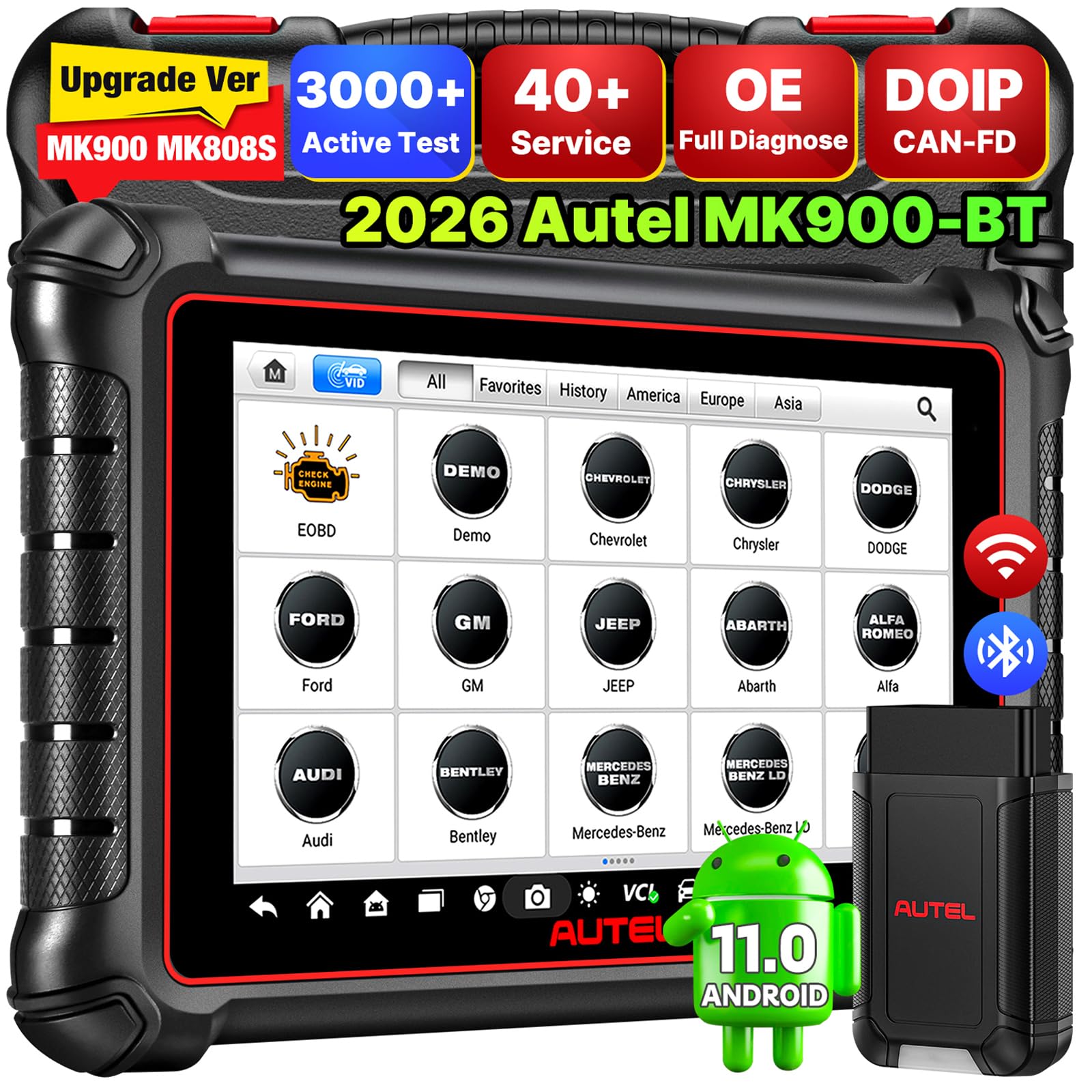
1. Autel Scanner MaxiCOM MK900BT Bidirectional Tool
Our pick — over 4.5★ from 800+ verified ratings; the strongest balance of quality and price.
A bidirectional tablet that runs 3000+ active tests and 40+ service resets.
If you have ever burned a Saturday swapping parts on a hunch, this is the tool that ends the guessing. The MK900BT runs 3000+ active tests — that means it can actually command a component, like a fuel injector, radiator fan, or AC clutch, to switch on and off so you see whether the part works, not just whether a code fired. You also get 40+ maintenance services across 150+ brands, covering the popular jobs like oil reset, ABS bleed (pushing brake fluid through the anti-lock system), steering angle calibration, and battery registration.
The hardware itself is built for long sessions. The 8-inch display (1280×800 resolution — sharp enough to read live graphs without squinting) sits on Android 11.0 with a quad-core RK3566 chip and 4 gigabytes of RAM with 64 gigabytes of storage. A 7700mAh battery keeps you working away from an outlet. The MaxiVCI V150 connector talks to the car over Bluetooth, and Autel advertises 33 feet of wireless range, so you can watch data from outside the cabin instead of curling up under the steering wheel.
Two features separate it from the cheaper tablet tools on this list: CAN FD and DoIP protocol support (newer data languages that open up networks on 2019+ GM vehicles and select BMW, Volvo, and Jaguar/Land Rover models), plus one-click Wi-Fi printing of pre- and post-repair reports. Buyers report it works on vehicles as old as a 1998, so this one tool spans a modern truck and a driveway classic. The learning curve is real though — the menu system is dense, and the free software update runs for one year before a renewal is needed to keep the newest coverage.
What Techs Keep Reaching For
- 3000+ active tests let you command components, not just read codes
- 40+ service resets across 150+ brands and 10,000+ vehicles
- Bluetooth VCI with 33 feet of wireless range
- CAN FD and DoIP cover newer networks on 2019+ GM and select BMW, Volvo, and JLR models
Where It Demands Patience
- Steep menu system — budget time to learn it
- Free software updates run one year, then a renewal keeps the newest coverage
- Battery test and endoscope features need separate add-on purchases
Heavy daily use: A shop tech or a serious DIY owner who wants a full diagnostic tablet without the flagship price will get years out of this.
Weekend tinkerer: If you only ever clear a check engine light, the depth here is more capability than you will use.
2. FOXWELL NT301 OBD2 Scanner
A plug-in engine code reader that clears the check engine light with one click.
The NT301 is the tool most people should start with. You plug it into the 16-pin port, turn the key, and it reads and clears engine fault codes with one click — no pairing, no app, no subscription. It shows you live sensor data in graph form too, so you can watch oxygen sensors, fuel trims, coolant temperature, and RPM as the engine runs. For a buyer who just wants the check engine light explained before a shop visit, that covers the whole job.
The screen is a 2.8-inch color display (320×240) with a built-in speaker, and it runs on the car’s own power — no charging. It supports all the standard OBD2 protocols including KWP2000, J1850 VPW, ISO9141, J1850 PWM, and CAN, which covers most 1996+ gas cars, light trucks, and SUVs in the U.S. It also has dedicated I/M readiness hotkeys with a red-yellow-green indicator — a quick way to know if the car is ready for an emissions test before you drive to the inspection center.
There is a ceiling, and it is worth naming. This is an engine-only reader: it will not touch ABS, SRS, or traction control, and it does not offer bidirectional controls. Coverage varies by year, make, and model, so a few users do find their specific vehicle is not fully supported. Against the Autel MK900BT, this is a fraction of the tool — but for clearing codes and reading live engine data, it earns its place.
What buyers notice first: It reads codes in about 30 seconds, shows built-in code definitions on screen, and clears a check engine light only after you have fixed the underlying issue — so the light stays off for the right reason.
One honest note: Not every reviewer finds the manual helpful. The I/M readiness symbols and the erase hotkey are not explained clearly, and shoppers shopping the whole category should know that going in.
First scan tool: Ideal for a car owner who wants to stop paying diagnostic fees for a light they can read themselves.
Deeper diagnostics: If you need ABS, SRS, or transmission modules, step up — this one stays in the engine bay.
3. GEARWRENCH Professional Bi-Directional Diagnostic Scan Tool
A Bluetooth dongle that turns your phone into a 23-reset bidirectional tool.
Here is the value play: a compact dongle plugs into the port and turns your phone into a bidirectional scan tool, with 23 vehicle reset and relearn functions — throttle matching, ABS bleeding, and TPMS reset among them. It covers 185+ car manufacturers, and the software updates are free forever with no subscription attached. The absence of a yearly fee is the single biggest reason a DIY buyer picks this over a tablet tool that charges to stay current.
The hardware runs on Android 10.0, and it delivers live data mapping plus freeze frame capture, so it can log a snapshot of sensor readings the moment a code sets. When a fault is intermittent and refuses to show itself in the driveway, that freeze frame is what gives it away. Users with JDM vehicles — Mazda, Toyota, Nissan — and BMW owners mention solid coverage here.
The catch is connectivity. Bluetooth is slow to pair, and a couple of owners flag real headaches: the app connects through your phone’s Bluetooth settings rather than the OS pairing menu, and the activation is tied to a single registered phone — replace that phone and the registration can be lost, which is a real waste. Coverage is not universal either; some users find certain modules, like a Mazda airbag reset, refuse to respond. Sizing that fairly: this is one of the highest-rated tools in the category on value, and those gripes are the “know before you buy” kind that come from pushing a phone-based tool hard, not a reason to pass.
The case for the dongle: For the price of a subscription-free phone tool, you get bidirectional control (the ability to command parts on and off, not just read codes), 23 service resets, and a live data graph that would sit on a much pricier scanner — cheap insurance if you plan to own your car for years.
Know this first: If you swap phones often or drive a car with fussy module support, confirm compatibility and keep your current phone on the account.
One phone, one car, careful savings: A great fit for a hands-on owner who wants bid control without a subscription tax.
Shared or multi-phone households: The single-device registration and fussy pairing may frustrate you.
4. Innova SD35 OBD2 Scanner
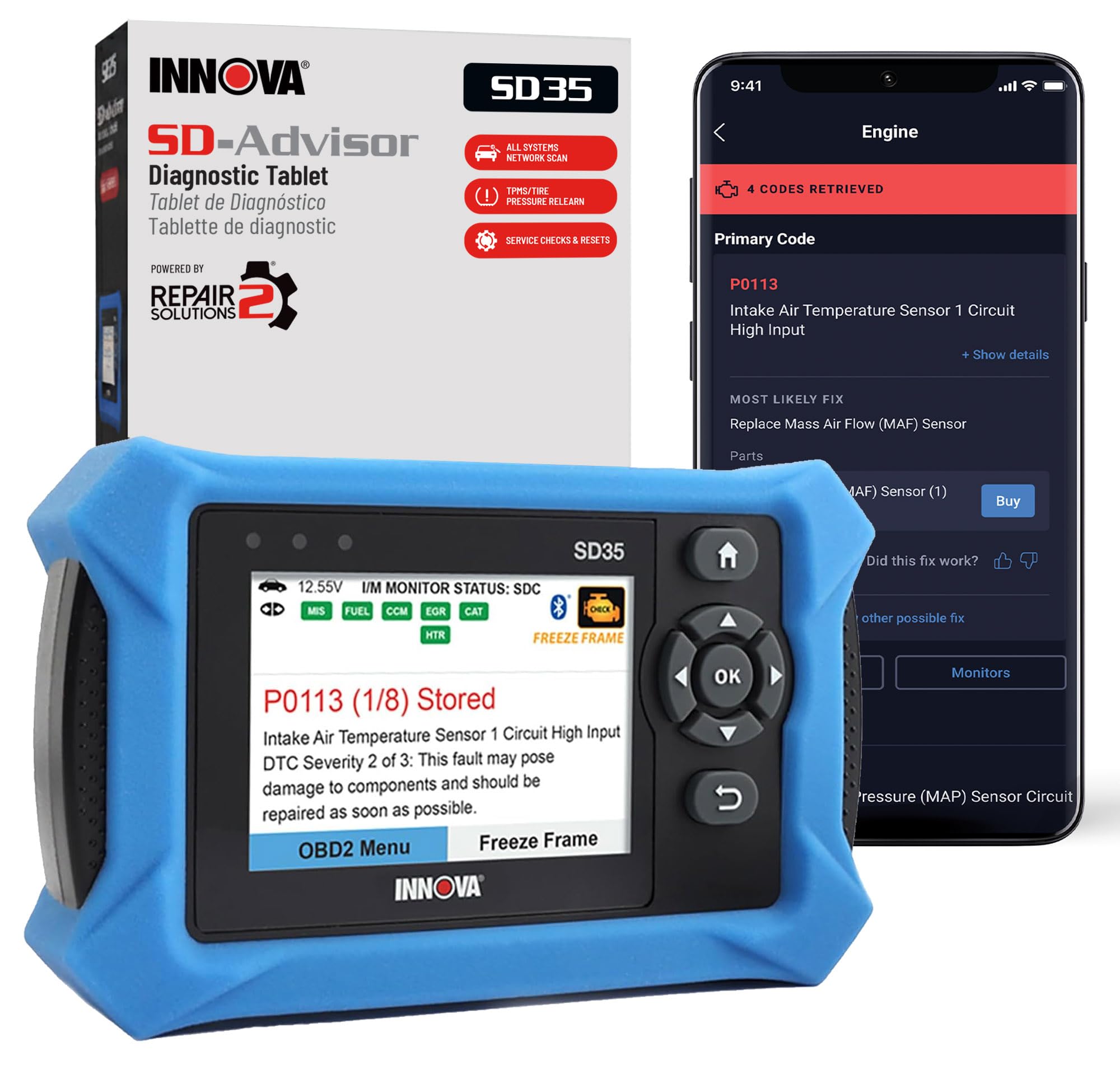
A code reader that pairs with RepairSolutions2 for verified fixes and parts.
Most code readers hand you a number and stop. The SD35 goes one step further and pairs with the RepairSolutions2 app to pull verified fixes — real-world repairs from ASE-certified mechanics — matched to your vehicle, with the parts you need and cost estimates attached. It is the difference between “P0420” and “here is what typically causes it and what to do about it.”
The scope is wider than a basic reader too. It reads and clears check engine, ABS, SRS, and TPMS codes, tests your battery and alternator, and scans engine, transmission, and more. Live data covers RPM, fuel trims, temperature, and oxygen sensor performance on the 3.5-inch display, and it runs off the OBD2 cable — no batteries to manage.
Two things to weigh honestly. The screen is small, and a few users call that out on first unboxing. Connectivity also splits — most find the Bluetooth link to their phone simple, but some hit pairing trouble. Both are minor in the scheme of a 4.4-star tool, but worth knowing before you buy, especially if you have large hands or want a big graph view.
Why DIYers Stick With It
- Verified fixes and suggested parts via the RepairSolutions2 app
- Reads ABS, SRS, TPMS, and engine codes plus battery/alternator test
- No subscriptions — app features are included
- Runs on the car’s power, so no charging between jobs
Before You Commit
- 3.5-inch screen is smaller than tablet-style tools
- Bluetooth pairing works for most but not every owner
- Buttons need a firm press, as one user puts it
Fix-it-yourself: Perfect for the owner who wants the fault explained in plain language with parts and repair steps attached.
Big-screen preference: If you want a large graph panel, look at a tablet tool instead.
5. BlueDriver OBD2 Scanner Bluetooth

A pocket-sized Bluetooth dongle that pairs with your phone for VIN-matched repair reports.
BlueDriver is the tool you leave plugged in and forget about until a light comes on. There are no wires and no bulky handheld unit rattling around the console.
Two things make it earn its keep. First, unlimited technician-verified repair reports matched to your VIN, so each code arrives with definitions, causes, and confirmed fixes instead of a bare number. Second, live data and freeze frame monitoring while you drive, plus Mode 6 test results — the deep engine self-tests a plain code reader never sees. It covers gas vehicles 1996 and newer with strong support for GM, Ford, Stellantis, Toyota, Honda, Nissan, Mazda, Subaru, Hyundai, Mercedes-Benz, BMW, and VW.
The trade-off is speed on some vehicles. On a 2004 Lexus ES330, a full scan ran 12 to 14 minutes and clearing a code took 10 to 12 minutes, and the VIN was not readable so the owner had to enter it manually. Some advanced features also fall short on certain cars. Those are the exceptions — for most drivers, the pairing is quick and the reports are the reason they keep it plugged in. It is also the highest-rated pick of the phone-dongle group, and there is no subscription, ever.
What wins people over: The repair reports. Owners routinely describe using the app for years and diagnosing issues an entry-level dealer scan would have charged to find.
The follow-up question: On older vehicles, expect a slower full scan and a manual VIN entry.
Phone-first drivers: Right for anyone who wants diagnostics in their pocket and no new hardware to carry.
Speed-critical jobs: If you need instant full-system scans on an older car, a tablet tool will feel quicker.
6. MUCAR CS6 OBD2 Scanner Diagnostic Tool
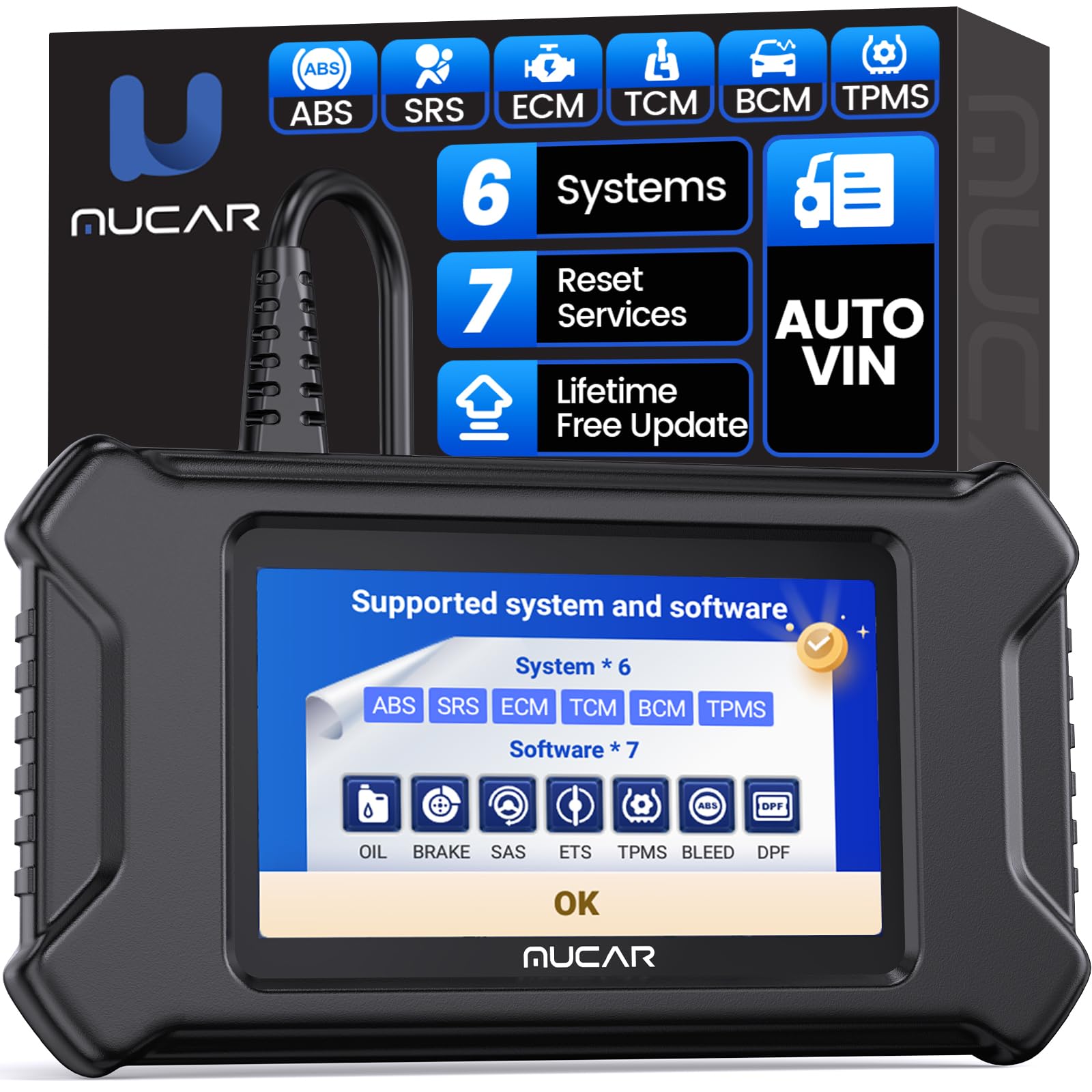
A 5-inch tablet that scans six systems and runs seven reset services.
For a buyer who wants more than engine codes but does not want to step up to a flagship tablet, the CS6 fits the middle. It scans six systems — ABS, SRS, transmission, engine, BCM, and TPMS — and clears fault codes on each, so a stuck ABS light or a TPMS warning gets explained rather than ignored. It also runs seven targeted reset services: oil, EPB brake, steering angle calibration, tire pressure, ABS bleeding, DPF regeneration, and throttle adaptation.
The screen is a 5-inch display at 1280×720 resolution driven by Android 7.0, backed by a 4-core 1.3GHz processor with 2 gigabytes of RAM and 32 gigabytes of storage. Live data shows a 4-in-1 stream — PCM data, engine speed, coolant temperature, fuel system status — and you can record, print, or share the diagnostic report. Auto VIN reads the vehicle’s information for you, and the software updates are free for life with no hidden fees.
The honest trade-off here is the build. The body is hard plastic with no rubberized edges, the OBD2 cord is short and stiff, and there is no carry case included — it is a value tool, and it feels like one. A few owners also find the manual thin. Neither detail affects how it diagnoses; it just means the physical package feels more workbench than showroom.
The Value Case
- Scans six systems: ABS, SRS, transmission, engine, BCM, and TPMS
- Seven reset services including ABS bleed and DPF regeneration
- Lifetime free updates with no subscription
- Auto VIN, 4-in-1 live data, and shareable reports
The Honest Limits
- Hard plastic body with no rubberized grip and no carry case
- Short, stiff OBD2 cord
- Manual is thin for the number of functions
Coverage without the cost: Ideal for a home mechanic who needs six-system scanning and the common resets in one budget tablet.
Looking for premium feel: If unboxing quality matters to you, a metal-bodied tool will feel better in hand.
7. TOPDON AD600S OBD2 Scanner

A 5-inch tablet that reads engine, transmission, ABS, and SRS across 67+ brands.
The AD600S covers the four systems that trigger most warning lights — engine, transmission, ABS, and SRS — reads and clears their fault codes, and analyzes the data streams behind them. Its reach is the headline: 67+ global brands and 10,000+ models, spanning American, German, French, and Japanese vehicles. If you own a mixed fleet or flip cars, that broad compatibility is the reason to pick it over a narrower tool.
The service menu handles nine common resets in one click — oil, BMS (battery management system), ABS, SAS (steering angle sensor), EPB (electronic parking brake), DPF (diesel particulate filter), TPMS (tire pressure monitoring), throttle, and injector coding — so routine jobs like a brake pad change or an oil light no longer mean a shop trip. The hardware runs Android 11.0 with 32 gigabytes of ROM (storage space) and a 5-inch 1280×720 display, and AutoVIN pulls your vehicle ID automatically to speed things up. Updates are free for life over Wi-Fi.
Two practical notes. For the first 30 days you also get a complimentary trial of all 30 reset services, but after that only the original nine stay free — so plan around the nine. And this scanner needs a recharge at least once every seven days, even in storage, because the battery can go inert if left depleted for long stretches. That is a real habit to build, not a dealbreaker.
Where it shines: The breadth of coverage. It connects fast, clears trouble codes quickly, and its DTC readouts are detailed enough that techs use them to spot the root cause.
The catch to plan for: Recharge it weekly to keep it alive between uses, and treat the 9-reset set as the permanent feature list.
Mixed garage: Right for a mobile tech or multi-car household that needs one tool to cover many makes.
Storage-prone owners: If the tool will sit unused for weeks, the weekly recharge routine is easy to forget.
8. BLCKTEC 460T OBD2 Scanner Car Code Reader

A code reader that auto-reads the VIN and scans every ECU on plug-in.
Picture a used-car lot and a warning light you cannot read. The 460T auto-reads the VIN (your car’s unique ID number), scans every ECU (the car’s onboard computers) the moment you plug it in, and fires that code back without a single button press. That is the pitch of a tool with 12+ dealer-level reset functions — oil maintenance, ABS bleeding, EPB, steering angle, DPF, throttle relearn, battery reset, TPMS relearn, transmission reset, fluid change, and more — sitting at a price that undercuts full shop units.
The diagnostic depth runs deep for a mid-range tool. It supports all 10 OBD2 modes, reads and clears engine, transmission, ABS, and SRS codes (SRS covers airbags and seatbelt systems), and pulls real-time OBD2 and OEM live data with freeze frame info — you can view, graph, record, replay, and overlay up to four data streams on one graph. AutoScan and AutoReLink handle the full-system sweep, and it regathers DTC (diagnostic trouble codes) and I/M readiness data every 30 seconds, handy for monitor tests and smog prep. The claimed speed is 3X faster than other products, per the maker.
Pairing it with the free RepairSolutions2 app adds verified fixes, parts lists, maintenance schedules, and recall info with no subscription. The two caveats: the tool and app work in the USA and Canada only, and the EPB reset does not respond on every make and model, so confirm coverage first. A few users also flag a slow firmware update that needs a computer and some patience — set it running and wait.
What makes it a keeper: A single scan caught a coolant bypass valve fault on a used 2020 Camry before purchase — the kind of pre-buy catch that pays for the tool many times over.
Worth checking first: Run your vehicle through the compatibility checker, because function coverage varies by year, make, and model.
Used-car shoppers and DIYers: A great fit for anyone who buys cars sight-unseen or wrenches at home.
Must-have-every-reset users: If your exact model relies on a specific reset, verify it is supported before buying.
9. TOPDON ArtiDiag Pro Bidirectional Scan Tool

The coder’s tool — it does not just read the car, it rewrites it.
Most tools on this list read and reset. This one codes. The ArtiDiag Pro handles ECU coding on VW, Audi, Skoda, Seat, and Benz, letting you open up hidden features, deactivate functions you do not want, and code retrofitted parts to the car. That is a class of work the cheaper tools simply cannot do, and it is why a home garage that added a retrofitted module would reach for this over anything else.
The diagnostic reach is just as wide: bidirectional control over lights, door locks, fuel and coolant systems, windows, wipers, and EVAP, plus 35+ service functions that the maker says tackle 90% of maintenance issues. Oil reset, EPB reset, and steering angle reset are all here. Full vehicle scans run in under a minute, and the tool saves timestamped pre- and post-repair reports so you can prove a fix. FCA AutoAuth covers 2017 and later Chrysler, Dodge, Jeep, and Fiat vehicles for full diagnostics.
The fine print matters. It is tethered — no Bluetooth, so you work from the driver’s seat via the OBD cable. It also carries a subscription: the first two years of updates are free, then a renewal applies to keep the full feature set live, though the tool does not lock out when that lapses. A couple of owners also note slow VIN auto-detect on some cars. Enough buyers use it to run professional work that those limits are road bumps, not stop signs.
The Pro-Grade Case
- ECU coding on VW, Audi, Skoda, Seat, and Benz — rare at this tier
- Bidirectional control over lights, locks, windows, wipers, and fuel/coolant systems
- 35+ services covering resets, coding, and diagnostics
- Full vehicle scans finish in under a minute, per owner experience
Fine Print To Read
- Tethered via OBD cable — no Bluetooth
- Two years of free updates, then a renewal keeps full features active
- VIN auto-detect lags on some vehicles
Coding and retrofits: The right choice for a serious home tech who needs ECU coding and pro-level bidirectional work.
Wireless preference: If you refuse to work tethered, a Bluetooth tool will suit you better.
Understanding the Specs
Connection: Bluetooth vs Wired
A Bluetooth tool plugs a small dongle into the OBD2 port and pairs to your phone or a tablet unit, so you can watch live data from outside the cabin — handy when you are revving the engine to trigger a fault. A wired tool tethers you to the driver’s seat, which is fine for parked diagnostics but less convenient when testing something under the hood. Bluetooth range and latency (delay) vary by model, so consider how you plan to work.
Protocols: CAN FD and DoIP
These are newer communication languages a car uses to talk between its modules. CAN FD moves more data faster than the older CAN, which matters on 2019+ GM vehicles. DoIP routes diagnostics over the network rather than a wire, and it open up select BMW, Volvo, and Jaguar/Land Rover models. If you drive a recent car, checking for these two protocols is worth your time.
Bidirectional Control
A bidirectional tool can send a command to the car — like firing an ABS pump, cycling a radiator fan, or triggering a fuel injector — and watch the result. That turns diagnosis from a guessing game into a test: if the part does not respond, you have found the fault. It is the feature that separates a scan tool from a basic code reader.
Service Resets and Update Plans
Reset functions handle routine jobs without a shop visit — oil light, EPB, steering angle, DPF, TPMS, throttle, and ABS bleed are the common ones. Update plans decide how long you keep the newest vehicle coverage. Some tools offer free lifetime updates, others bundle a free window and then charge an annual renewal. Check what stays active before you buy.
FAQ
Will any of these scan tools work on my 2010 Honda Civic and my 2019 Chevy truck?
What is the difference between a code reader and a bidirectional scan tool?
Do I need a subscription to keep using my scan tool?
Can a scan tool bleed my brakes or reset the oil light?
BlueDriver or FOXWELL NT301 — which should I pick?
Which tool is best for a used-car inspection?
How much live data can these tools show at once?
Are these tools hard to set up for someone new to car repair?
What does ECU coding let me do that a regular diagnostic scan cannot?
Do I have to worry about battery drain when storing one of these scanners?
Final Thoughts: The Verdict
For most buyers, the automotive diagnostic scan tool worth starting with is the Autel MaxiCOM MK900BT — it combines 3000+ active tests, 40+ services, and CAN FD/DoIP support that reaches newer vehicles, so it grows with you instead of getting outgrown. If your budget is tighter and you just want to read and clear engine codes with live data, grab the FOXWELL NT301. And for a phone-based tool with no subscription that reads ABS, SRS, and TPMS codes, the BlueDriver is the one to leave plugged in. Whichever you choose, check your vehicle’s year, make, and model against the maker’s coverage list first — the best tool is the one that actually talks to your car.
How We Picked
We do not accept paid placement. Every pick is matched to a real buyer and a real use-case; we do not hands-on test units.
Sources & Methodology
Specifications: manufacturer listings and product documentation. Review insights: verified customer reviews, as of September 2026. Pricing: not shown on this page (it changes often); check the current price via the retailer link.
As an Amazon Associate, Gadgets Feed earns from qualifying purchases. This does not affect which products we feature.