
Our readers keep the lights on and my morning glass full of iced black tea. As an Amazon Associate, I earn from qualifying purchases.
Specs are compiled from manufacturer listings and verified buyer reviews and can change over time — please confirm the key details on the product page before buying.
If you are tired of crawling behind your TV to swap HDMI cables between a console, a streaming stick, and a Blu-ray player, an AV input selector is the simple fix. These small boxes let you plug several devices into one port and switch between them with a button press or a remote, so you only ever deal with cables once. The real challenge is picking the right one, because the category splits sharply between retro RCA gear and modern 4K HDMI switches.
I’m Min — the founder and writer behind Gadgets Feed. This guide is built by comparing the manufacturers’ published specifications and the patterns across verified customer reviews, so you get each pick’s real strengths and trade-offs instead of marketing spin.
Your TV only has so many inputs, and an AV Input Selector turns that single port into a whole entertainment hub for your consoles and streamers.
Our Picks at a Glance


How To Choose The Best AV Input Selector
Start by figuring out what you are plugging in, because that single answer decides everything else. If your gear uses yellow, red, and white composite cables, you need an RCA switch. If your gear uses HDMI, you need an HDMI switch. Mixing them up is the most common mistake, and it leads to buying a box that simply does not fit your setup.
Know Your Cable Types First
Older consoles like the SNES and N64 use composite RCA cables with three plugs, while modern systems like the PS5 and Series X use HDMI. Some versatile boxes combine both, letting you connect old and new gear to a single TV input, which is ideal if you are a retro gamer who also plays current titles. Check every device you own before choosing, because a pure HDMI switch will not help your VCR.
Match the Video Resolution to Your TV
For modern displays, you want a switch that supports at least 4K, and ideally 4K@120Hz if you game on a high-refresh TV. This is where bandwidth numbers like 18Gbps and 48Gbps matter, because they determine whether the switch can carry the full signal without cutting corners. Retro RCA signals top out at 480i, so those boxes just need to pass the signal cleanly without adding noise.
Decide Between Manual and Automatic Switching
Auto-switching sounds like the dream, but it often misbehaves when multiple devices are powered on at once. Many buyers end up relying on manual buttons or remotes anyway, so consider whether auto-detection is a must-have or just a nice bonus. A reliable manual switch with a remote is often the more practical choice.
Quick Comparison
| Model | Best For | Ports | Video Support | Switching | Amazon |
|---|---|---|---|---|---|
| BolAAzuL 4×2 RCA Switch★ Best Overall | Retro consoles to 2 TVs | 6 RCA | Composite | Button + Remote | Amazon |
| BolAAzuL 4-Way ComponentRetro Gamer’s Pick | Component retro gaming | 5 RCA | Up to 1080p | Button | Amazon |
| acer 5-in-1 HDMI | Budget 4K multi-device | 5 HDMI | 4K@60Hz | Remote + Button | Amazon |
| OREI 4-Port HDMI 2.1 | Next-gen gaming | 4 HDMI | 8K@60Hz / 4K@120Hz | Auto + Remote | Amazon |
| JCHICI HDMI 2.1 Switch | High-end 4K@120Hz gaming | 5 HDMI | 8K@60Hz / 4K@120Hz | Auto + Remote | Amazon |
| Y.D.F 3-Way HDMI + RCA | Hybrid retro + modern | 5 | 4K@60Hz HDMI | Button | Amazon |
| UGREEN 5-in-1 HDMI | Premium multi-device setups | 6 HDMI | 8K@60Hz | Remote + Button | Amazon |
In-Depth Reviews
1. BolAAzuL 4×2 RCA Switch Splitter
Our pick — over 4.5★ from 300+ verified ratings; the strongest balance of quality and price.
The crowd favorite RCA box that ends the cable-swapping ritual for good
Retro gamers, this switch solves a real problem: you can send one console’s signal to two different TVs at once, thanks to its 4 inputs and 2 outputs. That 4-in-2-out design lets you keep a DVD player and a gaming console both hooked up, so your TV only needs its single AV input. The metal casing keeps connections stable through years of heavy use.
Setup is genuinely plug-and-play, with no software drivers and no power adapter needed, just press the selection button or use the included control to jump between sources. That button responsiveness is a highlight, with owners noting it feels solid and reacts instantly, which matters when you are mid-level in a game.
What wins people over is the functionality, mentioned far more than any other trait, and it is easy to see why. It handles multiple systems like Nintendo and Sega without forcing you to unplug anything, and the RCA connection quality matches expectations for the price point. The only recurring nitpick is the LED indicators, which some find bright enough to tape over, and a quirk where the green lights flash when all devices are off.
Built for the Retro Room
- 4 inputs to 2 outputs, so two TVs can share one console
- Sturdy metal casing resists wear and corrosion
- True plug-and-play with no drivers or power supply
Small Quirks to Know
- LEDs are bright enough that some owners tape over them
- Green lights flash when every device is powered off
Your move: This is the pick if you juggle several composite-era consoles and want the freedom to watch on two TVs without ever unplugging a cable.
One caveat: If bright indicator lights will annoy you in a dark room, budget for a small strip of tape before you set it up.
2. BolAAzuL 4-Way Component AV Switch Box
The compact component switch that keeps your SNES and Genesis looking sharp
If you are serious about retro gaming, this 4-in-1-out component switch is the one that understands your pain. The defining feature here is that it passes 240p signals through cleanly, which is exactly what your SNES and Genesis output, so those classic games look the way they should on a CRT. Unlike the composite box above, this one supports component cables with resolutions up to 1080p, making it a solid bridge for slightly newer gear like the Wii or PS3.
It runs on pure hardware with no power supply and no drivers, so you just hit the labeled button for inputs 1 through 4 and the box swaps sources instantly. The color-coded ports and metal housing make installation painless, and the satisfying click of the buttons gets mentioned as a genuine pleasure. It is compact enough to sit neatly on a shelf, and buyers report it feels solid in the hand rather than cheap and hollow.
It plugs multiple consoles into an old tube TV without cable swapping, and works for composite via the Y port. Enthusiasts run several older consoles through it into a Retro Tink 5X for upscaling, and it handles that duty without complaint. The honest trade-off is that the audio output channels were swapped on one unit, a QA slip that a few buyers hit, and it offers no HDMI at all, so it is strictly for RCA and component setups.
Who it serves: This is the quiet workhorse for the retro purist who wants component-quality video on a CRT or a Retro Tink upscaler. It does one job and does it well, but only if your entire chain uses RCA and component cables, not HDMI.
3. acer 5-in-1 HDMI Switch
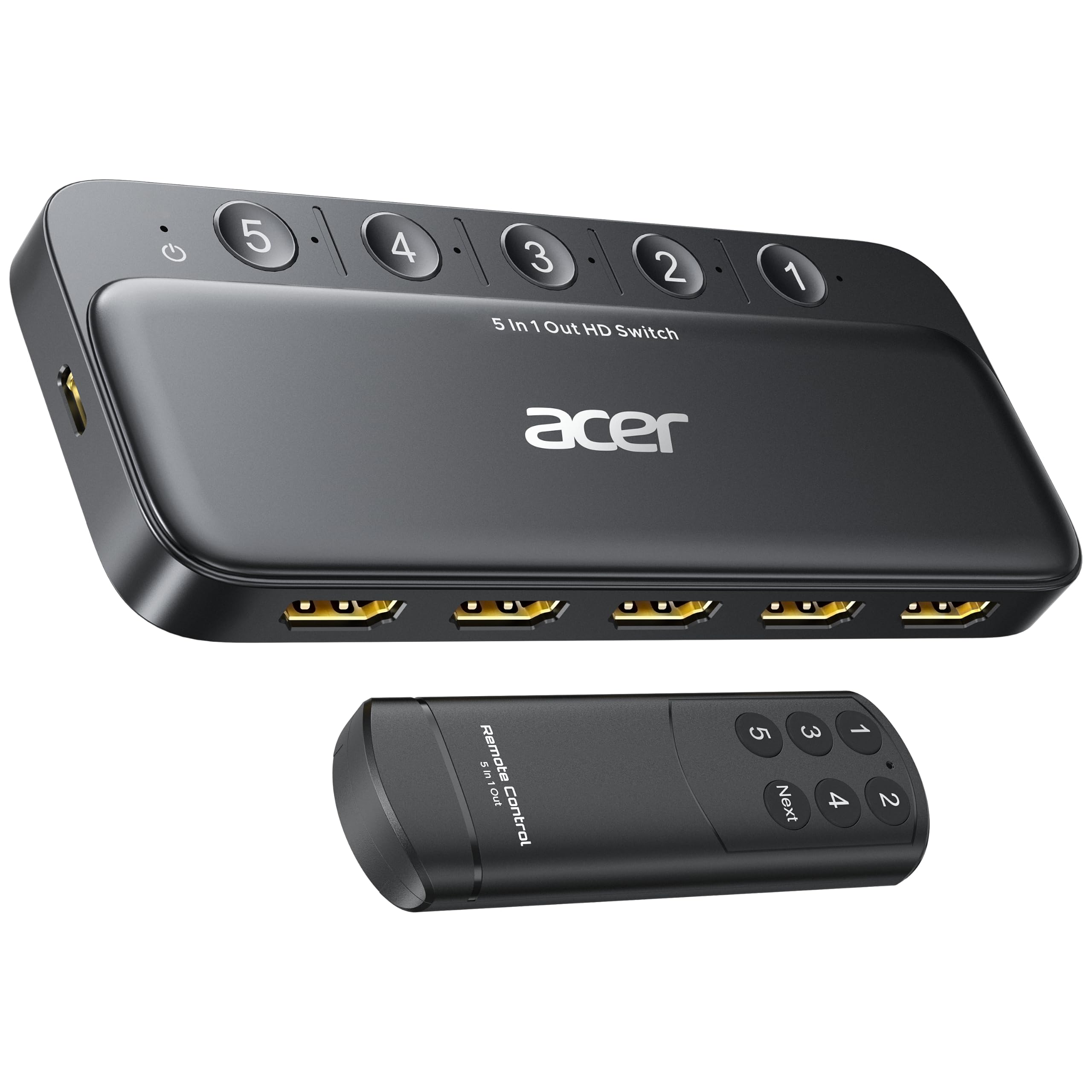
A five-port 4K switcher that stretches your dollar without stretching the signal
This acer box solves the most basic TV dilemma: you have five devices and only two ports. It expands a single HDMI output to 5 inputs, covering game consoles, laptops, Blu-ray players, and streaming sticks, and it delivers 4K@60Hz through an HDMI 2.0 connection with HDCP 2.3 support. The video quality is sharp enough for HDR and 3D content, with 18Gbps bandwidth carrying the signal without visible tearing or ghosting.
Switching is handled by a remote control with a wide-range IR receiver or by physical buttons on the box, and 5 LED indicators show exactly which port is live. The metallic body and gold-plated ports resist corrosion and keep the signal clean. One important note: to hit 4K@60Hz, your total HDMI cable length must stay at 10 feet or less, so plan your setup with that limit in mind.
Buyers consistently call it well-made and easy, with the remote making couch-level switching a one-hand job. It is worth knowing that this is a one-way switch with no automatic detection, so you press a button every time, and the box needs a 5V/1A power supply to run at full performance. The included accessories drew some grumbles, because the power adapter, remote batteries, and HDMI cables are not in the box, so factor a few extra dollars into your plan.
Straight talk: This is the value-minded choice for a home theater or office that needs 4K output across several HDMI devices. It asks you to supply its power and cables, and it will not auto-detect inputs, but for the price it delivers a clean, reliable 4K signal.
4. OREI 8K 4-Port HDMI 2.1 Switch

The full-metal 8K box built for PS5 and Series X players who hate input lag
Next-gen console owners, this switch delivers the smoothest gameplay because it pushes 8K@60Hz and 4K@120Hz over a 48Gbps connection (a high-speed data link that handles heavy video signals). It carries HDR10+ and Dolby Vision (two high-dynamic-range formats that boost color and contrast), and it supports VRR, ALLM, and FVA—the trio of gaming features that keep your PS5 and Xbox running tear-free. That 4K@120Hz support is what separates it from the acer above, which tops out at 4K@60Hz, so next-gen players should skip the cheaper box.
The full-metal build feels higher quality than plastic alternatives. It offers both auto and manual switching, so you can let it detect an active input or override with the front button or included IR remote. The remote is a genuine favorite, letting you flip between your console, streamer, and Blu-ray player without leaving the couch.
Setup is extremely easy, and owners note it handles 4K@120Hz and HDR without issues once it is wired in. One practical tip from the community: disable HDMI-CEC in your console settings, or the switcher can trigger consoles to power on by themselves. The auto-switching is reliable for most, though a few found the detection a bit aggressive, so having the manual button and remote as backups is a real comfort.
Built for Modern Gaming
- Full metal body that outlasts plastic rivals
- 48Gbps bandwidth for 8K@60Hz and 4K@120Hz
- VRR, ALLM, and FVA keep gameplay smooth
Setup Notes
- Disable HDMI-CEC on consoles to stop auto power-on
- Auto-switching can occasionally need a manual override
Best fit: This is your box if you own a PS5, Series X, or Switch 2 and want their full 120Hz potential on one display without juggling cables.
Fair warning: It is priced above the basic 4K switches, and you will spend a few minutes adjusting console settings to get the cleanest behavior.
5. JCHICI HDMI 2.1 Switch
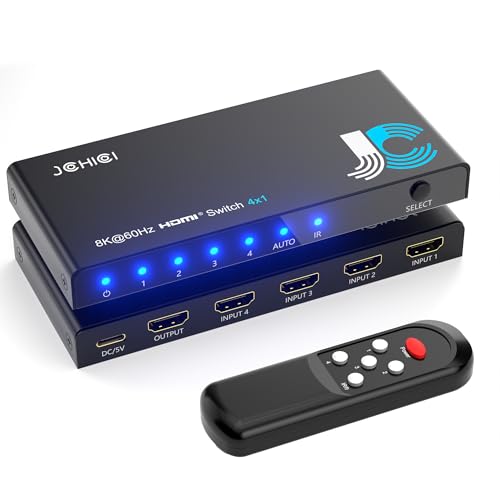
The four-console hub that keeps 4K@120Hz pristine with no cuts or delays
Connect your PS5, Xbox, Switch, and a streaming box to one display, and this switcher will move between them with a single push. It supports 8K@60Hz and 4K@120Hz at full 48Gbps bandwidth, so your high-end visuals arrive exactly as your console sent them. Owners praise the 4K@120Hz picture as perfect, with no cuts or delay between inputs.
Audio is a genuine strength here, supporting DTS5.1/7.1, Dolby Digital, DTS-HD Master Audio, Dolby TrueHD, and uncompressed LPCM5.1/7.1, so a home theater setup gets the full surround treatment. Switching is fast and automatic when a new source powers on, and the included remote works from up to 8 meters away, giving you total control from the couch. The package even includes an anti-slip mat, a small touch that keeps the box planted on your shelf.
Owners mention it is small, well packaged, and easy to set up, with fast and comfortable switching between devices. The remote and auto-switching can both be toggled off manually to prevent accidental changes, which is a thoughtful feature for households with curious kids or cats. The main things to plan for: a certified HDMI 2.1 cable is required for 8K, and the remote needs 2 AAA batteries that are not included.
Why it stands out: This one balances raw bandwidth, rich audio support, and a great remote in a compact box.
6. Y.D.F 3-Way HDMI + RCA Converter Switch
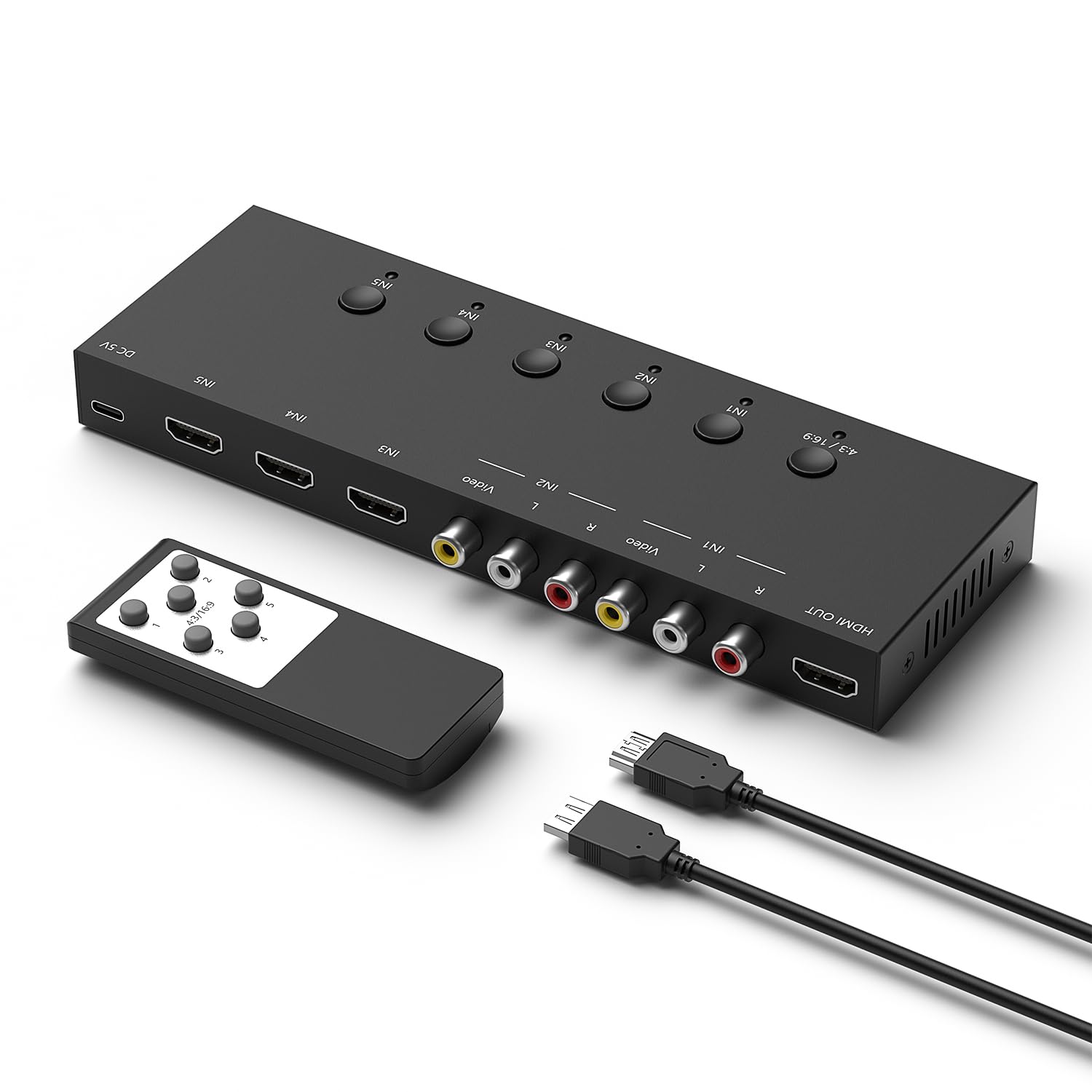
The rare box that marries your SNES and your PS5 without asking you to choose
This is the bridge box for the mixed household, combining a 3-port HDMI 2.0 switcher with a 2-way RCA to HDMI converter in one aluminum unit. That means your modern PS5 and your retro N64 both feed into a single TV input, with the RCA signals converted to HDMI automatically. It even supports 4:3 to 16:9 aspect ratio switching, so classic games fill your modern screen the way you want them to.
The HDMI side runs at 4K@60Hz with 18Gbps bandwidth, handling PCs, Xbox, PS4/5, and streaming sticks cleanly. The RCA side covers Sega, N64, SNES, PS1, PS2, and even VHS players, making it a one-stop shop for anyone who refuses to give up old media. It is plug-and-play with a one-key switch, and the durable aluminum build means it should outlast the inevitable console upgrades.
Buyers are delighted by how it handles both cable types across a single TV input, with one owner hooking up PS1, PS2, PS3, and PS4 all at once. It works flawlessly for PS2 owners who had already failed with two separate HDMI adapters, and it makes retro gaming and VHS playback possible again on a modern screen. The only mixed feedback lands on video quality, which is fine but not reference-grade for the converted RCA signals, an inherent limit of the format.
Perfect match: If your setup spans generations, from a VCR or SNES to a modern console, this combines a switcher and converter into one tidy box. It is not the cheapest option, but it replaces two separate purchases and a tangle of extra cables.
7. UGREEN 8K HDMI Switch

The premium five-port hub that tames even the fussiest HDMI 2.1 handshakes
Tired of switching devices by plugging and unplugging HDMI cables, this UGREEN box is the premium cure, connecting 5 devices to a single TV input with a clean aluminum body. It supports 8K@60Hz and is backward compatible down to 4K@60Hz and 1080p@240Hz, carrying up to 40Gbps of data. The aluminum build feels far more premium than plastic rivals.
The remote works from 33 feet away, and 5 LEDs show the active port. It handles VRR for smoother PS5 gameplay, and the actively powered design means stable 4K connections with no flickering or blackouts on a Series X. Owners running PS5 Pro and Switch 2 report clean 4K@120Hz with ALLM and VRR, and even older consoles like the Wii work without issue.
This is not an auto-switching box, so you will use the button or remote every time, and the manual approach actually earns praise for being responsive and predictable. The connectivity and signal quality get mixed marks from a minority, with an occasional unit dropping signal or needing a manual port cycle, so keep your HDMI cables premium and short for best results. It also skips ARC pass-through, meaning audio return to a receiver is not part of the deal.
Premium Where It Counts
- High-quality aluminum build over plastic competitors
- Actively powered for stable, flicker-free 4K
- Remote works from up to 33 feet away
Limits to Accept
- No automatic switching, manual button or remote only
- No ARC pass-through for audio return
Reach for this if: You want a premium, durable hub for multiple current-gen devices and prefer a reliable manual switch over finicky auto-detection.
Look elsewhere if: You need auto-switching or ARC audio return, since this box skips both and asks you to keep cables short.
Understanding the Specs
Bandwidth: 18Gbps vs 48Gbps
Bandwidth is the data pipe size for your video signal, measured in gigabits per second. An 18Gbps switch handles 4K@60Hz comfortably, which is plenty for movies and standard streaming. A 48Gbps switch is needed for 8K or 4K@120Hz, the high-refresh output that modern consoles use for smooth gaming, so match the number to your TV’s capabilities.
Auto-Switching Reality
Auto-switching sounds easy, but it detects whichever input is newly powered on, which can cause surprises when several devices are awake. Many switch boxes offer it alongside manual buttons and remotes, and buyers often end up relying on the manual controls anyway. Treat auto-switching as a bonus, not a reason to buy, and make sure a button or remote is always available.
FAQ
Will an RCA switch work with my modern HDMI TV?
Do I need an 8K switch if my TV is only 4K?
Will a switch add input lag to my gaming?
Why does my switch need a power adapter?
How long should my HDMI cables be with a switch?
Can I use a component switch for composite cables?
What does HDCP 2.3 mean for my streaming?
Is auto-switching reliable for multiple consoles?
Final Thoughts: The Verdict
For most retro setups, the av input selector winner is the BolAAzuL 4×2 RCA Switch, because its 4-in-2-out design and metal build solve cable chaos for two TVs at once. If you want next-gen gaming with 4K@120Hz and VRR, grab the OREI HDMI 2.1 Switch. And for a mixed room of retro and modern gear, the Y.D.F hybrid box is the one to reach for.
How We Picked
We do not accept paid placement. Every pick is matched to a real buyer and a real use-case; we do not hands-on test units.
Sources & Methodology
Specifications: manufacturer listings and product documentation. Review insights: verified customer reviews, as of August 2026. Pricing: not shown on this page (it changes often); check the current price via the retailer link.
As an Amazon Associate, Gadgets Feed earns from qualifying purchases. This does not affect which products we feature.