
Our readers keep the lights on and my morning glass full of iced black tea. As an Amazon Associate, I earn from qualifying purchases.
Specs are compiled from manufacturer listings and verified buyer reviews and can change over time — please confirm the key details on the product page before buying.
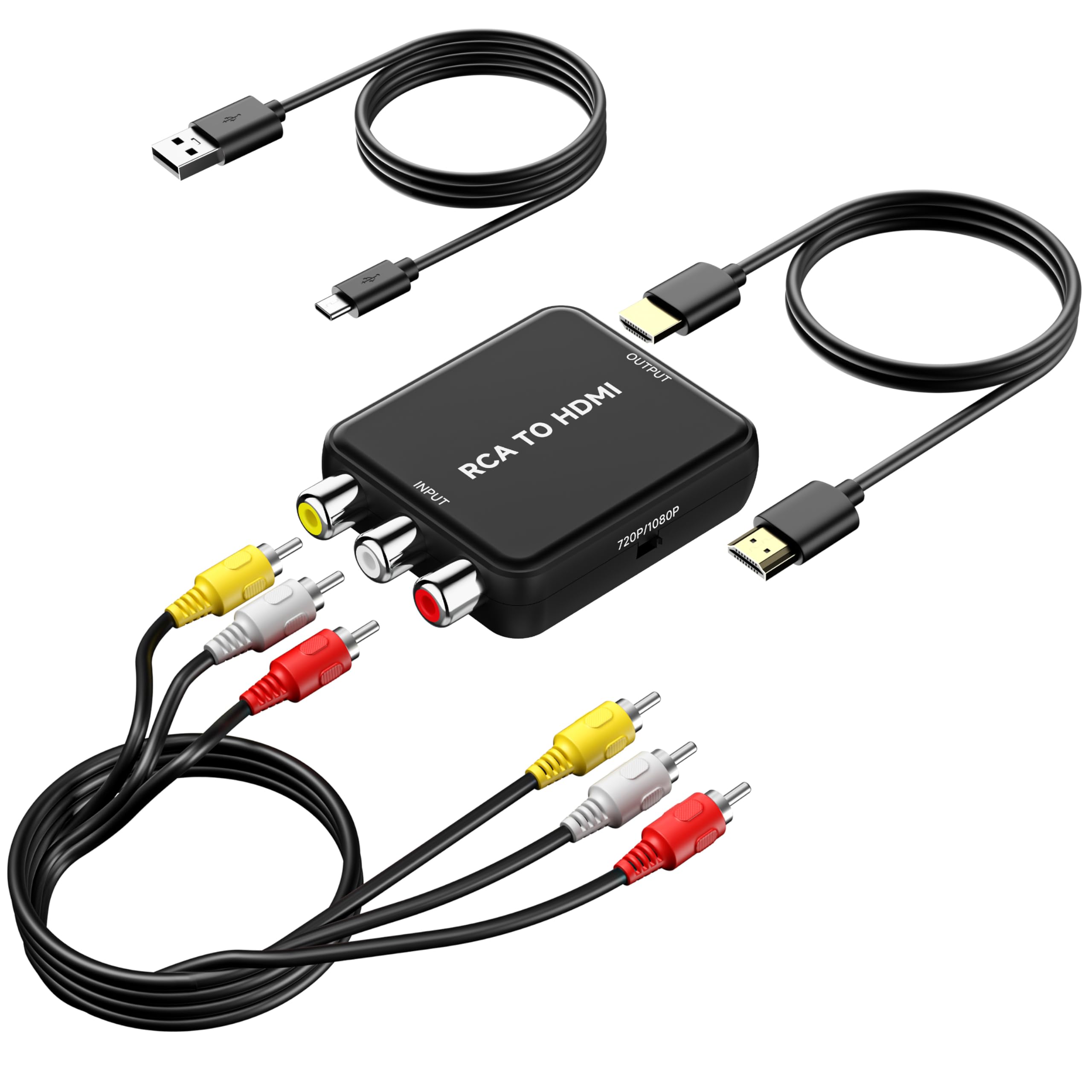
Your old DVD player, VCR, or Wii can work again on your modern flatscreen — you just need a small box that translates its old analog signal into the language your new TV speaks. An AV to HDMI converter takes the yellow, white, and red composite cables (the classic three-plug analog connection) from vintage gear and outputs them as a digital HDMI signal, so you can watch decades-old tapes and play retro consoles without hunting for a TV that still has those round jacks. Most of these converters are true plug-and-play: connect the cables, power it through USB, and switch your TV to the right HDMI input.
I’m Min — the founder and writer behind Gadgets Feed. This guide is built by comparing the manufacturers’ published specifications and the patterns across verified customer reviews, so you get each pick’s real strengths and trade-offs instead of marketing spin.
Whether you’re reviving a VHS collection or an old game console, this rundown of the av to hdmi converter market separates the true plug-and-play winners from the finicky boxes that frustrate.
Our Picks at a Glance

How To Choose The Best AV To HDMI Converter
Buying the right converter starts with knowing exactly what device you’re hooking up, because the input port style decides which box you need. The most common setup uses the familiar yellow, white, and red composite cables, but some older consoles and VCRs use a round S-Video connector instead, which needs its own input. Checking your device’s output jacks before you shop saves you a return trip.
Match the input to your source device
Most converters accept the classic composite input (yellow video plus white and red audio). If you only have two jacks on your old player — a single audio and a single video — that still works fine, since the converter can handle a mono audio signal. For S-Video setups, you need a model that includes that round input port, which some premium boxes add alongside composite.
Understand the power requirement
A common surprise for first-time buyers is that these converters do not draw power from the HDMI connection alone. Nearly every model needs a separate 5V USB power cable plugged into a wall adapter or a TV’s USB port. Most units include the USB cable but not the wall plug, so check what you have on hand before the box arrives.
Consider how many devices you want to connect
If you’re only reviving one VCR, a single-input converter keeps things simple and cheap. But if you want both a DVD player and a game console hooked up without swapping cables every time, a dual-port model with a switch button lets you toggle between two sources. These switcher boxes also tend to include the RCA couplers you need to connect devices with male or female output jacks.
Quick Comparison
| Model | Best For | Output Resolution | Input Ports | Weight | Amazon |
|---|---|---|---|---|---|
| ABLEWE Mini Converter★ Best Overall | Best Overall | 720P/1080P | Composite | 4.48 oz | Amazon |
| Uzifhdhi ConverterSimple Revival | Simple Retro Revival | 720P/1080P | Composite | — | Amazon |
| BD&M Converter | Smart TV Hookup | 720P/1080P | Composite | 0.05 kg | Amazon |
| TIXILINBI Converter | All-in-One Cable Kit | 720P/1080P | Composite (Male) | 3.2 oz | Amazon |
| Sedytetoc Dual Converter | VHS + DVD Setup | — | 2x Composite | 0.24 kg | Amazon |
| Knisopec Dual Port | Two Consoles, One TV | — | 2x Composite | 4.16 oz | Amazon |
| Tendak Metal Converter | S-Video + Composite | 720P/60Hz or 1080P/60Hz | Composite + S-Video | 250 g | Amazon |
In‑Depth Reviews
1. ABLEWE RCA to HDMI Converter
Our pick — over 4.5★ from 650+ verified ratings; the strongest balance of quality and price.
The crowd favorite that revives a Wii or VCR in under three minutes flat.
Set-up speed is the headline here — buyers report having this ABLEWE box running within three minutes, just plugging the cords, switching the HDMI input, and watching old content appear on a modern screen. The converter takes analog composite input (the yellow, white, and red cables) and outputs it as 720P or 1080P at 60Hz, which is exactly what a modern flatscreen wants to see. It supports a broad list of source formats including PAL, NTSC3.58, NTSC4.43, SECAM, PAL/M, and PAL/N, so it handles most global video standards.
Compatibility stretches across PS2, PS3, Xbox, WII, STB, VHS, VCR, and DVD players, and owners mention success pairing old Sony DVD players and camcorders with modern Samsung 4K TVs. The package includes the HDMI cable and a USB power cable, though the wall adapter is not included — you supply the 5V power source. At just 4.48 ounces and 2.7 x 2.2 x 0.66 inches, it disappears behind your entertainment center.
Picture quality earns the most mixed feedback here, so understand the source-signal limits before buying. The converter faithfully reproduces the source signal, so an old VHS tape or low-res console output will never look like 4K. Sound quality holds up well, and the reviewer consensus points to no input delay — a key win for retro gaming. A minor note: a low buzzing can be audible when the unit is idle but not while a movie plays.
Why It Wins Owners Over
- Functionality is the top praise — well over 90 owners single out how well it just works
- Quality earns the second-most mentions, with buyers calling it a solid build
- No input delay, so it suits fast-paced retro games
Know Before You Buy
- Needs a 5V USB power source you supply yourself
- Picture quality is only as good as your source tape or console
- An idle buzz can appear when nothing is playing
Reach for this if: you want the most-tested, most-praised single-input converter for reviving a Wii, VCR, or DVD player on a modern TV.
Look elsewhere if: you need to connect two devices at once, since this is a one-input box.
2. Uzifhdhi RCA to HDMI Converter
The no-frills box that brings Elvis DVDs and old VHS tapes back to life.
What sets this converter apart is the complete package — it ships with the HDMI cable, an RCA cable, the USB power cable, and the converter itself, so you are not hunting for extra cords. Customers note it working on both DVD and VHS players, including a VHS unit that only had two output jacks — a single audio and a single video — and it still connected and worked fine. The compact, lightweight black case slides easily into an entertainment center without taking up much space.
It outputs at 720P or 1080P and supports the same broad format list as pricier rivals — PAL, NTSC3.58, NTSC4.43, SECAM, PAL/M, and PAL/N. Compatibility spans PS One, PS2, PS3, N64, STB, VHS, VCR, and Blu-Ray DVD players on the input side, feeding a monitor or TV through HDMI. Like nearly every converter in this class, it needs the included USB power cable hooked to a 5V source; the wall plug is not included, and that is the one recurring complaint owners mention.
Video quality will match your source, not exceed it — old recordings have their own limits. The value pitch is simple: if you have an aging DVD player or VHS deck you refuse to part with, this is the low-fuss way to keep it usable. The converts-old-gear mission is exactly what owners describe it as — a great backup for saving your old equipment.
What it nails: the all-in-one cable kit means zero extra purchases, and two-jack mono VHS players connect without issue.
The honest catch: you will need to supply your own USB wall plug, since only the cable ships in the box.
3. BD&M RCA to HDMI Converter
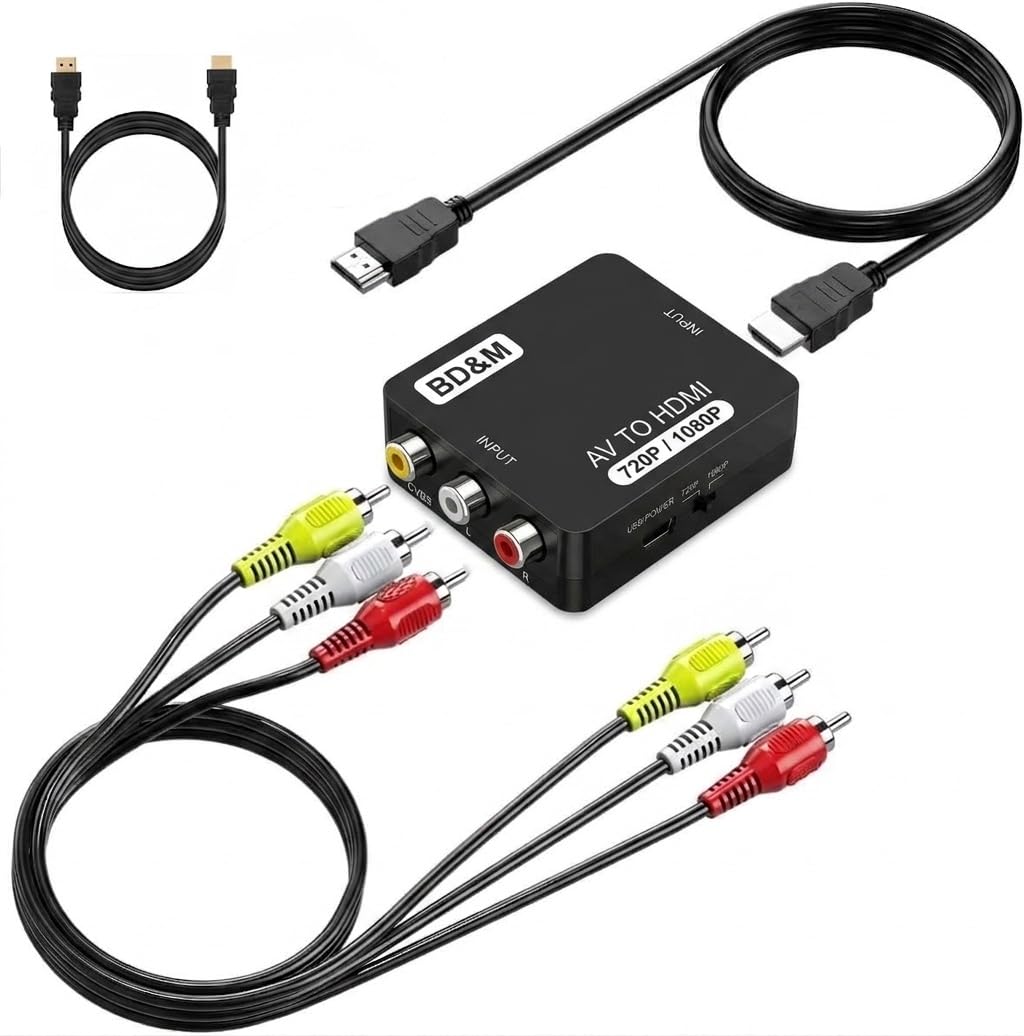
The go-to for parents reviving VHS tapes for a screen-free kids’ movie night.
This converter’s defining moment comes from the family use-case owners describe: hooking up a Toshiba VCR/DVD combo to a Fire Stick TV so kids can watch VHS tapes and DVDs with no ads and low stimulation. The 720P/1080P HDMI output handles the conversion cleanly, and the matte black mini design is light enough to travel or tuck behind a console. Build quality wins the top praise here, with owners calling the items excellent quality at a reasonable price.
Compatibility covers VHS players, VCRs, DVD players, camcorders, and retro consoles including PS1, PS2, PS3, Xbox, N64, and Wii — essentially anything with standard composite output. One notable difference from the ABLEWE pick: this unit ships with a Type A 2-pin North American power plug, so you are not hunting for a separate wall adapter. Setup is genuinely plug-and-play, with one owner noting installation was easy to follow via a YouTube tutorial.
Where this pick gets tricky is format support. The customer consensus notes this adapter works with NTSC but has issues with PAL sources, so if you are feeding it European PAL-format tapes, this may not be the right box. That same feedback flags picture quality as acceptable rather than outstanding — fine for VHS-era content, but don’t expect miracles. For buyers in North America with NTSC gear, it is a dependable, well-built pick.
Built right: quality is the most-praised aspect, backed by a US power plug in the box that most rivals omit.
Fit check: NTSC owners are happy, but PAL-format sources are a compatibility risk you should confirm before buying.
4. TIXILINBI Male RCA to HDMI Converter

The complete-cable kit that surprises skeptics with clean, instant conversion.
Everything needed is in the box — the converter, RCA cable, HDMI cable, USB power cable, and manual — so there are no surprise trips to the electronics store. The defining feature here is the male RCA connector on the input and an on-board switch button that lets you select between 720P and 1080P output resolution. It is powered by a standard USB-5V supply, making it easy to find a power source in any room. At just 3.2 ounces, it is the lightest pick among the single-input converters here.
Reviewers point out it converting an old Sony DVD player and an 8mm camcorder to a new TV with an instant picture and no issues. One described being skeptical and then surprised at how well it worked. The built-in HD chip handles the analog-to-digital scaling, and the converter automatically detects the incoming RCA signal. Image quality matches the original source, so an early-1990s 8mm tape looks like an early-1990s tape.
There is one compatibility wrinkle worth flagging. Because the RCA connector on this converter is male, you need a female-to-female RCA adapter if your source device — like a PS2, N64, Wii, or Xbox — has female output jacks. That adapter is not included, so factor it into your setup planning. For DVD players and STBs with female RCA outputs, it connects directly with no extra parts.
Why It Stands Out
- Functionality tops the praise list, with over 80 owners calling it reliable
- Ease of use ranks second — buyers repeatedly mention the simple hookup
- Complete cable kit means zero extra purchases
Plan For This
- Male RCA input needs a female-to-female adapter for game consoles
- Separate 5V/1A power brick required — not included
- Resolution switch means a manual button press to change output
Best suited for: DVD players, STBs, and camcorders with female RCA outputs, where it connects with no extra parts.
Not ideal for: direct game-console hookup without also buying the female-to-female coupler.
5. Sedytetoc Dual RCA to HDMI Converter

The two-port switcher built for older folks who just want to press one button.
This pick answers a very specific problem: how to keep both a VHS player and a DVD unit hooked up to one modern TV without swapping cables. The dual-input design lets you connect two RCA devices at once and use the switch button to choose which one displays on the HDMI screen. Buyers describe setting this up for parents who wanted to keep their VHS and DVD units for legacy content, and finding it easy enough to switch from TV to VHS to DVD without assistance.
A standout feature for retro gamers is the 4:3 and 16:9 aspect ratio switch — a capability some competing converters lack, defaulting to 16:9 and distorting older 4:3 content. Two female-female RCA couplers ship in the box, so you can connect devices with either male or female RCA outputs, including DVD players, STBs, VHS, N64, PS2, and Wii. The whole kit is plug-and-play with no drivers needed.
The honest trade-off is a physical one. Owners note this solution involves a lot of wiring, which is not aesthetically appealing in an open cabinet — if you can hide the wires, it is a fine solution. The plastic housing is lightweight at 0.24 kg, and the two-port design means more cables behind your TV. For anyone who hates plugging and unplugging RCA cables, the convenience of a button press outweighs the cable clutter.
What it solves: the dreaded cable-swapping ritual, plus a 4:3 switch that most single-input rivals lack.
Keep in mind: this box adds noticeable wiring, so plan your cable management before committing.
6. Knisopec Dual Port RCA to HDMI

The dual-port box that keeps a VCR and a game console plugged in for months straight.
Where this pick earns its keep is long-term reliability — shoppers say it running for months without a single issue, which is exactly what you want from a device that sits behind your TV. The dual RCA inputs let you keep two devices connected and toggle between them with a switch button, eliminating the constant plugging and unplugging. It ships with two RCA female-female couplers, two RCA cables, an HDMI cable, and a USB power cable — a genuinely complete kit minus the wall plug.
The 4:3 and 16:9 aspect ratio switch is a real draw for retro game consoles that need the older squarer display format. Compatibility covers old game consoles with male RCA output as well as DVD, VHS, and STB units with female RCA output. One owner routes audio straight to an amplifier and still praises the plug-and-play video conversion, while another confirms stereo-plus-video RCA works cleanly. The 4.16-ounce weight keeps it portable enough to take anywhere.
Picture quality gets mixed reviews — some call it outstanding, others merely acceptable, depending on the source signal. The converter runs on 5V (a standard low-voltage power level) via the included USB cable. This dual-port design is a slight step up in capability over the single-input budget boxes, and buyers praise its quiet, dependable operation.
What Owners Appreciate
- Functionality leads the praise — the switch-then-play flow just works
- Quality follows closely, with buyers noting clean, dependable build
- Includes couplers and cables for both male and female RCA devices
What To Expect
- Picture quality depends heavily on your source, with mixed owner feedback
- Audio conversion gets mixed notes if you rely on the box’s sound output
- USB power cable ships, but the wall adapter does not
Grab this if: you want two RCA devices — like a VCR and a retro console — both hooked up and switchable without touching cables.
Think twice if: you only need a single device converted, where a simpler one-port box costs less and hides easier.
7. Tendak 3RCA AV CVBS & S-Video to HDMI

The metal-cased workhorse that handles both S-Video and composite in one box.
This is the most capable converter in the lineup, and the first thing you notice is the metal case — a step up in durability from the plastic housings elsewhere. It accepts both composite video and S-Video inputs, converting standard-definition signals (480i/576i) up to HDMI output. A dedicated pushbutton lets you switch between the two video inputs without touching cables, and the converter automatically saves your input and resolution settings between power-ups. Composite and S-Video share the same R/L audio input, simplifying your wiring.
Resolution control is flexible: press a button to toggle between 720P/60Hz and 1080P/60Hz output, with support for 480i, 480P, and 576P sources incoming. It is compatible with VCRs, DVD players, NES, SNES, N64, PS1/2/3 and other vintage game consoles — though it is explicitly not compatible with Sega Genesis. An extra 3.5mm audio jack gives you an additional audio output option beyond HDMI. Buyers report sharp 720p/1080p output with no lag on retro consoles, and full-screen VHS playback on 4K TVs.
The honest picture here is more complicated. This is the highest-priced pick, and the review pattern is genuinely split: functionality gets praise, but picture quality is the most-discussed topic and it is mixed at best, with some owners reporting color bleed and fragmented images on S-Video sources (a higher-quality analog video input) while others call the output sharp and clear. Colors skew slightly muted or off for some, and the metal case has no on/off switch. It is the right choice only if you specifically need S-Video input support or the durable metal build — for plain composite-only setups, the simpler budget boxes deliver comparable results for less.
What it offers: combined S-Video and composite input, a metal body, and six selectable resolutions — the most flexible box here.
The honest split: retro-console owners rave about the no-lag sharpness, but S-Video quality gets the most mixed feedback of any aspect, so expect variability.
Understanding the Specs
720P vs 1080P Output
The output resolution is what your TV actually receives after the converter upscales the old analog signal. Most converters here support both 720P and 1080P, often selectable via a switch button. A converter cannot create detail that was never in the source — a VHS tape is still a VHS tape. Pick a model with 1080P output for future-proofing, but expect the image to reflect your source’s true quality.
Composite vs S-Video Input
The input side is where compatibility lives. Composite input is the classic yellow, white, and red RCA setup found on most DVD players, VCRs, and older consoles. S-Video is a round connector carrying video on separate channels, found on some mid-90s gear — it typically delivers a slightly cleaner picture than composite. Check your device’s output jacks and match them to the converter’s inputs before buying.
USB Power Requirement
Nearly every AV to HDMI converter needs external power to run its signal-processing chip — it does not draw power from the HDMI connection. Most units include a USB power cable that you plug into a 5V source, typically a phone charger or a TV’s USB port. The wall adapter is frequently not included, so verify what you have available before the converter arrives.
4:3 vs 16:9 Aspect Ratio
Aspect ratio describes the shape of the picture: 4:3 is the squarer format of old TVs and retro games, while 16:9 is the widescreen shape of modern displays. Some converters force everything to 16:9, which can stretch or distort 4:3 content. Dual-input models here include a switch to preserve the original 4:3 shape for old games and tapes — a feature worth seeking if you play retro consoles.
FAQ
Why does my AV to HDMI converter need USB power to work?
Will my old VCR work with a converter if it only has two output jacks?
Why is the picture quality not as good as my modern Blu-ray?
What is the difference between NTSC and PAL formats?
Can I connect two devices like a VCR and a DVD player at the same time?
Do I need a special cable to connect a game console with male RCA jacks?
What does the 4:3 and 16:9 aspect ratio switch do?
Is there any input delay when playing retro games through a converter?
Final Thoughts: The Verdict
For most people, the av to hdmi converter winner is the ABLEWE Mini Converter because it combines the broadest tested compatibility with a set-up time owners measure in minutes and no input delay for gaming. If you want two devices hooked up without cable swapping, grab the Knisopec Dual Port. And for S-Video gear or a durable metal build, the Tendak is the one to reach for — just go in knowing its picture quality draws the most mixed feedback of the group.
How We Picked
We do not accept paid placement. Every pick is matched to a real buyer and a real use-case; we do not hands-on test units.
Sources & Methodology
Specifications: manufacturer listings and product documentation. Review insights: verified customer reviews, as of August 2026. Pricing: not shown on this page (it changes often); check the current price via the retailer link.
As an Amazon Associate, Gadgets Feed earns from qualifying purchases. This does not affect which products we feature.