
Dusting off that box of VHS tapes or digging out the old N64 means facing one unavoidable wall: modern TVs have long abandoned the composite RCA jacks your vintage gear needs. Without the right bridge, that grainy analog signal simply won’t appear on your 4K panel. A quality converter handles the translation, upscaling the video while keeping input lag low enough for retro gaming.
I’m Min — the co-founder and writer behind Gadgets Feed. I’ve spent hundreds of hours dissecting the technical specifications of these signal adapters, comparing chipset performance, output resolution support, and format compatibility to separate the seamless performers from the noise-inducing duds.
Whether you are reviving a camcorder or a classic console, finding the right av1 to hdmi converter means matching input ports to output resolution while ensuring stable power delivery for consistent playback.
How To Choose The Best AV1 To HDMI Converter
Not every converter handles the job equally. The cheap options often introduce noise, color shifting, or unacceptable lag, while premium models offer upscaling with adjustable geometry. Focus on input type, output resolution, and format support to match your specific source device.
Input Types: Composite, S-Video, and Multi-Port Hubs
The most common analog input is composite video (the single yellow RCA jack carrying luminance and chrominance together). For better separation and a sharper image, S-Video splits luminance and chrominance into separate pins. If you have multiple retro consoles or VCRs, a multi-port hub (4-in-1 or 2-in-1) saves constant cable swapping.
Output Resolution: 720p vs. 1080p and Upscaling Quality
A converter that outputs 1080p at 60Hz gives you a sharper image on modern HD displays, but upscaling quality varies. Cheaper chips simply stretch the image, while better ones apply line-doubling or deinterlacing that reduces artifacts. For gaming, 720p output can actually reduce input lag versus 1080p scaling.
Format Compatibility and Power Delivery
PAL and NTSC are the two dominant analog broadcast standards. If you import region-specific hardware, confirm your converter supports both. Most units require a DC power adapter or USB power — a stable 5V/1A supply prevents signal dropouts and intermittent black screens during playback.
Quick Comparison
On smaller screens, swipe sideways to see the full table.
| Model | Category | Best For | Key Spec | Amazon |
|---|---|---|---|---|
| ClearClick AV to HDMI 3.0 | Premium | S-Video & image adjustments | 1080p upscaling + remote | Amazon |
| INSIGNIA RCA to HDMI | Mid-Range | Reliable VHS playback | 720p/1080p switchable | Amazon |
| BolAAzuL 4-Port RCA to HDMI | Mid-Range | Multi-console setups | 4 RCA inputs + remote | Amazon |
| Cbcuyle 4-in-1 RCA to HDMI | Mid-Range | Compact multi-input hub | 1080p/60Hz + 4:3/16:9 switch | Amazon |
| LUKFOCAB HDMI to RCA + HDMI | Mid-Range | HDMI passthrough + composite out | HDMI + RCA simultaneous out | Amazon |
| RuiPuo 2-Port RCA to HDMI | Budget | Two-device switching | 2 RCA inputs + remote | Amazon |
| VQP HDMI to RF Modulator | Budget | Coaxial output for old TVs | NTSC RF output (CH3/CH4) | Amazon |
In‑Depth Reviews
1. ClearClick AV to HDMI Converter 3.0
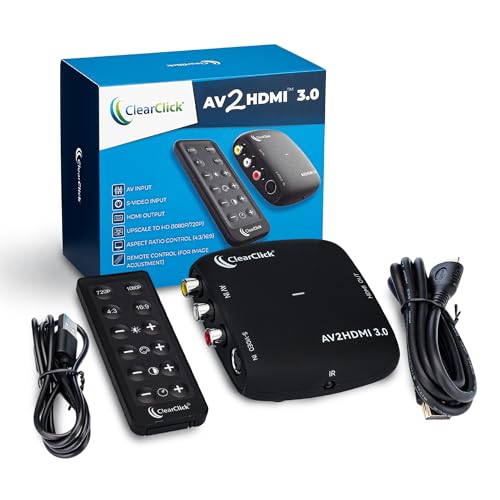
The ClearClick AV to HDMI 3.0 stands apart from the crowd because it includes an S-Video input alongside the standard composite RCA jack. S-Video delivers noticeably sharper luminance separation, which makes a real difference when digitizing Hi8 tapes or connecting a high-end Super Nintendo. The 1080P upscaling works via a dedicated chip, and you get a remote control that lets you tweak brightness, contrast, saturation, and hue in real time.
Users report that the image adjustments are genuinely useful for correcting washed-out VHS transfers or tuning color for older game consoles. The unit supports both PAL and NTSC, making it region-agnostic for imported hardware. The 2-year warranty from a US-based company adds peace of mind that budget alternatives simply don’t offer.
One buyer noted a defective unit with unnatural color that couldn’t be corrected, but most reviews confirm solid build quality and excellent compatibility with finicky devices like the Philips CDi. If you want the most flexible input selection and the ability to fine-tune your picture, this is the converter to beat.
Why it’s great
- S-Video input provides superior video quality over composite
- Full remote control for real-time image tuning (brightness, contrast, hue)
- Includes 2-year warranty with US-based tech support
Good to know
- Some units have reported quality control issues with color processing
- S-Video cable is not included in the box
- Higher price point than basic composite-only converters
2. INSIGNIA RCA to HDMI Converter
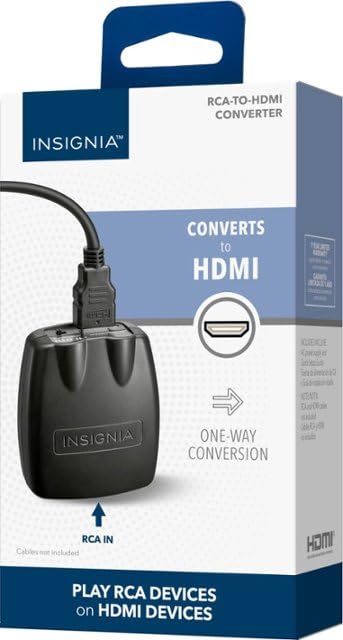
The INSIGNIA NS-HZ330-C is a straightforward RCA-to-HDMI converter from a trusted brand that emphasizes reliability over bells and whistles. It accepts composite video and stereo audio through RCA inputs and outputs a clean 720p or 1080p signal via HDMI. The included AC power adapter ensures stable operation, which is critical for VCRs that need consistent power to avoid frame drops.
Buyers specifically praise its performance with VCRs, noting that the upscaled picture is much clearer than cheap converters — no green streaks or helicopter background noise that often plague budget units. The simple switch between 720p and 1080p lets you optimize for latency or clarity depending on your source. It handles PAL and NTSC formats without issue.
Some users mention that cheaper converters work just as well for basic use, and one reviewer reported incompatibility with a 2025 Samsung QLED TV. The lack of an included HDMI cable is a minor annoyance. Overall, it’s a solid mid-range choice for those who prioritize consistent picture quality from a known brand.
Why it’s great
- Clean 1080p upscaling with no visible artifacts or noise
- AC power supply provides stable, consistent operation
- Simple switch between 720p and 1080p output resolutions
Good to know
- No HDMI cable included in the package
- May have compatibility issues with some newer TV models
- Higher price than basic converters with similar core functionality
3. BolAAzuL 4-Port RCA to HDMI Converter
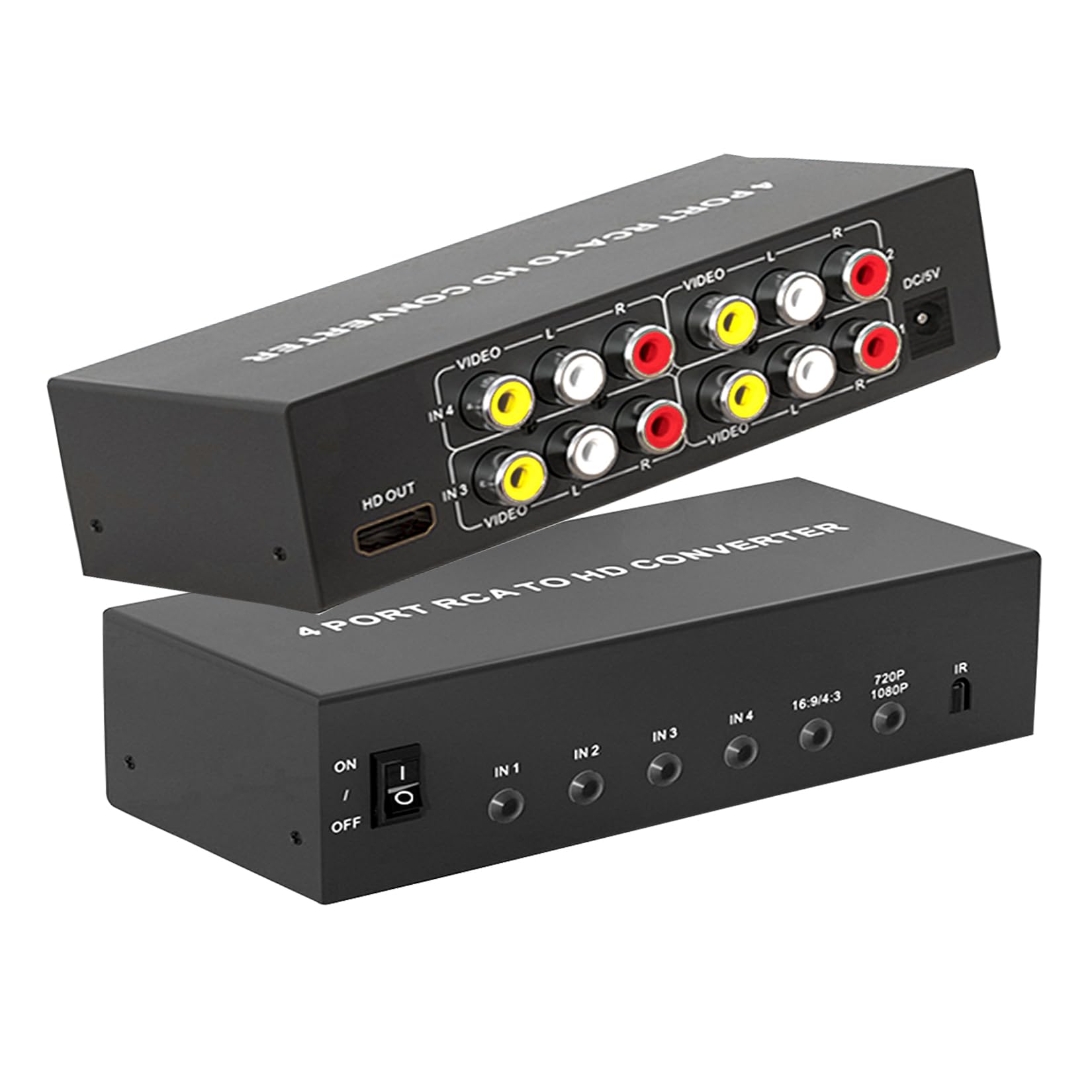
The BolAAzuL 4-Port converter solves the cable-swapping problem by giving you four RCA inputs feeding into a single HDMI output. Each input has its own composite video and stereo audio jacks, letting you connect a Wii, N64, VCR, and DVD player all at once. The front-panel button and included IR remote make switching between sources effortless from the couch.
It outputs at 720p or 1080p at 60Hz, with a switch for 4:3 or 16:9 aspect ratio to preserve the original look of retro content. Users report excellent compatibility with the Wii specifically, with better font clarity compared to other converters they tested. The built-in protection against overheating and overvoltage adds durability for long gaming sessions.
The remote requires two AAA batteries (not included), and the unit only converts RCA to HDMI — not the reverse. A few users noted that the small size makes it easy to misplace the remote. For anyone with multiple retro consoles, this is a clean and cost-effective hub solution.
Why it’s great
- Four RCA inputs eliminate constant cable swapping
- IR remote and front button for easy source switching
- 4:3/16:9 aspect ratio switch preserves original content framing
Good to know
- Remote requires separate AAA batteries
- Only converts RCA to HDMI (not bidirectional)
- Small remote can be easily misplaced
4. Cbcuyle 4-in-1 RCA to HDMI Converter
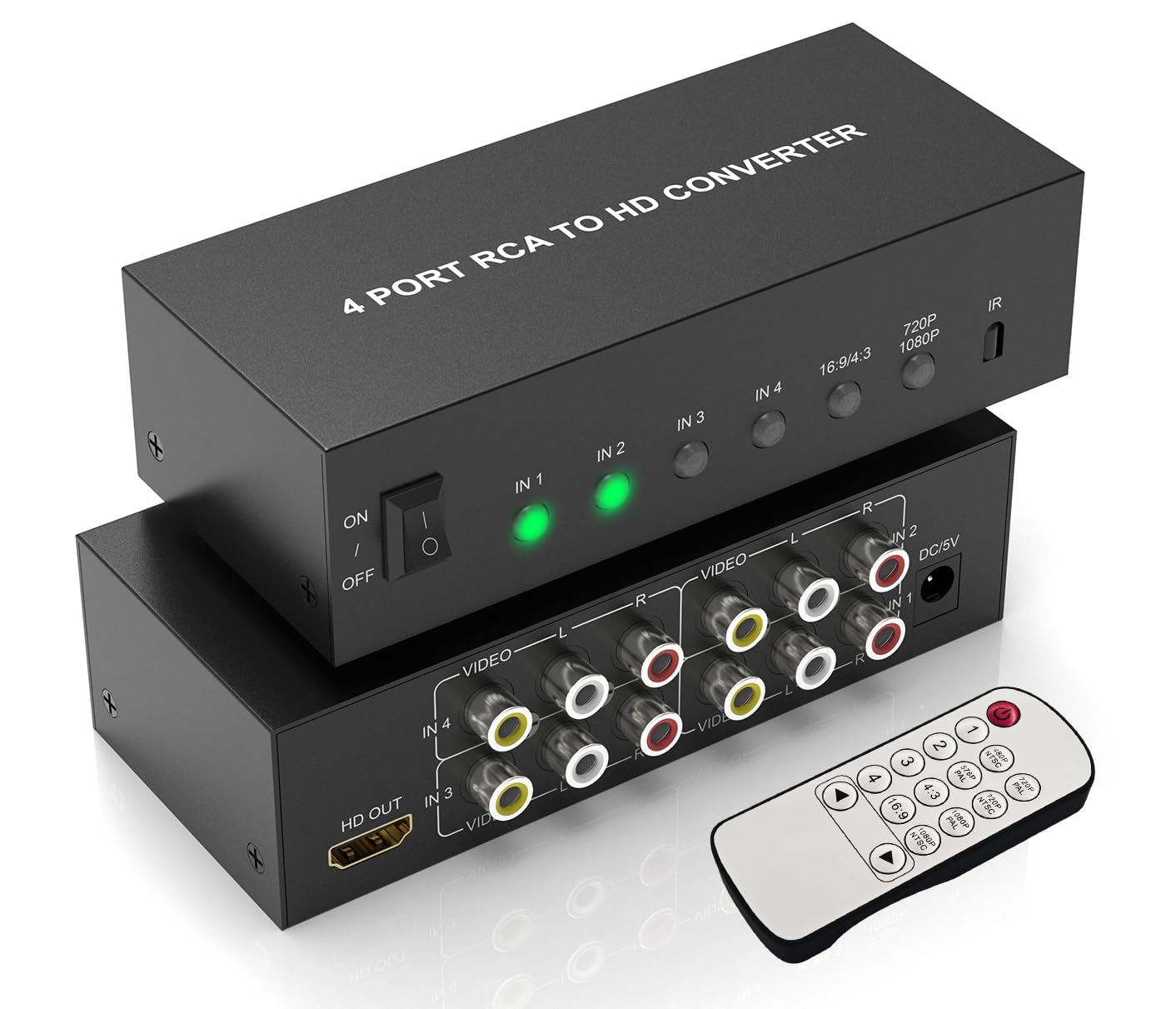
The Cbcuyle AV2HD-401-N packs four RCA inputs into a lightweight enclosure powered via USB, making it a versatile travel companion for retro gaming setups. It converts analog composite video to HDMI at 720p or 1080p at 60Hz, with a physical switch for 4:3 or 16:9 aspect ratio. The USB power cable is included but the wall plug is not, so you’ll need a standard 5V/1A adapter.
Users report reliable performance with original NES, N64, and old camcorders, noting that output quality at 1080p is slightly better than expected from such a compact unit. The small size and near-weightless build make it easy to throw in a bag for LAN parties or events. The included remote works for source switching, and the button on the unit provides tactile feedback.
One downside is the use of USB Mini-B for power — an outdated connector that’s less common than Micro-USB or USB-C. A few users also noted that the manual doesn’t specify the required power adapter rating. Overall, it’s a solid, no-fuss hub for anyone needing to switch between multiple retro sources.
Why it’s great
- 4 RCA inputs in a very compact, lightweight design
- USB power makes it easy to use with TV USB ports
- Clean 1080p output quality for retro consoles
Good to know
- Uses outdated USB Mini-B power connector
- Wall plug adapter not included
- Manual lacks clear power requirements
5. LUKFOCAB HDMI to RCA & HDMI Adapter
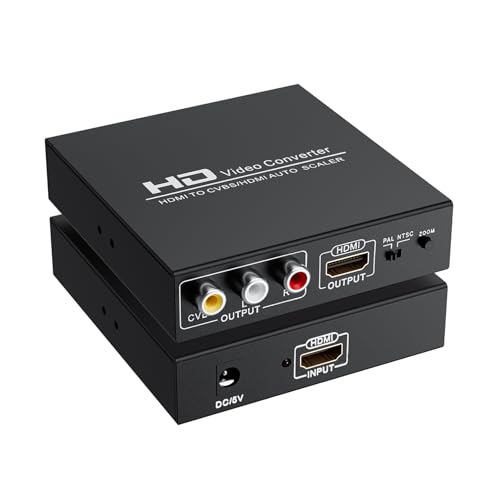
The LUKFOCAB 146C-PA is unique in this roundup because it works in the opposite direction — it takes an HDMI input and splits it into both an HDMI output and a composite RCA output. This is ideal for connecting a modern streaming stick (like a Fire Stick or Roku) to an older CRT TV that only has composite inputs, while still feeding the HDMI signal to a modern monitor simultaneously.
It supports 1080p@60Hz HDMI input and outputs 576i composite, making it perfect for CRT enthusiasts who need geometry adjustments. A buyer using it for a CRT projector reported zero lag and a clean image with minimal noise. The unit also solved HDCP issues for a projector that wasn’t HDCP compliant, acting as a signal converter that strips the copy protection.
Note that this is not an AV-to-HDMI converter — it’s HDMI to HDMI+RCA. Some users report slightly weaker audio on the left channel, which may require cable troubleshooting. The 3-month warranty is shorter than competitors, but the unique dual-output functionality makes it indispensable for specific setups.
Why it’s great
- Simultaneous HDMI + RCA output for dual monitor setups
- Zero lag and clean image quality for CRT use
- Can bypass HDCP issues on non-compliant displays
Good to know
- Only converts HDMI to RCA (not the reverse direction)
- Some users report left-channel audio imbalance
- Short 3-month warranty period
6. RuiPuo 2-Port RCA to HDMI Converter

The RuiPuo V23 offers a simple 2-port RCA-to-HDMI conversion at an entry-level price point. It accepts two composite video sources with stereo audio and outputs a clean 1080p at 60Hz signal. The front panel has labeled buttons for switching between inputs, and a remote control is included for convenience. It supports PAL, NTSC, SECAM, and PAL/M/N formats, giving it broad regional compatibility.
Most users find it works flawlessly with the Wii, Super Nintendo, PlayStation 2, and standard DVD players. The ability to leave two devices plugged in simultaneously avoids the hassle of reaching behind the TV to swap cables. The 4:3 and 16:9 aspect ratio switch lets you preserve the original game or movie framing.
One user reported that it didn’t work with a DVD/VHS combo unit despite working with standalone devices. The build uses standard AC power, and the unit weighs about 9.6 ounces. For a basic dual-input setup without premium S-Video, this is a reliable, budget-friendly entry point.
Why it’s great
- Two RCA inputs allow simultaneous connection of two devices
- Includes remote control for source switching
- Supports PAL, NTSC, SECAM, and other regional formats
Good to know
- May not work with DVD/VHS combo units
- No S-Video input for higher quality sources
- Bulky AC power adapter adds cable clutter
7. VQP HDMI to RF Modulator
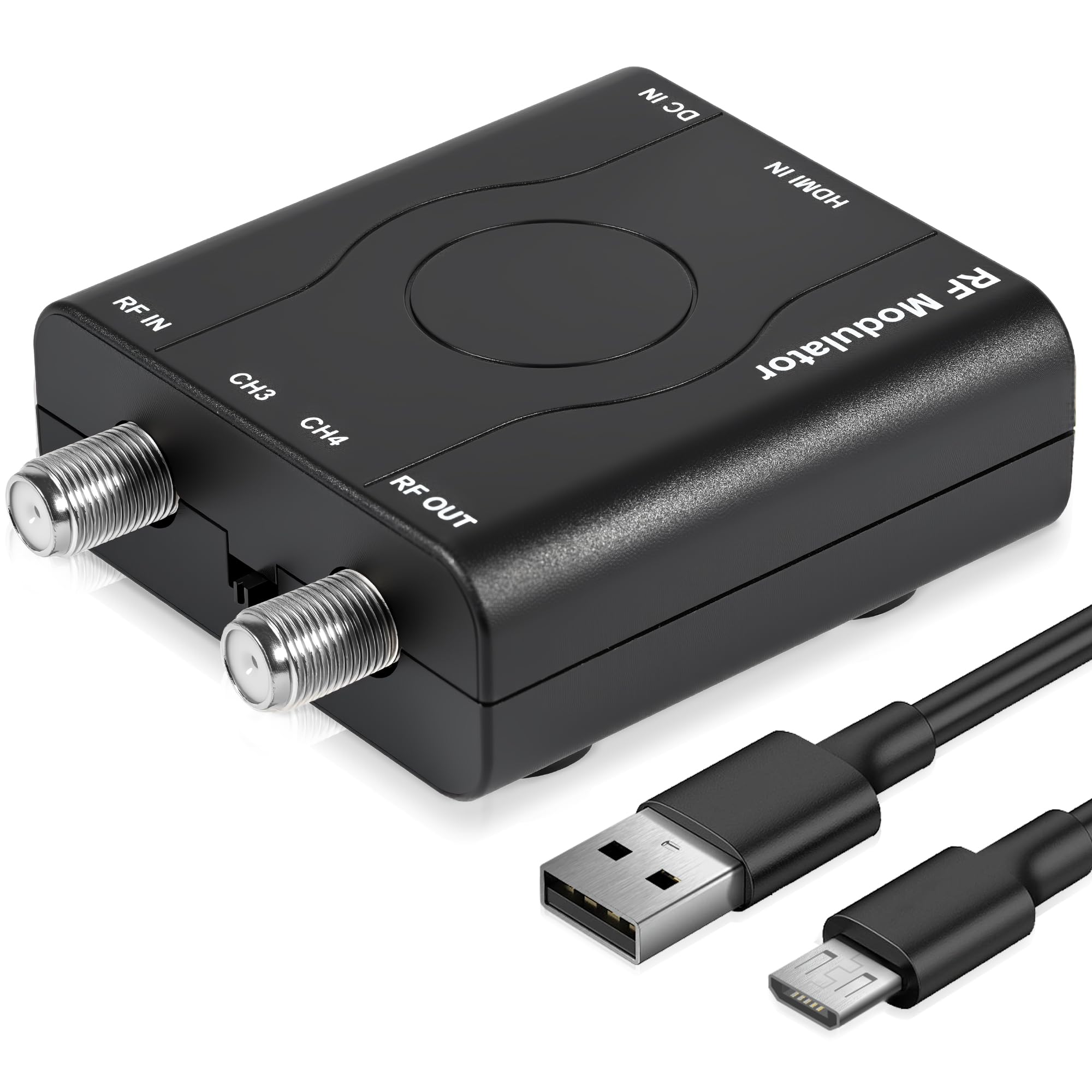
The VQP HDM61 takes a completely different approach — it converts an HDMI signal into a VHF RF coaxial output that works with older TVs that only have a coaxial antenna input. This is a niche but essential tool for connecting modern HDMI devices (like a Roku or game console) to a vintage CRT television that lacks any composite or component jacks.
It outputs NTSC format on channel 3 (61.25MHz) or channel 4 (67.25MHz), and supports input resolutions from 480p up to 1080p. The PLL control ensures stable frequency locking, and the unit can be powered via the HDMI port alone for some users, eliminating the need for the included power cord. The ABS plastic build is designed for durability.
Some users report that the coaxial connector can be finicky, requiring careful positioning to avoid a snowy picture, and one reviewer noted frequent resets. The composite signal quality is inherently limited by RF modulation, so text smaller than 1 inch may be unreadable. For coax-only setups, this fills a specific gap that standard RCA-to-HDMI converters cannot address.
Why it’s great
- Enables HDMI devices to work on TVs with only coaxial input
- Can be powered from HDMI port without extra adapter
- PLL-controlled frequency for stable RF output
Good to know
- RF coaxial output has inherently lower quality than composite
- Coaxial connection can be finicky with snowy picture
- Some units require frequent resets or have poor port quality
FAQ
Will an AV to HDMI converter work with my N64 or original PlayStation?
What is the difference between a converter and an upscaler?
Can I use an AV to HDMI converter to record old VHS tapes to my computer?
Final Thoughts: The Verdict
For most users, the av1 to hdmi converter winner is the ClearClick AV to HDMI 3.0 because it offers S-Video input for sharper quality and a remote control for fine-tuning image parameters. If you want a multi-input hub for multiple retro consoles, grab the BolAAzuL 4-Port RCA to HDMI. And for connecting modern streaming devices to a vintage CRT via coaxial, nothing beats the VQP HDMI to RF Modulator.