
An incredible computer setup isn’t built on the core components alone—the true differentiator is the peripherals. A subpar wrist rest can lead to chronic pain, a poor microphone will ruin your voice clarity for meetings, and an unstable monitor stand can create neck fatigue. The right accessories transform a basic desk into a hub of productivity, comfort, and seamless workflow.
I’m Min — the co-founder and writer behind Gadgets Feed. After analyzing hundreds of spec sheets and customer reviews across ergonomic supports, precision tools, and audio gear, I’ve found which accessories genuinely deliver on their promises without cutting corners on build quality.
Whether you’re upgrading your home office or seeking to eliminate desk clutter, this guide breaks down the ergonomic supports, repair tools, and audio solutions that define the best awesome computer accessories to invest in right now.
How To Choose The Best Awesome Computer Accessories
Selecting the right peripherals involves more than just matching your aesthetic. You must prioritize ergonomic relief, material longevity, and compatibility with your existing devices. The following criteria will help you identify accessories that genuinely improve your daily workflow.
Ergonomics and Material Density
The primary goal of wrist rests and foot stools is to reduce pressure points and correct posture. Look for high-density memory foam (typically rated by rebound time) rather than standard polyurethane foam. A slow-rebound foam provides continuous support without flattening over hours of use. For foot rests, the frame material matters: a heavy-duty steel frame with a 500-pound capacity rating prevents sagging, while adjustable height angles (usually between 4–10 inches) let you find the perfect leg elevation for your chair height.
Bit Versatility and Hardness in Tool Kits
For electronic repair kits, the critical spec is the bit material’s Rockwell hardness rating (HRC). Bits made from chrome-vanadium steel with a hardness of 60 HRC resist deformation and stripping on tight screws. The number of bits (measured in pieces, often 120+) is less important than the variety of head types: you need pentalobe for Apple devices, Tri-Wing for Nintendo consoles, and Torx Security for laptops. A magnetic mat (measured in inches, usually around 5.7″ x 3.3″) helps keep small screws organized during disassembly.
Connectivity and Audio Clarity
USB microphones should feature a cardioid polar pattern to reject ambient noise from behind and sides, focusing on your voice at close range. The frequency response (20Hz–20kHz) defines the mic’s ability to capture deep bass and high treble without distortion. For monitors, look for a refresh rate of at least 75Hz for smoother visual flow during productivity and light gaming. VESA mount compatibility (typically 75x75mm or 100x100mm standard) ensures you can upgrade to an ergonomic arm setup later.
Quick Comparison
On smaller screens, swipe sideways to see the full table.
| Model | Category | Best For | Key Spec | Amazon |
|---|---|---|---|---|
| Logitech Ergo M575S | Trackball Mouse | Long-term ergonomic precision | 18-month battery life | Amazon |
| FIFINE Studio Mic T669 | USB Microphone Kit | Podcasting and streaming audio quality | 20Hz–20KHz frequency response | Amazon |
| OPNICE Desk Riser | Monitor Stand | Dual monitor elevation and storage | 3.78″ rising height | Amazon |
| YEASHEIN Foot Rest | Ergonomic Foot Stool | Posture correction for tall users | 6 adjustable positions | Amazon |
| STREBITO 142-Piece Kit | Precision Screwdriver Set | Comprehensive electronics repair | 60 HRC chrome-vanadium steel bits | Amazon |
| Lomil Cloud Wrist Rest | Ergonomic Wrist Support | Comfortable typing and pain relief | 7° & 13.3° tilt options | Amazon |
| Packard Bell airFrame 21″ | Dual Monitor Bundle | Multi-screen office productivity | 75Hz refresh rate | Amazon |
In‑Depth Reviews
1. Logitech Ergo M575S Wireless Trackball Mouse

The Logitech Ergo M575S is a premium trackball mouse designed to eliminate arm movement entirely, reducing muscle strain by 25% in the forearm compared to traditional mice. Its sculpted shape cradles your hand during long shifts, while the thumb-operated ball provides precise cursor control without moving your wrist across a pad. The switch to quiet clicks makes it suitable for shared office environments without bothering coworkers.
Connectivity is flexible with both Bluetooth and the included Logi Bolt USB receiver, supporting dual-device pairing. The 18-month battery life from a single AA battery is industry-leading, and the high-resolution optical sensor tracks smoothly on any surface—even glass. The Logi Options+ app allows you to customize three buttons and set app-specific pointer speeds for productivity workflows like Photoshop or Excel.
Build quality is excellent: the graphite model uses 52% post-consumer recycled plastic, and the trackball cage is easy to eject for cleaning. Some users note that the Logi Bolt receiver is not backward compatible with older Unifying receivers, requiring a dedicated USB port. Overall, this is the definitive ergonomic mouse for anyone dealing with wrist or forearm pain.
Why it’s great
- Eliminates arm movement, reducing forearm strain by 25%
- Up to 18 months of battery life on a single AA battery
- Customizable buttons with app-specific pointer speed controls
Good to know
- Logi Bolt receiver is not backward compatible with older Unifying receivers
- Right-handed orientation only; left-handed users may struggle
- Occasional ball cleaning required for smooth tracking
2. FIFINE Studio Condenser USB Microphone T669
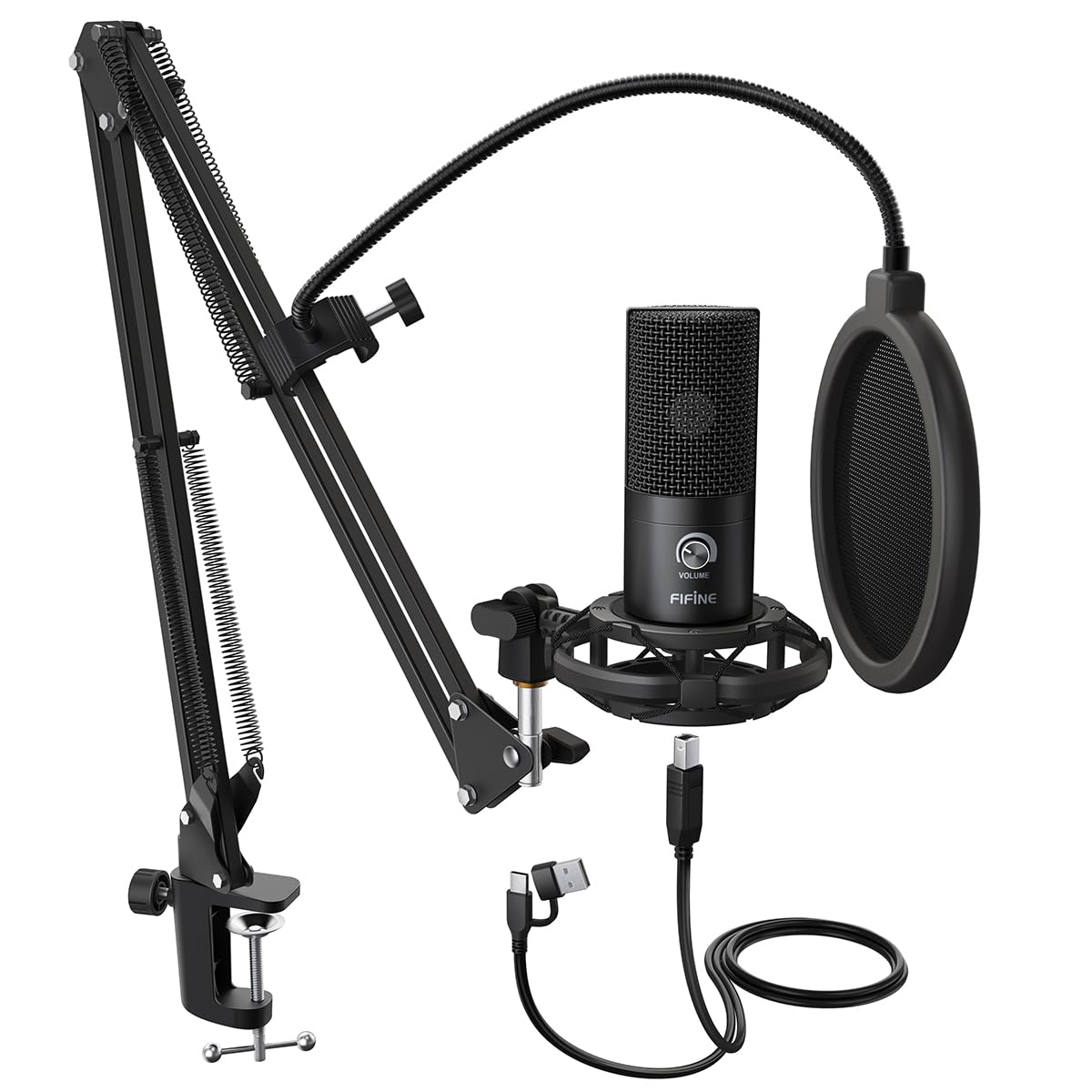
The FIFINE T669 delivers near-professional audio quality for podcasting, streaming, and voice-over work at a price point that undercuts most competitors. Its cardioid condenser capsule captures sound from the front while rejecting up to 70 dB of ambient noise from the sides and rear, making it effective in untreated rooms with background hum. The frequency response of 20Hz–20kHz covers the full vocal range without coloration.
The complete kit includes a studio-grade shock mount, a double pop filter, a sturdy scissor boom arm with a C-clamp, and an 8.2-foot USB-B to USB-A/C cable. The boom arm rotates 180° vertically and extends 135° forward, providing ample positioning flexibility for streamers who need vocal clarity without visible gear obstructing their face. The metal construction of the mic body and arm ensures longevity.
Setup is truly plug-and-play on PC, Mac, PS4, and PS5 with zero driver installation. The main drawbacks are the lack of a physical mute button and a pop filter attachment that can feel slightly loose on some units. However, for the capsule quality and included accessories, this is the best entry-level condenser microphone for content creators.
Why it’s great
- Cardioid pattern rejects ambient noise, focusing on vocal clarity
- Comprehensive kit includes shock mount, pop filter, boom arm, and cable
- Plug-and-play USB connection, compatible with PC, Mac, PS4, and PS5
Good to know
- No physical mute button; volume knob acts as mute/unmute
- Pop filter arm uses low-quality glue on some units
- Boom arm C-clamp may not grip round or curved desk edges securely
3. OPNICE Dual Monitor Stand Riser
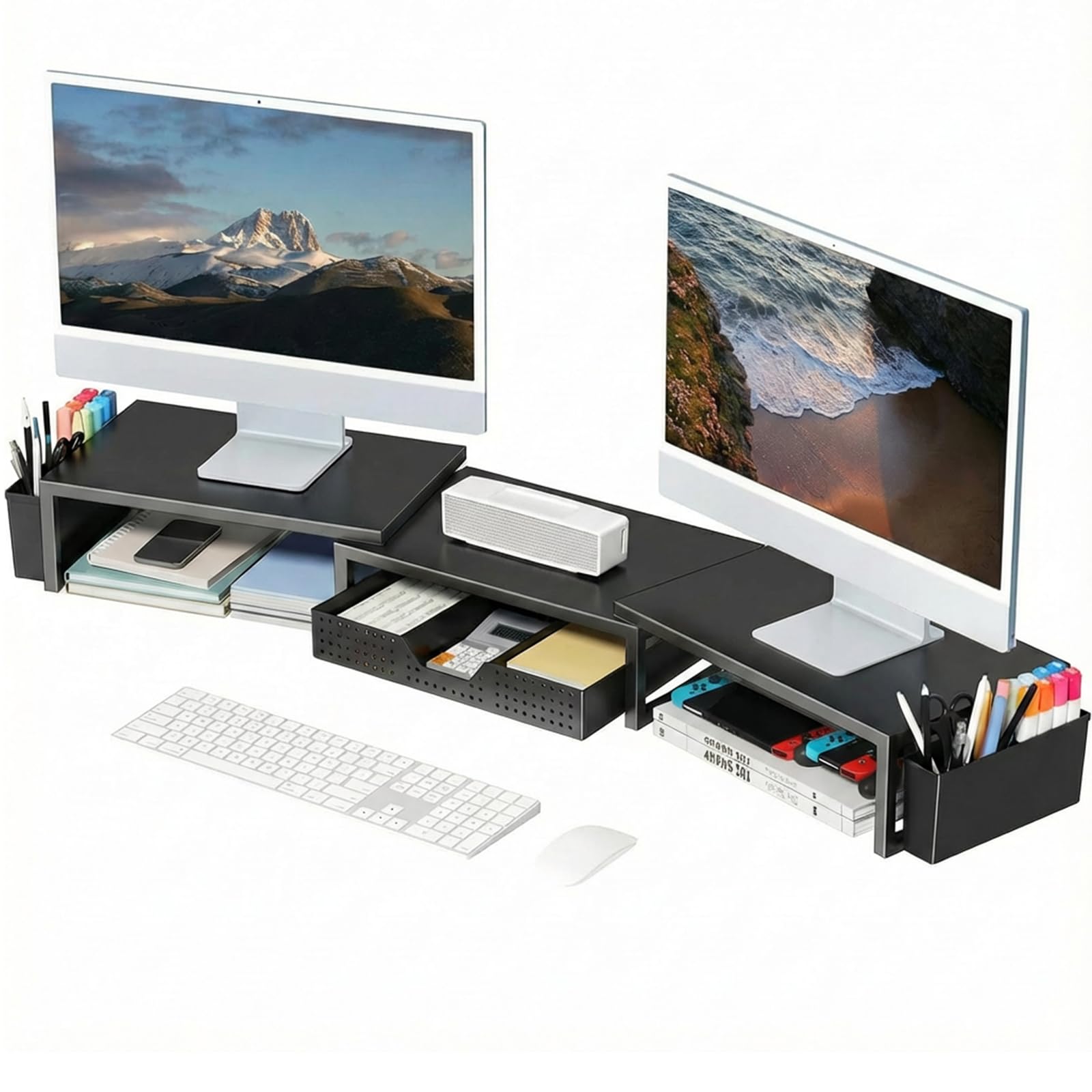
The OPNICE Dual Monitor Stand Riser tackles desk clutter head-on by elevating two monitors to eye level while integrating storage underneath. Its alloy steel frame supports heavy monitors without wobble, and the powder-coated black finish resists scratches. The 3.78-inch rising height is ideal for aligning most standard monitors to a neutral gaze angle, reducing neck and back strain over long workdays.
Built-in storage includes a pull-out drawer for pens and small gadgets, plus two hanging pen holders on the side. The riser is extendable to 39 inches wide, accommodating dual 32-inch monitors or a single ultra-wide display. No assembly is required—you unbox it and it instantly transforms your workspace with a clean, organized footprint.
Some users note that the metal surface can show fingerprints more readily than wood alternatives, and the included drawer lacks dividers for separating items. But for the price, this is the most robust multi-monitor riser available, offering both ergonomic elevation and integrated organization without a complex setup.
Why it’s great
- Extendable to 39 inches wide, supporting dual 32-inch monitors
- Integrated drawer and pen holders reduce desk clutter
- No assembly required; tool-free instant deployment
Good to know
- Metal surface shows fingerprints and smudges easily
- Drawer lacks dividers for separating small items
- Maximum height is fixed; no added tilt adjustment
4. YEASHEIN Adjustable Foot Rest
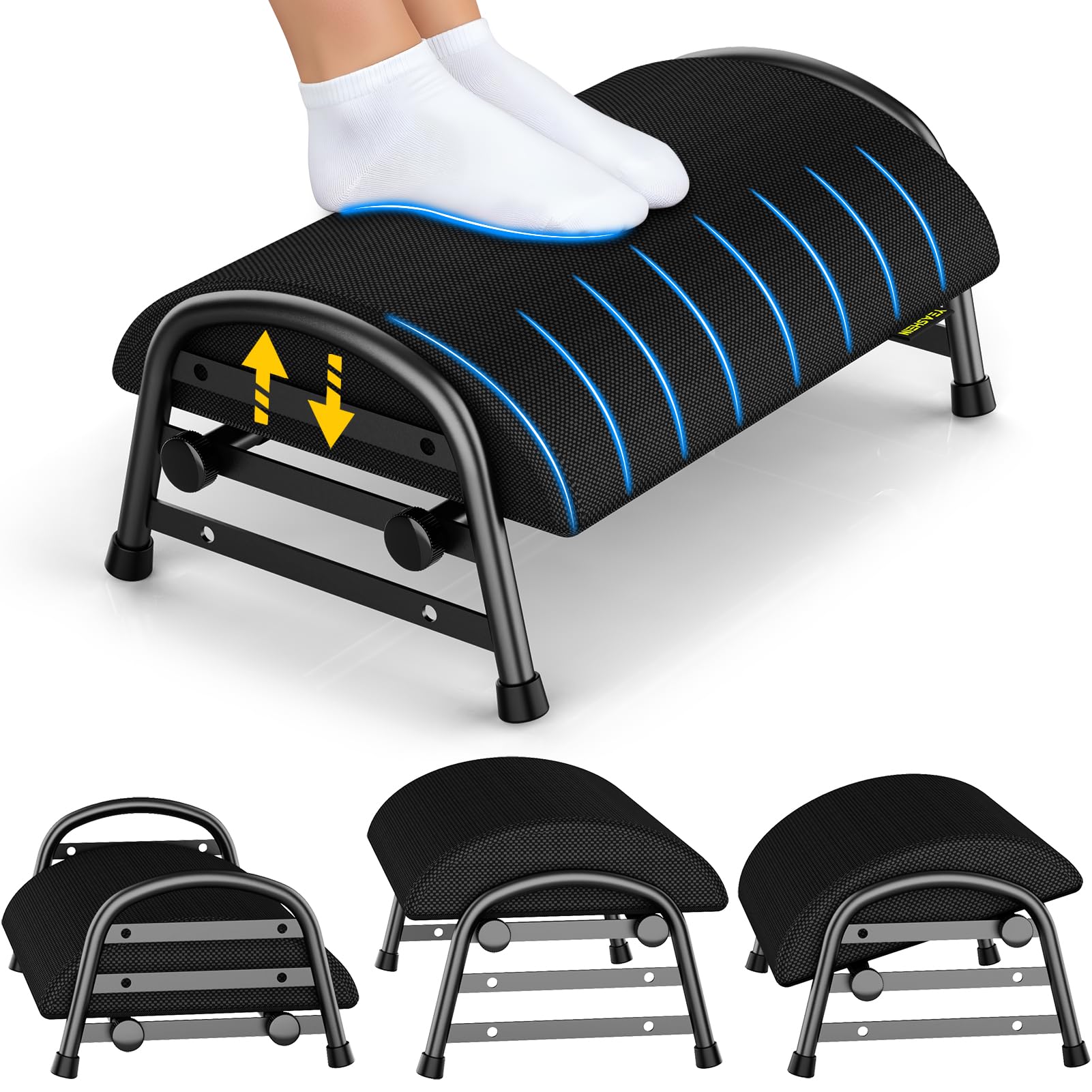
The YEASHEIN Adjustable Foot Rest addresses a frequently overlooked ergonomic area: lower leg support. With six distinct adjustment positions—four height levels ranging from 4 to 10 inches and two tilt angles—you can match the platform to your chair height and desk depth. The high-density memory foam cushion contours to your feet without bottoming out, supported by a heavy-duty carbon steel frame rated for 500 pounds.
The removable cushion doubles as a lumbar support or knee rest when you switch positions. Assembly takes minutes with enlarged screws and no tools required. The non-slip textured foam base keeps the rest firmly placed on hardwood or tile floors, though a few users report slight sliding under heavy pressure on smooth surfaces. The elevated design allows airflow underneath, preventing dust and debris accumulation.
For tall users or those with deep desks, the YEASHEIN provides the range needed to achieve a 90-degree knee angle. The cushion may permanently deform over many months of use, but the metal frame ensures the base structure remains stable. It is a meaningful upgrade for anyone experiencing sciatica or lower back discomfort during long sitting sessions.
Why it’s great
- Six adjustable configurations for custom leg elevation
- Heavy-duty carbon steel frame supports up to 500 pounds
- Removable cushion doubles as lumbar or knee support
Good to know
- Cushion may deform permanently over extended use
- Non-slip base can shift slightly on very smooth floors
- Some users report slight wobble at maximum height
5. STREBITO 142-Piece Precision Screwdriver Set

The STREBITO 142-Piece Precision Screwdriver Kit is the most complete electronics repair solution at this tier. Its 120 bits are crafted from 60 HRC chrome-vanadium steel, ensuring the tips resist stripping even on stubborn screws in laptops, iPhones, and game consoles. The bit selection covers Phillips, Flathead, Torx, Pentalobe, Tri-Wing, Pozidriv, Gamebit, Spanner, and Square heads—effectively covering every consumer electronic standard.
Beyond the bits, the kit includes a magnetic project mat (5.7 x 3.3 inches) that keeps screws organized, ESD tweezers, a suction cup, spudgers, a magnetizer/demagnetizer tool, and a flexible extension shaft for tight spaces. The handle features a rubberized grip with a swivel top, allowing smooth rotation while applying pressure. The entire set packs into a tear-resistant Oxford bag with labeled bit holders for quick retrieval.
Some users find the bag straps less durable over time, and the mat’s magnetic strength is moderate rather than strong. However, the lifetime warranty and the sheer breadth of included accessories make this a one-time purchase for DIY enthusiasts. It is an essential companion for anyone who builds or maintains their own PC and peripheral ecosystem.
Why it’s great
- 120 bits made from 60 HRC chrome-vanadium steel resist stripping
- Comprehensive specialty bits cover Apple, Nintendo, and laptop standards
- Includes magnetic mat, tweezers, spudgers, and extension shaft
Good to know
- Oxford bag straps may wear over time with frequent travel
- Magnetic mat has moderate strength; tiny screws can shift
- Some bits fit tightly in the holder, requiring careful removal
6. Lomil Cloud Ergonomic Wrist Rest Set
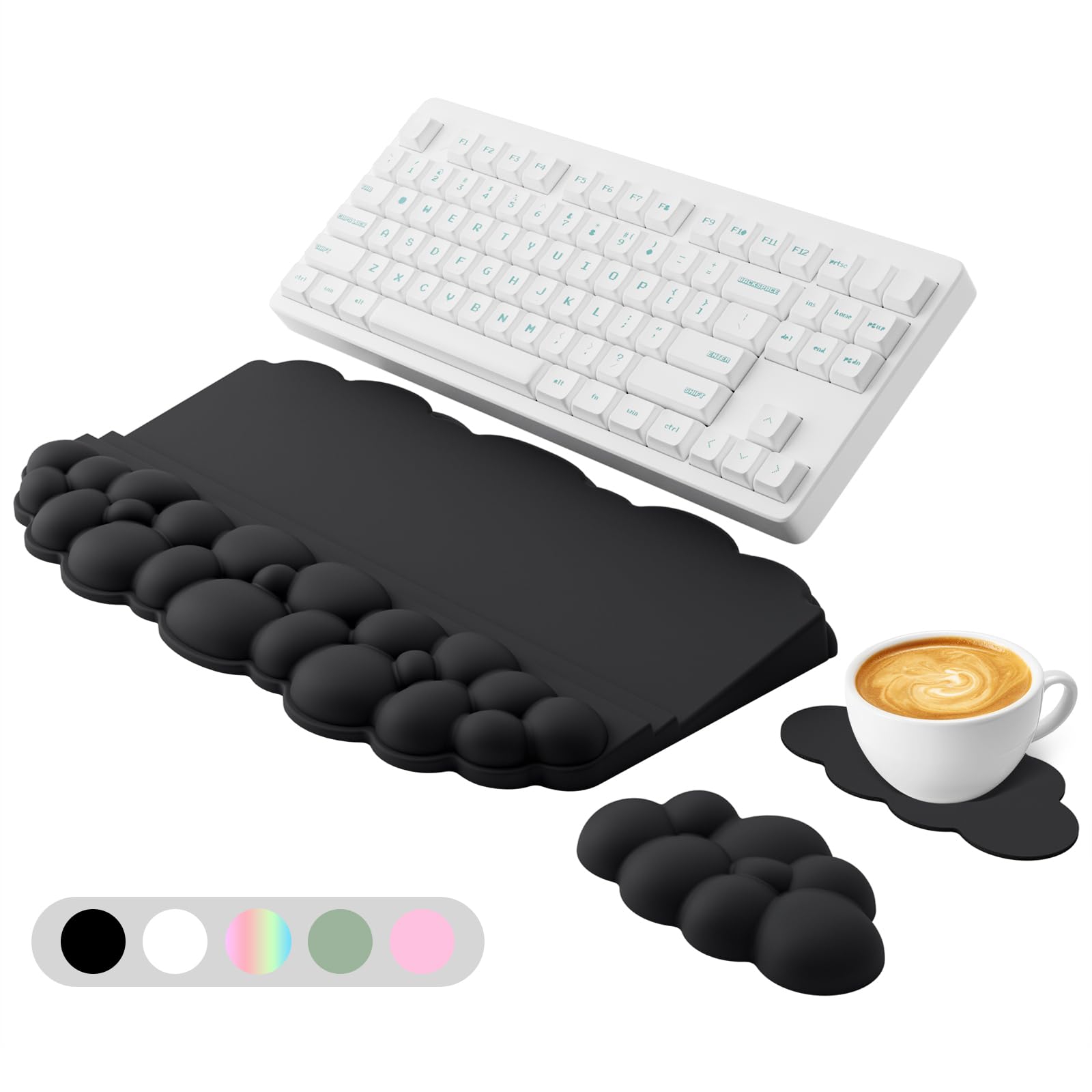
The Lomil Cloud Wrist Rest Set combines ergonomic support with a playful aesthetic, but the real value lies in its two tilt options—7° and 13.3°—which allow you to match the angle to your keyboard’s height and your natural wrist posture. The high-density memory foam provides quick rebound, resisting permanent flattening even after months of daily use. The non-slip PU base grips most desk surfaces firmly.
This 3-in-1 set includes a keyboard wrist rest, a mouse pad, and a cup holder, all designed in a cloud shape. The keyboard rest measures 17.3 inches long and 4 inches wide, fitting standard full-size keyboards with room to spare. The fabric cover is odor-free and skin-safe, and cleaning requires only a damp cloth—tougher stains can be treated with a baking soda and water paste.
While the cloud design may not suit minimalist or professional office aesthetics, the dual-tilt mechanism is a rare feature that genuinely improves typing comfort by reducing wrist extension. Some users note that the foam density is softer than firm, which may not suit those who prefer hard palm supports. For those prioritizing comfort and visual personality, this set delivers solid ergonomic value.
Why it’s great
- Two tilt angles (7° and 13.3°) for personalized wrist positioning
- High-density memory foam resists flattening and provides quick rebound
- 3-in-1 set reduces desk clutter with integrated cup holder
Good to know
- Cloud design may not suit minimalist or professional office decor
- Foam is softer than firm alternatives; not for those preferring hard support
- Protective film must be peeled off before first use
7. Packard Bell airFrame 21″ Dual Monitor + Keyboard/Mouse Bundle

The Packard Bell airFrame 21″ Bundle is a budget-friendly entry point for multi-monitor setups, offering two 21-inch FHD (1920×1080) LCD monitors with a 75Hz refresh rate and 5ms response time. The 178° viewing angle ensures good color retention from most seating positions, while VESA mount compatibility allows upgrading to ergonomic arms. The slim bezel design minimizes visual gaps when pairing the monitors side by side.
The bundle also includes a wireless keyboard and mouse, making it a genuine all-in-one starter kit for home offices or students. Connectivity options include HDMI and VGA ports, supporting older laptops and newer gaming consoles like PS5. Each monitor has a 5° forward and 15° backward tilt adjustment, providing basic ergonomic positioning without height or swivel adjustments.
Some units have reported inconsistent performance, with isolated cases of screen glitching or WiFi interference. The built-in speakers are limited in volume and clarity, so external audio solutions are recommended. For those seeking a cost-effective dual-monitor solution with included peripherals, the Packard Bell bundle delivers, but reliability may vary across individual units based on customer feedback.
Why it’s great
- 75Hz refresh rate and 5ms response provide smooth visual flow
- Includes wireless keyboard and mouse for an all-in-one setup
- VESA mount compatible for future ergonomic upgrades
Good to know
- Quality control inconsistencies; some units experience screen glitching
- Built-in speakers are low volume and lack bass response
- No height or swivel adjustment in the included stand
FAQ
What tilt angle should I look for in a keyboard wrist rest?
Is a trackball mouse better for preventing wrist pain?
Final Thoughts: The Verdict
For most users, the awesome computer accessories winner is the Logitech Ergo M575S because it provides the most impactful daily ergonomic improvement by eliminating arm movement. If you want higher audio clarity for content creation, grab the FIFINE Studio T669 for its cardioid rejection and complete kit. And for achieving a clutter-free dual-monitor desk setup, nothing beats the OPNICE Dual Monitor Stand Riser with its integrated storage and tool-free installation.