
Choosing a PC case used to be simple — pick a box, throw in your parts, and hope it didn’t overheat. Today, the market is flooded with dual-chamber layouts, panoramic glass panels, and pre-installed RGB fan arrays that promise the moon. The reality is that aesthetics often come at the cost of thermal performance, and many of those beautiful cases choke high-end hardware under load. Getting it right means knowing which layouts actually move air and which are just pretty traps.
I’m Min — the co-founder and writer behind Gadgets Feed. I’ve spent thousands of hours dissecting thermal test results, fan curves, and build quality reports across every major PC case brand to separate genuine engineering from marketing theater. (And Homer 🐱 supervised the whole research session from a warm motherboard box, tail twitching at every fan spec).
The challenge today is balancing airflow capacity, GPU clearance, radiator support, and build quality without overspending — and awesome pc cases deliver exactly that mix of premium features at prices that make sense for real builders.
How To Choose The Best Awesome PC Cases
Picking the right chassis is the single most consequential decision in a PC build — it determines your thermal ceiling, upgrade path, and build experience. Focus on three pillars: airflow path and fan configuration, component clearance (especially GPU length and radiator thickness), and the internal layout’s impact on cable routing. A case that looks stunning but starves your GPU of fresh air will cost you in throttled performance and noise.
Airflow Path and Fan Configuration
Look for a clear, unobstructed intake path — mesh front panels or side intakes with perforated steel beat solid glass every time. Pre-installed fan counts mean less upfront, but not all bundled fans are equal: check rated CFM, static pressure, and noise levels. Cases with reverse-blade side fans offer better aesthetics without sacrificing intake performance, while dual-chamber designs separate heat zones effectively.
Component Clearance and Radiator Support
Your GPU length and cooler height dictate chassis fit — measure before buying. Premium builds with high-end graphics cards need 340mm or more clearance, while custom water loops demand simultaneous support for 360mm radiators at the top and front. Back-connect motherboard compatibility is a bonus for cleaner builds but isn’t mandatory unless you already own a compatible board.
Quick Comparison
On smaller screens, swipe sideways to see the full table.
| Model | Category | Best For | Key Spec | Amazon |
|---|---|---|---|---|
| NZXT H9 Flow | Premium | High-End Builds & Custom Loops | 420mm Radiator Support | Amazon |
| Corsair 4000D RS Frame | Premium | Modular Customization & Airflow | InfiniRail Fan Mount System | Amazon |
| MUSETEX Y6 | Premium | Visual Showcases & White Builds | 6 PWM ARGB Fans Pre-Installed | Amazon |
| FOIFKIN F600 | Mid-Range | Panoramic Glass & Triple Radiator | 7 Pre-Installed ARGB PWM Fans | Amazon |
| Lian Li V100 | Mid-Range | Collectible Display & Balance | 420mm GPU Clearance | Amazon |
| MONTECH XR-B | Value | Budget RGB Builds | 3 Reverse-Blade ARGB Fans | Amazon |
| DARKROCK EC2 | Value | Entry-Level ATX Builds | Type-C Ready Front Panel | Amazon |
In‑Depth Reviews
1. NZXT H9 Flow
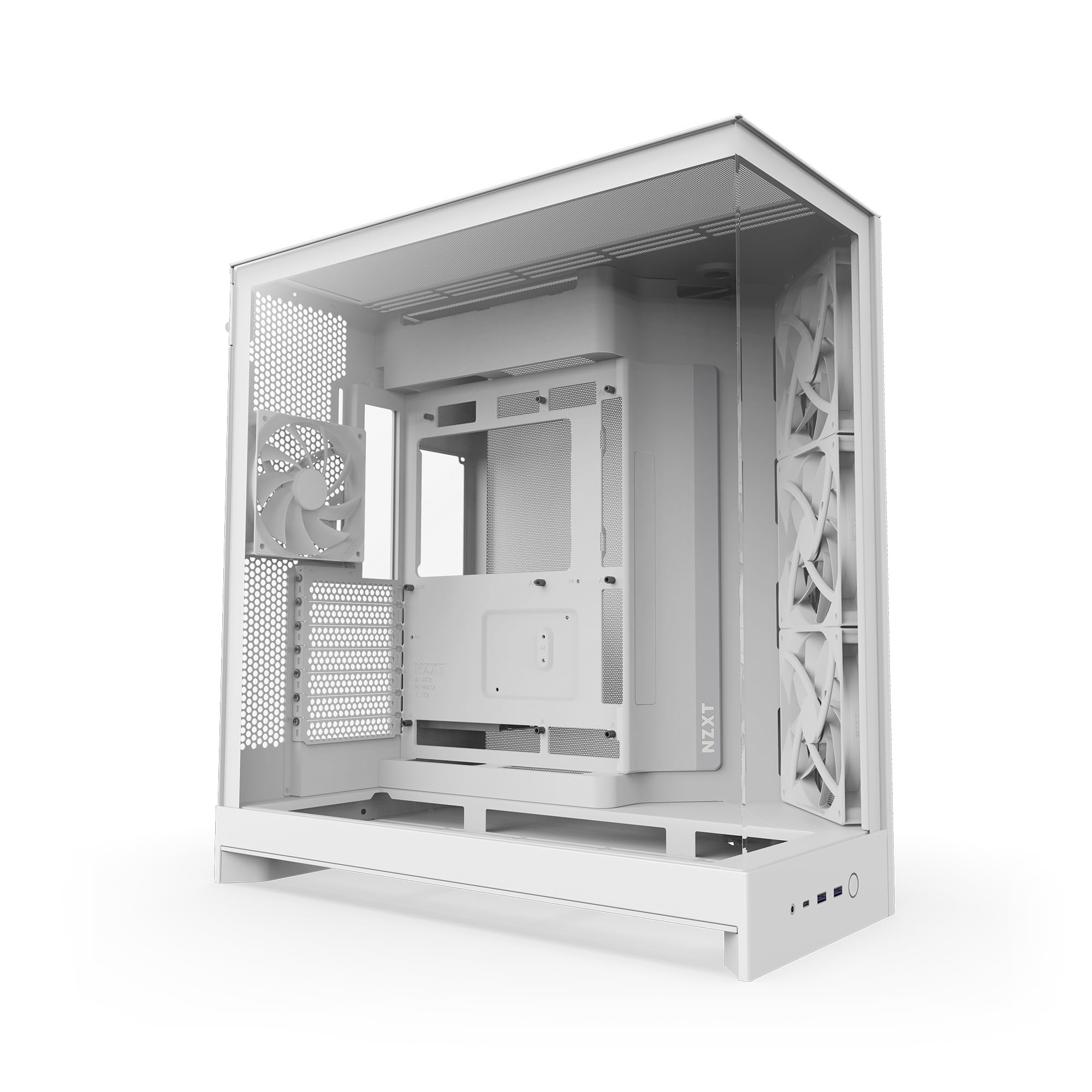
The NZXT H9 Flow is the benchmark that other mid-tower cases aspire to reach in 2025. Its dual-chamber design separates the main motherboard area from the PSU and drives, which dramatically reduces heat buildup and keeps cable management effortless with extra-wide routing channels and built-in Velcro straps. The chassis supports up to ten fans — including nine 140mm units — and fits a 420mm radiator on both the top and front-right, making it one of the most flexible airflow platforms at this size.
Build quality is top-tier: alloy steel and tempered glass panels feel substantial, and the wraparound panoramic glass offers an unobstructed view of your hardware without the thermal penalty of a fully closed front. The case also comes back-connect ready for ASUS BTF and MSI Project Zero motherboards, future-proofing your build for cable-free aesthetics. Pre-installed fans include three F140Q and one F120Q, though some builders report they run louder than premium aftermarket units under load.
Real-world testing confirms excellent thermals — one review noted the H9 Flow resolved an RTX 5090 overheating issue in Cyberpunk 2077 that a previous case could not handle. The only ergonomic downside is the front I/O panel placement at the bottom, which can be awkward to reach if the case sits on a desk. For serious builders who prioritize thermal headroom and build quality above all else, the H9 Flow is the definitive choice.
Why it’s great
- Dual-chamber design massively improves thermals and cable routing
- Supports 420mm radiators and up to ten fans for extreme cooling
- Back-connect ready with premium alloy steel construction
Good to know
- Front I/O panel at the bottom is inconvenient for desk placement
- Stock fans are louder than premium alternatives at higher RPMs
2. Corsair 4000D RS Frame

The Corsair 4000D RS Frame redefines what customization means in a PC case with its modular FRAME system. You can swap out the motherboard tray for billet aluminum, replace the front I/O panel for more USB ports, and reconfigure the interior as your needs evolve — which is unprecedented in this price tier. The InfiniRail mounting system allows you to slide fans anywhere along the front and roof rails, accommodating up to 200mm fans in the front and 140mm in the roof for perfectly targeted airflow.
Airflow performance is outstanding thanks to the 3D Y-pattern perforated steel front panel, which provides a low-restriction intake path while maintaining a clean, professional look. The case includes three pre-installed Corsair RS PWM fans that support daisy-chained 4-pin connections and Zero RPM mode for near-silent operation at idle. Builders consistently praise the cable management routing channels and included Velcro straps, which make a clean build achievable even for first-time assemblers.
Some users reported that the front USB-C cable arrived pinched out of the box, though Corsair’s support and warranty service is highly rated for resolving such issues. The glass side panel requires removal via thumb screws rather than a hinge, which increases the risk of accidental drops. Despite these minor quirks, the 4000D RS Frame offers modularity and airflow that no other case at this level can match — a true investment that grows with your system.
Why it’s great
- FRAME modular system lets you swap motherboard tray and I/O panel
- InfiniRail mounts provide unmatched fan placement flexibility
- Excellent airflow with Y-pattern steel front panel
Good to know
- Front USB-C cable may arrive pinched in rare cases
- Side panel uses thumb screws rather than tool-less hinge
3. MUSETEX Y6

The MUSETEX Y6 is a visual masterpiece that doesn’t skimp on thermal performance. Its 270-degree fully transparent dual tempered glass panels offer a panoramic view of your components, while the white finish stands out against a sea of black cases. Six pre-installed PWM ARGB fans — including two reverse-blade side intakes for improved aesthetics — ensure strong airflow straight out of the box, with anti-vortex blades that keep noise in check.
Internally, the case supports GPUs up to 400mm and CPU coolers up to 176mm, with top mounting for a 360mm liquid cooler. The dual-chamber layout divides the PSU and drive bays into a separate compartment, which keeps cable clutter hidden and improves thermal separation. Builders have reported that the case is spacious enough for full ATX builds but note that cable management channels are somewhat minimal compared to more expensive options — careful planning is needed for a truly clean front view.
The pre-installed fans are ribboned with a 2-pin connection for RGB control, which limits individual color customization unless you use motherboard software. Some ATX builders found that full-size boards fit tightly at the bottom edge, making bottom cable routing difficult. For those building a white-themed show rig with mid-range to high-end components, the Y6 delivers exceptional value without forcing a compromise on looks or cooling.
Why it’s great
- Stunning 270-degree panoramic glass in pure white finish
- Six pre-installed ARGB fans with reverse-blade side intakes
- Supports 400mm GPUs and 360mm top radiator
Good to know
- RGB fans use ribboned 2-pin connectors limiting individual control
- Cable management channels are tighter than premium alternatives
4. FOIFKIN F600

The FOIFKIN F600 punches far above its price tier by offering a dual-chamber design with seven pre-installed 120mm ARGB PWM fans — six reverse-blade and one forward — delivering exceptional out-of-the-box cooling that rivals cases costing twice as much. The 270-degree panoramic tempered glass panel provides a fish-tank view of your hardware, and the chassis accommodates triple 360mm radiators simultaneously, enabling serious custom water loops. GPU clearance is a generous 400mm, and PSU support extends to 200mm.
Build quality is surprisingly robust for the price point, with a sturdy metal and plastic frame that feels substantial during assembly. Builders have reported that the spacious interior makes cable management straightforward, though the SSD/HDD mounting plate is difficult to work with due to tight clearance — installing SSDs may require bending them slightly into position. The magnetic mesh top panel simplifies AIO radiator installation, and the front I/O includes a USB-C port for modern connectivity.
Customer feedback is overwhelmingly positive, with users noting that the case fits massive GPUs like the ASUS Astral 5090 OC without issue. The bundled fans provide decent airflow and are reasonably quiet at lower speeds, but they are not top-tier performers — builders seeking silent operation may eventually replace them. For anyone building a high-performance rig on a budget, the F600 offers an unbeatable combination of features, fans, and panoramic aesthetics.
Why it’s great
- Seven pre-installed ARGB fans including six reverse-blade
- Triple 360mm radiator support for custom water cooling
- 400mm GPU clearance fits flagship cards easily
Good to know
- SSD mounting bracket has very tight clearance
- Stock fans are adequate but not premium-grade for noise
5. Lian Li V100

The Lian Li V100 brings a unique concept to the mid-tower segment: a dedicated display platform integrated into the front PSU shroud, angled to showcase collectible figurines or GPUs without obstructing airflow. This thoughtful design detail is backed by solid engineering — four pre-installed 120mm ARGB PWM fans with hydraulic bearings and daisy-chain connectivity deliver airflow up to 61.47 CFM each, while the integrated 26-LED ARGB strip synchronizes with motherboard software for full-spectrum lighting control.
Clearance is generous across the board: the V100 supports back-connect ATX and Micro-ATX motherboards, GPUs up to 420mm, and CPU coolers up to 178mm. Tool-less side panels make component access quick, and the case includes a GPU sag bracket to protect heavy graphics cards from long-term stress. Build quality is typical Lian Li — predominantly plastic but with premium-feeling tempered glass and stainless steel accents that keep weight manageable without feeling flimsy.
Some users noted that the pre-installed fans can be louder at maximum RPM than premium alternatives, and the bottom fan mounting position may interfere with larger PSUs or lower PCIe slots. Cable management behind the motherboard tray is described as tight but workable, and the single 2.5-inch drive bay may limit storage options for some users. For builders who want a case that doubles as a display pedestal and delivers strong all-around performance, the V100 is a genuinely original choice.
Why it’s great
- Unique slanted display platform for collectibles or GPU showcase
- Pre-installed 4 ARGB fans with hydraulic bearings and 1800 RPM
- Supports back-connect motherboards and 420mm GPUs
Good to know
- Bottom fan positioning may conflict with large PSUs
- Only one 2.5-inch drive bay included
6. MONTECH XR-B

The MONTECH XR-B proves that a budget-friendly case doesn’t have to feel cheap or compromise on essential features. Its wood-grain textured I/O interface adds a warm, natural aesthetic to the front panel that stands apart from the usual all-black or all-glass designs. The case comes with three pre-installed 120mm ARGB PWM fans, including two reverse-blade units on the side that provide clean intake airflow without visible fan frames disrupting the interior view.
Interior space is well-utilized: the XR-B fits ATX, Micro-ATX, and Mini-ITX motherboards, supports high-end 40-series GPUs, and accommodates a 360mm radiator at the top. Builders frequently praise the cable management experience, noting generous routing space with rubber gaskets and ample tie-down points that make even first-time builds look tidy. The full-view dual tempered glass panels provide a clean showcase for RGB components, and magnetic dust filters cover the top, bottom, and side panels for easy maintenance.
A few users reported that the side glass panel requires a tight push to seat properly, and some units arrived with minor scratches on the glass. The pre-installed fans are bright and effective for the price, but they are not PWM-controlled on all headers — check your motherboard’s fan header count. For builders on a tight budget who refuse to sacrifice aesthetics or cooling capability, the MONTECH XR-B delivers exceptional value with a distinctive look.
Why it’s great
- Unique wood-grain I/O design for a warm aesthetic
- Three pre-installed ARGB fans with two reverse-blade units
- Excellent cable management with rubber gasketed routing holes
Good to know
- Side glass panel is a tight push-fit that requires care
- Some units may have minor glass scratches in transit
7. DARKROCK EC2

The DARKROCK EC2 is the definition of a no-nonsense entry-level mid-tower that includes features typically reserved for more expensive cases. The mesh front panel provides efficient airflow, magnetic dust filters on the top and bottom keep interiors clean, and the tempered glass side panel uses a hinged design that swivels open for quick access — a premium touch at an entry-level price. The front I/O includes a Type-C port, making it one of the most affordable cases with modern connectivity.
Interior compatibility is surprisingly generous: the EC2 supports ATX, M-ATX, and ITX motherboards, GPUs up to 340mm, and PSUs up to 200mm. It can accommodate up to eight 120mm cooling fans and a 360mm radiator on the front, giving builders room to upgrade cooling over time. A single 120mm fan is pre-installed at the rear, which is sufficient for basic builds but most users will want to add more. The steel chassis feels sturdy despite the thin metal, and cable management is adequate with abundant tie-down points.
Some users noted that the thin metal panels can bend slightly during assembly, and the HDD bracket may transfer vibration to the case at higher speeds. The top fan mounting positions are somewhat awkward, with CPU power connectors blocking a second 140mm fan. For budget-conscious builders who want a Type-C port, a hinged glass panel, and compatibility with future component upgrades, the DARKROCK EC2 offers unbeatable value without cutting corners on the features that matter most.
Why it’s great
- Hinged tempered glass door for tool-less access
- Type-C front port at an entry-level price point
- Supports 8 fans and 360mm radiator for future upgrades
Good to know
- Thin steel panels can flex during assembly
- Top fan mounting limited by CPU power connector clearance
FAQ
What is the real difference between dual-chamber and standard mid-tower designs?
How much GPU clearance do I need for a flagship graphics card?
Are pre-installed case fans good enough for a high-end gaming build?
Final Thoughts: The Verdict
For most users, the awesome pc cases winner is the NZXT H9 Flow because its dual-chamber layout, 420mm radiator support, and back-connect compatibility set the standard for thermals and build quality. If you want modular customization and limitless fan placement, grab the Corsair 4000D RS Frame. And for a budget-friendly visual showcase that doesn’t cut cooling corners, nothing beats the FOIFKIN F600 with its seven pre-installed fans and panoramic glass.