
Our readers keep the lights on and my morning glass full of iced black tea. As an Amazon Associate, I earn from qualifying purchases.
The Intel AX210 chipset is the definitive upgrade for anyone still using an older Wi-Fi 5 or first-gen Wi-Fi 6 card. It unlocks the uncongested 6 GHz band, delivering theoretical speeds up to 2.4 Gbps on that band alone, alongside Bluetooth 5.3 for lower-latency peripherals and stronger anti-interference. The difference is immediately noticeable in online gaming, 4K streaming, and large file transfers—lag spikes and buffering become a thing of the past.
I’m Min — the co-founder and writer behind Gadgets Feed. I’ve spent hundreds of hours combing through technical datasheets, cross-referencing chipset generations, and analyzing real-world user benchmarks across dozens of Wi-Fi adapter models to separate genuine performance gains from marketing fluff.
Whether you are building a new desktop, reviving an older laptop, or simply tired of unstable connections, this guide walks you through every critical factor to find the best ax210 wi-fi card for your specific setup and budget.
How To Choose The Best AX210 Wi-Fi Card
The Intel AX210 is a specific M.2 2230 module. Your first decision is whether you need just the bare card (for a laptop or a motherboard with a pre-existing M.2 slot) or a full PCIe kit with antennas, brackets, and a Bluetooth header cable. The wrong form factor can turn a thirty-minute install into a frustrating afternoon.
Form Factor: Bare M.2 vs. PCIe Adapter
A bare AX210NGW card measures 22mm x 30mm and requires an M.2 Key A+E slot on your motherboard or laptop. Many desktop boards lack this slot, which means you need a PCIe adapter card that houses the M.2 module and provides antenna connectors. PCIe kits like the TP-Link Archer TXE72E include everything in one box, while bare cards like the HighZer0 AX210NGW assume you already have the antennas and bracket.
Antenna Quality and Magnetic Bases
Not all antennas are equal. The GIGABYTE GC-WBAX210 ships with a magnetic antenna that sticks to a metal monitor arm or PC case, offering flexible placement. Cheaper PCIe kits often use fixed, non-detachable antennas that limit positioning. If your desk is in a corner or far from the router, higher-gain antennas (6 dBi or more) make a measurable difference in signal stability at the 6 GHz band, which is more range-sensitive than 5 GHz.
Bluetooth 5.3 Header Connection
Every AX210 card includes Bluetooth 5.3 functionality, but the PCIe versions require a USB 2.0 header cable to activate it. Some motherboards have limited internal USB headers, especially if you already use a USB-powered AIO cooler or RGB controller. Check your board’s header layout before buying a PCIe kit—otherwise you may lose Bluetooth or need a splitter.
Quick Comparison
On smaller screens, swipe sideways to see the full table.
| Model | Category | Best For | Key Spec | Amazon |
|---|---|---|---|---|
| REKONG AX210NGW | Bare M.2 Card | Laptop upgrades & DIY desktop builds | M.2 2230, 5374 Mbps theoretical | $22.99Amazon |
| FENVI FV-AXE3000 | PCIe Kit | Desktop users needing a full kit | PCIe x1, 5400 Mbps, dual antennas | $29.99Amazon |
| HighZer0 AX210NGWG | Bare M.2 Card | Laptop & Linux users | M.2 A+E, 2.4 Gbps, 0.16g | $26.63Amazon |
| QFly AX210-Black | PCIe Kit | Gamers wanting low latency | PCIe, 2400 Mbps, 6 dBi antennas | $29.98Amazon |
| TP-Link Archer TXE72E | Premium PCIe Kit | High-end gaming & VR | PCIe, 5400 Mbps, WPA3, 2 high-gain | $36.99$54.99Limited time dealAmazon |
| GIGABYTE GC-WBAX210 | Premium PCIe Kit | High-end desktop with magnetic antenna | PCIe, 2400 Mbps, BT 5.2, magnetic | $49.99Amazon |
In‑Depth Reviews
1. TP-Link Archer TXE72E

The TP-Link Archer TXE72E combines Intel’s AX210 chipset with a polished PCIe adapter that includes two high-gain antennas, a Bluetooth 5.3 header cable, and both full-height and low-profile brackets. It supports the full tri-band Wi-Fi 6E spec—2.4 GHz at 574 Mbps, 5 GHz at 2402 Mbps, and 6 GHz at 2402 Mbps—for a total of 5400 Mbps. WPA3 encryption is built in, and OFDMA with MU-MIMO keeps latency low even when multiple devices are active.
Installation is straightforward: slide the card into any PCIe x1, x4, x8, or x16 slot, connect the Bluetooth USB cable to a motherboard F_USB header, and download the latest Intel AX210 drivers directly from Intel’s site (the included CD is outdated). Real-world reviews report a dramatic drop in ping during online gaming and stable 6 GHz connections at moderate distances from a Wi-Fi 6E router. The antennas also have a clean, angular design that looks at home in a modern gaming rig.
On the downside, the included Bluetooth cable is relatively short, which can make routing around a large GPU tricky. Some users noted that the TP-Link driver site occasionally serves older versions, so going straight to Intel is the smarter play. For a complete, hassle-free desktop upgrade, this is the most balanced AX210 kit available.
Why it’s great
- Complete kit with brackets, antennas, and Bluetooth cable
- High-gain antennas deliver strong 6 GHz range
- WPA3 security and MU-MIMO for low-latency gaming
Good to know
- Short Bluetooth header cable may need careful routing
- Better to download Intel drivers directly, not from TP-Link
- 6 GHz band requires Windows 11 or Windows 10 Dev build
2. GIGABYTE GC-WBAX210

The GIGABYTE GC-WBAX210 stands out for its magnetic dipole antenna, which attaches cleanly to any metal surface—your monitor arm, PC case side panel, or even a wall-mounted bracket. It uses the same Intel AX210 module, providing dual-stream 2.4/5/6 GHz connectivity at up to 2400 Mbps per stream (2402 Mbps theoretical on each high band). Bluetooth 5.2 (slightly earlier than 5.3) still offers strong range and stable multi-device connections.
Installation requires connecting the card to a PCIe slot and plugging the Bluetooth USB header cable into a motherboard 9-pin header. Windows 10 and 11 auto-install basic drivers, but downloading the full Intel package ensures both Wi-Fi 6E and Bluetooth work at peak performance. The magnetic antenna is a genuine convenience upgrade—no adhesive strips or drilling holes. It also eliminates the cyclic disconnection issues that plague cheaper USB dongles.
The premium price tag is the main drawback, and it only supports Bluetooth 5.2 instead of the newer 5.3 found on most other AX210 implementations. Still, for a clean, stable desktop setup where antenna placement flexibility matters, this is a top-tier choice. Owners of large GPUs should check clearance, as the card may block airflow or sit very close to the graphics card backplate.
Why it’s great
- Magnetic antenna for flexible, tool-free placement
- Solid 6 GHz performance with Intel AX210 reliability
- Plug-and-play driver recognition on Windows 10/11
Good to know
- Bluetooth 5.2, not the latest 5.3
- Premium cost compared to other PCIe kits
- May sit uncomfortably close to a large GPU
3. QFly AX210-Black

The QFly AX210-Black is a straightforward PCIe adapter that houses an Intel AX210NGW module and ships with two 6 dBi high-gain antennas, a low-profile bracket, and a driver CD. It supports the full tri-band spectrum: 574 Mbps on 2.4 GHz, 2400 Mbps on 5 GHz, and 2400 Mbps on 6 GHz. The 6 dBi antennas provide noticeably better signal penetration through walls compared to the standard 2-3 dBi antennas found on budget kits, which is critical for the 6 GHz band’s shorter range.
Installation is similar to other PCIe cards—plug into any x1 or larger slot, connect the Bluetooth USB 2.0 header, and install drivers. The card is recognized on Windows 10 and 11 automatically, but for full BT 5.3 functionality, downloading the Intel AX210 driver package is recommended. Linux Mint 21.3 and later kernels also support this card out of the box without additional firmware.
Some users reported that Bluetooth power must be connected to the motherboard 9-pin header—skipping this step leaves Bluetooth non-functional. The driver CD is largely useless, and the manual could be clearer about the antenna installation. For its price, however, you get a well-built card with superior antenna gain that outperforms many more expensive options in raw range.
Why it’s great
- 6 dBi high-gain antennas for superior range
- Full tri-band 5400 Mbps AX210 performance
- Works plug-and-play on Linux Mint
Good to know
- Bluetooth requires motherboard USB 2.0 header connection
- Included driver CD is outdated
- Manual lacks detailed installation guidance
4. FENVI FV-AXE3000

The FENVI FV-AXE3000 is a PCIe x1 card built around the Intel AX210 chipset, offering tri-band speeds up to 5400 Mbps and Bluetooth 5.3. It ships with two fixed external antennas, a low-profile bracket, and a Bluetooth USB header cable. The PCB is a distinctive red color, which stands out in windowed cases but has no performance impact. Its main selling point is the complete package at a friendly price point—ideal for first-time desktop Wi-Fi 6E upgraders.
Performance is in line with other AX210 implementations: fast 6 GHz connectivity when paired with a Wi-Fi 6E router, and full backward compatibility with 802.11ac/b/g/n. The Bluetooth 5.3 works well for peripherals once the USB header cable is connected. On Linux, users reported plug-and-play operation with OpenSUSE Leap, though the WiFi section may need manual firmware placement on older kernels.
A notable limitation is that the fixed antennas cannot be swapped for higher-gain alternatives. If your router is in another room, you may experience weaker 6 GHz signals compared to a kit with detachable antennas. Also, some users found that the Bluetooth functionality requires disabling internal front USB ports on certain motherboards to free up the 9-pin header—a quirk to check before buying.
Why it’s great
- Complete kit with low-profile bracket included
- Reliable Intel AX210 chipset for 5400 Mbps
- Bluetooth 5.3 works well with standard peripherals
Good to know
- Fixed antennas cannot be upgraded
- Bluetooth may conflict with front USB header usage
- Linux support varies by kernel version
5. REKONG AX210NGW

The REKONG AX210NGW is a pure M.2 2230 card with no PCIe adapter, no antennas, and no bracket—just the AX210 module, a tiny screwdriver, and a screw. It is designed for users who already have an M.2 Key A+E slot on their motherboard or laptop, or who plan to buy a separate PCIe riser. This is the most cost-effective way to get the AX210 chipset if you have the slot and antennas from a previous card.
Installing it in a laptop (like the Acer Aspire 5) requires prying open the back cover, locating the existing Wi-Fi card, and swapping it out—delicate work but fully documented on forums. Users reported link speed increases of up to 50% (from ~766 Mbps to ~1155 Mbps) after the swap. The card is recognized by Windows 10/11 automatically, and Intel provides regular driver updates. Linux users on Kubuntu confirmed it works with the iwlwifi driver on kernel 5.15+.
The main caveat is that you must handle antennas yourself—if your laptop uses MHF4 connectors, your existing antennas may work, but desktop users need to buy a separate antenna set and PCIe bracket. For experienced tinkerers, this is the ultimate budget path to Wi-Fi 6E. For everyone else, a pre-integrated PCIe kit saves time and frustration.
Why it’s great
- Lowest cost way to get genuine Intel AX210 chipset
- Works seamlessly in laptops with M.2 A+E slots
- Supports Linux with iwlwifi driver from kernel 5.15
Good to know
- No antennas, bracket, or PCIe adapter included
- Requires careful physical installation in laptops
- Desktop users need extra parts for full functionality
6. HighZer0 AX210NGWG
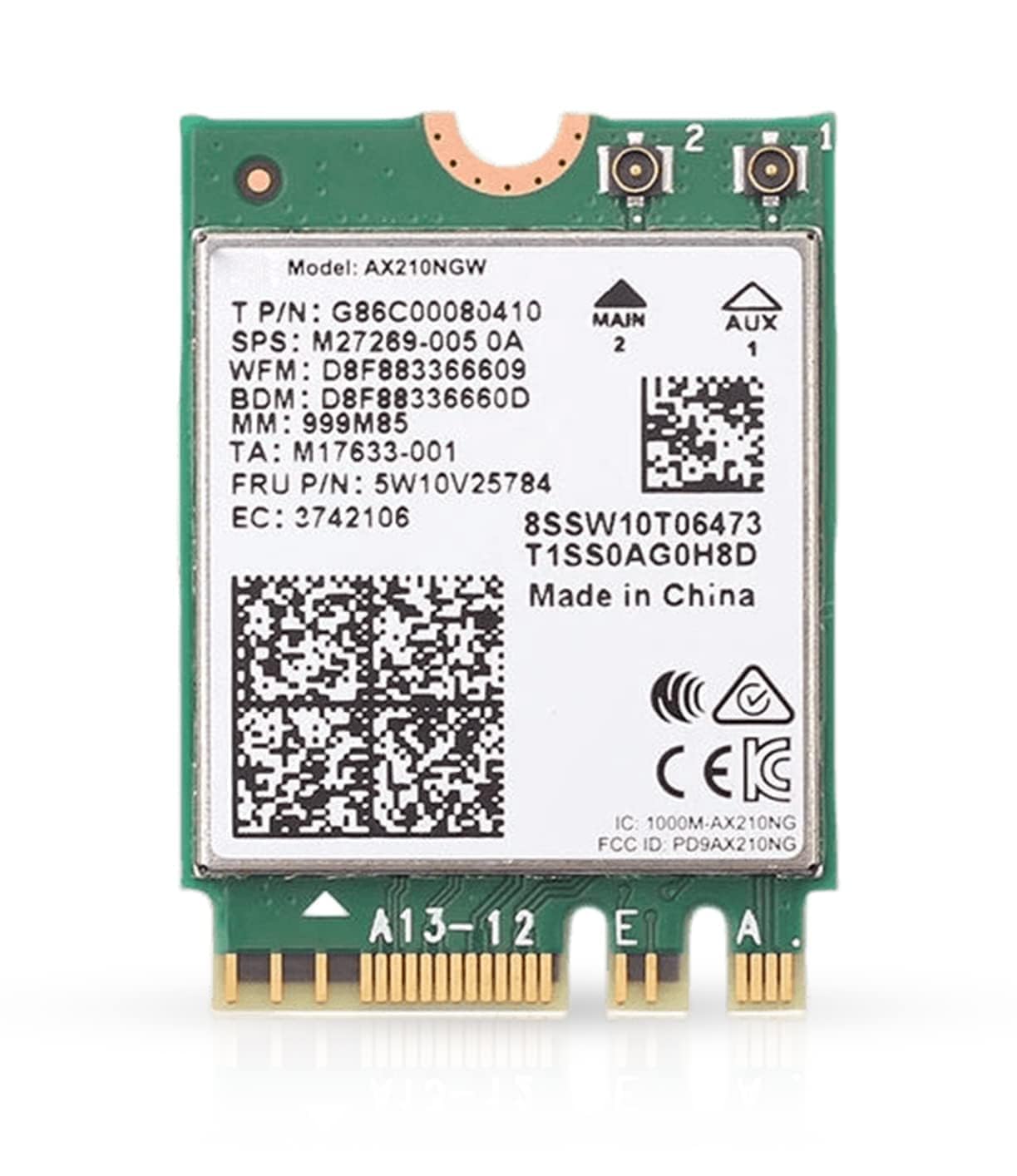
The HighZer0 AX210NGWG is another bare M.2 2230 card, but it comes from a brand with strong community recognition on laptop upgrade forums. It supports the full Wi-Fi 6E tri-band spectrum (2.4/5/6 GHz) with speeds up to 2.4 Gbps and includes Bluetooth 5.3. Weighing only 0.16 grams, it is essentially weightless inside a chassis, and its small form factor fits ultra-thin laptops without clearance issues.
Users upgrading from factory Qualcomm or Realtek Wi-Fi cards reported immediate improvements in both speed and stability. The card works natively on Windows 10/11 (drivers are automatically fetched via Windows Update) and on Linux kernels 5.15+ with the iwlwifi firmware. One user on a Z370-E motherboard saw dramatically faster Wi-Fi and Bluetooth after swapping out an older Intel AC card. Bluetooth 5.3 paired with modern earbuds and controllers without dropout issues.
The biggest limitation is the same as the REKONG card: no antennas, no bracket, no PCIe adapter. It is strictly for users who have the M.2 slot and existing antenna wiring. Some buyers also noted that the packaging lacks a clear model number—verify you are receiving the AX210NGW and not an older AX200 by checking the chip markings. For laptop owners with a dead or slow Wi-Fi card, this is a straightforward fix that costs less than most external USB adapters.
Why it’s great
- Ultra-light 0.16g, perfect for thin laptops
- Native driver support on Windows and Linux
- Significant real-world speed improvement over older cards
Good to know
- Antennas and bracket must be sourced separately
- Packaging can be ambiguous about exact model
- Requires careful antenna connector handling (MHF4)
FAQ
Does the AX210 card work with AMD motherboards?
Can I use an AX210 card without a Wi-Fi 6E router?
Do I need special drivers for the AX210 on Windows 11?
Final Thoughts: The Verdict
For most users, the ax210 wi-fi card winner is the TP-Link Archer TXE72E because it delivers a complete, reliable kit with high-gain antennas, WPA3 security, and easy installation at a fair price. If you want magnetic antenna flexibility and premium build quality, grab the GIGABYTE GC-WBAX210. And for a pure laptop upgrade on a tight budget, nothing beats the HighZer0 AX210NGWG.
Product prices and availability are accurate as of the date/time indicated and are subject to change. Any price and availability information displayed on Amazon at the time of purchase will apply to the purchase of this product. As an Amazon Associate I earn from qualifying purchases.
CERTAIN CONTENT THAT APPEARS ON THIS SITE COMES FROM AMAZON. THIS CONTENT IS PROVIDED "AS IS" AND IS SUBJECT TO CHANGE OR REMOVAL AT ANY TIME.
Amazon and the Amazon logo are trademarks of Amazon.com, Inc. or its affiliates.