
Getting a true black-and-white photo print from a consumer printer often disappoints — muddy grays, color casts, or a visible tint that ruins the monochrome look. This guide cuts through the noise, focusing on hardware that delivers genuine tonal depth, sharp detail, and archival longevity for your black-and-white work.
I’m Min — the co-founder and writer behind Gadgets Feed. I’ve spent hundreds of hours analyzing print engine architectures, ink systems (dye vs. pigment), resolution specs, and media handling to separate the real contenders from the compromise machines. This guide is the result of that deep research into the B&W photo printing landscape.
Whether you’re printing for a gallery show or a personal portfolio, finding the right best b&w photo printer means understanding ink technology, paper path design, and output resolution beyond the marketing sheet.
How To Choose The Best B&W Photo Printer
Selecting a printer for monochrome photography is different from picking an all-purpose color machine. The key lies in the ink system’s ability to render a smooth gray gradient without color shifts. A printer that handles B&W well must have dedicated black, gray, and light gray ink channels to achieve neutral tonality from paper white to maximum black density (Dmax).
Pigment vs. Dye-Based Inks
Pigment inks embed solid particles into the paper surface, creating prints that resist fading for decades — often rated up to 200 years for color and 400 years for black-and-white. Dye-based inks sit on top of the paper and fade much faster, making them unsuitable for archival monochrome work. For serious B&W printing, a pigment ink system is non-negotiable.
The Role of Gray Ink Channels
A printer with only a single black ink will produce grayscale images with a visible grain pattern — the printer must dither black dots to simulate gray. Adding light gray and matte black ink channels allows the printer to lay down actual gray tones, resulting in smoother transitions, finer shadow detail, and a wider dynamic range. Look for a minimum of three black/gray ink positions in the print head for professional-grade output.
Quick Comparison
On smaller screens, swipe sideways to see the full table.
| Model | Category | Best For | Key Spec | Amazon |
|---|---|---|---|---|
| Epson SureColor P700 | Premium Photo | Gallery-quality 13″ B&W prints | 10-channel UltraChrome PRO10 | Amazon |
| Canon imagePROGRAF PRO-310 | Premium Photo | Archival pigment prints with Chroma Optimizer | 9-color LUCIA PRO II | Amazon |
| Canon PRO 2100 24″ | Large Format | Fine art & gallery prints up to 24″ wide | 12-color LUCIA PRO | Amazon |
| Canon PIXMA PRO-200S | Mid-Range Photo | Dye-based prints for glossy display | 8-color dye system | Amazon |
| HP LaserJet Pro MFP 3101sdw | Office B&W | Text documents with auto duplex | 35 ppm laser | Amazon |
| Xerox B310DNI | Office B&W | High-speed monochrome laser | 42 ppm laser | Amazon |
| HP Laserjet Pro 3001dw | Office B&W | Wireless B&W laser for small teams | 35 ppm laser | Amazon |
| Xerox B230/DNI | Office B&W | Compact home office monochrome | 36 ppm laser | Amazon |
| Liene Amber M110 | Portable Photo | On-the-go prints from phone | Thermal dye sub | Amazon |
In‑Depth Reviews
1. Epson SureColor P700 13-Inch

The Epson SureColor P700 sets the benchmark for B&W photo printing at the 13-inch format. Its UltraChrome PRO10 ink system includes dedicated Photo Black, Matte Black, Gray, and Light Gray channels, which means neutral grayscale tones directly from the print head — no dithering artifacts. The new Carbon Black Driver mode dramatically increases Dmax for inky, rich blacks on glossy papers that rival darkroom prints.
Dual black ink nozzles eliminate the wasteful switch-over time between photo black and matte black media — you can print on glossy paper, then fine art matte, without a purge cycle. The 10-channel MicroPiezo AMC printhead delivers precise droplet placement at resolutions that reveal every shadow detail in a monochrome negative. Built-in Wi-Fi and the 4.3-inch touchscreen make paper feed and status checks straightforward.
The main drawback is the starter cartridge set — the included ink cartridges are nearly empty, delivering only about two 8×10 prints before requiring a full replacement set that costs nearly as much as the printer itself. Expect an effective upfront cost significantly above the body price. For photographers printing consistently, the ongoing ink cost is predictable but high.
Why it’s great
- Dedicated gray/light gray inks for smooth B&W gradients
- Separate Photo Black and Matte Black nozzles eliminate switching delay
- Compact footprint — 23% smaller than predecessor
Good to know
- Starter ink cartridges contain very little ink — plan a full replacement immediately
- Thick fine art paper requires manual feeding and careful setup
- Multi-page sheet printing requires manual initiation per sheet
2. Canon imagePROGRAF PRO-310 13″

The Canon imagePROGRAF PRO-310 brings a 9-color LUCIA PRO II pigment ink system plus a dedicated Chroma Optimizer clear coat. For pure B&W work, the inclusion of Matte Black alongside three gray variants (Photo Black, Gray, Light Gray) produces exceptional tonal depth with no color shift — the Dmax on glossy paper rivals wet-process prints. The Chroma Optimizer eliminates gloss differential, so your matte black areas don’t look smeary next to lighter highlights.
Setup is straightforward via the 3.0-inch color LCD, and the built-in Anti-Clogging System keeps print heads clean during idle periods — a real advantage if you print B&W in intermittent batches. Skew correction and wireless connectivity (Wi-Fi, Ethernet) make it easy to position away from your desk. At 31.6 pounds and dimensions of 28.7 x 18.6 x 14.04 inches, it needs a sturdy stand but is compact for its class.
The price of consumables is the primary concern — after roughly 16 A3+ prints, the PK and GY inks showed about 65% remaining, suggesting a moderate per-print cost. Some users report feeding issues after a few hundred prints when using thick card stock. Also, the driver enforces strict custom size limits that may not support every fine art paper dimension out of the box.
Why it’s great
- Superior Dmax and neutral gray tones with Chroma Optimizer
- Anti-Clogging System reduces maintenance between print sessions
- Excellent results with Canon Pro Luster and Pro Matte papers
Good to know
- Ink replacement costs add up over time
- Thick media handling can choke after heavy use
- Driver UI for print size selection is less intuitive than Epson’s
3. Canon PRO 2100 24″ Wide Format

The Canon PRO 2100 is a 24-inch wide-format printer designed for photographers who need large-scale fine art prints. Its 12-color LUCIA PRO pigment ink system includes multiple black and gray channels, delivering museum-quality monochrome prints that hold their ground against silver-gelatin enlargements. The roll feed support and integrated rotary cutter make it practical for borderless panoramic B&W images.
Setup is well-guided through the LCD interface, and the initial printer calibration steps are clear enough that you can be printing within an hour. The imagePROGRAF Professional Print & Layout software integrates deeply with Lightroom Classic for seamless color-managed workflows. For B&W artists working on baryta or cotton rag papers, the shadow detail retention is extraordinary — no crushing, no color cross-talk.
The real barrier is the upfront investment and consumable cost. The machine ships with only starter ink cartridges — expect to purchase a full set of 12 large cartridges immediately, adding a significant sum to the total cost. It also requires a dedicated space due to its size and weight. The 1-year on-site warranty from Canon provides peace of mind for such a large investment.
Why it’s great
- Flawless color accuracy with deep, neutral blacks out of the box
- Roll media support with built-in cutter for large prints
- On-site warranty included for first year
Good to know
- Requires immediate full set of 12 large ink cartridges beyond the starter set
- Large physical footprint — not for cramped desks
- Learning curve with layout software for custom sizes
4. Canon PIXMA PRO-200S 13″

The Canon PIXMA PRO-200S is a 13-inch dye-based inkjet that produces vibrant color prints, but for B&W photography it falls short of the pigment-based competition. The 8-color dye system lacks dedicated gray channels — it must mix cyan, magenta, and yellow to create neutral tones, which can lead to slight color casts in grayscale shadows. However, for glossy display prints where longevity isn’t a priority, the output can be quite pleasing.
Borderless printing from 3.5 x 3.5 up to 13 x 19 inches is a strong feature — versatile sizing for different projects. Print speed is decent for a photo printer, delivering a bordered 8×10 in around 53 seconds. The 3.0-inch color LCD makes ink level checks and printer status easy, though the initial setup process via phone app can be confusing and requires technical confidence.
The dye-based ink is the main limitation for archival B&W work. Prints will fade noticeably within a few years under normal display conditions, and the lack of a Chroma Optimizer means gloss differential is visible on coated papers. Ink cartridges also deplete relatively quickly — some users report a black cartridge half-empty after about 30 prints. Best suited for quick glossy prints, not permanent monochrome collections.
Why it’s great
- Affordable entry point for 13×19 borderless photo printing
- Quiet operation and fast print speed
- Vibrant color output out of the box
Good to know
- Dye-based ink lacks archival permanence for B&W
- No dedicated gray channel — B&W tones can shift
- Setup process via phone app is confusing
5. HP LaserJet Pro MFP 3101sdw

The HP LaserJet Pro MFP 3101sdw is a black-and-white laser all-in-one built for document throughput, not photo reproduction. It prints up to 35 ppm with support for auto duplex scanning and copying. For a small team printing monochrome reports, forms, or contracts, it’s fast, reliable, and easy to set up via its intelligent Wi-Fi that automatically reconnects after power loss.
From a B&W image standpoint, laser printers produce sharp text but struggle with photographic gradients. The 1-bit depth means every tone is simulated via dithering — you’ll see a visible dot pattern in shadow areas. The 250-sheet input tray and 50-sheet auto document feeder keep workflow moving, but the real pain is HP’s firmware enforcement of original cartridges. The printer will block third-party toner, and firmware updates are designed to maintain this lock.
Noise level is reasonable for the speed, and prints come out crisp for text. The MFP functionality (scan to email, copy) adds versatility for office use. Some users report WiFi dropping intermittently, requiring simple troubleshooting. Overall, it’s a capable document machine, but it cannot substitute for a photo-grade inkjet for B&W prints.
Why it’s great
- Fast 35 ppm mono laser with automatic duplex
- Intelligent Wi-Fi with good reconnection behavior
- Scan, copy, and email functions included
Good to know
- Laser dithering produces visible dot pattern in photo areas
- HP firmware locks out third-party toner cartridges
- WiFi can drop intermittently, requiring periodic re-setup
6. Xerox B310DNI Laser Printer
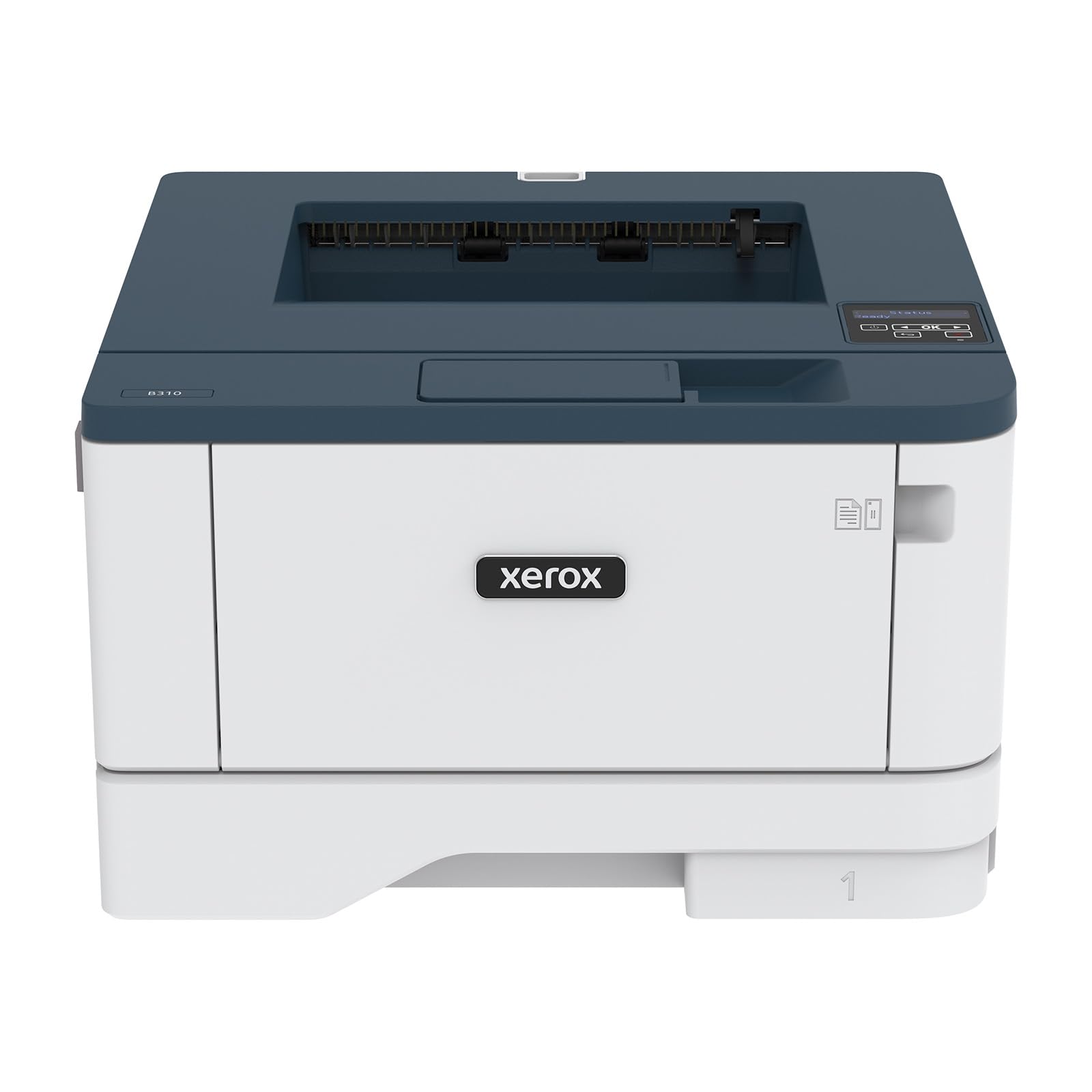
The Xerox B310DNI pushes monochrome laser speed to 42 A4 pages per minute, making it one of the fastest single-function B&W lasers in its price tier. It handles high-volume text printing with ease — a 250-sheet paper tray and automatic two-sided printing keep the workflow moving. The compact chassis fits smaller office spaces, and it supports Ethernet, USB, and Wi-Fi for flexible placement.
Printed text is sharp at 2400 x 2400 dpi resolution, and it handles envelopes and labels cleanly. For B&W image reproduction, it’s comparable to other lasers — good for line art and barcodes, but the fundamental 1-bit dithering prevents smooth photo rendering. The 2,500-page starter toner is a nice bonus, though replacement toner costs are the printer’s long-term expense factor.
Setup via wireless can be complex, requiring multiple attempts and careful reading of configuration screens. Operation is louder than average for a laser printer — audible in a quiet home office. The small LCD display can make navigating the network settings tedious. For pure document printing at high speed, it’s a solid choice, but photographers should look to the inkjet section for true B&W photo output.
Why it’s great
- Blazing 42 ppm monochrome speed
- Sharp 2400 dpi text quality
- Auto duplex saves paper on large jobs
Good to know
- No scan or copy functions — print-only
- Noisy operation in quiet environments
- Wireless setup can be complex and error-prone
7. HP Laserjet Pro 3001dw

The HP Laserjet Pro 3001dw is a straightforward, no-frills monochrome laser designed for small teams printing up to 35 pages per minute. Setup over Wi-Fi is typically smooth as long as all devices are on the same network, and the auto duplex printing helps cut paper costs. For a small office printing contracts, invoices, or text documents, it’s a plug-and-play solution that works out of the box.
From a B&W photo perspective, the same laser limitations apply — 1-bit depth means any image with tonal transitions will exhibit heavy dithering. The printer is best used for crisp text and line work. HP Wolf Pro Security adds firmware-level protection for business use, and the printer supports printing from Android, iOS, Mac, and Chromebook natively with AirPrint and Mopria.
Reliability is a mixed bag in user reports — some units fail after 10 months with network connectivity issues (becoming a “brick”). The HP cartridge lock continues to be a sore point, as firmware updates can block non-OEM toner. Cartridges last well over a year for the average user, keeping operational costs low when using genuine HP supplies.
Why it’s great
- Fast 35 ppm with auto duplex
- Easy Wi-Fi setup on unified network
- Long-lasting toner for moderate use
Good to know
- Laser output limited to text and line art for image work
- Firmware updates enforce HP-only toner cartridges
- Some units experience failure just under one year
8. Xerox B230/DNI

The Xerox B230/DNI delivers 36 ppm black-and-white laser printing in a compact body built for home offices and small teams. It supports Apple AirPrint, Mopria, and Chromebook printing natively, so no driver chasing is needed for most modern setups. For text-heavy monochrome workflows — spreadsheets, reports, emails — the B230 is a reliable performer that integrates seamlessly into an Apple ecosystem.
Print quality is solid for text but again limited by the laser engine’s 1-bit depth for photographic content. It handles 200-page print jobs without jamming or overheating, and the automatic duplex reduces paper consumption. The security features (access control, sensitive data protection) make it useful for small businesses that need compliance.
The main frustration point is the interface: entering a Wi-Fi password via the tiny LCD screen requires scrolling through the alphabet character by character, taking over two minutes for a long password. Some units suffer from repeated wireless disconnections — needing re-pairing multiple times per day. Driver installation on Windows has also been problematic, with crashes during setup on certain configurations.
Why it’s great
- Strong AirPrint and Mopria support for mobile devices
- Reliable high-volume printing up to 200 pages
- Compact footprint for home office desks
Good to know
- Interface UI for Wi-Fi setup is painfully slow
- Wireless connectivity can drop repeatedly
- Windows driver installation can crash
9. Liene Amber M110 Bluetooth Photo Printer

The Liene Amber M110 is a portable Bluetooth photo printer using thermal dye sublimation to produce 4×6 and 3×3 prints. It pairs with your phone in about 13 seconds and works with both iOS and Android via the companion app, which offers filters, borders, and even ID photo templates. For instant photo fun at parties or travel memories, it’s compact, easy, and prints above its weight class for color output.
For B&W work, it’s a different story. Dye sublimation inherently produces vibrant colors with glossy finish, but the thermal process does not have the gray channel depth needed for true monochrome photography. Black-and-white prints from this device tend to have slight color casts — typically a blue or magenta tint — because the yellow, magenta, and cyan dye panels must mix to approximate gray. The laminated surface adds water and scratch resistance but doesn’t improve tonal accuracy.
Print cost per sheet is around , which is competitive for portable convenience but high for serious volume. Prints come out darker than the screen preview, so exposure compensation is needed. App features are limited and contain typos. This printer is meant for casual color snapshots, not for photographers seeking genuine B&W output.
Why it’s great
- Portable and easy to carry for on-the-go printing
- Fast Bluetooth pairing and simple app interface
- Dual media trays for 4×6 and 3×3 sticker prints
Good to know
- Dye sub produces color casts in B&W mode
- Prints darker than screen — requires exposure adjustment
- Higher per-print cost than online printing services
FAQ
Can a black-and-white laser printer produce photo-quality monochrome prints?
How many ink cartridges does a good B&W photo printer need for neutral grays?
Final Thoughts: The Verdict
For most users, the best b&w photo printer winner is the Epson SureColor P700 because it combines a true 10-channel pigment ink system with dedicated gray channels and a compact 13-inch body — all at a price that delivers commercial-grade monochrome output without the large-format footprint. If you want the deepest possible Dmax and best gloss uniformity for gallery prints, grab the Canon imagePROGRAF PRO-310. And for large-scale fine art prints up to 24 inches wide, nothing beats the Canon PRO 2100.