
Our readers keep the lights on and my morning glass full of iced black tea. As an Amazon Associate, I earn from qualifying purchases.
Specs are compiled from manufacturer listings and verified buyer reviews and can change over time — please confirm the key details on the product page before buying.
Choosing a B650 ATX motherboard is the decision that makes or breaks a Ryzen 7000, 8000, or 9000 build. You are locking in how many fast SSDs you can add, what speed your DDR5 memory runs at, and whether the board survives a future CPU upgrade. The right pick balances PCIe 5.0 lanes for your GPU, M.2 slots for storage, and a VRM that feeds your CPU clean power without overheating.
I’m Min — the founder and writer behind Gadgets Feed. This guide is built by comparing the manufacturers’ published specifications and the patterns across verified customer reviews, so you get each pick’s real strengths and trade-offs instead of marketing spin.
From triple M.2 layouts to 7200 MHz memory support, here are the best options to start your build. This is the ultimate breakdown of the b650 atx motherboard landscape for smart buyers who want performance without overpaying.
Our Picks at a Glance


How To Choose The Best B650 ATX Motherboard
Every B650 board supports DDR5 memory and the full Ryzen 7000 and 9000 lineup, so your choice depends on how many drives you run, how hard you push memory, and if you want built-in wireless. Think about your storage needs first — adding a second or third NVMe drive later is far easier when the board already has the slots and heatsinks.
The M.2 and PCIe lane math that matters
The B650 chipset gives you a limited number of high-speed lanes from the CPU and chipset. A board with a single PCIe 5.0 M.2 slot plus PCIe 4.0 slots covers almost everyone. Video editors and pack-rats filling multiple drives should prioritize boards with three M.2 slots — the difference between one 2 TB drive and three is a real workflow change, not a spec-sheet flex.
VRM phases and memory overclocking headroom
Power delivery (the VRM, a set of components that feeds clean voltage to the CPU) decides how comfortably a board runs a power-hungry Ryzen 9 under full load. Look for at least a 12-phase design if you plan heavy multi-core work. On memory, most Ryzen systems run best near 6000 MT/s; boards advertising 7200+ MHz (OC) simply give you extra headroom to experiment.
Quick Comparison
| Model | Best For | M.2 Slots | Memory Speed | Max Capacity | Amazon |
|---|---|---|---|---|---|
| GIGABYTE B650 Eagle AX★ Best Overall | Triple storage value | 3 (1x PCIe 5.0) | 5200 MHz | 128 GB | Amazon |
| MSI B650 Gaming Plus WiFiMemory Champion | Overclocking memory | — | 7200 MHz | 256 GB | Amazon |
| GIGABYTE B650 Gaming X AXValue Pick | Budget gaming rigs | 3x PCIe 4.0 | 5200 MHz | 128 GB | Amazon |
| ASRock B650 Steel Legend | Aesthetic builds | 3 (1x Gen5) | 7200 MHz | — | Amazon |
| MSI PRO B650-S WiFi | Reliable builds | 2x Gen4 | 6000+ MHz | — | Amazon |
| ASUS Prime B650-PLUS | Core builders | 1x PCIe 5.0 | 6400 MHz | 128 GB | Amazon |
| Asus ROG Strix B650-A | ROG styling | 3x M.2 | 6400 MHz | — | Amazon |
| TUF Gaming B650-E WiFi | PCIe 5.0 readiness | 2 | 5200 MHz | 192 GB | Amazon |
| ASUS Prime B650-PLUS WiFi | Wi-Fi + upgradability | 1x PCIe 5.0 | 4000 MHz | — | Amazon |
In‑Depth Reviews
1. GIGABYTE B650 Eagle AX
Our pick — over 4.5★ from 950+ verified ratings; the strongest balance of quality and price.
The storage-focused AM5 board that keeps pace with Ryzen 9000 and your growing drive collection.
For anyone juggling a game library and a video-editing scratch drive, the headline here is three M.2 slots: one wired for PCIe 5.0 (the fastest current standard for SSDs) plus two at PCIe 4.0. That setup doubles the drive capacity ceiling of the MSI PRO B650-S above — 128 GB of memory support also means you can stuff this board with RAM later without swapping it out.
The board carries a 12+2+2 phase digital VRM (the power-delivery array that keeps your CPU fed and stable), so it handles a Ryzen 7 7800X3D without breaking a sweat — buyers report it working “perfectly” with that exact chip. Build quality is the most-praised trait here by a wide margin, with performance a clear second. What wins people over is how it just works: the BIOS is easy to navigate, and setup is straightforward even on a first build.
Connectivity is thoughtful without being excessive: USB 3.2 Gen 2×2 Type-C at 20Gbps, GbE LAN, and AMD Wi-Fi 6E for wireless. The crowd favorite here is the value — it delivers the storage expansion that video editors need at an entry-level price. Just know the 5200 MHz memory clock is modest, so plan a 6000 MT/s kit for best Ryzen performance.
Why storage lovers pick this
- Triple M.2 with one PCIe 5.0 slot for future drives
- 12+2+2 phase VRM keeps Ryzen 9000 stable under load
- Q-Flash Plus rescues a bricked BIOS via USB in minutes
The trade-offs to know
- Memory clock capped at 5200 MHz — lower than rivals
- Rear port layout gets mixed feedback on spacing
Reach for this if: you are building around a Ryzen 7 7800X3D and want room for multiple fast drives now and later.
Look elsewhere if: you plan to push DDR5 past 6000 MT/s — several rivals support 7200 MHz.
2. MSI B650 Gaming Plus WiFi
The memory-overclocking board with built-in Clear CMOS and Flash BIOS conveniences.
If squeezing every megahertz out of your DDR5 kit matters, this MSI board is the one to beat. It supports dual-channel DDR5 up to 7200+ MHz (OC) — a 38% higher ceiling than the GIGABYTE Eagle AX’s 5200 MHz — and its 256 GB maximum capacity doubles the Eagle AX’s 128 GB. The 12+2+1 Duet Rail power system with dual 8-pin CPU connectors keeps even a thirsty Ryzen 9 fed.
The standout for builders is the layout convenience: a Clear CMOS button and a Flash BIOS button sit right on the rear I/O, so you can recover from a bad overclock or update the BIOS without a CPU installed. Owners sum it up: “Really easy to install, and it has a Clear CMOS and Flash BIOS button built in which is convenient.” Quality is the top praise, and value-for-money runs a close second — a strong signal for budget gaming builds.
Wireless comes via Wi-Fi 6E and Bluetooth 5.3, with a 2.5Gbps LAN port for wired setups. The honest caveat: reliability and compatibility get the most mentions overall and are marked mixed — some builders report needing a replacement unit before things ran smoothly. This is a great board if you are comfortable with a possible RMA dance.
What the overclockers love
- 7200+ MHz (OC) DDR5 support — top of this list
- 256 GB max capacity, double many rivals
- Onboard Clear CMOS and Flash BIOS buttons
Where it gets shaky
- Only 2 memory slots (a 2.0x gap vs the Eagle AX’s 4)
- Reliability mixed in some owner experiences
Grab it for: a Ryzen gaming rig where you want the fastest possible memory and easy BIOS recovery tools.
Think twice if: you plan four sticks of RAM — this board only has two slots.
3. GIGABYTE B650 Gaming X AX
A clean budget AM5 board that pairs Wi-Fi 6E with 2.5GbE and three M.2 slots.
This is the value play that still gives you modern essentials: three PCIe 4.0 x4 M.2 slots with thermal guards (small heatsinks that stop SSDs from slowing down when hot), USB 3.2 Gen 2×2 Type-C, and an 8+2+1 phase digital VRM. At 1900 g it is the heaviest board here, which speaks to a substantial heatsink layout that keeps VRMs cool during long sessions.
Owners love that the board labels everything clearly — several note they built without opening the manual. “Solid AM5 board” is the recurring verdict, with one builder detailing the full picture: “1 full PCIe x16, 4 DIMMs (128GB max; 2 slots 6000+ MT/s, 4 slots ~3600), 3 M.2 (2 fast, 1 slow 2-lane).” Quality ranks as the top praised aspect, with installation a strong second — most find it genuinely easy to set up.
The asterisk on this pick is boot behavior: boot issues are the single most-discussed topic and are rated mixed, with some owners hitting first-boot DDR5 RAM training quirks. The fix is usually leaving the board on for a few minutes or reseating a stick once. Plan to update the BIOS via Q-Flash+ (no CPU needed) and enable EXPO for your memory to run at its rated speed.
What earns its keep
- Clear labels make it a first-time builder favorite
- Three M.2 slots with thermal guards included
- Wi-Fi 6E and 2.5GbE both on board
The fine print
- Boot issues are the most-discussed topic — know the RAM training fix
- PCIe 4.0 only, no PCIe 5.0 graphics slot
Best for: budget gaming builds where clear labels and an easy install beat bleeding-edge PCIe 5.0.
Who should pass: anyone wanting a debug LED or a PCIe 5.0 slot — neither is here.
4. ASRock B650 Steel Legend WiFi 6E

The black-and-white board whose 14+2+1 power phase design keeps a 7800X3D cool.
Steel Legend is ASRock’s mid-range gaming line, and this B650 version leans into both looks and power delivery. Its 14+2+1 power phase design with 80A Dr.MOS for Vcore (the main CPU voltage rail) is one of the heftiest VRM layouts on this list, which is why owners running a Ryzen 7 7800X3D report rock-solid stability with temperatures in check even under load.
Performance is the most-praised trait, with appearance a clear second — the black-and-white scheme matches popular cases like the NZXT H6 Flow. Builders highlight the three M.2 slots (one Blazing M.2 at PCIe Gen5x4, two Hyper M.2 at Gen4x4) all fitted with heat spreaders, keeping drives like the Samsung 990 EVO Plus cool. A BIOS Flashback button and ASRock’s Auto Driver Installer smooth out first-boot setup.
The honest friction point: the color scheme divides opinion — some love the camo-style aesthetic, others find it busy. One owner noted soft coil whine under load that is inaudible at 28 inches or with headphones on. If RGB syncing perfection is your priority, the weaker software ecosystem here may frustrate; otherwise this is a future-proof Ryzen 7000-series board that One builder called it “the best B650 on the market.”
The core appeal: a sturdy VRM and triple M.2 with heat spreaders make this a performance-per-dollar standout for 7800X3D builds.
The honest caveat: weak RGB software and a divisive color scheme mean it suits function-first builders over lighting purists.
Choose this if: you want premium VRM headroom and a distinctive look that matches a white or black-white case.
skip it if: RGB ecosystem control is central to your build — the syncing here is basic.
5. MSI PRO B650-S WiFi

The no-drama workhorse that boots a 7900X on the first try and keeps running.
Some boards chase headline specs; this MSI PRO model chases reliability. It runs a 12 Duet Rail Power System VRM (a power-delivery design using paired components for cleaner voltage) with MSI Core Boost, and its cooling includes 7W/mK MOSFET thermal pads and a 6-layer PCB with 2 oz thickened copper. The result is a board that just works. — Owners mention flawless out-of-the-box boots with Ryzen 5 8600G and Ryzen 7 7900X alike.
Build quality is the most-praised aspect here, with performance second. Dual M.2 Gen4 x4 slots (each at 64Gbps) with Shield Frozr covers most storage needs, while Wi-Fi 6E and Bluetooth 5.3 handle wireless duty.
The trade-offs are physical layout quirks rather than performance: SATA ports sit buried under the GPU, and the bottom USB 3 header is awkward to reach. The 6000+ MHz (OC) memory support is realistic for Ryzen — hitting the common balance without the instability that chasing 7200 MHz can bring on some boards.
Why it stands out: It’s the rare board where owners consistently report zero issues, even after a year of daily use.
The physical catch: SATA headers under the GPU slot make cable management fiddly — plan your drives before building.
Pick this for: a dependable mid-range gaming PC where stability outranks overclocking bragging rights.
Pass if: you need more than two M.2 slots or want to push memory past 6000 MHz.
6. ASUS Prime B650-PLUS

The bare-bones ASUS classic with BIOS Flashback that recovers any bad update.
ASUS Prime is the entry point to the brand, and the B650-PLUS keeps things focused: a PCIe 5.0 M.2 slot, Realtek 2.5Gb Ethernet, USB 3.2 Gen 2 Type-C, and 128 GB of memory support at 6400 MHz. Its BIOS FlashBack feature is the safety net — drop a BIOS file on a FAT32 USB stick, press the button, and update even without a CPU or RAM installed. That alone makes it forgiving for first-time builders.
The board supports Ryzen 9000, 8000, and 7000 series processors, though ASUS notes a BIOS update may be required for the newer 9000 and 8000 chips. The VRM heatsink, M.2 heatsink, and PCH heatsink keep temperatures controlled, and Fan Xpert 2+ gives you granular control over case fans.
Honest assessment: reliability is the most-discussed topic and it is mixed — Some customers note years of flawless service, while others describe units that wouldn’t boot from the start. This is a lottery-ticket risk on an otherwise capable board. There is no built-in Wi-Fi, so factor in a wireless card or ethernet cable. For a no-frills AM5 foundation at a value price, it delivers; for confidence, the higher-rated picks above are safer bets.
The upside: BIOS FlashBack and ASUS OptiMem II signal-integrity tuning make memory overclocking approachable.
The honest risk: a mixed reliability track record means you may need to troubleshoot a no-boot unit or exchange it.
Suits: builders who want the ASUS BIOS ecosystem and plan to run a wired connection anyway.
Not for: anyone who wants Wi-Fi built in or cannot tolerate the risk of a DOA unit.
7. Asus ROG Strix B650-A Gaming WiFi

The silver-and-black ROG board where build quality is visible in every detail.
ROG Strix is ASUS’s enthusiast line, and the B650-A carries the pedigree: a PCIe 5.0 M.2 slot, DDR5 up to 6400 MHz, three M.2 slots total, Wi-Fi 6E, Bluetooth, 2.5Gbit LAN, and Aura Sync RGB lighting across the board. The PCIe Slot Q-Release button lets you pop your graphics card free without wrestling the latch — a small luxury that shows up the first time you swap GPUs.
Owners consistently note the build quality is “perceptible in the details,” and the silver-and-black design stands apart from the all-black field. One builder running a Ryzen 5 7500F with an RX 9060 XT and 32GB of DDR5-6000 reported easy setup with EXPO enabled in seconds. The board ships Ryzen 9000-ready with a BIOS update, expanding its lifespan well into future CPU generations.
The compromises are minor: there is no PCIe 5.0 graphics slot (it tops out at PCIe 4.0 for GPUs, which is fine for current cards), and Wi-Fi 7 is absent. At its price point you are paying for the ROG name, the aesthetic, and the Q-Release convenience — a fair deal if those matter to you, a premium if they do not.
The standout: PCIe Slot Q-Release and Aura Sync make this the most pleasant board to build with and show off.
The premium cost: you pay extra for the ROG badge and styling over functionally similar cheaper boards.
Worth it for: enthusiasts who value the ROG ecosystem, RGB control, and easy GPU swapping.
Reconsider if: you want PCIe 5.0 for your graphics card or Wi-Fi 7 — neither is on this board.
8. TUF Gaming B650-E WiFi
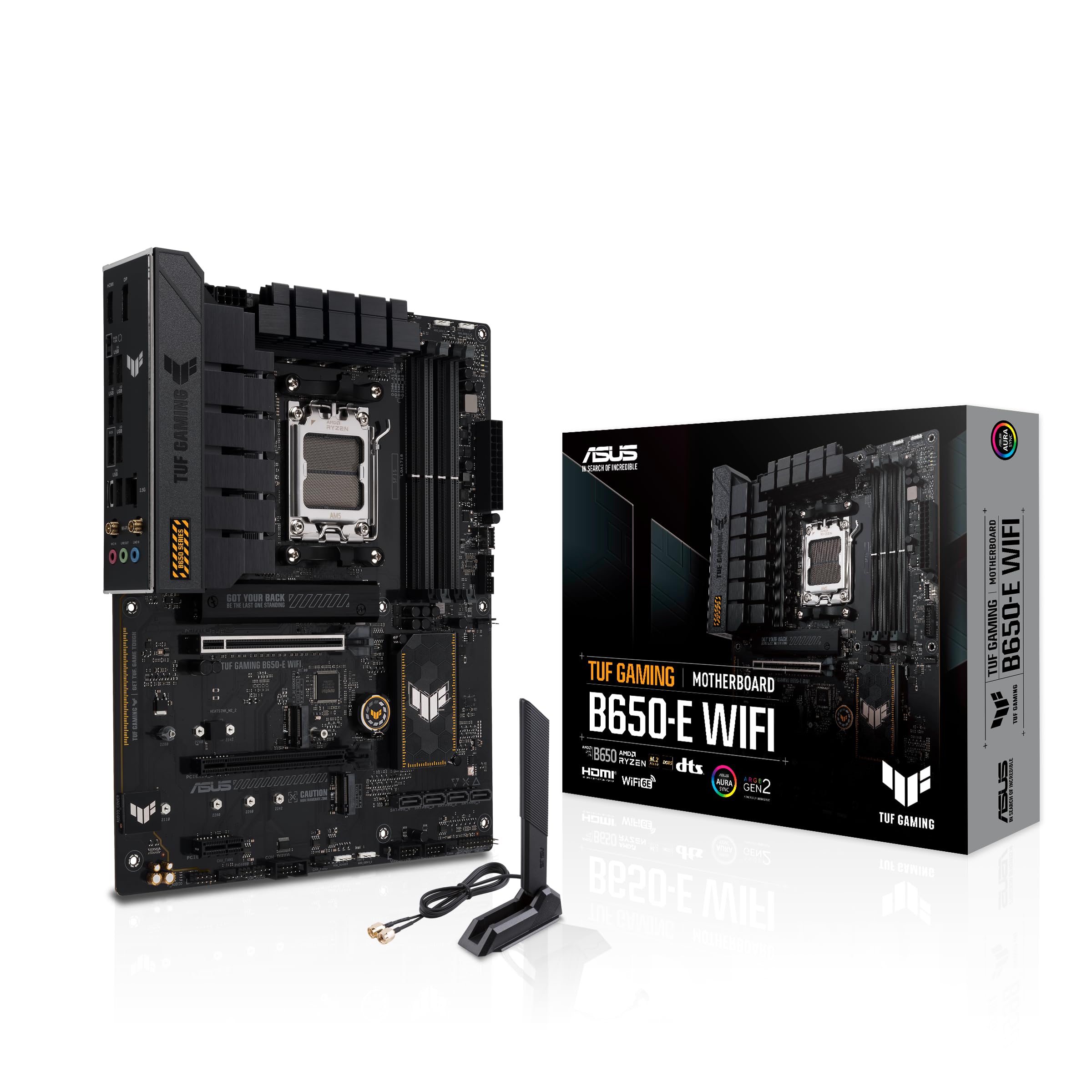
The PCIe 5.0-ready board that handles a Ryzen 7 7700X and RTX 5070 without drama.
TUF Gaming is ASUS’s durability-focused line, and the B650-E WiFi brings both PCIe 5.0 for your graphics card AND a PCIe 5.0 M.2 slot — the full modern speed envelope. Its 8+2 teamed power stages with 8+4 ProCool sockets (reinforced power connectors) and alloy chokes (components that smooth electrical current) deliver stable power to even a Ryzen 7 7700X paired with an RTX 5070, a combo reviewers point out runs “perfectly” in daily use.
With 192 GB of memory support and four DDR5 slots, this board has room to grow. Cooling is comprehensive: enlarged VRM and PCH heatsinks, M.2 heatsinks, hybrid fan headers, and Fan Xpert 4 with AI Cooling II (which learns your system’s thermals and adjusts fan curves automatically). The Aura Sync edge lighting adds a subtle glow without being obnoxious.
The reality check: this is a newer entry with a thinner review base, so long-term reliability is less proven than the veteran picks above. Connectivity is solid — Intel Wi-Fi 6E, Realtek 2.5Gb Ethernet with TUF LANGuard, USB 10Gbps Type-C on the rear and a front USB 20Gbps Type-C header. For a forward-looking AM5 build that stays fast for years, this is a compelling premium choice.
The future-proofing: dual PCIe 5.0 (GPU and M.2) plus 192 GB memory headroom keeps this relevant for years.
The new-kid caution: fewer owner reports means less long-term data — the core specs are excellent, the track record is short.
Ideal for: builders pairing a current-gen GPU with a Ryzen 7000 or 8000 chip who want PCIe 5.0 everywhere.
Skip if: you prefer a proven, heavily-reviewed board over the newest spec sheet.
9. ASUS Prime B650-PLUS WiFi

The ASUS Prime formula upgraded with Wi-Fi 6E and a Thunderbolt 4 header for creators.
This is the wireless version of the Prime B650-PLUS, adding Wi-Fi 6E and a Thunderbolt 4 header (a port connection for ultra-fast external drives and docks) to the core recipe. You still get the PCIe 5.0 M.2 slot, Realtek 2.5Gb Ethernet, USB 10Gbps Type-C, and ASUS’s BIOS FlashBack for simple to use updates. Setup is the most-praised aspect here — owners call it easy and appreciate the perfect fit in standard cases.
The extra ports make this the more versatile Prime: front USB 5Gbps Type-C joins the rear Type-C, and the Thunderbolt 4 header future-proofs you for high-bandwidth peripherals. Owners running Ryzen chips report smooth setup and stable operation., with value-for-money and appearance rounding out the praise.
The honest tension on this board: reliability is the most-discussed topic and it is mixed — while many report smooth sailing, a minority describe units that worked for only a few months or arrived with bent pins. An occasional unit arrives damaged in shipping, which is a risk with any board. You are paying a premium over the non-WiFi Prime for the wireless convenience and Thunderbolt 4 header, which is a fair trade if you need both.
The convenience win: Wi-Fi 6E plus a Thunderbolt 4 header makes this the fullest-featured Prime board for creators.
The reliability note: mixed owner reports mean the safety of BIOS Flashback matters — test it early if you can.
Best suited to: first-time builders who want Wi-Fi built in and a Thunderbolt 4 path for future external storage.
Look past it if: you are comfortable with a wired connection and want to save for a more proven board.
Understanding the Specs
M.2 Slots and PCIe Generations
M.2 slots are where your NVMe SSDs plug in. A PCIe 5.0 slot runs about twice the data speed of a PCIe 4.0 slot, which matters for the fastest current drives and future ones. Count your drives before buying — three slots means you can run a boot drive, a game drive, and a scratch drive without adapters.
VRM Phases and Power Stages
The VRM (voltage regulator module) converts your power supply’s output into clean voltage for the CPU. More phases — like 12+2+2 or 14+2+1 — generally means steadier power and cooler operation under heavy loads. This matters most if you run a power-hungry Ryzen 9 or plan to overclock.
Memory Clock Speed (MT/s and MHz)
DDR5 memory speed is measured in megahertz or MT/s (megatransfers per second — roughly equivalent units). Ryzen chips typically perform best near 6000 MT/s, which is the “balance.” Boards advertising 7200+ MHz (OC) just provide extra headroom for overclocking enthusiasts.
BIOS Flashback and Q-Flash
These features let you update the motherboard’s BIOS (the low-level software that boots your PC) using only a USB stick — no CPU or RAM required. This is crucial for compatibility with newer Ryzen 9000 chips or recovering from a failed update. Look for it if you buy a board that might ship with an older BIOS version.
FAQ
Will a B650 ATX motherboard work with a Ryzen 7 7800X3D?
How many M.2 slots do I actually need?
Is 6000 MT/s DDR5 better than 7200 MHz on a B650 board?
What does the 12+2+2 phase VRM number mean for my build?
Do I need a BIOS update before installing a Ryzen 9000 chip?
What is the difference between a PCIe 5.0 and PCIe 4.0 M.2 slot?
Why do some B650 boards have 2 memory slots and others 4?
Is built-in Wi-Fi on a motherboard worth paying extra for?
What does the Thunderbolt 4 header on the ASUS Prime B650-PLUS WiFi do?
Final Thoughts: The Verdict
For most buyers, the b650 atx motherboard winner is the GIGABYTE B650 Eagle AX because triple M.2 storage, a 12+2+2 phase VRM, and Wi-Fi 6E cover every modern need at a value price. If you want to push memory to 7200+ MHz, grab the MSI B650 Gaming Plus WiFi. And for PCIe 5.0 across both GPU and storage, the TUF Gaming B650-E WiFi is the one to reach for.
How We Picked
We do not accept paid placement. Every pick is matched to a real buyer and a real use-case; we do not hands-on test units.
Sources & Methodology
Specifications: manufacturer listings and product documentation. Review insights: verified customer reviews, as of September 2026. Pricing: not shown on this page (it changes often); check the current price via the retailer link.
As an Amazon Associate, Gadgets Feed earns from qualifying purchases. This does not affect which products we feature.