
Choosing a micro-ATX motherboard with four DIMM slots for the AM5 platform means balancing compact footprint against maximum memory headroom. The B650 chipset sits at the sweet spot, delivering PCIe 5.0 support for storage and future GPUs without the premium of X670 or the feature cuts of A620. With four DDR5 slots, you have a clear upgrade path from 32GB to 128GB or more as workloads—and game textures—grow.
I’m Min — the co-founder and writer behind Gadgets Feed. I’ve spent years tracking AMD’s AM5 motherboard ecosystem, studying VRM phase counts, memory topology, and real-world DDR5 compatibility across dozens of boards. My goal is to translate what the spec sheet actually means for your build.
I’ve sorted through nine solid contenders to help you find the right board for your next Ryzen build. After evaluating VRM design, DDR5 support, connectivity options, and real-world user experiences, here is the definitive list of the best b650 motherboard m-atx 4dimm options on the market today.
How To Choose The Best B650 mATX Motherboard with 4 DIMM Slots
Picking a B650 mATX board with four DDR5 slots requires you to weigh VRM power delivery, memory overclocking capacity, and I/O connectivity in a compact layout. Not all four-slot AM5 boards handle RAM the same way, and your CPU choice will determine how many power phases you actually need.
VRM Phase Count and Dr.MOS vs. Discrete MOSFETs
The voltage regulator module (VRM) converts power from your PSU into stable voltages for the CPU. Boards with 8+2+2 or 12+2+2 phase designs using Dr.MOS (integrated MOSFETs) run cooler and deliver cleaner power to high-core-count Ryzen 9 chips. A 5+2+2 arrangement works well for Ryzen 5 or 7 builds but may struggle to sustain prolonged all-core loads on a 7950X or 9900X, especially in mATX cases with limited airflow.
DDR5 Memory Compatibility with 4 Sticks
Four DIMM slots in a daisy-chain topology are common on mATX boards, but running four sticks at high speeds (6000MT/s or above) is harder on the integrated memory controller than two sticks. Look for boards with reinforced memory traces (like ASUS OptiMem II) or those that specifically list EXPO and XMP profiles. Many buyers report needing to drop speeds to 5200-5600MT/s when populating all four slots, so understand your capacity versus speed trade-off before committing.
PCIe 5.0 Allocation and M.2 Lane Sharing
Most B650 boards reserve PCIe 5.0 lanes for a single M.2 slot and the primary x16 slot. Some boards share bandwidth between the second PCIe slot and additional M.2 connectors, which can drop your GPU to x8 mode if you use certain storage configurations. Check the manual for lane-sharing restrictions before ordering — especially if you plan to install two high-speed NVMe drives.
Quick Comparison
On smaller screens, swipe sideways to see the full table.
| Model | Category | Best For | Key Spec | Amazon |
|---|---|---|---|---|
| GIGABYTE B650M AORUS Elite AX ICE | Premium | Ryzen 9 builds with white aesthetics | 12+2+2 Phase VRM, PCIe 5.0 M.2 | Amazon |
| ASRock B650M PG Riptide | Premium | Enthusiasts wanting robust VRM in a compact board | 12+2+1 Phase Dr.MOS, DDR5 6200+ OC | Amazon |
| ASRock B850M Pro A WiFi 6E | Premium | B850 chipset features at a competitive price | 8+2+1 Dr.MOS, PCIe 5.0, WiFi 6E | Amazon |
| ASUS Prime B650M-A AX II | Mid-Range | Reliable build with BIOS Flashback and Wi-Fi | DDR5 6400+ OC, PCIe 5.0 M.2 | Amazon |
| MSI PRO B650M-A WiFi V1 | Mid-Range | Clean, no-frills mATX for productivity rigs | DDR5 6000+ MHz OC, 2x PCIe 4.0 x16 | Amazon |
| ASRock B650M Pro X3D WiFi | Mid-Range | Optimized for AMD X3D processors | 8+2+1 Dr.MOS, DDR5 8000+ OC | Amazon |
| MSI PRO B650M-A WiFi ProSeries | Mid-Range | First-time AM5 builders wanting Wi-Fi out of the box | DDR5 Support, Wi-Fi 6E & BT 5.3 | Amazon |
| GIGABYTE B650M D3HP | Budget | Entry-level AM5 with basic features | 5+2+2 Phase VRM, 2.5GbE LAN | Amazon |
| GIGABYTE B850M Eagle WIFI6E | Budget | B850 PCIe 5.0 features on a tight budget | 8+2+2 Phase VRM, PCIe 5.0 | Amazon |
In‑Depth Reviews
1. GIGABYTE B650M AORUS Elite AX ICE

The GIGABYTE B650M AORUS Elite AX ICE stands out for its excellent 12+2+2 phase digital VRM, which handles Ryzen 9 processors without breaking a sweat. The white PCB and silver heatsinks make it a top choice for builders targeting a clean, light-themed aesthetic in a compact mATX format. It supports four DDR5 DIMMs with both AMD EXPO and Intel XMP profiles, giving you flexibility in memory tuning.
Storage options include one PCIe 5.0 x4 M.2 slot and one PCIe 4.0 x4 M.2 slot, alongside dual M.2 Thermal Guard heatsinks to prevent throttling under sustained NVMe loads. The included Wi-Fi 6E module and 2.5GbE LAN deliver fast networking, while the EZ-Latch system for M.2 and GPU makes installation tool-free. The rear I/O includes USB-C 3.2 Gen 2, several USB 3.2 Type-A ports, and HDMI/DisplayPort outputs for integrated graphics.
Some users have reported difficulty running four DDR5 sticks at speeds above 5600MT/s, which is a common limitation of daisy-chain memory topology on mATX boards. The board lacks PCIe 5.0 on the primary GPU slot, limiting it to PCIe 4.0 x16, though this does not materially impact current graphics card performance.
Why it’s great
- 12+2+2 phase VRM with Dr.MOS for stable power delivery
- White aesthetic fits all-white builds perfectly
- Wi-Fi 6E and 2.5GbE LAN included
Good to know
- Four DDR5 sticks may require speed reduction
- Primary GPU slot limited to PCIe 4.0
2. ASRock B650M PG Riptide

The ASRock B650M PG Riptide packs a 12+2+1 phase Dr.MOS design into a pure mATX board, making it one of the most capable offerings for overclocking Ryzen 7000 series CPUs. The four DDR5 DIMM slots support up to 6200MT/s in overclocked configurations, and the board includes two PCIe 4.0 x16 slots and two PCIe 3.0 x1 slots for expansion. The black PCB with subtle Riptide branding keeps the look aggressive but not over-the-top.
Connectivity covers the basics well: one HDMI 2.1 and one DisplayPort 1.4 output, multiple USB 3.2 Gen 2 Type-A ports, and a 2.5GbE LAN port. The board lacks built-in Wi-Fi, so you will need to add a Wi-Fi card or stick to wired networking. The BIOS interface is clean and offers granular voltage and memory timing controls for enthusiasts.
Several users noted the GPU release lever is fragile and lacks tactile feedback, requiring care during component swaps. The board does not include a PCIe 5.0 M.2 slot, which may matter if you plan to use next-gen NVMe drives that leverage Gen5 bandwidth. ASRock’s customer support turnaround was also flagged as slow in a few RMA cases.
Why it’s great
- 12+2+1 phase Dr.MOS VRM for reliable overclocking
- High DDR5 overclocking headroom (6200+ MT/s)
- Two PCIe 4.0 x16 slots for multi-GPU setups
Good to know
- No built-in Wi-Fi or Bluetooth
- GPU release lever can be fragile
3. ASRock B850M Pro A WiFi 6E

The ASRock B850M Pro A WiFi 6E brings the newer B850 chipset to mATX at a price that undercuts many B650 competitors. Its 8+2+1 phase Dr.MOS power design is sufficient for Ryzen 7 and Ryzen 9 processors, and the four DDR5 DIMM slots support overclocked speeds up to 8000+ MT/s. The board features one PCIe 5.0 x16 slot for modern GPUs and one Blazing M.2 (PCIe Gen5x4) slot alongside two Hyper M.2 (PCIe Gen4x4) slots for storage.
Networking includes Realtek 2.5GbE LAN and a Wi-Fi 6E module with Bluetooth, covering both wired and wireless needs. The rear I/O offers multiple USB 3.2 ports including Type-C at the front and rear, making it easy to connect peripherals. BIOS Flashback is available for CPU-less firmware updates, which is helpful if you are building with a Ryzen 9000 series chip that may need a newer BIOS revision.
A small number of users reported the board dying after a few months, with slow ASRock RMA response. While these cases appear to be outliers, the mixed reliability feedback is worth noting. The board also lacks an integrated I/O shield, requiring careful alignment during case installation.
Why it’s great
- B850 chipset with PCIe 5.0 support at a competitive price
- Three M.2 slots (one Gen5, two Gen4)
- BIOS Flashback for easy firmware updates
Good to know
- Some users reported early board failures
- No integrated I/O shield
4. ASUS Prime B650M-A AX II

The ASUS Prime B650M-A AX II is a well-rounded mATX board that leans heavily on memory stability, thanks to ASUS OptiMem II technology. The four DDR5 DIMM slots are rated for up to 6400MT/s in overclocked configurations, and the board supports AMD EXPO and Intel XMP profiles. The VRM includes a solid heatsink solution, though it uses a simpler phase design than premium competitors, making it best paired with Ryzen 5 or Ryzen 7 chips.
Connectivity includes Realtek 2.5Gb Ethernet, Wi-Fi 6, Bluetooth 5.2, and a front USB 3.2 Gen 1 Type-C header. The board also has a useful BIOS Flashback feature that lets you update the firmware without a CPU or memory installed — a real time-saver for Ryzen 9000 compatibility. The Aura Sync RGB headers allow lighting control through ASUS software, and the board includes a legacy VGA port, which is rare on modern AM5 boards.
Several users reported long boot times (around 60 seconds to POST) and memory instability when mixing DIMMs or populating all four slots with high-speed kits. If you plan to use four sticks, expect to run them at DDR5-5600 or lower for reliable operation. The board’s layout also places the front USB connector pointing upward, which can interfere with some case cable management.
Why it’s great
- OptiMem II technology for clean DDR5 signal traces
- BIOS Flashback for CPU-free updates
- Includes Wi-Fi 6 and Bluetooth
Good to know
- Long POST times reported by some users
- Four-stick DDR5 may require speed reduction
5. MSI PRO B650M-A WiFi V1

The MSI PRO B650M-A WiFi V1 is a clean, no-nonsense mATX board designed for productivity and stable daily operation. Its four DDR5 DIMM SMT slots are rated for 6000+ MT/s in dual-channel single-rank mode, and the 6-layer PCB with 2 oz thickened copper helps maintain signal integrity at higher frequencies. The VRM uses MSI Core Boost technology with an extended heatsink to keep temperatures in check under sustained loads.
Storage includes two M.2 Gen4 x4 slots, one with Shield Frozr to prevent thermal throttling on high-end NVMe drives. The rear I/O offers USB 3.2 Gen 2 Type-A (10Gbps), HDMI 2.1, DisplayPort 1.4, and 7.1 HD Audio with Audio Boost. Networking is handled by a 2.5Gbps LAN port, and the board lacks built-in Wi-Fi, though the V1 revision keeps the price lower than its Wi-Fi variant.
The primary PCIe slot is limited to PCIe 4.0 x16, which is fine for current GPUs but leaves no Gen5 expansion path. Some users noted that the front USB 3.2 connector faces upward, making cable routing in tight mATX cases slightly more challenging. The board also lacks a BIOS Flashback button, so a compatible CPU is required for firmware updates.
Why it’s great
- DDR5 6000+ MHz support with SMT DIMM slots
- Effective M.2 Shield Frozr heatsink
- Clean, professional aesthetic
Good to know
- No PCIe 5.0 on any slot
- No BIOS Flashback for CPU-less updates
6. ASRock B650M Pro X3D WiFi

The ASRock B650M Pro X3D WiFi is specifically optimized for AMD’s X3D processors, with a tuned BIOS and 8+2+1 Dr.MOS power delivery designed to handle the unique power curves of 3D V-Cache chips. The four DDR5 DIMM slots support overclocked speeds up to 8000+ MT/s, and the board includes a PCIe 5.0 x16 slot for next-gen GPUs alongside a Blazing M.2 (PCIe Gen5x4) slot for ultra-fast storage.
Connectivity is generous for an mATX board: Realtek 2.5GbE LAN, Wi-Fi 6E with Bluetooth, three M.2 slots, and four SATA3 ports. The audio section uses a Realtek ALC897 codec with Nahimic Audio for immersive sound. The board also includes a dedicated M.2 Bottom Heatsink to keep the primary NVMe drive cool during sustained transfers.
Some users experienced initial Wi-Fi or Bluetooth failure due to loose antenna connections and missing mounting screws, both of which were resolved after reseating the wireless card. The board’s micro-ATX dimensions may not fit all cases, so verify clearance before purchase. A small number of reports mention long boot training times when running four DDR5 sticks at high speeds.
Why it’s great
- Tuned for AMD X3D processors
- DDR5 8000+ OC support and PCIe 5.0
- Three M.2 slots with bottom heatsink
Good to know
- Wi-Fi module may need reseating out of the box
- Case compatibility should be checked in advance
7. MSI PRO B650M-A WiFi ProSeries

The MSI PRO B650M-A WiFi ProSeries is a popular entry point into the AM5 platform, offering Wi-Fi 6E, Bluetooth 5.3, and 2.5Gbps LAN straight out of the box. Its four DDR5 DIMM slots support high-speed memory with MSI’s Memory Boost technology, which optimizes signal routing for better stability. The VRM uses a 7W/mK thermal pad and additional choke thermal pads to keep power delivery cool under load.
The board includes two PCIe 4.0 x16 slots, two M.2 Gen4 x4 slots, and six SATA 6Gb/s ports for extensive storage configurations. The rear I/O features USB 3.2 Gen 2 ports (10Gbps), HDMI 2.1, and DisplayPort 1.4, making it suitable for integrated graphics use or multi-monitor setups. The M.2 Shield Frozr prevents thermal throttling on the primary SSD.
Some users reported receiving units with dented boxes and bent I/O shields due to poor packaging during shipping. The board lacks PCIe 5.0 entirely, so it is not future-proof for upcoming Gen5 graphics cards or storage. A few buyers also noted that the Wi-Fi antenna connection can be finicky, requiring careful tightening to maintain signal strength.
Why it’s great
- Built-in Wi-Fi 6E and Bluetooth 5.3
- Effective thermal pad solution for VRM
- Good storage expansion with 2 M.2 and 6 SATA
Good to know
- No PCIe 5.0 support
- Shipping packaging can be insufficient
8. GIGABYTE B650M D3HP

The GIGABYTE B650M D3HP is the most affordable way to get four DDR5 slots on the AM5 platform. Its 5+2+2 digital VRM phase design is adequate for Ryzen 5 and Ryzen 7 processors, but not recommended for the higher-core Ryzen 9 SKUs under sustained all-core loads. The board supports AMD EXPO and Intel XMP memory modules, giving you flexibility in RAM selection without locking into one standard.
Storage options include two PCIe 4.0 x4 M.2 slots and four SATA 6Gb/s ports. Connectivity features USB 3.2 Gen 2 Type-C (rear), several USB 3.2 Gen 1 Type-A ports, and 2.5GbE LAN. The board also includes GIGABYTE’s Q-Flash Plus for BIOS updates without a CPU installed, a surprising convenience at this entry-level price point. The EZ-Latch system simplifies M.2 installation.
The primary PCIe slot is limited to PCIe 4.0 x16, and the board has no Wi-Fi or Bluetooth built in, so a wired connection or add-in card is required for wireless networking. Some users reported DOA units with dead I/O ports, though the majority found the board functional at this price. The I/O shield is not pre-installed and can feel flimsy during installation.
Why it’s great
- Affordable entry to AM5 with 4 DDR5 slots
- Q-Flash Plus for CPU-less BIOS updates
- USB-C 3.2 Gen 2 on rear I/O
Good to know
- 5+2+2 VRM not ideal for Ryzen 9
- No Wi-Fi or Bluetooth
9. GIGABYTE B850M Eagle WIFI6E
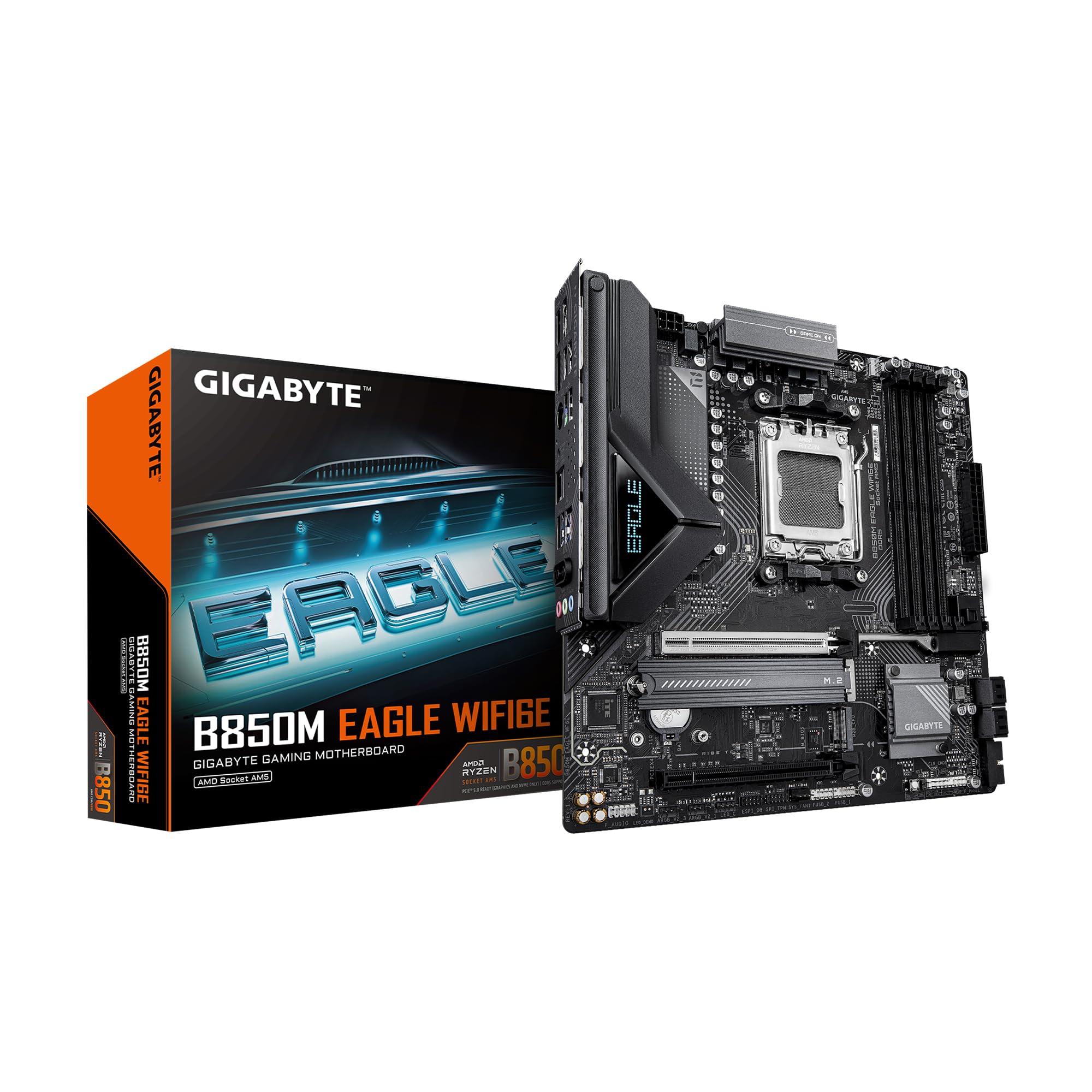
The GIGABYTE B850M Eagle WIFI6E brings the newer B850 chipset and its PCIe 5.0 support to an aggressively priced mATX board. Its 8+2+2 phase power design is a significant step up from the entry-level D3HP, making it suitable for Ryzen 7 and even some Ryzen 9 builds. The four DDR5 DIMM slots support a wide range of EXPO and XMP kits, and the board includes two M.2 slots (one PCIe 5.0, one PCIe 4.0) for fast storage.
Networking is handled by an integrated Wi-Fi 6E module and 2.5GbE LAN, covering both wireless and wired scenarios. The board also features GIGABYTE’s EZ-Latch for M.2 and PCIe, the Wi-Fi EZ-Plug for easy antenna setup, and a 3-year warranty. The rear I/O includes USB-C 3.2 Gen 2, multiple USB 3.2 Gen 1 ports, and HDMI output for integrated graphics.
The board lacks PCIe 5.0 on the primary GPU slot, limiting it to PCIe 4.0 x16. Some users reported that the Wi-Fi antenna connection can be loose out of the box, though reseating resolves the issue. The audio codec is a basic Realtek chip, so audiophiles may want to use a dedicated DAC or USB headset for higher fidelity.
Why it’s great
- B850 chipset with PCIe 5.0 M.2 at a low price
- 8+2+2 phase VRM for solid power delivery
- Wi-Fi 6E and 2.5GbE LAN included
Good to know
- GPU slot limited to PCIe 4.0
- Basic audio codec
FAQ
Why would I choose a B650 mATX board over a full-size ATX board?
Can I run DDR5-6000 on all four DIMM slots of a B650 mATX board?
Do I need PCIe 5.0 on an mATX B650 board for gaming?
Final Thoughts: The Verdict
For most users, the best b650 motherboard m-atx 4dimm winner is the GIGABYTE B650M AORUS Elite AX ICE because its 12+2+2 phase VRM, white aesthetics, PCIe 5.0 M.2 support, and built-in Wi-Fi 6E offer the best blend of features for both gaming and productivity builds. If you want to maximize memory overclocking on a budget, grab the ASRock B650M PG Riptide. And for the tightest budgets where four DDR5 slots are non-negotiable, nothing beats the GIGABYTE B650M D3HP.