
Choosing the right micro-ATX motherboard for a modern Intel build means balancing PCIe 4.0 lanes, DDR5 memory support, and Wi-Fi 6 connectivity without overspending on features you’ll never use. The B760M chipset hits a sweet spot — it skips CPU overclocking, which most mid-range builders don’t need, while delivering full support for 12th, 13th, and 14th Gen Intel processors on the LGA 1700 socket. The real differentiators come down to VRM power delivery, M.2 slot count, and the quality of the onboard Wi-Fi and audio solutions.
I’m Min — the co-founder and writer behind Gadgets Feed. My research into the B760M market involves cross-referencing VRM phase counts, DDR5 overclocking ceilings, and real-world customer feedback across dozens of configurations to separate the boards that deliver reliable daily performance from those that cut corners on build quality and I/O.
This guide breaks down the top contenders to help you invest confidently in the best b760m d5 wi-fi cec motherboard for your next build.
How To Choose The Best B760M D5 Wi-Fi CEC Motherboard
Selecting the right micro-ATX board for a DDR5 Intel build requires looking past the marketing specs to understand what actually impacts your system’s stability, upgrade path, and daily usability. The B760M platform is designed for the vast majority of builders who don’t need unlocked multiplier overclocking but still want modern memory and storage standards.
VRM Quality and Power Delivery
The voltage regulator module determines how cleanly and consistently power reaches your CPU. Look for boards with at least an 8+1+1 phase design with discrete Dr.MOS components, not just chokes and capacitors. Heatsink mass matters too — a board with small aluminum extrusions on the MOSFETs will thermal-throttle a Core i7-13700 under sustained all-core loads, while a board with deeper fin stacks or heat pipes will keep delivering full boost clocks.
DDR5 Speed Certification and Stability
Not all B760M boards handle high-speed memory kits the same way. A board rated for DDR5 7200MHz+ has undergone stricter trace routing and signal integrity validation than one capped at 6000MHz. If you plan to run 32GB or 64GB of DDR5-6400 or faster, check whether the board lists XMP 3.0 support for those speeds with dual-rank configurations. Many budget boards will boot at lower speeds but fail to stabilize advertised frequencies with four DIMMs populated.
M.2 Slot Configuration and Bandwidth
A B760M board typically offers two M.2 slots, but check whether both run at PCIe 4.0 x4 or if one drops to PCIe 3.0 x4. The primary slot near the CPU should have a heatsink, especially if you install a PCIe 4.0 NVMe drive that generates significant heat during sustained writes. Some boards also include a dedicated M.2 key E slot specifically for adding or upgrading a Wi-Fi module later.
Quick Comparison
On smaller screens, swipe sideways to see the full table.
| Model | Category | Best For | Key Spec | Amazon |
|---|---|---|---|---|
| ASUS Prime B760M-A AX | Mid-Range | Balanced all-round builds | DDR5 7000MHz OC | Amazon |
| MSI B760 Gaming Plus WiFi | Mid-Range | Gaming with future GPU support | DDR5 6800+MHz OC | Amazon |
| ASRock B760M Steel Legend WiFi | Mid-Range | High-speed DDR5 and PCIe 5.0 GPU | DDR5 7200MHz OC | Amazon |
| ASRock B760 Pro RS | Premium | Durable ATX full-size with PCIe 5.0 | DDR5 7200MHz OC | Amazon |
| GIGABYTE B760M Gaming Plus WiFi DDR4 | Budget | DDR4 memory on a budget | DDR4 3200MHz XMP | Amazon |
| ASRock B650I Lightning WiFi | Premium | AMD AM5 Mini-ITX SFF builds | DDR5 7200+MHz OC | Amazon |
| Gigabyte B760M DS3H DDR4 | Premium | Stable DDR4 with 2.5GbE LAN | DDR4 5333MHz OC | Amazon |
| ASRock B760 Pro RS/D4 | Premium | Full-size ATX with DDR4 economy | DDR4 5333MHz OC | Amazon |
| GIGABYTE B760 Gaming X AX | Premium | High-end DDR5 and triple M.2 storage | DDR5 7600MHz | Amazon |
In-Depth Reviews
1. ASUS Prime B760M-A AX

The ASUS Prime B760M-A AX nails the core mission of a B760M board: it delivers reliable power delivery, DDR5 speeds up to 7000MHz via OptiMem II trace routing, and comprehensive connectivity including Wi-Fi 6, Realtek 2.5GbE LAN, and a front USB 3.2 Gen 1 Type-C header. The VRM heatsink and included M.2 heatsink keep temperatures manageable even with a Core i5-14600K under sustained loads, though it lacks a rear USB-C port and CPU overclocking support.
Builders reported straightforward setup with 12th through 14th Gen CPUs, with the board recognizing i3-14100 chips without requiring a BIOS flash. The Aura Sync RGB headers give you lighting control flexibility, and the four DIMM slots support up to 64GB of DDR5 with XMP 3.0 profiles. A few users noted the M.2 thermal pad arrived slightly misaligned, but third-party heatsinks resolved the issue easily.
For a balanced mid-range build that prioritizes stable memory overclocking, onboard Wi-Fi, and future BIOS compatibility across three Intel generations, this ASUS board represents a thoroughly tested choice that covers the essentials without unnecessary frills.
Why it’s great
- DDR5 7000MHz overclocking confirmed stable by reviewers
- Wi-Fi 6 and 2.5GbE LAN included out of the box
- Compatible with 12th-14th Gen without BIOS update for most chips
Good to know
- No rear USB-C port on the I/O panel
- Only two M.2 slots, both PCIe 4.0 x4
- M.2 thermal pad may require re-seating in some units
2. MSI B760 Gaming Plus WiFi

The MSI B760 Gaming Plus WiFi steps up to Wi-Fi 6E and Bluetooth 5.3, making it a strong pick for users who want the latest wireless standard without moving to a Z-series board. The ATX form factor gives you more expansion room than mATX — including three PCIe x16 slots (one running at Gen4, the others at Gen3) — while maintaining support for DDR5 speeds beyond 6800MHz. The extended heatsink with 7W/mK MOSFET thermal pads keeps the VRM cool enough to handle a Core i7-13700K without throttling.
Users praised the straightforward assembly experience, with the board supporting both 12th and 13th Gen CPUs out of the box, and many reporting stable 32GB DDR5-6000 kits with XMP enabled. The 2.5GbE LAN and Wi-Fi 6E module delivered excellent throughput for gaming and streaming. Some builders noted the bottom connectors are slightly cramped when using a full ATX case with limited clearance under the GPU.
This board earns its spot for gamers who want zero-compromise networking, future-proof memory support, and enough PCIe lanes for a capture card or second GPU. The RGB implementation via MSI Center is clean, though the software overhead is noticeable on older CPUs.
Why it’s great
- Wi-Fi 6E + Bluetooth 5.3 out of the box
- DDR5 6800+MHz XMP compatible
- Robust VRM heatsink with premium thermal pads
Good to know
- ATX form factor requires a mid-tower or larger case
- No CPU overclocking support
- Bottom I/O connectors can be tight to access
3. ASRock B760M Steel Legend WiFi

The ASRock B760M Steel Legend packs a 12+1+1 phase Dr.MOS power delivery system into a compact mATX board, supporting DDR5 overclocking up to 7200MHz — a spec usually reserved for higher-priced options. The PCIe 5.0 x16 slot future-proofs your GPU upgrade path, while the multiple M.2 slots with dedicated heatsinks keep NVMe drives cool under sustained writes. The black-and-silver aesthetics with RGB lighting appeal to builders who want a clean, modern look without sacrificing performance.
Reviewers found the board worked reliably with i5-12400 and i7-12700 CPUs without requiring a BIOS update, and XMP memory profiles up to 4800MHz and beyond applied without hassle. A few users reported difficulty populating four DDR5 DIMMs at high speeds — drop to two modules if you need 6400MHz+ stability. One reviewer experienced boot failure with four sticks of DDR5-6000 and had to switch to a competing board for that specific configuration.
For builders targeting DDR5-7200 speeds on a micro-ATX form factor, the Steel Legend delivers exceptional value. The PCIe 5.0 slot gives it an edge over many competitors at this level, and the included Wi-Fi module saves you the cost of a separate adapter.
Why it’s great
- 12+1+1 Dr.MOS VRM for clean power delivery
- DDR5 7200MHz OC support
- PCIe 5.0 x16 slot
Good to know
- Four DIMMs at high speeds can be unstable
- No direct BIOS update from internet — requires USB flash
- Only one PCIe 5.0 M.2 slot
4. ASRock B760 Pro RS
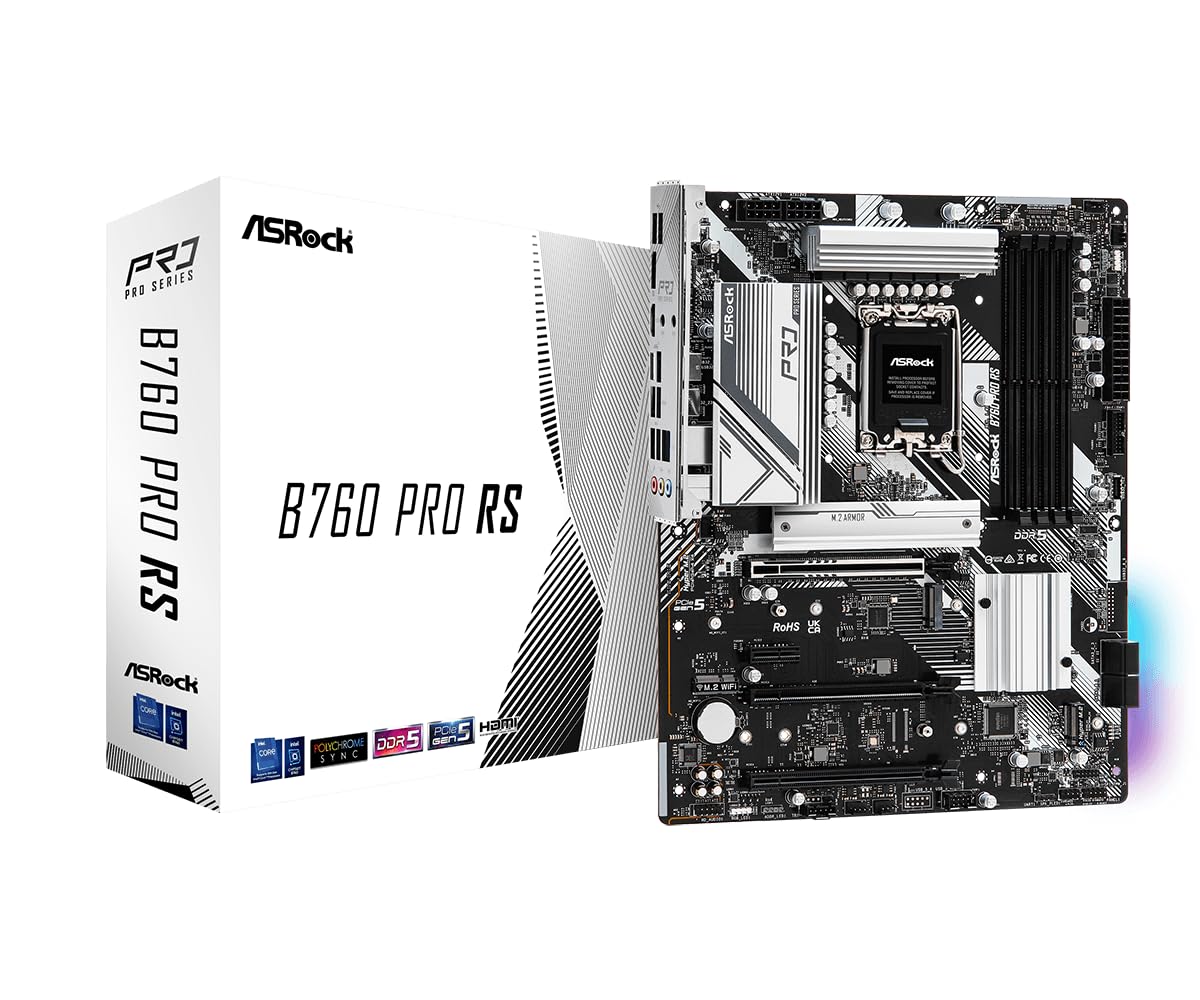
The ASRock B760 Pro RS brings a full ATX layout to the B760 chipset with a 10+1+1 phase Dr.MOS power stage and support for DDR5 up to 7200MHz. The PCIe 5.0 x16 slot is reinforced with a steel bracket to handle the weight of oversized RTX 40-series or Radeon RX 7000 series cards, a consideration that matters for system longevity. The board includes both front and rear USB-C ports, HDMI and DisplayPort outputs, and a dedicated M.2 Key E slot for Wi-Fi modules.
Users consistently highlight the board’s surprising durability — one builder reported the board survived extreme flex while fitting into a tight mATX case with a heavy GPU. Performance matched much more expensive Z690 boards in gaming benchmarks. The lack of a dedicated PCIe SSD RAID 0 option is the most notable omission for storage enthusiasts. The product packaging protection was criticized as minimal, though the boards arrived intact.
If you need the expandability of an ATX form factor but want to stay on the B760 platform for the price savings, the Pro RS delivers robust power delivery and PCIe 5.0 support at a mid-range price point that outclasses many similarly-priced Z690 boards.
Why it’s great
- Reinforced PCIe 5.0 slot for heavy GPUs
- DDR5 7200MHz overclocking
- Front and rear USB-C ports
Good to know
- No PCIe SSD RAID 0 support
- packaging could be better for shipping
- ATX form factor, not mATX
5. GIGABYTE B760M Gaming Plus WiFi DDR4

The GIGABYTE B760M Gaming Plus WiFi uses DDR4 memory, cutting the overall build cost significantly while retaining Wi-Fi 6E, Bluetooth 5.3, and a 2.5GbE LAN port. The 4+1+1 hybrid digital VRM is modest but sufficient for Core i5 and i7 processors up to the 65W TDP class, and the enlarged MOSFET heatsinks help maintain boost clocks during prolonged gaming sessions. The board supports XMP 3.0 for DDR4, with many users reporting stable 3600MHz and 4000MHz kits without issues.
Builders appreciated the Q-Flash Plus feature, which allows BIOS updates without a CPU installed — essential for those pairing a 14th Gen chip with an older BIOS revision. The front USB-C header and two M.2 PCIe 4.0 x4 slots (only one fits thick heatsinks comfortably) meet basic storage needs. Some users noted the board defaults to 2666 MT/s on DDR4 and requires enabling XMP for rated speeds. The CPU power connector at the top edge is tight in small cases.
For budget-constrained builders who already own DDR4 RAM, this board delivers excellent value. The included Wi-Fi 6E module eliminates the need for a separate network card, and the overall feature set supports a very capable mid-range gaming PC without pushing the total system cost upward.
Why it’s great
- Wi-Fi 6E + Bluetooth 5.3 at a low platform cost
- DDR4 support saves memory expense
- Q-Flash Plus for CPU-less BIOS updates
Good to know
- DDR4 only — no upgrade path to DDR5
- Only one M.2 slot fits large aftermarket heatsinks
- VRM limited to ~125W sustained loads
6. ASRock B650I Lightning WiFi

The ASRock B650I Lightning WiFi is an AMD AM5 Mini-ITX board, included here for builders weighing the Intel B760M ecosystem against a compact AMD alternative. The 8+2+1 phase Dr.MOS power delivery supports Ryzen 7000, 8000, and 9000 series CPUs in a tiny 170mm x 170mm footprint. It includes a PCIe 5.0 M.2 slot, Intel Wi-Fi 6E, 2.5GbE LAN, and dual DDR5 DIMM slots optimized for speeds beyond 7200MHz. The permanent I/O shield and rear Type-C port are thoughtful touches for SFF builds.
Reviewers confirmed the board’s initial boot sequence can take several minutes with repeated restarts as it trains DDR5 memory, a known AM5 behavior that resolves after the first POST. BIOS Flashback allows recovery if the board ships on an older BIOS revision. The rear M.2 slot lacks a heatsink, so plan accordingly for hot NVMe drives.
For builders committed to small form factor cases who want the latest AM5 platform, this ASRock board packs desktop-class features into a space-constrained layout. Just budget for a separate M.2 heatsink if you use both SSD slots.
Why it’s great
- 8+2+1 Dr.MOS VRM for Ryzen 7 and 9 CPUs
- PCIe 5.0 M.2 slot
- Wi-Fi 6E and 2.5GbE included
Good to know
- AM5 platform only — not Intel LGA 1700
- Rear M.2 slot lacks heatsink
- Some reports of board failure within first year
7. Gigabyte B760M DS3H DDR4

The Gigabyte B760M DS3H DDR4 is a straightforward, reliable micro-ATX board for users who prefer DDR4’s lower cost and proven stability. Its 6+2+1 phase digital VRM handles 65W and 125W CPUs reliably, and the memory support extends to DDR4 5333MHz overclocked — impressive for a budget-tier board. The rear USB-C port at 10Gb/s, dual M.2 PCIe 4.0 x4 slots, and 2.5GbE LAN are welcome connectivity upgrades over entry-level B760 options.
Users consistently rated this board highly for long-term stability, with one reviewer reporting two years of flawless operation. Q-Flash Plus enables BIOS updates without a CPU, and Smart Fan 6 provides granular fan curve control through the BIOS. The board comes ready for 14th Gen CPUs out of the box, and compatibility with i3 through i9 processors covers a wide range of build budgets. The M.2 Thermal Guard keeps SSDs cool during sustained writes.
If you have DDR4 memory already and want a board that simply works without hassle, the DS3H delivers dependable daily performance with solid I/O. Just be aware that some XMP profiles at 3600MHz and above may require manual voltage tuning for full stability.
Why it’s great
- DDR4 5333MHz overclocking support
- USB-C 10Gb/s rear port
- Q-Flash Plus for CPU-less BIOS updates
Good to know
- DDR4 only — no DDR5 upgrade path
- Only two fan headers on the board
- XMP at high speeds may require manual tweaking
8. ASRock B760 Pro RS/D4

The ASRock B760 Pro RS/D4 offers an ATX layout with DDR4 support, giving builders a full-size board with four PCIe slots, dual M.2 PCIe Gen4 connectors, and 2.5GbE LAN at a moderate platform cost. The 7+1+1 phase Dr.MOS VRM with heatsinks is capable of handling Core i7 processors without thermal issues, and the memory overclocking support up to DDR4 5333MHz ensures compatibility with high-speed XMP kits. The board includes USB 3.2 Gen2 Type-C both front and rear, plus HDMI and DisplayPort outputs for integrated graphics.
The extra PCIe slots make this board a good fit for builders who need a dedicated sound card, capture card, or additional NVMe expansion via a PCIe adapter. The lack of integrated Wi-Fi means you’ll need a USB dongle or a PCIe Wi-Fi card, though the M.2 Key E slot is ready for a module if you prefer to install one yourself.
For users who want the expandability of ATX without paying a premium for DDR5 support or an integrated Wi-Fi module, the Pro RS/D4 provides a robust foundation for a reliable mid-range system. The DDR4 memory savings can be redirected toward a faster GPU or larger SSD.
Why it’s great
- Full ATX with four PCIe slots
- DDR4 5333MHz OC support
- USB-C front and rear connections
Good to know
- No integrated Wi-Fi adapter
- DDR4 only — no DDR5 option
- Only two M.2 slots
9. GIGABYTE B760 Gaming X AX

The GIGABYTE B760 Gaming X AX tops the list with DDR5 support up to 7600MHz and three M.2 slots — a rare configuration for the B760 chipset. The ATX form factor includes four DDR5 DIMM slots supporting up to 128GB, three full-length PCIe x16 slots, and a comprehensive I/O array with Wi-Fi 6E, Bluetooth 5.3, and a USB-C port. The VRM solution on this board is robust enough to handle Core i5 and i7 processors at their full boost clocks even under extended workloads.
European users praised the board for its straightforward setup with i5-14600 CPUs and the magnetic Wi-Fi antenna base. The Gigabyte GCC software simplifies driver installation. The three M.2 slots (one PCIe 5.0 capable on some revisions) allow for substantial storage expansion without SATA cables. Some users noted the board lacks a dedicated POST code display, which is a minor inconvenience for enthusiast troubleshooting.
If you need the highest DDR5 memory speeds, multiple M.2 storage options, and reliable Wi-Fi 6E connectivity in an ATX package, the Gaming X AX delivers premium-tier features without forcing a jump to the Z790 platform. It’s the board to choose when performance and future expandability are the top priorities.
Why it’s great
- DDR5 7600MHz support
- Three M.2 slots for extensive storage
- Wi-Fi 6E with magnetic antenna
Good to know
- ATX form factor requires a larger case
- No POST code display
- Premium price bracket for a B760 board
FAQ
Can I overclock my CPU on a B760 motherboard?
Does a B760M board work with 14th Gen Intel processors out of the box?
What is the difference between PCIe 4.0 and PCIe 5.0 on a B760M board?
Final Thoughts: The Verdict
For most users, the best b760m d5 wi-fi cec motherboard winner is the ASUS Prime B760M-A AX because it delivers a perfect balance of DDR5 support up to 7000MHz, integrated Wi-Fi 6 and 2.5GbE LAN, and proven compatibility across three Intel CPU generations at a competitive price. If you want the fastest memory speeds and three M.2 slots, grab the GIGABYTE B760 Gaming X AX. And for the tightest budget while keeping Wi-Fi 6E, nothing beats the GIGABYTE B760M Gaming Plus WiFi DDR4.