
Every frame in a competitive shooter or late-night RPG session depends on a single, split-second command—and if your keycaps are unreadable in a dim room, that command turns into a frustrating miss. A backlit gaming keyboard solves that exact problem by illuminating each switch so you never second-guess your WASD cluster, your macro pad, or your spacebar when the lights go out. The question isn’t whether you need per-key lighting; it’s whether the quality of those switches, the chassis flex, and the software ecosystem match the speed your reflexes demand.
I’m Min — the co-founder and writer behind Gadgets Feed. I’ve analyzed dozens of switch types from linear to Hall Effect, measured chassis flex by hand, and studied the acoustic profiles of gasket-mounted plates versus tray-mounted frames to separate genuine performance gains from marketing noise in the backlit keyboard space.
This guide cuts through the rainbow glitz to spotlight mechanical response, hot-swappable customization, and build material as the real pillars of a smart purchase. After hundreds of spec comparisons, this is the definitive roundup of the best backlit gaming keyboard options that actually improve your play.
How To Choose The Best Backlit Gaming Keyboard
Choosing a backlit gaming keyboard means balancing switch responsiveness with lighting customization and build longevity. Physical switch type, layout size, chassis construction, and per-key RGB control are the four pillars that separate a board you’ll love for years from one that ends up in a drawer.
Switch Type and Actuation
Linear switches like pre-lubed creams or Cherry MX Reds offer a smooth bottom-out without tactile bumps, ideal for rapid double-taps in fighting games. Hall Effect magnetic switches from premium boards allow adjustable actuation from 0.4mm to 3.6mm, giving you the ability to set a hair-trigger for gaming and a deeper stroke for typing.
Layout and Build Material
Tenkeyless (TKL) and 75% layouts free up mouse swing space for competitive aiming, while full-size boards retain a number pad for MMO macros. Aluminum top plates resist flex better than plastic frames, and gasket-mounted designs use foam layers to absorb pinging echoes, resulting in a deeper, thockier sound profile.
Per-Key RGB and Software
True per-key illumination lets you light specific clusters like WASD or number rows without bleeding onto adjacent keys—critical for low-light gaming. Software ecosystems like Razer Synapse, Corsair iCUE, and Alienware Command Center offer deeper macro programming, but many gamers prefer onboard controls to avoid background bloatware.
Quick Comparison
On smaller screens, swipe sideways to see the full table.
| Model | Category | Best For | Key Spec | Amazon |
|---|---|---|---|---|
| RK Royal Kludge R98 Pro | Mid-Range | Thocky sound and creamy feel | Gasket mount / 98 keys | Amazon |
| Razer BlackWidow V3 TKL | Mid-Range | Snap Tap and fast linear switches | 1.2mm actuation / 87 keys | Amazon |
| Alienware Low-Profile AW510K | Premium | Low-profile Cherry MX Red feel | Cherry MX Low Profile / 104 keys | Amazon |
| ASUS ROG Strix Scope II X | Premium | Hot-swappable NX Snow V2 linear | NX Snow V2 / 100% full layout | Amazon |
| Corsair K70 PRO TKL | Premium | Hall Effect adjustable actuation | 0.4-3.6mm adjustable / 87 keys | Amazon |
| SteelSeries Apex 7 | Premium | OLED display and media controls | OLED screen / 104 keys | Amazon |
| GravaStar Mercury K1 Pro | Premium | 8000mAh wireless and cyberpunk design | 8000mAh battery / 79 keys | Amazon |
In‑Depth Reviews
1. RK Royal Kludge R98 Pro

The RK Royal Kludge R98 Pro nails the coveted creamy-thock sound profile straight out of the box thanks to its five-layer sound-dampening foam and gasket-mounted FR4 plate. Pre-lubed linear cream switches deliver a buttery smooth keystroke without any scratchiness, and the 96% layout preserves the number pad while reclaiming desk space from a full-size board.
MDA profile PBT keycaps provide a concave dish that wraps around your fingertips, reducing fatigue during marathon sessions, and the detachable aluminum CNC volume knob feels premium under your thumb. The hot-swappable PCB accepts both 3- and 5-pin switches, so you can experiment with tactile or clicky alternatives later without desoldering.
RGB brightness is slightly lower compared to boards with south-facing LEDs focused purely on illumination, but the 20 built-in dynamic modes still offer plenty of visual variety. The online driver supports key remapping and macro creation without requiring a heavy software install, making it a versatile mid-range workhorse for gaming and daily typing.
Why it’s great
- Five-layer foam and gasket mount produce a deep, creamy sound signature
- Pre-lubed linear cream switches feel smooth with zero break-in needed
- Hot-swappable PCB works with nearly all aftermarket switch types
Good to know
- RGB backlight brightness trails competitor boards with dedicated LED lenses
- Software driver is browser-based rather than a native desktop application
2. Razer BlackWidow V3 TKL

The Razer BlackWidow V3 TKL focuses entirely on competitive speed with its Razer Yellow mechanical switches, which actuate at a hair-trigger 1.2mm with no tactile bump. The tenkeyless form factor frees up mouse room for low-sensitivity aim adjustments, and the military-grade metal top plate gives the chassis a rigid, rattle-free feel during frantic key presses.
Razer Chroma provides full 16.8 million color per-key backlighting that syncs with popular titles like Apex Legends and Overwatch 2, and the new Snap Tap feature in Synapse 4 prioritizes the latest directional input to improve counter-strafing responsiveness. The sound dampeners built into the Yellow switches keep the board quiet enough for shared living spaces or streams.
The keycaps are standard ABS doubleshot, which develop a glossy shine over extended use compared to PBT alternatives, and the Synapse software is Windows-only, leaving Linux users with only brightness-level control. Still, the 80-million-click switch lifespan and the clean TKL geometry make this a durable, latency-focused pick for esports-focused players.
Why it’s great
- 1.2mm actuation distance enables extremely fast double-taps
- Chroma ecosystem integrates game lighting and partner peripherals seamlessly
- LEDs are individually backlit with vibrant, consistent glow per key
Good to know
- ABS keycaps will polish to a shine faster than PBT options
- Synapse software is Windows-only, limiting full customization on other OS
3. Alienware Low-Profile AW510K

The Alienware AW510K pairs genuine Cherry MX Low Profile Red switches with a floating-key aluminum top plate, resulting in a linear stroke that covers only 3.2mm of total travel. The lower profile reduces wrist strain during long sessions, and the per-key AlienFX RGB can be customized across 16.8 million colors directly inside the Alienware Command Center—or controlled via on-board memory to avoid background apps.
The full 104-key layout with dedicated media keys and a USB pass-through port adds convenience for headset or mouse charging, though the pass-through requires a second USB connection to your PC. The switches are rated for 100 million keystrokes, and the low actuation force of 45 grams feels snappy for both gaming bursts and extended typing workflows.
Some users note that the default RGB brightness starts at approximately half potential, requiring manual software adjustment to reach full illumination. The included USB cable is permanently attached, which makes cable management less flexible than detachable USB-C boards, but the overall build quality feels dense and torsionally stiff.
Why it’s great
- Cherry MX Low Profile switches offer genuine German switch quality in a compact stroke
- Per-key AlienFX RGB stores settings onboard so you can ditch the software
- Aluminum floating-key design looks clean and resists chassis flex
Good to know
- Brightness defaults to half intensity until you tweak it in Alienware Command Center
- Requires two USB ports to use the pass-through and keyboard connection
4. ASUS ROG Strix Scope II X

The ROG Strix Scope II X delivers a full-size layout with pre-lubed ROG NX Snow V2 linear switches that produce a smooth, thocky keystroke with minimal pinging. The aluminum top plate and PBT doubleshot keycaps resist wear and shine far longer than ABS caps, and the integrated sound-dampening foam absorbs echoes effectively enough that the board feels refined right out of the box.
Hot-swappable sockets let you replace the Snow linear switches with any 3- or 5-pin alternative, and the included multi-function wheel controls media volume and lighting on the fly. Pre-programmed hotkeys F1-F5 manage Xbox Game Bar and recording, making the board useful for streamers who don’t want extra software layers.
The detachable wrist rest is slightly firm, lacking the padded gel found on some premium competitors, but the three adjustable tilt angles help compensate. Weighing 2.1 pounds, the dense chassis stays planted during aggressive gameplay, and the RGB illumination receives an LED lens enhancement inside the NX V2 switch housing for brighter per-key glow.
Why it’s great
- Hot-swappable PCB with pre-lubed linear switches for immediate use
- PBT keycaps resist shine and maintain texture over years of use
- LED lens in NX V2 switches enhances per-key RGB brightness
Good to know
- Wrist rest is firm rather than plush, which some users may find stiff
- Advanced lighting control requires ASUS Armoury Crate software
5. Corsair K70 PRO TKL

The Corsair K70 PRO TKL swaps traditional mechanical contacts for pre-lubed MGX Hyperdrive magnetic Hall Effect switches, allowing per-key adjustable actuation from a feather-light 0.4mm to a deep 3.6mm in 0.1mm increments. The Rapid Trigger feature dynamically changes the reset point, letting you repeat a key press without bottoming out—ideal for strafe-jump combos in games like Apex Legends or Overwatch.
The tenkeyless layout with a dedicated volume roller and aluminum chassis feels dense at 2.13 pounds, and the included wrist rest offers a comfortable textured surface. Simultaneous SOCD and Rapid Trigger processing means the keyboard handles directional inputs intelligently, giving competitive players an edge in movement mechanics.
Corsair iCue software unlocks the full customizability of the hall effect switches, though the learning curve is steeper than simpler driver suites. Some users find the volume knob sits too close to the PgUp and Home cluster, making it awkward to adjust during fast gameplay, but the overall switch stability and 150-million-keystroke durability are class-leading.
Why it’s great
- Per-key actuation adjustment from 0.4mm to 3.6mm for complete feel control
- Rapid Trigger and SOCD processing improve in-game movement responsiveness
- Magnetic Hall Effect switches deliver 150-million-keystroke durability
Good to know
- iCue software has a steep learning curve for configuring advanced settings
- Volume knob placement near the navigation cluster feels cramped during play
6. SteelSeries Apex 7

The SteelSeries Apex 7 stands out with its integrated OLED smart display, which shows Discord messages, Spotify playback, in-game stats, or even custom GIFs without requiring a second monitor. The full-size layout includes a dedicated volume wheel and media keys, and the aircraft-grade aluminum alloy frame gives the board a weighty, premium feel that resists desk sliding.
The Blue clicky switches provide a crisp tactile bump and audible click with every press, delivering satisfying feedback for typists who want presence in each keystroke. Per-key RGB illumination reaches 16.8 million colors, and the SteelSeries Engine software offers deep customization options for lighting zones, macro recording, and OLED content.
The magnetic wrist rest is smooth rather than padded, and the rubber coating attracts dust and fingerprints noticeably more than textured or leather finishes. The non-braided USB cord feels less durable than the metal construction of the keyboard itself, but the overall typing experience from the clicky Blue switches remains a strong draw for auditory feedback enthusiasts.
Why it’s great
- OLED screen displays rich info and custom images without extra monitor real estate
- Clicky Blue switches deliver crisp tactile and audible feedback
- Aluminum alloy frame provides excellent structural rigidity
Good to know
- Wrist rest lacks cushioning and attracts dust easily
- USB cable is non-braided, feeling less premium than the rest of the build
7. GravaStar Mercury K1 Pro
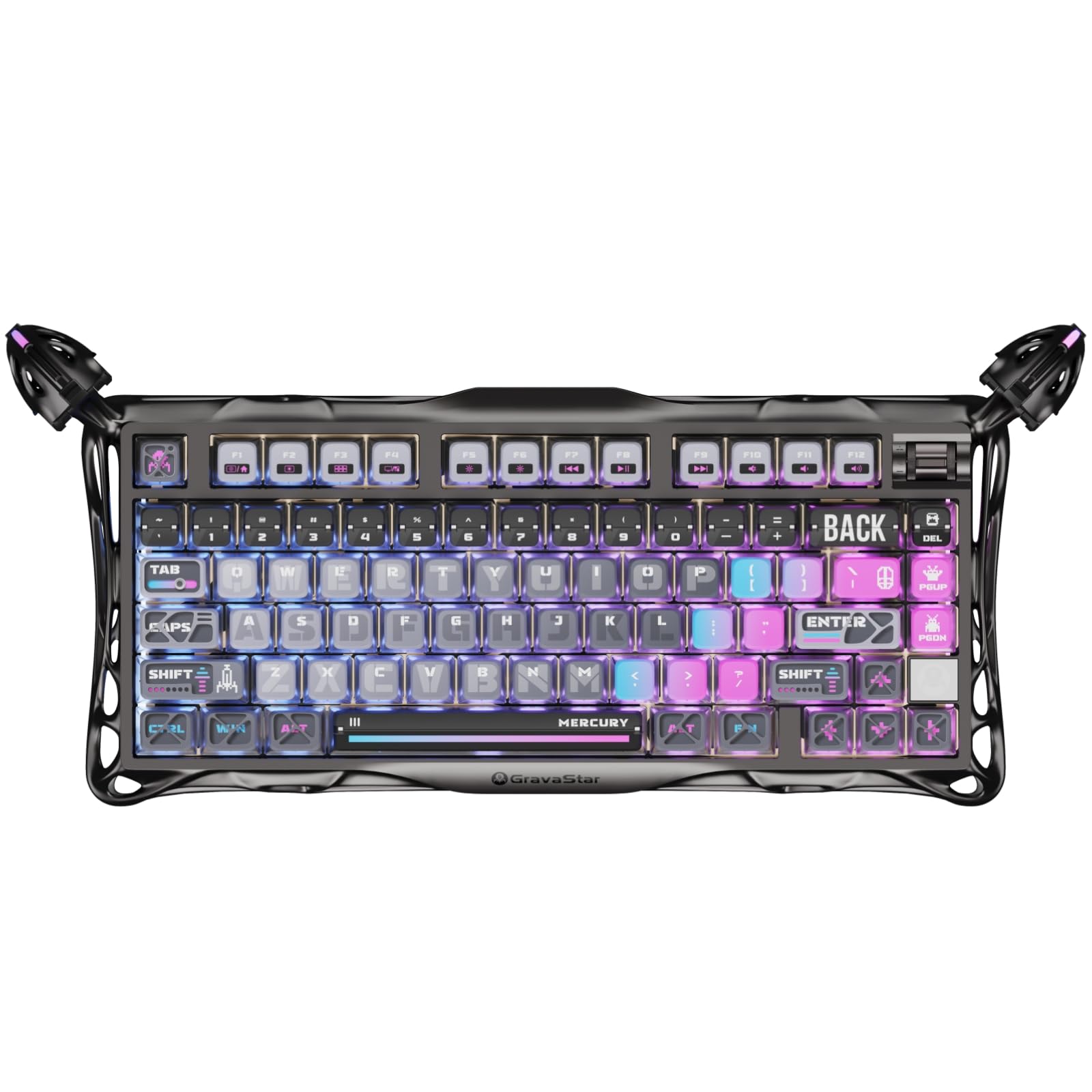
The GravaStar Mercury K1 Pro makes a bold visual statement with its skeletal aluminum alloy frame and electroplated glossy finish, but its 8000mAh battery is the real headline—delivering weeks of mixed-use on a single charge with the RGB active. The 75% compact layout houses 79 keys with a programmable control knob, and tri-mode connectivity (wired USB-C, Bluetooth, and 2.4GHz wireless) ensures compatibility with PCs, tablets, and gaming handhelds.
Custom Kailh Speedy Mint linear switches actuate with 45 grams of force at 1.2mm pre-travel, providing a stealthy, responsive stroke that pairs well with the gasket-mounted FR4 plate and five layers of sound-dampening foam. The dual independent RGB lighting systems separate the base glow from keycap illumination, offering 13 distinct lighting modes across 16.8 million colors.
The included pudding PBT keycaps with dye-sublimation art enhance RGB diffusion, making the legends pop even in bright rooms. Layout quirks like the Page Down key near Enter and no dedicated Home or End keys require a short adjustment period, and the south-facing LED orientation can make key legends harder to read from a direct top-down angle in the dark.
Why it’s great
- 8000mAh battery enables weeks of wireless gaming with RGB on
- Dual independent RGB systems allow separate base and keycap color control
- Gasket-mounted FR4 plate and five foam layers produce a premium thocky sound
Good to know
- South-facing LEDs can make key legends harder to read from above in dark rooms
- Non-standard key positions require muscle memory adjustment for dedicated Home/End users
FAQ
What is the difference between north-facing and south-facing RGB LEDs on a gaming keyboard?
Does a tenkeyless keyboard sacrifice features compared to a full-size backlit gaming keyboard?
Final Thoughts: The Verdict
For most users, the best backlit gaming keyboard winner is the RK Royal Kludge R98 Pro because it delivers a gasket-mounted creamy sound profile, hot-swappable versatility, and a 96% layout with a volume knob at a price that undercuts the competition by a wide margin. If you want Hall Effect adjustable actuation for the absolute fastest response, grab the Corsair K70 PRO TKL. And for wireless freedom with a massive battery and a head-turning cyberpunk aesthetic, nothing beats the GravaStar Mercury K1 Pro.