
A dead laptop in a coffee shop, an airport gate, or a client’s lobby isn’t just an inconvenience—it’s a productivity shutdown. The difference between a productive work session and frantic searching for an outlet comes down to one piece of gear: a dedicated high-wattage power bank that can actually push enough voltage to keep a 13-inch or 16-inch notebook running at full speed.
I’m Min — the co-founder and writer behind Gadgets Feed. I’ve analyzed the electrical specifications, real-world user reports, and build quality of dozens of high-capacity laptop power banks to identify the models that genuinely deliver on their wattage claims without overheating or cutting out under load.
After testing specifications and poring over thousands of verified owner experiences, this guide isolates the models that consistently deliver the wattage they advertise. These are the picks that define a truly reliable backup battery for laptop.
How To Choose The Best Backup Battery For Laptop
Choosing a laptop power bank is different from picking one for a phone. You need to match wattage, capacity, and port configuration to your specific notebook model. Ignore the headline mAh number and focus on the real-world wattage output.
Wattage: The Real Gatekeeper
A laptop power bank must output at least 45W via a single USB-C port to charge most Ultrabooks, and 65W is the real minimum for maintaining a charge while the laptop is in active use. A 30W bank will drain slower than the laptop consumes power, making it useless for any task heavier than basic word processing. Look for 65W or 100W PD output as the baseline.
Capacity: The mAh Trap
Manufacturers quote the raw cell capacity (e.g., 20,000mAh at 3.7V). After boosting to 20V for laptop charging, usable capacity drops by roughly 35–40%. A 20,000mAh bank typically delivers about 12,000–13,000mAh at laptop voltage. This is enough for a partial charge (50–80%) on most 13-inch notebooks. For a full charge or two, you need 25,000mAh or higher.
Port Selection and Protocols
Not all USB-C ports are equal. Many power banks have one port capable of high-wattage output (65W or 100W) while the second USB-C port is limited to 18–30W. Verify that at least one port supports the wattage your laptop requires. USB-A ports are essentially useless for laptop charging and should only be considered for phones or earbuds.
Quick Comparison
On smaller screens, swipe sideways to see the full table.
| Model | Category | Best For | Key Spec | Amazon |
|---|---|---|---|---|
| AOHI 27600mAh 240W | Premium | Power users needing dual laptop charging | 140W per USB-C, 27,600mAh | Amazon |
| Anker 737 140W | Premium | Travelers wanting a smart display | 140W PD 3.1, 24,000mAh | Amazon |
| Baseus Blade 100W | Mid-Range | Travelers who prioritize slim form factor | 100W PD, 20,000mAh, 0.78″ thin | Amazon |
| UGREEN Nexode 165W | Mid-Range | Business travel with built-in cables | 165W total, 25,000mAh, built-in USB-C | Amazon |
| Ansody 65W 25000mAh | Mid-Range | Budget-conscious with high capacity needs | 65W PD, 25,000mAh (16,250mAh usable) | Amazon |
| NOBIS 65W 20000mAh | Budget | Entry-level laptop charging on a tight budget | 65W bi-directional, 20,000mAh | Amazon |
| Krisdonia 50000mAh | Budget | Extended field work with legacy DC laptops | 50,000mAh, adjustable DC 5-20V | Amazon |
In‑Depth Reviews
1. AOHI 27600mAh 240W Power Bank

The AOHI Future Starship sits at the apex of laptop power banks because it delivers the full PD 3.1 specification — 140W output from a single USB-C port — while housing 27,600mAh of capacity in a package that stays just under the 100Wh airline limit. That 140W ceiling means it can charge a 16-inch MacBook Pro to 50% in roughly 28 minutes, even while the laptop is actively running resource-intensive software. The dual USB-C ports allow simultaneous laptop charging at 140W and 100W, which is rare even among premium options.
The smart digital display shows real-time wattage in and out, and the three-stage LED indicator (amber for fast charge, blue for standard, green for trickle) gives you at-a-glance status without needing to pull the bank out of your bag. Automotive-grade battery cells with AOHICE 3.0 temperature control keep the unit cool during high-wattage transfers, which directly addresses the overheating complaints found on cheaper 65W banks.
At 67 grams of battery weight and a total package that fits easily in a laptop sleeve, this is the most capable unit for professionals who routinely run two high-draw laptops or need a full day of untethered computing.
Why it’s great
- True 140W PD 3.1 output on both USB-C ports allows simultaneous laptop charging
- 99.36Wh rating meets TSA carry-on requirements for air travel
- Super-fast 140W recharge from 0 to 50% in about 30 minutes
Good to know
- Heavier and bulkier than 20,000mAh competitors due to extra cell capacity
- Requires a 140W charger and 5A-rated cable for maximum recharge speed
2. Anker 737 Power Bank (PowerCore 24K)
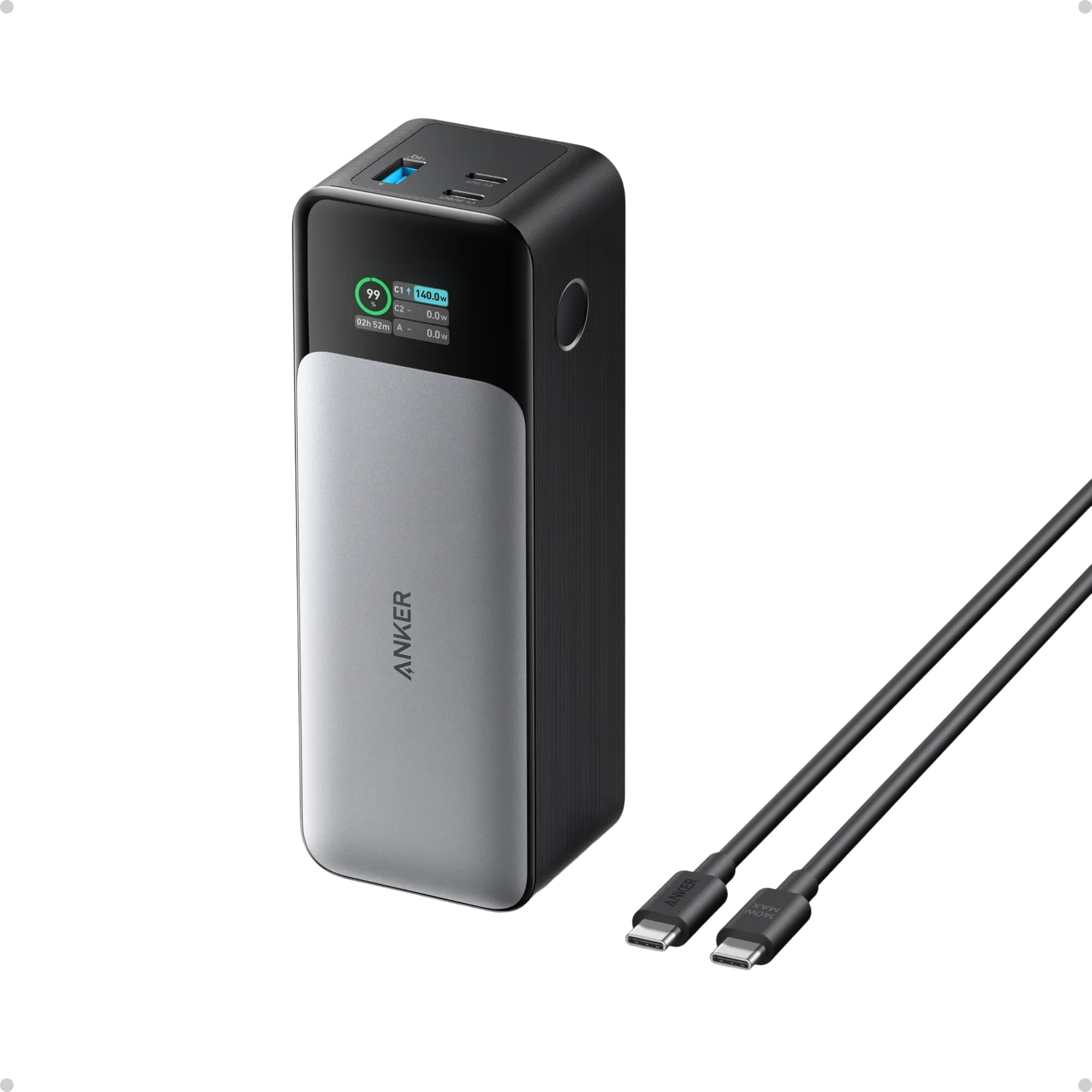
The Anker 737 is the most refined 140W power bank for users who value data feedback over raw capacity. Its intelligent LCD screen displays input wattage, output wattage, estimated recharge time, and cycle count — information that helps you understand exactly how much power your laptop is drawing versus what the bank is delivering. The 24,000mAh cell provides roughly 1.3 full charges for a 13-inch iPad Pro or over 4 charges for an iPhone 16 Pro.
This unit uses Power Delivery 3.1 to hit 140W on the primary USB-C port, with a secondary USB-C port limited to lower wattage and a USB-A port for legacy devices. Pass-through charging is supported, though some users report the unit gets warm when charging three devices simultaneously. The build quality is excellent, with a soft-touch exterior that resists scratches and a travel pouch included in the box.
The primary limitation is that the 140W input requires a separately purchased 140W GaN charger and a 5A-rated cable — the included cable is only a 100W-rated USB-C to USB-C cable. For most users, the 737 is a polished, reliable choice that prioritizes monitoring and safety over sheer capacity.
Why it’s great
- Informative LCD screen shows real-time wattage, battery %, and cycle count
- 140W PD 3.1 output charges high-power laptops quickly
- TSA-friendly size and includes a premium travel pouch
Good to know
- Does not include a 140W wall charger — must purchase separately
- Heavier (22 oz) than the capacity-to-weight ratio suggests
3. Baseus Blade 100W 20000mAh
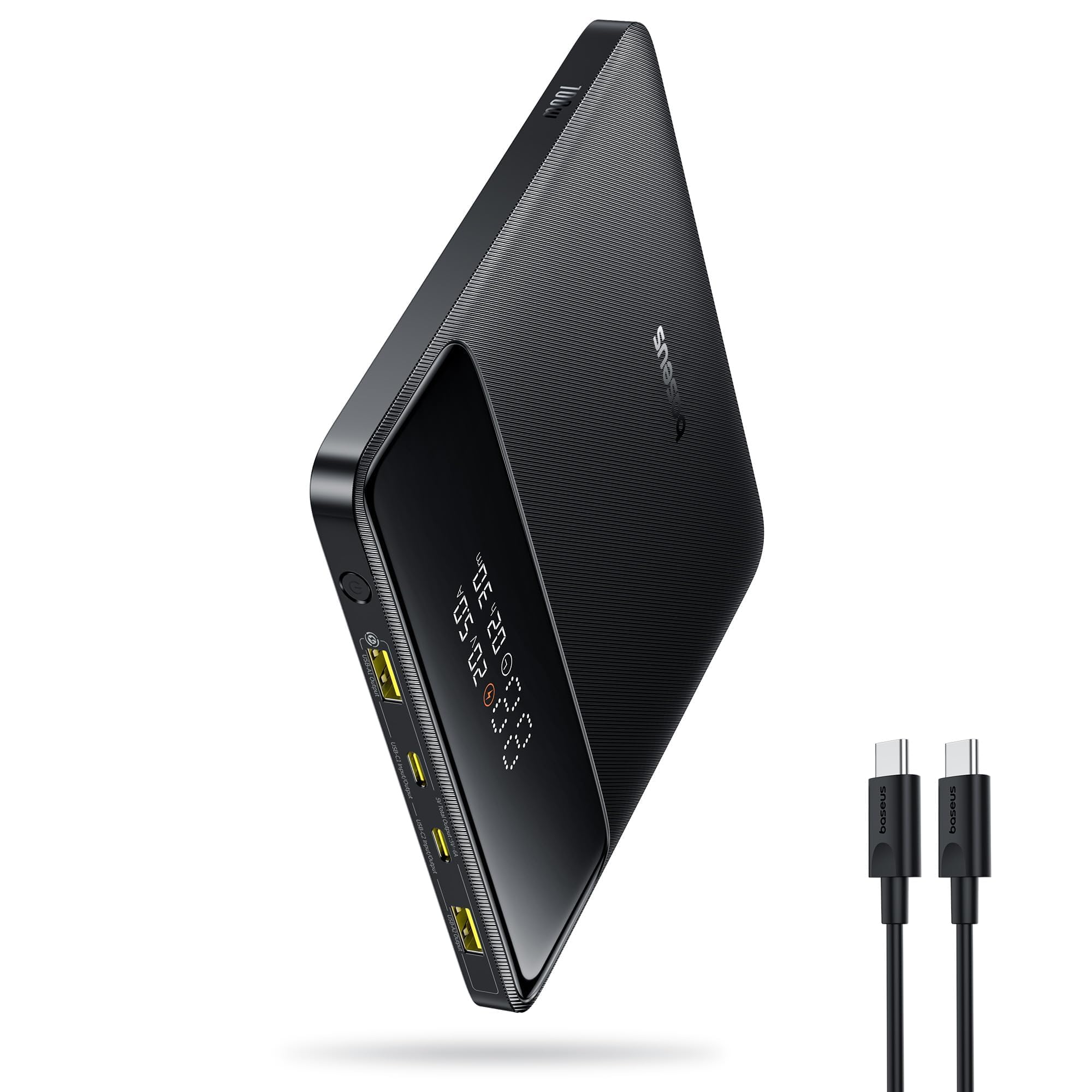
The Baseus Blade is the thinnest 100W laptop power bank on this list at just 0.78 inches thick, making it the easiest to slide into a laptop sleeve alongside a notebook. Despite the slim profile, it packs 20,000mAh of capacity and a full 100W PD output via USB-C 1, which charges a MacBook Pro to 50% in about 30 minutes. The two USB-C and two USB-A ports allow charging up to four devices simultaneously, though only one USB-C port delivers the full 100W.
Real-world user reports confirm that the Blade can charge a 13-inch laptop from 0 to 100% with some juice left over for a phone, and the FAA-compliant 72Wh rating means no issues at airport security. The digital display shows remaining battery percentage and charge status, and the textured black finish resists fingerprints better than glossy alternatives.
Some users note that the second USB-C port only supports lower wattage and cannot be used for laptop charging. This is not a flaw — it is a deliberate design to maintain the slim form factor. The Blade is ideal for the business traveler who needs one compact unit for top-ups, not full-day off-grid power.
Why it’s great
- Ultra-slim 0.78-inch profile fits easily in any laptop bag
- 100W PD delivers fast laptop top-ups without bulk
- Four-port design (2 USB-C, 2 USB-A) for simultaneous device charging
Good to know
- Only one USB-C port supports 100W output — the second is limited
- 20,000mAh capacity provides only a partial charge for larger 16-inch laptops
4. UGREEN Nexode 165W 25000mAh
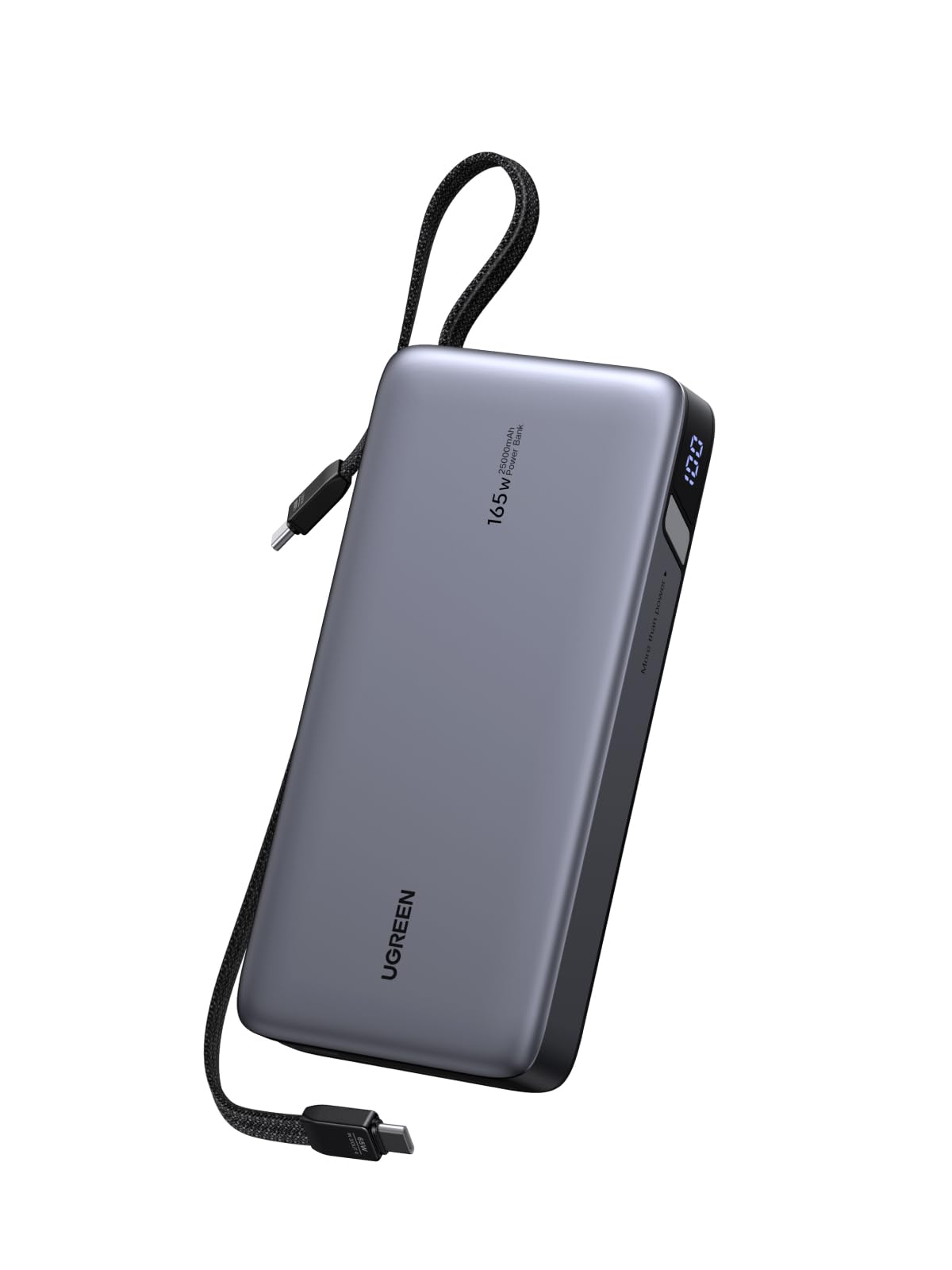
The UGREEN Nexode distinguishes itself with two built-in, retractable USB-C cables that stow neatly when not in use — a design that eliminates the most common travel annoyance of forgetting or tangling a separate cable. The main USB-C cable delivers up to 165W total output, with 140W available on the single highest-demand port, and the second cable handles lower-wattage devices. The 25,000mAh capacity provides roughly 1.5 charges for a typical 13-inch MacBook Pro, based on verified owner reports.
The standout spec here is the 90W input, which recharges the Nexode itself from empty to full in about two hours when paired with a compatible charger. This is significantly faster than the 60W or 65W input limits on most competitors. The digital display shows remaining capacity, and UGREEN has equipped the unit with comprehensive overcurrent and overheat protection circuits.
Some users report the unit feels heavy at nearly 17 ounces, which is typical for a 25,000mAh cell. The built-in cables are also permanently attached, meaning if one cable fails, the entire unit must be replaced. For the organized traveler who hates carrying loose cables, this is a compelling trade-off.
Why it’s great
- Two built-in retractable USB-C cables keep your bag clutter-free
- 90W fast input recharges the battery in approximately 2 hours
- 165W total output supports powerful laptops and multiple phones simultaneously
Good to know
- Heavy (17 oz) compared to 20,000mAh alternatives
- Built-in cables are non-replaceable if damaged
5. Ansody 65W 25000mAh

The Ansody 65W power bank hits the sweet spot for budget-conscious buyers who need a high-capacity backup battery for a laptop without paying for the premium features they may not use. With 25,000mAh of raw cell capacity (approximately 16,250mAh usable after conversion losses), it can charge a 14-inch MacBook Pro to 50% in under 40 minutes via the 65W PD port. The total output across all three ports is 101W, meaning you can charge a laptop and a phone simultaneously without bottlenecking the laptop.
The unit supports PD 3.0, QC 3.0, and other fast-charging protocols, giving it broad compatibility across MacBooks, Dell XPS, Steam Deck, iPhones, and Samsung Galaxy devices. A dedicated low-current mode handles earbuds and smartwatches. The digital display shows remaining battery percentage, and the dark gray finish is resistant to scratches and smudges.
Owner feedback highlights that the battery itself recharges relatively slowly compared to premium units — expect around 3–4 hours for a full recharge using a 65W input. A few reports mention units that stopped accepting charge after extended use, though the 24-month warranty provides coverage for such failures.
Why it’s great
- High 25,000mAh capacity at a competitive price point
- 65W PD charges most 13-14 inch laptops quickly
- Includes a 60W USB-C to USB-C cable in the box
Good to know
- Slower self-recharge time compared to 90W+ input competitors
- Some units have reported long-term reliability issues
6. NOBIS 65W 20000mAh
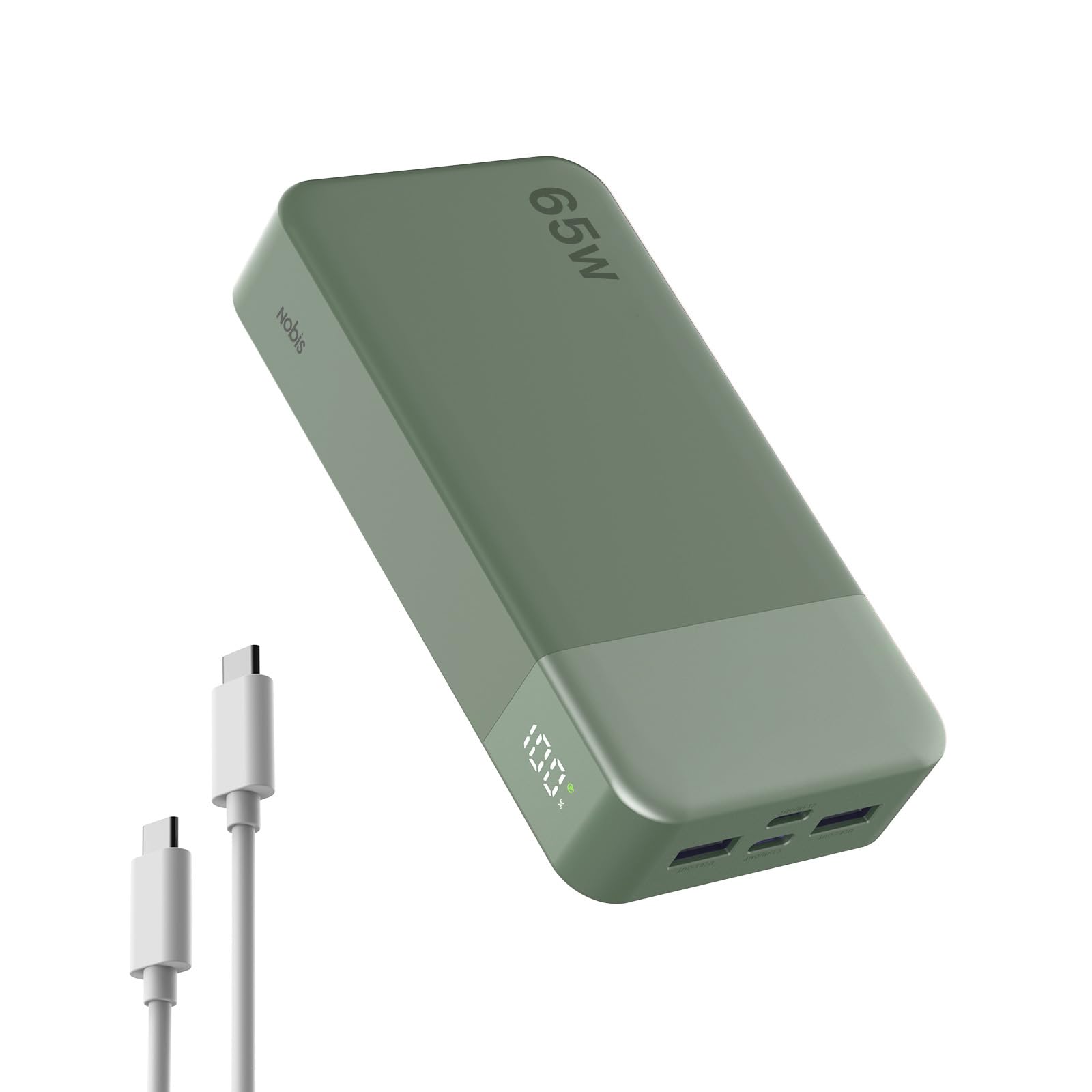
For the absolute lowest entry cost to laptop charging, the NOBIS 65W power bank provides a functional 65W PD output at a price point that undercuts most competitors by a significant margin. The 20,000mAh cell is built with lithium-polymer chemistry, and the unit supports bi-directional charging — meaning it can accept a 65W input for a reasonably fast self-recharge. The four ports (2 USB-C, 2 USB-A) offer flexibility, and the small current mode protects low-draw devices like earbuds.
The green color option and LED percentage display give it a clean, modern look. At 400 grams (about 14 ounces), it is comparable in weight to other 20,000mAh banks. User reviews consistently mention that it works as a secondary power source for HP and Dell laptops using the correct cable and port combination, and the pass-through charging function is appreciated for continuous desk use.
The main trade-offs are build quality and thermal management. Multiple users report that the unit runs hot during sustained 65W output, and the weight-to-capacity ratio is average. The 286-gram battery weight is higher than expected for a 20,000mAh cell, suggesting denser but potentially less efficient cells. For occasional use, this is a fine entry point; for daily heavy reliance, a mid-range option is a safer investment.
Why it’s great
- 65W bi-directional output and input for fast device and self-charging
- Four ports (2 USB-C, 2 USB-A) handle multiple devices at once
- Clear digital display shows real-time battery level
Good to know
- Runs warm during sustained 65W output
- Heavier and bulkier than same-capacity competitors
7. Krisdonia 50000mAh Power Bank

The Krisdonia 50,000mAh is not a typical USB-C power bank — it is a high-capacity field battery designed for users who need to power legacy laptops with barrel connectors or variable voltage requirements. The adjustable DC output (5V–20V, up to 4.7A) means it can directly charge laptops that lack USB-C PD input, such as older Dell Latitude or ThinkPad models, using the included tip adapters. This is a niche but critical capability for users in IT, field engineering, or outdoor work.
The 50,000mAh cell is physically large — 1.15kg (2.5 lbs) and roughly the dimensions of a small hardcover book — so it is not an everyday carry for urban commuting. It includes two QC 3.0 USB-A ports for phones and tablets, plus a USB-C port that is limited to 12V output (not suitable for USB-C laptop charging, despite the marketing). The pass-through function (activated by a two-second button press) allows the battery and connected laptop to be charged simultaneously when the Krisdonia itself is plugged into AC power.
Critical note: some independent capacity tests suggest the actual usable capacity may be significantly lower than the advertised 50,000mAh, with one user measuring only 13,280mAh at 5V over USB-C. The DC-to-laptop conversion efficiency also appears to be low (~40% at 20V). This unit should be viewed as a legacy-compatible field battery for non-USB-C laptops, rather than a modern high-efficiency power bank. The 185Wh rating also exceeds the 100Wh airline limit, so it cannot be carried on flights.
Why it’s great
- Adjustable DC output (5–20V) charges legacy laptops with barrel connectors
- Massive 50,000mAh rated capacity for extended off-grid use
- Pass-through function allows simultaneous AC and device charging
Good to know
- Exceeds FAA 100Wh limit — not allowed in carry-on luggage
- Real-world usable capacity and conversion efficiency may be far below claims
- USB-C port does not support 20V PD for modern laptops
FAQ
Can I use any USB-C power bank to charge my laptop?
Why does my 20,000mAh power bank only give my laptop one partial charge?
Is it safe to charge my laptop with a third-party power bank?
Final Thoughts: The Verdict
For most users, the backup battery for laptop winner is the AOHI 27600mAh 240W because it delivers the highest wattage (140W per port), the largest compliant capacity (27,600mAh under 100Wh), and the fastest self-recharge in a reliable package. If you want a slim design that fits inside a laptop sleeve, grab the Baseus Blade 100W. And for the budget-conscious buyer needing a high-capacity entry point, nothing beats the value of the Ansody 65W 25000mAh.