
Our readers keep the lights on and my morning glass full of iced black tea. As an Amazon Associate, I earn from qualifying purchases.
Specs are compiled from manufacturer listings and verified buyer reviews and can change over time — please confirm the key details on the product page before buying.
Buying a badge printer is really a question of how many cards leave it in an hour, and whether the colour ribbon inside survives the job. Every pick below prints plastic ID cards; the difference is whether you feed them one at a time by hand or load a stack into a feeder, and whether your design software can pull names from a spreadsheet without a fight. Start with how many badges you print in a week, because that single number decides almost everything else.
I’m Min — the founder and writer behind Gadgets Feed. This guide is built by comparing the manufacturers’ published specifications and the patterns across verified customer reviews, so you get each pick’s real strengths and trade-offs instead of marketing spin.
You will find hand-feed kits built for a front desk and dual-sided machines built for a full employee rollout, sorted so the trade-off is obvious. What matters most is matching the printer to your daily badge count with the best badge printer for your desk.
Our Picks at a Glance


How To Choose The Best Badge Printer
Three things decide whether a badge printer makes your week easier or turns it into a chore: how the card gets in, whether it prints one side or both, and what comes in the box on day one.
Hand-feed or loaded feeder
A hand-feed printer takes one card at a time, so you place a blank in and a finished badge comes out. That suits a reception desk printing a visitor badge on demand, and it means fewer cards jammed because the stack slipped.
A loaded feeder holds a stack and pulls cards automatically, so a batch of new-hire badges runs while you do something else. The Primacy 2 takes a 100-card feeder straight away, with an optional 200-card feeder installed on site if your volume grows.
Simplex versus duplex
Simplex means single-sided printing — one face of the card carries your design. Most visitor and membership badges only ever need that, so a simplex machine does the job without extra cost.
Duplex prints both faces in one pass. That matters when the back of the card carries a barcode, terms, or a photo, and it saves you flipping cards by hand. The Magicard 300, Primacy 2, and DTC4250e all list automatic duplex.
What the kit actually includes
The ribbon and blank cards are the running cost that sneaks up on new buyers. Look for a package that ships with a colour ribbon and a starter stack of PVC cards, so you are printing the day it lands rather than shopping for supplies.
Quick Comparison
| Model | Best For | Print Sides | Colour Speed | Ribbon In Box | Amazon |
|---|---|---|---|---|---|
| Bodno Seaory S25 Bronze Edition★ Best Overall | Front-desk badge on demand | Simplex | 18 pages per minute | 100 prints | Amazon |
| Bodno Seaory S26 Bronze with CameraPhoto ID Pick | Photo ID from scratch | Simplex | 18 pages per minute | 100 prints | Amazon |
| Badgy100Simple Starter | Beginner single badges | Simplex | 9 pages per minute | 100 cards + ribbon | Amazon |
| IDP SMART-21S Kit | Small business starter | Simplex | 150+ colour cards per hour | 100 prints | Amazon |
| Badgy200 | School and club badges | Simplex | — | 100 prints | Amazon |
| Zebra ZC100 LT Package | Compact office printing | Manual duplex | 12 pages per minute | Included | Amazon |
| Magicard 300 Dual Sided Bundle | Two-sided staff badges | Automatic duplex | 3 pages per minute | Color ribbon | Amazon |
| Evolis Primacy 2 Bundle | High-volume batch runs | Automatic duplex | 280 cards per hour | Color ribbon | Amazon |
| Fargo DTC4250e Package | Rewrite and network badges | Automatic duplex | — | 250 prints | Amazon |
In‑Depth Reviews
1. Bodno Seaory S25 Single Sided ID Card Printer & Complete Supplies Package (Bronze Edition)
Our pick — 4.5+★ from 200+ verified ratings; the strongest balance of quality and price.
The front-desk workhorse that hands you a finished badge in the time it takes to greet a visitor.
Eighteen pages per minute in colour is the number to hold onto here. That is roughly three times the colour output of the Badgy100 at 9 pages per minute, so a lobby queue of five employees waiting for replacements clears in a fraction of the wait. For a machine that costs a fraction of the dual-sided flagships, that pace is the reason it sits at the top.
The rest of the package is built to remove first-day friction. You get 100 blank PVC cards (the stiff plastic blanks badges are printed on), the Seaory 11011 YMCKO colour ribbon (four colour panels plus a clear overcoat that seals the print against handling), and the Bodno ID software on a lifetime licence — so the design and print tools stay with the printer, not a subscription. Drivers cover Windows, Mac, and Linux, which matters if your office is not all one platform.
Owners single out the print itself: crisp text, saturated colour, and a sealed overcoat finish that looks like a proper ID card rather than a sticker. Setup is the other thing that lands well; the software is drag-and-drop with templates, so a school secretary or an office manager can build a badge layout without design training. The recurring gripe is size rather than performance: this is a desk-side unit, so plan a footprint for it and expect to feed one card at a time.
Where it earns its keep
- 18 pages per minute in colour keeps a reception queue moving.
- Ribbon, 100 cards, and a lifetime software licence all in the box.
- Windows, Mac, and Linux drivers mean no platform lock-in.
- Two-year hardware warranty plus lifetime software support.
What to plan around
- Hand-feed only, so batch runs need someone standing there.
- Simplex means one face of the card, no back-side printing.
Made for: the office that prints a handful of badges most days and wants a clean, sharp card each time.
Look elsewhere if: your badge backs need barcodes or terms printed in the same pass.
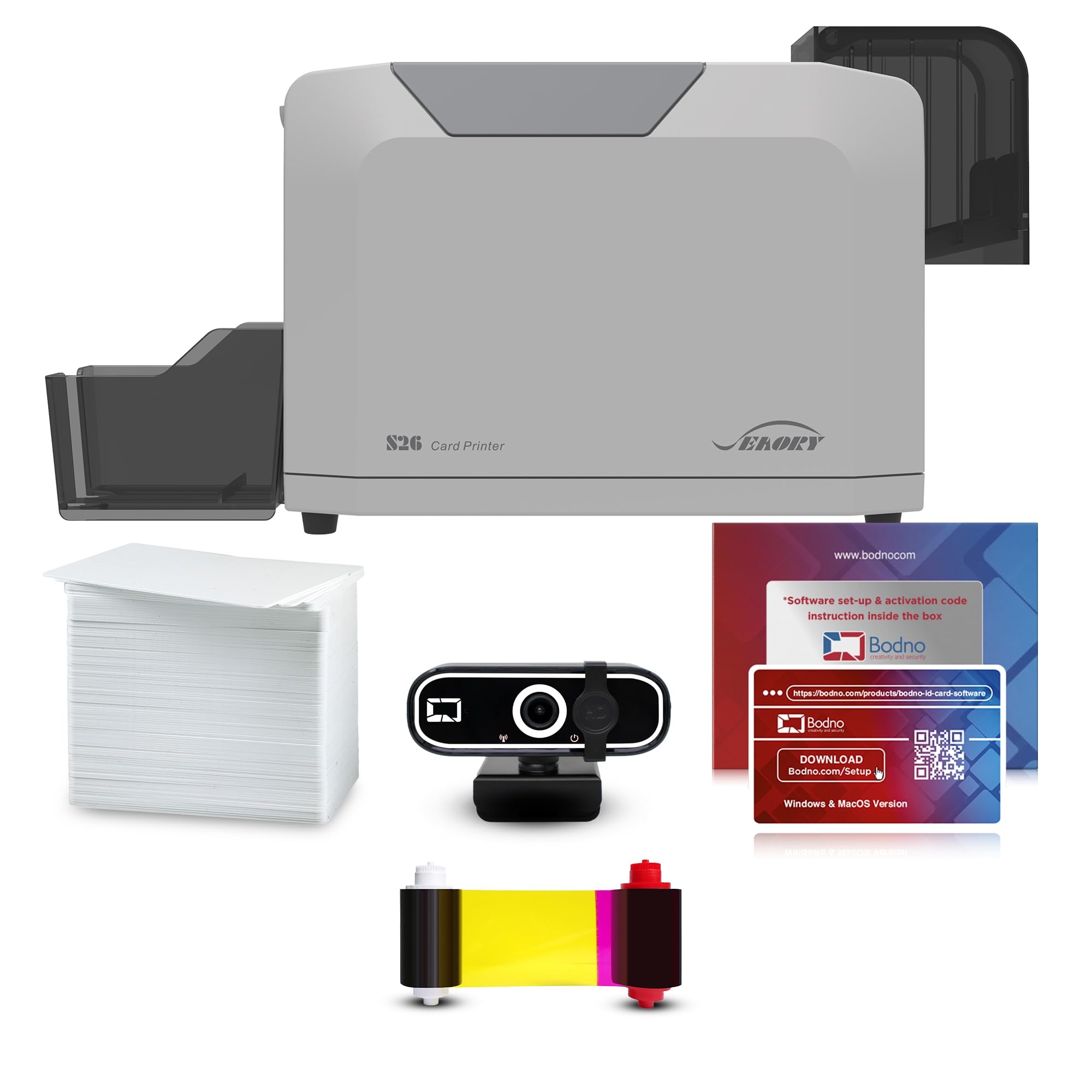
2. Bodno Seaory S26 Single Sided ID Card Printer & Complete Supplies Package with Camera (Bronze Edition)
Print quality at 300 x 1200 dpi — plus the camera to shoot the face going on the card.
Printing at 300 x 1200 dpi is the sharpest resolution on this list, and it shows up exactly where plastic badges fail: small print on a security line, a logo with fine detail, a photo that still looks like the person after a year in a wallet. Here the 18 pages per minute colour rating matches the S25 above, but the resolution is the upgrade you are paying for.
The real differentiator is the box. A Bodno A11 Full HD 1080p photo ID camera comes with the printer, along with the Seaory 11011 YMCKO ribbon for 100 prints, 100 blank PVC cards, and the same Bodno ID software licence with drag-and-drop templates and camera capture built in. For a school or a security desk that has to take the photo and print the badge at the same station, that is one purchase instead of three.
Owners describe vibrant colour and quick output, and the setup goes in without a fight — the software is the part that gets called intuitive for putting together office badges. Reliability holds up too, with steady card feeding the theme rather than jams. Slower to first card at 30 seconds, and it is still simplex, so the back of the card stays blank.
The honest catch: a single-sided machine with a camera attached is a photo-badge station, not a re-badging factory. If you need batch runs of hundreds with a printed back, look further down this list.
Your match if: you shoot the employee photo and print the badge at one desk, and want the camera in the same order.
Skip the upgrade if: you already own a decent webcam and only need one face of the card.
3. Badgy100 Color Plastic Card Printer
A colour badge in 45 seconds, with a print margin so tight the design nearly touches the edge.
Near-to-edge printing at a 1.35mm margin (about 0.05 inches of white border) is the detail that makes this one look less like a kit machine. Badges come out with the artwork running right up near the card boundary rather than floating in a wide white frame, which is the visual tell between a homemade card and a proper one.
The pace is modest — 9 pages per minute in colour, and 45 seconds for a full-colour badge — so this is a print-it-when-you-need-it machine rather than a batch engine. It ships with a colour ribbon and 100 cards, runs from USB 2.0, and the maker pitches it as easy setup for a beginner or an advanced user, which is the honest way to describe a first badge printer.
Its real value is a low-cost trial of the whole badge workflow: lay out a card in the bundled software, print one, check the alignment, then commit to a bigger run. The trade-off is throughput and format: single-sided only, no feeder stack, and the slower colour output means a big onboarding day will feel like a waiting game.
Worth it when: you print a few dozen badges a month and want edge-to-edge looks without a premium outlay.
Think twice if: your printer will ever sit in a queue — 45 seconds per card adds up fast.
4. IDP SMART-21S ID Card Simplex Printer Kit

Over 150 colour cards an hour from a box small enough to live on a corner of the desk.
That hourly figure is the headline: more than 150 colour cards per hour, or 600 monochromatic ones, which puts it ahead of the hand-feed printers on raw throughput. It measures 6.6 by 10.2 by 7 inches, so it fits a desktop without eating the whole surface — a real consideration if your print station doubles as a reception counter.
The kit is genuinely complete: the SMART-21S printer, the PC-only IDesigner software and driver, a 100-print YMCKO ribbon, and 100 PVC cards. It needs Microsoft Windows 10 or 11, so a Mac-only office should look elsewhere. The control panel is a single LED button, and the ribbon loads without fuss, which keeps training time short for whoever inherits the job.
Here is where to be careful. Print quality and reliability draw genuinely mixed reactions — some owners get top-notch results and others do not — so this is a printer to buy once you have confirmed your card stock and ribbon match. The upside is a real one: as an affordable alternative to the expensive card printing setups, it lets a small business own the whole process. Budget a little patience for dialling in the first few cards.
The fit question: if your office runs Windows and you want volume without a premium price, this rates as a sensible small-business buy — but keep the receipt window open until your first hundred cards run clean.
Best for: a Windows shop printing access cards, student IDs, or loyalty cards in steady batches.
Not for: Mac users, since the included software runs on PC only.
5. Badgy200 Plastic Card Printer with Badge Studio+ Software

Built for the school office that has a spreadsheet of names and a stack of blank cards.
Database import is the feature that separates this from the cheaper Badgy100. Load your student or member list and Badge Studio+ pulls the names in, so a hundred badges become a batch job rather than a hundred retypes. The software also ships with free templates and a design wizard, or you can build the layout from scratch if you have a specific look in mind.
The kit is all-in-one: the printer, a 100-print colour ribbon, 100 blank cards, the Badge Studio design software, USB and power cables, and a quick start guide. USB 2.0 is the connection, and the maker frames it for student IDs, employee badges, and gift or loyalty cards — a full-colour, tamperproof plastic card with your own artwork on it.
Ease of use is its strongest suit — reviewers call Badge Studio+ user-friendly, which matters when the person running badges is not a tech person. Be realistic about the rest: print quality draws mixed feedback and reliability is a genuine fit note, so this suits a club or school printing in modest batches. It carries a one-year warranty, with an optional extended warranty available. A second trade-off is that it is single-sided, so the card back stays blank.
Reach for this if: you have a roster to badge and want software that imports it, not a printer for daily volume runs.
Consider alternatives if: you need a machine that runs unattended all day — that is a different class of printer.
6. Zebra ZC100 LT ID Card Printer — Complete Supplies Package with CloudBadging Software

Automatic card-thickness adjustment means you stop fiddling with settings when you switch card stock.
That adjustment is the quietly useful bit. Card blanks vary in thickness, and this machine senses the card and adapts instead of asking you to dial anything in — one less reason for a first-run jam. It prints at 12 pages per minute in both black-and-white and colour, which sits comfortably ahead of the Badgy100’s 9 pages per minute in colour.
The package bundles CloudBadging software, blank cards, and a ribbon, so it prints from the start. The graphical interface on the machine is designed to guide you through a job, and the ribbon change system is built to be hard to get wrong — both aimed at someone who prints occasionally and does not want to memorise a manual. It is compact, which is the point for a small office that has to fit a printer somewhere.
What it is not is a batch machine. The duplex here is manual, meaning you flip the card yourself to print the second side, and the whole thing is priced in the premium bracket. It suits a front desk printing a badge at a time, with the name-recognition of Zebra behind it.
The honest read: you are buying a friendly interface and automatic adjustment in a small footprint — not speed, and not two-sided automation.
Pick this if: space is tight and you want a printer that adapts to your card stock on its own.
Move on if: you expect both sides printed without touching the card.
7. Magicard 300 Dual Sided ID Card Printer & Supplies Bundle

Both faces of the badge in one pass, with an LCD screen that tells you what it is doing.
Automatic duplex is the whole argument for this one. The printer turns the card itself and lays down the back as well as the front, so a badge with a barcode or terms on the reverse is a single job rather than a manual flip. At 300 dpi it is built for images, logos, and micro-text — small print that has to stay legible on a plastic card.
The LCD display spells out messages and instructions in plain words rather than blinking an error code at you, which shortens the learning curve for whoever runs it. The bundle brings a colour ribbon, 100 PVC cards, and Card Imaging design software, and free tech support is included to help with setup. A three-year warranty backs the hardware.
Two things to weigh before buying. The colour output is 3 pages per minute, which is the slow end of this list — a stack of two-sided badges will take real time. And the out-of-box software is limited, with functionality drawing mixed reactions, so plan on either upgrading the design software or accepting a basic toolset. Print quality and ease of use are where the Magicard 300 earns its keep.
Suits you if: every badge needs both sides printed and you can live with a slower per-card pace.
Pass if: you print in large batches — 3 pages per minute gets old on a hundred-card run.
8. Evolis Primacy 2 Dual Sided Card Printer & Supplies Bundle

A 100-card feeder, 280 colour cards an hour, and a network port for a shared print station.
Feed it a stack and walk away. The 100-card feeder holds a batch on its own, with an optional 200-card feeder installed on site later if your volume keeps climbing. At 280 full-colour cards per hour this is the fastest machine here, and the maker states it is faster than the Primacy 1 it replaces.
The specs read like a machine built for a busy badging station: direct-to-card dye sublimation printing (the process that fuses colour into the card surface), automatic duplex, 36 bpp colour depth, an LED panel for operational guidance, and an optional LCD touch screen with QR code display. USB and Ethernet are both on board, so it can sit on a network instead of being tethered to one PC. Windows and Mac are supported, and a three-year warranty covers it.
The supplies bundle includes a colour ribbon, 100 blank cards, and Card Imaging design software, so nothing is missing on arrival. This is the premium end of the range, and at 280 cards per hour the value case rests entirely on you actually printing at volume — a small office printing ten badges a week is paying for a 100-card feeder it will never fill.
Why volume buyers care
- 100-card feeder runs a batch without babysitting.
- 280 full-colour cards per hour, the fastest rate in this lineup.
- Ethernet plus USB lets the whole office share one printer.
- On-site option to move up to a 200-card feeder.
- Three-year warranty and automatic duplex in one pass.
Where it stings
- Premium pricing that only makes sense at genuine batch volume.
- The touch screen is optional, not standard, so check what ships.
The right buy if: you run onboarding batches and want badges finished before you finish your coffee.
The wrong buy if: your monthly badge count is small — you would pay for throughput you never touch.
9. Fargo DTC4250e Dual-Side ID Card Printer & Supplies Package with Card Imaging Software

The only printer here with built-in erase and rewrite — reprint a card without a fresh blank.
Built-in erase and rewrite is the unusual feature, and it changes the maths on consumables. Instead of using a new blank every time a badge needs a change, certain cards can be cleared and printed again. The package also carries the largest ribbon on this list at 250 prints, so fewer ribbon swaps interrupt a working day.
It prints both sides automatically, takes a direct-to-card approach, and connects over Ethernet so it can sit on the office network rather than beside one computer. The initial page print time is listed at 20 seconds, and the bundle includes 100 high-quality white PVC cards and the Card Imaging XXS edition design software with drivers for Windows XP through Windows 10. A three-year warranty covers the hardware.
This is the most expensive machine here, so the honest question is whether erase-and-rewrite and network printing are things you will actually use. For an access-control desk that recycles cards or issues temporary badges, they are the reason to buy. For a school printing a fresh photo badge once a year, erase-and-rewrite and Ethernet go unused.
Worth knowing up front: the included drivers list Windows XP through Windows 10, so confirm your operating system before this becomes your production printer.
Meant for: a security or facilities team that needs networked printing and reusable cards.
Overkill for: occasional one-off badges, where erase and rewrite never comes into play.
Understanding the Specs
YMCKO ribbon, and what it does
YMCKO stands for yellow, magenta, cyan, black, and overcoat — five panels on one ribbon. The first four lay down colour like a photo lab, and the overcoat is a clear protective layer fused over the top. That overcoat is what stops a badge scuffing in a wallet, which is why a YMCKO ribbon matters more than raw colour alone.
Colour pages per minute
This figure tells you how many finished colour cards the machine produces in a minute, and it is the single best predictor of whether a queue forms at your desk. A hand-feed printer rated at 3 pages per minute will take noticeably longer over a batch than one rated at 18. Always compare the colour figure, not the black-and-white one, since badges are almost always printed in colour.
Resolution in dpi
Dpi means dots per inch — how finely the print head lays down detail. A higher figure keeps micro-text, small logos, and photo detail readable on a card that will be handled daily. Print at a low resolution and fine text blurs at the edges even though the colour looks fine at a glance.
Simplex, manual duplex, and automatic duplex
Simplex prints one face of the card. Manual duplex means you physically flip the card to print the other side. Automatic duplex means the printer turns it for you. If your badge backs carry barcodes or terms, automatic duplex saves a handling step on every single card.
Hand-feed versus a card feeder
A hand-feed printer takes one card per job, so you stand there for each badge. A feeder holds a stack and pulls cards automatically, which is the difference between printing a badge and printing a batch. The Primacy 2 holds 100 cards and can take an optional 200-card feeder; the hand-feed models take one card at a time.
Cards, ribbons, and running costs
Blank PVC cards are the plastic you print on, and the ribbon is consumed with every card. Starter kits usually include 100 cards and a 100-print ribbon, so your first hundred badges are covered. After that, ribbon yield per print becomes the number that quietly sets your cost per badge.
FAQ
Do I need a duplex badge printer for standard employee badges?
How many badges can I print in an hour on a hand-feed printer?
What does YMCKO mean on a badge printer ribbon?
Can I use any brand of blank PVC card in these printers?
Do these badge printers work with a Mac?
How long does a colour ribbon last?
Is a 300 dpi badge printer sharp enough for photos and small text?
What is erase and rewrite on an ID card printer?
Do I need to buy design software separately?
Final Thoughts: The Verdict
The badge printer that makes the most sense for a typical office is the Bodno Seaory S25 Bronze Edition, because it pairs a 18 pages per minute colour rate with a ribbon, 100 cards, and a lifetime software licence in the box. If you need the photo going on the badge shot at the same desk, the Bodno Seaory S26 adds a 1080p camera and 300 x 1200 dpi output. And for a genuine batch operation, the Evolis Primacy 2 with its 100-card feeder and 280 cards per hour is the one to reach for. Whichever you choose, order the matching YMCKO ribbon and PVC card stock before the first badge is due.
How We Picked
We do not accept paid placement. Every pick is matched to a real buyer and a real use-case; we do not hands-on test units.
Sources & Methodology
Specifications: manufacturer listings and product documentation. Review insights: verified customer reviews, as of November 2026. Pricing: not shown on this page (it changes often); check the current price via the retailer link.
As an Amazon Associate, Gadgets Feed earns from qualifying purchases. This does not affect which products we feature.