
The 3D-printing market has matured past the point where you need to mortgage your workshop for reliable, detailed output. Today, the real competition is among manufacturers who deliver genuine engineering features — Core XY motion, auto-leveling, heated chambers, and high-resolution displays — without the premium price tag that once came with those specs. The trick is knowing which cost-saving compromises are acceptable and which ones will land you in an endless cycle of failed first layers and tangled filament.
I’m Min — the co-founder and writer behind Gadgets Feed. I’ve spent hundreds of hours dissecting technical specifications, reading real owner experiences, and comparing the on-paper claims against the real-world failure modes of the most popular resin and FDM printers in the mid-range value zone to find the machines that actually deliver on their “bang for buck” promise.
This guide cuts through the marketing noise to evaluate the machines that offer the strongest balance of print volume, motion system, resolution, and build quality for your budget. It is built around the central question of finding a truly excellent bang for buck 3d printer that won’t cost you more in time and frustration than you saved in cash.
How To Choose The Best Bang For Buck 3D Printer
The value equation in a 3D printer isn’t simply sticker price divided by cubic inches of build volume. A cheap printer that requires constant tinkering, produces failed prints, or uses proprietary consumables is the most expensive machine you’ll ever buy. Focus on the motion system, the leveling mechanism, and the ecosystem of slicer support before you count the millimeters of build area.
Motion System Matters More Than Max Speed
A printer claiming 600 mm/s is useless if the frame wobbles at 200 mm/s. Core XY machines, like those from Bambu Lab and Flashforge, distribute mass more evenly and produce fewer artifacts than a moving bed on a cantilevered arm. For resin printers, the Z-axis stability and the uniformity of the light source directly affect layer consistency — a cheap lead screw and a low-quality LCD will show banding on every print regardless of how high the “resolution” number is.
Leveling: Automatic Does Not Mean Perfect
Many budget-friendly resin printers now offer one-click leveling, but the mechanism differs. Sensor-based leveling (like on the ELEGOO Mars 5) is genuinely hands-off, while systems on some FDM printers still require a paper feeler gauge for initial calibration. Read real user reports about whether the leveling stays true over time — a printer that needs re-leveling every third print has a hidden labor cost that destroys its value proposition.
Filament and Material Versatility
A high-value printer should handle the materials you actually want to use. Entry-level resin printers are locked into photopolymer resins, which require PPE and ventilation. For FDM machines, a 300°C nozzle unlocks engineering-grade filaments like ABS and polycarbonate, while a direct-drive extruder — not a Bowden tube — makes flexible TPU actually printable. If the printer can only reliably handle PLA, its real-world versatility is limited, and its bang-for-buck score drops.
Quick Comparison
On smaller screens, swipe sideways to see the full table.
| Model | Category | Best For | Key Spec | Amazon |
|---|---|---|---|---|
| Bambu Lab P1S | FDM | Reliable enclosed printing | 500 mm/s Core XY | Amazon |
| Creality Ender-3 V3 KE | FDM | Budget fast FDM | 500 mm/s, 300°C nozzle | Amazon |
| FLASHFORGE Adventurer 5M | FDM | Out-of-box simplicity | 600 mm/s, 220 mm³ build | Amazon |
| Creality K2 SE | FDM | Enclosed beginner FDM | 600 mm/s Core XY, enclosed | Amazon |
| QIDI Q2 | FDM | Engineering materials | 65°C heated chamber | Amazon |
| ANYCUBIC Photon Mono 4 | Resin | High-detail resin printing | 10K LCD, 17 μm pixel | Amazon |
| ELEGOO Mars 5 | Resin | Effortless resin setup | Auto-leveling, 4K LCD | Amazon |
| Entina TINA2S | FDM | Kids and complete beginners | 200 mm/s, auto-leveling | Amazon |
| Entina Tina2C | FDM | STEM and classroom use | 3.9″ cube build volume | Amazon |
In‑Depth Reviews
1. Bambu Lab P1S

The Bambu Lab P1S is the machine that redefined what a mid-range FDM printer can deliver. Its fully enclosed body, 500 mm/s Core XY motion system, and automatic bed leveling produce prints that rival machines costing twice as much. The enclosure supports advanced filaments like ABS and ASA without warping, while the 260 mm³ build volume is generous for a desktop unit. The ecosystem — Bambu Studio slicer and the MakerWorld community — is the best-in-class for workflow ease.
Users consistently report out-of-box reliability that is rare at this level. Auto-leveling is deeply integrated: the printer compensates for minor bed irregularities rather than requiring perfect manual adjustment. The filament runout sensor and power-loss recovery are standard, not upcharges. While the sealed nature of the system means less tinkering for enthusiasts, it also means fewer variables for failure.
The limitation is that the full multi-color capability requires the separate AMS unit, which adds to the total investment. The P1S also cannot handle carbon or glass-filled filaments, and the closed ecosystem means you are reliant on Bambu Lab for spare parts and firmware updates. For the user who wants to print reliably from day one with minimal tuning, however, this is the benchmark machine.
Why it’s great
- Exceptional out-of-box print quality with zero calibration fiddling
- Fully enclosed chamber enables ABS, ASA, and other high-temp filaments
- Automatic bed leveling is genuinely hands-off and compensates for warp
Good to know
- Multi-color printing requires the separate AMS accessory
- Closed ecosystem limits third-party part upgrades and deep customization
- LAN-only mode required for those avoiding cloud connectivity
2. Creality Ender-3 V3 KE

The Ender-3 V3 KE builds on the legendary Ender platform with meaningful upgrades that address the most common pain points of previous generations. The Sprite direct-drive extruder and 300°C bimetal hotend unlock printing with PETG, ABS, TPU, and even some nylon blends right out of the box, while the CR Touch automatic leveling sensor eliminates the manual paper-feeler dance. The 500 mm/s speeds and 8000 mm/s² acceleration are backed by a rigid frame that keeps ringing under control.
Real-world reports highlight that the printer is genuinely beginner-friendly — assembly takes about 10 minutes, and the initial prints are often flawless with default profiles. The community support is massive: if you run into an issue, a Reddit thread or YouTube guide almost certainly exists. The dual-fan cooling system handles overhangs well, and the power-loss recovery means multi-hour prints are not lost to a flicker.
The trade-offs include noise levels that are noticeably higher than enclosed alternatives, and some units do arrive with dimensional tolerances that require minor mechanical alignment. The touchscreen interface is functional but not as polished as higher-tier machines. Still, for the combination of speed, material versatility, and aftermarket support, the V3 KE is a tough value to beat.
Why it’s great
- Direct-drive extruder handles flexible filaments without jams
- CR Touch leveling is reliable and reduces failed first layers
- Vast community support and aftermarket upgrade ecosystem
Good to know
- Fan noise is higher than enclosed printers at similar speeds
- Some units need gantry alignment attention out of the box
- Token touchscreen UI feels dated compared to competitors
3. FLASHFORGE Adventurer 5M

The Adventurer 5M packs a Core XY motion system and 600 mm/s printing into a remarkably compact 14-inch cube footprint. The full-auto leveling system is genuinely one-click — the printer probes multiple points and auto-compensates before every print, eliminating the need for manual intervention. The upgraded direct extruder and 280°C nozzle support PLA, PETG, and TPU with impressive consistency.
Owners consistently praise the print quality at speed, noting that the vibration compensation effectively eliminates ghosting even at 300 mm/s. The 220 mm³ build volume is adequate for most hobbyist projects, and the dual-sided PEI plate provides excellent adhesion for PLA while making removal simple. The machine has been available since mid-2023 and has accumulated a reliable track record over thousands of prints.
The limitations are notable: the build volume is smaller than many similarly priced competitors, and the lack of a structural enclosure means ABS and ASA are difficult to print without warping. Some users report Wi-Fi connectivity issues, and the open design requires a well-ventilated space. For the user who prioritizes speed and reliability in a small footprint over maximum build volume, however, this is a top-tier choice.
Why it’s great
- Core XY design delivers true high-speed printing with minimal artifacts
- Auto-leveling is truly hands-off — no manual probe or paper needed
- Excellent tech support and community: fast replacement of faulty parts
Good to know
- Smaller build volume than many open-frame competitors
- No enclosed chamber — difficult to print ABS and ASA
- Wi-Fi module has connectivity quirks with some network setups
4. Creality K2 SE
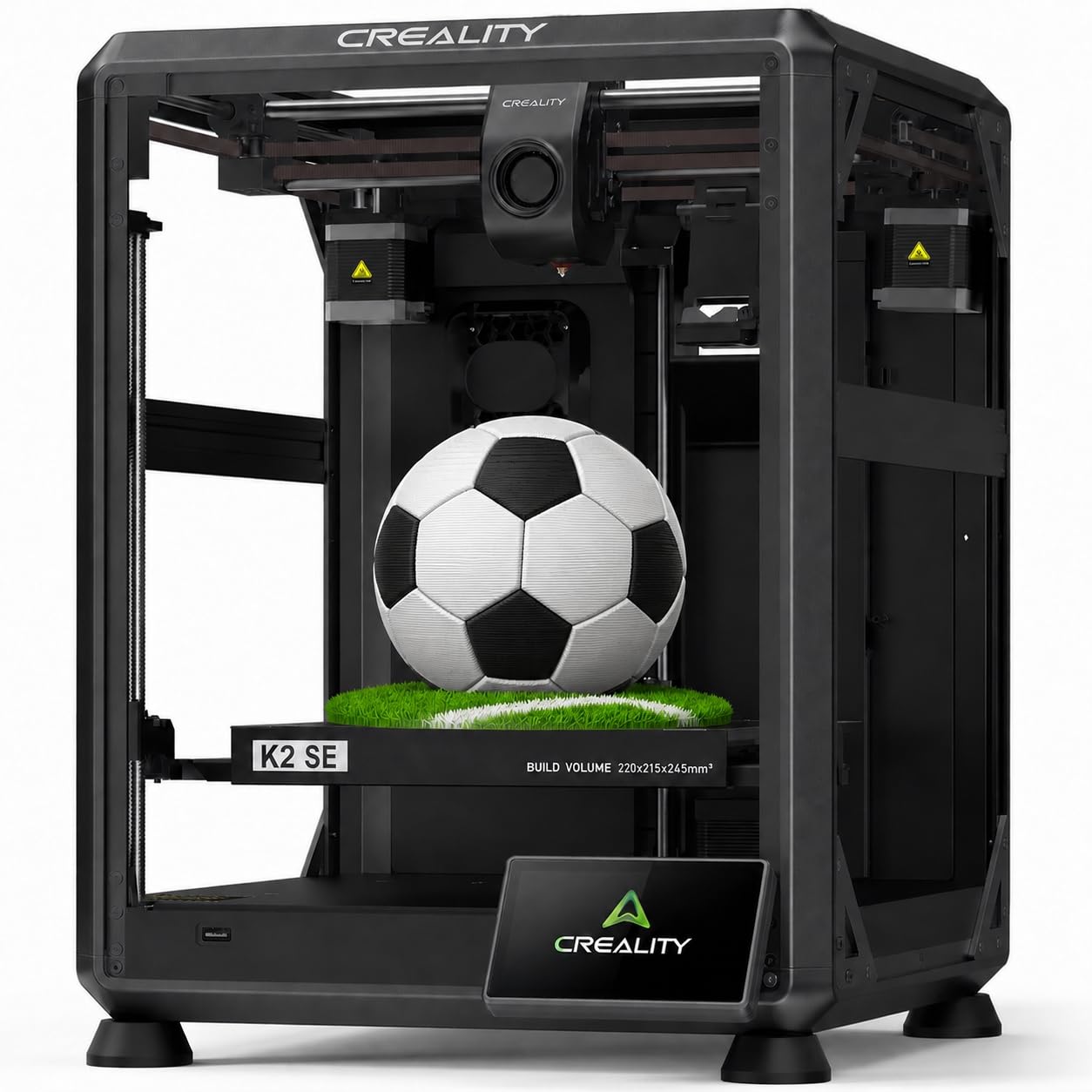
The K2 SE brings Creality’s enclosed Core XY design to a price point that previously demanded significantly more. The 600 mm/s travel speed and 20000 mm/s² acceleration are supported by a rigid aluminum frame and a dynamically balanced part cooling fan that reduces vibration. The fully enclosed body enables stable printing of PETG and ABS, and the 300°C tri-metal nozzle handles the full range of common engineering materials.
User experiences highlight the auto-calibration system as genuinely effective — the printer handles its own leveling, input shaping, and vibration compensation without user intervention. The pre-installed damping pads reduce operational noise to levels suitable for a home office or shared space. The 75-second heatup time from 0 to 300°C is genuinely convenient for quick iterative prints.
The enclosed nature does mean heat management requires attention: some users report needing a glue stick on the textured PEI plate as a release agent for certain materials. The control panel is basic — functional but not premium. Quality control on early units had occasional issues, though recent firmware updates have resolved most. For the user seeking an enclosed printer with minimal set-up friction, the K2 SE delivers strong value.
Why it’s great
- Enclosed design enables reliable ABS and PETG printing without warping
- Full auto-calibration — no manual leveling, input shaping set automatically
- Pre-installed damping pads make it quieter than most open-frame machines
Good to know
- PEI plate often needs glue stick as release agent for some materials
- Control panel is basic with limited on-device functionality
- Early units had quality consistency issues requiring firmware updates
5. QIDI Q2

The QIDI Q2 is a serious contender for the best bang-for-buck crown thanks to features normally found in printers costing more. The 65°C actively heated chamber is rare at this price point and dramatically reduces warping for ABS, ASA, and even nylon prints. The nozzle-based leveling probe delivers first-layer accuracy that is unaffected by bed texture or debris, and the 370°C hotend unlocks carbon-fiber and glass-filled composites.
The triple filtration system — G3 pre-filter, H12 HEPA, and activated carbon — makes this one of the few printers genuinely safe for indoor use without additional ventilation. Printers of this caliber also include an AI camera for spaghetti detection, filament runout and tangle sensors, and power-loss recovery. The Core XY frame with linear rails delivers stability at the advertised 600 mm/s speeds.
The firmware is still maturing — some users report UI quirks and network connectivity issues that require patience. The QIDI Box for multi-color printing is not yet fully proven and has received mixed reviews. Customer support, however, earns high marks for responsiveness and fast replacement part shipping. For the advanced user who needs engineering-grade materials and a clean indoor setup, the Q2 is an outlier in value.
Why it’s great
- Actively heated 65°C chamber is unmatched at this price point
- 370°C nozzle and direct drive support advanced fiber-filled materials
- HEPA + carbon triple filtration minimizes fumes for safe indoor use
Good to know
- Firmware is still maturing with occasional connectivity quirks
- The QIDI Box multi-color add-on has mixed early user feedback
- Pre-print preparation cycle takes about 12 minutes per job
6. ANYCUBIC Photon Mono 4

The Photon Mono 4’s 10K LCD screen — 9024 x 5120 resolution with a 17 μm pixel pitch — is the defining spec that makes this resin printer a standout. The 105% increase in XY precision over the Mono 2 means miniatures, jewelry molds, and detailed figurines come out with layer lines that are effectively invisible to the naked eye. The LighTurbo light source delivers consistent UV curing across the build area, minimizing the banding and overexposure issues common in cheaper resin printers.
The 4-point leveling system is genuinely beginner-friendly — set it once via the four screws, and subsequent prints do not require re-leveling. The laser-engraved build platform provides excellent adhesion that prevents mid-print lift-off, while still allowing clean removal. The 6.04 x 3.42 x 6.49 inch build volume is adequate for most hobbyist resin projects.
The downsides of resin printing are universal here: ventilation and PPE are mandatory due to resin fumes. The proprietary FEP film is thin and scratches easily, requiring periodic replacement that costs -50 combined with LCD replacement if damage occurs. Some users report minor leveling inconsistency in the back corners of the build plate. For the user prioritizing microscopic detail over build volume, this is the best resin value available.
Why it’s great
- 10K resolution with 17 μm pixels produces unmatched surface detail
- Light source uniformity reduces layer lines and curing artifacts
- 4-point leveling holds calibration over multiple print runs
Good to know
- Resin printing requires ventilation and PPE — not a desktop casual device
- Proprietary FEP film is fragile and scratches easily, requiring replacement
- Minor leveling inconsistency can appear in back plate corners
7. ELEGOO Mars 5
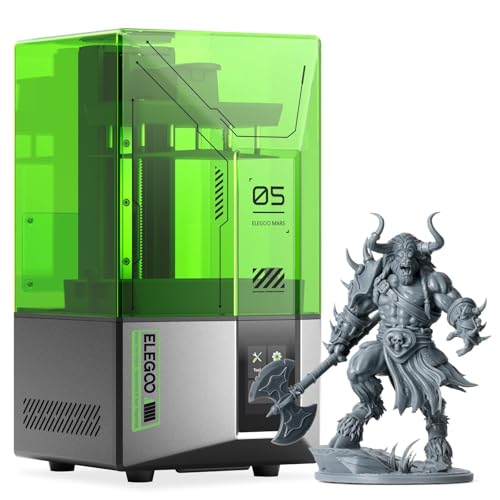
The Mars 5 solves one of the biggest pain points of resin printing: the dreaded manual leveling ritual. Its one-click automatic leveling uses a mechanical sensor to set the build plate distance perfectly, and the system verifies the level before every print. The 4K monochrome LCD with COB light source produces sharp details with smooth surface finishes and fast layer curing times that reduce total print duration by up to 30% compared to older RGB screens.
The smart features add genuine value. The residue detection system prevents printing if debris or cured resin is stuck to the LCD, preventing expensive screen damage. The overheat protection halts printing if the LED temperature exceeds 80°C, protected by an efficient cooling system. The textured build plate provides excellent adhesion without requiring sanding or adhesive.
Early units showed quality variation — some users reported dead screens requiring exchange — but the overall reliability has improved. The build volume of 5.65 x 3.53 x 5.91 inches is smaller than some competitors, and the plastic vat screws can strip if over-tightened. For the user who wants resin printing without the leveling headache and with basic safety protections built in, the Mars 5 is the most user-friendly entry point.
Why it’s great
- One-click automatic leveling eliminates the most common resin print failure
- Residue and overheat sensors protect LCD from expensive damage
- Textured build plate provides strong adhesion without adhesive spray
Good to know
- Build volume is smaller than some similarly priced resin printers
- Plastic vat screws are prone to stripping if over-tightened
- Early units had quality variation with some dead-on-arrival screens
8. Entina TINA2S
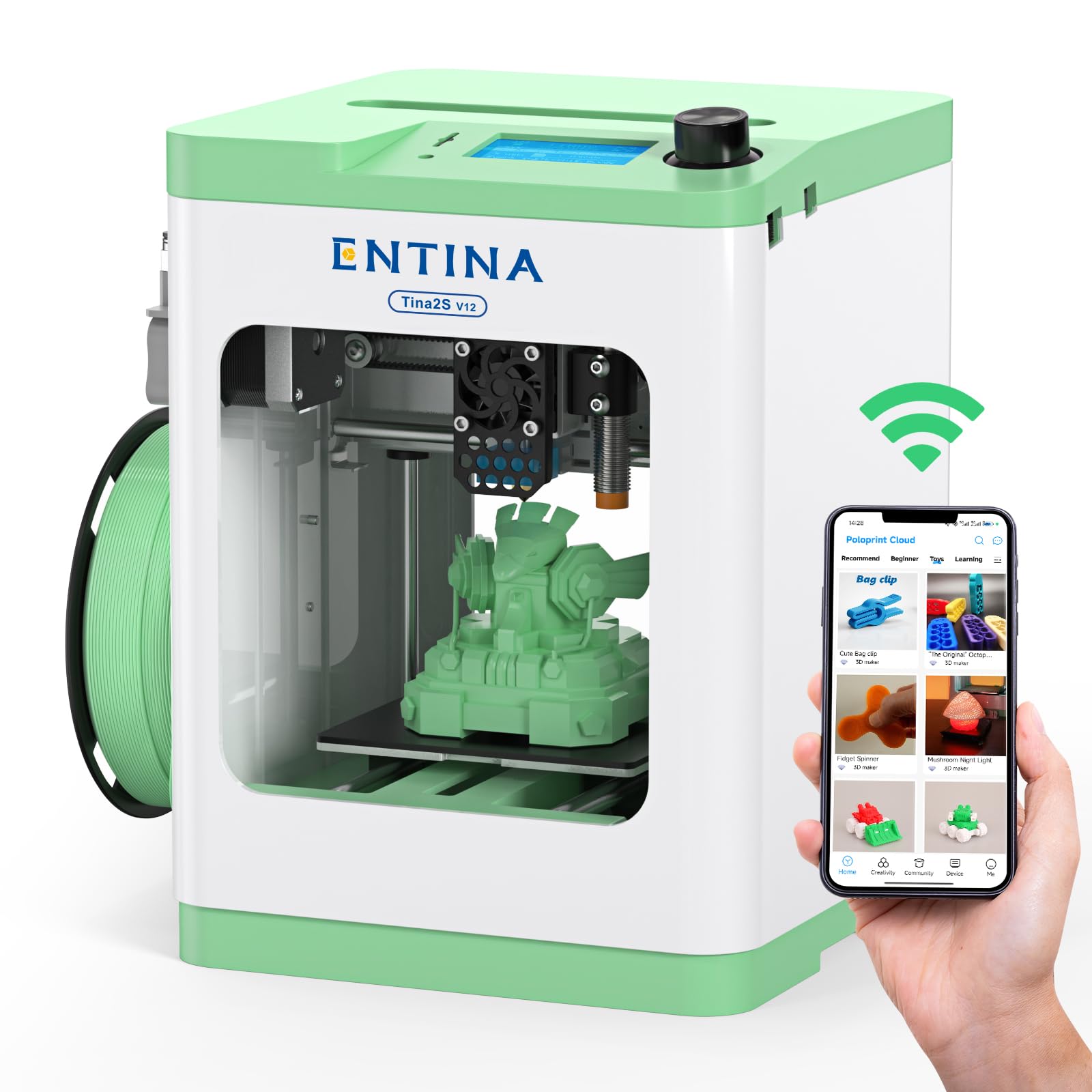
The TINA2S is designed from the ground up for absolute beginners and younger users who just want to print without understanding the mechanics. It arrives fully assembled — no tools, no bed leveling, no calibration routines. The Poloprint Cloud app provides access to 1,500+ ready-to-print models with regular updates, and the built-in Creative Hub supports simple DIY design for STEM learning.
The printer hits 200 mm/s with 0.04 mm precision, which is respectable for its size class. The auto-leveling system and flexible spring steel build plate make first-layer adhesion reliable and print removal simple. The low-noise motherboard and optimized cooling keep it quiet enough for a bedroom or classroom environment. The dual Z-axis structure provides improved movement stability compared to single-arm designs.
The obvious limitation is size: the 3.9 x 4.7 x 3.9 inch build volume restricts prints to small toys, keychains, and educational models. The 2.4G WiFi-only connectivity can be limiting for some home networks. Some early users reported server overload issues during holiday periods that made the app sluggish. For the user buying for a child or classroom where simplicity trumps build volume, however, this is a safe and frustration-free introduction.
Why it’s great
- Fully assembled and calibrated out of the box — unbox and print in minutes
- App-based interface with 1,500+ preloaded models removes the learning curve
- Low noise and enclosed design are safe for bedroom and classroom use
Good to know
- Very small build volume limits projects to miniatures and educational pieces
- App can suffer from server lag during peak holiday demand periods
- 2.4G WiFi only may not work with some modern mesh network configurations
9. Entina Tina2C

The Tina2C shares the same philosophical approach as the TINA2S — absolute beginner-first, no prior knowledge required — but adds a stronger emphasis on educational engagement. The Poloprint Cloud app powers AI-driven features including photo-to-print conversion and 20+ creative modules designed for STEM learning. The guided setup walks first-time users through their first print in as fast as 8 minutes.
Print quality is tuned for reliability over speed: the auto-leveling system and self-cleaning nozzle design reduce the most common failure modes for novices. The flexible magnetic build plate allows easy model removal with a simple bend, and the power-loss recovery ensures that multi-hour school projects survive interruptions. The compact body with rounded edges is designed explicitly for safety around children.
The 3.9-inch cube build volume is the most restrictive on this list — even smaller than the TINA2S. The print quality at the advertised 0.1 mm layer height is good but not exceptional, and the 8-minute “print start” claim refers to the fastest possible pre-model scenario. For families and educators who want a low-risk, low-cost introduction to 3D printing focused on the conceptual experience rather than the output size, the Tina2C fills that niche effectively.
Why it’s great
- AI-powered app with photo-to-print and 20+ STEM learning modules
- Guided setup lets beginners start their first print in under 10 minutes
- Self-cleaning nozzle and auto-leveling minimize common beginner failures
Good to know
- Tiny 3.9-inch build volume restricts projects to very small objects
- Print quality at default settings is acceptable but not premium
- App-based printing requires a smartphone or tablet as the primary interface
FAQ
Should I buy a resin or FDM printer for the best value?
What does automatic bed leveling actually do?
Can I print ABS in an open-frame FDM printer?
How many prints does a resin LCD screen last?
Final Thoughts: The Verdict
For most users, the bang for buck 3d printer winner is the Bambu Lab P1S because it delivers enclosed reliability, Core XY speed, and a polished ecosystem without requiring constant tinkering or expensive upgrades. If you want the absolute highest surface detail and work with miniature-scale projects, grab the ANYCUBIC Photon Mono 4. And for engineering-grade materials with a heated chamber and advanced filtration at a fraction of the premium competitor price, the QIDI Q2 is an unmatched value proposition.