
Finding a laptop that delivers serious performance without draining your savings is the core challenge for any smart buyer. The gap between a processor that chokes on six browser tabs and one that chews through spreadsheets, video calls, and light creative work is often just a few key specs away — and too many shoppers mistake a low sticker price for a deal that leaves them frustrated within months.
I’m Min — the co-founder and writer behind Gadgets Feed. I’ve spent countless hours dissecting processor benchmarks, RAM configurations, storage interfaces, and real-world battery data across hundreds of models to identify which machines actually stretch every dollar into tangible daily speed.
This guide isolates the machines that strike the hardest balance between cost and capability, so you know exactly where your money buys the most real-world power. That is the promise of every bang for buck laptop featured here — a machine that outperforms its price tag without compromise.
How To Choose The Best Bang For Buck Laptop
Selecting a laptop that maximizes value per dollar requires shifting your focus from marketing buzzwords to measurable components. The three pillars that determine whether a machine delivers true bang for its cost are the processor generation and core count, the amount and type of RAM, and the storage interface — not the brand logo on the lid.
Processor Architecture and Core Count
A late-generation Intel Core i3 or AMD Ryzen 5 with six true cores will outrun an older i7 with only four cores in nearly every multitasking scenario. The number of cores and threads directly dictates how smoothly your machine handles multiple applications, video calls, and browser tabs simultaneously. For value-focused builds, a modern mid-range chip often outperforms an older high-end part at the same price point.
RAM Capacity and Speed
16GB of RAM is the new baseline for any laptop intended for work, study, or light content creation. Machines with only 8GB will struggle under the weight of a dozen browser tabs, a video meeting, and a document editor running at once. The RAM speed — DDR4 at 3200MHz versus LPDDR5 at 4800MHz — also affects how quickly data moves between the processor and memory, especially in integrated-graphics scenarios.
Storage Interface and Capacity
A PCIe NVMe solid-state drive is non-negotiable for a responsive experience. The difference between a SATA SSD and a PCIe 4.0 NVMe drive can be a factor of five in sequential read speeds, translating to dramatically faster boot times, application launches, and file transfers. Aim for at least 512GB of storage; 256GB can fill up quickly with modern operating systems and applications.
Quick Comparison
On smaller screens, swipe sideways to see the full table.
| Model | Category | Best For | Key Spec | Amazon |
|---|---|---|---|---|
| Acer Nitro V Gaming Laptop | Gaming | Budget gaming & creative work | RTX 4050 GPU, 144Hz display | Amazon |
| Dell 16 Plus Laptop | Premium Ultrabook | Content creation & AI tasks | Intel Core Ultra 7, 2.5K display | Amazon |
| NIMO 15.6″ Light-Gaming-Laptop | Light Gaming | Multitasking & moderate gaming | Ryzen 7 Pro 6850U, 32GB RAM | Amazon |
| Apple MacBook Neo 13-inch | Ecosystem | Everyday use & student mobility | A18 Pro chip, 16-hour battery | Amazon |
| Lenovo V15 Laptop | Business | Office work & light gaming | Ryzen 5 5500U, Windows 11 Pro | Amazon |
| HP 17.3 inch Laptop | Large Screen | Home office & entertainment | Ryzen 5 7520U, 17.3″ HD+ display | Amazon |
| Lenovo IdeaPad Slim 3X | AI Laptop | AI-assisted work & all-day battery | Snapdragon X, 45 TOPS NPU | Amazon |
| HP 15.6″ FHD Laptop | Student | Students & home office | Intel N100, Wi-Fi 6 | Amazon |
| Dell 15 Laptop | Everyday | Casual computing & retro gaming | Intel Core 3, 120Hz display | Amazon |
| ASUS Vivobook Laptop | Portable | Travel & lightweight tasks | i3-1215U, 16GB RAM, Wi-Fi 6 | Amazon |
| Auusda 15.6″ FHD Laptop | Budget | Entry-level work & study | 32GB RAM, 1TB SSD | Amazon |
In‑Depth Reviews
1. acer Nitro V Gaming Laptop

The Acer Nitro V ANV15 delivers a rare combination: a dedicated NVIDIA GeForce RTX 4050 GPU paired with a 13th Gen Intel Core i5-13420H processor inside a chassis that costs less than many integrated-graphics ultrabooks. The 15.6-inch Full HD IPS display runs at 144Hz, which eliminates motion blur in competitive titles and makes general desktop navigation feel incredibly fluid. With 8GB of DDR5 RAM and a 512GB Gen 4 SSD, the boot and load times are snappy, though the RAM is the first candidate for an upgrade given the accessible SODIMM slot.
Gamers will appreciate the DLSS 3 support from the RTX 4050, which uses AI-driven frame generation to boost performance in demanding titles like Cyberpunk 2077 and Hogwarts Legacy. The dual-fan cooling system with quad exhaust keeps temperatures under control during extended sessions, though the fans do ramp up audibly under load. Battery life is limited — expect around 3 hours of light use — so this machine is best used near an outlet. The Thunderbolt 4 port adds versatility for external GPUs or high-speed storage.
What sets this model apart in the value segment is the upgrade potential. Two M.2 slots and two RAM slots mean you can start with the base configuration and scale up storage and memory later without replacing the entire laptop. The backlit keyboard and NitroSense software for performance tuning round out a package that punches far above its weight class for gaming and creative workloads alike.
Why it’s great
- Dedicated RTX 4050 GPU delivers playable framerates at 1080p high settings in modern games.
- 144Hz IPS display provides a smooth, responsive visual experience for both gaming and general use.
- Dual M.2 and dual RAM slots allow for easy future upgrades.
Good to know
- Battery life is short — expect around 3 hours of light use before needing a charge.
- Comes with significant pre-installed bloatware that should be removed on first boot.
- 8GB of RAM is below the modern multitasking threshold; an upgrade to 16GB is recommended.
2. Dell 16 Plus Laptop DB16250
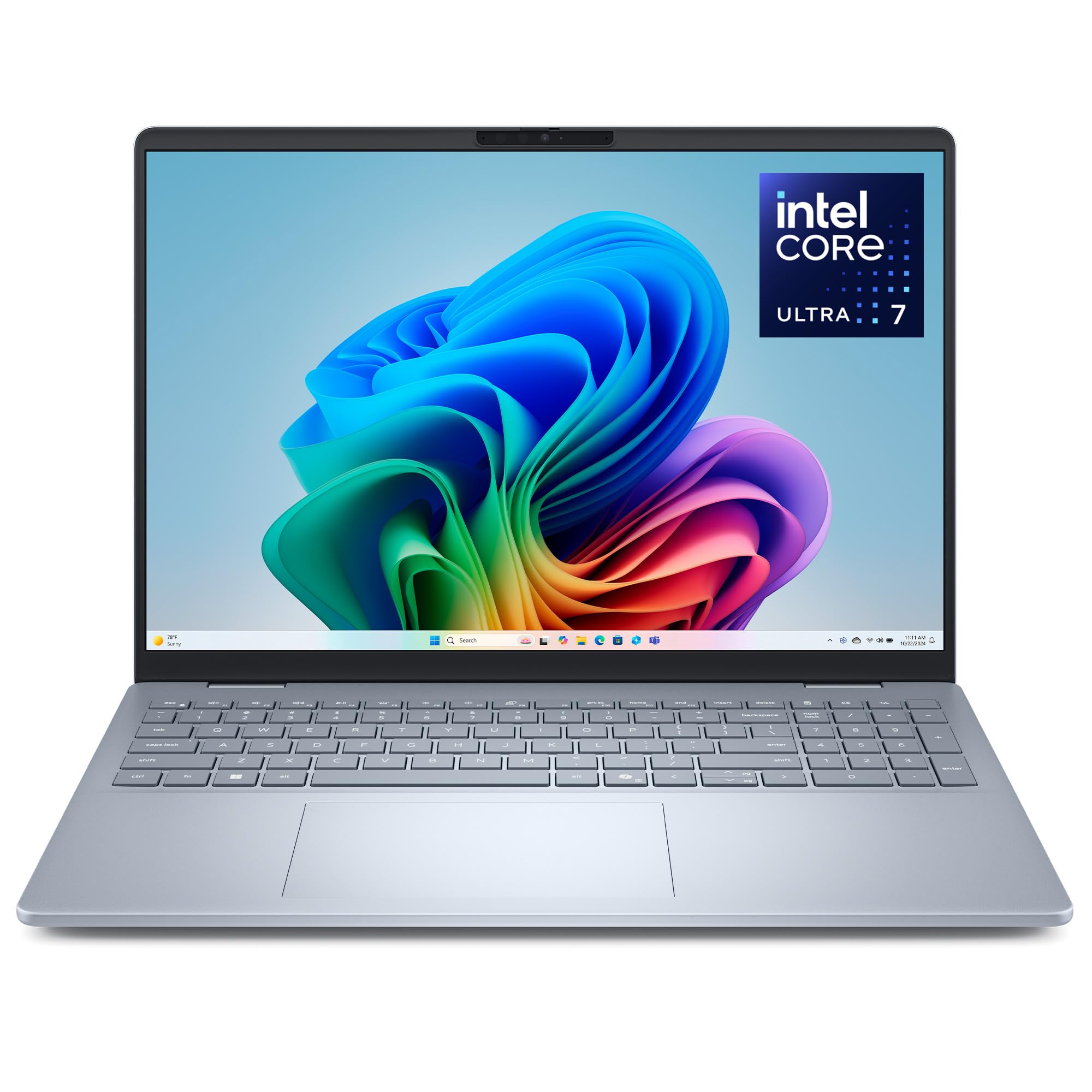
The Dell 16 Plus stands out with its 16.0-inch 16:10 display at a crisp 2560×1600 resolution — a rarity in this segment. The anti-glare panel covers 100% sRGB, making it a legitimate option for photo editing, design work, and any task where color accuracy matters. Powering the machine is Intel’s Core Ultra 7 256V, a processor built from the ground up for AI workloads with a 47 TOPS NPU, paired with 16GB of LPDDR5X memory and a 1TB PCIe SSD. The Intel Arc Graphics handle light gaming and video editing with surprising competence.
The build quality is exceptional for the price point, with an all-aluminum chassis that feels rigid and premium. The FHD+ webcam with Windows Hello support makes for fast, secure logins, and the backlit Copilot key provides instant access to Microsoft’s AI assistant. The keyboard is comfortable for extended typing sessions, though the trackpad is larger than average due to a keyboard layout pushed slightly forward. The 65W Type-C adapter keeps the machine slim and the battery life is strong, easily lasting a full workday on mixed use.
The primary trade-off is port selection — only a single USB-A port is available, which may require a hub for users with multiple legacy peripherals. The 1TB of storage is generous and removes the immediate need for external drives. Dell backs this with a 1-year onsite service warranty, so any hardware issues are addressed at your location. For anyone who prioritizes screen quality and AI-ready silicon, the Dell 16 Plus delivers outlier value.
Why it’s great
- 2.5K 16:10 display covers 100% sRGB for accurate color work.
- Intel Core Ultra 7 with integrated NPU provides efficient AI acceleration.
- Aluminum chassis with 1-year onsite warranty adds long-term peace of mind.
Good to know
- Only one USB-A port is included; a hub is likely needed for multiple peripherals.
- Some users reported driver compatibility issues with third-party devices like printers.
- No dedicated GPU limits performance in heavy 3D gaming or rendering.
3. NIMO 15.6″ Light-Gaming-Laptop
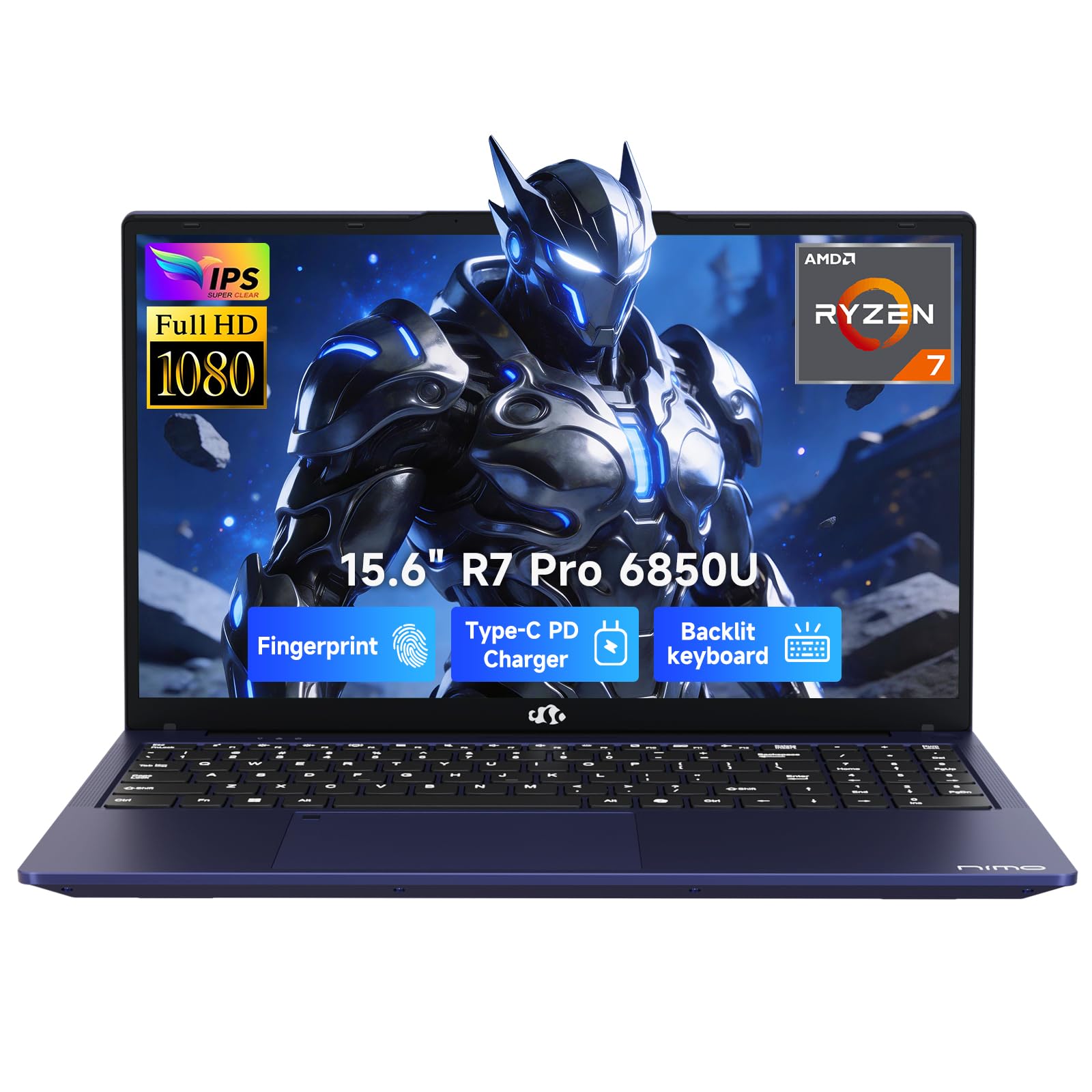
The NIMO N15A disrupts the value equation by offering 32GB of LPDDR5 RAM and a 1TB PCIe 4.0 SSD at a price where competitors typically cap out at 16GB and 512GB. Powered by the AMD Ryzen 7 Pro 6850U with 8 cores and 16 threads, the Radeon 680M integrated graphics — built on RDNA 2 architecture — rival entry-level discrete GPUs, handling titles like Baldur’s Gate 3 at high settings without breaking a sweat. The 15.6-inch Full HD anti-glare display provides a clear workspace for productivity and media consumption alike.
The connectivity suite is genuinely pro-grade: dual full-function USB-C ports supporting Power Delivery and DisplayPort, HDMI 2.0, and three USB-A ports eliminate the need for dongles in most setups. The 100W PD charging via USB-C means the included charger can top up the 53.58Wh battery rapidly, and the battery life holds up to around 9 hours on mixed workloads. The backlit keyboard and physical camera shutter with fingerprint reader add security and comfort for late-night work sessions.
Build quality is the main compromise — the chassis uses cost-saving materials that feel less premium than aluminum-clad rivals. The trackpad responsiveness has also drawn some criticism from users. However, the raw performance-to-cost ratio is unmatched: the 32GB RAM configuration future-proofs the machine for heavy multitasking, virtual machines, and local AI model experimentation. Nimo backs this with a 2-year warranty and US-based support, which is rare at this price tier.
Why it’s great
- 32GB of LPDDR5 RAM and 1TB SSD provide exceptional multitasking and storage headroom.
- Radeon 680M integrated graphics deliver near-entry-level discrete GPU gaming performance.
- Dual USB-C with PD, HDMI 2.0, and three USB-A ports handle any peripheral setup.
Good to know
- Plastic chassis lacks the rigidity and feel of metal-built alternatives.
- Trackpad responsiveness has been noted as inconsistent by some users.
- BIOS settings may require manual configuration for full RAM performance.
4. Apple 2026 MacBook Neo 13-inch

Apple’s most accessible laptop, the MacBook Neo, brings the A18 Pro chip — built on a second-generation 3nm process — to a starting configuration that undercuts the MacBook Air lineup significantly. The 13-inch Liquid Retina display runs at 2408-by-1506 resolution with 500 nits of brightness and support for a billion colors, offering an image quality that rivals much more expensive machines. With up to 16 hours of battery life, this is the longest-lasting option in the entire comparison, making it ideal for students and mobile professionals who need to get through a full day without hunting for an outlet.
The A18 Pro chip handles everyday productivity tasks with effortless efficiency, and the 16-core Neural Engine accelerates AI features across the operating system. The aluminum chassis is available in four colors — including a standout Citrus finish — and is noticeably thinner and lighter than most Windows competitors at just 2.71 pounds. The 1080p FaceTime HD camera with spatial audio speakers ensures video calls look and sound clear, and Touch ID integration keeps authentication fast and secure.
The main limitation is the 8GB of unified memory, which cannot be upgraded after purchase. While macOS handles memory compression efficiently, power users running multiple virtual machines or heavy creative applications will hit the ceiling faster than with a 16GB Windows machine. The 512GB SSD is generous for the price, and the ecosystem integration with iPhone — including iPhone Mirroring — is a compelling bonus for existing Apple users. This is the premium pick for anyone who values battery endurance, display quality, and build refinement above raw specs.
Why it’s great
- A18 Pro chip delivers class-leading single-core performance and power efficiency.
- Up to 16 hours of battery life is best-in-class for this size and price tier.
- Liquid Retina display with 500 nits and billion-color support is stunning for media and work.
Good to know
- 8GB of unified memory is non-upgradable and may limit heavy multitasking over time.
- No backlit keyboard, which may disappoint users who work in dim environments.
- Port selection is limited to USB-C/Thunderbolt — adapters needed for legacy peripherals.
5. Lenovo V15 Laptop

The Lenovo V15 is a straightforward business-class laptop that prioritizes reliability and productivity features. The AMD Ryzen 5 5500U with 6 cores and 12 threads provides solid multitasking performance for office applications, web browsing, and even light gaming — Fortnite and Rocket League run comfortably with the integrated Radeon Graphics. The 15.6-inch Full HD display offers ample screen real estate, and the inclusion of a numeric keypad is a welcome addition for data entry work. With 16GB of RAM and a 512GB PCIe SSD, this configuration handles the standard office workload without any lag.
What makes the V15 a strong value is the inclusion of Windows 11 Pro, which adds features like BitLocker encryption, Remote Desktop, and Group Policy management — capabilities typically reserved for more expensive business laptops. The port selection is generous, with USB-A, USB-C, HDMI, and even an RJ45 Ethernet port for stable wired connections. The keyboard is comfortable for long typing sessions, and the build quality feels solid despite the plastic construction.
The display quality is the clearest compromise — it is a standard FHD panel with limited brightness and color gamut, which may disappoint users accustomed to vibrant screens. Battery life is also modest at around 4 to 5 hours of mixed use, so this machine is best suited for a desk environment. For small business owners or IT managers who need Windows 11 Pro features without paying the premium for a ThinkPad, the V15 represents a smart, cost-effective choice.
Why it’s great
- Windows 11 Pro offers enterprise-level security and management features out of the box.
- Ryzen 5 5500U with 6 cores handles multitasking and moderate gaming well.
- RJ45 Ethernet port and full-size keyboard with number pad cater to business users.
Good to know
- Display quality is mediocre with limited brightness and color accuracy.
- Battery life is average at best, lasting only 4–5 hours on a typical workday.
- Trackpad placement may cause accidental clicks during typing.
6. HP 17.3 inch Laptop

HP’s 17.3-inch model offers a rare combination of a large screen and surprisingly capable internals at a mid-range price. The AMD Ryzen 5 7520U is a 4-core, 8-thread processor that balances power efficiency with enough performance for everyday tasks and even some light photo editing. The 16GB of LPDDR5 RAM is notably fast and power-efficient, while the 512GB PCIe NVMe SSD ensures quick boot times. The HD+ display at 1600×900 is not Full HD, but the anti-glare coating reduces reflections significantly, making it usable in brightly lit rooms.
The lift-hinge design tilts the keyboard to a more ergonomic angle, which reduces wrist strain during long sessions — a thoughtful touch for home-office users. The HP True Vision HD camera with AI noise reduction improves video call clarity, and the physical camera shutter provides privacy assurance. HP has also integrated recycled materials into the chassis, with ocean-bound plastic in the bezel and post-consumer recycled plastic in the keyboard keycaps, appealing to environmentally conscious buyers.
The weight is the most significant drawback — at over 5 pounds, this is not a machine you want to carry between classrooms or coffee shops daily. The display resolution also lags behind competitors that offer Full HD at a similar price, which means text and images appear slightly less sharp. Battery life sits around 7 hours, which is decent for a 17-inch chassis. If you need a spacious screen for a fixed desk and value an eco-friendly build, this HP delivers good per-dollar screen area.
Why it’s great
- Large 17.3-inch anti-glare display reduces eye strain in bright environments.
- 16GB of LPDDR5 RAM provides fast, responsive multitasking performance.
- Ergonomic lift-hinge design and AI noise reduction enhance video call quality.
Good to know
- HD+ display resolution (1600×900) is lower than the Full HD standard found on competitors.
- Heavy chassis at over 5 pounds makes it inconvenient for regular travel.
- Plastic build quality feels less durable than metal alternatives.
7. Lenovo IdeaPad Slim 3X

The IdeaPad Slim 3X is a Copilot+ PC powered by the Snapdragon X processor, which integrates a 45 TOPS NPU designed specifically for on-device AI tasks. This makes it the most forward-looking machine in the lineup, capable of accelerating features like real-time video call background blur, AI-assisted file search, and content summarization without relying on cloud servers. The 15.3-inch WUXGA display with a 16:10 aspect ratio offers more vertical screen space than standard 16:9 panels, which is genuinely useful for document editing and web browsing.
Battery life is outstanding — users report 12 to 15 hours of mixed usage, easily covering a full day of work or classes without charging. The metal chassis has passed MIL-STD 810H durability testing, so it can withstand drops and shocks better than average. The physical webcam shutter and fingerprint reader provide solid privacy and security foundations. Lenovo also includes 3 months of Xbox PC Game Pass, which adds some gaming value out of the box.
The primary consideration is software compatibility. While the Snapdragon X runs native ARM64 Windows apps efficiently, some x86 applications may require emulation, which can introduce performance overhead or rare compatibility issues. The 16GB of RAM and 512GB SSD are adequate but not generous for power users. If you want to experience the next generation of AI-powered Windows features and need marathon battery life, the IdeaPad Slim 3X is the best entry point at this price.
Why it’s great
- Snapdragon X processor with 45 TOPS NPU enables advanced on-device AI features.
- All-day battery life of 12-15 hours sets a new standard for the segment.
- Military-grade durability certification and metal chassis add long-term reliability.
Good to know
- ARM-based processor may have compatibility issues with some legacy x86 applications.
- Storage and RAM configurations are not the largest for the price tier.
- Gaming performance is limited compared to x86 alternatives with dedicated GPUs.
8. HP 15.6″ FHD Laptop 2026 Edition

The HP 2026 Edition pairs an Intel N100 processor with 16GB of RAM and a 256GB SSD, creating a configuration that handles web-based office suites, video streaming, and online learning platforms without hesitation. The N100 is a low-power Alder Lake-N chip with 4 efficient cores, so it is not designed for heavy lifting, but for the typical student workflow — research papers, Zoom lectures, and cloud-based collaboration — it delivers a perfectly smooth experience. The 15.6-inch Full HD anti-glare display reduces eye strain during long study sessions.
This HP comes with lifetime Microsoft Office for web, which eliminates a recurring subscription cost for students. The inclusion of Wi-Fi 6 ensures stable, fast connectivity in crowded dorm environments or coffee shops. At just 3.64 pounds, it is light enough to carry between classes without back strain. The full-size keyboard with numeric keypad makes data entry and spreadsheet work more comfortable than on smaller 14-inch machines.
The 256GB SSD is the main trade-off — it will fill up quickly if you install many applications or store large media files locally. Cloud storage or an external drive will likely be necessary within the first year. The N100 processor also lacks the horsepower for any serious gaming or video editing. For budget-conscious students who primarily work in the cloud, however, this HP offers an excellent cost-to-functionality ratio with enough RAM to keep multiple tabs and apps running smoothly.
Why it’s great
- 16GB of RAM handles multitasking with multiple browser tabs and Office apps seamlessly.
- Wi-Fi 6 provides reliable, high-speed connectivity in busy network environments.
- Lifetime Office for web and Copilot AI integration add value without recurring fees.
Good to know
- 256GB SSD fills up quickly; external or cloud storage is recommended.
- Intel N100 processor lacks the power for gaming or intensive creative work.
- Some users reported setup issues with forced Windows updates and system freezes.
9. Dell 15 Laptop DC15250

The Dell 15 offers a surprising feature at its price: a 120Hz Full HD display, which makes scrolling through documents and web pages feel remarkably fluid. The Intel Core 3 100U is a 12th-gen processor with 2 performance cores and 4 efficient cores, delivering adequate performance for everyday computing, web browsing, and office applications. With 8GB of DDR4 RAM and a 512GB SSD, this configuration provides enough storage for most users, though the 8GB memory is a bottleneck for heavy multitasking.
The design includes a separate numeric keypad, a calculator hotkey, and a lift-hinge that tilts the keyboard to an ergonomic angle. Dell’s ComfortView software reduces blue light emissions, and the 120Hz panel makes a noticeable difference in reducing perceived flicker during extended use. The 1-year onsite service warranty means a technician will come to your home if hardware issues arise, which adds significant peace of mind for non-technical users.
The battery life is modest, typically lasting 5 to 6 hours under mixed use. The webcam quality is basic, and there is no fingerprint reader for quick login. The 8GB RAM will become a limitation as you install more applications and keep more browser tabs open over time — upgrading to 16GB should be considered a priority. For users who prioritize a smooth display experience and Dell’s support infrastructure, this is a solid everyday workhorse.
Why it’s great
- 120Hz Full HD display provides buttery-smooth scrolling and reduced eye strain.
- 512GB SSD offers ample storage with fast boot and load times.
- 1-year onsite service warranty provides hassle-free hardware support.
Good to know
- 8GB of RAM is below the modern multitasking standard; upgrade recommended.
- Battery life is average at around 5 to 6 hours of mixed usage.
- Webcam quality is basic and there is no fingerprint reader for quick login.
10. ASUS Vivobook Laptop

The ASUS Vivobook packs a 14-inch Full HD IPS display and an Intel Core i3-1215U processor — which features 6 cores (2 performance, 4 efficient) — into a chassis that is light enough to carry everywhere without thinking. The 16GB of high-bandwidth RAM ensures that running multiple applications and dozens of browser tabs simultaneously does not cause slowdowns. The 512GB PCIe NVMe SSD provides fast boot times and ample storage for documents, media, and light applications.
The port selection is practical for a 14-inch machine: USB-C, two USB-A ports, HDMI, and a headphone jack cover most connectivity needs without a dongle. The IPS-level panel offers decent viewing angles and 250 nits of brightness, making it usable in typical indoor lighting. Windows 11 Home runs cleanly out of the box, and the machine is notably free of excessive bloatware compared to some competitors. The build quality feels solid for the price, with a professional aesthetic that fits both office and campus environments.
The main concern is the lack of a dedicated GPU — the integrated Intel UHD Graphics handle video playback and light productivity fine, but any gaming or creative rendering will struggle. Some users reported quality control issues, including a dead pixel or unresponsive keyboard keys, so inspecting the unit promptly after delivery is wise. The 10-hour battery life claim is optimistic; real-world mixed use yields closer to 7 to 8 hours. For students or professionals who need a lightweight, capable companion for daily productivity, the Vivobook is a strong value.
Why it’s great
- 16GB of RAM ensures smooth multitasking with many applications and browser tabs open.
- Lightweight 14-inch design is ideal for daily commuting and travel.
- USB-C connectivity and decent port selection reduce the need for adapters.
Good to know
- Integrated UHD Graphics limit gaming and creative workload capabilities.
- Some units have reported quality control issues like dead pixels or keyboard defects.
- Real-world battery life is closer to 7-8 hours rather than the advertised 10 hours.
11. Auusda 15.6″ FHD Laptop
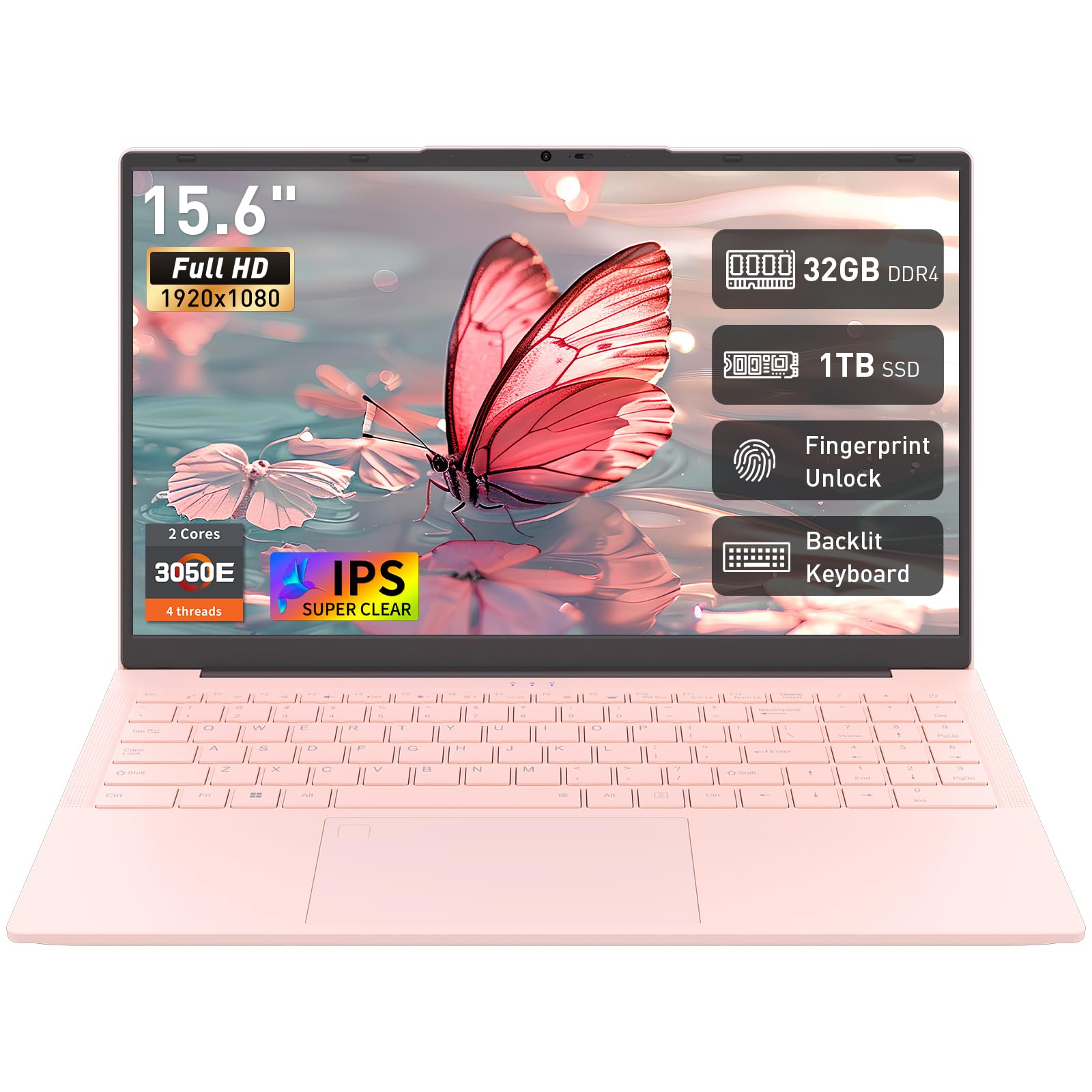
The Auusda 15.6 is an entry-level laptop that undercuts most competitors on raw specs by offering 32GB of RAM and a 1TB SSD at a price that typically buys only 8GB and 256GB. The Athlon 3050E processor is a basic dual-core chip from AMD’s embedded lineup, so this is not a speed demon for heavy applications — but the massive memory capacity means it can keep dozens of browser tabs, Office documents, and video calls open simultaneously without crashing. The Full HD IPS display provides a sharp, vibrant image that surprises for the price.
Build features include a fingerprint reader for secure login, a backlit keyboard for low-light use, and a slim profile at 0.7 inches thick and 3.7 pounds — impressively portable for a 15.6-inch machine. The port selection covers USB 3.0, USB-C, and HDMI, providing enough flexibility for external displays and accessories. It ships with Windows 11 Pro, which is unusual at this price point and adds enterprise-level features. Auusda backs the laptop with a 2-year manufacturer warranty, signaling confidence in the build.
The processor is the clear bottleneck — the Athlon 3050E will struggle with anything beyond basic productivity, such as video editing, programming, or modern gaming. Battery life is also on the shorter side at around 5 to 6 hours, so this is a machine best used near a power outlet. The build quality is acceptable but not premium, with a plastic chassis that flexes under pressure. For the budget-constrained user whose primary need is massive storage and RAM for office work and web browsing, the Auusda delivers unmatched raw capacity per dollar.
Why it’s great
- 32GB of RAM and a 1TB SSD are unheard of at this price point, offering massive capacity.
- Windows 11 Pro includes enterprise security features like BitLocker and Remote Desktop.
- Fingerprint reader and backlit keyboard add convenience and security.
Good to know
- Athlon 3050E dual-core processor is underpowered for anything beyond basic tasks.
- Battery life is short, typically lasting 5 to 6 hours on a single charge.
- Plastic chassis feels less durable than metal or thicker plastic alternatives.
FAQ
How much RAM do I need in a budget-friendly laptop for smooth multitasking?
Is a dedicated graphics card necessary for AI and creative workloads on a budget laptop?
What is the difference between a 256GB SSD and a 512GB SSD for a value laptop?
Final Thoughts: The Verdict
For most users, the bang for buck laptop winner is the Acer Nitro V because it delivers a dedicated RTX 4050 GPU and a high-refresh display at a price usually reserved for integrated-graphics machines. If you want AI-ready silicon and marathon battery life, grab the Lenovo IdeaPad Slim 3X. And for a massive RAM and storage configuration without breaking the bank, nothing beats the Auusda 15.6.