
A banner printing machine that can’t handle a full 36-inch roll, clogs mid-job, or makes you wait minutes per print isn’t a tool — it’s a bottleneck. Whether you’re an architect spooling blueprints, a sign shop running DTF transfers, or an artist proofing gallery canvas, the difference between a plotter and a pro rig isn’t just ink systems — it’s whether your workflow stops or flows.
I’m Min — the co-founder and writer behind Gadgets Feed. I’ve cross-referenced printhead technology, ink chemistry, media compatibility, and real-world customer pain across six models spanning the to range so you know exactly which machine earns its spot in your workspace.
After analyzing output speeds, color depth, cartridge economics, and connectivity options, best banner printing machine choices come down to how well each model balances upfront cost against per-print ink burn and media flexibility.
How To Choose The Best Banner Printing Machine
Picking a large-format printer isn’t about brand loyalty. You need to match the printhead technology, ink volume, media width, and connectivity to your actual daily output — whether that’s 80 CAD drawings an hour or a dozen small-batch DTF transfers.
Printhead Technology and Resolution
The heart of any banner printer is the printhead. PrecisionCore MicroTFP and LFP (Epson), Thermal inkjet (HP), and F1080 (DTF printers) each behave differently. A PrecisionCore head excels at droplet control for architectural lines, while a 720x1440dpi XP600 head on a DTF rig delivers the saturation needed for garment transfers on dark fabric. Resolution matters — 1200×2400 dpi is overkill for banners, but a minimum of 600×600 dpi ensures text stays crisp at wide widths.
Ink System and Cartridge Economics
Starter cartridges included in the box are rarely full-size. A 50 mL color cartridge on a plotter forces replacement after roughly 30–40 square feet. High-capacity 140 mL bottles or 700 mL cartridges drastically lower your cost per print. If you produce more than 50 banners a month, a model with separate printheads and bulk ink support saves hundreds annually. Sublimation inks (for polyester banners) and pigment inks (for paper/vinyl) are not interchangeable — picking the wrong ink chemistry ruins media and adds cleanup costs.
Media Width, Roll Support, and Cutters
A 24-inch printer limits you to smaller signs, while a 36-inch width handles standard banner rolls and A0 engineering sheets without wasteful trimming. Look for automatic roll-to-sheet switching, a core size of 2 inches (common for wide rolls), and a built-in horizontal cutter — manually cutting banners destroys alignment and wastes minutes per job. The bin or basket design matters: haphazard rolling creates paper creases that turn a finished print into scrap.
Connectivity and Software Ecosystem
Wi-Fi Direct and AirPrint are convenient, but for production environments, Gigabit Ethernet and USB 2.0 are non-negotiable. Proprietary driver software (Epson Edge Print Pro, HP Click, Canon PosterArtist) that supports nesting, gang printing, and color profiling cuts labor. If you run a mixed Mac/Windows shop, verify native driver support — some DTF printers lock into Windows-only software, which kills flexibility.
Quick Comparison
On smaller screens, swipe sideways to see the full table.
| Model | Category | Best For | Key Spec | Amazon |
|---|---|---|---|---|
| Epson SureColor T5170 | 36-Inch Plotter | Architectural & engineering prints | 31 sec A1/D-size; 80 mL black cartridge | Amazon |
| HP DesignJet T650 | 36-Inch Plotter | CAD line drawings & posters | 25 sec A1/D-size; 1GB memory; 2-yr onsite warranty | Amazon |
| Canon imagePROGRAF TA-30 | 36-Inch Inkjet | High-volume poster & blueprint production | 113 posters/hour; 6 x 55 mL ink tanks | Amazon |
| Canon PRO 2100 | 24-Inch Fine Art | Museum-quality prints & fine art | 48-bit color depth; 1-year onsite warranty | Amazon |
| Epson SureColor F570 Pro | 24-Inch Sublimation | DTF transfer & fabric banners | PrecisionCore MicroTFP; 720×1440 dpi; 140 mL ink bottles | Amazon |
| Lancelot M1630 Pro DTF | DTF All-in-One | Startup garment decoration & small-batch transfer | XP600 printhead; 720×1440 dpi; shaker + heater + workstation bundle | Amazon |
In‑Depth Reviews
1. Epson SureColor T5170 36” Wireless Printer

The Epson T5170 tackles the most common banner-printing pain: throughput without tank draining. Its 31-second A1/D-size speed competes with printers costing hundreds more, and the 80 mL black cartridge (50 mL color) means fewer mid-job swaps than typical 28 mL starters. The integrated 4.3-inch color touchscreen handles roll-feed settings and Wi-Fi Direct pairing without a computer tethered to the machine.
Printhead stalling is a real risk on large-format printers left idle for a week. The T5170 runs reliably when used regularly — customers reporting multi-week gaps saw motor overtorque errors from paper roll diameter mismatches. Stick with 2-inch core rolls and keep the machine powered on during workweeks, and you’ll avoid the 00159A and 00113C error codes that require carting a 60-pound unit back to a service center.
The included stand with casters and a media basket keeps floor prints organized, though the paper catch bin folds prints haphazardly — expect creases on long banner runs unless you manually guide the exit. Ink cost runs approximately per full set, which holds between 50 and 80 linear feet of dense color. That’s competitive for a 36-inch production plotter in this tier.
Why it’s great
- Fast 31-second A1 prints for quick turnarounds
- High-capacity cartridges reduce replacement frequency
- Wireless and Wi-Fi Direct for flexible office placement
Good to know
- Paper catch bin doesn’t fold prints neatly — creasing on long runs
- Small paper rolls (under 5 inches) trigger motor torque errors
2. HP DesignJet T650 Large Format 36-inch Plotter

The HP T650 edges the competition on warranty peace of mind — a two-year onsite Care Pack means a technician comes to you if the printhead or drive system fails, not the other way around. Output speed of 25 seconds per A1/D-size page and 82 prints per hour matches the fastest 36-inch machines in its class, and the 1 GB memory handles dense vector CAD files without stuttering on the Gigabit Ethernet connection.
Media handling is its standout feature: the automatic sheet feeder switches between 36-inch rolls and up to 13×19-inch sheets without manual intervention — ideal for shops that produce both full-size blueprints and wide-format posters. HP Click software nests multiple PDF/JPEG/HP-GL/2 files on one roll, cutting paper waste by 15-20 percent compared to manual layouts. The HP 712 ink system uses 95 percent less ink during routine maintenance than older plotter lines, which directly reduces per-print cost over a year of daily use.
Assembly requires care — some buyers reported plastic brackets cracking if over-torqued. The stand and media bin are functional but feel less robust than a steel-frame alternative. Home office users will appreciate the AirPrint compatibility, but production shops should stick to wired USB for job queuing. The 2.4 ppm black-and-white speed rating underestimates actual throughput; real-world 24×36 color posters finish in roughly one minute each.
Why it’s great
- 2-year onsite warranty eliminates shipping downtime
- Automatic roll-to-sheet switching saves manual labor
- HP Click nesting reduces paper waste by up to 20%
Good to know
- Plastic bracket assembly can crack if over-tightened
- Starter ink cartridges are smaller than regular replacements
3. Canon imagePROGRAF TA-30 36” Large Format Inkjet

Throughput is the TA-30’s calling card. At 113 posters per hour (27 seconds per D-size print), it outpaces every other 36-inch machine in this lineup — perfect for shops fulfilling bulk poster orders, event signage, or real estate banners on tight deadlines. The six 55 mL ink tanks include double matte black for enhanced text contrast on plain paper, and the + worth of starter ink included in the box cushions the initial investment.
Manual duplex printing is a welcome feature for double-sided marketing banners, but the trade-off is small cartridge capacity. At 55 mL per color, an active shop replacing banners daily will swap tanks more than once a week, driving up consumable cost. The printhead PF-06 holds up well through the first hundred square feet, but several customer reports note head failure under 100 pages in heavy production — Canon’s warranty covers replacement, but the downtime stalls workflow.
Wireless connectivity and Canon’s free PosterArtist Lite software let staff queue jobs from tablets or phones, a practical feature for print shops where the machine sits in a back room. Roll media from 8 to 36 inches fits the 2-inch core spindle, and the built-in horizontal cutter trims finished banners clean. The grey chassis and 24-inch height fit under low shelving, a nice space-saving detail for cramped print rooms.
Why it’s great
- 113 posters per hour for high-volume banner runs
- Manual duplex saves paper on double-sided jobs
- Free PosterArtist Lite software for quick layout
Good to know
- 55 mL cartridges are small — frequent swaps in heavy use
- Printhead failure reported earlier than expected by some users
4. Canon PRO 2100 24” Wide Format Fine Art Printer

Color accuracy on banner-grade material often drifts between roll types, but the Canon PRO 2100 locks saturation across fine art paper, canvas, and photo rag. The 48-bit color processing pipeline and PF-10 printhead produce rich blacks out of the box — no calibration curve needed for most spot-color brand banners. The multifunction roll system (RU-23) loads media in under two minutes, and the rotary cutter trims dry prints without dragging ink.
The 24-inch width limits this unit to banners smaller than 36-inch standard builds, but for gallery-quality signage, fabric banners, and art reproduction, the trade-off pays off. The 1-year onsite warranty from Canon includes free tech dispatch, which matters when a printhead needs replacement. LUCIA PRO ink cartridges last through approximately 80-100 rolls of fine art paper before requiring a full set — customer reports confirm paper runs out before the ink does, an unusual efficiency for this class.
Setup is straightforward: the included roller holder set and maintenance cartridge install in under an hour. The LCD screen guides through nozzle checks and alignment without needing a laptop. Note that the box ships with starter cartridges only; the initial 12 full-size ink tanks cost roughly extra. The 30 ppm black-and-white spec is misleading for banner work — actual photo-quality color prints run closer to 2-3 minutes per square foot.
Why it’s great
- 48-bit color depth delivers gallery-grade banner accuracy
- Rotary cutter prevents edge feathering on fine art media
- 1-year onsite warranty from Canon
Good to know
- 24-inch width won’t fit 36-inch standard banner rolls
- Full ink set costs extra — starter cartridges are miniatures
5. Epson SureColor F570 Pro 24″ Desktop Sublimation Printer
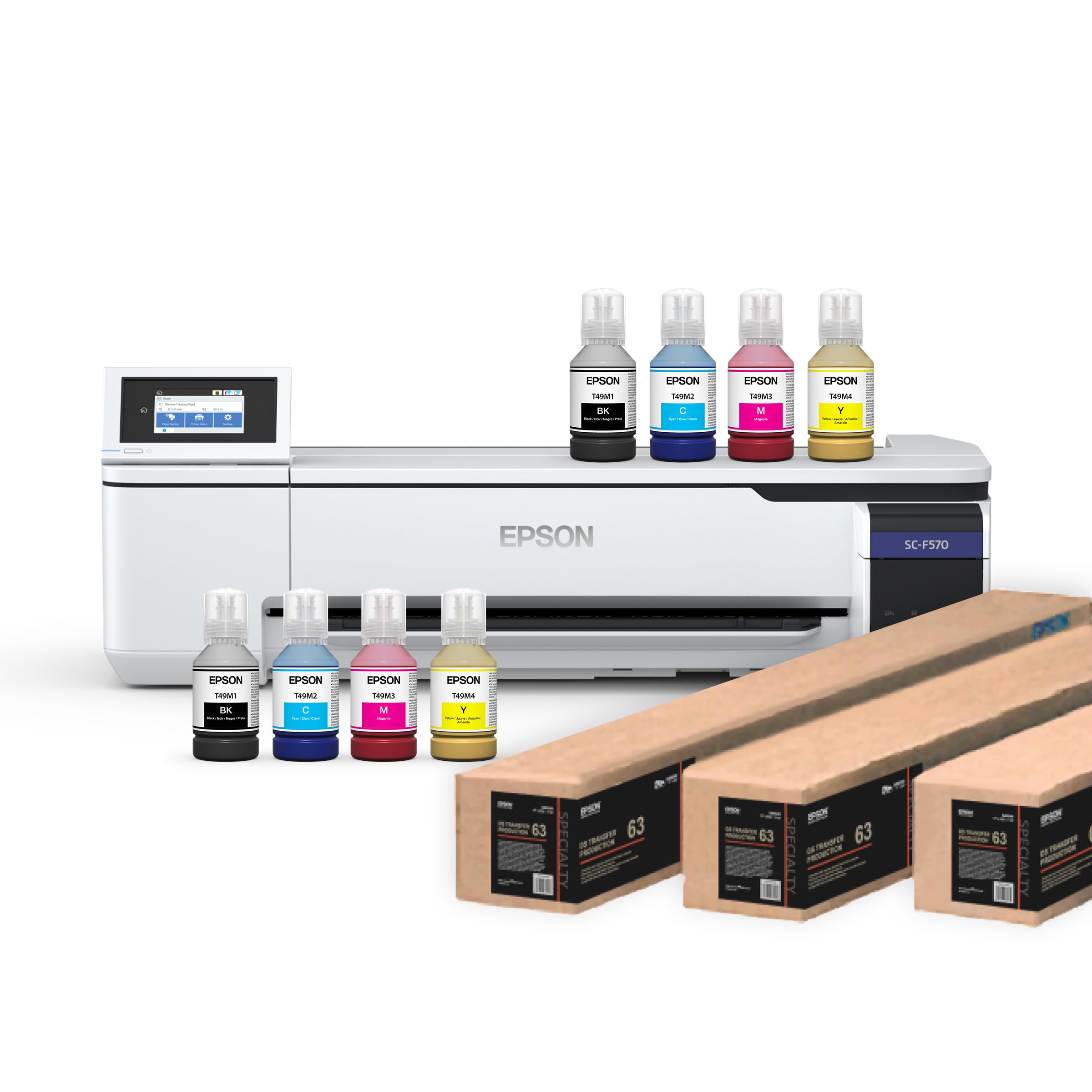
Sublimation banners on polyester fabric require an ink chemistry that standard pigment printers can’t handle. The F570 Pro uses T49M sublimation inks designed to bond with polyester fibers when heat-pressed, delivering spot colors that don’t crack or peel on soft signage. The PrecisionCore MicroTFP printhead achieves 720×1440 dpi with Precision Droplet Control — fine enough for small text on trade show banners while maintaining 24-inch roll feed for standard table throws and pop-up backdrops.
The bundle includes two full 140 mL ink sets, a 24-inch x 100-foot roll of DS Transfer paper, and two 17-inch rolls — roughly worth of consumables out of the box. The 50-sheet auto-feed tray handles smaller transfer jobs without changing media. Epson Edge Print Pro software with Adobe PostScript 3 provides nesting and pattern repeats, critical for tiling large banners across multiple sheets when no single roll print head can cover a 60-inch width in one pass.
This unit ships via LTL freight only and requires a valid phone number for delivery appointment — plan for a truck-level drop, not porch delivery. The starter software installs on MacOS 10.7 through current and Windows 11, but the printer itself has no Wi-Fi; Ethernet or USB 2.0 is required. The 1 ppm speed rating is conservative for banner work — actual print time for a 24×36-inch transfer sheet is about 3-4 minutes depending on density.
Why it’s great
- True sublimation chemistry for durable polyester banners
- Two full 140 mL ink sets included in the box
- PrecisionCore printhead with nozzle verification prevents banding
Good to know
- LTL freight requires scheduling — no standard shipping
- No Wi-Fi support; only Ethernet or USB connectivity
6. Lancelot M1630 Pro DTF Printer Bundle

The M1630 Pro isn’t a banner printer in the traditional paper-roll sense — it’s a DTF (direct-to-film) production station built for fabric banners, garment transfers, and soft signage. The XP600 (F1080) dual printhead configuration prints at 720×1440 dpi on any textile substrate without pre-treatment, bypassing the cotton-only limitation of DTG machines. The bundle includes a powder shaker, heater dryer, mobile workstation, and a pre-loaded laptop — plug-and-play for startups looking to produce polyester banners, tote bags, and hats within hours of unboxing.
Smart Holiday Mode is the practical differentiator: the machine auto-circulates ink through the heads during idle periods, preventing the clogging that kills DTF printheads overnight. At roughly 6-7 prints per hour on 12×12-inch transfer sheets, the speed is slower than a 36-inch paper plotter, but you’re printing on film that will be heat-pressed onto fabric — a fundamentally different workflow. Customers report vibrant color hold on dark garments and responsive 24/7 tech support that troubleshoots nozzle issues via video call.
The proprietary software locks you into the Lancelot ecosystem, which means no third-party RIP compatibility. The shaker and heater require 110V power and produce noticeable noise during operation. The all-in-one nature trades modularity for simplicity: if one sub-component fails (heater, shaker, printhead), you can’t easily swap it with an off-the-shelf part. For a small business printing fewer than 50 banners per week, the convenience outweighs the repair risk.
Why it’s great
- Complete DTF studio in one box — print, shake, dry, cure
- Smart Holiday Mode prevents nozzle clogs during breaks
- 24/7 live support for setup and troubleshooting
Good to know
- Proprietary software — no third-party RIP compatibility
- Noisy operation; powder refill can create mess
FAQ
Can I print vinyl banners with a regular inkjet plotter?
How often should I replace the printhead on a large-format banner printer?
What is the difference between DTF and standard banner printing?
Final Thoughts: The Verdict
For most users, the best banner printing machine winner is the Epson SureColor T5170 because it balances 31-second A1 speed, high-capacity 80 mL black cartridges, and wireless flexibility at a mid-range investment point. If you need onsite warranty coverage and automatic media switching, grab the HP DesignJet T650. And for fabric-based signage and garment transfer production, nothing beats the Epson SureColor F570 Pro sublimation system.