
A smudged barcode or a label that peels mid-shipment isn’t just an annoyance — it’s a lost package, a delayed order, and a frustrated customer. Moving from a standard inkjet or laser printer to a dedicated thermal unit changes the entire shipping workflow, eliminating the cost of toner and the time wasted cutting out sheets of labels.
I’m Min — the co-founder and writer behind Gadgets Feed. I’ve spent countless hours analyzing print head durability, DPI specifications, connectivity options, and label feed mechanisms across dozens of models to understand what separates a reliable daily driver from a frustrating paperweight.
Whether you’re running a home-based side hustle or a busy fulfillment center, picking the right hardware saves hours of frustration. This guide breaks down the best bar code printer for your specific setup and volume.
How To Choose The Best Bar Code Printer
Picking a barcode printer means balancing three core factors: your daily print volume, the types of labels you need, and your preferred method of connecting to the device. A home seller printing twenty labels per week has very different needs from a warehouse printing two hundred per day.
Resolution and Print Quality
Most direct thermal barcode printers offer either 203 DPI or 300 DPI resolution. A 203 DPI print head is perfectly adequate for standard 4×6 shipping labels and most barcodes — the lines are crisp enough for any handheld scanner. The 300 DPI option becomes important when printing smaller labels (like 2×1 inch retail tags) or very dense 2D barcodes, where finer detail prevents misreads.
Connectivity: USB, Bluetooth, or Ethernet
A USB-only printer works well when the unit sits next to a single computer and never moves. Bluetooth models let you print directly from a phone or tablet, which is useful for on-the-go shipping or small spaces. Ethernet networking is the gold standard for multi-user environments — any computer on the same local network can send labels without needing a dedicated host always turned on.
Label Handling and Media Support
Check whether the printer accepts roll labels, fanfold labels, or both. Roll-fed models with an internal paper bin keep the workspace cleaner, while fanfold support is essential if you buy bulk labels in boxes. Also verify the maximum label width — 4 inches is the standard for shipping, but some units handle widths from under an inch up to 4.6 inches for multi-purpose use.
Quick Comparison
On smaller screens, swipe sideways to see the full table.
| Model | Category | Best For | Key Spec | Amazon |
|---|---|---|---|---|
| Rollo USB | Thermal | High-speed bulk shipping | 203 DPI / 150mm/s | Amazon |
| Brother QL-820NWB | Thermal | Multi-user network printing | 300 DPI / WiFi + BT + Ethernet | Amazon |
| MUNBYN RW405B | Thermal | Long-term cost with replaceable print head | 203 DPI / Bluetooth + USB-C | Amazon |
| Brother QL-1100 | Thermal | Wide-format barcode cropping | 300 DPI / USB host | Amazon |
| Arkscan 2054A-LAN | Thermal | Industrial-grade Ethernet networking | 203 DPI / Ethernet + USB | Amazon |
| ZEBRA ZD410 | Thermal | Compact space with durable build | 203 DPI / USB 2.0 | Amazon |
| Phomemo D530 Pro | Thermal | Sharp 300 DPI with mobile Bluetooth | 300 DPI / BT + Ethernet + USB-C | Amazon |
| HP Shipping Label Printer | Thermal | Simple USB setup for beginners | 203 DPI / 7 ips / USB | Amazon |
| Westinghouse WHTP203e | Thermal | Budget-friendly ZPL support | 203 DPI / Ethernet + USB | Amazon |
In‑Depth Reviews
1. Rollo USB Shipping Label Printer

The Rollo USB printer has become a default choice in the small-business shipping world, and the reasons are straightforward: a print speed of 150mm/s (roughly one 4×6 label per second) with a 203 DPI print head that produces reliably scannable text and barcodes. It handles label widths from 1.57 inches up to 4.1 inches, making it useful for everything from poly bag shipping labels to internal barcode stickers.
Setup is genuinely fast — drivers install in minutes on both Windows and macOS, and the unit feeds fanfold and roll labels without jamming. The compact footprint sits neatly on a small desk or packing station, and the direct thermal technology means zero ink or toner costs over the life of the printer. Users report running thousands of labels with consistent quality and no mechanical issues.
The main limitation is the lack of wireless connectivity: this is a USB-only device, so it must stay tethered to a single computer. For a solo seller who doesn’t need mobile printing, that’s rarely a problem, but multi-user workspaces may want a networked option. The adjustable print density and speed settings give you fine control over darkness and throughput.
Why it’s great
- Reliable, jam-free feed mechanism that handles thousands of labels
- Simple driver setup on Windows and Mac with no proprietary software required
- Adjustable density and speed settings for fine-tuning print darkness
Good to know
- USB-only connectivity — no Bluetooth, Ethernet, or WiFi for mobile or network printing
- 203 DPI print head, so fine-detail 2D barcodes may not be as sharp as 300 DPI models
2. Brother QL-820NWB Professional Label Printer

The Brother QL-820NWB is the most connectivity-rich label printer in this lineup, packing Bluetooth, WiFi (802.11b/g/n), Ethernet, and a USB host interface into one compact unit. The 300 DPI print engine delivers sharp, professional-grade output on labels up to 2.4 inches wide, with a rated speed of 110 standard address labels per minute — fast enough for high-volume fulfillment.
An integrated monochrome LCD screen allows standalone operation without a connected computer, which is useful for quick batch prints or when the network is down. The unit also supports black/red printing when using Brother’s DK-2251 media, adding visual hierarchy for urgent shipments or inventory warnings. Multiple users can send jobs over the network without swapping cables.
The trade-off is that Brother’s proprietary label rolls cost more than generic alternatives, and the paper loading path requires careful alignment under the sensor to avoid feed errors. Users also note that the Bluetooth connection can occasionally drop after a laptop goes to sleep, requiring a quick reconnect. The P-Touch Editor software feels dated but gets the job done.
Why it’s great
- Full connectivity suite: WiFi, Bluetooth, Ethernet, and USB host for maximum flexibility
- 300 DPI resolution ensures crisp text and scannable barcodes on small labels
- Standalone LCD operation allows printing without a computer attached
Good to know
- Requires Brother proprietary label rolls, which are more expensive per label than generic
- Label loading is finicky — the media must pass under the right side sensor correctly
3. MUNBYN RW405B Bluetooth Thermal Label Printer
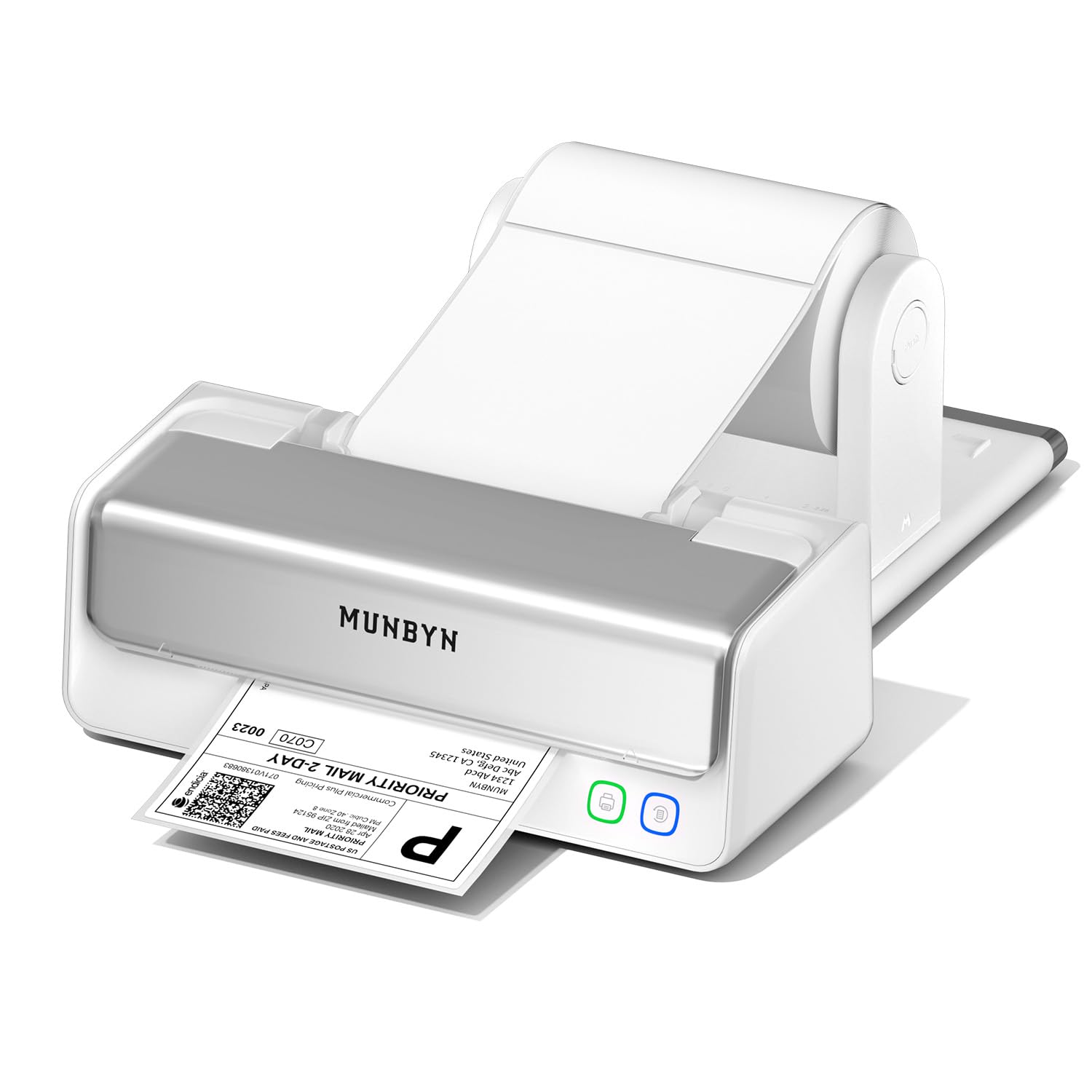
The MUNBYN RW405B stands out for a design decision that directly addresses the most common failure point of thermal printers: a replaceable print head. The company rates this unit for up to 970,000 labels, about six times the lifespan of standard models, with a claimed jam rate below 0.01 percent. That longevity dramatically lowers the total cost of ownership for a small business printing daily.
Bluetooth connectivity pairs instantly with iOS and Android devices through the MUNBYN Print App, which includes over 3,500 design elements and 2,000 templates for custom labels. The printer also supports USB-C for desktops and introduces a unique feature: black/red or black/blue printing using MUNBYN’s specialty thermal labels, useful for color-coding inventory or priority shipments.
An integrated paper holder keeps labels organized without an external stand, saving desk space. Some early users reported defective units where labels smeared or the printer shut down mid-job, though customer support appears responsive. The 4-inch DAC chip with military-standard precision auto-calibrates to prevent vertical misalignment, a thoughtful touch for shipping label alignment.
Why it’s great
- Replaceable print head extends usable life far beyond typical consumer thermal printers
- Black/red and black/blue printing options for color-coded labels without ink
- Built-in paper holder reduces desk clutter and simplifies label feeding
Good to know
- Color printing only works with MUNBYN’s proprietary specialty thermal labels
- Quality control issues reported — some units arrive defective or with smearing problems
4. Brother QL-1100 Wide Format Label Printer

The Brother QL-1100 fills a specific niche for users who need wide-format labels up to 4 inches in width, combined with Brother’s signature 300 DPI print quality. A standout feature is the barcode crop function, which lets you isolate and print individual barcodes from a sheet template on Windows, eliminating wasteful full-sheet prints for retail UPC codes or inventory tags.
The USB host interface allows connecting a barcode scanner directly to the printer, streamlining workflows where you scan and print without a computer in the loop. The auto-cutter mechanism trims each label precisely, which saves time compared to tear-bar designs. Users report the printer lasting through 10,000 labels with consistent, smudge-free output that stays dark and scannable.
The main drawback is cost per label: Brother’s proprietary DK rolls are premium-priced, and the auto-cutter blade can fail after extended use, typically around the 10,000-label mark. The setup is not fully plug-and-play — you need to download drivers and run the Software Document Installer on first use. There’s no wireless option, so it must stay tethered via USB or serial.
Why it’s great
- Barcode crop function on Windows lets you print individual barcodes without full-sheet waste
- USB host port enables direct scanner connection for standalone barcode printing
- 300 DPI resolution produces sharp, professional labels with consistent darkness
Good to know
- Proprietary Brother DK label rolls cost more per label than generic alternatives
- Auto-cutter blade has a history of failing after roughly 10,000 prints
5. Arkscan 2054A-LAN Ethernet Shipping Label Printer

The Arkscan 2054A-LAN is built for environments where multiple people need to print labels from different computers without cable swapping. Ethernet connectivity allows it to sit on the network with a static IP, so any machine on the LAN can send jobs instantly. Print speed is rated at 5 inches per second at 203 DPI, adequate for most shipping and warehouse labeling tasks.
It supports both roll labels (loaded internally) and fanfold labels (fed from the back), giving flexibility in media sourcing. The included BarTender UltraLite software on Windows provides full label design capabilities including text, graphics, and barcodes with serialization — a rare bonus in this price tier. The unit is compatible with every major shipping platform from Amazon and Shopify to FedEx and ShipStation.
The primary complaint is the initial setup, which can take 20 minutes or more of configuring network settings via a utility tool. It’s not plug-and-play out of the box. The build is chunky and industrial, not designed for a tidy retail desk. Some users note that the Ethernet port requires a router speed under 1GHz, which may complicate compatibility with newer mesh networks.
Why it’s great
- Ethernet network printing allows any computer on the LAN to send labels without a dedicated host
- Comes with BarTender UltraLite label design software with barcode serialization
- Supports both roll and fanfold media for flexible sourcing
Good to know
- Setup is not plug-and-play — requires manual network configuration via utility tool
- Chunky, industrial design takes up significant desk space
6. ZEBRA ZD410 Direct Thermal Desktop Printer

The ZEBRA ZD410 is the smallest footprint in this roundup at just 8.25 x 11 x 8 inches, making it ideal for space-constrained workstations like pharmacy counters, greenhouse tagging stations, or small kiosks. Despite its size, it delivers 6 inches per second print speed at 203 DPI, producing clear, bold text that resists smearing even in humid or wet conditions — a specific advantage for agricultural or cold-storage environments.
It uses Zebra’s Link-OS platform, which provides remote management tools for fleets of printers across multiple locations. That’s a feature typically reserved for enterprise-grade equipment and makes the ZD410 scalable if your operation grows. The media handling supports 1-inch core rolls with a max outer diameter of 5 inches and a width up to 2.25 inches, limiting it to smaller labels.
Setup is the biggest hurdle. The wireless configuration is notoriously finicky, with some users spending over an hour resolving driver conflicts. It does not support a direct plug-and-play connection with Square or other POS systems without careful driver selection. The unit prints without an auto-cutter — labels are manually torn or peeled, which can slow down high-volume workflows.
Why it’s great
- Compact design fits in tight spaces like pharmacy counters or greenhouse workstations
- Thermal output resists smearing in high-humidity and cold environments
- Link-OS platform enables remote fleet management for scalable deployments
Good to know
- Wireless setup is complex and often requires significant troubleshooting
- No auto-cutter — labels must be manually torn or peeled from the roll
7. Phomemo D530 Pro 300 DPI Thermal Label Printer
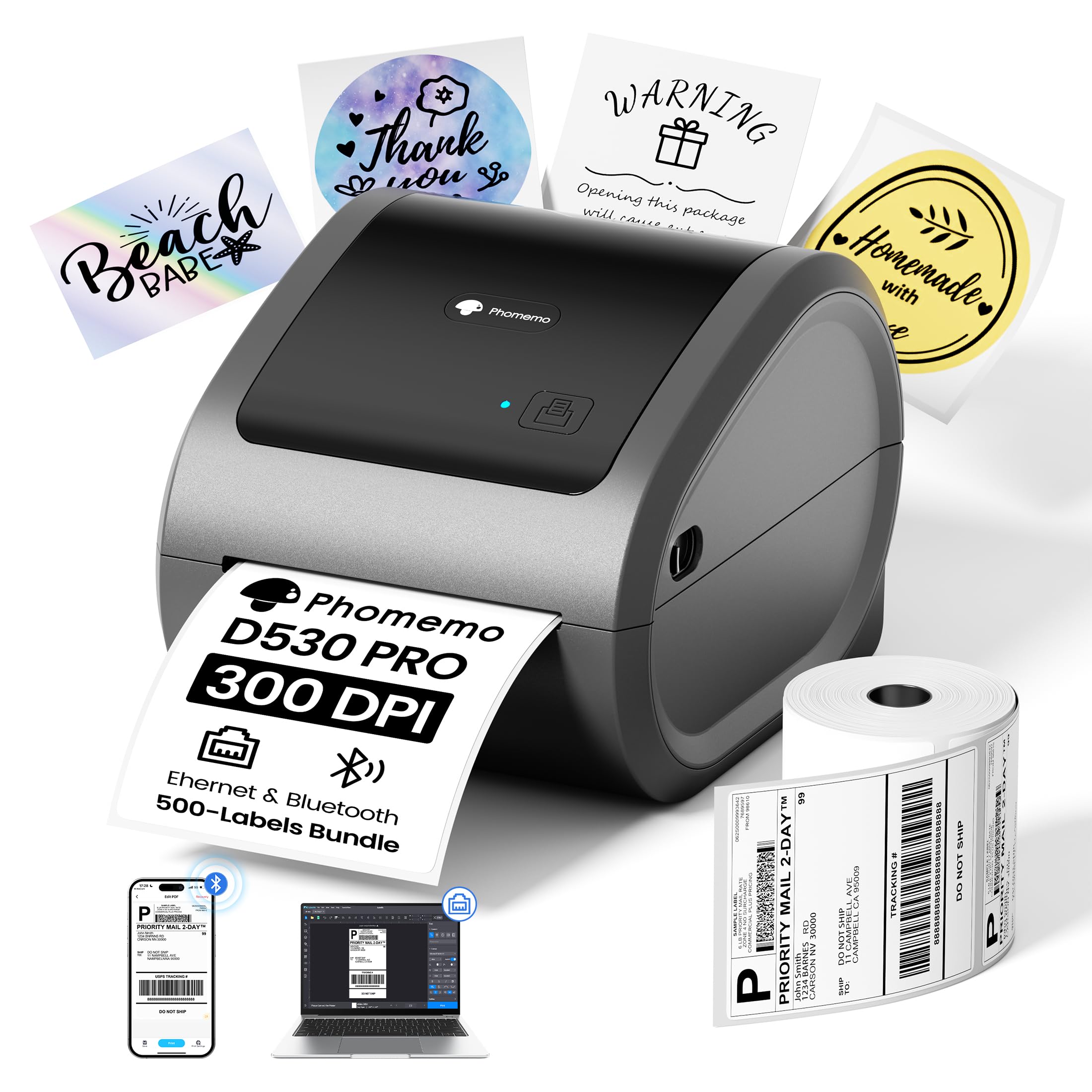
The Phomemo D530 Pro brings 300 DPI resolution to a mid-range package, making it one of the few sub- thermal printers capable of printing the ultra-sharp text and barcodes typically expected from premium units. It ships with 500 labels in the box, so you can start printing immediately without a separate purchase — a convenience that removes the biggest friction point for first-time buyers.
Connectivity options are generous: Bluetooth for mobile printing via iOS and Android, USB-C for modern laptops, and Ethernet for a stable network connection. The built-in paper bin keeps labels contained and feeds smoothly without an external holder, reducing desk clutter. Users consistently note that the print quality surpasses their expectations for the price, with crisp barcodes that scan reliably on the first pass.
The build quality is slightly bulkier and feels less premium than name-brand competitors, and some users report that the printer fails to fully print certain UPS shipping labels (specifically from Shopify). The Labelife app adds an extra setup step compared to true plug-and-play units. It’s also worth noting that while the 300 DPI head is excellent for barcodes, it doesn’t support color printing.
Why it’s great
- 300 DPI resolution at a mid-range price point produces superior barcode and text clarity
- Comes with 500 labels included, removing the need for an immediate accessory purchase
- Multiple connectivity options: Bluetooth, USB-C, and Ethernet for flexible setups
Good to know
- Some users report incompatibility printing certain UPS labels from Shopify
- Labels require the thermal side facing the print head — incorrect loading results in blank prints
8. HP Shipping Label Printer

The HP Shipping Label Printer is the entry point for sellers moving from sheet labels to a dedicated thermal printer. It prints at 7 inches per second at 203 DPI — faster than many competitors — and supports labels up to 4 inches wide through adjustable media holders. The direct thermal process means no ink cartridges to replace, which is the main draw for budget-conscious users.
Setup is straightforward on Windows with automatic driver detection, and the printer works with all major eCommerce platforms including Amazon, UPS, Shopify, and ShipStation. The unit includes a power cord, AC adapter, USB cable, and quick start guide, so you have everything needed out of the box. Users who get a working unit report fast, quiet operation with good print quality.
The reliability issues are significant enough to note: a meaningful portion of units produce blurry, illegible output regardless of font or file settings, and some stop printing entirely after a short period. There is no Bluetooth or WiFi connectivity — this is a pure USB device. The compact build feels light, and the included starter label roll is tiny, requiring an immediate purchase of additional labels.
Why it’s great
- Fast 7 ips print speed for quick label output during busy shipping periods
- Direct thermal eliminates ongoing ink and toner costs entirely
- Compatible with all major eCommerce and shipping platforms out of the box
Good to know
- Quality control issues — some units produce blurry, illegible prints from day one
- USB-only with no Bluetooth or WiFi, limiting placement and multi-device use
9. Westinghouse WHTP203e Thermal Shipping Label Printer

The Westinghouse WHTP203e offers Ethernet networking at a budget-friendly price point, making it a compelling option for small offices that want network printing without spending premium dollars. It prints at 6 inches per second with 203 DPI resolution, suitable for standard 4×6 shipping labels, and supports both roll and fanfold media from 0.78 inches up to 4.6 inches wide.
One rare capability at this level is ZPL support, which allows integration with existing warehouse management systems and label design software. The included USB flash drive with drivers simplifies the initial setup process — users report being up and running within 30 minutes. The straight label path design minimizes jams, a practical benefit for high-volume daily use.
There is no Bluetooth or WiFi, which is expected at this tier, but the Ethernet port covers network sharing. The printer is optimized for router speeds under 1GHz, which may cause compatibility issues with some modern mesh systems. The build feels solid and the included starter labels allow immediate testing, but the overall fit and finish is more functional than refined.
Why it’s great
- Ethernet networking at a budget-friendly price point for easy multi-computer sharing
- ZPL support enables integration with professional warehouse management software
- Straight label path design reduces the likelihood of paper jams during high-volume printing
Good to know
- No Bluetooth or WiFi — network sharing requires a wired Ethernet connection
- Compatibility issues reported with routers running speeds above 1GHz
FAQ
Can I use generic labels with a Brother printer?
What does direct thermal mean and does it fade over time?
Why does my label printer print blank labels?
Final Thoughts: The Verdict
For most users, the best bar code printer winner is the Rollo USB because it combines fast print speed, jam-free reliability, and straightforward USB setup at a fair price point. If you need mobile printing from your phone or tablet, grab the Phomemo D530 Pro for its 300 DPI clarity and Bluetooth connectivity. And for a multi-user office that demands Ethernet networking and enterprise-grade management, nothing beats the ZEBRA ZD410 despite its finicky setup.