
Our readers keep the lights on and my morning glass full of iced black tea. As an Amazon Associate, I earn from qualifying purchases.
Specs are compiled from manufacturer listings and verified buyer reviews and can change over time — please confirm the key details on the product page before buying.
Lost track of a laptop, a tool, or a whole shelf of inventory because one flimsy sticker faded or peeled off? That is the exact problem this guide kills. Below you will find the barcode asset tags that actually survive real warehouses, workshops, and book spines, with the honest trade-offs of each.
I’m Min — the founder and writer behind Gadgets Feed. This guide is built by comparing the manufacturers’ published specifications and the patterns across verified customer reviews, so you get each pick’s real strengths and trade-offs instead of marketing spin.
We break down the best barcode asset tags by print method, adhesive strength, and durability so you can pick the right one for your gear the first time.
Our Picks at a Glance


How To Choose The Best Barcode Asset Tags
Before you buy any barcode asset tag, ask yourself three things: which printer you already own, what surface you’ll stick it on, and how many years it must survive. Get those right and you won’t waste money on 8,000 labels that smear or slide off.
Print method: thermal, laser, or pre-printed
Direct thermal labels print without ink, toner, or ribbons — the heat from the printer darkens the paper itself. That makes them fast and cheap, but the print can fade with heat or prolonged sunlight. Laser-printable metallic tags fuse toner into the film for a tougher finish, and custom pre-printed tags are done for you, often on durable polyester.
Adhesive and material match your surface
A permanent adhesive that grips cardboard may not hold on a greasy machine housing or a textured plastic case. Polyester tags resist water, scratches, and fading far better than paper, which is why they dominate serious asset tracking. If a tag sits outdoors or on metal tools, skip plain paper.
Size and printer compatibility
Measure your narrowest surface first. A 2-inch square label fits boxes and jars, while a 0.5-inch wide strip suits book spines and file folders. And confirm the roll matches your printer — DYMO LabelWriter rolls are not compatible with Zebra or Rollo machines, and vice versa.
Quick Comparison
| Model | Best For | Print Method | Material | Quantity | Amazon |
|---|---|---|---|---|---|
| 2″ x 2″ Aegis Thermal Labels★ Best Overall | High-volume shipping & FNSKU | Direct Thermal | Paper | 8,400 | Amazon |
| DYMO 30346 ReplacementBest Value | Book spines & narrow surfaces | Direct Thermal | Paper | 7,200 | Amazon |
| Trek Label Serial TagsOutdoor Pick | Outdoor & sequential inventory | Pre-printed | Thermal Paper | 1,000 | Amazon |
| IntelliScanner Custom Tags | Small business & boutique | Pre-printed | Polypropylene | 100 | Amazon |
| Avery Metallic Tags | Laser-printed equipment tags | Laser | Metallic Film | 240 | Amazon |
| Ecotherm 2.25″ x 1.25″ | Jars, price tags & FBA | Direct Thermal | Paper | 4,540 | Amazon |
| BETCKEY DYMO 30334 | FBA barcodes on DYMO | Direct Thermal | Thermal Paper | 16,000 | Amazon |
| McAuley Custom Polyester | Permanent equipment ID | Pre-printed | Polyester | 100 | Amazon |
In-Depth Reviews
1. 2″ x 2″ Square Direct Thermal Printer Labels (8400 Count)
Our pick — over 4.5★ from 600+ verified ratings; the strongest balance of quality and price.
The high-volume workhorse that prints sharp barcodes without a drop of ink
For packing and fulfillment, this is the volume king. You get 12 rolls with 700 stickers per roll, for 8,400 total labels on a 1-inch core — enough to tag a small warehouse. The matte white thermal paper uses permanent adhesive and perforations between each sticker, so peeling one off mid-shift is quick.
Direct thermal printing means crisp, high-contrast barcodes with no ink, toner, or ribbons to buy. It handles cardboard, poly mailers, plastic, and paper without lifting or curling, and it is designed to prevent printer jams during fast-paced packing. Just know this works with Rollo, MUNBYN, iDPRT, and Zebra desktop printers — not DYMO or Brother.
Buyers report: “I’ve printed around 300, they’ve all looked good, even if my data was wrong.” Owners also note that after sticking about 30 labels a week or two earlier, they stayed stuck well. The quality and adhesion win people over — the sheer count makes it a value standout.
Why it wins
- 8,400 labels across 12 rolls for relentless packing days
- Permanent adhesive grips cardboard, poly, and plastic
- Fade and scratch resistant thermal output
The honest limits
- Not compatible with DYMO or Brother printers
- Paper material won’t survive harsh outdoor weather
Grab it for: high-volume shipping, FNSKU, and shelf tagging where you need thousands of clean scans without restocking.
Think twice if: you run a DYMO LabelWriter — you’d need the compatible rolls instead.
2. Replacement for DYMO 30346 (12 Rolls, 7200 Labels)
The slim 0.5-inch strip that slides onto book spines and file folders
This is the perfect fit when your surface is narrow. At 0.5″ x 1.875″, it’s designed for library barcode labels, book spines, media cases, file folders, key tags, and small inventory items where a bigger label just doesn’t belong. Twelve rolls give you 7,200 total labels with 600 per roll.
It’s a non-OEM replacement for the DYMO 30346 that works with LabelWriter 450, 450 Turbo, 4XL, Wireless, 400, and 330 desktop printers. Owners mention: “I’ve used them in both my LabelWriter 450 and 4XL, and they’ve worked flawlessly with no jamming, misfeeds, or smudging.” The permanent adhesive bonds to paper, plastic covers, and folders while resisting edge lift.
Keep in mind the 500-series DYMO models (550 and 5XL) that require RFID-enabled rolls are not compatible. Adhesion gets mixed feedback — most owners find it plenty sticky for books and folders, though a few want stronger grab on slick surfaces.
Sharp and steady: For cataloging sessions, the clean separation between stickers keeps feeding smooth, and the dark, readable barcodes scan consistently even in batch runs.
Watch the printer: If you own a DYMO 550 or 5XL, skip this roll — it won’t work with those RFID-demanding models.
3. 1000 Serial Number Barcode Labels 1-1/2″ x 1/2″
Pre-printed sequential tags that hold up outdoors and scan through tape
If you need consecutive numbers without touching a printer, this roll of 1,000 die-cut labels is the cleanest shortcut. Each 1-1/2″ x 1/2″ sticker carries a sequential barcode, and multiple rolls continue the numbering instead of duplicating (unless you request otherwise). The barcodes are printed with approved equipment and verified to GS1 & ANSI standards, so they scan reliably.
Customers note using these on wood for bee hive inventory outdoors — the labels stay in place and scan right through Gorilla Tape. The permanent acrylic pressure-sensitive adhesive holds to coated and even silicone-treated surfaces. Note the material is a 3.2 mil thermal transfer paper, so it’s better for monitor backs and machine panels than high-friction spots like a laptop bottom.
This is a custom-printed product, so there are no returns — email the seller before ordering if you have special numbering needs. Owners consistently praise the responsive customer service and the quick turnaround.
Reach for this if: you want durable sequential labels for equipment, hives, or simple inventory without printing a single one yourself.
Look elsewhere if: your tags will face constant rubbing — the paper won’t love that abuse.
4. IntelliScanner Custom Barcode Asset Tags (Pack of 100)

Custom tags with your own name and a unique barcode that’s never repeated
For a boutique or small business that wants a polished, branded look, these custom tags print your company or family name right on each sticker. Every tag carries a unique 7 or 8 digit barcode — the seller guarantees no barcode is ever printed twice, which is exactly what you want for clean inventory tracking. The construction is high-durability polypropylene printed with high-quality resin.
Owners have run these through ThriftCart and PayPal’s Zettle inventory tools, scanning with two different scanners successfully. Others use them to label leased and managed gear, lab samples, and older books missing ISBNs. The industry-standard Code 39 barcodes are not UPC/EAN compatible, so confirm your system reads Code 39 first.
Still, for a few shelves of gear, the convenience of zero printing is real.
Polished and done: These are a set-and-forget solution for small catalogs, with a durable film that outlasts paper.
Budget reality: At 100 tags per pack, larger collections will need multiple orders — factor that into the cost.
5. Avery Metallic Asset Tag Labels (240 Waterproof Labels)

Metallic film tags whose laser-printed barcodes fuse into the surface
This is the pick when you need tough, professional-looking tags for electronics, tools, and machinery. The metallic material is chemical resistant, waterproof, and abrasion resistant, with a strong industrial-grade permanent adhesive. At 3/4 x 2 inches, they suit equipment bodies and toolboxes nicely.
You print them yourself with a laser printer using Avery’s free Design & Print software, which includes templates and a barcode generator. That means print-on-demand in any quantity — no minimum orders or long lead times. Reviewers point out crisp, barcode-perfect results on metal toolboxes, machinery, and plastic cases, with toner that fuses so it can’t be scratched off on a Canon color LaserJet.
The catch is printer dependence. On a Brother mono laser, owners found toner scrapes off easily, so a color laser that fuses toner properly is recommended. The finish is a dull matte silver rather than shiny, and occasional smearing is noted on certain printers.
Standout strengths
- Waterproof, chemical-resistant metallic film
- Strong adhesive on metal and machinery
- Crisp laser print with fused, scratch-resistant toner
The fine print
- Requires a laser printer that fuses toner well
- Matte silver finish, not a shiny metallic look
6. Ecotherm 2.25″ x 1.25″ Thermal Labels (4,540 Total)

A mid-size thermal label that handles boxes, jars, and barcode work
At about half the size of a business card, this 2.25 x 1.25 inch label sits neatly on jars, price tags, shelf labels, and inventory bins. Four rolls give you 1,135 labels per roll for 4,540 total, all on a 1-inch core that fits standard 4-inch desktop thermal printers like the Zebra ZD421, Rollo, and MUNBYN.
The high tack permanent hot melt adhesive is built for boxes, cardboard, glass, metal, and even shrink wrap. It’s UV light resistant with a service temperature range of -4°F to 158°F. This is also one of the few options that’s BPA-free and BPS-free, with the white facestock independently tested by SGS with no BPA or BPS detected.
Owners love the compatibility with various printers including the GoDex RT700i+, and the crisp, clear prints for Etsy shops and warehouse operations. The water resistance gets mixed feedback — it survives light moisture but isn’t fully waterproof, so keep that in mind for wet environments.
Balanced daily driver: Good size for a huge range of jobs, with clean high-contrast output and no ink needed.
Not for the wet: Label it as weather-resistant rather than waterproof, and it will treat you right.
7. BETCKEY Compatible DYMO 30334 (16 Rolls, 16000 Labels)

Massive 16,000-label rolls that nail Amazon FBA barcode work
When a seller needs the right size for Amazon FBA labels, this is the roll to grab. The 2-1/4″ x 1-1/4″ (57mm x 32mm) labels replace the DYMO LW 30334 and are widely used on barcodes, packages, envelopes, and temporary name tags. Sixteen rolls deliver 16,000 labels total, a quantity that will carry a busy seller for a long stretch.
The labels are perforated for easy separation, and the patented adhesive stays reliable across extreme temperatures from 14°F up to 369°F. Owners confirm these meet Amazon requirements and work with DYMO 450, 450 Turbo, 4XL, Wireless, 400, as well as Zebra, Rollo, and MUNBYN printers. Some report each roll holds 1,000 labels plus 5-20 extra, a small bonus.
The recurring gripe is printer jamming on some DYMO 450 units, and the newest DYMO 550 and 5XL models won’t accept these because they demand RFID chips. The adhesive is strong yet removable without damaging the original label underneath — a thoughtful touch for FBA work. A detailed step-by-step printing guide from Seller Central is appreciated by first-timers.
Perfect for: Amazon FBA sellers printing barcodes by the thousands on a DYMO LabelWriter.
skip it if: you own a DYMO 550 or 5XL — those need RFID-enabled rolls.
8. McAuley Labels Custom Asset Tags (1.5×0.75 Inches)
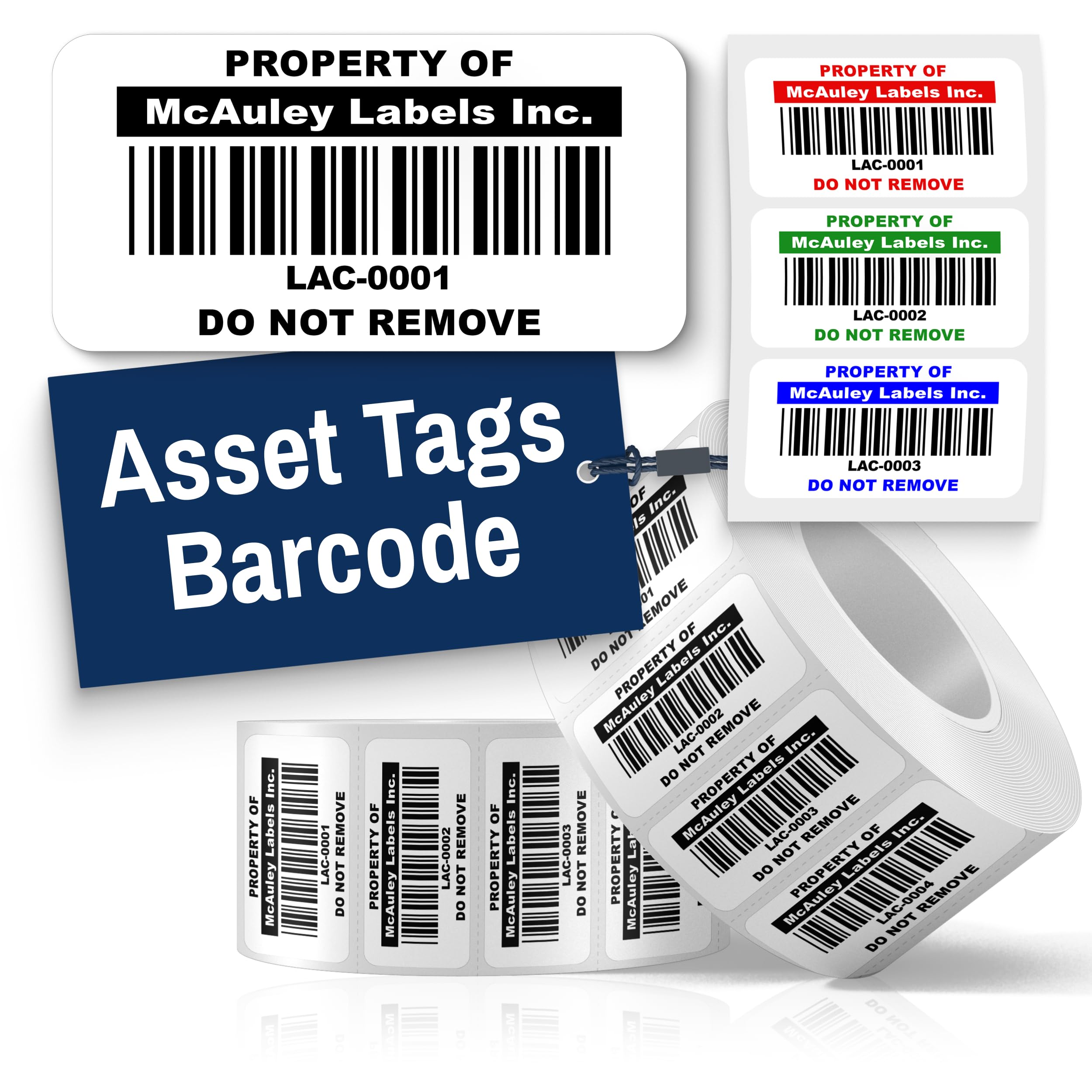
The premium polyester tag that resists water, scratches, and fading
For equipment you expect to keep for years, this is the durability king. These custom semi-gloss white polyester tags resist water, scratches, and fading — unlike flimsy stickers that fade or peel. The industrial-strength permanent adhesive bonds to metal, plastic, and textured surfaces, staying put on laptops, servers, and machinery.
The 1.5×0.75 inch size is compact yet readable, with high-contrast barcodes that scan easily in any lighting. Owners run these with the Sortly app to track radios, computers, generators, and trailers, and report the app reads the barcodes easily. The print doesn’t smudge, application is easy, and the tags are built to last. It’s a family-owned American business, and buyers appreciate the weekend proof approvals and same-day customer service calls.
This is a premium product at a premium price, and like all custom prints, there are no returns. The 100-count pack suits a defined equipment list better than a huge loose inventory.
Built to last
- Water, scratch, and fade resistant polyester
- Industrial adhesive grips metal and textured plastic
- Sharp printing scans easily in any light
Price of permanence
- Premium cost per tag
- Custom order means no returns — confirm details first
Understanding the Specs
Direct Thermal vs. Laser vs. Pre-Printed
Direct thermal labels darken when heat passes over them, so they need no ink or ribbon — fast and cheap, but the print fades with heat and sun. Laser-printable metallic tags fuse toner into the film for a tougher finish, while custom pre-printed tags are done for you, often on polyester that resists water and scratching.
Adhesive Strength and Material
Permanent adhesives are rated for long-term hold, but surfaces matter — a label that grips cardboard may not grab greasy metal or textured plastic. Polyester tags outlast paper in harsh conditions, which is why serious asset tracking uses them. Check the material type before you commit to a 16,000-label order.
FAQ
What is the difference between direct thermal and thermal transfer asset tags?
Will DYMO 30334 compatible labels work in my DYMO 550 printer?
Can I print barcode asset tags with a regular laser printer?
What is the best material for barcode asset tags that go outdoors?
How do I choose the right size barcode asset tag?
Are sequential serial number barcode labels reusable?
What does GS1 verification mean for barcode labels?
Can I use thermal labels in both Zebra and DYMO printers?
How long do direct thermal barcode labels last before fading?
What is the difference between Code 39 and UPC barcodes on asset tags?
Final Thoughts: The Verdict
Across the board, the barcode asset tags winner is the Aegis 2″ x 2″ thermal labels because the 8,400-label count and sharp, smudge-free prints handle high-volume packing while staying affordable. If you want the slim strip for book spines and narrow folders, grab the DYMO 30346 replacement. And for equipment you plan to keep for years, the McAuley polyester tags are the one to reach for.
How We Picked
We do not accept paid placement. Every pick is matched to a real buyer and a real use-case; we do not hands-on test units.
Sources & Methodology
Specifications: manufacturer listings and product documentation. Review insights: verified customer reviews, as of August 2026. Pricing: not shown on this page (it changes often); check the current price via the retailer link.
As an Amazon Associate, Gadgets Feed earns from qualifying purchases. This does not affect which products we feature.