
Our readers keep the lights on and my morning glass full of iced black tea. As an Amazon Associate, I earn from qualifying purchases.
Specs are compiled from manufacturer listings and verified buyer reviews and can change over time — please confirm the key details on the product page before buying.
You need a barcode scanner for prices that actually reads the tiny, crumpled, or screen-based codes your customers or inventory throw at it — without slowing you down. The cheap options might save a few dollars upfront, but a pick that misreads or misses codes costs you time and money on every single scan. This guide sorts through the real specs (scan angles, battery lives, decoding abilities) and real buyer experiences so you know exactly which model matches your checkout counter, warehouse floor, or event booth.
I’m Min — the founder and writer behind Gadgets Feed. This guide is built by comparing the manufacturers’ published specifications and the patterns across verified customer reviews, so you get each pick’s real strengths and trade-offs instead of marketing spin.
Whether you run a retail store, manage inventory, or check tickets at events, the right barcode scanner for prices makes scanning fast and frustration-free by reading every barcode type on the first try.
Quick Picks
- Tera 1D 2D QR Barcode Scanner Wireless and Wired (D5100) — Best Value
- NetumScan Automatic Omnidirectional Desktop Barcode Scanner — Best Overall
- TEEMI T22N-AU 2D USB Barcode Scanner with Smart Stand — Best Desktop Hybrid
- Eyoyo Bluetooth 2D&1D Mini Barcode Scanner (EY-015P) — Best Portable Pick
- Tera Pro Barcode Scanner Wireless with Screen and Charging Cradle (HW0009) — Premium Pick
- Symbol Zebra LS2208 Corded Handheld Laser Scanner Kit — Reliable Workhorse
- Inateck Bluetooth Barcode Scanner (BCST-70) — Rugged Wireless
How To Choose The Best Barcode Scanner For Prices
A barcode scanner for prices isn’t just about flashing a red beam. You need to match the scanner’s technology and physical design to the types of barcodes you scan and the environment you work in — from a busy retail till to a dusty warehouse.
1D vs 2D Decoding: What You Can Scan
A 1D-only laser scanner reads the traditional black-and-white lines (UPC, Code 39, EAN). A 2D imager reads those plus QR codes, PDF417 (common on driver’s licenses), DataMatrix, and barcodes on phone screens. If you ever scan a code from a customer’s phone or a paper ticket, you need a 2D model — otherwise you’ll be stuck typing numbers by hand.
Connection Type: Wired, Wireless, or Bluetooth
Wired USB is the simplest plug-and-play option for a fixed checkout counter. Wireless 2.4G gives you a dedicated connection up to roughly 328 feet in open areas, while Bluetooth pairs with iPads, tablets, and phones. Some models combine all three so you can switch based on the task — scanning on a sales floor then docking back at a computer.
Hands-Free vs Handheld
A desktop hands-free model with an auto-sensing stand (often omnidirectional with a wide 180-degree scan angle) lets you pass items under the window without lifting the scanner — ideal for high-volume checkout. A handheld wireless unit gives you the freedom to walk an aisle and scan boxes, but you have to consider battery life and drop protection.
Battery Life and Durability
For wireless models, look at the battery capacity in mAh (milliamp-hours) and the standby time. A 2200mAh battery, for instance, can last through a full work week. The IP54 rating (protection against dust and splashes) and a silicone protective cover that cushions drops from about 6.5 feet are signs the scanner will survive daily bumps and falls.
Quick Comparison
On smaller screens, swipe sideways to see the full table.
| Model | Best For | Scan Technology | Connection | Decoding | Amazon |
|---|---|---|---|---|---|
| Tera D5100 | Retail & event scanning | 2D Imager | 2.4G Wireless + USB | 1D/2D/QR | $44.99Amazon |
| NetumScan A5 | High-volume checkout | 2D Imager (180° view) | USB Wired | 1D/2D/QR | $34.99Amazon |
| TEEMI T22N-AU | Versatile desktop scanning | 2D Global Shutter | USB Wired | 1D/2D/QR/Postal | $39.99Amazon |
| Eyoyo EY-015P | Mobile & pocket use | 2D Imager (25° view) | BT + 2.4G + USB | 1D/2D/QR | $49.99Amazon |
| Tera HW0009 | Customizable all-day scanning | 2D Imager | BT + 2.4G + USB | 1D/2D/QR | $59.55$85.99Limited time dealAmazon |
| Symbol LS2208 | Reliable wired laser scanning | 1D Laser | USB Wired | 1D only | $60.36$69.97Amazon |
| Inateck BCST-70 | Rugged wireless scanning | 1D Laser | BT + USB | 1D only | $69.99Amazon |
In‑Depth Reviews
1. Tera 1D 2D QR Barcode Scanner Wireless and Wired (D5100)

The everyday workhorse with a 2200mAh battery (milliamp-hours, the measure of energy stored) that outlasts your shift and a shell that survives a counter drop.
You get a 2200mAh battery that buyers report lasts 8-10 days of regular scanning, plus a dedicated battery indicator light so you never have to guess when it’s about to die. The 2.4G wireless connection reaches up to 328 feet in an open space, and you can fall back to the included USB cable when the battery runs flat — no drivers to install.
Owners mention it is “lightweight, durable, fast and accurate barcode reading on worn/curved packaging.” The orange anti-shock silicone cover protects against drops from 6.56 feet, and the IP54 rating (resistant to dust and splashes) keeps it working even on a grimy warehouse counter. A minor frustration: adjusting settings requires scanning printed barcodes rather than using a Bluetooth or app-based option, so keep the manual handy.
Why It Stands Out
- Large 2200mAh battery with visible level indicator — no surprise mid-day shutdowns
- IP54 rated and silicone-armored against 6.56ft drops
- Dual wireless/wired mode gives 328ft range plus a backup cable
The Trade-Offs
- Settings changes require scanning configuration barcodes — no software tool
- Won’t read ITF-14 barcodes (a specific 14-digit shipping code format)
Your daily driver if: you need a wireless handheld that lasts a full work week and can survive bumps, drops, and dusty shelves.
Look elsewhere if: you regularly scan ITF-14 barcodes or want to adjust settings from a phone app.
2. NetumScan Automatic Omnidirectional Desktop Barcode Scanner

This hands-free countertop scanner catches barcodes from any angle so you never lift a finger during a rush — its 180° scan angle gives it a wider view than the TEEMI T22N-AU’s 55°.
Its 180-degree real angle of view, compared with the 55-degree TEEMI T22N-AU below, means the scanner reads a barcode no matter how you pass it under the window — perfect for a retail checkout or supermarket lane. The auto-sensing trigger wakes the scanner when you move an item near it and puts it back to sleep automatically, saving power and keeping the workflow fast.
Keep in mind it is a wired-only USB device (not compatible with Square, Clover, or Shopify) and does not support wireless or Bluetooth operation, so it stays where you put it.
What You Gain
- 180° omnidirectional reading — no need to orient the barcode perfectly
- Auto-sensing stand with sleep mode saves power
- Solid 250g build stays put on the counter
What You Give Up
- Wired USB only — no wireless for walking the floor
- Not compatible with Square, Clover, or Shopify POS
Perfect for a fixed checkout counter if: you want to slide items past a window and get a read every time without picking up a scanner.
skip it if: you need to roam a warehouse or connect to Square/Clover.
3. TEEMI T22N-AU 2D USB Barcode Scanner with Smart Stand

A wired desktop scanner that switches to hands-free mode the moment you set it in its intelligent stand — its global shutter (captures the whole image at once, not line-by-line) snaps damaged barcodes that would confuse other models.
The T22N-AU uses a global shutter (a sensor that captures the entire barcode in one instant, not scanning line-by-line) so it snaps damaged, reverse-printed, or screen-based codes fast. It reads 1D, 2D, and postal barcodes including PDF417 and DataMatrix, plus has advanced data formatting to parse driver’s license data or add prefixes and suffixes to scans — helpful if you need to format scanned data for a spreadsheet or POS. At 154 grams, it is noticeably lighter than the 250-gram NetumScan, making it easy to lift and use as a handheld gun when you pull it from its smart stand.
Customers note it is an “excellent budget Bluetooth scanner for events” and call it “ridiculous how much fun” to scan books with — though one buyer mentions the scanner cannot disable its inactivity sleep timer, which can be an issue if you run a kiosk that needs constant on-demand scanning.
Strong Points
- Global shutter captures clear images of damaged or screen barcodes instantly
- Smart stand auto-switches between hands-free presentation mode and handheld trigger mode
- Data parsing and formatting for driver’s licenses and custom prefixes/suffixes
To Consider
- Cannot disable the inactivity sleep timer — not ideal for always-ready kiosk use
- Wired USB only — no Bluetooth or 2.4G wireless option
Choose this if: you need a versatile desktop scanner that doubles as a handheld and handles special barcodes like PDF417 on driver’s licenses.
Reconsider if: your setup requires the scanner to stay awake 24/7 without ever going to sleep.
4. Eyoyo Bluetooth 2D&1D Mini Barcode Scanner (EY-015P)
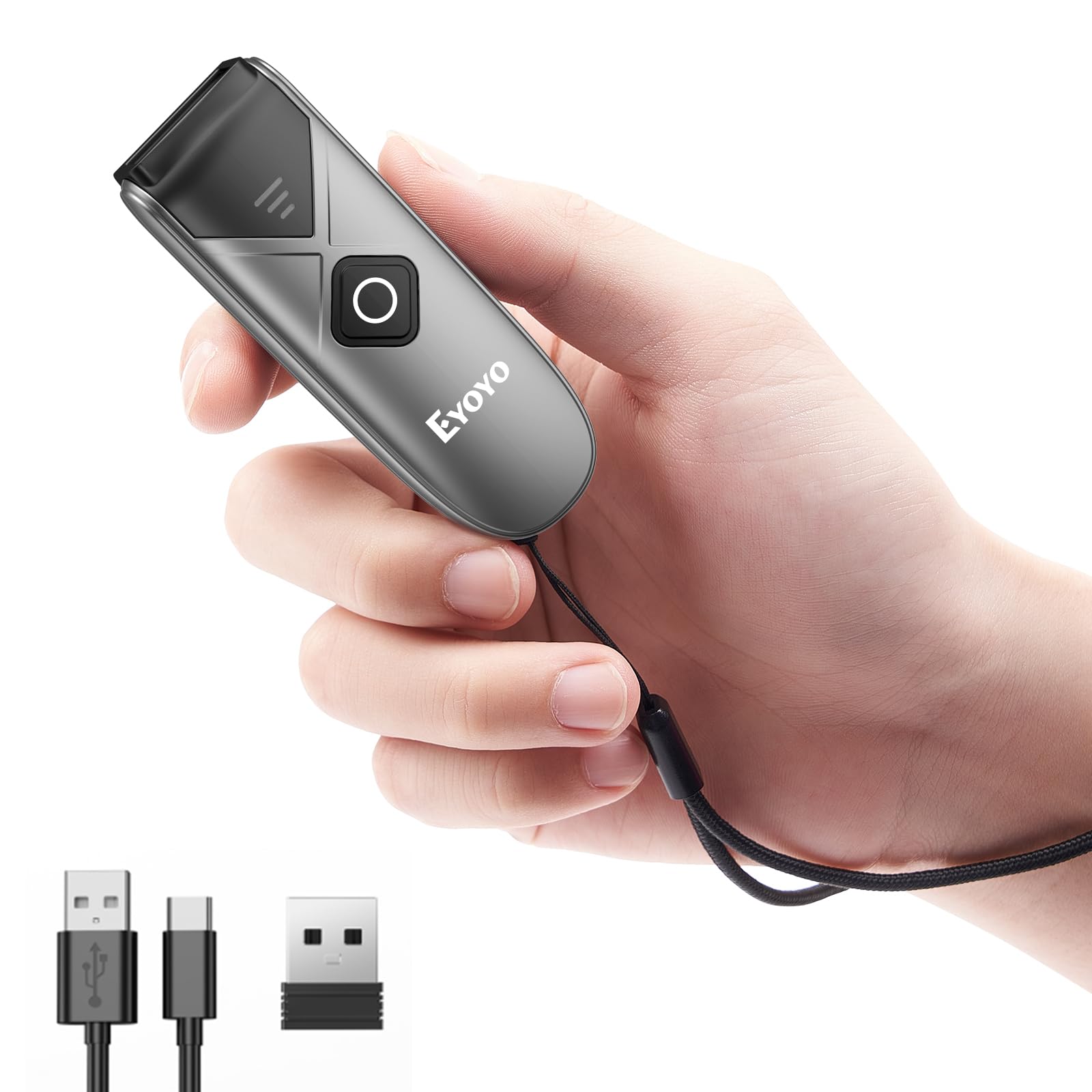
A key-fob-sized wireless scanner that fits in your pocket and stores 150,000 barcodes for batch uploads — at 1.08 inches wide versus the TEEMI T22N-AU’s 2.76 inches.
At just 0.6″D x 1.08″W x 3.24″H and 1.5 ounces, the Eyoyo is more pocket-friendly than the 4.21″D x 2.76″W x 7.09″H TEEMI T22N-AU. It connects three ways: 2.4G wireless, Bluetooth, or USB wired, and works with pads, phones, and tablets. The offline storage mode is a standout: the scanner can automatically save up to 150,000 barcodes in its memory and upload them in bulk later, which is a lifesaver when you walk an aisle without network coverage.
Reviewers point out “the barcode scanner can automatically store the barcode data in the device” and that the small size is “key fob size.” One reviewer noted the unit initially failed on Aztec barcodes on patient wristbands, but customer support provided a configuration QR code to enable them. The scan angle is a narrow 25 degrees compared to the NetumScan’s 180 degrees, so you need to aim more carefully at each barcode.
Why It’s Unique
- Ultra-compact (1.5 oz and pocket-size) for mobile inventory on the go
- Offline storage holds up to 150,000 barcodes for later batch upload
- Triple connection (Bluetooth, 2.4G, USB) works with almost any device
Watch For
- Narrow 25° scan angle requires precise aiming — no sweeping pass
- Some units need a configuration scan to read certain barcode types; support is responsive
Best for inventory staff who roam: clip it on your lanyard, scan a whole shelf, and dump data back at the computer.
Not for fixed checkout: the narrow scan angle means you cannot just wave items under it like an omnidirectional model.
5. Tera Pro Barcode Scanner Wireless with Screen and Charging Cradle (HW0009)
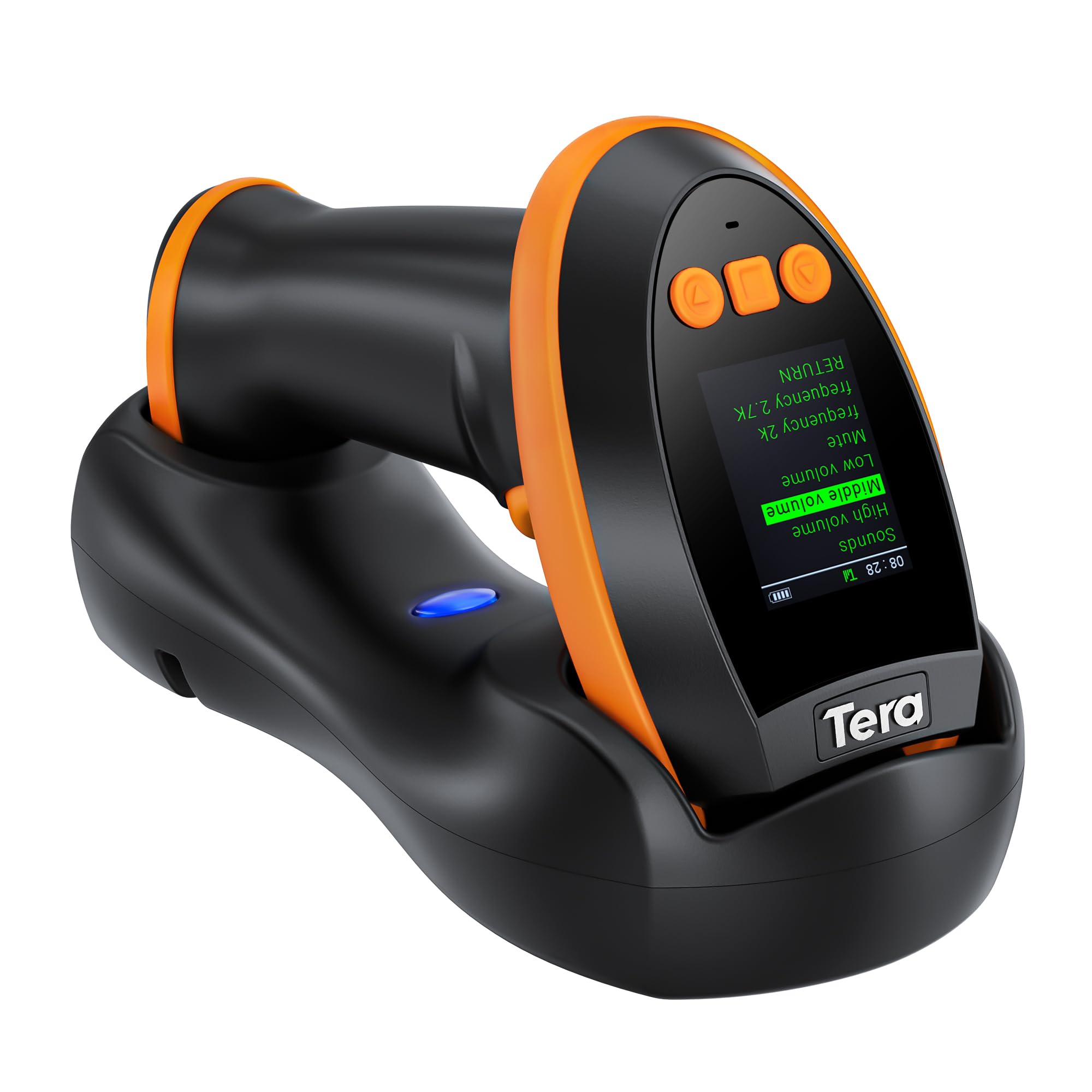
The only pick with a built-in screen and keypad so you adjust settings without scanning a booklet of barcodes — and it carries a 2500mAh battery versus the Tera D5100’s 2200mAh.
The HW0009’s screen display lets you change language, volume, connection mode, and view stored barcodes on the device itself — a rare feature that eliminates the “scan this tiny barcode to change a setting” dance. A 2500mAh battery, compared with the 2200mAh Tera D5100, powers it all day, and the included charging cradle keeps it topped off between shifts. You get three connections: Bluetooth, 2.4G wireless (328ft open-range, 114ft through obstacles), and USB wired, plus full 1D/2D decoding including PDF417 on driver’s licenses and ITF-14 codes.
Buyers call it “feature-packed” and note the “on-screen verification” and “charging cradle” are standout conveniences. The unit is slightly heavier than basic models, and one buyer mentioned the display could be larger and the function navigation a bit easier — helpful feedback if you plan to switch settings often during a busy shift.
Premium Advantages
- Built-in screen and keypad for on-device setting changes — no configuration barcodes needed
- 2500mAh battery + charging cradle for all-day operation
- Reads ITF-14, PDF417, and 2D codes with Bluetooth, 2.4G, or USB
A Few Downsides
- Screen and navigation could be larger and more intuitive, per some users
- Heavier than basic handhelds; you feel it in a pouch
Go with this if: you often tweak scanning settings (language, volume, connection) and want to do it from a screen, not a paper manual.
Pass if: you just need a simple point-and-shoot scanner and don’t want the extra weight or cost of the display and cradle.
6. Symbol Zebra LS2208 Corded Handheld Laser Scanner Kit

An industry-standard wired laser scanner that just works — plug it in and start scanning immediately, backed by a 3-year warranty that beats every other model here.
This is the no-frills option: a 1D laser scanner (it reads traditional linear barcodes, not QR codes or screen-based codes) that connects via USB cable. It comes as a kit with a gooseneck stand, so you can rest it hands-free on the counter and pass items under the beam. The Symbol/Zebra brand has a long reputation in retail and warehouse scanning, and this model carries a 3-year warranty — the longest coverage in this lineup.
Shoppers say it is “easy to use, no software download, works with Mac (needs USB-C adapter)” and “plug-and-play with Square hardware.” One owner reported that after a few days Square stopped detecting it, but unplugging and replugging the Square hardware fixed the glitch — simple to resolve. The LS2208 is wired-only with no 2D decoding, so if you scan QR codes or phone screens it won’t work, but for pure UPC/Code 39 scanning it is dependable.
Solid Strengths
- Trusted Symbol/Zebra brand with long retail durability record
- Kit includes gooseneck stand for hands-free positioning
- 3-year warranty — the longest coverage here
Limitations
- 1D laser only — cannot read QR codes, PDF417, or phone screens
- Wired USB only — no wireless or Bluetooth option
Stick with this if: you run a standard barcode-only retail counter and want a proven wired scanner with a strong warranty.
Avoid if: you need to scan QR codes, driver’s licenses, or any 2D code — you need a 2D imager for that.
7. Inateck Bluetooth Barcode Scanner (BCST-70)

A 1D laser scanner built for the warehouse floor with a battery that stays ready for half a year — its 180-day standby outlasts any other model in this guide.
Rated for 180 days of standby and an active range of 115 feet (over Bluetooth), this wireless handheld prioritizes longevity and toughness. The external TPU protective case (a rubbery plastic armor) is thicker than similar models, and the internal parts get reinforced treatment so it survives repeated 6-foot drops to concrete — a clear advantage over lighter consumer-grade picks. It can also hide part of a barcode or edit prefixes/suffixes up to 32 digits, useful for cleaning up scanned data before it hits your inventory system.
Buyers report it is “durable, long battery life, simple Bluetooth setup” and one staffer who purchased 30+ units for a warehouse trusts the build. Firmware updates have fixed batch-scan import errors by adjusting data transmission speed. The BCST-70 is a 1D-only laser scanner, so it won’t decode QR codes or phone screens — if your workflow includes 2D codes, look at the full-imager models above.
Built Tough
- Double-thick TPU case and reinforced internals survive 6-foot concrete drops
- 180-day standby, 115ft Bluetooth range
- Compatible with Windows, iOS, Android, Linux, and even Raspberry Pi
Shortfalls
- 1D laser only — cannot read QR codes, DataMatrix, or screen barcodes
- Bluetooth connectivity can be finicky; some users prefer using the USB cable
Reach for this if: your warehouse drops scanners, needs six months between charges, and scans nothing but standard linear barcodes.
Not the one if: you scan QR codes from phones or paper tickets — you need a 2D imager.
Understanding the Specs
Real Angle of View
This is the width of the area the scanner’s sensor covers in one shot, measured in degrees. A wider angle — like 180 degrees on the NetumScan — means you can pass items under it in any orientation and it still catches the barcode. A narrow angle, like 25 degrees on the Eyoyo mini, requires you to point the scanner directly at the code. For a fixed checkout counter, wider is generally better; for a pocket-sized personal scanner, narrow might feel natural because you aim by hand anyway.
Standby vs Active Battery Life
Standby time (like the 180 days on the Inateck BCST-70) tells you how long the scanner lasts when sitting unused. Active battery life (like 8 hours continuous on the Eyoyo) tells you how long it scans before needing a charge. Battery capacity in mAh (milliamp-hours) — the 2200mAh Tera D5100 vs the 2500mAh Tera HW0009 — gives you a straight comparison of total energy storage. A higher mAh generally means a longer shift between charges, but the actual runtime also depends on how often you scan and whether you use wireless or wired mode.
FAQ
Will a barcode scanner for prices work with my Square POS?
How do I scan a barcode from a customer’s phone screen?
What does offline storage mode mean on a barcode scanner?
How far can a wireless barcode scanner reach from its base?
Can a barcode scanner read damaged or wrinkled barcodes?
How long does the battery last on a wireless barcode scanner?
What is the difference between a global shutter and a rolling shutter in a barcode scanner?
Can I use a barcode scanner with a tablet or phone?
How do I know if a barcode scanner has a stand or cradle included?
What does IP54 mean on a barcode scanner?
Final Thoughts: The Verdict
If you want one dependable pick, the barcode scanner for prices winner is the NetumScan Automatic Omnidirectional Desktop Scanner because its 180-degree scan angle and hands-free auto-sensing design speed up checkout dramatically without you ever picking it up. If you want wireless portability and a long-lasting battery, grab the Tera D5100. And for a pocket-sized unit with offline storage of up to 150,000 barcodes, the Eyoyo Mini is your best travel companion.
How We Picked
We do not accept paid placement, and we did not hands-on test every unit. Instead, we match each pick to a real buyer and use-case by comparing the manufacturers’ published specifications against the patterns in verified customer reviews — so you get each pick’s real strengths and trade-offs instead of marketing copy.
Sources & Methodology
Specifications: manufacturer listings and product documentation. Review insights: verified customer reviews, as of July 2026. Pricing: not shown on this page (it changes often); check the current price via the retailer link.
As an Amazon Associate, Gadgets Feed earns from qualifying purchases. This does not affect which products we feature.
Product prices and availability are accurate as of the date/time indicated and are subject to change. Any price and availability information displayed on Amazon at the time of purchase will apply to the purchase of this product. As an Amazon Associate I earn from qualifying purchases.
CERTAIN CONTENT THAT APPEARS ON THIS SITE COMES FROM AMAZON. THIS CONTENT IS PROVIDED "AS IS" AND IS SUBJECT TO CHANGE OR REMOVAL AT ANY TIME.
Amazon and the Amazon logo are trademarks of Amazon.com, Inc. or its affiliates.