
Forgetting to buy RAM and an SSD for a new computer sounds like a rookie mistake, but with a barebone mini PC, it’s the entire point. You get to choose every component that defines speed and capacity, avoiding the markups and bottlenecks of pre-configured systems. This makes them the ultimate choice for homelab enthusiasts, budget gamers, and digital creators who know exactly what they need from their hardware.
I’m Min — the co-founder and writer behind Gadgets Feed. I’ve spent countless hours analyzing processor benchmarks, expansion slot configurations, and cooling designs across dozens of models to find the barebone mini PCs that deliver real value for their technical investment. The goal of this guide is to cut through the noise and spotlight the machines that let you build exactly what you need.
After comparing 9 distinct models, from a Ryzen 7 beast with OCuLink to a enterprise-grade workstation with 10G SFP+ networking, I built this definitive ranking of the very best barebone mini pc options for every serious use case.
How To Choose The Best Barebone Mini PC
Choosing a barebone system means you are committing to a DIY desktop build, so the chassis and motherboard become your foundation. Your focus must shift from the whole package to the quality of the platform itself, including its CPU, expansion slots, and connectivity. The right choice balances your workload with the physical limits of a small form factor.
CPU Architecture and Performance Tier
The processor is the single most critical component in a barebone mini PC because you cannot swap it later. For light office tasks and media streaming, a mid-range Ryzen 7 or Core i5 is more than enough. For content creation and heavy virtualization, you want a high-core-count Ryzen 9 or Core i9 that can sustain high boost clocks under load without thermal throttling in a small chassis.
Expansion Potential: RAM and Storage Slots
Barebone designs vary wildly in how many SODIMM slots and M.2 NVMe slots they offer. Two SODIMM slots are the standard, but some models like the AOOSTAR MACO solder the RAM directly, which eliminates upgradability. For storage, three M.2 slots are ideal for a RAID array or separating OS from game and media drives, while single-slot machines limit your total capacity and speed.
Connectivity for Networking and eGPU
If you are building a virtualization server, dual 2.5G LAN ports or 10G SFP+ matter far more than a flashy GPU. For gamers and creators, the presence of a dedicated OCuLink port for external GPU connectivity is a defining advantage over standard USB4. Also check for USB4 with 40Gbps bandwidth, DisplayPort Alt Mode, and PD input to keep your desk clean with a single cable.
Quick Comparison
On smaller screens, swipe sideways to see the full table.
| Model | Category | Best For | Key Spec | Amazon |
|---|---|---|---|---|
| MINISFORUM MS-A2 (Ryzen 9 9955HX) | High-End Workstation | Enterprise server with 10G networking | Dual 10G SFP+ & PCIe x16 slot | Amazon |
| MINISFORUM MS-01 i9-13900H | Pro Workstation | Proxmox cluster or development rig | 2x 10G SFP+ & 2x 2.5G LAN | Amazon |
| Reatan X7 Ryzen 7 255 | Best Overall | Budget gaming and general use | OCuLink 64Gbps eGPU support | Amazon |
| GMKtec K12 Ryzen 7 H 255 | Pro Gaming | Gaming with 120GB+ RAM potential | 3x M.2 slots & quad display | Amazon |
| MINISFORUM AI X1-255 | AI Ready | Multi-display office and eGPU | Dual USB4 & OCuLink port | Amazon |
| MINISFORUM UM870 Slim | Silent Workhorse | LLM inference and multitasking | Radeon 780M & silent 35dB fan | Amazon |
| MINISFORUM UM790 Pro | Compact Power | High-end gaming on a budget | Ryzen 9 7940HS & Radeon 780M | Amazon |
| AOOSTAR MACO 6850H | Eco Choice | Home server with 3x NVMe RAID | Soldered 24GB LPDDR5 & 3x M.2 | Amazon |
| MINISFORUM MS-01 i5-12600H | Network Appliance | Router and virtualization | Dual 10G SFP+ & dual 2.5G LAN | Amazon |
In‑Depth Reviews
1. Reatan X7 AI AMD Ryzen 7 255 Barebone Mini PC
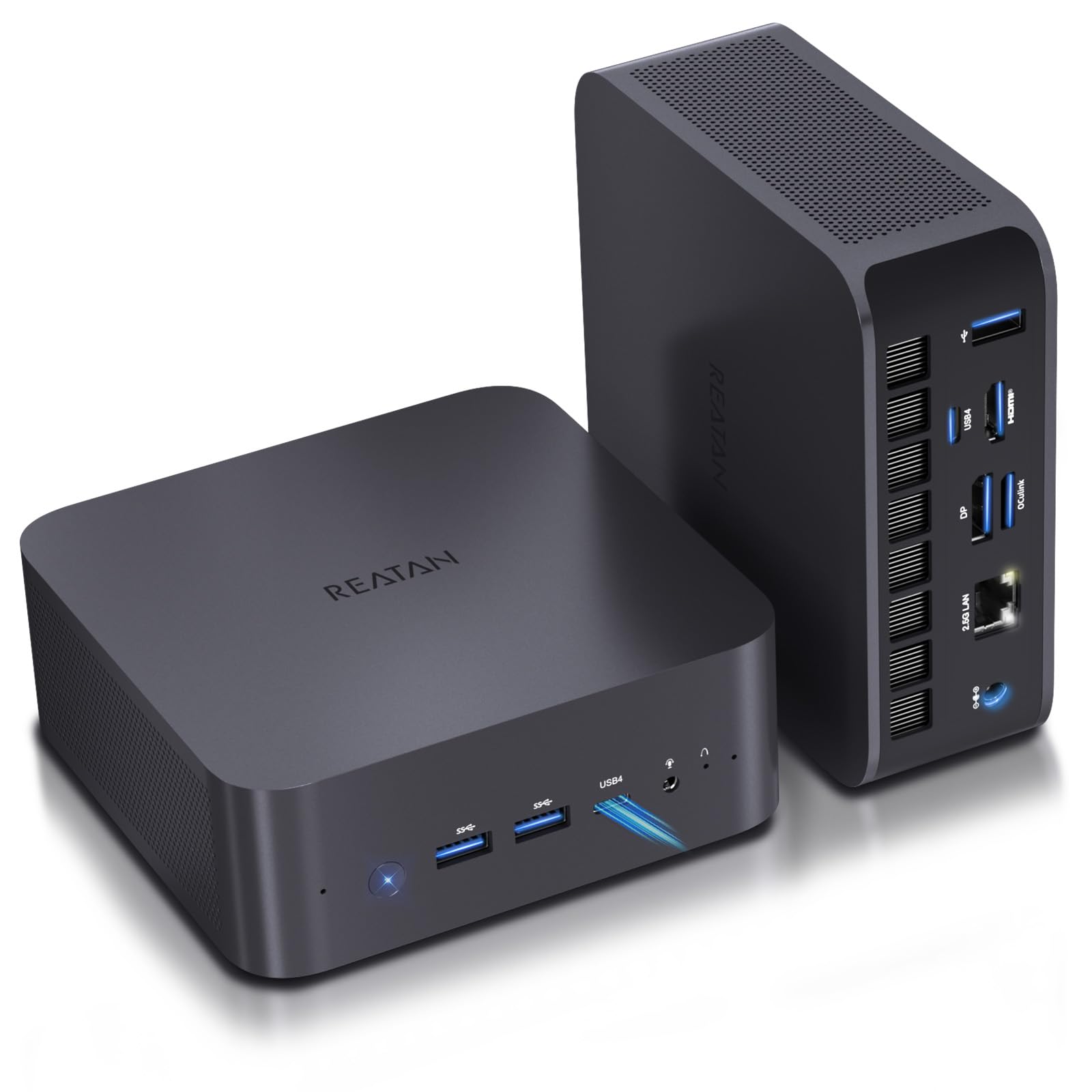
The Reatan X7 strikes a remarkable balance between price and features by packing the Ryzen 7 255 processor — a direct upgrade over the popular 8745HS — and the mighty Radeon 780M integrated graphics. This combination handles 1080p gaming, 4K video editing, and heavy multitasking without breaking a sweat. The inclusion of a dedicated OCuLink port gives you a 64Gbps pathway to an external GPU, something most competitors in this price range skip entirely.
Connectivity is future-proof out of the box with Wi-Fi 7, two full-speed USB4 ports (40Gbps each), and an HDMI 2.1 port that pushes 8K at 60Hz. The dual M.2 2280 PCIe slots support RAID configurations up to 4TB total, and you can install up to 96GB of DDR5 RAM via its two SODIMM slots. The all-metal chassis also houses dual built-in microphones and a speaker, which is rare for a machine at this tier.
Noise and thermal performance are well managed by the three operating modes — Silent, Standard, and Performance — letting you trade power for quietness based on your workload. The active cooling system includes dedicated fans for the memory and SSDs, a detail that suggests careful engineering. For anyone wanting a budget-friendly gateway into the barebone ecosystem with room to grow, this is the consistent top pick.
Why it’s great
- OCuLink port for high-speed eGPU connection
- Wi-Fi 7 and dual USB4 for future-ready connectivity
- Remarkably quiet operation in silent mode
Good to know
- OCuLink uses one M.2 slot
- Design is less premium compared to aluminum unibody rivals
2. MINISFORUM MS-A2 (Ryzen 9 9955HX) Barebone Mini PC
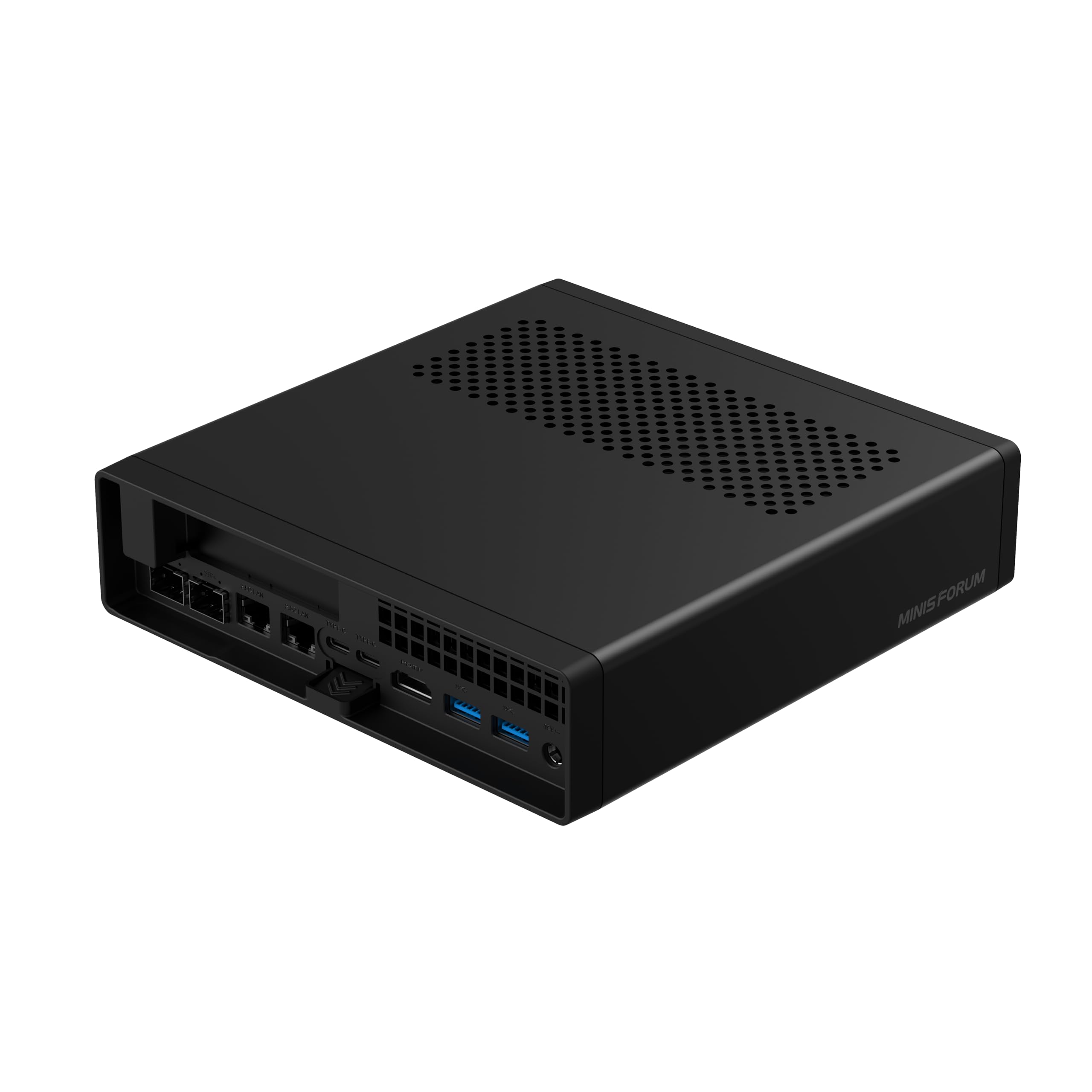
The MINISFORUM MS-A2 is a genuine workstation in a miniature form factor, driven by the Ryzen 9 9955HX with 16 cores and 32 threads based on the Zen 5 architecture. It also features an active PCIe x16 slot that supports external GPUs, network cards, and even AI accelerators, making it a truly expandable system. The dual 10G SFP+ ports and dual 2.5G LAN ports deliver networking capabilities typically reserved for full-tower servers.
Storage expansion is equally generous, with three M.2 NVMe slots compatible with 2280 and 22110 form factors, plus support for U.2 enterprise drives for up to 23TB of total capacity. The triple copper heat pipe and turbo fan system increase airflow by 30%, ensuring sustained performance during 24/7 operation. The dual USB-C ports and HDMI output support up to 8K at 60Hz, perfect for high-resolution creative work.
This is a machine designed for serious homelab users building Proxmox clusters, network engineers running virtualized routers, and professionals who need a compact but mighty workstation. Some early users noted thermal management quirks that required BIOS tweaks, but after repasting and adjusting power limits, the system stays stable under full load. If you demand enterprise-grade networking and expansion in a small footprint, this is the undisputed champion.
Why it’s great
- Dual 10G SFP+ for ultra-fast networking
- PCIe x16 slot for external GPU or network card
- Massive storage capacity with U.2 support
Good to know
- Thermals require BIOS tweaks or repaste for sustained loads
- Very premium price point
3. MINISFORUM MS-01 (i9-13900H) Workstation Barebone Mini PC

The MS-01 i9-13900H model is the Intel counterpart to the AMD MS-A2, built around a 14-core, 20-thread Raptor Lake processor that boosts up to 5.4 GHz. It is optimized for multi-device server environments, supporting Proxmox clusters and virtualized router setups with dual 10G SFP+ and dual 2.5G LAN ports. The PCIe x16 slot can accommodate an RTX 3050 or professional capture cards, making it a hybrid between a server and a compact creative workstation.
Memory and storage are equally versatile, with two DDR5-5200 SODIMM slots supporting up to 96GB officially (and more unofficially) and three M.2 NVMe slots that support RAID 0/1. A U.2 to M.2 conversion adapter is included, letting you install enterprise-grade drives for large-scale data tasks. Dual USB4 ports provide 8K at 30Hz output and 20G Thunderbolt Ethernet compatibility for an aggregated 65Gbps total transfer speed.
Owners consistently report rock-solid stability in 24/7 operation, with many running multiple VMs and Kubernetes clusters without issue. The main drawback is that the fan can be tricky to realign after an SSD installation, and the manual is somewhat unclear. Still, the combination of raw performance and prosumer networking makes the MS-01 a favorite for enthusiasts who need one machine to rule a home lab.
Why it’s great
- Dual 10G SFP+ and dual 2.5G LAN for any network setup
- PCIe x16 slot supports real dedicated GPUs
- Includes U.2 adapter for enterprise storage
Good to know
- Fan reassembly after SSD install is tricky
- Manual is sparse and sometimes unclear
4. GMKtec K12 Gaming Mini PC Barebone (Ryzen 7 H 255)
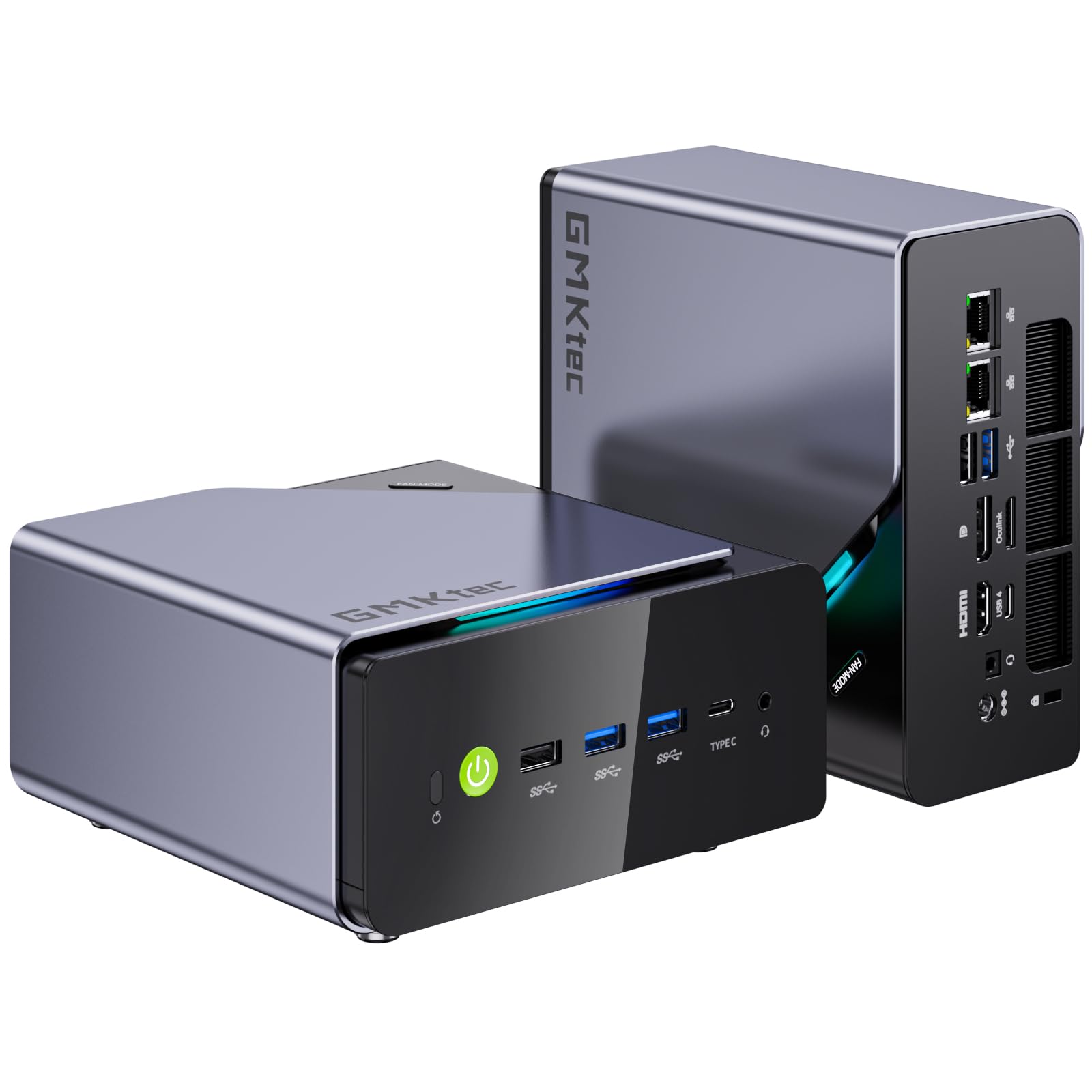
The GMKtec K12 is a crowd-pleaser for budget gamers and server builders alike, powered by the Ryzen 7 H 255 processor with Radeon 780M graphics. It supports up to 128GB of DDR5 RAM — the highest capacity in this tier — and three M.2 2280 PCIe 4.0 slots, each capable of holding up to 8TB SSDs for a potential 24TB of storage. The dedicated OCuLink port provides a direct path to an external GPU for serious frame rates, while dual 2.5G LAN ports enable soft routing and firewall applications.
The cooling system is a standout feature, incorporating a turbo CPU fan and a dedicated DDR5/SSD fan with 13 different RGB lighting modes. In Quiet Mode, the system runs at only 35dB, making it unobtrusive for living room setups. Quad display support through HDMI 2.1, DisplayPort 1.4, and USB4 lets you run 8K output across up to four monitors, which is excellent for stock traders and video editors who need expansive workspaces.
Users praise the K12 for its surprisingly capable 1080p gaming performance with lowered settings, and many have repurposed it as a powerful Plex server or Minecraft host. The only consistent complaint is that the fans become audible during heavy gaming loads, but the performance per dollar remains outstanding. For anyone wanting a do-it-all barebone system that can pivot between gaming and server duties, the K12 is a smart investment.
Why it’s great
- Three M.2 slots for massive storage expansion
- 128GB RAM capacity and OCuLink for eGPU
- RGB cooling with quiet mode at 35dB
Good to know
- Fans get loud during gaming loads
- Only one M.2 slot is PCIe 4.0 x4; others are x2
5. MINISFORUM AI X1-255 Barebone Mini PC

The MINISFORUM AI X1-255 is a forward-looking barebone system that brings Wi-Fi 7 and Bluetooth 5.4 to the table alongside the proven Ryzen 7 255 processor and Radeon 780M graphics. It features a full-blooded USB4 port that supports PD input from 65W to 100W, letting you power and display through a single USB-C cable in some setups. The OCuLink port, combined with HDMI, DP, and USB4, supports up to four independent 8K displays.
Storage is handled by dual M.2 2280 PCIe 4.0 x4 slots, each supporting up to 4TB, and DDR5 SODIMM RAM up to 64GB. The large silent fan and heat pipe system deliver a stable 65W TDP release while keeping full-load noise at 45dB. Built-in dual microphones and dual speakers are a nice addition for Zoom calls and media consumption without external peripherals.
Reviewers consistently describe the X1-255 as extremely quiet and fast, with one user noting it replaced a full desktop and handled VMs under Proxmox without issue. The power button is reportedly very bright, but that is a minor cosmetic complaint. For users who value the latest wireless standards and versatile display output in a compact chassis, this is an excellent mid-range pick.
Why it’s great
- Wi-Fi 7 and Bluetooth 5.4 for cutting-edge wireless
- USB4 with PD input for single-cable setups
- Very quiet operation in daily use
Good to know
- Bright power button may need dimming
- RAM limited to 64GB
6. MINISFORUM UM870 Slim Barebone Mini PC

The UM870 Slim from MINISFORUM is a streamlined system built around the Ryzen 7 8745H processor and Radeon 780M graphics, delivering class-leading integrated GPU performance in a very thin chassis. The active cooling system with phase change material reduces CPU temperature by 25% compared to passive solutions, and the entire system operates at under 35dB even under moderate workloads. This makes it an ideal choice for a quiet home office or media center.
It supports dual DDR5 SODIMM RAM and two M.2 2280 PCIe 4.0 SSD slots for up to 4TB total storage. Connectivity is solid with one USB4 port supporting Alt PD, an HDMI 2.1 port for 8K output, and a DisplayPort 1.4 for 4K at 144Hz. The dual USB 3.2 Gen2 ports and dual USB 2.0 ports cover most peripheral needs.
Users have successfully used the UM870 Slim for LLM inference with llama.cpp via Vulkan, thanks to the 780M’s compute capabilities, and several have migrated from older Intel NUCs with positive results. One review noted that official drivers had minor installation hiccups, but compatible AMD drivers resolved the issue. For a compact, whisper-quiet barebone system that punches above its weight in multitasking and light gaming, the UM870 Slim is hard to beat.
Why it’s great
- Extremely quiet operation at under 35dB
- Efficient phase-change cooling for sustained loads
- Radeon 780M handles light gaming and LLM tasks
Good to know
- Driver installation can be quirky with official site versions
- Only two M.2 slots limits storage expansion
7. MINISFORUM DeskMini UM790 Pro Barebone Mini PC

The UM790 Pro was the first of its generation to ship with a Ryzen 7040 series CPU featuring an AI engine, and it still holds up as one of the fastest integrated graphics systems available. Powered by the Ryzen 9 7940HS (4nm, Zen 4) boosting up to 5.2 GHz and paired with Radeon 780M graphics, this tiny box can run 1080p games at ultra settings and handle 4K video production without stutter. The dual USB4 ports support 8K displays at 60Hz and can drive a 15W mobile display with a single cable.
Storage is served by two M.2 2280 PCIe 4.0 slots that support RAID 0 and RAID 1, and RAM slots support up to 64GB of DDR5. Connectivity includes a 2.5Gbps LAN port ideal for soft router applications, along with dual HDMI 2.0 ports for multi-monitor productivity. The system also supports Auto Power On, PXE Boot, WOL, and RTC Boot, making it suitable for remote server applications.
Setup can be challenging — users have reported needing a BIOS flash and a fresh Windows installation with driver packs to achieve stability. The Wi-Fi and Bluetooth performance is also notably poor due to the metal case causing signal attenuation. However, once properly configured, the UM790 Pro is a powerhouse that rivals much larger desktops. For those willing to invest some setup time, the performance return is substantial.
Why it’s great
- Ryzen 9 7940HS and Radeon 780M deliver top-tier integrated performance
- Dual USB4 with 8K output and 15W PD out
- Compact and VESA-mountable for flexible placement
Good to know
- Wi-Fi and Bluetooth are severely weakened by the metal chassis
- Setup requires BIOS updates and driver disk preparation
8. AOOSTAR MACO (Ryzen 7 PRO 6850H) Barebone Mini PC

The AOOSTAR MACO takes a unique approach to the barebone concept by soldering 24GB of LPDDR5 6400MHz RAM directly to the motherboard, boosting memory bandwidth by 14.3% over standard DDR5 while reducing power consumption. This makes it a semi-barebone system where you still choose your own SSD, but the RAM is fixed. The Ryzen 7 PRO 6850H with 8 cores and 16 threads is an enterprise-grade chip, ensuring enhanced security and stability for serious workloads.
Storage is where the MACO truly shines, offering three full M.2 2280 PCIe 4.0 x4 slots that support RAID 0/1/5 arrays for up to 24TB. The dedicated OCuLink port does not consume an M.2 slot, preserving all three for NVMe drives. The recycled aluminum alloy chassis is both premium and eco-friendly, cutting carbon emissions by 75% compared to virgin materials. Connectivity is comprehensive, with dual USB4 (40Gbps, 100W PD), HDMI 2.1, DP 1.4, and dual 2.5G Intel I226V LAN.
Users praise the MACO for its excellent build quality and quiet operation, especially when used as a Proxmox node with multiple VMs. The soldered 24GB is dual-channel equivalent and adequate for most tasks, but the lack of upgradability will disappoint power users who want 64GB or more. If you value high-bandwidth memory, rugged construction, and a full complement of expansion slots, the MACO is a compelling mid-range choice.
Why it’s great
- Three M.2 slots without occupying OCuLink
- Premium recycled aluminum chassis
- Dual USB4 with 100W PD, dual 2.5G LAN
Good to know
- 24GB RAM is soldered and non-upgradable
- No RAM expansion options for memory-hungry tasks
9. MINISFORUM MS-01 (i5-12600H) Barebone Mini PC

The MS-01 i5-12600H is the entry-level gateway to MINISFORUM’s professional workstation line, offering the same dual 10G SFP+ and dual 2.5G LAN networking stack as its i9 sibling but at a significantly lower cost. The Intel Core i5-12600H with vPro support is a 12-core, 16-thread processor that offers hardware-level security and virtualization features, making it ideal for running enterprise workloads. It supports a PCIe 4.0 x16 slot for discrete GPUs or high-performance networking cards.
Storage is flexible, with support for three M.2 NVMe SSDs (one PCIe 4.0 capable) plus a U.2 NVMe SSD slot for enterprise-grade 24TB total capacity. Dual DDR5 SODIMM slots support up to 96GB of RAM. The SFP+ ports are hot-swappable and provide 10G fiber-optic networking for secure, high-speed data transmission that is 10 times faster than standard gigabit Ethernet.
Users have successfully deployed the MS-01 as an OPNSense router, a Proxmox host, and even a firewall, praising its quiet operation and ease of assembly. Some units have experienced failure after several months, but the customer support has been consistently responsive with replacements. For anyone building a home lab or network appliance on a budget, the i5-12600H MS-01 delivers a professional networking platform without the prosumer price tag.
Why it’s great
- Dual 10G SFP+ for fiber-optic networking
- Intel vPro for enterprise security and management
- PCIe x16 slot for expansion cards
Good to know
- Some units have reported failure after a few months
- Not ideal for gaming due to weaker integrated graphics
FAQ
Can I use a barebone mini PC as a router?
How much RAM and storage should I install for a barebone mini PC?
Final Thoughts: The Verdict
For most users, the best barebone mini pc winner is the Reatan X7 Ryzen 7 255 because it delivers OCuLink, Wi-Fi 7, and a potent Ryzen 7 CPU at an exceptionally low entry point, leaving you budget for quality RAM and SSD. If you want enterprise-grade 10G networking and a PCIe slot for expansion, grab the MINISFORUM MS-A2. And for a silent, compact workhorse optimized for LLM inference and quiet multitasking, nothing beats the MINISFORUM UM870 Slim.