
A barebones keyboard is the chassis, the skeleton, the one decision that dictates every future choice you make about how your next custom mechanical keyboard will feel, sound, and perform. Skip the pre-builts and the gamer-marketed membrane boards. This is where you take control of the switch feel, the keycap profile, the plate material, and the stabilizer sound in a single purchase.
I’m Min — the co-founder and writer behind Gadgets Feed. I spend my hours digging through switch compatibility charts, mounting system schematics, and chassis resonance data to separate the genuine custom-tier hardware from the plastic shells dressed up as DIY kits.
Whether you want a creamy thock or a crisp clack, the right foundation is everything. This guide breaks down the best barebones keyboard options for every build philosophy and budget.
How To Choose The Best Barebones Keyboard
Choosing a barebones keyboard means deciding on the three fixed constraints of your build before you ever touch a switch. The case material, the mounting style, and the layout are the only specs that are essentially permanent. Get these right, and your switches and keycaps will shine; get them wrong, and no amount of lube will fix the hollow echo.
Case Material: Plastic vs. Aluminum
Plastic cases are lighter and cheaper, and they produce a warmer, deeper sound signature — often called “thocky” — because the material absorbs higher frequencies. Aluminum cases, especially CNC-machined ones, are dramatically heavier, more rigid, and produce a higher-pitched, more metallic “clack” or “creamy” tone depending on the plate material. If you plan to travel with the board or want a budget-friendly introduction, a well-dampened plastic case like the GMK67 works. If you want a premium desk anchor that feels solid under every keystroke, a 4-pound aluminum frame like the Keychron Q6 Max is the endgame.
Mounting System: Gasket, Top, or Tray
A gasket mount isolates the PCB and plate from the case with silicone or poron gaskets, creating a softer, more flexible typing feel and reducing harsh resonance. This is the most popular system in modern custom boards. Top mounting screws the plate directly into the top case for a stiffer, more consistent bottom-out that typists often prefer. Tray mount is the cheapest and most common in entry-level boards — the PCB screws into standoffs on the bottom case, which can create a stiff, uneven feel. For a forgiving first build, choose a board with a gasket mount like the YUNZII B75 PRO Max.
Layout: 65%, 75%, TKL, or Full-Size
65% layouts sacrifice the function row for a compact footprint that saves desk space and is ideal for gaming. 75% layouts keep the function row and add navigation keys, making them the most versatile for mixed gaming and productivity. TKL (Tenkeyless) omits the numpad but keeps everything else, offering arrow keys and a navigation cluster. Full-size includes everything plus a numpad, but it violates the compact spirit of most custom builds. The 75% layout, used by the Glorious GMMK PRO and the OOCTPK Chilkey ND75, is the safest all-rounder for most users.
Quick Comparison
On smaller screens, swipe sideways to see the full table.
| Model | Category | Best For | Key Spec | Amazon |
|---|---|---|---|---|
| Keychron Q6 Max | Full-Metal | Ultimate Premium Build | Full aluminum chassis, double-gasket mount | Amazon |
| OOCTPK Chilkey ND75 | Aluminum 75% | Premium Wireless with Screen | Full aluminum alloy, 3-mount system, LCD screen | Amazon |
| Glorious GMMK PRO 75% | CNC Aluminum | Entry-Level High-End Build | CNC aluminum frame, 5-pin hotswap | Amazon |
| YUNZII B75 PRO Max | 75% Wireless | Feature-Rich Mix | QMK/VIA, 8000mAh battery, screen & knob | Amazon |
| Glorious GMMK TKL | TKL Wired | Budget First Build | Hotswap 3-pin, aluminum top plate, 87 keys | Amazon |
| nullbits Nibble 65% | DIY Soldering | Programmable Tinkering | QMK native, through-hole soldering, rotary encoder | Amazon |
| GMK67 65% Kit | Plastic Budget | Budget Wireless Candidacy | Tri-mode, 3000mAh battery, gasket mount | Amazon |
In‑Depth Reviews
1. Keychron Q6 Max

The Keychron Q6 Max is a full-size, full-metal powerhouse with a 108-key layout that doesn’t compromise on acoustics. Its double-gasket design decouples the plate and PCB from the chassis twice, significantly reducing pinging and reverberation compared to single-gasket or tray-mount boards. The 1000 Hz polling rate on wired and 2.4 GHz modes makes it competitive for gaming, while Bluetooth 5.1 handles up to three device connections.
Every component is designed for assembly without soldering — the hotswap PCB accepts both 3-pin and 5-pin switches, and screw-in stabilizers come pre-installed and ready to lube. The full aluminum body weighs close to 5 pounds, which means it stays planted even during aggressive typing sessions. The included rotary encoder knob controls volume or can be reprogrammed via VIA.
This board is the best foundation if you want a premium typing experience without ever switching keyboards again. The tradeoff is that the chassis is heavy and expensive, but for a one-and-done build, the Q6 Max delivers an acoustic clarity and structural rigidity that plastic frames cannot touch.
Why it’s great
- Impossibly solid 5-pound aluminum frame eliminates flex
- Double-gasket mount produces clean, neutral acoustics
- Screw-in stabilizers with minimal rattle
Good to know
- Full-size layout makes it desk-bound; not travel-friendly
- VIA setup requires a Chromium browser and manual JSON load
2. OOCTPK Chilkey ND75

The ND75 brings three mounting styles — Split O-Ring, Silica Gel Particle, and Top Mount — to a single CNC-machined aluminum chassis, letting you swap the typing feel without swapping the case. This level of flexibility is rare in a board that retails in the value-premium space, and it practically guarantees you can dial in the flex and sound signature you prefer.
A screwless ball-catch assembly means the top frame clicks off in seconds, giving you direct access to the four-layer internal dampening (Poron, IXPE, PET, and PCB foam). The south-facing RGB shines through doubleshot PBT keycaps, and the integrated LCD screen can display GIFs and system info. Tri-mode connectivity covers BT 5.0, 2.4 GHz, and USB-C.
Critically, the typing sound out of the box is a creamy thock with minimal hollow echo — no tape mod required for a satisfying Hi-Fi tone. Battery life is the single weak link, as the unit drains faster than the 8000 mAh competitors, but the quick-assembly system and acoustic layering make this the most versatile wireless 75% on the list.
Why it’s great
- Three swappable mounting systems in a single metal chassis
- Tool-free disassembly for rapid modding
- Four-layer acoustic foam yields creamy stock sound
Good to know
- Battery drains noticeably faster than similarly sized wireless boards
- Official driver software is hard to find; requires community link
3. Glorious GMMK PRO 75%

The GMMK PRO is the board that made premium custom builds accessible to a wider audience. Its CNC-machined aluminum frame has a satin-like anodized finish that resists scratches, and the 3.3-pound weight provides an immediate sense of quality. Unlike the plastic GMMK TKL, this one swaps the top plate with swappable options — brass for a firmer, brighter typing feel, or polycarbonate for a softer, deeper sound.
All mounting points are hotswap-friendly for 3-pin and 5-pin switches, and the included rotary encoder adds a functional tactile touch. The plate is mounted with a gasket system that softens the bottom-out, though the gaskets are on the stiffer side, meaning the flex is minimal compared to the ND75 or Q6 Max. The stock stabilizers are adequate but benefit from a light application of dielectric grease.
For its asking price, the GMMK PRO delivers an aluminum build quality that rivals boards costing twice as much. The main tradeoff is the software — Glorious Core is functional but limited in macro customization compared to QMK/VIA open-source alternatives. Still, for a first high-end build, this is a confident, no-regret choice.
Why it’s great
- True CNC aluminum chassis with premium satin anodization
- Swappable top plates (brass, polycarbonate) change sound profile
- Hotswap PCB supports 3 and 5-pin switches
Good to know
- Glorious Core software is less powerful than QMK/VIA
- Stabilizers can develop ping; plan to re-lube them
4. YUNZII B75 PRO Max
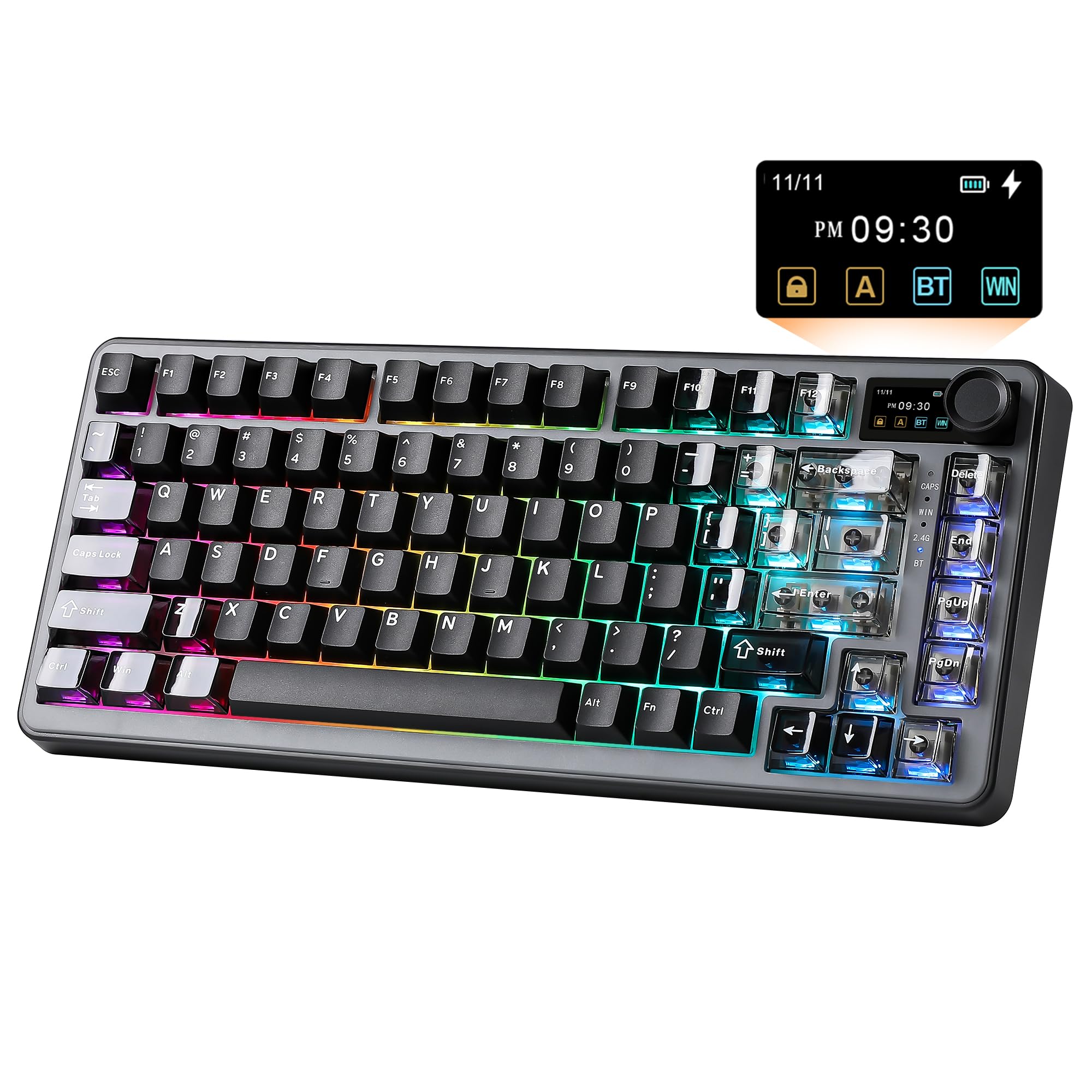
The YUNZII B75 PRO Max packs an 8000 mAh battery, an integrated LCD screen, a rotary encoder, and full QMK/VIA support into a plastic chassis that punches far above its tier. The five-layer gasket system uses Poron pads, IXPE foam, and PET film to deliver a creamy, pre-lubed Cocoa Cream V2 switch sound that needs zero modifications to satisfy.
Connectivity is tri-mode — BT, 2.4 GHz, and USB-C — and the board can pair with up to five devices simultaneously. The screen displays battery level, time, and custom GIFs, and it is fully configurable through the VIA interface. The 75% layout includes a function row and arrow cluster, making this a strong choice for both gaming and spreadsheet work.
The plastic build keeps the board lightweight, but it does not feel cheap thanks to the dense internal dampening that kills cavity echo. The biggest advantage here is the battery: 8000 mAh provides weeks of use on a single charge. If you want wireless freedom without sacrificing feature depth, this is the best balanced barebones kit available.
Why it’s great
- Massive 8000 mAh battery lasts weeks between charges
- Full QMK/VIA support for deep macro customization
- Five-layer dampening delivers creamy stock sound
Good to know
- Plastic case may not appeal to buyers seeking premium heft
- RGB lighting is south-facing and may appear dim with opaque switches
5. Glorious GMMK TKL Barebone
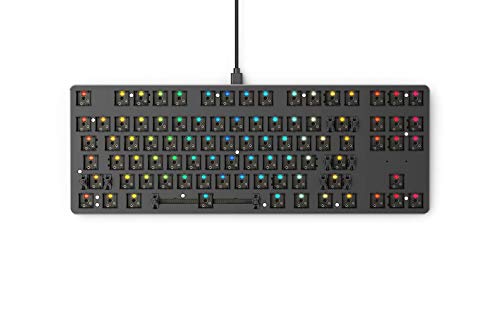
The original GMMK TKL remains a staple for first-time builders because of its balanced feature set and low entry point. The aluminum top plate overlays an ABS plastic bottom case, creating a solid typing base that avoids the hollow ring of pure plastic shells. The 87-key TKL layout omits the numpad but keeps the navigation cluster, which is the ideal compromise for desk space and functionality.
Hotswap sockets accept 3-pin switches only — you will need to clip the plastic legs off 5-pin switches to use them. The pre-lubed stabilizers come from a later revision that addressed the original rattle complaints, and they now perform respectably. The floating key design gives the board a modern look, and the standard ANSI bottom row means any aftermarket keycap set works immediately.
The RGB lighting is per-key and can be programmed without software via onboard controls, though the Glorious Core software provides deeper customization. This board is the cheapest path to learning what a hotswap build feels like without committing to a soldering iron. It is perfect as a starter platform before upgrading to a gasket-mount aluminum frame.
Why it’s great
- Aluminum top plate provides stability without full-metal cost
- Standard keycap layout means broad compatibility with third-party sets
- Pre-lubed stabilizers reduce rattle compared to earlier revisions
Good to know
- 3-pin hotswap socket excludes 5-pin switches without modification
- Glorious Core software offers limited macro and layer control
6. nullbits Nibble 65%

The Nibble is the only board on this list that requires soldering, and that is precisely why it belongs here. Built around a Pro Micro controller and fully through-hole components (diodes, capacitors, resistors), it teaches you the electrical fundamentals of a keyboard while delivering a programmable 72-key layout. The acrylic support structure with RGB underglow produces a floating, illuminated look that cannot be replicated by pre-built boards.
Assembly guides on the nullbits site and Discord walk you through the entire process, and most novices finish in about four hours. The kit includes a rotary encoder and a color-matched knob, plus an optional LED display. QMK integration is native, meaning you can program every key, macro, and lighting effect down to the last LED. The board supports multiple layouts, and the exposed acrylic layers give the Nibble a distinct mechanical sculpture aesthetic.
This is not a quick assembly. You need a soldering iron, a multimeter for troubleshooting, and patience. But the reward is a fully bespoke board that you understand at the circuit level. If your goal is to learn custom keyboard building from the ground up, this is the most fulfilling starting point.
Why it’s great
- Through-hole soldering teaches real keyboard electronics
- Native QMK support for total firmware control
- Rotary encoder, RGB underglow, and display options included
Good to know
- Requires a soldering iron and multimeter; not beginner-friendly
- Acrylic chassis flexes noticeably, reducing switch pop feel
7. GMK67 65% Kit

The GMK67 65% Kit proves that a satisfying custom build does not require a premium budget. The tri-mode connectivity (BT, USB-C, and Wi-Fi — though Wi-Fi is likely a mis-listing for 2.4 GHz) combined with a 3000 mAh battery delivers wireless freedom that many boards at twice the price lack. The 66-key layout includes a dedicated rotary encoder, and the gasket-mounted plate creates a typing flex that typically belongs in higher-tier designs.
Internal dampening includes a Poron switch pad and case foam that choke out hollow resonance, and users consistently describe the stock sound as creamy or thocky after a simple tape mod. The hotswap PCB supports both 3-pin and 5-pin switches, and the south-facing RGB produces consistent per-key illumination. The plastic case is weighted and sturdy, though it clips together rather than screwing, which can make reassembly fiddly.
No switches or keycaps are included — you must supply your own, which is standard for barebones kits. For the absolute lowest cost of entry into a wireless, gasket-mounted, fully moddable platform, the GMK67 is the most achievable starting point.
Why it’s great
- Tri-mode wireless with a 3000mAh battery for true desktop portability
- Gasket mount and internal foam deliver stock thocky sound
- Accepts both 3 and 5-pin switches for flexible switch selection
Good to know
- Case uses clips instead of screws, making reassembly tricky
- Stock stabilizers sound plasticky; plan to replace or lube them
FAQ
Do I need to solder to use a barebones keyboard?
Can I use any Cherry-style keycap set on a barebones board?
Why does my barebones board sound hollow or pinging?
Final Thoughts: The Verdict
For most users, the best barebones keyboard is the Keychron Q6 Max because its full aluminum double-gasket chassis and full-size layout provide a typing foundation that will never need upgrading. If you want wireless freedom with a screen and a massive 8000 mAh battery, grab the YUNZII B75 PRO Max. And for a first custom build that teaches you soldering and firmware programming from scratch, nothing beats the nullbits Nibble 65%.