
A basic desktop computer shouldn’t feel like a compromise. Whether it’s for a home office, student homework, or just managing family finances, the line between “functional” and “frustrating” is razor-thin. The market is flooded with machines that promise simplicity but deliver sluggish boot times and constant updates. Finding a reliable, affordable workhorse means looking past flashy marketing and focusing on the core specs that actually matter for everyday use.
I’m Min — the co-founder and writer behind Gadgets Feed. I’ve spent countless hours combing through technical specifications and analyzing market trends in the budget desktop space to find the machines that deliver real, consistent value for non-demanding users.
This guide helps you make sense of the options and pick a dependable machine for daily tasks. After reviewing dozens of configurations, I’ve found the best basic desktop computer choices that balance price, performance, and longevity.
How To Choose The Best Basic Desktop Computer
Most people make the mistake of buying a desktop that is either too weak to handle basic multitasking or too expensive for what they actually need. A “basic” computer for web browsing, office work, and media streaming requires a specific balance of components. Focus on these three factors.
Processor Generations Matter More Than Core Counts
An older Intel i7 might look impressive on paper, but an 8th Gen i7 from 2018 uses a platform that lacks modern efficiency and security features. For a basic desktop, a newer i3 or i5 (12th Gen or later) often delivers better real-world performance and power consumption than a decade-old i7. Look for the generation number in the CPU model — the first digit or two after the hyphen tells you how recent it is.
RAM Is the Bottleneck You Can’t Ignore
8GB of RAM is the absolute minimum for Windows 11, but it leaves little room for multiple browser tabs, office apps, and background updates. 16GB is the sweet spot for long-term usability. If you see a configuration with only 4GB or 8GB of RAM, plan the cost of an upgrade into your budget, or choose a model that comes with 16GB already installed. DDR5 RAM offers a speed advantage, but for basic tasks, DDR4 at 16GB is often a better value.
SSD Type Determines Responsiveness
The difference between a SATA SSD and an NVMe SSD is night and day in boot times and application loading. A SATA SSD (like the Samsung 870 EVO) is still a huge upgrade over a hard drive, but an NVMe drive is 3 to 5 times faster for sequential reads and writes. For a basic desktop, a 256GB to 512GB NVMe SSD is the sweet spot — enough for the operating system, essential software, and moderate file storage.
Quick Comparison
On smaller screens, swipe sideways to see the full table.
| Model | Category | Best For | Key Spec | Amazon |
|---|---|---|---|---|
| Dell Optiplex 7060 SFF | Refurbished Tower | Office & Home Productivity | i7-8700 | 32GB RAM | 512GB NVMe | Amazon |
| HP ProDesk 600G4 Tower | Refurbished Tower | Heavy Multitasking | i7-8700 | 32GB RAM | 1TB SSD | Amazon |
| Dell Optiplex w/ Dual 24″ Monitors | Refurbished Bundle | All-in-One Setup | i5-8500 | 16GB RAM | 1TB SSD | Amazon |
| HP Pro Tower 290 G9 | New Business Tower | Small Business & Remote Work | i5-12500 | 16GB RAM | 512GB NVMe | Amazon |
| Dell Next Gen OptiPlex Tower | New Tower | Future-Proof Home Office | i3-14100 | 8GB DDR5 | 256GB NVMe | Amazon |
| HP 22″ All-in-One | New All-in-One | Simple & Space-Saving | N100 | 8GB DDR5 | 128GB SSD | Amazon |
| Lenovo V100 AIO | New All-in-One | Home & Student Use | N100 | 8GB RAM | 512GB NVMe | Amazon |
| abytespark Prebuilt Gaming PC | New Gaming Tower | Light to Mid Gaming | i7-4770 | 16GB RAM | 512GB SSD | Amazon |
| NOVATECH Phantom | New Gaming Tower | Entry-Level Gaming | Xeon E3-1230v6 | 16GB | 512GB M.2 | Amazon |
| MSI Codex Z2 | New Gaming Tower | AAA Gaming & VR | R7-8700F | RTX 5070 | 32GB DDR5 | Amazon |
| Samsung 870 EVO 1TB (Upgrade) | Internal SSD | Speed Upgrade for Old PCs | 1TB | 560 MB/s Read | Amazon |
In‑Depth Reviews
1. Dell Optiplex 7060 SFF Desktop

The Dell Optiplex 7060 in the Small Form Factor (SFF) chassis is arguably the best-balanced entry-level machine on this list. It pairs a powerful 8th Gen i7-8700 (6 cores, 12 threads) with a generous 32GB of DDR4 RAM and a 512GB NVMe M.2 SSD. This combination eliminates the two biggest bottlenecks for everyday computing — insufficient RAM and a slow hard drive — so boot times, app launches, and multi-tab browsing all feel instantaneous.
The SFF design is compact enough to sit on a desk or fit into a tight cubby, and it still includes an optical drive for legacy media. Connectivity is robust with five USB 3.0 ports, two DisplayPort outputs, and built-in Wi-Fi and Bluetooth. The included wireless keyboard and mouse are basic but functional out of the box, though you may want to upgrade them over time for a better feel.
As a refurbished unit, build quality varies. Most arrive in near-new condition, but some users have noted the included keyboard stopped working after a few days, and a few units had the wrong SSD spec (SATA instead of NVMe). The performance, however, is undeniable — this is a machine that can handle heavy Office workloads, 4K video playback, and even light photo editing without breaking a sweat.
Why it’s great
- 32GB of RAM is overkill for basic use, ensuring years of future-proofing
- NVMe SSD delivers sub-10-second boot times
- SFF case with optical drive and dual DisplayPort
Good to know
- Refurbished condition may vary; some units arrive with cosmetic wear
- Requires DisplayPort to HDMI adapter if using HDMI monitors
- Included keyboard and mouse are low-quality
2. HP ProDesk 600G4 Tower Desktop

The HP ProDesk 600G4 Tower is a full-size business-class desktop that offers serious expansion potential. Its core specs are impressive: an i7-8700 processor, 32GB of DDR4 RAM, and a 1TB solid-state drive. While the SSD is a SATA drive rather than NVMe, the sheer capacity (1TB) makes this ideal as a primary machine for a home office where you need to store large files, documents, and media locally without worrying about running out of space.
The tower chassis provides plenty of room for future upgrades — you can add a dedicated graphics card, more storage, or additional RAM later. The selection of ports is extensive, including a USB Type-C port, six USB 3.0 ports, and dual DisplayPort outputs that support 4K resolution on up to two monitors. The included Wi-Fi adapter and Bluetooth dongle are functional, though they connect via USB rather than being internal components.
Customer experiences highlight the speed and multitasking ability of this machine, with users praising its performance for photo editing and heavy office use. However, the refurbished condition can be hit or miss — some units arrived with cosmetic blemishes like wrinkled plastic sheets on the case, and one report noted a loud power supply that shut down the system. The inclusion of cheap peripherals and the dependency on DisplayPort adapters for HDMI monitors are common minor complaints.
Why it’s great
- 32GB RAM + 1TB SSD provides ample headroom for power users
- Full tower design allows for easy upgrades (GPU, storage)
- Includes USB-C, dual DisplayPort, and 4K support
Good to know
- SATA SSD is slower than NVMe; consider adding an NVMe drive later
- Wi-Fi and Bluetooth are via external USB dongles, not built-in
- Power supply and cosmetic condition can be inconsistent
3. Dell Optiplex PC w/ Dual 24″ LCDs & RGB Speakers
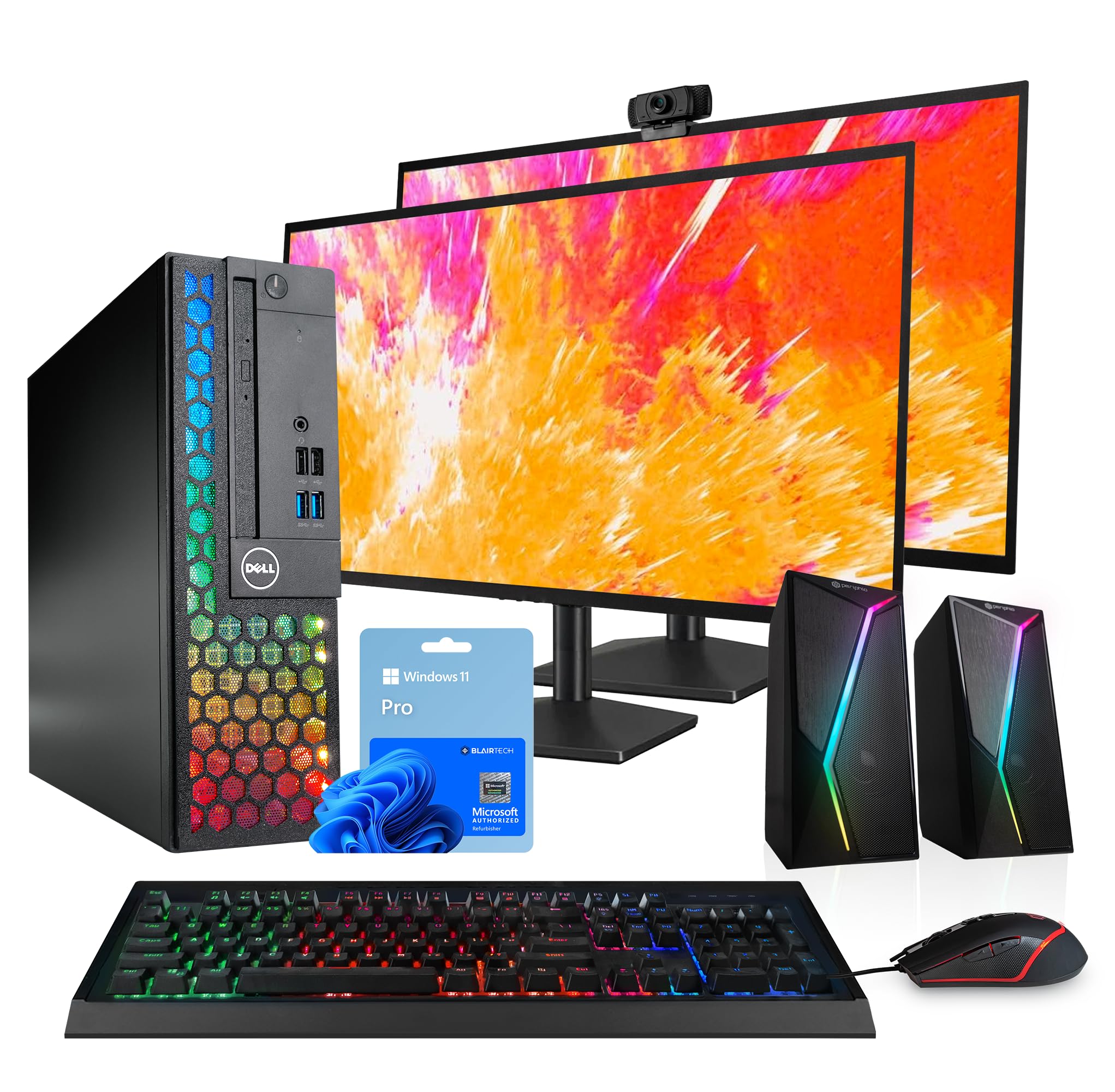
This bundle from a major Microsoft Authorized Refurbisher includes a Dell Optiplex desktop with an 8th Gen i5-8500 processor, 16GB of DDR4 RAM, and a 1TB SSD, plus two renewed 24-inch LCD monitors, RGB speakers, a 2K webcam, and an RGB keyboard and mouse. For anyone starting from scratch or upgrading from a single-monitor laptop setup, this package removes the hassle of sourcing peripherals separately.
The i5-8500 with 6 cores and 9MB cache provides snappy performance for productivity tasks like spreadsheets, document editing, and video conferencing. The 16GB of RAM is sufficient for running multiple monitors with several applications open simultaneously. The 1TB SSD (likely SATA) offers fast storage for large projects and file archives. The inclusion of two 1080p monitors is a major productivity boost — you can have email open on one screen and a browser or document on the other.
Customer feedback is generally positive, with many users impressed by the overall value. The system runs smoothly out of the box and the RGB lighting adds a fun aesthetic touch. A few buyers reported reliability issues after a few months, with motherboard or RAM problems causing the system to fail. The 90-day warranty from the refurbisher offers limited protection, so consider an extended service plan for peace of mind.
Why it’s great
- Complete plug-and-play setup with dual monitors, speakers, webcam, and peripherals
- 16GB RAM and 1TB SSD are well-balanced for productivity
- RGB aesthetics make it feel more premium than its price suggests
Good to know
- Some units have had motherboard or RAM failures after 3 months
- Warranty is limited to 90 days from the refurbisher
- Monitors are 60Hz 1080p, not for gaming or high-FPS work
4. HP Pro Tower 290 G9 Business Desktop

The HP Pro Tower 290 G9 represents the safe, reliable choice for small business owners and remote workers who need a brand-new machine with a modern platform. It is powered by a 12th Gen Intel Core i5-12500 processor, which features 6 performance cores and 18MB of cache. This CPU significantly outperforms older i7 chips of the 8th generation in single-threaded tasks, which is exactly what most office software relies on.
The configuration includes 16GB of DDR4 RAM and a 512GB PCIe NVMe SSD, providing a balanced setup that won’t need upgrades for years. The Intel UHD Graphics 770 supports two monitors simultaneously, and the compact tower has a small footprint (11.92″ deep) while still offering room for future expansion. Wi-Fi 6 and Bluetooth 5.3 are built in, so connections are stable and fast without external dongles.
Users consistently praise the HP brand for reliability and the smooth, quiet operation of this system. It handles heavy multitasking, streaming, and data analysis without slowdowns. The only caveat is that the integrated graphics are not suitable for even light gaming — this is strictly a productivity machine. Some users with many applications open simultaneously found the 16GB RAM to be adequate but not generous, though it’s perfectly fine for typical office workloads.
Why it’s great
- 12th Gen i5 offers excellent single-thread performance for business apps
- Built-in Wi-Fi 6 and Bluetooth 5.3 for clean, reliable connectivity
- Compact tower with expansion slots for future upgrades
Good to know
- Integrated UHD 770 graphics cannot handle gaming
- 16GB RAM is fine but could be tight for heavy data analysis
- Lacks a USB-C front port; only USB-A on the front
5. Dell Next Gen OptiPlex Tower Desktop
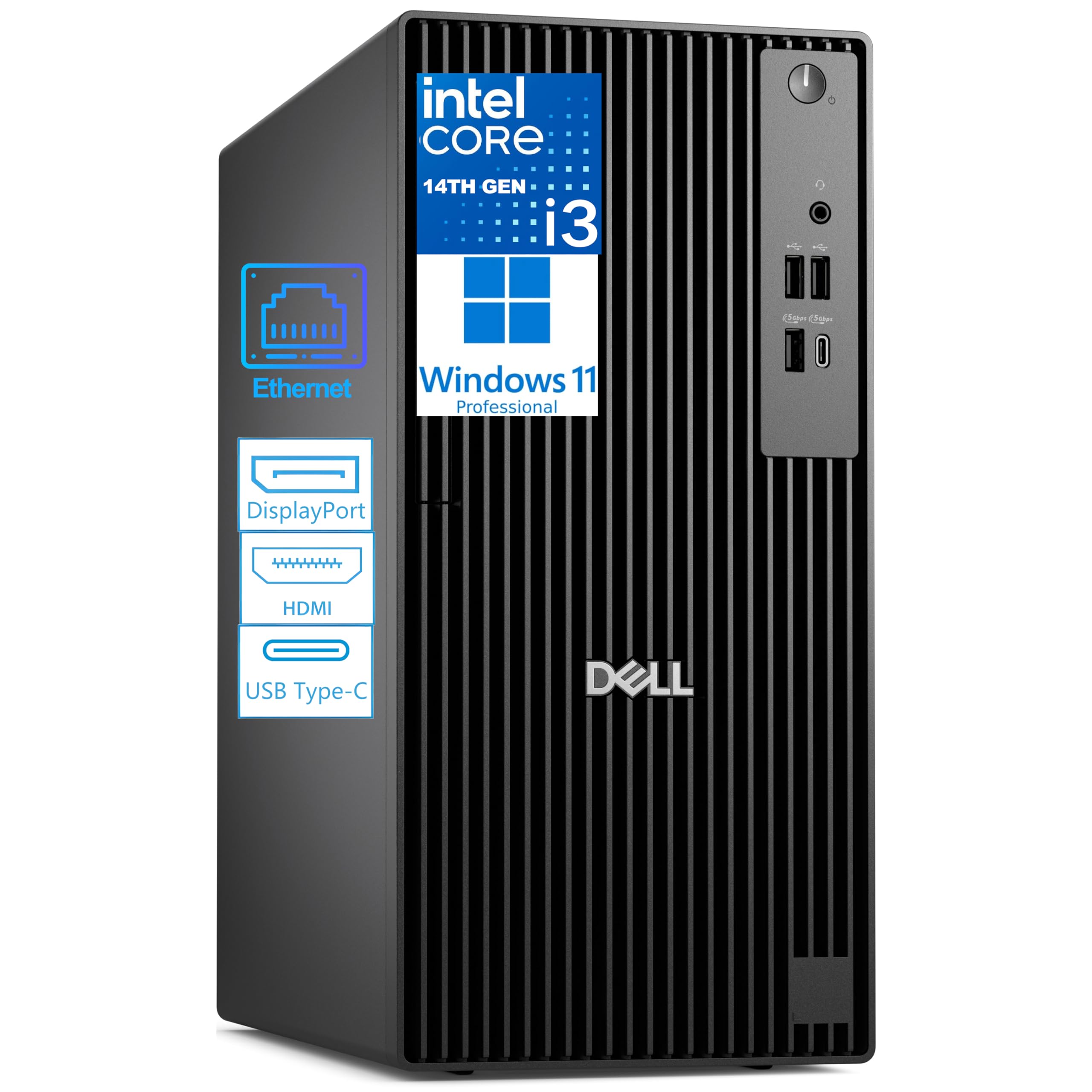
The Dell Next Gen OptiPlex Tower is one of the few options on this list that ships with a 14th Gen Intel processor and DDR5 memory. The Core i3-14100 may sound modest compared to i7 and i5 chips, but its 4 performance cores and 12MB cache are more than sufficient for web browsing, streaming, and Office applications. The 8GB of DDR5 RAM is faster than DDR4, though the capacity is on the lower end for heavy multitasking.
The 256GB PCIe NVMe SSD provides extremely fast boot and load times, but the storage space is limited — you’ll need cloud storage or an external drive if you work with large files. The tower supports upgrading to 64GB of RAM and up to 2TB of additional storage, making it a future-proof platform if you’re willing to invest later. Port selection includes a front USB-C Gen 1 port and dual 4K display support via HDMI 2.1 and DisplayPort 1.4a.
Customer reviews are generally positive, with users appreciating the speed and modern design. It is an ideal choice for someone who doesn’t need graphics or gaming but wants a brand-new, energy-efficient machine that is built to last. A few users reported issues with monitor connectivity after a day of use, but these seem isolated. Note that the desktop does not include built-in Wi-Fi — a USB adapter is provided in the box.
Why it’s great
- 14th Gen processor and DDR5 RAM for the latest platform features
- Upgradeable to 64GB RAM and 2TB storage
- Front USB-C port and dual 4K display support
Good to know
- 8GB RAM is enough for basic use but needs upgrade for future multitasking
- 256GB SSD fills up quickly; plan additional storage
- No built-in Wi-Fi; USB adapter included but adds clutter
6. Lenovo V100 23.8″ FHD All-in-One

The Lenovo V100 all-in-one desktop delivers an excellent balance of price and features for home and student use. Its 23.8-inch Full HD IPS anti-glare display provides sharp visuals with 99% sRGB coverage, making it suitable for photo viewing and basic creative work. The Intel N100 processor is a 4-core, 4-thread chip that handles web browsing, streaming video, and office applications with ease, offering a modern platform that is more efficient than many older desktop chips.
While the 8GB of DDR4 RAM is the minimum recommended for Windows 11, the upgrade path is open — the system supports up to 32GB total. The 512GB PCIe NVMe SSD is a strong inclusion, providing fast boot times and ample storage for documents, photos, and media. Connectivity is modern with Wi-Fi 6, Bluetooth 5.2, and a USB-C port that supports 10Gbps data transfer. The built-in HD camera with privacy shutter and dual 2W speakers make it ready for video conferencing out of the box.
Customers appreciate the speed and clean all-in-one design, which saves desk space and reduces cable clutter. The keyboard and mouse are functional, and the system is quiet in operation. A common complaint is the location of the USB ports on the back, which can be difficult to reach when plugging in flash drives or peripherals. Overall, this is a well-rounded machine for users who prioritize simplicity and a clean setup over raw processing power.
Why it’s great
- 23.8″ IPS anti-glare display with excellent color accuracy
- 512GB NVMe SSD provides fast boot and app loading
- Space-saving all-in-one design with Wi-Fi 6 and USB-C
Good to know
- 8GB RAM may need upgrading for heavy multitasking
- All-in-one design limits upgradeability compared to a tower
- USB port placement on back is inconvenient for frequent plugging
7. HP 22″ FHD All-in-One Desktop

The HP 22″ All-in-One is a compact, budget-friendly machine designed for users who value ease of use and a tidy desk above all else. Its 21.5-inch Full HD anti-glare display is adequate for everyday tasks, and the 13th Gen Intel N100 processor offers efficient quad-core performance for basic web browsing, email, and streaming. The inclusion of 8GB of DDR5 RAM is a nice touch, as DDR5 offers greater bandwidth than DDR4 at the same capacity.
The 128GB SSD is the main limitation of this configuration. It is sufficient for the operating system, a handful of applications, and essential documents, but you will quickly run out of space if you store large photo libraries, music collections, or video files. Cloud storage or an external drive is essential for most users. The port selection is decent, with a single USB-C port, two USB-A ports, HDMI-out, and built-in Wi-Fi 6 and Bluetooth 5.3.
Reviews are overwhelmingly positive, with users praising the speed, easy setup, and excellent value. It is particularly popular among seniors and less tech-savvy users who need a simple, reliable computer for daily use. The HD webcam with privacy shutter and dual stereo speakers are appreciated for video calls. The main drawbacks are the limited storage and the lack of upgradeability inherent in all-in-one designs.
Why it’s great
- Low footprint with integrated display, speakers, and webcam
- DDR5 RAM and Wi-Fi 6 for modern performance
- Privacy shutter on webcam is a nice security touch
Good to know
- 128GB storage is very limited; external/cloud storage needed
- All-in-one form factor means very limited upgrade options
- HP support has been criticized by some users as unhelpful
8. abytespark Prebuilt Gaming PC

The abytespark Prebuilt Gaming PC is a mixed bag that serves a specific niche: budget-conscious users who want light gaming capability in a package that also works as a standard home computer. The CPU is a 4th Gen i7-4770 (circa 2012), which is a decade old but still capable of running most productivity software. The highlight is the AMD Radeon RX 590 with 8GB of GDDR5 memory, which can handle games like Fortnite, CS2, and GTA V at 60 fps on 1080p medium settings.
The system includes 16GB of DDR3 RAM (an older memory standard) and a 512GB SSD for storage. It comes in a white tower case with four RGB fans, giving it a gamer aesthetic that appeals to younger users. The package includes a gaming keyboard and mouse. One important caveat: the 4th Gen i7 CPU is not officially supported by Windows 11, which has caused issues for some buyers. The system ships with Windows 11 but may experience compatibility problems.
Customer feedback is split. Many budget shoppers and parents buying for kids are happy with the gaming performance relative to the cost. However, some users have reported instability, with constant game crashes, display issues, and even a few cases where the CPU incompatibility with Windows 11 caused the system to be repaired at significant extra cost. This machine offers a glimpse into budget gaming but comes with notable risks due to the aging hardware platform.
Why it’s great
- Dedicated RX 590 GPU can play many popular games at 1080p
- 16GB RAM is sufficient for gaming and multitasking
- RGB case and included peripherals add aesthetic value
Good to know
- 4th Gen i7 is not Windows 11 compatible officially
- Uses DDR3 RAM, which is slower than modern DDR4/DDR5
- Potential stability and compatibility issues reported
9. NOVATECH Phantom Gaming PC

The NOVATECH Phantom is an entry-level gaming PC that uses a server-grade Intel Xeon E3-1230v6 processor (essentially an i7-7700 equivalent) paired with an AMD Radeon RX 580 8GB graphics card. This combination can handle most popular online games at 1080p with decent frame rates — Fortnite at 30-60 fps, Minecraft at 100+ fps, and GTA V at 70+ fps. The 16GB of DDR4 RAM and 512GB M.2 NVMe SSD are solid modern specs that ensure fast boot times and smooth application loading.
The case features an infinity mirror design with RGB fans, giving it an aggressive gaming look. The system comes with a one-year warranty from Novatech, which provides more protection than many refurbished units. The build quality is generally praised for the price point, with clean cable management and easy setup out of the box. Some users report excellent customer support from Novatech when issues arise.
However, there are significant drawbacks. The Novatech H61 motherboard is proprietary and has broken SATA drivers, making Windows reinstallation difficult. The fan configuration blows hot air back at the CPU, and the RX 580 2048SP variant requires manual fan tuning to avoid overheating. Only 2 USB ports work at a time, which is extremely limiting. Several reports of the motherboard catching fire after a year of use raise serious safety concerns that cannot be ignored.
Why it’s great
- RX 580 can handle 1080p gaming at medium settings
- Includes 1-year warranty for peace of mind
- 16GB RAM and NVMe SSD for fast system performance
Good to know
- Proprietary motherboard limits upgrades and repairs
- Only 2 functional USB ports at a time
- Reports of motherboard failure and fire hazard after extended use
10. MSI Codex Z2 Gaming Desktop

The MSI Codex Z2 is a powerhouse that sits far above the “basic” category but deserves mention as the ultimate upgrade path for users whose needs evolve beyond word processing. Its AMD Ryzen 7 8700F (8 cores, 16 threads, up to 5.0 GHz) combined with the NVIDIA GeForce RTX 5070 (12GB GDDR7) delivers exceptional performance for AAA gaming, 4K video editing, and VR applications. The 32GB of DDR5 RAM and 2TB NVMe SSD ensure that storage and memory are never a bottleneck.
The case design is understated compared to typical gaming rigs, with a well-ventilated chassis featuring four ARGB fans. The system supports 4K resolution on up to three monitors, and the included MSI Center software allows for easy RGB lighting customization and performance monitoring. The overall build quality is robust, with good airflow that keeps temperatures in check under load.
Reviews highlight the smooth gaming experience and excellent MSI support, although some users experienced early issues with SSD failure and WiFi instability, which were resolved through factory resets and RMA exchanges. The fans can get loud under heavy gaming loads. The RTX 5070 is a premium component that makes this system overkill for basic computing, but for users who want a machine that can handle both work and demanding games, the Codex Z2 is a top contender.
Why it’s great
- RTX 5070 delivers next-gen ray tracing and high-FPS 4K gaming
- 32GB DDR5 RAM and 2TB NVMe provide premium responsiveness
- Excellent cooling design and MSI support
Good to know
- Far more power and cost than a basic desktop user needs
- Fans become audible under heavy load
- Some units have required RMA for SSD or WiFi issues
11. Samsung 870 EVO SATA III 1TB SSD

The Samsung 870 EVO is not a desktop computer itself, but it is the single most impactful upgrade you can make to an existing machine. If you have an older computer running on a hard drive, swapping in this 2.5-inch SATA III SSD will transform its responsiveness. Boot times drop from minutes to seconds, applications open instantly, and the overall user experience becomes dramatically smoother.
The 870 EVO boasts sequential read speeds of up to 560 MB/s and write speeds of up to 530 MB/s, which maximizes the SATA III interface. It comes in a 1TB capacity that provides ample space for an operating system, software, and personal files. Samsung’s reputation for reliability is backed by a 5-year limited warranty with up to 600 TBW (terabytes written) endurance, making it a long-term investment in your computer’s performance.
Reviews consistently praise the 870 EVO for its reliability, consistent performance, and ease of installation. It works with both PCs and laptops, and the included Samsung Magician software makes cloning your existing drive simple. The main drawback is that it is a SATA SSD, not an NVMe drive, so it is limited by SATA’s maximum bandwidth. For users with an older system that only supports SATA, however, this is the gold standard.
Why it’s great
- Maximizes SATA III speeds for dramatic system responsiveness
- 5-year warranty with high endurance rating
- Samsung Magician software for easy data migration
Good to know
- Not an NVMe drive; limited by SATA interface speeds
- Requires a SATA connection; not for M.2 slots
- May be overkill for very old systems with SATA II ports
FAQ
Is 8GB of RAM enough for a basic desktop computer in 2024?
Should I buy a new basic desktop or a refurbished business machine?
Can a basic desktop computer be upgraded later?
Is a dedicated graphics card necessary for a basic computer?
Final Thoughts: The Verdict
For most users, the basic desktop computer winner is the Dell Optiplex 7060 SFF because it packs 32GB of RAM and a fast NVMe SSD into a compact, reliable chassis at a price that leaves room for a good monitor and peripherals. If you want a brand-new machine with a modern platform, grab the Dell Next Gen OptiPlex Tower. And for a clutter-free all-in-one setup, nothing beats the Lenovo V100 AIO for its balance of display quality, storage speed, and ease of use.