
Our readers keep the lights on and my morning glass full of iced black tea. As an Amazon Associate, I earn from qualifying purchases.
Specs are compiled from manufacturer listings and verified buyer reviews and can change over time — please confirm the key details on the product page before buying.
You want to start a podcast, and the gear is the first wall you hit. The good news: you do not need a treated room, an audio interface, or a producer’s budget to sound like you know what you are doing. What you need is one microphone that ignores the dishwasher, a stand that keeps it off your desk, and something to plug it into. That is the whole starter kit. Everything else — the shock mounts, the pop filters, the voice changers, the bundled software — is a bonus you should judge on whether you will actually use it.
I’m Min — the founder and writer behind Gadgets Feed. This guide is built by comparing the manufacturers’ published specifications and the patterns across verified customer reviews, so you get each pick’s real strengths and trade-offs instead of marketing spin.
That is why a dynamic capsule with tight pickup beats a cheap condenser almost every time in a normal apartment, and it is the single thread running through every pick in this basic podcast equipment roundup.
Our Picks at a Glance


How To Choose The Best Basic Podcast Equipment
The first decision is not brand, and it is not budget. It is microphone type, because that single choice decides how much of your room you hear back on the recording.
Dynamic vs condenser: the choice that saves your audio
A dynamic microphone (one with a moving coil inside that reacts to your voice) is built to ignore distance and surrounding sound. That makes it the safer pick for a bedroom, a shared apartment, or a room with a fridge humming nearby. A condenser microphone is more sensitive by design, so it captures more detail — and more of the room. You can run a condenser happily, but you will want soft surfaces and a quiet space around it. For a first setup, the dynamic route is the one that keeps your first ten episodes usable.
USB, XLR, or wireless: pick your connection before your features
USB plugs straight into your laptop, needs no extra box, and gets you recording in minutes. XLR is the pro-standard three-pin connector — it routes your mic into an audio interface or a mixer, which is extra gear but gives you more control and room to grow. Wireless 2.4G systems skip the cable run altogether, which is why they show up in gaming and streaming kits. Many picks here do two or all three, so you are not locked in on day one.
What comes in the box matters as much as the microphone
A pop filter (the mesh disc that breaks up hard “p” and “b” sounds) and a shock mount (a cradle that stops desk bumps from thudding through the recording) matter more than they cost. A bundle that includes them saves you a second order. Check for the stand type too: a weighted desktop base stays put, a clamp arm clears desk space but needs a sturdy edge to grip.
Quick Comparison
| Model | Best For | Connection | Mic Type | Key Extra | Amazon |
|---|---|---|---|---|---|
| Shure MV7+★ Best Overall | One-mic solo podcasts | USB-C & XLR | Dynamic | LED touch panel, auto level | Amazon |
| MAONO PD200WMost Versatile | Two-host shows and interviews | Wireless, USB & XLR | Dynamic | Dual wireless mics, 4 presets | Amazon |
| FIFINE AmpliGame KS5Best for Streamers | Streamers who want a mixer | XLR & USB | Dynamic | 4-channel mixer, RGB | Amazon |
| FIFINE AmpliTank K688T | Small desks, hot mic duty | USB & XLR | Dynamic | Boom arm, tap-to-mute | Amazon |
| Zoom ZDM-1 Pack | First-time podcasters, full kit | XLR | Dynamic | Headphones, tripod, windscreen | Amazon |
| Focusrite Scarlett Solo Studio | Singer-songwriters and voice work | USB-C | Condenser | Interface, headphones, DAW software | Amazon |
| H1 Bundle for 2 | Two people, one small budget | USB & XLR | Condenser | Dual mics, RGB mixer, voice changer | Amazon |
| MAONO PD100W | Clutter-free desk streaming | Wireless & USB | Dynamic | 1500 mAh battery, RGB | Amazon |
| sktome M300 Bundle | Sound effects and voice fun | XLR | Condenser | Sound card, 4 voice changers | Amazon |
In‑Depth Reviews
1. Shure MV7+ USB-C & XLR Podcast Dynamic Mic with Stand – Black
Our pick — over 4.5★ from 600+ verified ratings; the strongest balance of quality and price.
A dynamic USB-C/XLR mic with a live denoiser that keeps fan noise and room echo out of the take.
If your recording space is a spare room with a laptop fan in it, this is the pick that quietly solves that problem. The MV7+ is a dynamic microphone — the moving-coil design that naturally rejects sound arriving from the sides and rear — so it hears you and mostly ignores the room. Shure’s Voice Isolation Technology and built-in DSP (digital signal processing, an onboard chip that cleans the signal before it ever reaches your computer) handle the rest. The real-time denoiser filters out ambient sound, fan noise, and room echo as you record rather than making you fix it later.
The numbers back the reputation: audible noise sits at 20 db here, against 25 db on the sktome M8 bundle, and audio sensitivity of 40 db against that bundle’s 45 db — both differences that show up as a quieter, more controlled floor in a room that is not soundproofed. Auto Level Mode adjusts gain based on how far you are from the capsule and how loud you speak, which means you can lean back in your chair without the recording dropping off. And the virtual pop filter handles plosives (the hard “p” and “b” bursts) without you buying a physical one. Connectivity is USB-C for plug-and-play or XLR if you later add an interface — a genuine upgrade path, not a dead end.
What wins people over is simply how it sounds coming from the start — owners describe voices landing clear and professional with no fiddling, and dozens single out the overall quality and sound quality as the reasons they kept it. The build is note too: an all-metal enclosure and an adjustable desktop stand included in the box, plus a 3m USB-C to USB-C cable. The multi-color LED touch panel gives you 16.8 million hues, level monitoring, pulse effects, and tap-anywhere muting, and it works with the MOTIV Mix app for reverb and tone shaping. The honest catch is size and weight — it is larger and heavier than most desktop mics and genuinely wants a stand, and it sits at the top of this list on cost. Neither is a defect; it is the price of a metal body and a broadcast capsule. Across 600+ ratings it holds a 4.8, which is the strongest score in this group.
Where It Earns Its Keep
- 20 db audible noise — the quietest floor of any mic on this list, so room hum stays out of the take
- Voice Isolation Tech plus a live denoiser cut fan noise and echo as you record, not after
- All-metal body with the adjustable stand, foam windscreen, and 3m USB-C cable in the box
- USB-C today, XLR tomorrow — one mic that follows you as your setup grows
Before You Commit
- Bigger and heavier than a typical desktop mic, and it really does want its stand
- The top of this list on cost — a real decision if you are testing the waters
- Tap-anywhere mute is easy to trigger by accident if you handle the mic mid-sentence
Reach for this if: you record solo in a normal room and want the take to sound finished without a post-production pass.
Look elsewhere if: you are splitting a budget across two hosts — the PD200W covers two voices for less.
2. MAONO PD200W Hybrid Wireless Podcast Microphone for PC, Dynamic XLR USB Mic
Two hosts, one receiver, three ways to connect — the co-host problem, solved.
Most beginner gear assumes you podcast alone. The PD200W assumes you have a co-host sitting three feet away, and it handles that better than anything else here. One Type-C receiver pairs with two wireless desktop mics, and each mic records to its own separate track — so when your co-host coughs over your punchline, you cut it in editing instead of re-recording. The receiver also captures audio and video in sync straight to a camera, which means no clapping your hands at the top of a take to line things up later. Camera and Lightning accessories are sold separately.
The core specs are strong for the money. A 30mm dynamic capsule with cardioid pickup (a heart-shaped sensitivity pattern that favors what is directly in front of it) delivers an 82dB signal-to-noise ratio and handles up to 128dB SPL — loud sources without distortion. Three-stage noise cancellation keeps your voice forward without a soundproof booth, and you can record with no cable at all across a stable 60m wireless range. Battery life runs up to 60 hours with the RGB lighting off, and the included desktop stand, USB-C cable, and receiver mean it is genuinely ready on arrival. Connection-wise it does all three: wireless for freedom, USB for plug-and-play, XLR for a fixed interface setup. Compare that to the Zoom ZDM-1 pack below, which is XLR only — a great mic, but it needs an interface before it makes a sound.
The MaonoLink app gives you four master-tuned preset modes plus EQ and reverb adjustment on PC or smartphone, and the physical dial plus Nvidia Broadcast covers you if you would rather not install it. What owners talk about most is how the dual wireless setup cleans up same-room recording — two people in one room without audio bleeding between mics. The recurring gripe is battery: real-world runtime lands short of the 60-hour ceiling, so charge before a long session. One owner did report opening the box to find no wireless adapter, though the standard kit list includes the Type-C receiver — worth a quick check on arrival.
The two-voice math: if your show is a conversation between two people, this is the structure that saves you a second microphone purchase and a second interface channel.
The honest trade-off: going wireless costs you a charge cycle to think about, and the headphones-free desktop stand is more practical than premium.
Buy it for: co-hosted shows, interviews, and anyone who wants to stop untangling cables before every record.
Pass if: you record solo and would rather put the whole budget into one premium capsule.
3. FIFINE Gaming Equipment Bundle, Dynamic XLR/USB Gaming Microphone Set with Streaming Audio Mixer — AmpliGame KS5
A real fader-based mixer under your hand, not a screen full of sliders.
If you have ever mid-stream needed to drop your game volume by 30 percent in a hurry, this bundle answers that problem physically. The KS5 pairs a dynamic XLR/USB microphone with a four-channel gaming audio mixer that has individual mute control, headphone monitoring, and a proper volume fader — so game audio, voice chat, and your mic each live on their own control instead of fighting over a software panel. Five RGB lighting effects run static or flowing across the mixer while the mic carries its own light, and both are there to match your setup rather than to sell you anything.
One detail to know before you buy: every function key — RGB, mute, monitoring, volume — works over the USB connection only, not over XLR. That is stated plainly in the product notes, and it changes how you should plan your setup. Run the mic on USB if you want the controls, or go XLR into the mixer for a fixed signal path if you want the quieter, more pro-style chain. The 3.5mm cable, dynamic microphone with windscreen, mixer, USB cables, and XLR cable are all in the box, and the whole kit weighs 1.48 kg.
What buyers report most is the sheer amount of kit you get for a budget-tier price. The mixer’s physical faders and mute controls get called out repeatedly, and people running Discord, game chat, and streaming setups describe the sound as clean and voice-focused with proper gain staged. One owner had a mixer that sporadically shut off and rebooted, losing audio mid-session, and exchanged the unit — a rare event rather than a pattern, and the sort of thing you catch in the first week under warranty. XLR output is slightly better than USB on this mic, though the gap is small enough that many users simply run USB for the control flexibility.
Suits you if: you stream, game, and record to the same PC and want hands-on faders instead of alt-tabbing to adjust levels.
Think twice if: you want a pure XLR signal chain with working onboard controls — the buttons need USB.
4. FIFINE AmpliTank K688T Dynamic Microphone Set, Podcast XLR/USB Mic with Boom Arm

The all-metal boom arm that clears your desk and stays where you point it.
This is the one for a cramped desk. Instead of a base taking up a corner, the K688T ships with a heavy-duty alloy-steel boom arm that clamps to the edge and swings 180 degrees vertically and 135 degrees horizontally — so you can pull the mic in close while speaking and push it away when you are done. Because the capsule hangs in the air on a shock mount rather than sitting on the desk, typing and table bumps do not travel up into the recording. The arm is rated to hold up to 2 kilogram, and the full package weighs 2 kg with everything attached.
On the audio side it is a dynamic capsule with cardioid pickup and a 130dB SPL handling figure, running 50Hz to 16KHz. The cardioid pattern turns down sound from the sides, which is the whole reason hard-drive whirr and computer fans stay out of the take. You get both connection types: USB for a straight plug-and-play session, or XLR into an interface or mixer when you want to step up. There is a tap-to-mute button right on the body for sudden interruptions, a gain knob for trimming level, and a headphone jack with its own volume knob so you can hear yourself in real time without touching software. The windscreen and shock mount handle plosives and low-frequency vibration from the start.
The thing that keeps coming up in the feedback is simply how close this sounds to mics costing far more, with value for money the second-most-praised trait. Owners also note there is no special software to install and no instructions needed — you plug in and it works, and it holds its position well once set. The honest caveat: the arm is not a fully articulating model, so it does not bend from the stem and takes some effort to reposition. Buy it for the price-to-sound ratio and the clear-desk design, and accept that the arm is functional rather than silky.
The standout combo: tap-to-mute on the mic body plus a headphone jack with its own knob means you never open a settings window mid-session.
Fit note: a very small desk with a thin edge may struggle — the clamp and arm need something solid to grip.
Pick this for: a first mic where the desk is tight, the budget is real, and you do not want to buy a stand separately.
skip it if: you record standing up or at a lectern — a boom arm expects a fixed desktop.
5. Zoom ZDM-1 Podcast Mic Pack with Dynamic Mic & Headphones

One box, five pieces, nothing left to order before your first episode.
Where other kits leave you hunting for a stand or a pair of monitoring headphones, the ZDM-1 pack closes every gap at once. Inside you get the dynamic microphone, a pair of closed-back headphones, a threaded tabletop tripod that folds flat, a windscreen, and an XLR cable. The microphone itself is tuned for voice rather than instruments, and the headphones are built for isolation and full-range monitoring so you hear what is actually being captured instead of guessing. The tripod sets up in seconds and packs down small if you record away from your usual desk. Audible noise is rated at 135 db and sensitivity at 45 db, with an 18KHz frequency response.
The one thing to flag early: this is an XLR-only kit, so it needs an audio interface or a mixer to connect to a computer. If you already own one — or plan to add the Focusrite below — that is fine, and it is precisely why this pack belongs next to a proper studio starting point rather than at the very bottom of a list. Buy it standalone with no interface and you have a microphone that cannot talk to anything yet.
Owners describe the sound as clean and undistorted with no echo creeping into the final product, and repeatedly note the build quality of the materials and the generous cable length. A few lighter points come up: the ear pads fit slightly tight when new, and the mic housing diameter is right at the edge of standard suspension holders, so a weighted base is the safer mount. Noise cancellation on the headphones takes some figuring out, and replacement foam ear pads are not the easiest to source. Nothing there changes the verdict; it is a pack aimed at people who care about output rather than audiophile finishing touches.
The right call when: you want mic, monitoring headphones, stand, and cable in one purchase and already have an interface or mixer waiting.
Hold off if: you have no XLR interface — start with a USB mic instead and add this later.
6. Focusrite Scarlett Solo Studio 4th Gen USB-C Audio Interface Bundle
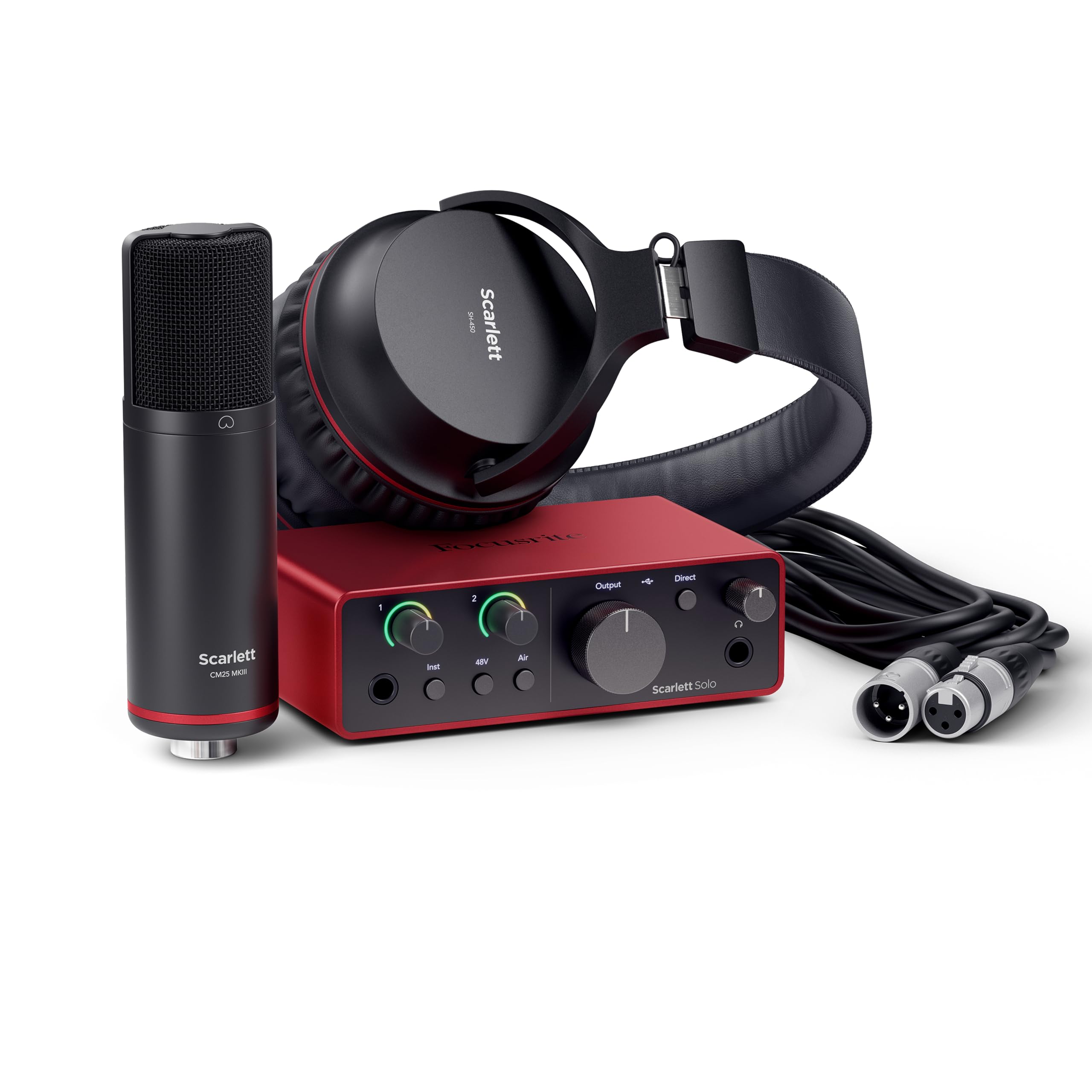
The full studio chain in a box, with the software to actually use it.
This is the pick for anyone whose podcast has music in it. The Scarlett Solo Studio is built around an audio interface with a 120dB dynamic range (the gap between the quietest and loudest signal it can handle cleanly) and 24-bit/192kHz conversion — the same converter design Focusrite uses in its flagship interfaces. It has one XLR mic preamp for the included CM25 MkIII condenser mic and one Hi-Z instrument input so you can plug a guitar straight in and record both at once. Air mode adds presence and harmonic drive to lift vocals and guitars forward in the mix, which is exactly the flavor podcast intros and music breaks want.
The package is genuinely complete: the interface, a USB A-C cable, the condenser microphone, a 3m XLR cable, and SH-450 headphones. On the software side it bundles Pro Tools Intro+, Ableton Live Lite, Cubase LE, and the Hitmaker Expansion suite with effects, instruments, and mastering tools. It works with Windows, Mac, and iPad, weighs 3 pounds, and runs at a 20KHz frequency response. That software bundle is the real differentiator here — most beginner kits hand you hardware and leave you to figure out a recording program on your own.
Owners describe the sound as impeccable and the setup as simple, with several noting it landed cheaper than buying the same unit at their local music shop. Compatibility is the one mixed area — for many it works perfectly, while others hit connectivity snags, so budget a few minutes for driver installation on first setup. For spoken-word podcasts this is more interface than you strictly need; the argument for it is the music input, the headphone monitoring, and not having to replace your whole chain if you later start recording songs or score your show.
What The Money Buys
- 120dB dynamic range and 24-bit/192kHz conversion — headroom you can hear on loud plosives and guitar strums
- XLR mic preamp plus a Hi-Z instrument input, so voice and guitar record together
- Pro Tools Intro+, Ableton Live Lite, Cubase LE and the Hitmaker Expansion included
- CM25 MkIII mic, SH-450 headphones, and a 3m XLR cable in the box
Worth Knowing
- Compatibility reports are mixed — some setups need a driver pass before they behave
- A condenser mic and a full interface is more chain than a spoken-word solo show needs
- Windows, Mac and iPad only per the listed compatibility
Choose it if: your show includes music, multiple inputs, or a real ambition to record instruments alongside your voice.
pass on it if: you record one voice and want it to work the moment you plug in.
7. H1 Podcast Equipment Bundle for 2, RGB Audio Interface with Dual Mics
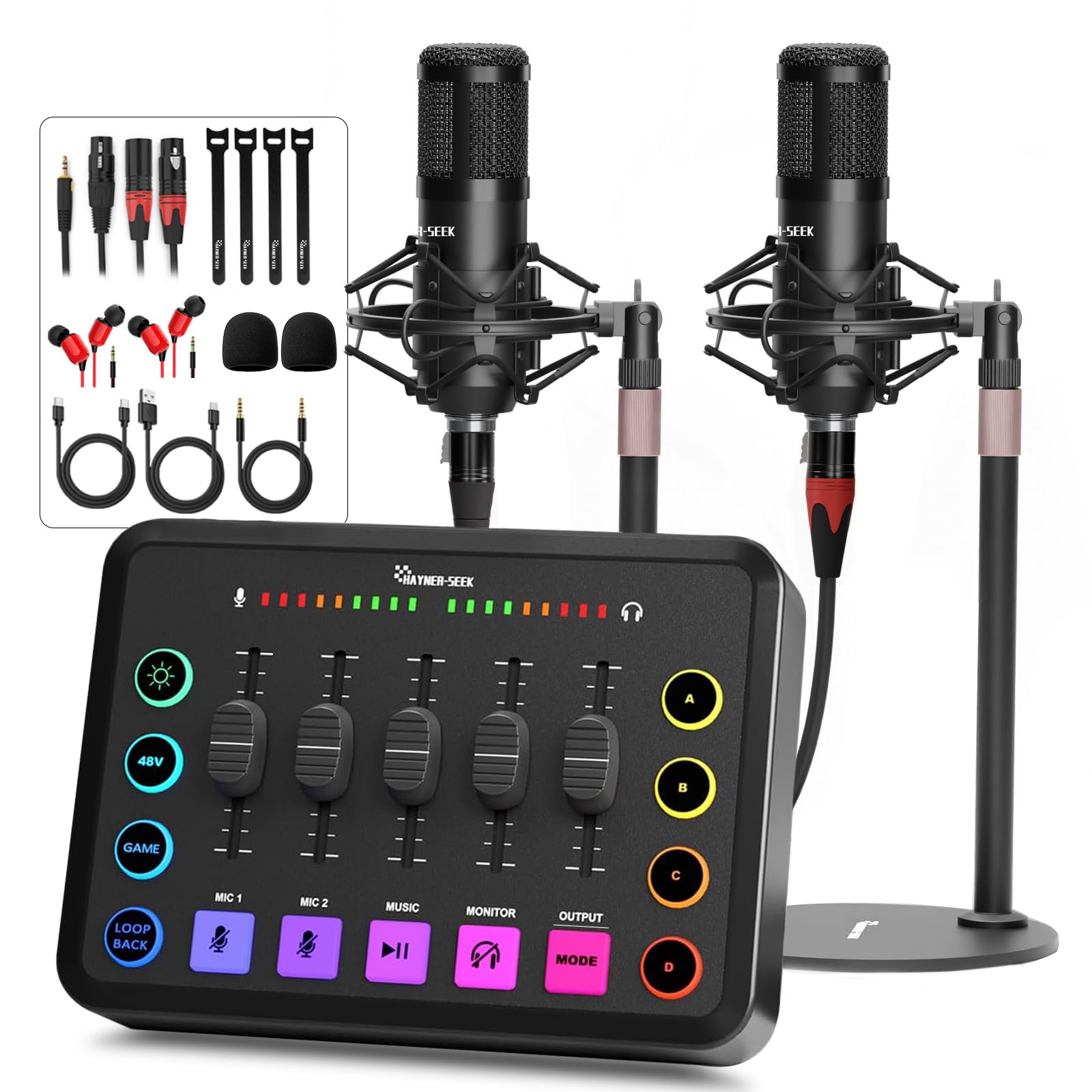
Two voices, five channels, and a mixer neither host has to squint at.
For a two-person show on a starter budget, this kit makes the clever parts obvious the moment you open it. You get two complete microphone setups — a 48V condenser mic on XLR and a 3.5mm condenser mic — plus desktop stand discs, two pairs of earphones, hook-and-loop cable ties, XLR and 3.5mm audio cables, a Micro USB cable, and a dual Type-C cable. Nothing else needs ordering. The audio interface runs five channels with individually labelled faders, mute control per channel, and headphone monitoring, so each host can be adjusted without touching the other’s levels.
Phantom power is built in at 48V (the voltage a condenser mic needs to operate), and the XLR input accepts both condenser and dynamic microphones, which leaves room to swap capsules later. The 3.5mm second input is the practical route for a call-in guest or a second co-host with their own mic. Setup is driver-free across PC, laptop, smartphone, tablet, PS4 and Xbox, and it plays nicely with Windows, Mac, iOS and Android plus OBS, TikTok and YouTube. There is also Bluetooth for music beds, a built-in 1800mAh battery, four customizable sound buttons that can run 30-second clips each, six voice modes, and eleven RGB light modes.
Ease of use carries this bundle — it is the trait owners bring up more than any other, with the sound quality and value for money right behind it. The setup is described as following the steps and being recording within minutes, and the mic quality comes through clean and warm. The one real risk to plan around is the second microphone channel: in a rare case it developed static and cut in and out after the first week’s use. That is a warranty conversation, not a design flaw, and the manufacturer covers it for 90 days — so test both mic channels thoroughly in the first few days rather than the night before you publish.
Reach for this if: two people share a table, a show, and a tight budget and want everything in one box.
Look elsewhere if: you record solo — the second microphone channel is exactly the part you would never use.
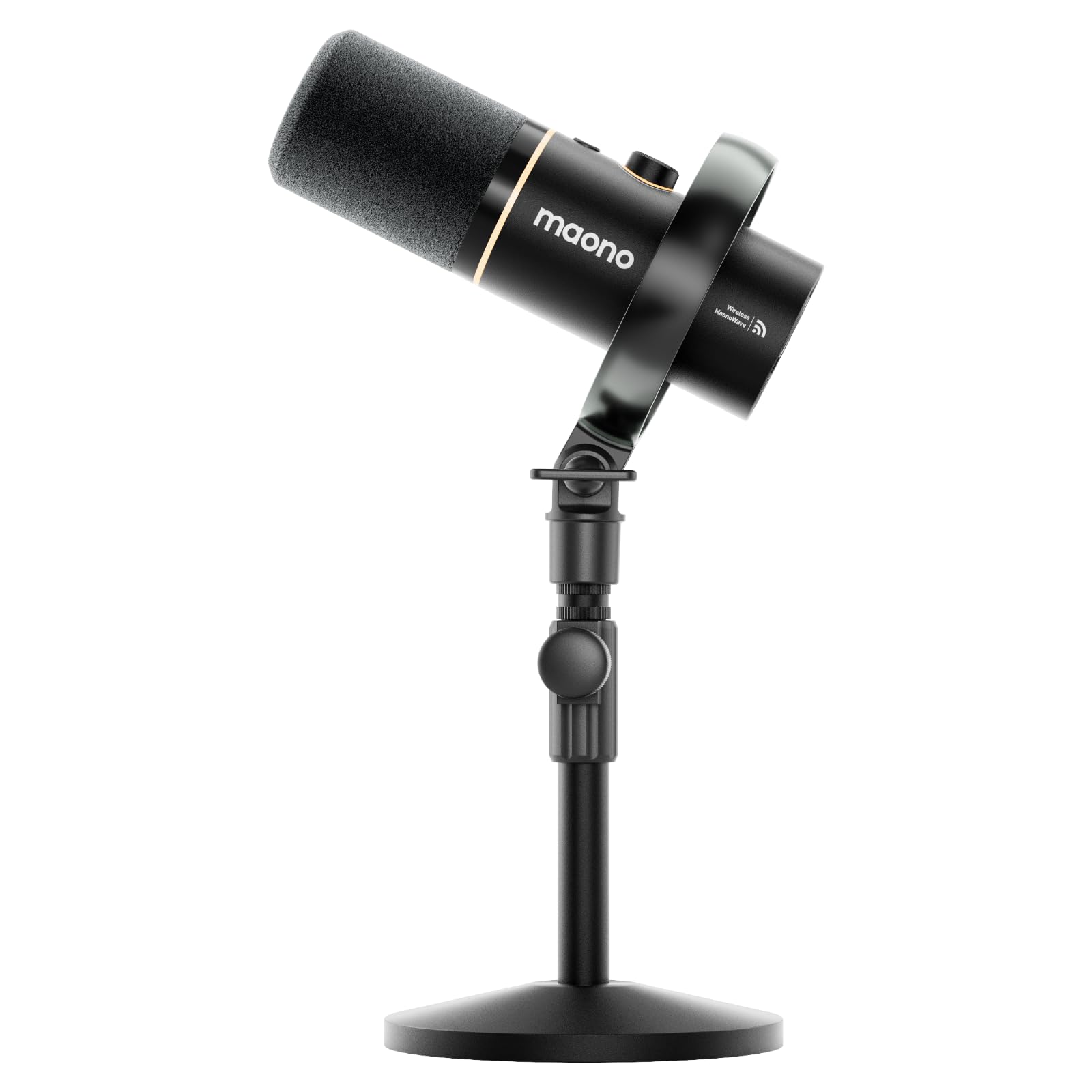
8. MAONO PD100W Wireless Dynamic Gaming Microphone for PC with USB-C Receiver
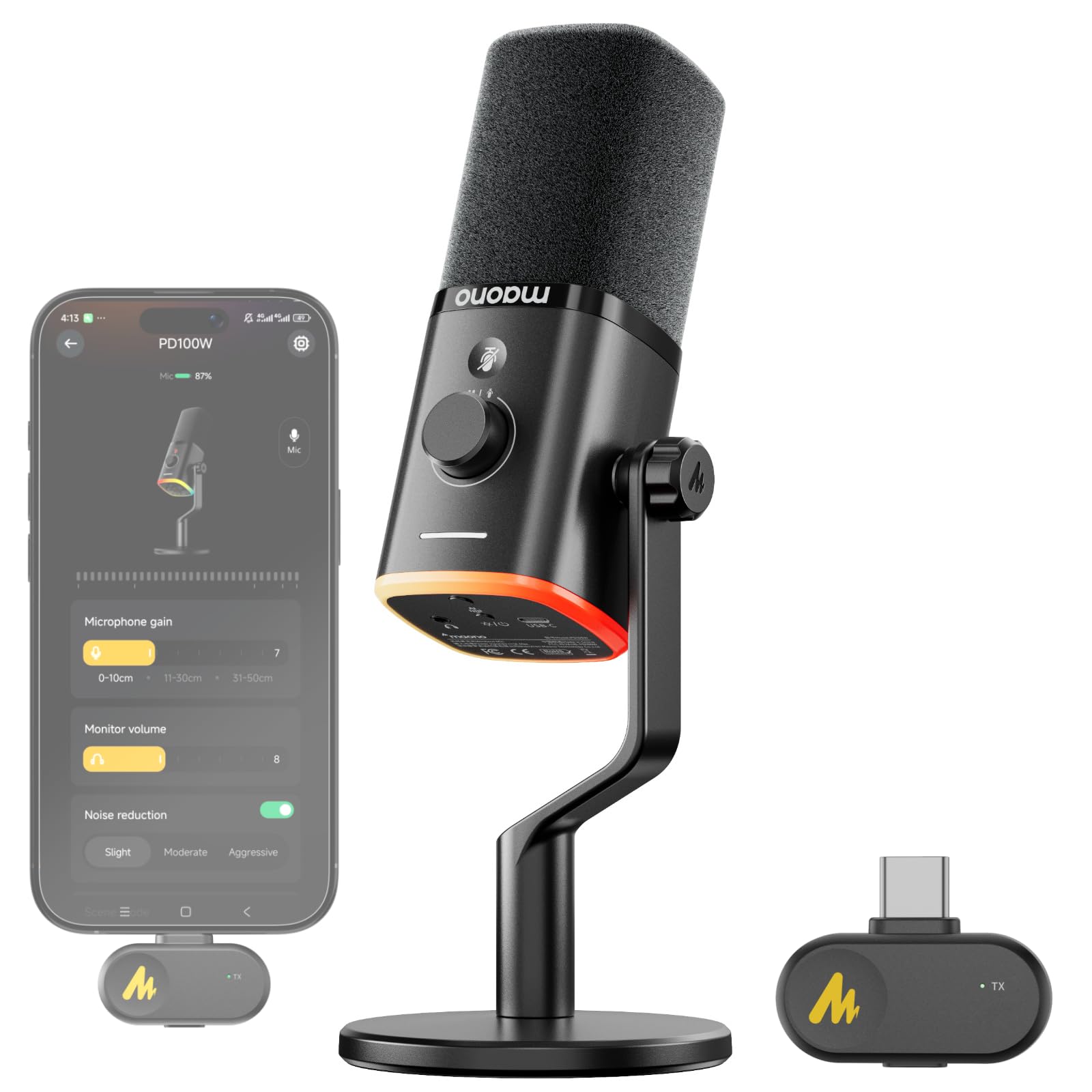
Your desk loses a cable and your recording keeps the clarity.
The cleanest desk on this list belongs to the PD100W. It is a dynamic mic with a 30mm capsule and cardioid pickup that connects over 2.4G wireless or USB, so there is no cable running from mic to tower. The battery is a 1500 mAh cell rated for up to 40 hours of continuous use, and an orange indicator flashes once you drop below 20 percent, with live battery level visible in the Maono Link app. A 2.4G wireless link rated for up to 50 meters (160 ft) means you can step away from the desk mid-session without dropping out.
The vocal chain is built for talk. An 8mm high-density foam windscreen and a precision pop filter block up to 95 percent of plosives and breath pops, and one-click noise reduction gives you three levels — low, medium, high — to match a quiet room or a noisy one. There is a touch mute that also kills the RGB lighting in a single tap, a 3.5mm headphone jack for real-time monitoring, and a combined gain-and-volume knob. The taller stand is a small but real ergonomic fix: it lifts the capsule closer to your mouth so you are not leaning forward for an hour. Software covers EQ, noise reduction, RGB effects, and scene presets on Windows, iOS and Android. One compatibility note worth checking first: it does not support Xbox, and iPhone users need a separate Maono Lightning receiver.
What owners rate highest is the sound quality itself, with the wireless versatility and noise cancellation close behind. The noise reduction genuinely earns its keep — it swallows a washing machine running in the next room and a racing wheel spinning on the desk during a session. The honest wrinkles live in the periphery: the wired and wireless connection can occasionally drop out for some users, the stand is functional rather than premium and can work loose, and a unit here and there arrives with a fault before its replacement runs flawlessly — a pattern Maono’s support handles with free replacements. This is a mic you buy for the sound and the freedom from cables, and you accept a plastic build to get there.
Where it shines: 40 hours of rated runtime plus a 50-meter wireless range means the cable is genuinely the last thing on your mind.
Check before you buy: Xbox is not supported, and iPhone recording needs an extra receiver — confirm your platform first.
Made for: streamers and solo podcasters who want the desk clean and the sound clear without a cable run.
Not for: Xbox players or anyone who wants every dollar in the capsule and none in the wireless.
9. Podcast Equipment Bundle, 48V XLR Microphone Bundle with Voice Changer and Adjustable Stand

The kit that turns a plain episode into a produced one with button presses.
Some shows want theatre, and this is the bundle built for that. It centers on a 48V XLR condenser microphone with a dual DSP noise reduction chip and phantom power support, paired with M300 sound card mixer that delivers 4 voice variations — Female, Male, Child and Monster — plus 23 built-in sound effects and 6 professional modes. Four sound modes and 13 functions live on the sound card, so applause, laughter and stingers land live rather than in editing. The rechargeable 1800 mAh battery is rated up to 10 hours of live broadcast, and breathing RGB lighting plus an LED display show what you are adjusting in real time.
Everything arrives together: the 48V XLR microphone, the DJ mixer, a 3.5mm earphone, desktop microphone stand, shock mount, pop filter, anti-wind foam cap, an XLR-to-XLR cable, a USB-to-Type-C data cable, two 3.5mm TRRS audio cables, and a user manual. Compatibility spans Windows, iOS, Android and Mac OS across smartphones, computers, PS4, Xbox, and Switch. Two practical notes from the documentation themselves: charge it before first use, and if your phone has no 3.5mm jack you will need an OTG adapter, which is not included.
Where this bundle gets fun is exactly where it gets limited. The sound effects transmit to your headphones rather than down the line to your connected device, so your audience hears your voice but not the cheering you triggered. The build is lightweight plastic, the effects buttons are described as unremarkable but functional, and all three mic inputs share one level control rather than having independent gain. Battery is the other watch point — real-world use has come in well short of the advertised runtime, with the interface dying around two hours against a claimed five-hour run. Buy it for the creative toolkit and the price, and treat it as a stepping stone rather than a broadcast console.
What Makes It Fun
- 4 voice changers and 23 sound effects give a one-person show instant production value
- 48V XLR condenser mic with a dual DSP noise reduction chip, plus phantom power support
- Full accessory set — shock mount, pop filter, foam cap, stand, earphone and both cables included
- Wide platform support across Windows, iOS, Android and Mac OS, smartphone to console
Set Your Expectations
- Sound effects play through headphones only — they do not reach your recorded or streamed audio
- Battery has run short of its claimed runtime in practice, so keep it topped up before a session
- Phones without a 3.5mm jack need an OTG adapter that is not in the box
Great fit for: TikTok, YouTube and casual live streamers who want voice effects and sound buttons on a starter budget.
Wrong fit for: anyone chasing a clean, unprocessed interview recording — the effects and shared input level get in the way.
Understanding the Specs
Audible noise and sensitivity (db)
Audible noise is the level of hiss the microphone produces with no one speaking — lower is better, because a low floor lets you raise the voice without raising the background. Sensitivity measures how much output the capsule produces for a given sound, usually expressed in db; a lower sensitivity figure generally means the mic needs a bit more gain but stays calmer around room noise. These two numbers are what separate a microphone that works in an untreated room from one that needs a quiet booth.
SPL handling and pickup pattern
SPL (sound pressure level) is the loudest sound the capsule can take before it distorts, measured in db — useful if you shout, sing, or laugh close to the mic. The pickup pattern is the shape of the area the microphone listens to: cardioid favors what is directly in front and turns down sound from the sides and rear, which is why it appears on almost every voice-focused mic here. A tighter pattern means less of your room, your fridge, and your street comes along for the ride.
Connections: USB, XLR, and 2.4G wireless
USB needs no extra hardware and connects straight to a computer or phone, which is the fastest route to recording. XLR runs through an audio interface or mixer and gives you a cleaner, more expandable signal chain — the trade-off is that you must own or buy the interface. 2.4G wireless uses a small USB-C receiver to link mic and computer without a cable, typically with a stated range figure, and it trades a battery charge cycle for a tidier desk and free movement while recording.
Phantom power, DSP, and monitoring
48V phantom power is the voltage a condenser microphone needs before it will operate, so a mixer or interface that lists it can run condenser capsules. DSP is onboard digital processing — noise reduction, EQ, and effects handled inside the device rather than in software. A headphone jack with its own volume knob lets you monitor your own voice in real time with no delay, which is how you catch a plosive or a level problem while you still have the take in front of you.
FAQ
Do I need an audio interface to use an XLR microphone?
Is a dynamic microphone better than a condenser for a podcast in a normal room?
Can two people record a podcast on one microphone bundle?
Does wireless audio add noticeable lag to a podcast recording?
How long does a wireless podcast microphone battery last?
What is 48V phantom power and do I need it?
Will a podcast microphone work with my phone or tablet?
Do I need a pop filter and a shock mount for a basic setup?
Can a USB podcast microphone record two voices at once?
What is a cardioid pickup pattern and why does it matter?
Final Thoughts: The Verdict
For most solo podcasters, the basic podcast equipment answer is the Shure MV7+ — the lowest audible noise on this list at 20 db and a live denoiser mean your recording survives a normal room, and it is the highest-rated pick here at 4.8 stars across 600+ owners. If two people share the show, grab the MAONO PD200W, whose single receiver runs two wireless mics on separate tracks and connects over wireless, USB or XLR. And if your podcast has music in it, the Focusrite Scarlett Solo Studio gives you the interface, the condenser mic, the headphones, and the recording software in one purchase.
The honest nudge: start with the one that matches your actual room and your actual number of hosts. A single quiet dynamic mic and correct placement beats a bigger kit you never finish setting up — and every pick above can grow with you as the show does.
How We Picked
We do not accept paid placement. Every pick is matched to a real buyer and a real use-case; we do not hands-on test units.
Sources & Methodology
Specifications: manufacturer listings and product documentation. Review insights: verified customer reviews, as of September 2026. Pricing: not shown on this page (it changes often); check the current price via the retailer link.
As an Amazon Associate, Gadgets Feed earns from qualifying purchases. This does not affect which products we feature.