
Our readers keep the lights on and my morning glass full of iced black tea. As an Amazon Associate, I earn from qualifying purchases.
Specs are compiled from manufacturer listings and verified buyer reviews and can change over time — please confirm the key details on the product page before buying.
A classroom set of Chromebooks, a fleet of shop tablets, or a stack of office laptops often ends up with tangled cords and missing chargers. A charging cabinet locks every device into one organized, ventilated box, so you stop hunting for plugs. The picks here cover wall-mounted stations, compact desktop lockboxes, and a larger rolling-friendly unit — your choice depends on how many devices you own and where you want the cabinet to live.
I’m Min — the founder and writer behind Gadgets Feed. This guide is built by comparing the manufacturers’ published specifications and the patterns across verified customer reviews, so you get each pick’s real strengths and trade-offs instead of marketing spin.
The safest way to store and power a fleet of devices is a locking, ventilated battery charging cabinet that keeps cords managed and gadgets secure in one tidy unit.
Our Picks at a Glance
How To Choose The Best Battery Charging Cabinet
Before you buy, measure your devices. The single most common mismatch is assuming the slot count matches the screen sizes you own — a cabinet rated for 12 Chromebooks may not hold a class set of 14-inch laptops comfortably. Check the slot width and depth against your actual gear.
Capacity vs. Real Device Fit
A cabinet that claims 16 slots is only useful if those slots fit your screens. Look for the maximum screen size stated, then subtract a little for protective cases. If you own 17-inch laptops, you are already at the edge of what most tabletop units accept.
Security Features That Matter
Locking mechanisms vary — key locks are standard, while some units add a combination lock for a second layer. In shared spaces like classrooms or medical carts, a solid steel door with a real lock is worth more than a plastic shell with a flimsy latch.
Ventilation and Heat Management
Charging a full set of devices generates heat, so ventilation is critical. Ventilated side panels allow airflow and prevent overheating when all bays are in use. Without ventilation holes, devices can overheat during long charge cycles.
Quick Comparison
| Model | Best For | Max Screen Size | Weight | Lock Type | Amazon |
|---|---|---|---|---|---|
| Learniture Structure Series★ Best Overall | Wall-mounted classrooms with iPads | — | 23.5 pounds | Key | Amazon |
| POCHAR 8-Unit Cabinet | Compact desk or countertop | 14 inches | — | Key + Combination | Amazon |
| Pearington 16-Device Cabinet | Larger fleets with bigger screens | 17 inches | 28 pounds | Key Fob | Amazon |
In‑Depth Reviews
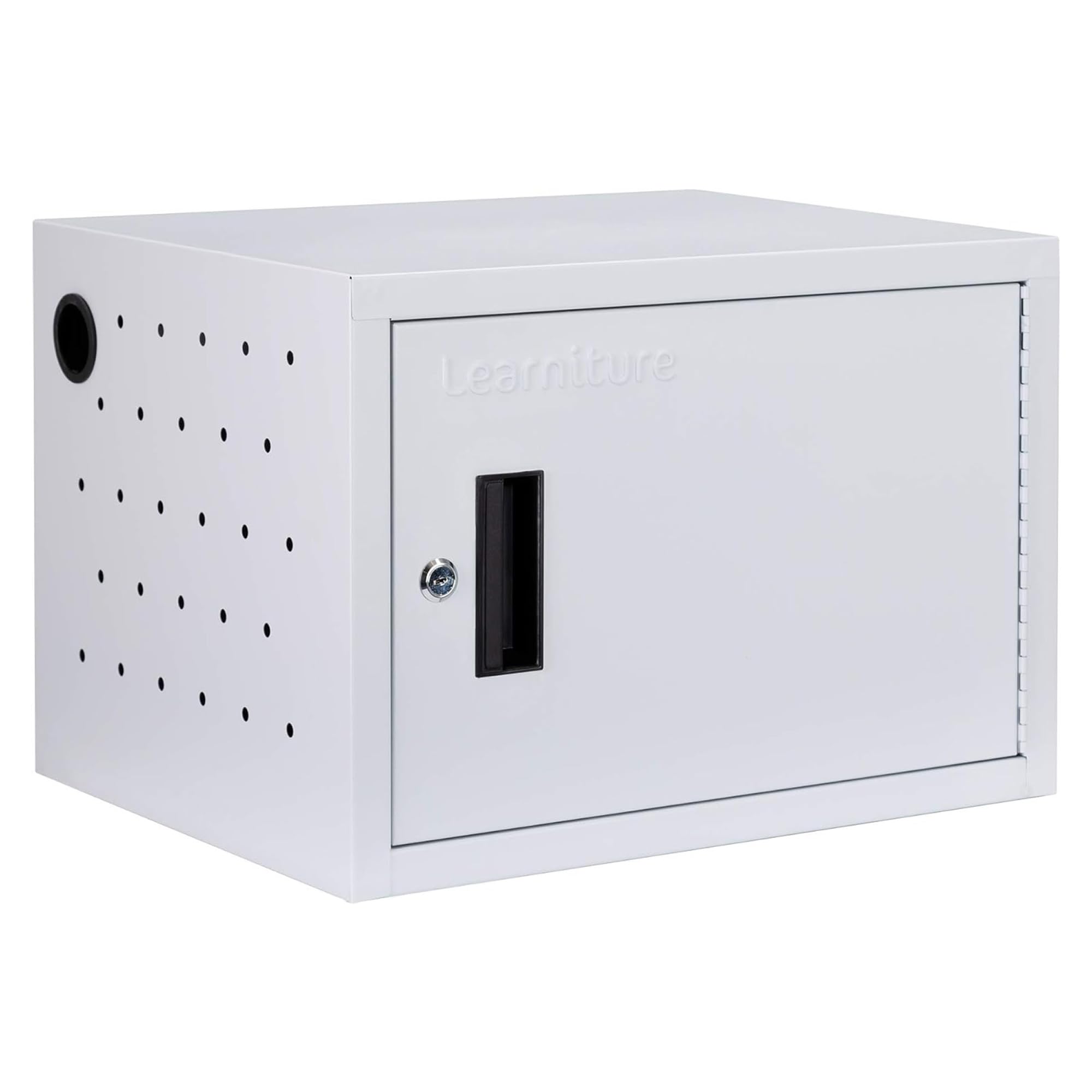
1. Learniture Structure Series 12-Device Charging Station
Our pick — over 4★ from 100+ verified ratings; the strongest balance of quality and price.
The classroom favorite that tucks onto a wall and charges twelve iPads without a cart in sight.
Teachers who want device storage off the floor entirely will like this one. It mounts to any open wall using a French cleat system (a two-piece hanging bracket), so you free up floor space that a rolling cart would eat — though you supply the mounting hardware yourself. At 23.5 pounds and 15″D x 19″W x 13″H, it is lighter and more compact than the 17″D x 17″W x 20″H Pearington unit, making it easier to handle during installation.
Inside, a 12-outlet strip with a rotated orientation is designed so every plug gets used, and 12 cable management clips stop wires from tangling. Each slot measures 1.25″W x 13″D x 9.5″H, and the whole station carries a 65-pound weight capacity — buyers report it holds a class set of iPads with room to spare and works with multiple charger types. The one-point key lock keeps devices secure while they charge, and 2 grommet holes let cables pass through so you can lock devices inside with power still connected.
Real buyers are clear about the trade-off. As owners mention: “The only issue is that there is not a good way to store the cords.” A teacher who used PTA funds for two of these called it a huge upgrade over an eyesore iPad cart, praising how much easier it made putting iPads away each day. A handful of owners note that the rear outlet orientation can block bulkier USB-C chargers, and some found they needed shorter 6-inch cords to let the door close cleanly.
What wins classrooms over
- Sturdy alloy steel build with a 5-year limited warranty behind it
- French cleat mounting keeps floor space clear
- 12 cable clips and grommet holes manage cords neatly
- 65-pound capacity handles a full class set
Where it asks for patience
- Cord storage is the recurring gripe — plan extra cable management
- Rear outlet orientation can block larger USB-C chargers
- Mounting hardware is not included
Reach for this if: you run a classroom and want a secure, wall-mounted home for a fleet of iPads or Chromebooks.
Think twice if: you rely on oversized USB-C bricks — the outlet layout may force you to buy shorter cords.
2. POCHAR 8-Unit Charging Cabinet for Laptops & Tablets
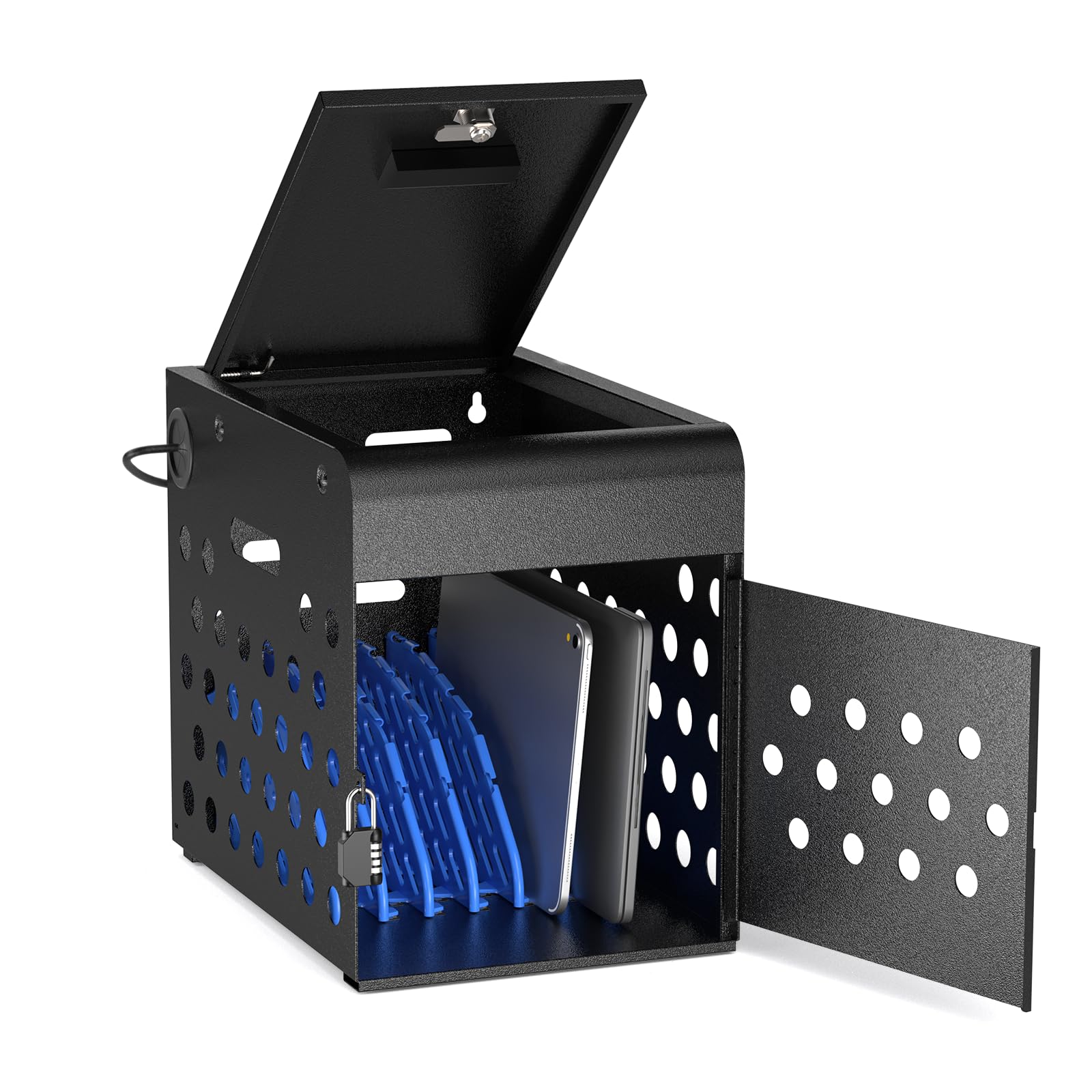
The pre-built steel lockbox that brings order to a busy countertop without a single tool.
This one arrives fully assembled, so you skip the hours-long setup — open the box, thread the power cord, and it is ready on a desk, countertop, or wall. Its compact 10.5″W x 15″D x 13.75″H footprint is the smallest of the three, so it disappears into a corner of a library or shop counter while still holding up to 8 devices with screens at 14 inches or smaller.
Security is the headline here: the all-steel door has two layers of theft prevention — 2 physical keys plus a separate combination lock. That dual setup is exactly what a school or medical cart needs in a shared space. Behind the door, the ventilated side panels keep air moving across all 8 bays charging at once, and the steel frame supports up to 40 pounds of devices. Numbered, adjustable divider slots let you assign each student or employee a dedicated bay, which simplifies check-in and check-out routines.
The honest sizing catch is real. As customers note: “Unfortunately, we have 17 inch screens and those did not actually fit in there.” This cabinet is built for Chromebook and tablet sizes, not full-size laptops. A shop owner who bought it for employee computers said it brought real order to the workspace — computers now safe, easy to find, and charged. A few owners note the power cord threading is tight and that bigger laptops need to be open up to charge, which is worth knowing before you commit.
Neat and secure: the dual key-and-combination locking is rare at this size, and the pre-built arrival means zero assembly frustration.
Know the limit: this is a Chromebook-and-tablet cabinet — 14-inch screens max — and threading the power cord takes patience.
Best for: K-12 classrooms, libraries, and shop counters storing 8 or fewer smaller devices with strong security needs.
Look elsewhere if: you own 15-inch or larger laptops, which simply will not fit inside the bays.
3. Pearington 16 Device Portable Table Top Charging Cabinet
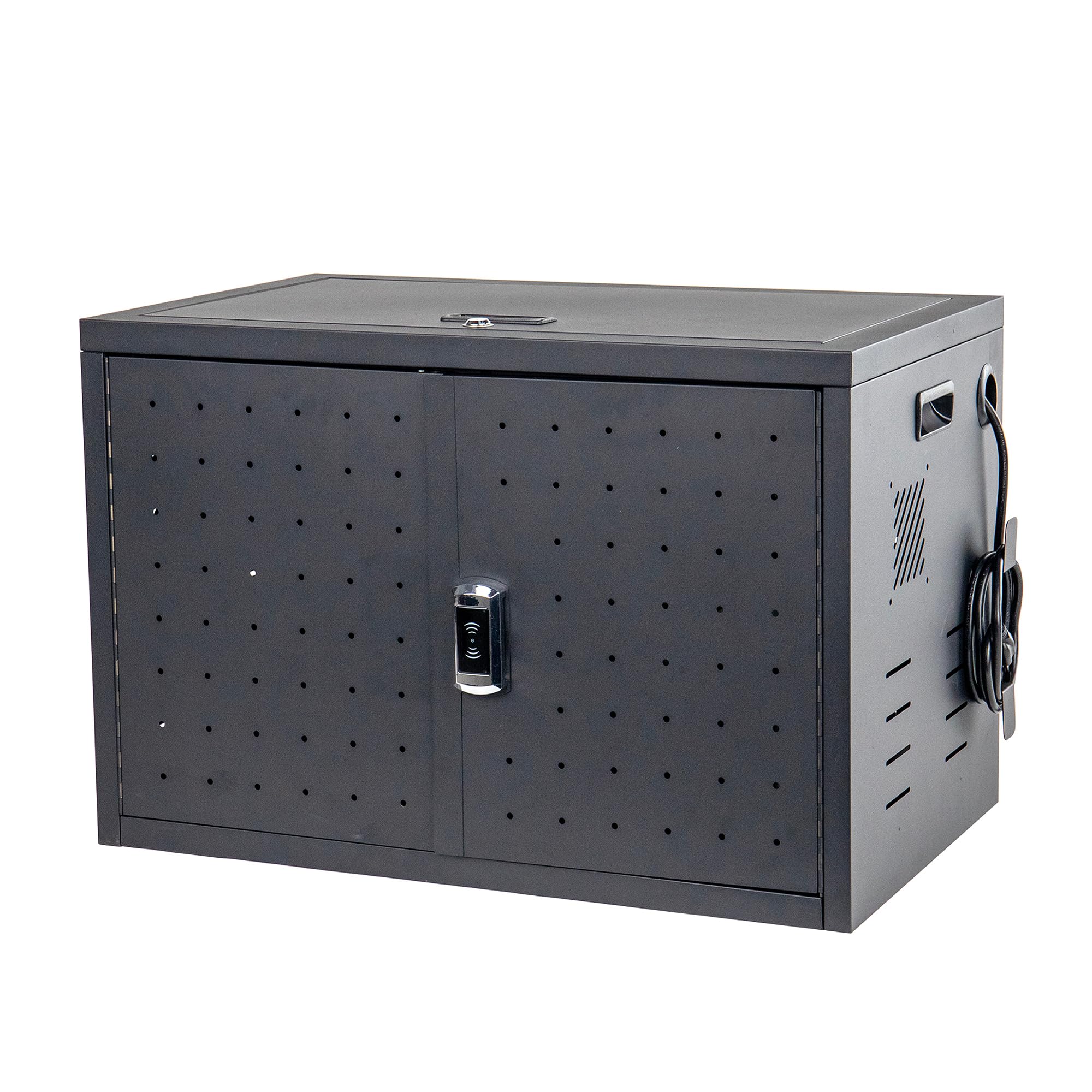
The 16-slot workhorse that swallows bigger screens and travels between rooms on side handles.
If your fleet is larger or your laptops run big, this is the cabinet that scales. It stores and charges 16 devices at once with padded slots that accept screens up to 17 inches — the most generous sizing of the three, beating the POCHAR’s 14-inch limit by a clear margin. At 17″D x 17″W x 20″H and 28 pounds, it is the biggest and heaviest unit here, which makes sense: it is 4.5 pounds heavier than the Learniture’s 23.5 pounds and occupies roughly 13% more volume, so it is built for a designated charging spot rather than frequent wall mounting.
Portability is a real feature, not a claim. Side handles let you move the whole charged fleet from one classroom or office to another without unloading anything, and the locking front door uses a key fob entry for quick access. Added slots on the top shelf handle cord and power-block management, so bulky chargers have a home instead of dangling.
The trade-off is in the assembly and fit. Reviewers point out the cabinet is easy to assemble, but the doors occasionally arrive misaligned — although the fix is often as simple as flipping the bottom “E” panel so the frame pieces orient correctly. One mechanic team uses it daily for tablet storage and charging and loves it. An occasional unit has arrived with doors that simply do not close, which is the rare lemon in an otherwise solid design.
Why the fleet crowd likes it
- 16 padded slots accept screens up to 17 inches
- Side handles make it genuinely portable between rooms
- Top-shelf slots manage cords and bulky power blocks
- Key fob entry is faster than fumbling with a key
Setup realities
- Assembly takes time and needs a screwdriver and wrench
- Door fit can be finicky if frame panels are oriented wrong
- Instructions are minimal — expect to work from the images
Choose this one if: you manage a bigger fleet of up to 16 devices, some with 17-inch screens, and want to move the whole cabinet between rooms.
Be ready for: a longer assembly session and a possible door-alignment tweak — flip the bottom panel if the doors do not close.
Understanding the Specs
Slot Size vs. Screen Size
The number on the box (12, 8, 16) tells you how many devices fit, but the slot width and depth decide which devices actually slide in. A cabinet rated for 14-inch screens will not hold 17-inch laptops, no matter how many slots it has. Always compare the maximum stated screen size against your real gear, and leave room for protective cases.
Ventilation and Airflow
Charging a full set of devices at once produces heat, which degrades battery health. Look for ventilated side panels or grommet holes that let air move through the cabinet while the door is closed. A sealed box with no airflow will overheat devices during long charge cycles.
Locking Mechanisms
Key locks are the standard, but combination locks add a second layer of security that matters in shared spaces. Some cabinets pair both, so a lost key does not mean a locked-out fleet. Steel doors with real latches offer far more theft protection than plastic fronts.
Cable Management
Clips, grommet holes, and dedicated power-block slots are what turn a cabinet from a messy box into an organized station. Without them, cords tangle and block the door from closing. This is the feature buyers most often wish they had checked before buying.
FAQ
Will a 16-device cabinet hold 16 full-size laptops?
Can I charge devices while the cabinet door is locked?
Do I need to assemble these cabinets?
How much weight can a charging cabinet support?
Is ventilation important in a charging cabinet?
What is the difference between a key lock and a key fob lock?
Can I wall-mount a charging cabinet?
Why do some buyers have trouble with cabinet doors not closing?
Final Thoughts: The Verdict
If you want one dependable pick, the battery charging cabinet winner is the Learniture Structure Series because its 12-outlet layout, sturdy steel build, 65-pound capacity, and wall-mount design make it the most complete classroom solution — and the crowd agrees, with a 4.4-star average across 100-plus ratings. If you want a compact, pre-assembled cabinet for smaller devices with strong dual-lock security, grab the POCHAR 8-Unit. And for a 16-device fleet with screens up to 17 inches that you need to move between rooms, the Pearington 16 is the one to reach for.
How We Picked
We do not accept paid placement. Every pick is matched to a real buyer and a real use-case; we do not hands-on test units.
Sources & Methodology
Specifications: manufacturer listings and product documentation. Review insights: verified customer reviews, as of August 2026. Pricing: not shown on this page (it changes often); check the current price via the retailer link.
As an Amazon Associate, Gadgets Feed earns from qualifying purchases. This does not affect which products we feature.