
A gaming laptop that dies mid-match isn’t a weapon; it’s a leash. The fight for real unplugged runtime is the defining battle of the modern mobile gaming scene, where high-performance silicon and high-capacity cells collide. Finding a machine that balances raw frame rates with genuine longevity requires looking past the marketing and straight at the watt-hours and integrated GPU efficiency.
I’m Min — the co-founder and writer behind Gadgets Feed. I’ve spent years deep in market analysis and spec-sheet comparisons, scrutinizing how manufacturers balance thermals, power draw, and battery chemistry to deliver the longest possible unplugged sessions.
This guide breaks down the real-world runners, the ones that can actually handle a commute, a café session, or a cross-campus LAN party without hunting for an outlet. After extensive research, these are the best options currently available if you are searching for the best battery life gaming laptop.
How To Choose The Best Battery Life Gaming Laptop
Not all gaming laptops are created equal when the power cord is left behind. The key is understanding that battery life is a system-level attribute driven by the processor, graphics card, display, and the software that manages them. Here are the critical factors that separate the marathon runners from the sprinters.
Battery Capacity (Watt-hours)
The single most important spec for longevity is the battery’s watt-hour (Whr) rating. A laptop with a 99.9Whr pack (the FAA limit for carry-on travel) will always outlast a 60Whr equivalent, assuming similar hardware. Look for models that pack at least 80Whr; premium models often push to 90Whr or the maximum allowable capacity. This is the foundation of any extended unplugged gaming session.
Integrated GPU Efficiency & MUX Switch
High-end gaming laptops rely on discrete graphics (dGPU), which are power-hungry. The smartest designs include a MUX switch paired with NVIDIA Optimus or Advanced Optimus technology. This allows the system to route display tasks through the efficient integrated graphics (iGPU) for everyday work, automatically switching to the powerful dGPU only when a game launches. This dynamic switching can triple or quadruple battery life during non-gaming use.
Display Technology & Refresh Rate
A 240Hz or 300Hz screen draws significantly more power than a 60Hz or 165Hz panel. Many laptops now include dynamic refresh rate switching, where the screen automatically drops to a lower refresh rate when on battery power to save energy. OLED displays also offer power advantages on dark content because each pixel is self-emissive. For the best balance of visuals and battery life, a high-quality IPS or OLED panel with a moderately high refresh rate is ideal.
Quick Comparison
On smaller screens, swipe sideways to see the full table.
| Model | Category | Best For | Key Spec | Amazon |
|---|---|---|---|---|
| Lenovo Legion Pro 7i | Premium | Balanced battery & desktop-replacement power | 80Whr battery, RTX 5070 Ti | Amazon |
| Lenovo Legion 5i | Mid-Range | OLED efficiency & workday longevity | PureSight OLED, 14700HX | Amazon |
| ASUS ROG Strix G16 (5070) | Mid-Range | Premium display & solid battery runtime | 90Whr battery, ROG Nebula display | Amazon |
| Acer Nitro V 16S AI | Value | Budget-friendly with modern efficiency | Ryzen 7 260, RTX 5060 | Amazon |
| GIGABYTE Gaming A16 | Mid-Range | Strong value with RTX 5070 | 32GB DDR5, RTX 5070 | Amazon |
| msi Vector 16 HX AI | High-End | Thunderbolt 5 & top-tier build | Ultra 9-275HX, RTX 5070 Ti | Amazon |
| msi Crosshair 18 HX AI | High-End | Massive 18” QHD+ 240Hz screen | 90Whr battery, 18” display | Amazon |
| ASUS ROG Strix G16 (5080) | High-End | Top-tier graphics in a portable chassis | RTX 5080, ROG Nebula display | Amazon |
| Lenovo Legion Pro 7i Gen 10 (5080) | Premium | Ultimate performance & OLED clarity | 64GB DDR5, RTX 5080 | Amazon |
| Alienware 18 Area-51 (5080) | Premium | Unapologetic power & build quality | 18” WQXGA 300Hz, RTX 5080 | Amazon |
| Dell Alienware 18 Area-51 (5090) | Ultra-Premium | Maximum firepower & future-proofing | RTX 5090, 64GB DDR5 | Amazon |
| Acer Nitro V 15.6” | Budget | Entry-level gaming with solid specs | i5-13420H, RTX 5050 | Amazon |
| ASUS ROG Strix G16 (5060) | Mid-Range | 165Hz display & reliable performance | i7-14650HX, RTX 5060 | Amazon |
In‑Depth Reviews
1. Lenovo Legion Pro 7i – AI-Powered Gaming Laptop
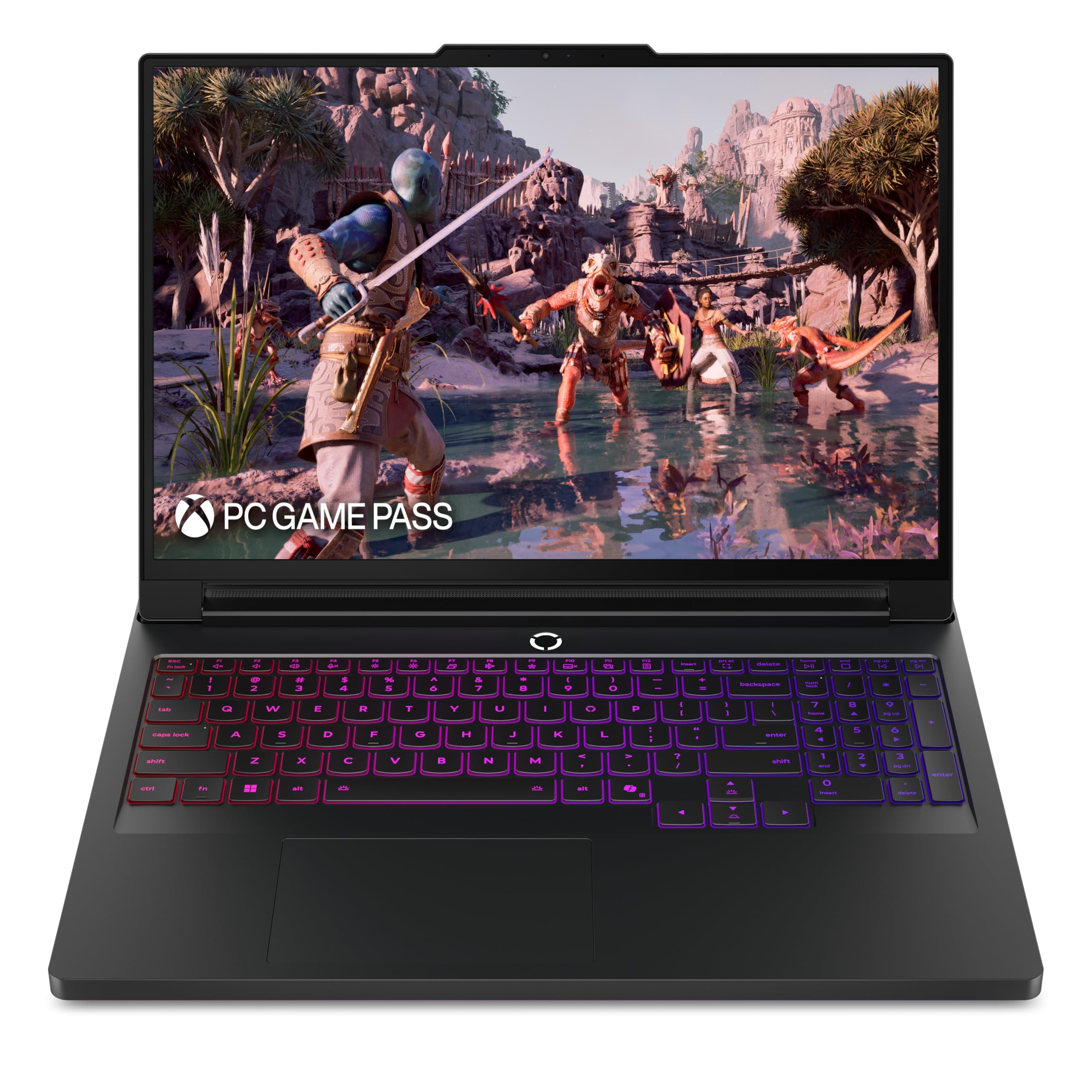
The Legion Pro 7i strikes a rare balance between brute-force gaming and genuine all-day usability. Powered by an Intel Core Ultra 7 255HX and an RTX 5070 Ti, it manages to deliver desktop-replacement class frames while still offering a reported 5-hour battery life for light use and around 2 hours for gaming on the go, thanks to its efficient Lenovo AI Engine+ that dynamically manages power distribution.
The 16-inch WQXGA PureSight OLED display with a 240Hz refresh rate is simply gorgeous, offering perfect blacks and vibrant colors that make every game pop. The Legion Coldfront: Vapor cooling system keeps the laptop from becoming a lap-burning liability, using a vapor chamber to efficiently expel heat out the back, which means quieter operation during less demanding tasks.
At roughly 6 pounds, it’s not the lightest travel companion, but that weight is justified by the robust metal build and a full 400W power supply that can fast-charge the battery. The 7-hour battery life estimate from Lenovo is optimistic for heavy use, but for a machine this powerful, it provides one of the best runtimes in its class.
Why it’s great
- Excellent OLED screen with 240Hz refresh rate
- Powerful RTX 5070 Ti with 12GB VRAM
- Very quiet under low load with a metal chassis
Good to know
- Heavy build, not ultra-portable
- Fans can get loud during intense gaming sessions
- No Windows Hello IR camera included
2. Lenovo Legion 5i – Gaming Laptop

The Legion 5i packs an impressive feature set into a more accessible price point. Its 15-inch 2.5K WQXGA PureSight OLED display is one of the best in its segment, offering exceptional color accuracy and contrast that rivals much more expensive units. The Intel Core i7-14700HX processor and RTX 5070 provide more than enough grunt for modern AAA titles.
Where this laptop shines for battery-conscious buyers is its power-efficient hardware and fast-charging capability. Lenovo claims the fast-charging technology can boost the battery from 0 to 70% in under 30 minutes via USB Type-C, a lifesaver between classes or meetings. The Legion Coldfront: Hyper cooling system keeps it whisper-quiet during light workloads, which helps preserve battery life.
The build quality is solid, with a clean aesthetic that avoids gamer bling, making it suitable for a professional environment. The main drawback is that it ships with single-channel 16GB RAM, which can hamper performance in CPU-bound scenarios; upgrading to a dual-channel configuration is strongly recommended for the best experience.
Why it’s great
- Stunning OLED display with great contrast
- Very fast 70% charge in 30 minutes
- Quiet cooling system for non-gaming tasks
Good to know
- Comes with single-channel RAM from factory
- Speakers are mediocre for the price range
- Keyboard is a fingerprint magnet
3. ASUS ROG Strix G16 (2025) – RTX 5070

This ROG Strix G16 brings the full premium experience, equipped with a powerful Intel Core Ultra 9 275HX and an RTX 5070. The 16-inch ROG Nebula display is a highlight, a 2.5K panel with a 240Hz refresh rate that includes an ACR anti-glare film for improved contrast in bright environments. It feels fast and responsive, with Dolby Vision support for HDR content.
For battery life, ASUS has optimized this model with Advanced Optimus, ensuring the laptop uses the integrated graphics for web browsing and video, switching to the discrete GPU only when needed. Users report excellent battery longevity for general productivity, often lasting a full workday. The tri-fan ROG Intelligent Cooling system with a vapor chamber keeps the system thermally efficient.
The 32GB of DDR5-5600MHz memory and 2TB Gen 4 SSD provide plenty of headroom for heavy multitasking and large game libraries. The customizable full-surround RGB light bar adds a visual flair, but it can be turned off in Stealth Mode for a more subdued look in public spaces. It is a well-rounded machine for the creative professional who also games.
Why it’s great
- Excellent 2.5K 240Hz ROG Nebula display
- Large 2TB SSD and 32GB RAM
- Effective cooling with vapor chamber
Good to know
- Some units require missing thermal pads for second SSD slot
- Premium price for the 5070/2TB configuration
- ASUS Armoury Crate software can be intrusive
4. GIGABYTE Gaming A16 Gaming Laptop

The GIGABYTE Gaming A16 is a compelling proposition for those who prioritize raw specs per dollar. It bundles an Intel i7-13620H, a full RTX 5070, and a generous 32GB of DDR5 RAM into a slim 19.45mm chassis. The 16-inch 165Hz WUXGA display is sharp and smooth, making it a great choice for fast-paced competitive shooters.
Users have reported a practical battery life of 5-7 hours when the system is running on the integrated GPU for light tasks, which is respectable for a gaming laptop in this price tier. The 180-degree hinge adds versatility for sharing the screen in collaborative settings. The cooling system keeps GPU temperatures under 71°C even under sustained load, though the fans become quite audible.
The GIGABYTE GiMATE AI software is a mixed bag; while intended to be a smart assistant, some users found it to be resource-heavy and buggy, occasionally causing issues with the Nvidia GPU. For many, a clean Windows install without it yields the best experience. It’s a fantastic raw hardware package, but the software ecosystem requires some careful management.
Why it’s great
- Excellent value with RTX 5070 and 32GB RAM
- Slim and light chassis at 19.45mm
- Good iGPU battery life for work tasks
Good to know
- GiMATE software can be problematic
- Fans are loud under load
- Battery drains quickly when gaming unplugged
5. GIGABYTE Gaming A16 – RTX 5070
This GIGABYTE model is an excellent proposition for users who need a powerful workstation that can also game. The combination of the i7-13620H and RTX 5070 in a slim chassis makes it a portable powerhouse. The 165Hz display is more than adequate for both gaming and creative work like video editing or 3D modeling.
Battery life is a strong point for this device, with reports of up to 7 hours of mixed use on the integrated GPU. This makes it a viable option for a full day of classes or meetings. The 180-degree hinge is a practical feature for presenting work to colleagues or clients.
Potential buyers should be aware that the GiMATE software has received criticism for being intrusive and performance-hungry. Additionally, some early units experienced driver issues that required manual intervention to fix. However, for those comfortable with a bit of software tinkering, the raw hardware value is undeniable.
Why it’s great
- Strong CPU and GPU combo for creation tasks
- Practical 180-degree lay-flat hinge
- Excellent value for the component level
Good to know
- GiMATE software bloat can be an issue
- Some users report needing driver fixes
- Fan noise is noticeable under load
6. msi Vector 16 HX AI

The MSI Vector 16 HX AI is built for pure performance, housing an Intel Core Ultra 9 275HX and an RTX 5070 Ti with 12GB of GDDR7 VRAM. This combination is capable of driving the 16-inch QHD+ 240Hz display at high frame rates in the most demanding titles. The build quality is excellent, with a sleek “Cosmo Gray” finish that feels premium.
Battery life in this class is typically a secondary concern, but the MSI Vector manages a decent runtime for light tasks thanks to its efficient power management. Users report about 2 hours of gaming on battery power, which is common for a high-TGP system. The inclusion of Thunderbolt 5 is a forward-looking feature, offering immense bandwidth for external GPUs and high-speed storage.
A significant point of contention for some users is the pre-installed software package, which includes Nahimic, Killer, and A-Volute bloatware that can be difficult to remove completely and may cause system stability issues. A clean installation of Windows is recommended for the best experience. The fans are also notably loud under full load, making a good gaming headset essential.
Why it’s great
- Extremely powerful RTX 5070 Ti with 12GB VRAM
- Future-proof Thunderbolt 5 connectivity
- Excellent QHD+ 240Hz display
Good to know
- Heavy pre-installed bloatware
- Fans are loud under heavy gaming load
- Requires a cooling pad for long sessions
7. msi Crosshair 18 HX AI

The MSI Crosshair 18 HX AI is a desktop replacement in every sense of the word, featuring an enormous 18-inch QHD+ 2560×1600 display with a blistering 240Hz refresh rate. This expansive canvas is perfect for immersive gaming and detailed creative work. Under the hood, it packs an Intel Core Ultra 9 275HX and an RTX 5070, supported by 32GB of DDR5 RAM.
The battery is a sizable 90Whr unit, which is near the FAA travel limit. While high-performance gaming will drain it quickly, the laptop is capable of surprising longevity for less intensive workloads like browsing or video playback. The SteelSeries 24-zone RGB keyboard is a pleasure to type on, and the inclusion of anti-ghost keys is a boon for competitive gaming.
At 6.83 pounds and a 1.17-inch profile, it is a hefty device and not for the faint of shoulder. The Dynaudio speaker system with dedicated woofers provides richer sound than most gaming laptops, reducing the need for external speakers in a dorm or office. It’s a fantastic offering for those who value screen real estate above all else.
Why it’s great
- Massive and vibrant 18-inch QHD+ 240Hz display
- 90Whr battery for extended unplugged use
- Superior audio with dedicated woofers
Good to know
- Very large and heavy, not very portable
- Fans can be loud under sustained load
- Requires a cooling pad for 4+ hour sessions
8. ASUS ROG Strix G16 (2025) – RTX 5080
This version of the ROG Strix G16 represents the pinnacle of the 16-inch form factor, pairing an Intel Core Ultra 9 275HX with the powerful NVIDIA GeForce RTX 5080. This GPU is a beast, capable of ray tracing and DLSS 4 at incredibly high frame rates on the 2.5K 240Hz ROG Nebula display. It is a true desktop replacement for the demanding gamer.
The laptop is designed to keep that power under control with a tri-fan vapor chamber cooling system and Conductonaut Extreme liquid metal on the CPU. Despite the immense power draw, the chassis remains relatively well-managed thermally. The battery life, while not a primary feature of such a high-power device, benefits from Advanced Optimus, allowing the system to idle on the integrated GPU for mundane tasks.
As with many high-end ASUS laptops, the Armoury Crate software can be a point of frustration for some users, feeling bloated and occasionally causing driver conflicts. A fresh Windows install or disabling non-essential services can improve the experience. This is a premium machine for those who demand the absolute best performance, regardless of price.
Why it’s great
- Outstanding RTX 5080 graphics performance
- Excellent 2.5K 240Hz Nebula display
- Advanced cooling with liquid metal
Good to know
- High price point for premium hardware
- Armoury Crate software can be problematic
- Some units have poor default driver settings
9. Lenovo Legion Pro 7i Gen 10 (5080)

The Lenovo Legion Pro 7i Gen 10 is a no-compromise powerhouse, featuring an Intel Ultra 9 275HX, a GeForce RTX 5080 with 16GB of VRAM, and a staggering 64GB of DDR5-6400MHz RAM. It is built for the gamer or creator who wants the absolute maximum headroom for multitasking, 4K video editing, and future-proofing against the most demanding titles.
The 16-inch WQXGA OLED display is a masterpiece, delivering perfect blacks, a 240Hz refresh rate, and DisplayHDR True Black 1000 certification. This screen makes games look incredibly vivid. The system is powered by a 400W adapter, and while the battery life is naturally limited under heavy load, the efficient OLED panel helps stretch the 80Whr battery during less intensive tasks like web browsing.
One potential downside is that some units sold by third-party sellers on Amazon may have been opened or have the RAM and SSD upgraded without the buyer’s knowledge. It is crucial to verify the source. The build quality is solid, but the lack of a Windows Hello IR camera is a notable omission for a laptop at this price point. It is a beast, but a slightly imperfect one.
Why it’s great
- Massive 64GB of high-speed DDR5 RAM
- Stunning 16-inch OLED 240Hz display
- Incredible RTX 5080 gaming performance
Good to know
- Very expensive configuration
- No Windows Hello support
- Third-party seller units may be pre-opened
10. Alienware 18 Area-51 (5080)

The Alienware Area-51 is a legend reborn. This 18-inch model is designed with a single purpose: unapologetic performance. It features a unique Cryo-Chamber cooling design that physically props up the laptop for increased airflow, visible through a Gorilla Glass panel. The Intel Core Ultra 9 275HX and RTX 5080 are pushed to their limits within this chassis.
The display is an 18-inch WQXGA panel with a 300Hz refresh rate and a 3ms response time, making it one of the smoothest screens available. This is a desktop-grade experience in a portable form. The battery, while large from a capacity standpoint, is quickly drained by the power-hungry components when gaming. However, for non-gaming tasks, the system’s efficiency can yield several hours of life.
This laptop is massive and heavy, weighing over 8 pounds. It is not designed for daily commuting. The unique liquid teal color and aurora-inspired AlienFX lighting make it a statement piece. It offers 1 year of Dell Onsite Service, which is a valuable safety net for such a significant investment. It is a tank, in every sense of the word.
Why it’s great
- Incredible 18-inch 300Hz display
- Unique and effective Cryo-Chamber cooling
- Rock-solid, rugged build quality
Good to know
- Extremely heavy and not portable
- High price point
- Runs hot in performance mode
11. Dell Alienware 18 Area-51 (5090)

This is the zenith of mobile gaming hardware. The Dell Alienware 18 Area-51 with an RTX 5090 and 64GB of DDR5 RAM represents the absolute best that money can buy. It is engineered to deliver ray tracing and DLSS 4 performance that rivals or exceeds many desktop PCs, making it the ultimate machine for high-fidelity gaming and professional creative workloads.
The laptop is designed from the ground up to handle the immense thermal load of the RTX 5090, with a sophisticated cooling system that, while effective, is not quiet. The 18-inch 2.5K display is crisp and fast. For a machine of this power, the battery is more of a buffer for power outages than a tool for extended unplugged use, though it does support light productivity tasks for a few hours.
The build quality is exceptional, with a robust chassis and premium materials. The Alienware Command Center software allows for deep customization of performance profiles and lighting. It is a massive financial commitment and a physically large device, but for those who require the absolute ceiling of mobile performance, there is no substitute. It redefines what a laptop can do.
Why it’s great
- Unrivaled RTX 5090 graphics performance
- Massive 64GB of memory for any task
- Excellent build quality and design
Good to know
- Extremely expensive
- Very heavy and large for travel
- Battery life is minimal for gaming
12. Acer Nitro V 15.6” Gaming Laptop

The Acer Nitro V is the entry-level hero for the budget-conscious gamer. It offers a solid foundation with an Intel Core i5-13420H, an NVIDIA GeForce RTX 5050 with 8GB of GDDR7 VRAM, and a 15.6-inch 165Hz IPS display. This is more than enough to run popular titles like Sims 4 and Google Play games smoothly, and it can handle heavier games like BeamNG.drive at respectable settings.
Battery life is a mixed bag. While the laptop is capable of switching between efficient and performance modes, the smaller battery pack means it is not a marathon runner. It is best for shorter sessions away from a plug. The display is a standard 1080p, but the high 165Hz refresh rate makes motion feel very fluid, which is a great feature at this price tier.
The build is decent for the price, and it includes a good selection of ports, including a USB-C port with Thunderbolt 4 support. Some users have noted that it only has one hard drive slot, limiting upgrade paths to a single large SSD. It’s a fantastic starting point for a new PC gamer or as a secondary travel rig that won’t break the bank.
Why it’s great
- Great entry-level price for the performance
- Smooth 165Hz display for fast-paced titles
- Includes Thunderbolt 4 connectivity
Good to know
- Battery life is limited for extended unplugged use
- Only one drive slot for storage upgrades
- Screen resolution is only 1080p
13. ASUS ROG Strix G16 (5060)

The ASUS ROG Strix G16 with an RTX 5060 is a well-rounded mid-tier option that brings the premium ROG design language to a more accessible audience. It features a 16-inch FHD+ 16:10 165Hz display with an ACR film that improves contrast, and it is powered by a capable Intel Core i7-14650HX processor. It handles demanding titles like Cyberpunk 2077 and World of Warcraft on Ultra settings without breaking a sweat.
Battery life is generally poor for gaming, as is typical for this segment, but the system does support some form of power management. The laptop shines in build quality and aesthetics, with a keyboard that feels responsive and a 360-degree RGB light bar that can be customized or turned off in Stealth Mode. The ROG Intelligent Cooling system with a vapor chamber and liquid metal is effective, though the bottom center can get hot.
The main drawback is the 8GB VRAM on the RTX 5060, which can become a bottleneck in newer games at higher resolutions or with heavy texture packs. It is a great choice for 1080p gaming and esports titles. The laptop can run other operating systems like VirtualBox and Kali Linux without issue, adding to its versatility for tech enthusiasts.
Why it’s great
- Solid gaming performance for 1080p and esports
- Excellent build quality from ASUS ROG
- Effective cooling with liquid metal
Good to know
- 8GB VRAM may be a limit for future titles
- Battery life is very short for gaming
- Some units may have backlight bleed on the LCD
FAQ
Can a gaming laptop actually last 6 hours unplugged?
What is a good battery watt-hour (Whr) for a gaming laptop?
Final Thoughts: The Verdict
For most users, the best battery life gaming laptop winner is the Lenovo Legion Pro 7i because it delivers a superb balance of top-tier gaming power, an excellent OLED display, and genuinely usable battery life for daily tasks, all within a well-built chassis. If you want the absolute longest unplugged runtime for work and content creation, grab the Lenovo Legion 5i with its efficient OLED screen and fast-charging capability. And for a massive immersive gaming experience that still offers a decent battery for general use, nothing beats the msi Crosshair 18 HX AI with its huge 90Whr pack and stunning 18-inch display.