
Our readers keep the lights on and my morning glass full of iced black tea. As an Amazon Associate, I earn from qualifying purchases.
Specs are compiled from manufacturer listings and verified buyer reviews and can change over time — please confirm the key details on the product page before buying.
Walk out the door without patting your pockets again. Battery operated door locks replace the key you keep losing with a fingerprint, a code, or even the palm of your hand — and they run on their own battery, so there are no wires to run and nothing to hardwire. Some stretch a single charge or set of batteries across a full year, and some let you hand a delivery driver a one-time code that dies the moment it is used. The real question is which one fits your door, your household, and how much maintenance you can honestly live with.
I’m Min — the founder and writer behind Gadgets Feed. This guide is built by comparing the manufacturers’ published specifications and the patterns across verified customer reviews, so you get each pick’s real strengths and trade-offs instead of marketing spin.
Installation fuss, battery chemistry, and the difference between a connected lock and a keypad-only one trip up more buyers than the lock itself ever will. This walkthrough narrows the field to the battery operated door locks worth your money, from fingerprint deadbolts to a palm-reading lock that never asks you to touch a thing.
Our Picks at a Glance


How To Choose The Best Battery Operated Door Locks
A battery operated door lock lives or dies on three things: how it lets you in, how it powers itself, and whether it keeps working when the battery runs low. Get those right and the rest is style. Get them wrong and you are locked out in a rainstorm.
Battery chemistry changes everything
Some locks run on standard AA alkaline batteries and others ship with a removable, rechargeable pack that charges over USB-C. Alkaline locks are simple — you swap in fresh cells when the chirping starts, and a lock rated for 12 months of battery life typically goes a year between swaps. A rechargeable pack means no disposable batteries, but you have to remember to plug it in, and a couple of buyers report it charges slowly, so overnight is the move. Many locks beep once you drop toward a low percentage, and some show the exact level in an app.
Connected or completely offline
A Wi-Fi or Bluetooth lock lets you open up remotely, issue guest codes, and check an activity log from your phone — handy if you rent the place out or want a pet sitter in without handing over a key. An offline keypad lock does none of that on purpose: no app, no network, nothing to hack remotely. If you mostly want to ditch the key and hand out a code to family, offline is simpler, cheaper, and immune to Wi-Fi hiccups. If you want to buzz someone in from two states away, you need the connected kind.
Door-position sensing versus a plain timer
Auto-lock is the feature that locks the door for you after a set number of seconds. The catch: a plain timer lock doesn’t know if the door is actually shut, so it will extend the deadbolt into thin air and jam against the trim. Better locks use a sensor — sometimes a gyroscope that detects the door’s angle, or radar that detects a person — so they only lock once the door has genuinely closed. If your household tends to leave the door ajar, spend for the sensing kind and save yourself the slammed-bolt embarrassment.
Quick Comparison
| Model | Best For | Access Methods | Battery Approach | Keypad / Biometric | Amazon |
|---|---|---|---|---|---|
| Tapo DL110★ Best Overall | Whole-home smart upgrade | 6 ways | Rechargeable pack, 1-year | Touchscreen + fingerprint | Amazon |
| Philips 1000 Series DDL210XBest Value | Voice-guided first-timer | Fingerprint, PIN, key | AA alkaline | Touchscreen + fingerprint | Amazon |
| Yale CodeSimplest Setup | No-app, no-network simplicity | Keypad + key | Battery operated | Back-lit keypad | Amazon |
| Veise VE06-L | Rental & property managers | App, code, IC card, key | Battery operated | Touchscreen keypad | Amazon |
| Tapo DL105 | Slim doors & window doors | 6 ways | Rechargeable pack, 1-year | Tactile buttons + fingerprint | Amazon |
| Kwikset SmartCode 260 | Long battery, no apps | Keypad + key | 4x AA alkaline | Back-lit keypad | Amazon |
| Schlage BE365 Camelot | Tried-and-true keypad deadbolt | Keypad + key | Battery operated | Push-button keypad | Amazon |
| Veise VE07-H | Hands-full fingerprint entry | App, fingerprint, fob, key | 12-month battery life | Touchscreen + fingerprint | Amazon |
| Wyze Palm Lock | Contactless palm open up | Palm vein, code, app, key | Dual battery, 6-month main | Illuminated keypad + palm | Amazon |
In‑Depth Reviews
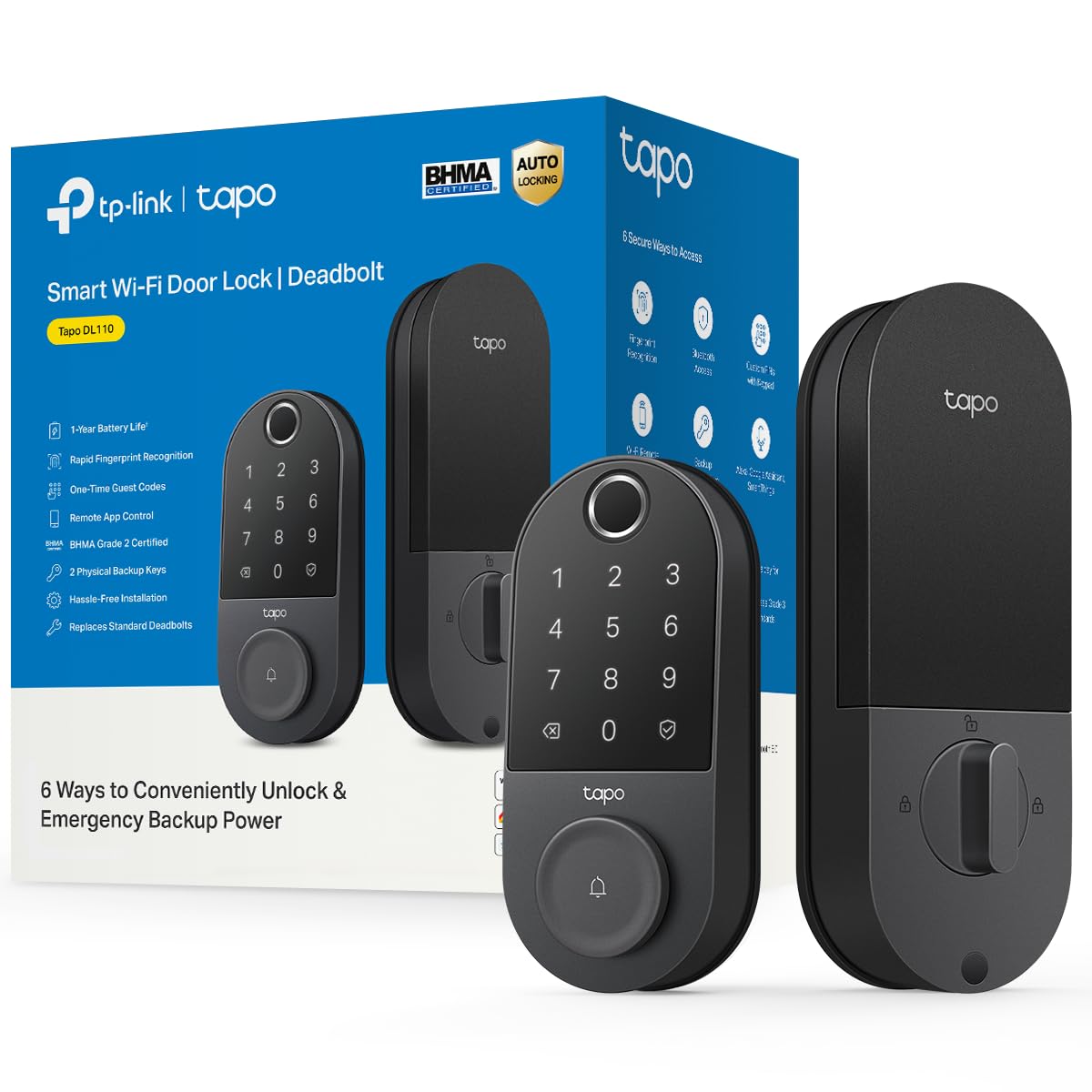
1. Tapo Smart Wi-Fi Door Lock, Deadbolt, Fingerprint Recognition, DL110
Our pick — over 4.5★ from 800+ verified ratings; the strongest balance of quality and price.
The rechargeable deadbolt that answers with your fingertip and never asks for a key
For a household that wants every door on one system and one app, the Tapo DL110 is the pick that keeps showing up on top. It is a Wi-Fi deadbolt (it connects to your home network directly, so you control it from your phone anywhere), and it solves the thing that annoys people most about keyless locks: changing batteries. The included pack is removable and rechargeable over USB-C, and it holds up for about a year of continuous operation between charges — the maker rates a full year, and owners mention roughly that.
Six ways in cover just about any situation. Your fingerprint open up it in 0.42 seconds — the fastest recognition in this lineup — and the lock stores up to 100 fingerprints. There is a keypad for custom passcodes, close-range Bluetooth, the smart-home assistant, and a pair of included backup keys. For guests you can build resident profiles with permanent codes, or hand out one-time codes that expire. The rechargeable pack and USB-C port mean you never touch a disposable battery, which matters if you hate last-minute dashes to the store.
Where the DL110 earns its keep day to day is the reliability of that fingerprint read. What wins people over is quality build and how easy it lands for first-timers — installation is a genuinely short job, and the app does most of the setting up for you. Customers note the battery sitting at 60% after about a year and the app showing the exact level, so there is no guessing whether it is about to die. The BHMA Grade 2 rating (an industry durability grade for locks) says the metal is built to take a beating — but note the polished finish and 5.91 x 2.69 x 1.29 inch dimensions mean it is a full-size unit, not a slim one, so check your door’s existing cutout first.
The strong points
- Fingerprint open up in 0.42 seconds with storage for up to 100 prints — the fastest read here, and double the Philips DDL210X’s capacity
- Rechargeable pack plus USB-C means no disposable batteries ever
- Six access methods including Wi-Fi remote open up and the app’s activity log
- Multiple access for guests via one-time and scheduled codes
What to weigh
- The doorbell button sits exposed on the exterior and can be bumped accidentally, triggering a chime
- The rechargeable pack is proprietary and sold only with the lock, so a lost pack means no replacement
- No Matter or open API support, so third-party automations are limited to what the Tapo app allows
the balance: anyone who wants every door tied to one smart-home app and is willing to trade a disposable battery for a rechargeable one.
Check first: measure your door — the DL110 is a full-size unit at 5.91 x 2.69 x 1.29 inches and the proprietary battery has no retail replacement.
2. Philips Fingerprint Keyless Entry Door Lock, DDL210X
A fingerprint lock that talks you through setup and keeps everything offline
Philips builds this one for the person who is done rekeying and sick of hiding a spare key under the mat. Its fingerprint reader carries a maker-listed accuracy rating of up to 99.99%, and it reads your finger in 0.3 seconds — a hair quicker than the Tapo DL110’s 0.42 seconds. The sensor is on the exterior unit and works well when your fingertip is clean and dry; the maker notes it reads less reliably for children under 6 and adults over 65, so that is worth knowing before you buy if your household spans those age ranges.
What makes this one genuinely friendly is the voice-guided programming. Instead of wrestling a paper manual, you follow spoken prompts in English, French, or Spanish to set codes and enable the auto-lock. The auto-lock timer is adjustable from 30 to 180 seconds, and the lock beeps to remind you to swap the batteries once they drop below 20%. It relies on 1.5V AA alkaline (LR6) batteries — the maker specifically warns against rechargeable or carbon cells, which can stop the lock turning on. None of it needs a network connection, so there is nothing to hack remotely, which is exactly what some buyers want.
The honest catch is reliability. The recurring gripe is the keypad flaking under direct sunlight and the fingerprint reader being less consistent than the headline accuracy figure suggests — some units work flawlessly for months and others go unresponsive and need a battery pull. Physical fitment is a little different too: at 6.29 x 2.79 x 0.63 inches it is a larger faceplate than the Tapo DL110, and Philips recommends checking your door’s backset, cross bore, and thickness before ordering. One-time-use PIN codes are unlimited, which is genuinely useful for contractors and last-minute deliveries.
The voice-guided angle: if you have ever dreaded programming a keypad lock from a confusing manual, the spoken setup on this Philips is a real difference-maker — you hear each step as you do it.
But plan around the interface: the keypad is dim in bright sun, the fingerprint sensor benefits from clean, dry fingers, and you must use exactly the alkaline AA cells the maker specifies.
Reach for this if: you want a name-brand fingerprint deadbolt with no network connection, unlimited one-time codes, and spoken setup help.
Look elsewhere if: you need remote open up from your phone or a fingerprint reader that never hesitates — those are the trade-offs here.
3. Yale Code Keypad Deadbolt for Keyless Front Door Entry, Satin Nickel
No phone, no Wi-Fi, no account — just a code and a raised-button keypad
If the words “smart home” make you tired, the Yale Code is the deadbolt that keeps it dumb on purpose. It has no Wi-Fi and no Bluetooth — Yale calls it a non-connected keypad lock — so every function, from adding and deleting entry codes to switching on Auto-Lock, happens right on the lock itself, in seconds. Guests get access with a code, not an app invite. The one thing people mention most warmly is the build quality, followed closely by how straightforward the install is, and that tracks: this is meant to be a clean swap for an existing deadbolt.
You can create and store up to 20 entry codes, which covers family, friends, and housemates with room to spare. The keypad is back-lit and weather resistant, and the raised buttons are a real point of difference — reviewers point out they feel better than the flat buttons on some rivals. Auto-lock can be set to fire about 30 seconds after you walk in, and it fits standard deadbolt door holes without new drilling. It runs happily on batteries with no wiring required, so there is nothing to hire an electrician for.
Because it is offline, there is no remote open up and no activity log — you simply cannot buzz someone in from across town. One owner found the locking sound quite loud and was unsure how to delete a code, though the operation itself is straightforward once you learn it. That optional 30-second auto-lock can also shut out a slow guest who is still gathering their bags. It is a footprint-sized 2.5 x 0.88 x 5.12 inches — noticeably slimmer than the Tapo or Philips units — which makes it an easy fit on doors where a bulky faceplate looks out of place.
The offline appeal: nothing to connect, nothing to update, nothing to hack remotely — the security is in what the lock simply cannot do.
The honest trade: you give up remote access and activity history entirely, and that 30-second auto-lock can catch guests mid-step.
Made for: households that want key-free entry and up to 20 codes without a single app, account, or network connection.
Think twice if: you need to open up remotely or review who came and went — this lock deliberately offers neither.
4. Veise VE06-L Smart Deadbolt Lock with 2 Lever Handle Set, Satin Nickel
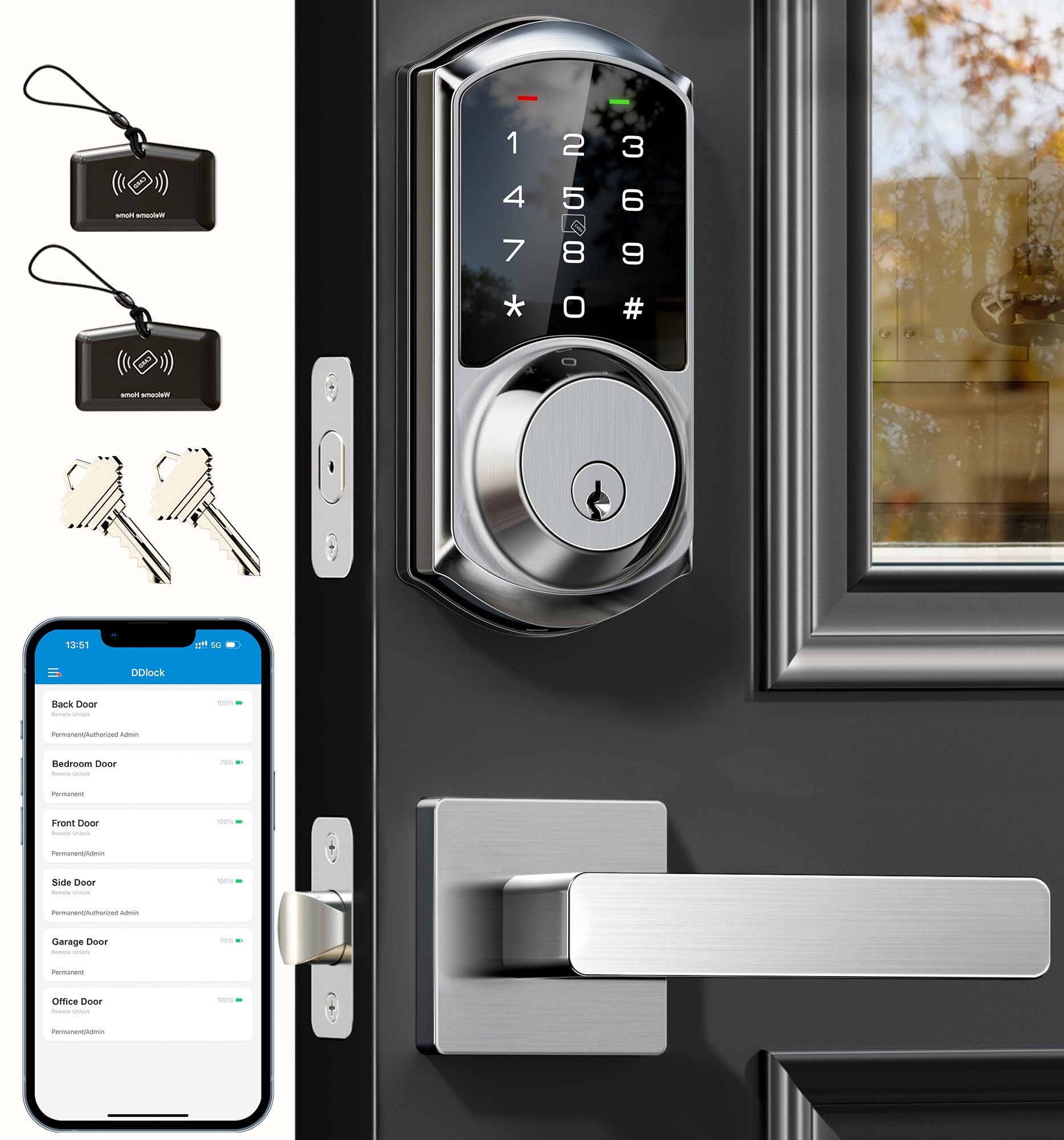
A complete handle-and-deadbolt set built for rotating tenants and last-minute bookings
This Veise package is the one to look at if your door is a revolving cast of people — guests, cleaners, contractors, new tenants. It ships as a full set with two lever handles included, so you are not buying a separate handle to match. Auto-lock is adjustable from 5 to 900 seconds, and a one-touch lock is just a two-second press of the “#” key.
For property managers, the remote code game is where it shines. You can hold more than 250 codes and issue permanent, scheduled, recurring, or one-time codes — the one-time ones self-delete after use, so a delivery driver cannot reuse them. Anti-peeping protection lets a guest punch random digits before or after their real code, and the lock disables itself for two minutes after five wrong attempts. To get true remote open up and Alexa or Google voice control, you do need the separate G2 gateway hub.
The weak link here is the paperwork, not the hardware itself. What frustrates owners is the included manual — some steps for changing the factory passcode are missing or wrong, and the app handles most of it anyway. Fortunately Veise’s phone support is a highlight, and owners regularly get walk-throughs that have the lock programmed in minutes. The build is solid zinc alloy, rated IP54 (protected against splashing water) and certified to BHMA/ANSI Grade 3, with the maker claiming a lifespan over 10 years. The face is a substantial 12.59 x 7.08 x 3.93 inches because it is a handle-plus-deadbolt set, not a standalone deadbolt.
Why hosts keep it
- 250+ codes with permanent, scheduled, recurring, and self-deleting one-time options for guest turnover
- Remote open up and smart-assistant control via the G2 gateway, plus a free web portal for mass user management
- Ships as a full set with two lever handles — no separate handle purchase
- IP54 weather resistance and BHMA/ANSI Grade 3 certification
Where it needs help
- The printed manual has gaps and errors; phone support is often the real setup path
- True remote access and Alexa/Google control require the G2 gateway, sold separately
- Bulkier handle-set footprint than a standalone deadbolt
Right for you if: you run a rental, Airbnb, or multi-tenant property and need to change access codes fast without rekeying anything.
Worth knowing: plan to lean on the support line for setup, and budget for the G2 gateway if you want remote open up and voice control.
5. Tapo Smart Wi-Fi Deadbolt Door Lock, Fingerprint Recognition, DL105
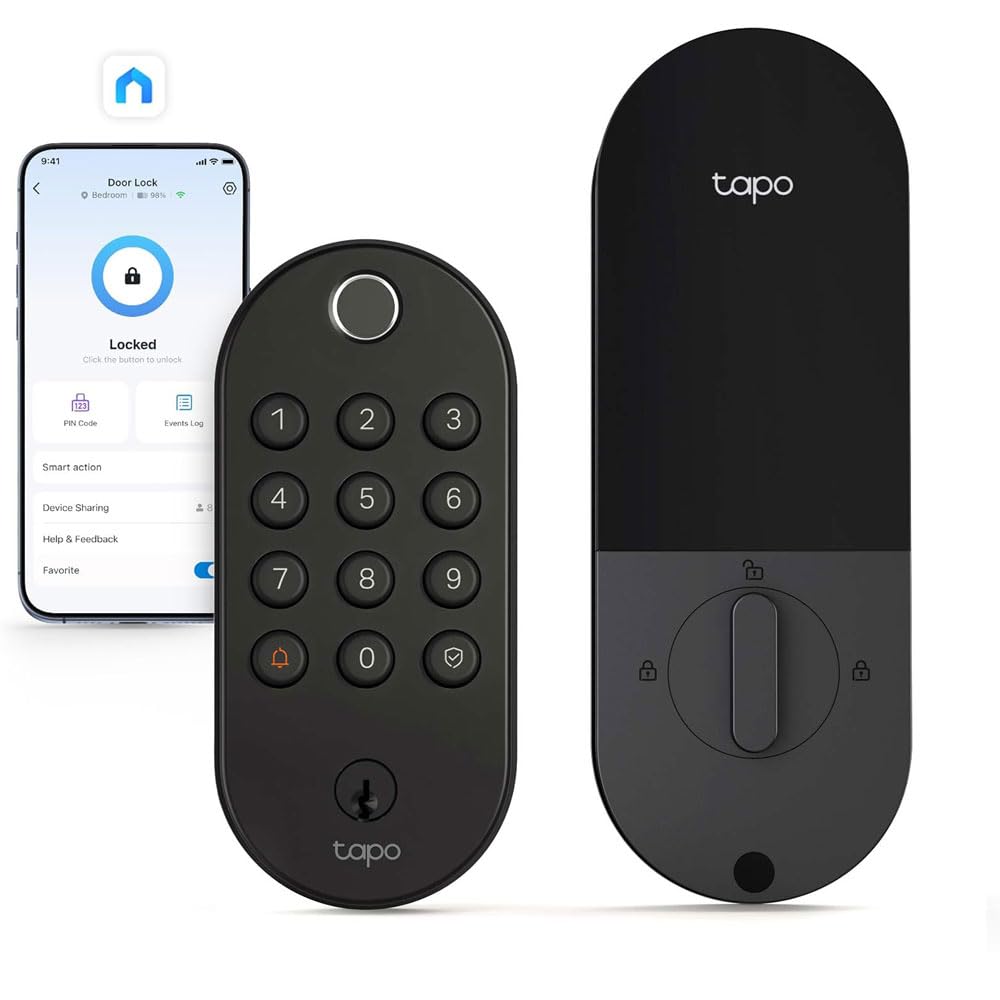
A fingerprint deadbolt slim enough to disappear onto a window-set door
The DL105 is Tapo’s slimmer sibling to the DL110 above, and it is the obvious choice when a full-size faceplate will not sit right. At 5.88 x 2.65 x 0.91 inches it slips onto narrower doors — buyers specifically note it fits a door with a window, a fit the bulkier units struggle with. It still packs the same six ways in: fingerprint, custom keypad passcodes, the Tapo app, close-range Bluetooth, your smart-home assistant, and a pair of included backup keys. Fingerprint recognition takes about 0.5 seconds, slower than the DL110’s 0.42 seconds, and it stores up to 100 prints.
Power works like the DL110 — a rechargeable pack with a built-in USB-C port and roughly a year of operation per charge, with no disposable AA batteries to buy. Voice control spans Alexa, Google Home, and Samsung SmartThings. There is a detailed activity log with timestamps so you can see who open up the door and when, plus automatic lockouts after failed attempts and real-time alerts for suspicious activity. Operating temperatures run from -22℉ to 158℉, and the lock is IP54 waterproof, so it stands up to weather outside.
What wins people over is how well it just works within the Tapo ecosystem — it pairs easily if you already run Tapo devices and gives you a polished app with notifications. The recurring gripe is the fingerprint reader itself, which some find finicky and slow to catch on the first touch — if you want fingerprint to be your primary entry method, the DL110 reads more reliably. Charging is the other thing to plan for: a few owners note the battery takes a long time to fill, so plug it in overnight rather than expecting a quick top-up. It installs on standard 2-1/8 inch and 1-1/2 inch lock holes with no drilling.
Where it fits best: narrow and window-set doors where the slimmer frame is a genuine necessity, and households already inside the Tapo app.
What to expect: a fingerprint reader that occasionally misses on the first try, and a slow overnight charging cycle for the rechargeable pack.
Best for: a slim door, a window door, or anyone already living happily inside the Tapo app ecosystem.
Skip the fingerprint-first plan if: you want the fastest, most forgiving reader — its 0.5-second sensor is the slower one of the two Tapo models.
6. Kwikset SmartCode 260 Keyless Entry Electronic Keypad Deadbolt

The workhorse that sips battery because it never talks to the internet
Kwikset’s SmartCode 260 is the lock for someone who wants a keypad and absolutely nothing else. No Wi-Fi, no app, no Bluetooth — which is exactly why its battery stretches so far. The maker rates 12 months on four AA alkaline cells, and owners confirm roughly that, though heavy daily use shortens it. It runs on four AA alkaline batteries that you supply, and because there is no radio constantly reconnecting, it barely sips power. Replace the cells once a year and forget about it.
Code management is generous for a purely offline lock: up to 50 user codes, 10 one-time codes, and a programming code for edits. Auto-lock can be set to fire every 30 seconds, 1 minute, 3 minutes, 5 minutes, or 10 minutes. Security touches include an intrusion alarm that sounds after three wrong code entries and disables the keypad for one minute, plus a Vacation Mode that shuts the keypad off entirely while you are away. SmartKey lets you re-key the cylinder yourself to any KW1 key in seconds, so one key can open every Kwikset lock in the house.
Build and longevity are the usual strengths — this is a rock-solid mechanical lock with a Grade 2 BHMA rating that Kwikset states is up to 2.5 times the strength of a Grade 3 set. Installation is a screwdriver job with BILT 3D interactive instructions guiding you by voice, text, and animation. The honest caveat is long-term durability for a minority: a small number of units have failed early, and at least one owner had trouble reaching warranty support. It is also a compact install at 1 x 2.75 x 4.56 inches, so it fits tight doors, and the battery cover on some units rattles slightly.
The battery play: cutting the radio is the whole trick — no Wi-Fi means no constant reconnecting, which is why a set of alkaline cells can last a full year.
What some hit: a rare early failure, a battery door that can rattle a little, and warranty service that has frustrated a few owners.
Pick this for: a code-only deadbolt with the longest practical battery life and zero network footprint.
Not for you if: you want remote access or app control — there is no connectivity here at all, by design.
7. Schlage Electronic Keypad Deadbolt Lock, Camelot Trim, Matte Black

A no-frills keypad deadbolt from the name locksmiths trust for the long haul
This Schlage is the lock that shows up when someone wants a keypad and a familiar brand, nothing flashy. The push-button keypad is battery operated with no wiring required, and it installs on existing standard pre-drilled doors with just a Phillips screwdriver. It is built for people who hand out codes rather than keys — pet sitters, plumbers, cleaners — and the maker backs it with a 3-year limited electronics warranty plus a limited lifetime mechanical and finish warranty. It is a 4.4-pound unit with a 2.64 x 3.17 x 5.43 inch body.
The day-to-day experience is about as simple as a keypad lock gets: punch in a code, the deadbolt retracts, and you go in. What owners value is that it does not need the internet to work, so there is no app and no network to babysit, and it handles wet climates without complaint. A physical key provides a backup so you are never fully locked out. Rekeying to a single house key is straightforward, and the whole setup is meant to replace an existing deadbolt without any new drilling.
The fair caveat is that this lock has a split personality in the field. Alongside the praise sits a real undercurrent of reliability complaints — keypads that stop responding and keys that struggle to work from outside — plus reports of units arriving used or defective. The keypad occasionally needs a reset via Support (not a battery issue when it happens), and you need the original code handy before you can change anything. For a lock at this price and with this many years on the market, the pattern is worth knowing, but it is still a solid pick for a homeowner who wants a long-lived keypad deadbolt in the door.
The case for Schlage: a plain, familiar keypad deadbolt with a mechanical key backup, a long warranty, and no network to fail.
The caveat: reliability is the mixed part of the story here — some units hum along and others arrive flaky, so keep your receipt.
Good fit for: a homeowner who wants a straightforward keypad deadbolt from a long-established brand and does not care about smart features.
Consider alternatives if: you want a fingerprint reader, remote access, or the newest sensor tech — this one sticks to the basics.
8. Veise VE07-H Fingerprint Smart Lock for Front Door Handle Set, Matte Black

Built for the moment your hands are full of groceries and the door still has to open
This Veise lock is aimed squarely at the arms-full scenario — a fingerprint reader that open up in 0.3 seconds while you are holding a child, bags, or a leash. Its fingerprint reader is rated by the maker at 99.99% accuracy and stores up to 50 prints, and you can add or delete prints right in the app instead of programming at the keypad. It ships as a complete handle set with a zinc alloy handleset, so it is a full front-door upgrade rather than a bare deadbolt. Across the whole set there are eight open up routes: app, fingerprint, Apple Watch, web portal, codes, e-keys, fobs, and a mechanical key.
Code management for guests is strong — unlimited one-time PINs and capacity for more than 250 access codes, spanning timed, permanent, recurring, custom, and self-erasing remote codes. You lock it five ways: auto-lock from 5 to 900 seconds, a two-second hold in the app, a two-second press of the “#” key, the backup key, or the thumb turn. It fits U.S. doors from 1-3/8 to 2 inches thick and handles both left- and right-handed doors, with a claimed 15-minute install using just a screwdriver.
Owners consistently praise the looks and the flexibility — a househusband favorite is the fingerprint reader, and the timed guest codes are perfect for a short stay. The honesty point is the fingerprint consistency: a portion of buyers find it works well, while others report it takes multiple tries to catch, which matters if you expect a flawless read every time. Instructions are the other soft spot, where a step can be missed and support ends up walking you through it. The VE07-H body measures 6.1 x 2.7 x 1.4 inches, so consider whether a handle set fits your door’s existing bore holes before ordering.
The fingerprint-first case: for a busy household where you want hands-free entry, 50 saved prints, and a full handle set in one box.
The consistency risk: some owners find the reader needs a second try, and the manual is not always enough — expect to call support once during setup.
Choose it when: you want a complete handle-and-deadbolt set with fingerprint entry and plenty of room for guest codes.
Hold off if: you need a perfect first-tap read every time or prefer a lock with rock-solid printed instructions.
9. Wyze Palm Lock, Smart Door Lock with Palm Vein Recognition

The lock that opens when you hover your palm, no finger or key needed
Wyze takes a different route entirely: instead of a fingerprint reader, the Palm Lock scans the vein pattern beneath your hand and open up the moment you hold it near. It is contactless, so you never touch a sensor, and the maker rates palm vein scanning as faster and more reliable than fingerprints. The result is a lock that a 5-year-old’s palm can register just as well as an adult’s, and owners consistently report the palm sensor reading fast and accurately, with no need to press or fiddle. It is a metal-bodied deadbolt with a 12.71 x 8 x 3.62 inch package and a 1.9 pound heft.
Battery life gets its own two-layer safety net. A 6-month main battery is backed by a 2-week secondary battery, so if the main one drains over time you still have a working lock while you recharge. And if both ever run flat, there is an integrated USB-C port that lets you jump-start the lock with any power bank. Auto-lock is smarter than a plain timer here — a built-in gyroscope (a motion sensor that reads the door’s angle) detects when the door has actually closed, then locks, which the maker says prevents the false or jammed locks you get from a timer-based deadbolt. A millimeter-wave radar chip — the kind used in self-driving cars — wakes the lock only when it senses a person standing there.
You get up to 50 guest codes on an illuminated keypad with anti-peep tech, Wi-Fi control from anywhere through the Wyze app, Alexa and Google voice commands, tamper and ajar alarms, and a mechanical key under a sliding cover as the final fallback. The motion-sensing auto-lock is the standout — no more deadbolt slamming into the trim while the door is open. The trade-offs are small but real: charging is slow, so expect an overnight top-up, and a few buyers find the reader more consistent for one household member than another. It is IP53 weather-resistant and BHMA3 certified.
Why palm beats finger here
- Contactless palm vein scanning — open up by hovering, no touch and no fingerprint smudge
- Dual-battery system with a 2-week backup and USB-C emergency charging via any power bank
- Gyroscope auto-lock that senses when the door has closed, avoiding jammed bolts
- Millimeter-wave radar wakes the lock only when a person is nearby, saving main battery
Keep in mind
- Charging is slow — plan an overnight charge for the main pack
- Palm recognition can vary between household members for some users
- Wider 12.71 x 8 x 3.62 inch footprint to fit around your door’s prep
Made for you if: you want truly contactless entry, need the reassurance of a backup battery, and value an auto-lock that knows when the door is shut.
Think twice if: you charge only on the fly — this lock prefers a patient overnight session.
Understanding the Specs
Battery type and lifespan
There are two ways these locks keep powered: disposable AA alkaline cells, and removable rechargeable packs. Alkaline locks (the Kwikset SmartCode 260 uses 4x AA, the Philips DDL210X uses 1.5V AA) are the simplest — you swap cells when the lock chirps, and a year of life is realistic on a lock that skips Wi-Fi. Rechargeable packs (the Tapo DL110 and DL105) charge over USB-C and skip the store runs entirely, but they charge slowly, so overnight is the practical routine. Whichever kind you pick, most locks beep or alert you once the battery drops below a set threshold, and connected locks show the exact level in their app.
Connectivity, auto-lock, and door sensing
Connected locks use Wi-Fi or Bluetooth to reach your phone, which buys you remote open up, guest codes, and activity logs. Offline locks (the Yale Code, the Kwikset SmartCode 260, the Philips DDL210X) skip the network entirely and simply work on a code. Auto-lock is where quality diverges most: a plain timer fires after a set number of seconds whether the door is open or shut, while a sensing lock — say the Wyze Palm Lock’s gyroscope-based system — only locks once it confirms the door has physically closed. If your door gets left ajar, sensing auto-lock saves you a jammed deadbolt and scraped trim.
FAQ
Will a battery operated door lock fit my existing deadbolt holes?
How long does the battery actually last on these locks?
Do I need Wi-Fi for a battery operated door lock to work?
Can I use rechargeable AA batteries in my keypad lock?
What happens if the battery dies while I am locked out?
Is a fingerprint lock more secure than a keypad code lock?
How do I stop a timer-based auto-lock from jamming my door?
Can I keep my existing house key with a new smart deadbolt?
What does a BHMA grade mean on a door lock?
Do these locks work with Alexa and Google Assistant?
How many codes or fingerprints can these locks store?
Final Thoughts: The Verdict
For most households, the battery operated door locks winner is the Tapo DL110, because it pairs the fastest 0.42-second fingerprint read in this lineup with a rechargeable pack you never have to swap and six ways in for any guest. If you want key-free entry without an app or a network, grab the Yale Code, and for the longest battery life on a code-only lock, the Kwikset SmartCode 260 is the one to reach for. And if truly contactless entry matters most, the Wyze Palm Lock opens on a hover with a backup battery behind it.
The pattern across this whole list is simple: connected locks buy you remote access and guest codes, offline locks buy you battery life and simplicity, and the best fit is the one whose trade-offs you can live with. One nudge if you are still deciding — the Tapo DL110 is the crowd favorite here, so if you want to stop worrying about which pick is the safe one, start there.
How We Picked
We do not accept paid placement. Every pick is matched to a real buyer and a real use-case; we do not hands-on test units.
Sources & Methodology
Specifications: manufacturer listings and product documentation. Review insights: verified customer reviews, as of September 2026. Pricing: not shown on this page (it changes often); check the current price via the retailer link.
As an Amazon Associate, Gadgets Feed earns from qualifying purchases. This does not affect which products we feature.