
Nothing kills workflow faster than a keyboard going silent in the middle of a deadline. A battery wireless keyboard eliminates that anxiety, keeping you typing for months—sometimes over a year—on a single charge or set of batteries. The best models combine low-power wireless standards (Bluetooth 5.2 or 2.4 GHz with auto-sleep) with efficient scissor-switch or gasket-mounted mechanical designs to stretch every milliwatt.
I’m Min — the co-founder and writer behind Gadgets Feed. I’ve spent hundreds of hours researching wireless keyboard battery performance, polling rates, switch efficiency, and real-world discharge curves to separate the truly long-lasting from the marketing claims.
This guide compares seven top contenders to help you find the right best battery wireless keyboard for your desk, whether you prioritize quiet mechanical switches or ultra-slim portability.
How To Choose The Best Battery Wireless Keyboard
Battery life in wireless keyboards isn’t just about capacity—it’s about efficiency across the entire system. The wireless protocol, backlighting, polling rate, and switch type all drain the internal battery or your disposable cells. Understanding these trade-offs helps you pick a keyboard that lasts through your longest projects.
Wireless Protocol: Bluetooth vs. 2.4 GHz vs. Wired
Bluetooth 5.0 and 5.2 offer the lowest power consumption, especially with auto-sleep enabled—many boards sip power only during active keystrokes. 2.4 GHz with a USB dongle delivers lower latency (often 1000 Hz polling) but draws slightly more current. Some premium models support both plus USB-C wired mode, giving you flexibility: use wired when charging and wireless for daily use.
Battery Capacity and Chemistry
Look for internal lithium-ion batteries rated in mAh—8000 mAh can last months even with RGB lighting, while 2000 mAh boards may need weekly charging with backlighting enabled. For models using disposable batteries (AAA or AA), power efficiency is measured in months of typical use; some Logitech models claim 36-month keyboard life. Auto-sleep timers and dedicated on/off switches are critical for maximizing runtime on any chemistry.
Switch Type and Backlighting Impact
Mechanical switches with gasket-mounted designs are quieter and more durable but often require more power than scissor-switch or membrane keyboards, especially when paired with RGB backlighting. If battery life is your top priority, choose a scissor-switch or low-power mechanical board with single-color or no backlighting. Full RGB at max brightness can cut battery life by 50% or more.
Quick Comparison
On smaller screens, swipe sideways to see the full table.
| Model | Category | Best For | Key Spec | Amazon |
|---|---|---|---|---|
| AULA F99 Pro | Mechanical | Quiet office & gaming | 8000 mAh battery | Amazon |
| Keychron B6 Pro | Ultra-Slim | Longest battery life | 1200 hour runtime | Amazon |
| Apple Magic Keyboard | Premium | Apple ecosystem | Rechargeable lithium-ion | Amazon |
| Logitech K950 | Multi-Device | Professional workflow | Customizable keys | Amazon |
| Sablute Retro | Style | Aesthetic desk setup | 7-color backlight | Amazon |
| Sablute Ergonomic | Ergonomic | Wrist comfort | Cushioned palm rest | Amazon |
| Logitech MK270 | Combo | Budget office setup | 36-month keyboard life | Amazon |
In‑Depth Reviews
1. AULA F99 Pro Wireless Mechanical Keyboard

The AULA F99 Pro dominates this list with an 8000 mAh internal battery—more than double the capacity of most competitors. Even with RGB backlighting enabled at moderate brightness, this board can run for weeks between charges. The gasket-mounted, pre-lubed linear switches produce a satisfyingly muted “thock” that won’t disturb coworkers.
It supports tri-mode connectivity (Bluetooth 5.0, 2.4 GHz dongle, and USB-C wired) with up to five paired devices. The 96% layout keeps the numpad and arrow keys while saving desk space. A multifunction knob adjusts backlight brightness or volume, and the hot-swappable PCB accepts any 3- or 5-pin switch without soldering.
Side-printed PBT keycaps resist shine and fading over time, and the solid metal-reinforced plastic body prevents flex during aggressive typing. If you want silent mechanical performance with the best battery capacity in this class, the F99 Pro is the clear choice.
Why it’s great
- Massive 8000 mAh battery
- Silent, gasket-mounted switches
- Hot-swappable PCB
Good to know
- RGB auto-dims after 1 min idle on wireless
- Not a true full-size layout
2. Keychron B6 Pro Ultra-Thin Wireless Keyboard

The Keychron B6 Pro is the battery life champion with a stunning 1200-hour continuous runtime on its internal rechargeable battery. That translates to roughly eight months of daily use at five hours per day—without ever seeing a charger. Its ultra-slim scissor-switch design is nearly silent and mimics a laptop typing feel.
It offers 2.4 GHz wireless with a 1000 Hz polling rate, Bluetooth 5.2, and USB-C wired mode. The ZMK open-source firmware lets you remap any key or create macros via the Keychron Launcher web app—no installation required. The full-size 104-key layout includes a numeric keypad and dedicated navigation cluster.
The low-profile keys have a short travel distance that reduces finger fatigue over long typing sessions. A silicone skin is included for dust protection. Weighing just 623 grams, it’s portable enough to move between workstations.
Why it’s great
- 1200-hour battery (8 months typical)
- Ultra-slim and lightweight
- Full ZMK key remapping
Good to know
- Key legends are unusually small
- RGB lighting drains battery faster
3. Apple Magic Keyboard with Numeric Keypad

Apple’s Magic Keyboard with Numeric Keypad is the gold standard for Mac, iPad, and iPhone users. Its internal lithium-ion battery delivers about a month of real-world use per charge—not the highest in this guide, but paired with the low-power Bluetooth chipset it maintains reliable uptime for daily professionals. The scissor-switch mechanism under each key provides crisp, stable feedback.
The extended layout adds a full numeric keypad, document navigation keys, and full-size arrow keys—ideal for spreadsheet-heavy workflows. Pairing is instant across Apple devices via iCloud, and the Lightning-to-USB cable lets you charge while typing. The white finish is clean but may show wear over time without a protective cover.
At 1.39 pounds, it has a reassuring heft that stays planted on the desk. If you live in the Apple ecosystem and value seamless multi-device switching with predictable month-long battery cycles, this board remains unbeatable.
Why it’s great
- Seamless Apple ecosystem pairing
- Precise scissor-switch keys
- Full numeric keypad
Good to know
- White finish may stain
- Lightning cable not USB-C
4. Logitech Signature Slim K950

Logitech’s Signature Slim K950 uses two AAA batteries rather than a built-in rechargeable cell, which gives it a practical advantage: replace dead batteries in seconds instead of waiting for a recharge. Logitech claims months of life per set, even with moderate daily use aided by auto-sleep technology. The slim membrane keyboard feels close to a laptop’s scissor-switch profile.
It supports Bluetooth and Logi Bolt USB connections, allowing you to switch between three paired devices (Windows, Mac, Chrome, iOS, Android) with a single button. The Logi Options+ app unlocks customizable function keys for screenshot, mute, volume, and more. The recycled plastic construction (48% post-consumer) reduces environmental impact without sacrificing build quality.
The K950 is non-backlit by design—Logitech prioritized battery life over illumination. If you type in well-lit environments and value instant battery swaps over recharge cycles, this is a smart pick.
Why it’s great
- AAA batteries for instant replacement
- Three-device switching
- Customizable shortcut keys
Good to know
- No backlighting
- Volume keys near backspace cause accidental presses
5. Sablute Retro Typewriter Keyboard and Mouse Combo
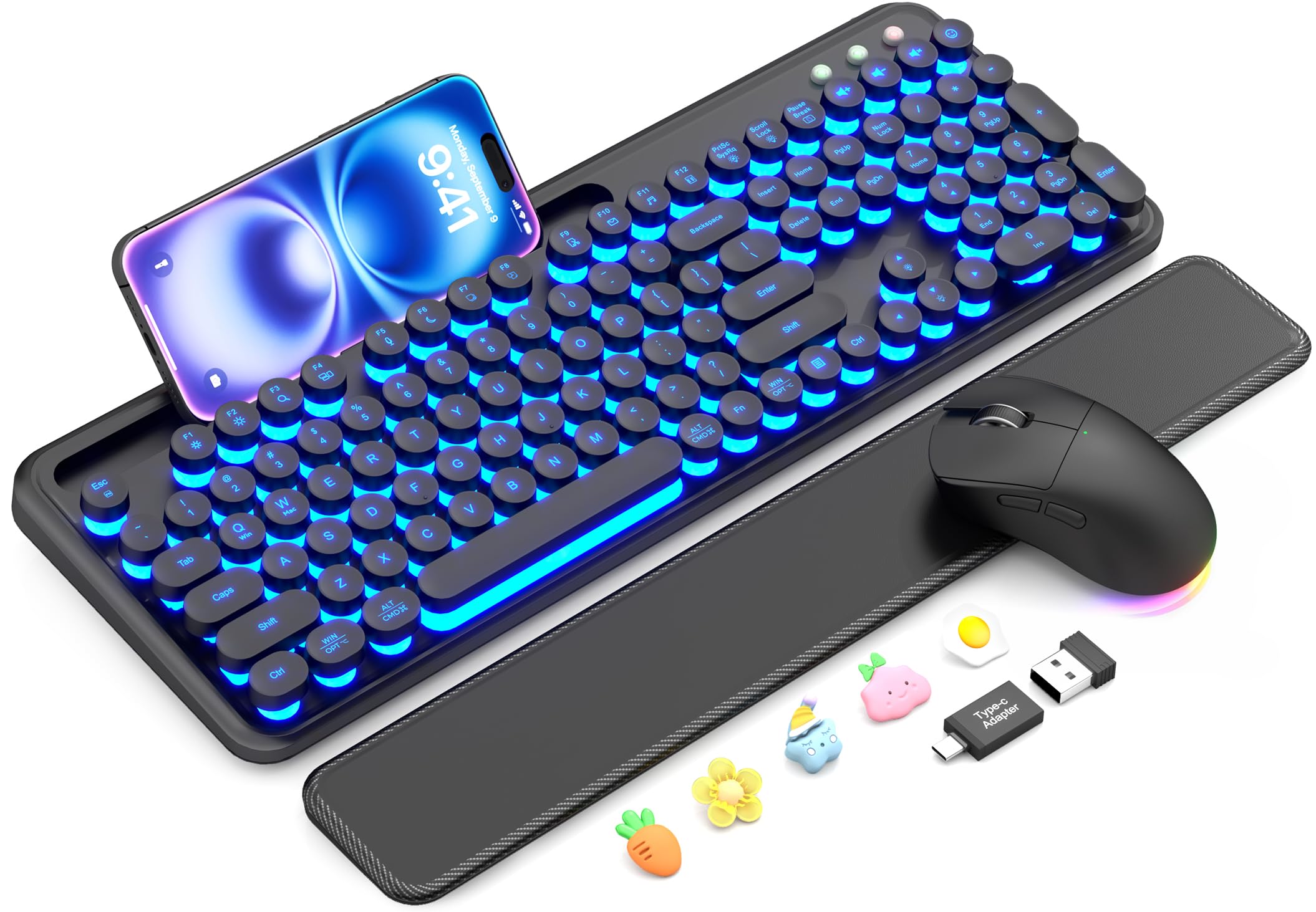
The Sablute Retro Typewriter combo proves that long battery life doesn’t require sacrificing style. Both the keyboard and mouse recharge via USB-C, and the built-in lithium batteries with auto-sleep keep you typing for extended periods between charges—no disposable cells needed. The 7-color backlight adds a nostalgic glow for nighttime work.
Round typewriter-style keycaps sit atop a membrane switch layer, producing a quiet, tactile feel that’s gentler on the ears than mechanical click. A magnetic detachable wrist rest with soft sponge padding reduces wrist strain, and the built-in phone holder keeps your device visible. The single 2.4 GHz USB receiver connects both devices instantly.
Compatibility spans Windows, macOS, Linux, and Chrome OS. The RGB mouse offers 11 lighting modes and three DPI settings. If you want a visually distinctive desk setup without sacrificing rechargeable battery convenience, this combo delivers.
Why it’s great
- USB-C rechargeable (both devices)
- Magnetic wrist rest included
- Built-in phone holder
Good to know
- Round keys are closely spaced
- Backlight could be brighter
6. Sablute Ergonomic Wireless Keyboard and Mouse Combo
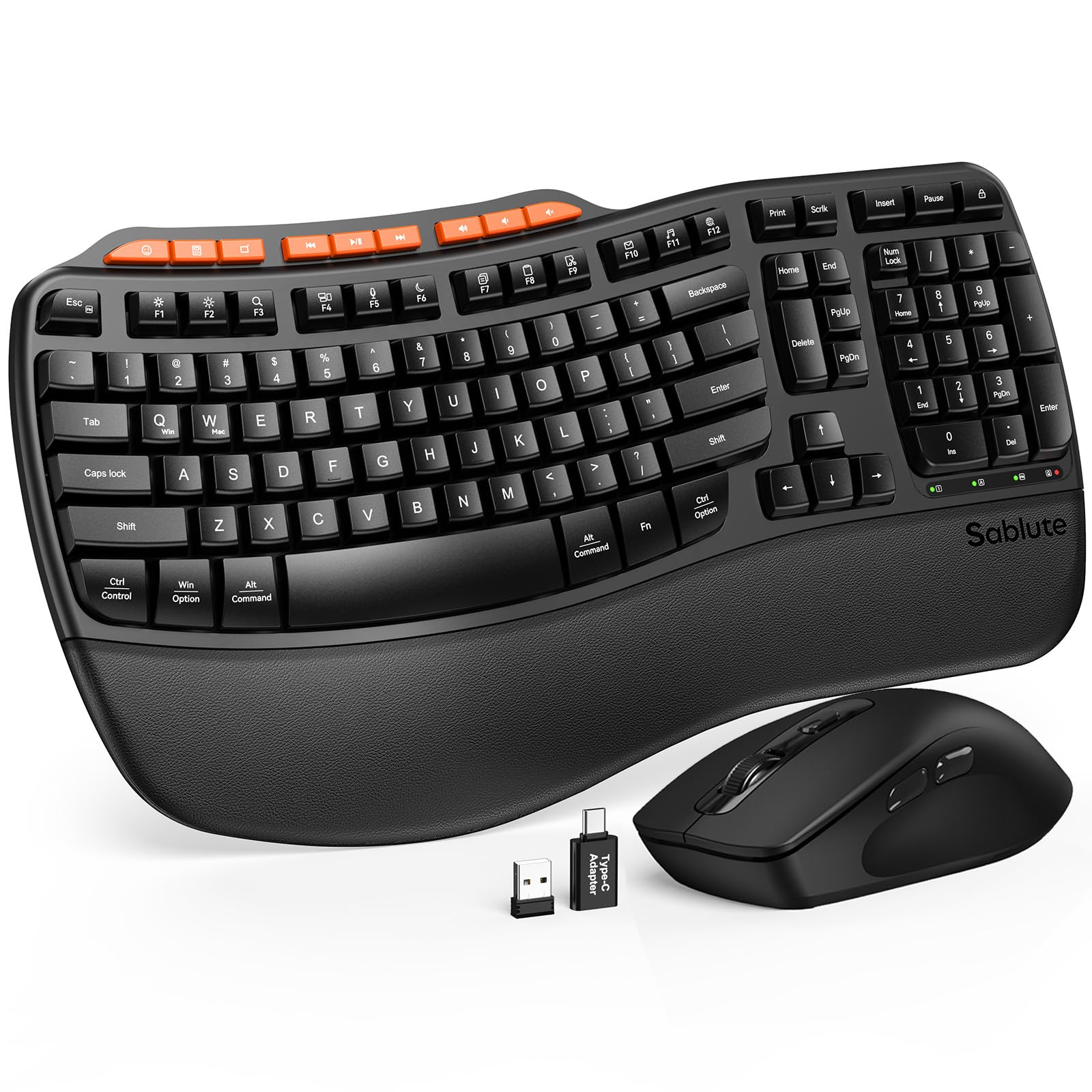
This Sablute ergonomic combo uses AAA batteries (two for the keyboard, one for the mouse) to deliver 6–12 months of typical use, thanks to intelligent auto-sleep technology. The wave-shaped keys follow your fingers’ natural curvature, reducing awkward hand angles during extended typing sessions. The premium leatherette wrist rest is sweat-resistant and easy to clean.
Adjustable front and rear tilt legs let you customize the typing angle for sitting or standing desks. The included mouse has three DPI settings (800/1200/1600) and fits medium to large hands comfortably. Nine dedicated shortcut keys provide instant access to emoji, calculator, screenshot, and media controls.
Laser-etched keycaps resist fading beyond 10 million keystrokes, and the 2-year replacement warranty provides peace of mind. If ergonomics and long battery life on standard batteries are your priorities, this combo is a strong mid-range choice.
Why it’s great
- Contoured wave keys reduce strain
- Leatherette palm rest included
- 6–12 month battery life on AAA
Good to know
- Batteries not included
- Keys are deeper and noisier than scissor-switch
7. Logitech MK270 Wireless Keyboard and Mouse Combo

Logitech’s MK270 combo is the undisputed battery life value champion: the keyboard runs for 36 months and the mouse for 12 months on pre-installed batteries. That’s three years without changing a single cell—unmatched in its price tier. The 2.4 GHz wireless dongle delivers a reliable connection up to 33 feet with no pairing fuss.
The full-size membrane keyboard features low-profile quiet keys, a spill-resistant design, and adjustable tilt legs. Eight multimedia hotkeys provide instant access to internet, email, play/pause, and volume control. The compact mouse is ambidextrous and tracks smoothly on most surfaces.
Plastic parts include 49% post-consumer recycled content for the mouse and 54% for the keyboard. It’s not a mechanical or backlit board, but for pure plug-and-play reliability with the longest battery life you can get, the MK270 remains a top seller for a reason.
Why it’s great
- 36-month keyboard battery life
- Spill-resistant membrane design
- Includes mouse with 12-month life
Good to know
- Membrane feel, not mechanical
- No backlighting or Bluetooth
FAQ
How long does a 8000 mAh battery actually last in a wireless keyboard?
Do mechanical keyboards have worse battery life than membrane keyboards?
Final Thoughts: The Verdict
For most users, the best battery wireless keyboard winner is the AULA F99 Pro because its 8000 mAh battery delivers unmatched runtime without compromising on silent mechanical feel or customization. If you want pure battery endurance above all else, grab the Keychron B6 Pro with its 1200-hour claim. And for a premium Apple ecosystem experience with reliable month-long charge cycles, nothing beats the Apple Magic Keyboard.