
Our readers keep the lights on and my morning glass full of iced black tea. As an Amazon Associate, I earn from qualifying purchases.
Specs are compiled from manufacturer listings and verified buyer reviews and can change over time — please confirm the key details on the product page before buying.
If you want a PC case that looks like furniture instead of a black box, focus on two things: how much glass you can see through, and whether the fans are already wired in when the box arrives. Everything else on this list is a variation on those two themes. A pillarless glass corner shows your graphics card and lighting from any angle, not just head-on. A case with pre-installed, daisy-chained fans means one cable run instead of four separate headers.
I’m Min — the founder and writer behind Gadgets Feed. This guide is built by comparing the manufacturers’ published specifications and the patterns across verified customer reviews, so you get each pick’s real strengths and trade-offs instead of marketing spin.
Every case below has been sorted by what actually hangs on your wall of a desk: glass layout, fan count, and how much room your graphics card really gets. if you want a walnut accent or a pillarless aquarium tank, this breakdown of the beautiful pc cases worth building in keeps the trade-offs honest.
Our Picks at a Glance



How To Choose The Best Beautiful PC Cases
A beautiful case is a display case first and a metal box second. The problem most buyers hit is that the pretty photo on the listing does not tell you whether your graphics card fits, whether the fans are already plugged in, or whether you will be able to hide the power supply cables. Get those three wrong and the build turns into a weekend of returns.
Glass layout is the single biggest visual decision
A wraparound or panoramic glass panel is glass that curves around a front corner with no metal pillar in the joint. That pillar is exactly what blocks your view of the graphics card from an angle, so a pillarless design shows the whole interior in one unbroken sweep. The trade-off is weight and fragility — large tempered glass panels are heavy, and thin glass demands care when you slide panels off. If your desk faces a wall, a single side window delivers most of the look for less money and less weight.
GPU clearance in millimetres is the number to check before anything else
GPU clearance is the maximum length of graphics card the case physically accepts, measured in millimetres from the rear bracket forward. Modern three-fan cards run long, and a case rated for 420 mm swallows the biggest ones with room to spare. The cases here range from 390 mm up to 440 mm, so measure your card before you commit. The same logic applies to CPU cooler clearance — the height from the motherboard surface to the side panel — and to top radiator support if you plan liquid cooling.
Pre-installed fans versus building your own cooling
PWM fans are fans whose speed is controlled by the motherboard rather than running at one fixed speed, and ARGB means the lighting is addressable — each LED can show a different colour. A case that includes four ARGB PWM fans with daisy-chain connectivity means you plug one chain into the board instead of chasing four separate headers. Some cases here ship with zero fans on purpose, which keeps the price down and hands you full control over which fans go where.
Quick Comparison
| Model | Best For | GPU Clearance | Included Fans | Internal Bays | Amazon |
|---|---|---|---|---|---|
| Lian Li V100-ATX★ Best Overall | Best Overall | 420 mm | 4× 120 mm ARGB PWM | 4 | Amazon |
| MONTECH XR PanoramicBest Value | Budget Showcase | 420 mm | 3× 120 mm ARGB PWM | 3 | Amazon |
| Okinos Cypress 7Best Wood Accent | Wood Accent Builds | 415 mm | 4× 120 mm PWM | 5 | Amazon |
| CORSAIR 3500X | Fanless Custom Builds | — | None | 5 | Amazon |
| NZXT H9 Flow | Big Airflow Rigs | — | 3× F140Q + 1× F120Q | 10 | Amazon |
| Antec C8 Wood | E-ATX Furniture Look | 440 mm | None | 3 | Amazon |
| Lian Li O11 Vision Compact | Three-Panel Aquarium | — | None | 3 | Amazon |
| be quiet! Light Base 900 DX | Reversible Display Case | — | None | 10 | Amazon |
| HYTE Y70 | Luxury Showpiece | — | None | 4 | Amazon |
In‑Depth Reviews
1. Lian Li V100-ATX Mid-Tower PC Case-Black-V100RX
Our pick — over 4.5★ from 550+ verified ratings; the strongest balance of quality and price.
Four fans already wired, a pillarless glass corner, and room for a 420 mm card — the easiest beautiful build here.
This is the case to buy if you want the good looks without the assembly homework. It arrives with four 120 mm PWM-controlled ARGB fans pre-installed — PWM meaning the motherboard varies their speed instead of them droning at one fixed rate — and those fans daisy-chain together, so you run one cable chain instead of hunting four separate headers. The 26-LED ARGB strip on the body syncs with your motherboard software, which means the light show matches whatever else is glowing inside. As owners put it: “Built 12+ client rigs with this case.”
Fit is where it quietly wins. You get 420 mm of GPU clearance and 178 mm of CPU cooler clearance, and the top takes a 360 mm radiator. Head-to-head against the MONTECH XR below, the Lian Li takes four internal bays to the MONTECH’s three and clears 178 mm of cooler height versus 175 mm — small margins, but they are the difference between a thick air cooler dropping in and a fight with the side panel. It supports ATX, Micro-ATX, Mini-ITX, and back-connect ATX or Micro-ATX boards, and both side panels come off tool-less for fast access.
The honest part: this is an open flow-through design, so it does not isolate sound, and the top radiator can crowd RAM access on some builds. One buyer missed an LED backlight on the power button, and the front I/O is light with 2 USB and 1 USB-C. None of that undercuts the core job. What wins people over most is the design itself, and the appearance holds up in a real room rather than just in listing photos.
Why It Earns The Top Spot
- Four ARGB PWM fans included and daisy-chained, so wiring is one chain, not four
- 420 mm GPU and 178 mm CPU cooler clearance swallows long three-fan cards
- Pillarless panoramic glass plus a 26-LED ARGB strip syncs with motherboard software
- Tool-less side panels and back-connect motherboard support for cleaner routing
- Takes a 360 mm top radiator with 1800 RPM fans rated 26.5–30.8 dBA
Fit Notes To Weigh First
- Open airflow design lets component noise through under load
- Top-mounted AIO can block quick RAM access on some builds
- Front I/O runs light at 2 USB plus 1 USB-C
- Storage tops out at 4 internal bays with limited 2.5-inch mounting
Buy it if: you want the finished look on day one with the fans already in and wired.
Think twice if: you run a top radiator and swap RAM often, or you need a quiet closed-panel rig.
2. MONTECH XR Panoramic ATX Gaming PC Case, Mid Tower, 3 ARGB PWM Fans, Black
Two reverse-blade fans turn their glowing faces inward, so the showcase side of the case is the pretty side.
Here is the clever bit that separates this from the other panoramic cases: the two side-mounted ARGB PWM fans are reverse-blade, meaning their illuminated fronts face the interior instead of showing you the support frames. A third rear fan completes the included trio. Pair that with panoramic front and side tempered-glass panels and the effect is a clean, warm showcase — helped by the wood-grain I/O area accenting the black chassis.
It is not a small case, and the numbers back that up. GPU clearance runs to 420 mm, CPU coolers to 175 mm, and the power supply to 230 mm. Against the Okinos Cypress 7, this MONTECH holds the longer 420 mm card clearance versus 415 mm. Support for up to 9 fans or a top 360 mm radiator means you can grow the cooling later without swapping the shell.
Owners consistently call the assembly beginner-friendly and praise how easily the front-panel connectors and GPU cables route. Two honest gripes surface in the reviews: the left panel screws can arrive extremely tight, and the fans are audible enough that one builder returned for a quieter be quiet! model. Storage is functional rather than generous — one 3.5-inch bay plus 2.5-inch SSD space — and the glass does pick up fingerprints. The recurring note in reviews, though, is the value.
The thoughtful detail: removable magnetic dust filters at the top, side, and bottom make routine cleaning a lift-off job rather than a teardown, and USB-C plus 2 USB 3.0 sit within reach up front.
The fair caveat: the tight left-panel screws and audible fan noise are the trade-offs frequently surfaced — neither is a dealbreaker, but know them going in.
Reach for this one when: you want the panoramic look with fans already installed and reverse-mounted for the view.
Look elsewhere if: you need multiple 3.5-inch drives or a near-silent desk companion.
3. Okinos Genuine Walnut Wood PC Case, Cypress 7
Real walnut on the outside, four quiet PWM fans on the inside — it slots into a living room like a speaker.
If your battle station doubles as furniture, this is the case that stops looking like a computer. Enclosure material is genuine walnut wood, and the four pre-installed PWM fans push an intake volume of 200 CFM — CFM meaning cubic feet per minute, the standard airflow rate. Drop a 26-LED-style light show in there and the walnut frame turns it into a warm accent piece rather than a blinking box.
It is not just a pretty face. GPU clearance reaches 415 mm at the front fan and 390 mm at the rear, and a 360 mm radiator fits on top. A side Type-C 3.2 Gen 2 port (a 10Gbps connection, so fast external transfers) sits alongside two USB 3.0 ports and audio jacks. Note the vertical GPU rule: Cypress 7 supports horizontal installation only.
What consistently impresses owners is the case quality and the natural wood grain, with easy assembly and generous room for fans and radiators rounding out the praise. One builder found a couple of spots “a little bit flimsy” — the word used directly in the listings — and the side SSD mounts do limit additional fan placement if you fill them. Ambient cooling is via air and water both, so you are not boxed in on the cooling plan.
The Case For Walnut
- Genuine walnut wood enclosure looks like decor, not gear
- 4 pre-installed PWM fans rated at 200 CFM intake
- Type-C 3.2 Gen 2 (10Gbps) plus 2 USB 3.0 up front
- Storage flexible up to 5 internal bays
- Hinged magnetic tempered glass panel for easy interior access
Where It Holds Back
- No vertical GPU installation — horizontal only
- 415 mm front GPU clearance trails the longer cases on this list
- A couple of panels feel less rigid than a full steel build
- Filling the side SSD mounts eats into side fan space
The pick for: a build that has to look good in a lounge or studio apartment.
Not the pick for: vertical-GPU displays or anyone stacking drives into every bay.
4. CORSAIR 3500X Mid-Tower ATX PC Case – Panoramic Tempered Glass – Black

A wraparound glass corner with no pillars, from a brand whose case ecosystem you probably already own parts of.
This one leans on brand familiarity, and that is not a knock — if you already run Corsair cooling or iCUE lighting, the 3500X slides straight into your setup. The wraparound tempered glass gives a smooth display-case look with no corner pillars, and the removable front and side panels pop off for access. It supports motherboards from Mini-ITX all the way up to E-ATX, and it is validated for ASUS BTF and MSI Project Zero reverse-connect boards, so your cables run behind the board instead of across it.
Cooling capacity is the headline number: side, roof, and power supply mounting points accommodate up to 10× 120 mm fans. Radiators go up to 280 mm and 360 mm in the roof and 360 mm in the side. It ships with no fans, which means you choose the exact airflow and noise profile you want rather than inheriting someone else’s. That is a real advantage for a sound-sensitive build.
The fit is where honest buyers should pause. Reviews are mixed on space — large GPUs combined with bottom fans can block PCIe slots, and rear cable space gets snug, especially with a compact Shift power supply. One builder flagged that it labeled drive support but realistically fits only a couple of SSDs. Store your expectations accordingly: this is a display-first case with a thoughtful inside, not a storage monster.
The standout: a pillarless wraparound glass front that shows your build from every angle, validated for back-connect motherboards so cables vanish behind the tray.
One thing to plan around: with no fans included and tight rear cable routing, budget your airflow and cable plan before the case arrives.
Choose it for: a Corsair-flavored build where you want total control over cooling choices.
Pass if: you are stuffing in a four-slot GPU plus bottom fans, or you need lots of drive bays.
5. NZXT H9 Flow – Dual-Chamber ATX PC Case – White
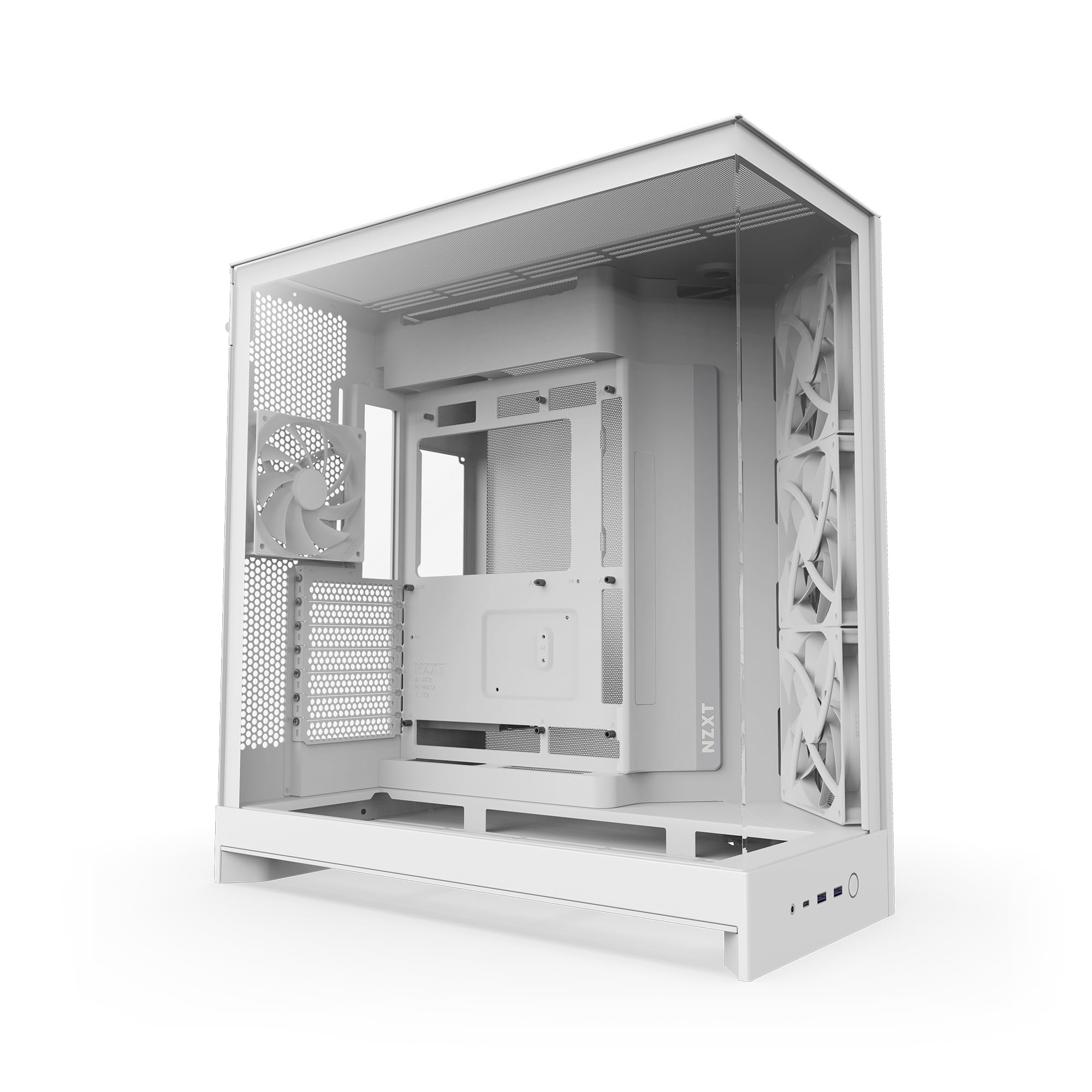
A dual-chamber tank that moves the power supply and drives out of the way, leaving the front clear for airflow and glass.
The H9 Flow earns its following on space and airflow rather than pre-installed lighting. Dual-chamber means the main components sit in front while the power supply and drives hide in a second compartment behind, which clears the front for unobstructed intake and tidy cable management. Perforated steel panels paired with angled front-right fans channel air straight across your graphics card, and the case includes three F140Q and one F120Q fan — the CV label meaning case version, a 3-pin DC fan rather than PWM.
Capacity is genuinely generous: up to nine 140 mm fans across the top, front-right, and bottom, plus one 120 mm in the rear. Radiators fit up to 420 mm on the top and front-right — larger than many mid-towers allow — and the interior takes E-ATX boards plus rear-connect ASUS BTF and MSI Project Zero motherboards. The wraparound tempered glass completes the panoramic look.
Owners describe it as solid, heavy, and beautifully organized inside, with cable management earning specific praise — extra-wide channels, built-in Velcro straps, and tie-down points. The recurring caveat is size: it is genuinely large, and buyers consistently advise measuring your space first. It is also heavy, so it is not a case you relocate often. It ships in white, which stands out if your desk is already light-toned.
What the reviews keep repeating: the room behind the motherboard is the star — cables disappear with almost no effort, and the case runs quiet even with its stock fans.
The one thing to check: measure your desk or shelf first, because this case is heavy and large enough to dominate a small room.
Pick the H9 Flow when: airflow and cable space matter more to you than RGB from the start.
Skip if: your workspace is tight — this one needs real floor space to live comfortably.
6. Antec C8 Wood Full-Tower E-ATX PC Case, Wooden Front Panel

A full-tower with a wooden front that swallows oversized E-ATX builds and still looks like furniture.
The C8 Wood is the answer for anyone running a Threadripper platform or an oversized E-ATX board that refuses to fit a mid-tower. It is a full tower with a wooden front panel and smooth tempered glass on the front and side, so the timber reads as a clean modern accent even in a room that is not a gaming den. It supports E-ATX, ATX, M-ATX, and ITX boards, GPUs up to 440 mm, and radiators up to 360 mm.
Cooling is where it stretches its legs. It fits three 140 mm fans or two 160 mm fans on both the top and the bottom, and supports thick 360 mm radiators on the top, bottom, and side at the same time. A full cut-out at the bottom with interchangeable 120 mm/140 mm fan brackets lets you tailor airflow from below. It ships with no fans, so you decide the whole cooling scheme and its noise character.
Owners consistently praise the case quality, the space, and the look, with the tool-less glass panels and the single front-panel connection earning special mentions. A couple of small annoyances surface: a narrow gap between the glass panels and a front power button that sits differently than expected. The real watch-out is size — this is a large case, and the gap between the glass panels is worth checking on arrival.
Why Full-Tower Buyers Want It
- 440 mm GPU clearance fits the largest cards
- Takes E-ATX down to ITX motherboards, including Threadripper boards
- Simultaneous 360 mm radiators on top, bottom, and side
- Wooden front panel with smooth front and side tempered glass
- Tool-less glass panels and generous cable routing room
What To Expect
- No fans included, so budget the cooling separately
- Very large footprint — measure your desk or floor space first
- A narrow gap can appear between the glass panels
- Only 3 internal bays despite the full-tower size
Best for: oversized E-ATX and Threadripper builds that need a statement chassis.
Reconsider if: your space is tight or you want fans pre-installed from the start.
7. Lian Li O11 Vision Compact ATX PC Case, Back-Connect, Black (O11VPX)

Glass on the front, top, and side — the closest thing here to an open aquarium display case.
The trick this case pulls is the three-panel tempered glass design: front, top, and left side all clear, with a patented layout that leaves your components in an uninterrupted view. Built in collaboration with PCMasterRace, it also hides AIO tubing within the second chamber when the radiator sits on the side, which keeps the interior looking clean rather than crossed with hoses. A top mesh panel is included for a 360 mm AIO if you prefer air straight through the lid.
It is a compact dual-chamber mid-tower that still fits a lot. It supports ATX and Micro-ATX plus a bottom-mounted power supply, takes ATX back-connect motherboards, and accommodates large GPUs and a 360 mm radiator. Tool-free installation and clean grommets keep assembly quick. Against the be quiet! Light Base 900 DX, this Lian Li keeps the same 360 mm radiator support but folds into a smaller footprint.
Owners describe it as one of the best cases they have worked with, calling out the cable management and the clean materials. Two practical notes: cable routing needs a bit of planning to hit the tidy result, and the front I/O is limited — one builder found the hidden cooler routing did not work for their specific cooler, though the case still performed. It is heavy, so treat it as semi-permanent once built.
The signature move: three glass panels with AIO tubing tucked into the second chamber, so the aquarium view stays clear instead of cluttered with hoses.
Worth confirming before you buy: that hidden cooler routing works with your specific AIO, and that the limited front I/O covers your peripherals.
Made for: builders who want a panoramic display and will plan cable routing to get it.
Not for: anyone needing a broad front I/O panel or a light, easily moved case.
8. be quiet! Light Base 900 DX White PC Case, Fully Windowed Front and Side

Flip it, lay it flat, or stand it tall — this case changes orientation in seconds to fit your room.
This is the most configurable case on the list, and orientation is the reason. Removable feet let you invert the case in seconds, or lay it horizontally just as quickly, so you can match whatever your gaming room calls for. Large window panels on the front and side keep your components visible whatever way you turn it, and a massive ARGB LED strip is visible from every angle, syncing with your motherboard for control. It comes in white, which pops if you want a bright build.
Inside, it is built for big. It supports an E-ATX motherboard, up to two 420 mm radiators, and even the strongest graphics cards at the same time. The removable radiator and fan holder in the lid and base each hold a radiator up to 420 mm, and a side radiator adds a third. There are 2 ARGB and PWM hubs with a total of 12 ports, positioned at the top and bottom. It supports back-connect boards including ASUS BTF, MSI Project Zero, and Gigabyte Project Stealth for a wire-free look.
It ships with no pre-installed fans, so you install up to 10 of your choosing — a control advantage, but one that adds a step and cost. Buyers describe it as a builder’s dream with excellent airflow and endless configuration, and one notes it holds two large three-slot GPUs comfortably. The 1.5 cm power supply clearance is a detail worth checking against your unit before you commit.
What makes it different: removable feet flip the case into an inverted or horizontal layout in seconds, so it fits a room rather than the other way around.
Budget for this: no fans included, so plan your airflow setup and the 1.5 cm power supply clearance alongside the case.
Ideal for: builders who want a reconfigurable display case and will choose their own fans.
Look elsewhere if: you want a plug-and-play case with fans already fitted.
9. Hyte Y70 Modern Aesthetic Gaming PC Case – Snow White
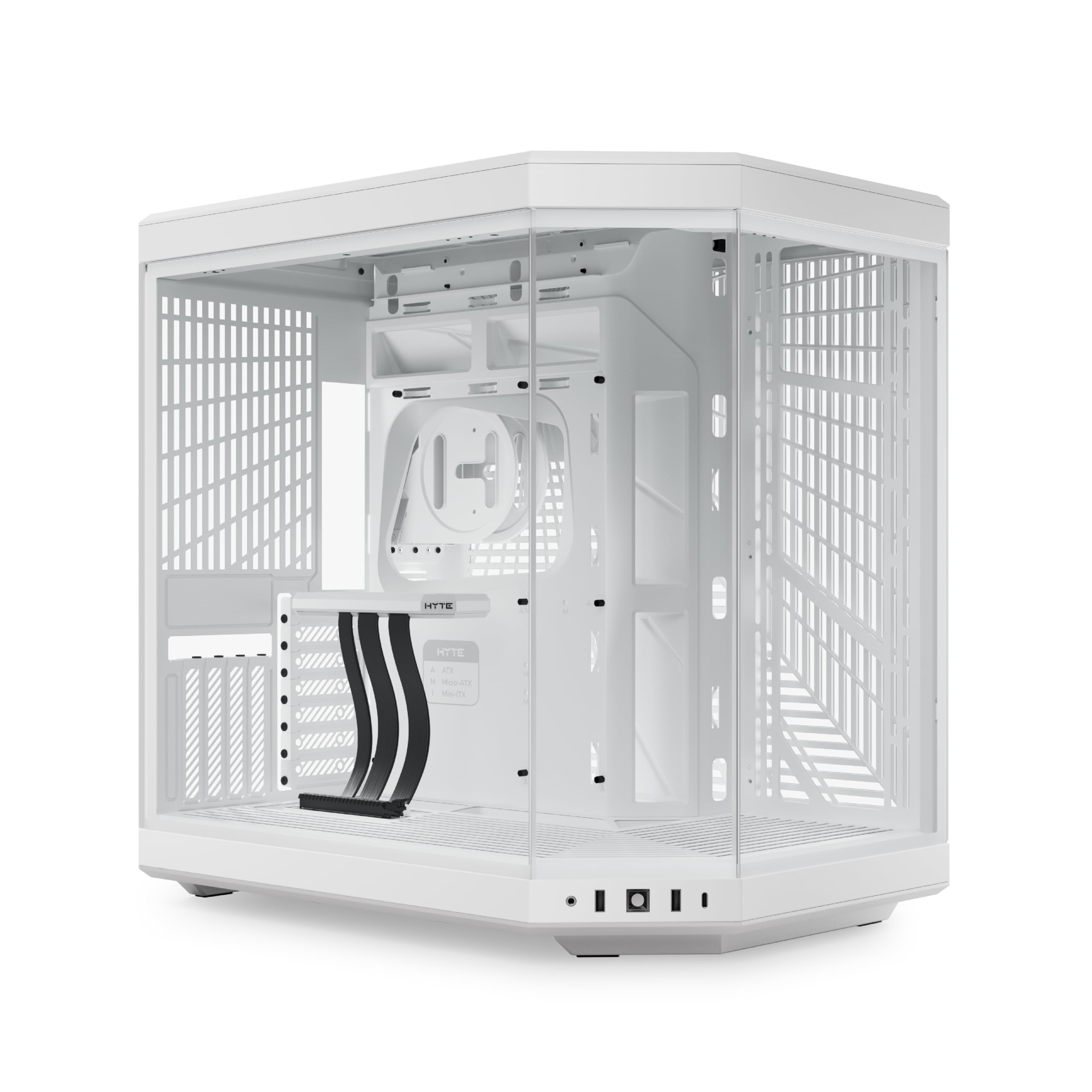
The showpiece: panoramic glass, a color-matched riser canopy, and a four-slot vertical graphics hero mount.
If the goal is a PC that looks like a display installation, this is the one. The Y70 creates a unified look with a three-piece panoramic glass front and a dual-chamber interior, and it comes in four colorways. It supports a massive four-slot vertical graphics setup with an included PCIe 4.0 x16 riser that wears a color-matched canopy, so the connection stays visually smooth instead of shouting “cable” at you.
Cooling capacity is ginormous in the maker’s own words: up to a 360 mm radiator on the side (125 mm thick) and an adjustable top (68 mm thick), plus cold floor cooling that fits either three 120 mm or two 140 mm fans. It supports ITX through E-ATX boards and holds up to 10 fans. The build experience gets the premium treatment too — helpful labels, reusable Velcro straps, floating storage sleds, and tool-less panels with deep rear cable space.
Owners rave about the design and appearance, calling it a statement case that is easy to build in and roomy for large cards. The honest trade-offs: it ships with no fans, so you need your own cooling and possibly splitters or a controller for your fan count. Airflow, dust filtration, and the vertical GPU mount all invite a little planning — bottom fan installation and rear fan mounting take some care, and the riser install can feel delicate. At premium pricing and real weight, this is a deliberate centerpiece, not a budget box.
The centerpiece factor: a three-piece panoramic glass wrap and an included PCIe 4.0 raiser with a color-matched canopy make vertical GPU build look intentional and clean.
The planning it asks for: no fans included, and vertical mounting or a dense fan layout takes a little care to get right.
Worth it for: a flagship showcase build where the glass and vertical card are the point.
Overkill if: you want fans included or have no appetite for a planned cooling layout.
Understanding the Specs
GPU Clearance (mm)
This is the maximum length of graphics card the case physically accepts, measured in millimetres from the rear bracket forward. Three-fan cards run long, so check your card’s length against the case rating before buying — a 420 mm rating swallows the biggest cards with room to spare, while a 415 mm rating is still generous but leaves less margin. Too tight, and the card either will not seat or crowds your front fans.
Fan Type: PWM, ARGB, and DC
PWM fans let the motherboard vary their speed, so they stay quiet at idle and ramp up under load. ARGB means addressable RGB — each LED can display its own colour, giving you gradients and patterns rather than one solid glow. DC fans run on a simpler fixed-voltage control. Cases bundling PWM ARGB fans with daisy-chain wiring save you from chasing individual headers when you build.
Dual-Chamber Layout
A dual-chamber case separates your main components from the power supply and drives, pushing the power supply into a rear compartment. The payoff is a clear front for airflow and glass, plus a dedicated hiding spot for cables so the visible side stays tidy. It also tends to run quieter because the power supply is tucked away from the main airflow path.
Radiator Support
Radiator support tells you the largest liquid-cooling radiator the case will hold and where. A case rated for 360 mm on top handles the popular three-fan AIO sizes; some support up to 420 mm on the top and front. If you plan liquid cooling, confirm the case fits your radiator size in the position you want, since a top mount can sometimes interfere with tall RAM or motherboard connectors.
FAQ
Will a large three-fan graphics card fit in these cases?
Do I need to buy extra fans for a case that includes none?
What is a dual-chamber case and why does it matter?
Which of these cases support reverse-connect motherboards?
Can these cases fit a 360 mm radiator for liquid cooling?
Do panoramic glass cases run hotter than mesh front cases?
Are the included fans noisy in these cases?
Can I lay a PC case on its side or invert it?
How much storage can these cases hold?
Is a wooden front panel PC case durable?
Final Thoughts: The Verdict
For most builders, the beautiful pc cases winner is the Lian Li V100-ATX because it lands the finish line first — four ARGB PWM fans already daisy-chained, 420 mm of GPU clearance, and a pillarless glass corner that shows the whole build. If your room calls for warmth over glow, pick the Okinos Cypress 7 and let the genuine walnut do the talking. And for a build that has to hold two large GPUs with room to spare, the be quiet! Light Base 900 DX is the one to reach for.
One nudge, straight from the data: the HYTE Y70 and the MONTECH XR are the two most-talked-about cases in this group, and for good reason — one is the showpiece, the other the value play. If you are still deciding, match the case to the glass layout you actually stare at daily.
How We Picked
We do not accept paid placement. Every pick is matched to a real buyer and a real use-case; we do not hands-on test units.
Sources & Methodology
Specifications: manufacturer listings and product documentation. Review insights: verified customer reviews, as of September 2026. Pricing: not shown on this page (it changes often); check the current price via the retailer link.
As an Amazon Associate, Gadgets Feed earns from qualifying purchases. This does not affect which products we feature.