
The last thing you want after a long day is a cramped neck, numb arms, or a tablet clattering onto your face mid-scroll. A proper bed tablet holder transforms your headboard, nightstand, or bed frame into a hands-free viewing station, but the market is flooded with flimsy goosenecks that droop and lightweight stands that tip over the moment you tap the screen.
I’m Min — the co-founder and writer behind Gadgets Feed. My deep market research and spec analysis for this guide focused on three failure modes that plague this category: joint creep under load, base instability on soft surfaces, and clamp compatibility with modern tablet cases.
After sifting through hours of real user reports and cross-referencing materials, clamping mechanisms, and maximum device weight tolerances, I’ve identified the stands that actually stay put. This is the definitive guide to choosing a best bed tablet holder that won’t leave you frustrated mid-chapter.
How To Choose The Best Bed Tablet Holder
Picking the right bed tablet holder means matching the stand’s physical constraints to your sleeping setup. A floor stand with a heavy base works well for floating beds with no headboard, while a C-clamp mount is nearly mandatory if you have a solid bed frame or nightstand edge. Focus on the joint design and the maximum device weight rating — those two specs decide whether your stand stays rigid or slowly sinks over an evening.
Base Stability and Mounting Type
A holder for bed use lives or dies by its base. Floor stands need at least 4.5 lbs of base weight to resist tipping when you lean over or bump the arm. C-clamp mounts require a surface thickness under 2.4 inches for a secure bite. Pillow-based holders rely entirely on friction and your body weight, making them ideal for lap use but unreliable for overhead viewing. Inspect the base material — carbon steel and reinforced ABS hold up far longer than thin plastic.
Joint Mechanics and Sag Resistance
Not all adjustable arms are created equal. Gooseneck arms use a single bendable metal core that works for lightweight Kindles but struggles to hold a 1.5-lb iPad Pro at an extended angle. Articulated arms with separate friction joints (sometimes requiring an Allen wrench to tighten) offer vastly better long-term support. Damping shafts, found on premium models, provide smooth movement without screws loosening over weeks. If you plan to keep a heavy tablet suspended over your pillow, choose a stand with independently adjustable joints rather than a single flexible neck.
Quick Comparison
On smaller screens, swipe sideways to see the full table.
| Model | Category | Best For | Key Spec | Amazon |
|---|---|---|---|---|
| AboveTEK Tablet Stand | C-Clamp Arm | Heavy iPad with case | 27″ reach / 1.13 kg weight | Amazon |
| BluuSuuk Floor Stand | Floor Stand | Total stability overhead | 11 lb base / 2.64 lb capacity | Amazon |
| Houele Tablet Stand | C-Clamp Arm | Large tablets up to 15.6″ | Damping shafts / 0.71 kg weight | Amazon |
| Urmust Tablet Stand | Desk Clamp | Desk-to-bed transition | Aluminum / 2.42 lb max load | Amazon |
| TabHolderix Floor Stand | Floor Stand | Budget floor stand | 4.5 lb base / 27.5″ – 59″ height | Amazon |
| Kefotic Gooseneck with Remote | Gooseneck Clamp | Kindle readers in bed | Page turner remote / 4.5″ – 7.2″ clip | Amazon |
| CreaDream Pillow Stand | Lap Pillow | Portable lap use | Velcro angle / storage pockets | Amazon |
In‑Depth Reviews
1. AboveTEK Tablet Stand Holder

The AboveTEK stand delivers the best balance of reach, rigidity, and material quality for serious bed use. Its four independently adjustable joints — offering 255°, 305°, and two 360° rotations — let you position a heavy 13-inch iPad Pro directly over your pillow without any drift. The C-clamp grips surfaces up to 2.95 inches thick, which covers most bed frames and thick headboards.
Weighing 1.13 kg with a steel-reinforced aluminum alloy construction, this stand handles devices up to 13.5 inches without sagging. An included Allen wrench lets you fine-tune the friction at each joint, though the joints arrive ready to hold an iPad with a heavy case right out of the box. The universal 1/4″ screw adapter also supports DSLR cameras and webcams, making it a multi-purpose tool for content creators.
Some users with 13-inch iPad Pro models in thick protective cases report the clamp fits snugly, but the device width range of 5.1″ to 8.8″ accommodates most standard setups. The plastic ball joint attachment is the only component that feels slightly less premium than the rest of the metal arm — a minor concession at this price tier.
Why it’s great
- Four fully independent joints eliminate drift at any angle
- C-clamp fits bed frames up to 2.95 inches thick
- Included 1/4″ screw adapter makes it a camera mount too
Good to know
- Plastic ball joint feels less durable than the aluminum arm
- Thick protective cases may reduce clamp opening margin
2. BluuSuuk Tablet Floor Stand

The BluuSuuk floor stand is the undisputed champion of stability — its 11-pound reinforced metal base makes tipping virtually impossible, even when the arm is fully extended over a bed. This stand supports devices up to 2.64 lbs, easily handling an iPad Pro 12.9 with an OtterBox case, and its height range stretches from 13.4 to 58.7 inches.
The double-support structure and folding arm design allow the stand to reach out horizontally over a mattress while the base stays planted on the floor. The upgraded clamp offers deeper jaws than typical floor stands, giving case-clad tablets a more secure bite. Assembly is straightforward, and the pivoting head rotates 360 degrees for portrait or landscape viewing.
The height adjustment screw mechanism can work loose over time if not tightened regularly — some users report the swing arm separating after months of daily repositioning. It’s also not built for typing, so keep it strictly for reading, watching, and scrolling. The wide footprint takes up about 16 by 10 inches of floor space.
Why it’s great
- 11-pound base is the heaviest in this roundup, zero tip risk
- Supports devices up to 2.64 lbs, ideal for bulky iPad cases
- Fully extends over a mattress without wobble
Good to know
- Swing arm joint can loosen over months of use
- Not designed for typing, bounces on screen taps
3. Houele Tablet Stand Holder
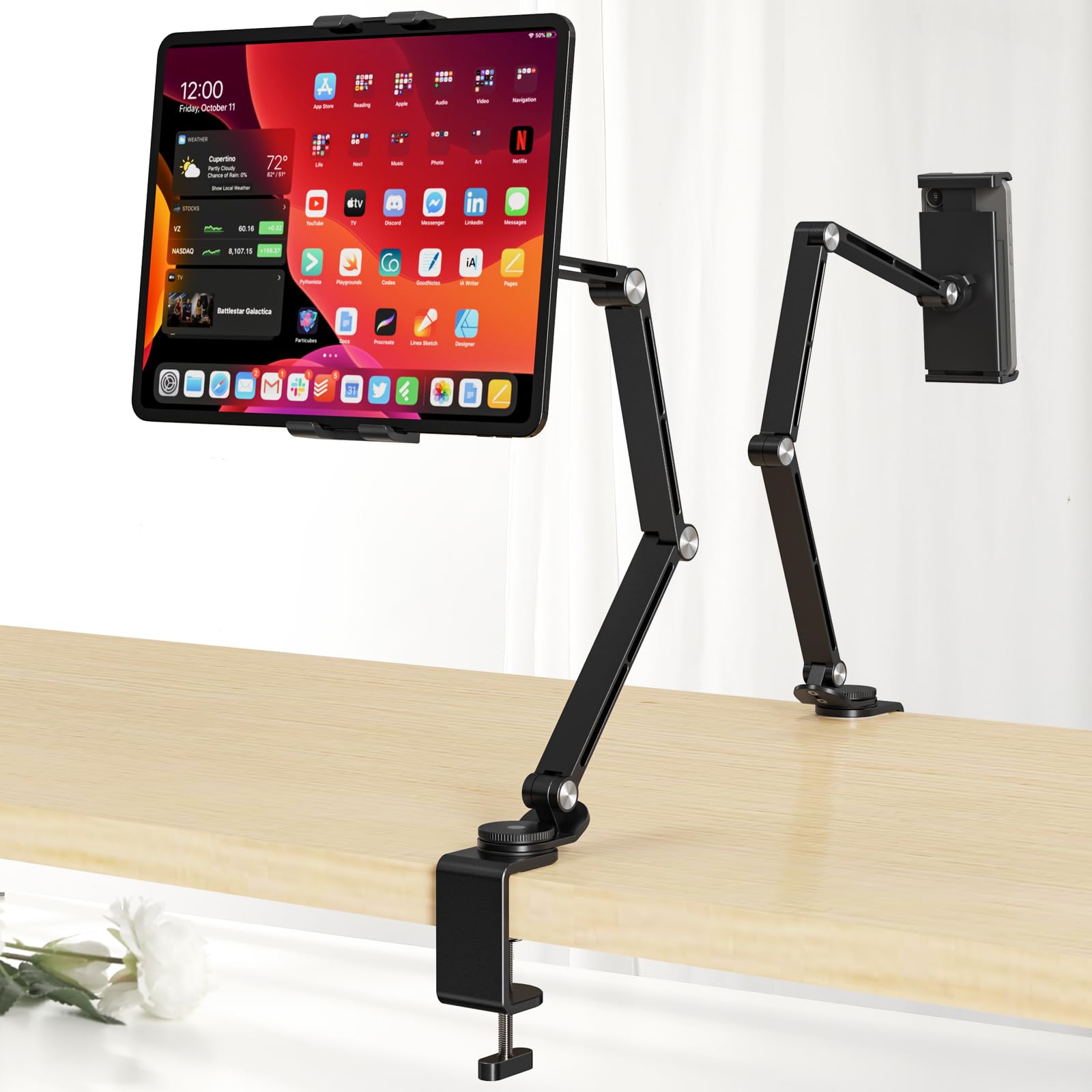
The Houele stand stands out for its unusually wide compatibility, accepting devices from 4 to 15.6 inches — a range that covers everything from a Kindle Scribe to a 15.6-inch portable monitor. The upgraded damping shafts provide smooth, precise positioning without the friction screw adjustments needed on cheaper models, and the aluminum alloy construction keeps the weight down to 0.71 kg.
The retractable clip and C-clamp mount fit surfaces up to 2.36 inches thick, and the 360-degree rotating base makes it easy to switch between desk and bed setups. The non-slip silicone pads on both the base and cradle protect your device and prevent surface scratches. Folded flat, it stores easily between uses.
The ball joint attaching the plastic cradle to the aluminum arm can feel slightly restricted in horizontal tilt. Some users note the arm joints arrive extremely stiff and require a strong pull to extend. The clamp’s default tension is high, so testing on a thick headboard edge is recommended before final placement.
Why it’s great
- Fits devices up to 15.6 inches, including portable monitors
- Smooth damping shafts resist sag without screw adjustments
- Lightweight aluminum build at 0.71 kg
Good to know
- Ball joint limits horizontal tilt range
- Arm joints are stiff at first, requiring force to reposition
4. Urmust Tablet Stand for Desk
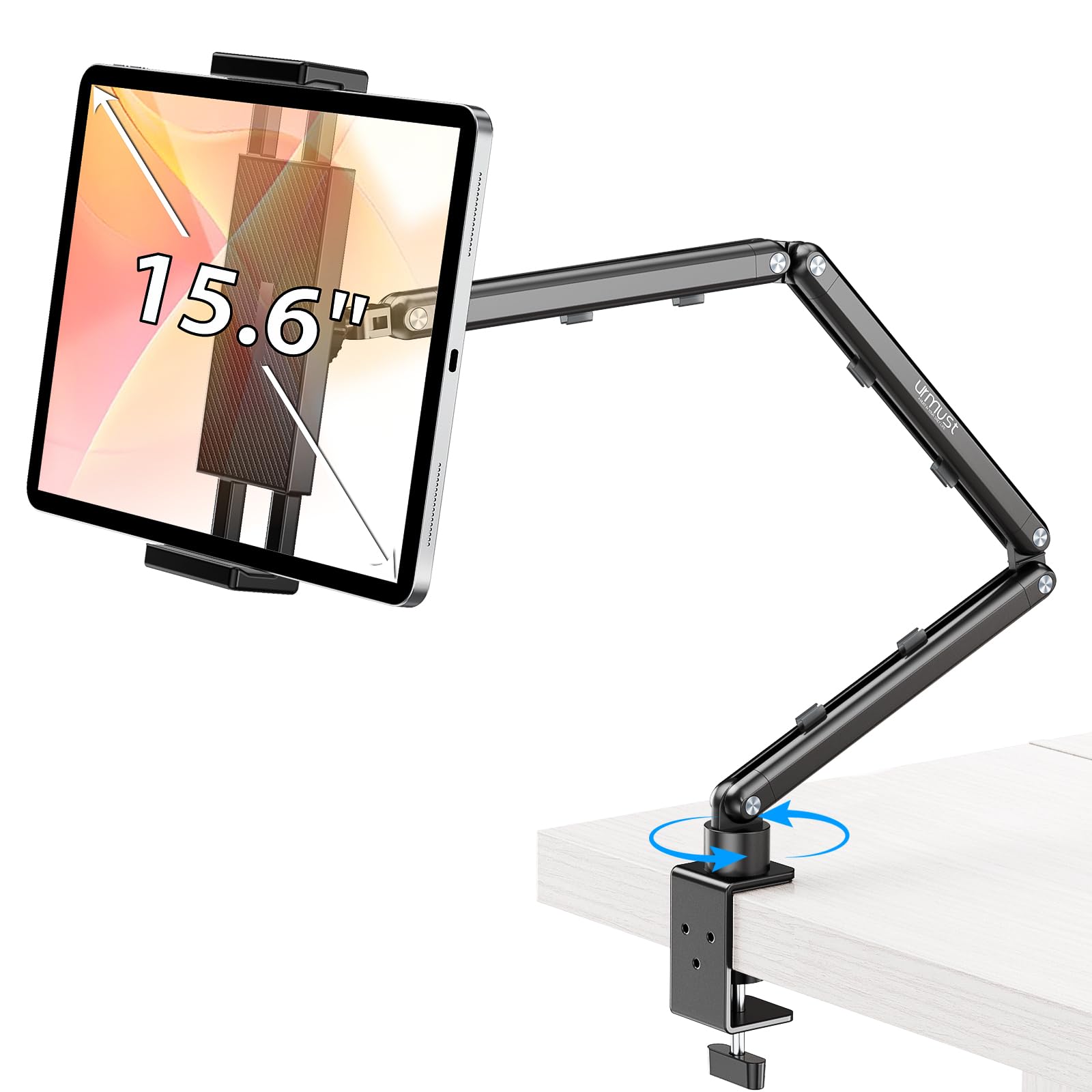
The Urmust stand brings premium desk-grade build quality to a dual-purpose tablet holder. Its aircraft-grade aluminum double-beam arm supports up to 2.42 lbs without any sag, and the included Allen wrench lets you dial in the exact joint tension for your device. The scientific base design distributes weight well enough to stay planted during aggressive screen tapping.
This stand supports devices from 4.7 to 15.6 inches, and the integrated cable clips keep your charging cord organized. The clamp works best on flat, stable surfaces like desks and nightstands — Urmust explicitly advises against using it on headboards where the anti-slip base can lose grip. The 360-degree rotation at the base makes switching between sitting and lying positions easy.
The hinge adjustments require the Allen wrench every time you want to change the joint tightness; there’s no quick-release mechanism. Tablets with thick folio cases may not fit well in the clamp, and the plastic swivel nut feels slightly finicky during tightening. For stationary setups where you set the angle once and leave it, this is a refined choice.
Why it’s great
- Aircraft-grade aluminum arm resists sagging at full extension
- Integrated cable clips keep desk and bed area tidy
- 360-degree base rotation for flexible viewing
Good to know
- Requires Allen wrench for all hinge adjustments
- Not recommended for headboard or uneven surfaces
5. TabHolderix Tablet Floor Stand

The TabHolderix floor stand packs a surprisingly solid 4.5-pound reinforced base into an entry-level price bracket. The carbon steel arm and cantilever design extend up to 22 inches, giving you the reach to swing a tablet over a bed from a bedside floor position. The height adjusts from 27.5 to 59 inches, covering both seated and standing use.
Users report this stand holds an iPad Mini securely with no tip hazard, and the 360-degree rotation at the head makes switching between landscape and portrait frictionless. Assembly is straightforward, and the weighted base footprint is compact enough to tuck next to a bed leg. For tablet-only use (up to 1.5 lbs), the stability is genuinely impressive at this price level.
The base-to-arm screw can be difficult to thread during assembly, and heavy tablets over 1.5 lbs — or tablets with thick cases — may require adding weight to the base for full stability. The clamp depth is shallower than premium models, so oversized protective cases may not fit securely. If you run a naked iPad or a slim case, this is a solid value play.
Why it’s great
- 4.5 lb base provides genuine stability for its price tier
- Carbon steel arm and 22-inch reach for bed overhead use
- Height range covers sitting, lying down, and standing
Good to know
- Base-to-arm screw can be difficult to thread
- May need extra weight on base for tablets over 1.5 lbs
6. Kefotic Gooseneck Tablet Holder with Remote

The Kefotic gooseneck holder is purpose-built for Kindle readers who want to burrow under blankets and never reach for the screen. The included page turner remote clips onto your finger or sleeve and turns pages via a capacitive tap mechanism — no Bluetooth pairing needed. The gooseneck arm wraps around your bed area and holds devices from 4.5 to 7.2 inches wide, covering the Kindle Paperwhite, Oasis, Scribe, and iPad Mini.
The clamp locks onto side tables, headboards, or bed frames up to a standard thickness, and the arm is stiff enough to resist drift over a reading session. The clip rotates 360 degrees, so you can flip between portrait for books and landscape for crosswords or comics. For readers with limited mobility or arthritis, the hands-free operation is genuinely life-changing.
The page turner remote’s battery life is the weak link — multiple users report the clicker needing frequent charging after a few months. The gooseneck arm will wobble if bumped, especially when extended to its maximum reach. It’s also not suited for heavy iPads; the clip and neck work best with e-readers and tablets under 1 lb.
Why it’s great
- Page turner remote eliminates need to touch screen while reading
- Stiff gooseneck resists sag with e-readers and mini tablets
- Works with all capacitive e-readers, no app required
Good to know
- Page turner remote battery degrades and needs frequent charging
- Arm wobbles when bumped at full extension
7. CreaDream Tablet Pillow Stand
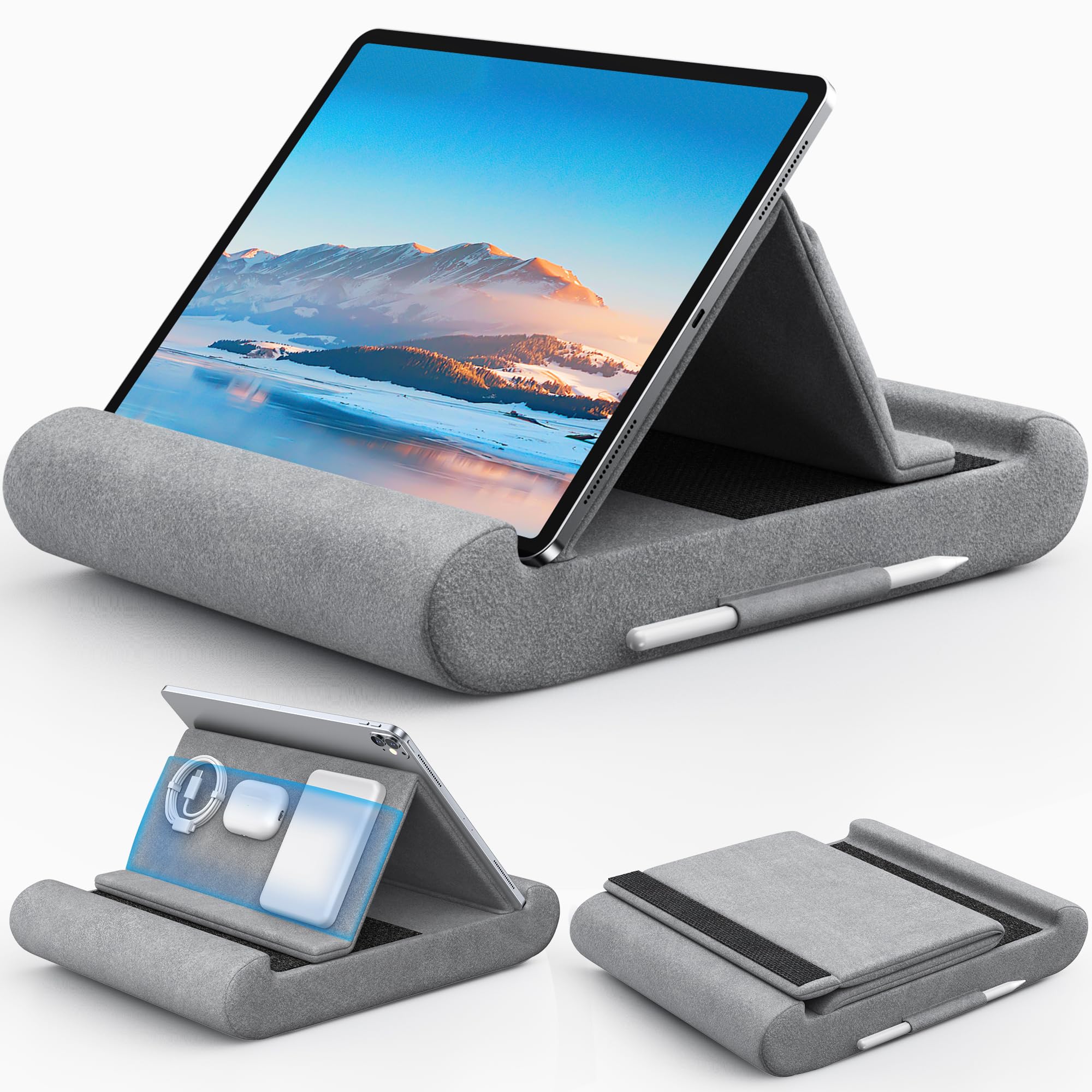
The CreaDream pillow stand is the best non-clamp, non-stand option for couch and bed lap use. Instead of a rigid arm, it uses a Velcro-fastened pillow wedge that props your tablet at multiple viewing angles while you recline. The plush fabric exterior is soft against bare legs, and the foldable design packs flat for travel, fitting into carry-on luggage effortlessly.
The large storage pouch holds a phone, power bank, and charging cables, while the side pen pocket keeps your stylus from rolling into the bed crevice. It supports devices from 4.7 to 13 inches, including the iPad Pro 13-inch, and the Velcro strap accommodates varying thicknesses. At just a few ounces, it’s the lightest option in this lineup — no setup, no assembly, no clamp.
This holder relies entirely on body weight and friction for stability. If you shift positions frequently, the pillow can slide off your lap. It’s also not a hands-free solution in the true sense — you still need to hold the pillow in place or have your knees elevated. Best suited for stationary lounging sessions with an 11-inch or smaller tablet.
Why it’s great
- Zero setup — unfold, drop in tablet, and recline
- Includes storage pockets for phone, cables, and stylus
- Folds flat for travel and storage
Good to know
- Requires body weight or knee elevation to stay in place
- Not a true hands-free mount — shifts with user movement
FAQ
Will a gooseneck stand hold my iPad Pro 12.9 without sagging?
Can I use a bed tablet holder with a thick OtterBox-style case?
How do I keep my tablet stand from wobbling during use?
Final Thoughts: The Verdict
For most users, the best bed tablet holder winner is the AboveTEK Tablet Stand because its four independent friction joints and deep 2.95-inch C-clamp deliver rock-solid positioning for heavy tablets without any sag. If you want total floor-standing stability that handles a case-clad iPad Pro 12.9 without tipping, grab the BluuSuuk Floor Stand. And for dedicated Kindle readers who want hands-free page turning under the covers, nothing beats the Kefotic Gooseneck with Remote.