
Our readers keep the lights on and my morning glass full of iced black tea. As an Amazon Associate, I earn from qualifying purchases.
Specs are compiled from manufacturer listings and verified buyer reviews and can change over time — please confirm the key details on the product page before buying.
If you’re shopping for a Bedside Monitor Stand, the real question isn’t whether to get one — it’s which mounting style actually fits your screen and your nightstand. You want a screen at eye level so you’re not craning your neck, and you want it stable enough that a midnight bump doesn’t send it crashing. The three stands here all solve that, but they go about it in very different ways: one screws onto the back of your monitor, one clamps to the screen’s edge, and one grabs it with a magnet.
I’m Min — the founder and writer behind Gadgets Feed. This guide is built by comparing the manufacturers’ published specifications and the patterns across verified customer reviews, so you get each pick’s real strengths and trade-offs instead of marketing spin.
We break down the fit, stability, and portability of each model so you can confidently choose the right bedside monitor stand for your setup without overpaying for features you will never use.
Our Picks at a Glance

How To Choose The Best Bedside Monitor Stand
A bedside monitor stand has one job: hold a screen at a comfortable angle where you can see it from bed or at a desk. But the three big decisions — how it attaches, how heavy it can hold, and how much it weighs — change which one is right for you.
Match the mounting style to your screen
Your monitor’s back panel tells you everything. If it has four holes spaced 75x75mm apart, you need a VESA mount that screws into them. If your screen is a sleek portable monitor with no holes, you’ll need a clamp that grips the edge or a magnetic plate that sticks to the back. Check your screen’s hole pattern before you commit — a stand built for 75×75 VESA holes won’t fit a screen without them.
Weigh the standing base against the screen
A heavier base means a more stable stand — it resists tipping when you tap the screen or swivel it hard. The trade-off is portability: a thick weighted base is a pain to carry in a backpack. Decide whether this stand lives permanently on one nightstand or travels with your setup to a co-working space.
Quick Comparison
| Model | Best For | Mounting Style | Max Screen Size | Max Weight | Amazon |
|---|---|---|---|---|---|
| JUNEBOX Portable Monitor Stand★ Best Overall | VESA screens up to 18″ | VESA 75×75 Screws | 18 inches | 10 lbs | Amazon |
| WYSXEBWZ Portable Monitor Holder | Hole-free screens | Stretchable Clip | 17.3 inches | 6.5 lb | Amazon |
| Jakeko Magnetic Stand | Fast attachment & travel | Magnetic / VESA | 18.5 inches | 4.4 lbs | Amazon |
In-Depth Reviews
1. JUNEBOX Portable Monitor Stand (VESA 75×75)
Our pick — over 4.5★ from 150+ verified ratings; the strongest balance of quality and price.
The screw-on workhorse that turns any 75×75 VESA screen into a silent bedside companion.
The defining feature here is the anti-loss screw system — four M4-standard screws that stay attached to the bracket, so you never hunt for a dropped screw on the floor. It fits flat screens from 7 inches up to 18 inches, covering the common 15.6″, 16″, 17.3″, and 18.5″ sizes, and supports a monitor weighing up to 10lbs/4.5kg. That’s a much broader range than the clip-style holder below, which starts at 6 inches but tops out at 17.3 inches — so this one is the better bet if you run a large 18-inch panel.
Stability is what keeps winning people over. The free-standing aluminum alloy base measures 7.75″x7.75″ and the whole thing rotates a full 360°, so you can spin the view toward the bed without lifting the heavy stand. Anti-slip pads on the bottom keep it from drifting on the nightstand. The middle gap in the arm also routes your cable for a clean look. The trade-off: this is a screw-in mount, so your monitor absolutely needs those 75x75mm VESA holes — it will not work on a screen without them.
Buyers report that after three weeks of use it rotates silently on its axis and feels ideal for small spaces next to a laptop. The recurring gripe is the tilt mechanism — it has no tensioner, so angling the screen requires a small leveling shim for some owners to stop a lean. A few also note the captive bolts sit 1 mm too long, though the mount stays wobble-free regardless. The thing everyone raves about is the fit, and the rock-solid sturdiness backs it up.
What wins people over
- Anti-loss M4 screws stay in the bracket, never lost
- 360° rotating base with anti-slip pads for steady swiveling
- Aluminum alloy build supports up to 10 lbs / 4.5 kg
Where it stumbles
- Tilt has no tensioner, so leveling can need a shim
- Requires a 75x75mm VESA pattern — no holes, no fit
Reach for this if: your monitor has standard 75x75mm VESA holes and you want a stable, swiveling stand that stays put.
Keep looking if: your screen is hole-free or you demand a smooth tilting action with built-in tension.
2. WYSXEBWZ Portable Monitor Holder (Clip)

The clamp-and-go stand that grips hole-free screens from 6 to 17.3 inches without a single screw.
If your portable monitor has no VESA holes, this is the stand that saves you. Its clip extends from 4.9 inches to 10.2 inches wide, so it grips the edge of any screen up to 17.3 inches — and it even works for tablets and phones between 6 and 17.3 inches. Unlike the JUNEBOX above, which demands a 75x75mm VESA pattern, this one clamps straight onto the bezel, making it the flexible pick for a household with multiple devices.
What wins people over is the stability — the heavy bottom plate and a spring-loaded clamp hold screens firmly, and the two long adjustable arms let you dial in the perfect height and angle. It rotates 360° so you can swivel it left or right with one hand. Made of aluminum alloy, it carries up to 6.5 lb, and the anti-slip pad on the base protects your nightstand from scratches. Owners mention it works great for a 16-inch monitor, folds flat for a laptop bag, and stops shaking within seconds of being set down.
The honest catch is the setup. The hinges arrive loose and need the included screwdriver to tighten, and that spring clamp is strong enough that it takes real effort to open. It’s also not ideal for daily folding — owners describe the repacking as tricky. Weighing 1.5 pounds, it’s portable but noticeably solid, and the heavy base is exactly why it stays put.
Stability first: the heavy powder-coated base and tight spring clamp are the standout reasons owners trust it with 17-inch screens.
Setup patience: plan a few minutes with the supplied tool to tune the joint tension to your liking.
Best for: anyone with a hole-free portable monitor or tablet who wants one stand that works across several devices.
Not for: those who need to fold and unfold the stand daily without fiddling with tight hinges.
3. Jakeko Magnetic Portable Monitor Stand
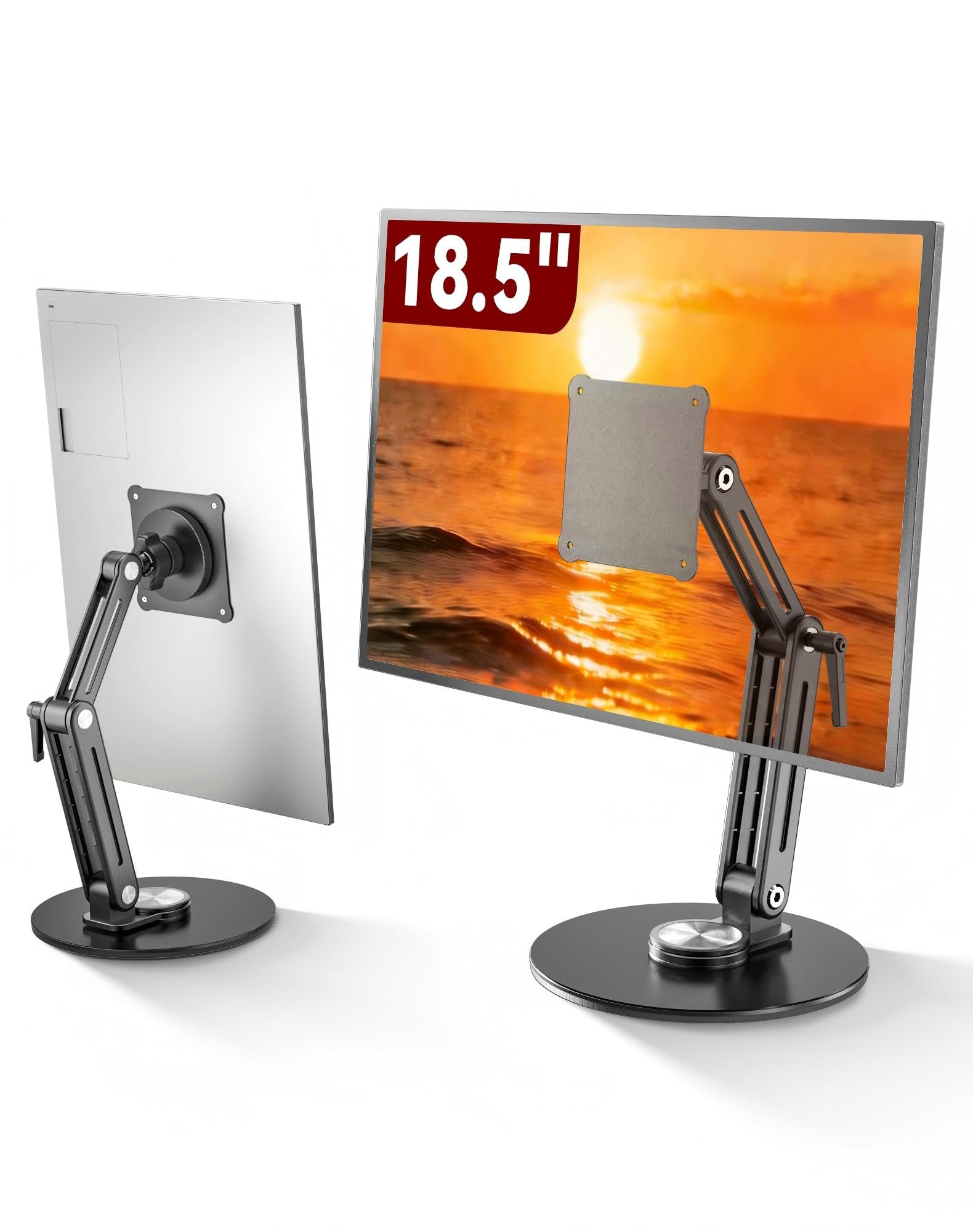
The magnetic mount that snaps a screen into place and folds flat for a carry-on bag.
The standout spec here is the magnetic mount — you stick the included pad to the back of your screen, and the stand grabs it instantly with a strong magnet, no screws or clamps in sight. It fits tablets and portable monitors from 8.3 inches up to 18.5 inches, which actually gives it a wider reach than the clip-style holder above (which maxes out at 17.3 inches). There’s also a VESA 75x75mm plate included if your monitor has standard holes, so you get two attachment paths in one stand.
It’s built around adjustment. Mechanical gears give you 360° base rotation, a 180° lower arm, 360° at the joint, and 360° at the upper arm — all with no tools required. A built-in thumb wrench on the mid-joint tightens or loosens tension by hand, and the matching wrench stores right in the base groove. At 0.8 kg, it’s light enough to toss in a bag, and the 2-stage folding packs it flat for remote desks and co-working spaces. Owners describe it as an insanely strong magnet on a stable weighted base.
The recurring gripe is a rotational play in the ball-and-socket mount that persists even when tightened — keeping a 16-inch monitor perfectly level takes some fuss. Magnetic strength itself gets mixed feedback, and since it’s not compatible with MagSafe, iPhone users need the included copper sheets for a secure hold. The thing everyone raves about is the fit, with solid functionality close behind — customers note using it daily as a mobile mechanic for dual screens on a laptop.
Instant attachment: the magnetic grab plus included VESA plate means one stand covers both hole-free and VESA screens.
Fuss factor: the ball-and-socket play can make precise leveling a small battle.
Grab it if: you switch between a portable monitor and a tablet and want tool-free, travel-friendly mounting.
Pass if: you need rock-solid leveling on a large 18.5-inch screen every single time.
Understanding the Specs
VESA Mounting Pattern
VESA is the standard spacing of the four screw holes on the back of a monitor. A 75x75mm pattern means the holes sit 75mm apart, both horizontally and vertically. Your stand’s bracket has to match that exact spacing to screw on — if your screen has no holes at all, you’ll need a clamp or magnetic mount instead.
Screen Size and Weight Limits
Every stand lists a maximum screen size and a maximum weight it can support. The weight limit matters more than the diagonal inches, because a heavy 16-inch OLED can stress a stand rated for a light 16-inch IPS panel. Check both numbers before you buy, and leave a little margin for safety.
FAQ
Will a VESA-mounted stand work with my portable monitor?
Can I use these stands with a tablet at the bedside?
How much weight can a bedside monitor stand hold?
What is the largest screen size these stands support?
Do these stands swivel so I can turn the screen toward my bed?
Can these stands fold flat for travel?
Will the magnetic stand work with my iPad?
What tools do I need to set up these stands?
Will these stands scratch my desk or nightstand?
Which stand is best for a narrow nightstand shelf?
Final Thoughts: The Verdict
If you want one dependable pick, the bedside monitor stand winner is the JUNEBOX because its stable 10 lb / 4.5 kg aluminum build and 360° swivel solve the two biggest bedside problems — wobble and awkward angles. If your screen has no VESA holes, grab the WYSXEBWZ. And for a travel-friendly magnetic mount that swaps between monitor and tablet, the Jakeko is the one to reach for.
How We Picked
We do not accept paid placement. Every pick is matched to a real buyer and a real use-case; we do not hands-on test units.
Sources & Methodology
Specifications: manufacturer listings and product documentation. Review insights: verified customer reviews, as of August 2026. Pricing: not shown on this page (it changes often); check the current price via the retailer link.
As an Amazon Associate, Gadgets Feed earns from qualifying purchases. This does not affect which products we feature.