
The jump from mouse to stylus is the single biggest leap in digital art. A Beginner Art Tablet puts a 16K pressure-sensitive pen in your hand, translating the subtlest change in wrist pressure into a brushstroke, a line width shift, or a shade gradient. Without it, you are fighting the tool, not making the art.
I’m Min — the co-founder and writer behind Gadgets Feed. After sifting through hundreds of hours of user reviews and technical datasheets on active area size, pressure curves, Bluetooth latency, and driver stability, I’ve narrowed down the field to seven tablets that actually deliver on their promises for someone starting out.
This guide breaks down the real-world performance of each model so you can confidently choose the best beginner art tablet for your budget and creative goals without wasting money on specs you do not need.
How To Choose The Best Beginner Art Tablet
For newcomers, the choice is between a pen tablet (no screen) and a pen display (with a screen). Pen tablets are lighter, cheaper, and build the essential hand-eye coordination that serious digital artists rely on. Pen displays offer a direct drawing surface but cost significantly more. Your decision should balance active area size, pressure sensitivity, connectivity, and software compatibility.
Active Area and Aspect Ratio
The active area, measured in inches (e.g., 8 x 5 inches or 10 x 6.25 inches), determines how much you move your hand to cross the screen. A larger area (10 x 6.25 inches) suits wide or dual-monitor setups, while a compact 8 x 5 inch size is better for limited desk space or travel. The aspect ratio (16:10 vs 16:9) affects how the tablet maps to your monitor — a mismatch can force you to work in a cropped zone.
Pressure Sensitivity and Pen Technology
Beginner tablets commonly offer 8192 levels, which is adequate for 90% of line variation. Premium models now reach 16384 or 16K levels, providing smoother taper at the start and end of strokes. Battery-free pens (electromagnetic resonance) never need charging, while Bluetooth pens require a rechargeable battery. Tilt recognition (60 degrees is standard) enables shading and angle-based brush effects.
Connectivity and Compatibility
USB wired offers zero latency and no battery worries. Bluetooth 5.0 adds cable-free convenience but introduces potential latency (usually imperceptible to beginners) and reduces battery life on wireless models. Ensure the tablet supports your OS — macOS, Windows, Android, and Linux (Ubuntu) support varies. Driver quality matters more than hardware for software like Photoshop, Clip Studio Paint, Krita, and ibisPaint.
Quick Comparison
On smaller screens, swipe sideways to see the full table.
| Model | Category | Best For | Key Spec | Amazon |
|---|---|---|---|---|
| HUION Inspiroy Dial 2 | Mid-Range | Workflow speed with dual dials | 10.5 x 6.56 in active area | Amazon |
| Wacom Intuos Pro Small | Premium | Professional precision & build | 8192 pressure levels | Amazon |
| XPPen Artist 13.3 Pro V2 | Premium | Full-laminated pen display | 16384 pen pressure | Amazon |
| UGEE UE12 | Mid-Range | Budget pen display with 124% sRGB | 11.6-inch FHD screen | Amazon |
| HUION Inspiroy Frego | Mid-Range | Bluetooth wireless & 24-hour battery | 10 x 6.25 in active area | Amazon |
| HUION Inspiroy 2 | Mid-Range | Large surface & PenTech 3.0 | 10.5 x 6.56 in active area | Amazon |
| GAOMON WH851 | Budget | Entry-level Bluetooth on a budget | 16384 pressure levels | Amazon |
In‑Depth Reviews
1. HUION Inspiroy Dial 2

The Inspiroy Dial 2 leads because it solves the beginner’s biggest speed bump: constantly switching between brush size, zoom, and undo. Two physical dials let you adjust brush width with your left hand while your right keeps drawing — a workflow advantage that typically costs triple on Wacom pro models. The 10.5 x 6.56 inch active area maps cleanly to 16:9 monitors, and the high-friction textured surface mimics the drag of real paper.
Powered by PenTech 3.0, the battery-free pen offers 8192 levels of pressure sensitivity and 60-degree tilt recognition. Bluetooth 5.0 delivers up to 18 hours of wireless use on a charge, and the USB-C connection provides a zero-latency fallback. The symmetrical design accommodates left-handed users, and the 12 programmable functions (via six keys and two dials) can be configured per application in the driver software.
Reviews consistently praise the build quality — a metal backplate and sturdy construction that rivals tablets twice the price. Some users report occasional Bluetooth disconnection that firmware updates resolve, and the dial layout may feel busy for absolute beginners. But for the price, this is the most feature-complete starting point for a beginner who plans to grow into the tool.
Why it’s great
- Dual physical dials dramatically speed up brush and zoom control
- Excellent paper-like surface texture for natural pen feedback
- Solid battery life (18 hours) and reliable Bluetooth 5.0 connection
Good to know
- Dial and button layout may overwhelm pure beginners at first
- Occasional Bluetooth issues fixed by firmware updates
- Third-party accessory ecosystem is limited compared to Wacom
2. Wacom Intuos Pro Small
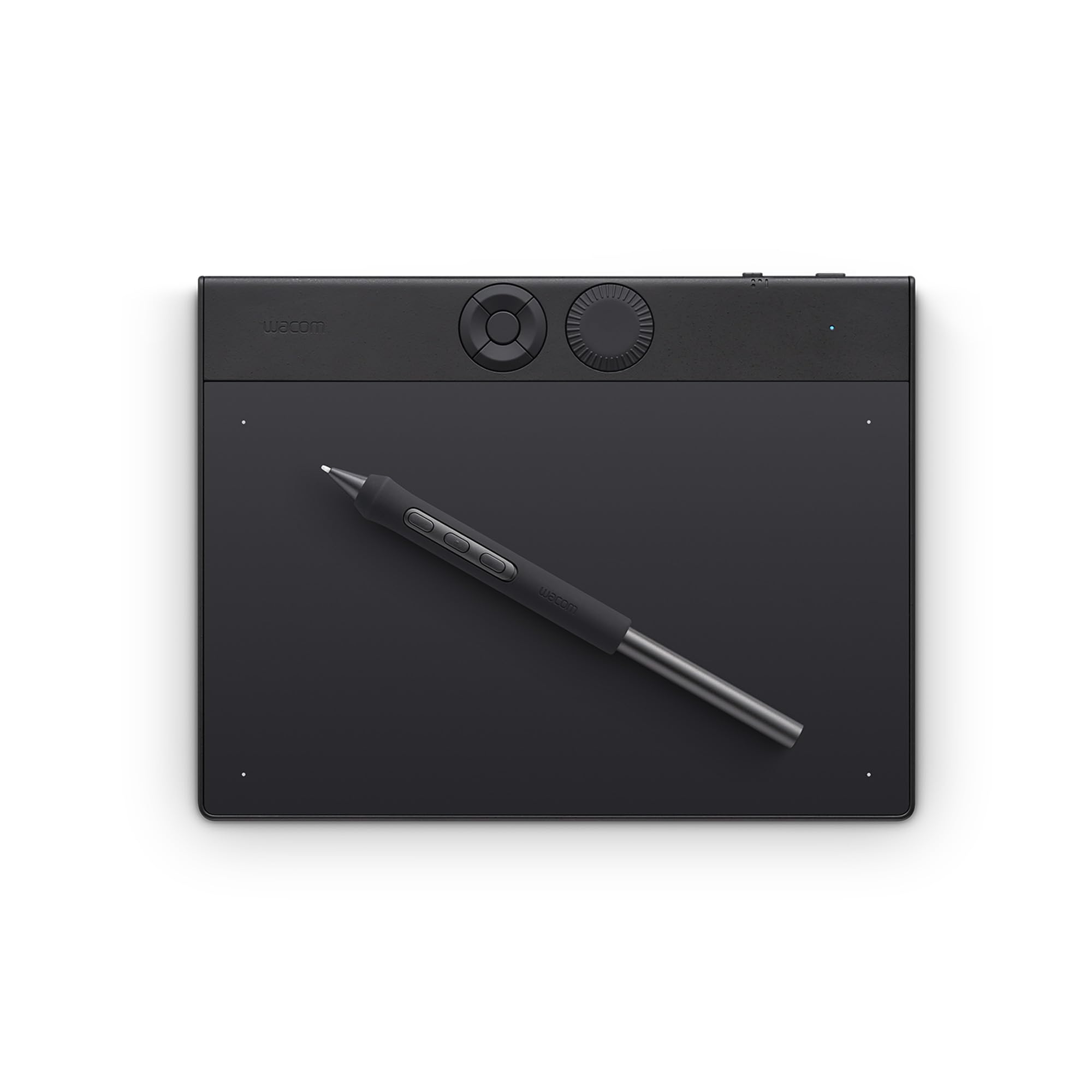
Wacom remains the benchmark for pen technology, and the 2025 Intuos Pro Small proves it. The Pro Pen 3 delivers 8192 levels of pressure with a customizable grip — you can swap between slim, straight, or flared barrels and adjust the center of gravity. The active area (8.4 x 6.4 inches) uses a 16:9 aspect ratio tailored for modern monitors, and it fits in a bag smaller than a paperback.
The magnesium chassis is just 4 mm thin, making it the most portable professional tablet on this list. Bluetooth 5.3 connects flawlessly to Mac systems (users confirm zero dropouts on M1 and M4 Macs), though Windows 11 users occasionally report connection quirks. The mechanical dial and five ExpressKeys sit at the top edge, close to your keyboard hand, for rapid shortcuts without lifting your stylus hand.
Where the Intuos Pro Small falls short for beginners is the price tag. You pay a premium for the brand, the Pro Pen 3 modularity, and the legendary driver stability that creative professionals demand. Beginners on a strict budget may find better value in mid-range competitors, but if you want a single tablet that will last through art school and beyond, this is the one.
Why it’s great
- Modular Pro Pen 3 with customizable weight and grip
- Ultra-thin magnesium build (4 mm) for easy portability
- Rock-solid Bluetooth 5.3 on macOS with dual computer switching
Good to know
- Premium price puts it out of reach for budget-conscious beginners
- No touch ring or touch surface — buttons and dial only
- Windows Bluetooth connectivity can be finicky
3. XPPen Artist 13.3 Pro V2

The Artist 13.3 Pro V2 is the first pen display on this list that justifies skipping a pen tablet. The full-laminated 13.3-inch screen eliminates the parallax gap, so your cursor sits directly under the pen tip — critical for detailed line work. With 16384 levels of pressure sensitivity and the X3 Pro smart chip stylus, the initial activation force drops to just 3 grams, capturing the faintest tickle of a stroke.
Color performance is outstanding: 125% sRGB, 107% Adobe RGB, and 95% DCI-P3 coverage with a 1000:1 contrast ratio. The included AC42 stand adjusts from flat to 90 degrees, and the Red Dial Quick Key handles brush size, zoom, and canvas rotation. Setup is genuinely beginner-friendly — a single full-featured USB-C cable handles video and data, and the driver auto-configures on first launch.
Several reviewers note that the screen surface is durable but can scratch if you apply heavy pressure with standard nibs; a screen protector is recommended. Some driver issues on Windows (multi-monitor misalignment) require matching both displays to 1080p resolution. For a beginner who wants to draw directly on the image, this is the most accessible pen display at this price point.
Why it’s great
- Full-laminated 13.3-inch screen with zero parallax
- 16384 pressure sensitivity with ultra-light 3g activation force
- Excellent color gamut (125% sRGB) and included adjustable stand
Good to know
- Screen can scratch with heavy nib pressure — protector recommended
- Multi-monitor alignment requires matching resolutions
- Not a standalone device — requires a computer
4. UGEE UE12

The UE12 is the most affordable pen display that still delivers a full-laminated, anti-glare screen at 1920 x 1080 resolution. The 11.6-inch active area is smaller than the XPPen’s 13.3 inches, but it fits neatly into a standard laptop bag and works directly with Android phones and tablets via a full-featured USB-C cable. The 124% sRGB color gamut provides punchy, accurate colors for the price.
Pen performance is powered by a battery-free stylus with 16384 levels of pressure and 60-degree tilt. The eight customizable shortcut keys feature a concave-convex design that allows blind operation — a thoughtful touch for beginners who cannot look away from the screen. The dual Type-C ports support blind plug-in connections, simplifying the cable management that plagues cheaper pen displays.
Reviewers highlight the excellent value: the screen is responsive, colors are vibrant, and the drawing experience feels natural. The main complaints are the short cable length of the included 3-in-1 cable and the nibs wearing down quickly for heavy-handed users. Linux users should note that the driver currently only supports X11 (not Wayland). For a beginner entering the pen display world on a budget, the UE12 is a smart entry point.
Why it’s great
- Full-laminated 1080p anti-glare screen at a budget-friendly price
- 16K pressure sensitivity with tilt support for natural shading
- Works with Android devices via USB-C connection
Good to know
- Nibs wear relatively quickly with heavy pressure
- Included cable is short for desktop setups
- Linux driver does not support Wayland (X11 only)
5. HUION Inspiroy Frego

The Inspiroy Frego prioritizes wireless freedom above all else — a full 24 hours of Bluetooth 5.0 battery life from a 2.5-hour charge. The 10 x 6.25 inch active area is slightly larger than A5 paper, and the minimalist design removes physical shortcut keys entirely for a clean, uncluttered surface. The slim PW550S stylus (9.5 mm diameter) stays comfortable during long sessions, and the 0.4 mm retraction distance prevents the pen tip from sinking too deep.
PenTech 3.0+ delivers smooth pressure curves with 8192 levels and 60-degree tilt. The tablet supports Android devices and even iOS via HiPaint or ibisPaint — unique at this price tier. The sloping curved edges and integrated wrist rest reduce fatigue during hour-long drawing marathons. A built-in nylon pen holder on the side keeps the stylus attached for travel.
Users love the excellent build quality and responsive performance with no noticeable wireless latency. The glossy surface texture feels slightly scratchier than competitors, and the driver software is underwhelming — no preset saving, so you must manually reconfigure settings when switching between applications. For the beginner who wants a no-fuss wireless tablet for on-the-go sketching, the Frego delivers.
Why it’s great
- Industry-leading 24-hour battery life for all-day wireless use
- Comfortable ergonomic design with sloping edges and wrist rest
- Works with iOS and Android via HiPaint/ibisPaint
Good to know
- No physical shortcut keys — all controls done in software
- Driver software lacks preset saving between applications
- Surface texture feels slightly scratchy with the included nibs
6. HUION Inspiroy 2

The Inspiroy 2 offers the second-largest active area in this list (10.5 x 6.56 inches) at a mid-range price, making it ideal for beginners with wide monitors or dual-screen setups. PenTech 3.0 eliminates the wobble and lag that plagued earlier Huion pens, delivering lines that feel as solid as a standard ballpoint. The PW110 stylus adds a soft silicone grip and two side buttons for quick undo or eraser access.
The unique scroll wheel and 3-Set 8 shortcut keys allow you to assign different functions for different applications — one configuration for Photoshop, another for Clip Studio Paint. The tablet is ultra-slim and lightweight (1.2 pounds), fitting easily into a laptop bag. Compatibility spans Windows, macOS, Linux (Ubuntu), and Android 6.0 or later via the included USB-C OTG adapter.
Customer feedback is overwhelmingly positive: beginners find it easy to set up, the pen tip is durable over months of use, and the pressure sensitivity is smooth across the full range. The main criticism is the USB Micro-B connection instead of USB-C, which feels dated. A few Linux users report issues with button remapping. For a beginner who wants a spacious drawing canvas without spending premium money, this is the pick.
Why it’s great
- Large active area (10.5 x 6.56 in) for dual-monitor workflows
- PenTech 3.0 delivers lag-free, wobble-free line accuracy
- Scroll wheel and multi-set shortcut keys boost productivity
Good to know
- Uses USB Micro-B instead of modern USB-C
- Linux button remapping can be unreliable via Huion driver
- No Bluetooth — wired connection only
7. GAOMON WH851
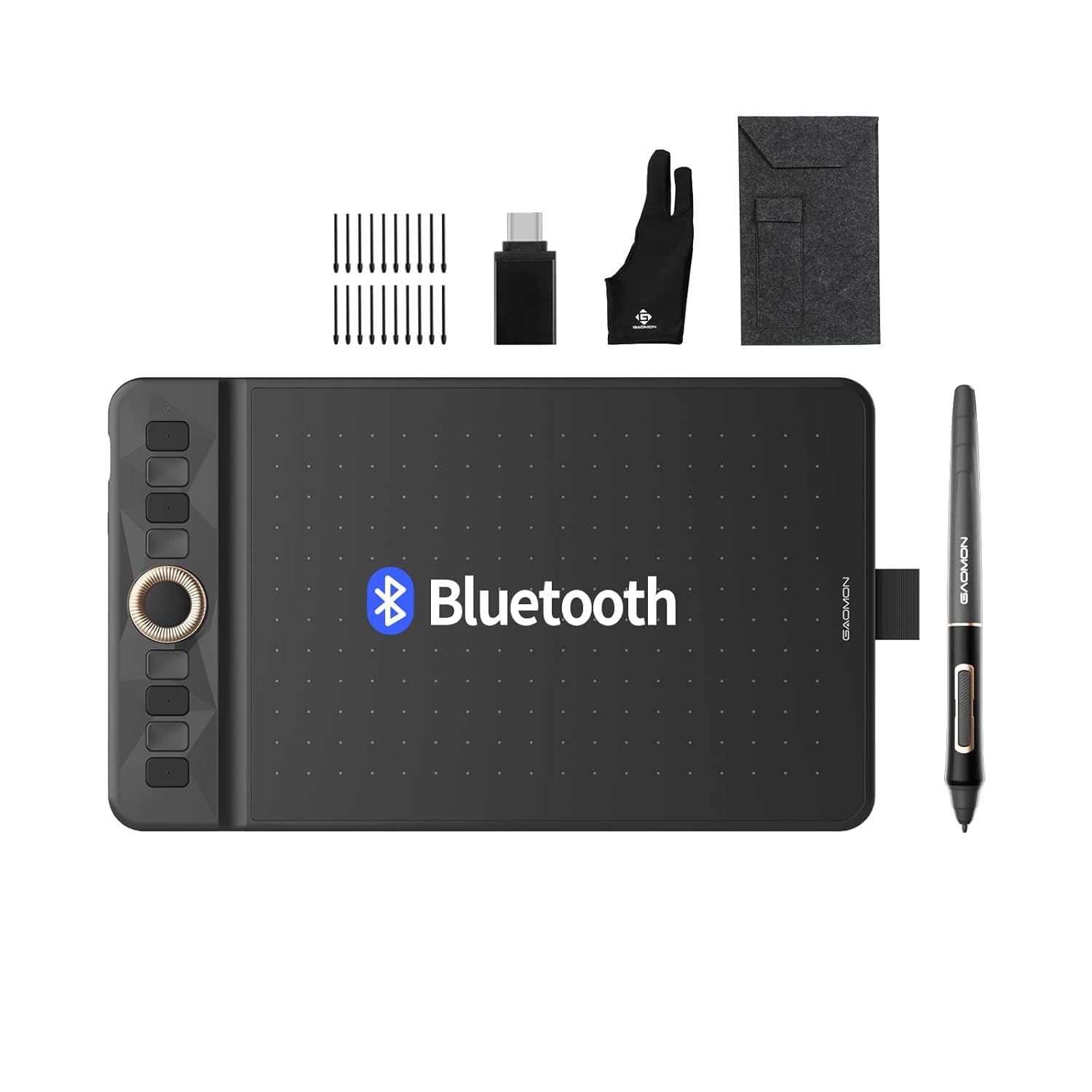
The GAOMON WH851 brings wireless Bluetooth 5.0 and 16384 levels of pressure sensitivity to the entry-level price tier — a spec combination that was unheard of at this price point just a year ago. The 8 x 5 inch active area is the smallest on this list but perfectly adequate for a student or hobbyist working on a single laptop screen. The 18-hour battery keeps you drawing across multiple sessions without reaching for a charger.
The AP519 battery-free pen supports 60-degree tilt detection, enabling natural shading and brush angle variation. The central dial and eight customizable shortcut keys mirror the workflow of premium tablets, though the dial modes (driver and radial) take some practice to master. The textured surface provides moderate friction — enough for line control without wearing down nibs too quickly.
Reviews highlight the exceptional build quality and precision for the price, with several users comparing it favorably to Wacom equivalents costing four times as much. The main trade-offs are the smaller active area (challenging for dual-monitor users) and the reported Bluetooth sluggishness — wired USB-C connection is recommended for precision work. For the absolute beginner testing digital art for the first time, the WH851 is a risk-free entry point.
Why it’s great
- 16384 pressure levels and Bluetooth 5.0 at an entry-level price
- Dial with 8 shortcut keys for efficient workflow
- Excellent build quality that rivals more expensive competitors
Good to know
- Small 8×5 inch active area is tight for dual-monitor setups
- Bluetooth can feel slightly sluggish for precision line work
- Surface texture may wear nibs faster than glossy alternatives
FAQ
Do I need 16384 pressure levels for a Beginner Art Tablet?
Should I buy a pen tablet or a pen display as a beginner?
How important is driver stability for a Beginner Art Tablet?
Final Thoughts: The Verdict
For most users, the best beginner art tablet winner is the HUION Inspiroy Dial 2 because it combines a dual-dial workflow, excellent paper-like surface, and wireless freedom at a price that leaves room for software and accessories. If you want a professional-grade pen and premium build that will last for years, grab the Wacom Intuos Pro Small. And for a full-laminated pen display that turns your desk into a direct drawing experience, nothing beats the XPPen Artist 13.3 Pro V2.