
Our readers keep the lights on and my morning glass full of iced black tea. As an Amazon Associate, I earn from qualifying purchases.
Specs are compiled from manufacturer listings and verified buyer reviews and can change over time — please confirm the key details on the product page before buying.
You are excited to start digital art, but picking your first tablet can feel like a maze. You need a tool that is responsive enough to learn on, durable enough to survive the learning curve, and affordable enough that you don’t break the bank. The right beginner tablet makes drawing feel natural from the first stroke.
I’m Min — the founder and writer behind Gadgets Feed. This guide is built by comparing the manufacturers’ published specifications and the patterns across verified customer reviews, so you get each pick’s real strengths and trade-offs instead of marketing spin.
Your beginner digital art tablet choice decides how fast you improve. We focus on pressure sensitivity, active area, and real-world durability to help you decide.
Quick Picks
- HUION Kamvas Slate 10 — Premium Standalone
- Frunsi RubensTab T11 Pro — Big Canvas
- Frunsi RubensTab T8 — Entry-Level Screen
- XPPen Deco 01 V3 — Best Overall
- GAOMON M10K — Value Pick
- XPPen Deco mini7W — Wireless Freedom
How To Choose A Beginner Digital Art Tablet
Match the tablet’s capabilities to the type of art you want to make. Here is what to look for.
Pressure Sensitivity: The Feel of Your Stroke
Pressure sensitivity determines how the tablet registers how hard you press. More levels (like 16,384 or 8,192) let you create thinner or thicker lines by varying your pen pressure. This is essential for shading and expressive line work. A level of 4,096 is a solid starting point, while 8,192 is excellent for a beginner.
Standalone vs. Computer-Connected: Your Workflow
A standalone tablet has its own screen and operating system (like Android) so you can draw anywhere without a computer. A computer-connected pad plugs into your laptop or desktop and is usually lighter and more affordable. If you want to draw on the bus or in bed, a standalone screen is ideal. If you already have a laptop and want the best value, a connected pad is the way to go.
Active Area: Your Drawing Space
The active area is the part of the tablet that responds to the pen. A larger active area (like 10 x 6 inches) gives you more room for sweeping arm movements. A smaller area (around 7 x 4 inches) suits a wrist-based style and is more portable. Think about where you will draw — a desk setup accommodates a larger tablet, while a small area works better for travel.
Quick Comparison
| Model | Best For | Pressure Sensitivity | Active Area | Connectivity | Amazon |
|---|---|---|---|---|---|
| HUION Kamvas Slate 10 | Standalone Performance | 4096 Levels | 216.6 x 135.4 mm | WiFi + Bluetooth | $219.00$249.00Amazon |
| Frunsi RubensTab T11 Pro | Big Screen Standalone | 1024 Levels | 10.1-inch | USB + WiFi | $199.95Amazon |
| Frunsi RubensTab T8 | Entry-Level Standalone | 2048 Levels | 8-inch | WiFi | $152.99$169.99Limited time dealAmazon |
| XPPen Deco 01 V3 | Ultra-High Sensitivity | 16,384 Levels | 10 x 6.25 inches | USB | $42.88$59.99Limited time dealAmazon |
| GAOMON M10K | Value & Shortcut Keys | 8192 Levels | 10 x 6.25 inches | USB | $42.99$59.99Amazon |
| XPPen Deco mini7W | Wireless Portability | 8192 Levels | 7.0-inch | Wireless 2.4G + USB | $42.17$49.99Limited time dealAmazon |
In‑Depth Reviews
1. HUION Kamvas Slate 10

A standalone powerhouse that grows with you from beginner to intermediate.
The HUION Kamvas Slate 10 is a fully independent drawing tablet — no computer required. It runs Android 12 and comes with a full-laminated 10.1-inch IPS screen at 1920 x 1200 resolution, so your strokes feel like they are touching the screen, not floating above it. The rechargeable stylus offers 4096 levels of pressure sensitivity with tilt function, which gives you smooth, responsive lines for shading and fine detail. The 8-core CPU, 8GB of RAM, and 128GB of storage (expandable up to 512GB) mean you can run apps like HiPaint and Clip Studio Paint without significant lag.
Buyers report that the tablet is lightweight at 575 grams and easy to set up. One reviewer noted that the pen works well and all apps run smoothly, though some experienced palm rejection issues that caused choppy drawing. The 6000mAh battery is a standout — it keeps you drawing all day without hunting for an outlet, which is rare in this price range. The included leather case supports multiple viewing angles, and the anti-glare film resists fingerprints and glare outdoors.
The HUION Kamvas Slate 10 is the best all-in-one package here for a beginner who wants a screen tablet and doesn’t want to tether to a laptop. It also beats the Frunsi T8 on storage and screen quality — 8GB RAM and 128GB storage versus the T8’s 4GB and 64GB — giving you more headroom for complex projects.
Strong Points
- Large 6000mAh battery lasts through long sessions
- Full-laminated 10.1-inch screen with anti-glare film
- 8GB RAM handles multitasking and heavy drawing apps
Trade-Offs
- Some owners mention palm rejection issues during drawing
- Higher price point than computer-connected models
Best for the serious beginner: This is the pick if you want a standalone tablet that handles professional-grade apps and won’t need an upgrade soon.
One thing to know: The included case is a bit flimsy — you might want an elastic band to keep the tablet secure.
2. Frunsi RubensTab T11 Pro
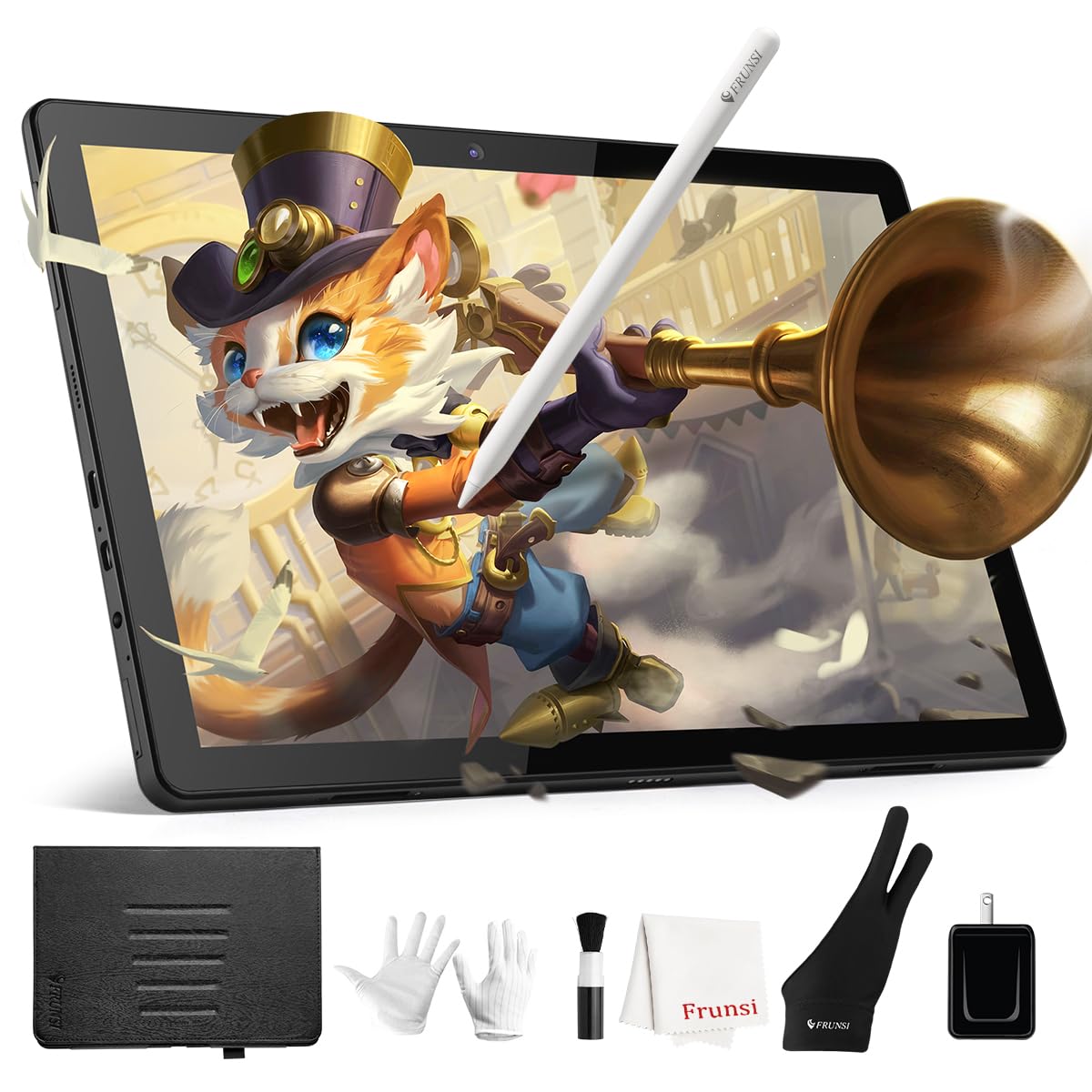
A standalone screen that is big, bright, and built for beginners on a budget.
The Frunsi RubensTab T11 Pro gives you a 10.1-inch Full HD IPS screen with a 1920 x 1200 resolution — the same resolution as the HUION Slate 10 — but at a lower entry point. It runs Android 12 and is completely standalone, so you can open pre-installed apps like Krita and Sketchbook straight away. The battery-free stylus offers 1024 levels of pressure sensitivity, which is enough for basic shading and line work, though it falls short of the 4096 levels on the HUION.
Reviewers mention that the battery lasts about 5 hours on a full charge, and the USB-C charging is convenient. One buyer mentioned that the screen is bright and clear, but cranking the brightness drains the battery faster. The included adjustable stand case doubles as a protective cover, making it easy to draw in bed or at a desk. A few users reported slight drawing lag with heavy brushes, but most said it is acceptable for the price.
The RubensTab T11 Pro is slightly heavier and bulkier than the HUION due to the larger screen, but the trade-off is a bigger canvas for your art. It also beats the smaller Frunsi T8 on display size and resolution, making it a better choice if you value screen real estate for detailed work.
Why It Works
- Large 10.1-inch FHD screen with vibrant colors
- Pre-installed with professional drawing apps
- Includes adjustable stand case for on-the-go use
Where It Lags
- 1024 pressure levels feel less responsive than higher-end options
- Brightness maxed out shortens battery life noticeably
Ideal for the cost-conscious artist: This is your screen tablet pick if you want a big display and don’t need the highest pressure sensitivity.
Watch out: The included stylus has 1024 pressure levels, which is less than the 2048 on the Frunsi T8 — sensitive artists may notice the difference.
3. Frunsi RubensTab T8

A portable standalone that slips into a bag and draws for hours.
The Frunsi RubensTab T8 is the smallest standalone tablet here with its 8-inch display and 1200 x 800 resolution. It runs Android 13 and packs an MTK quad-core CPU with 4GB of RAM and 64GB of storage (expandable to 256GB). The battery-free stylus offers 2048 levels of pressure sensitivity — a step up from the T11 Pro’s 1024 levels — which gives you better control over line weight for sketching and shading.
Customers note the 4000mAh battery delivers up to 20 hours of drawing, according to the manufacturer, but real-world use in apps like Sketchbook dropped it to under 3.5 hours based on one reviewer’s experience. The pre-installed apps (SketchBook, ArtFlow, ibis Paint X) make it easy to start immediately. Some reviewers noticed slight lag with heavy brushes and slow diagonal lines, but line smoothing helps. The included detachable keyboard is a nice bonus for note-taking or typing.
The T8 is a good entry point for a standalone screen, but its smaller canvas and 4GB RAM put it behind the HUION Slate 10, which has double the RAM and a larger, higher-resolution display. It is, however, more affordable than the HUION and the T11 Pro, making it the budget-friendly screen option.
Highlights
- Compact 8-inch size is very portable
- 2048 pressure levels for better shading control
- Detachable keyboard included for text input
Limitations
- Battery life can be shorter than advertised in heavy apps
- Smaller screen may feel cramped for detailed work
For the mobile beginner: Grab the T8 if you need a standalone tablet that fits in a small bag and you are okay with a smaller drawing area.
Heads up: Some reviewers point out no palm rejection — you may need to use a glove (included) to avoid accidental marks.
4. XPPen Deco 01 V3

The tablet that gives you more pressure sensitivity than tablets costing five times as much.
The XPPen Deco 01 V3 stands out with its 16,384 levels of pressure sensitivity and 60 degrees of tilt support — at 16,384 levels versus the GAOMON M10K’s 8,192 levels. This means you get incredibly fine control over your line weight and shading, rivaling professional tablets. The active area measures 10 x 6.25 inches, giving you plenty of room for sweeping strokes. It connects via USB and works with Windows, Mac, Android, and Chrome OS.
One owner reported: “Good used XP Pen; frequent wire disconnection issues (1/6 use).” Another said it is a fantastic upgrade from a Wacom Intuos, praising the consistent pressure sensitivity and the 8 customizable buttons. The stylus is battery-free, so you never have to charge it. The tablet is 8mm thick and weighs 1000 grams — heavier than the GAOMON M10K (695 grams) — but the added weight comes from a sturdier build and the 16K sensor technology.
For a beginner who wants the highest possible pressure sensitivity at a budget-friendly price, the Deco 01 V3 is the clear winner. It beats the GAOMON M10K on sensitivity (16,384 vs 8,192 levels) while costing about the same, making it the best value in the computer-connected category.
Key Strengths
- 16,384 pressure levels deliver ultra-fine shading
- Large 10 x 6.25-inch drawing area
- Battery-free stylus with 60-degree tilt support
Downsides
- Some users report wire disconnection issues
- Heavier than the GAOMON M10K by about 305 grams
Top pick for computer-connected users: If you draw at a desk and want the most responsive stylus sensitivity available at this price, this is your tablet.
skip it if: You need wireless freedom — this is a wired-only tablet.
5. GAOMON M10K

Ten hotkeys and a touch ring make this the most shortcut-friendly pick.
The GAOMON M10K offers a large 10 x 6.25-inch active area with 8,192 levels of pressure sensitivity from its battery-free stylus. Where it truly shines is productivity: it features 10 programmable press keys and a touch ring that you can customize for canvas zooming, brush adjusting, and page scrolling. This is more physical controls than any other tablet on this list — the XPPen Deco 01 V3 has 8 keys, and the Deco mini7W also has 8.
Reviewers consistently call it a “great budget tablet” and mention that it is left-hand friendly with a sensitive hover function. One customer observed the pen only turns on near the tablet surface, which saves battery. The included nib pack and pen case are nice bonuses for new artists. The GAOMON M10K weighs 695 grams — 305 grams lighter than the XPPen Deco 01 V3 — making it easier to move around your desk.
The trade-off is that the M10K has 8,192 levels versus the Deco 01 V3’s 16,384 levels. For a beginner, 8,192 levels is still excellent and will feel very natural for shading. The extra shortcut keys make this a strong choice if you want to speed up your workflow without reaching for the keyboard.
Advantages
- 10 customizable hotkeys plus a programmable touch ring
- Lightweight at 695 grams
- Battery-free stylus with 8,192 pressure levels
Considerations
- Pressure sensitivity is 8,192 levels; the XPPen Deco 01 V3 has 16,384 levels
- Wired USB connection only
Best for shortcut lovers: If you want quick access to brush sizes and undo functions without fumbling, the M10K’s 10 keys and touch ring are unbeatable at this price.
Not for you if: You need the highest possible sensitivity — the XPPen Deco 01 V3 offers more precision.
6. XPPen Deco mini7W

Leave the cables behind with this compact, wireless drawing companion.
The XPPen Deco mini7W is the only wireless model in this lineup. It connects via a 2.4 GHz USB dongle, so you can draw from your couch without being tethered to your PC. The active area is 7 inches, making it the most compact pad here — ideal for small desks or tossing into a laptop bag. It offers 8 custom shortcut keys and supports battery-free stylus with 8,192 levels of pressure sensitivity and 60-degree tilt.
Shoppers say that the tablet works well for both wired and wireless use, but note that Bluetooth pairing requires you to enable PC discovery first. One reviewer with 25 years of 3D art experience found lag in Maya and ZBrush via Bluetooth, but the issue was fixed by switching to a USB-C cable. The tablet is compatible with Windows, Mac, Android, Chrome OS, and Linux, giving you a wide range of device options.
The Deco mini7W is 0.56 kilograms and just 7 inches across, which makes it the most portable option for beginners who draw on the go. However, the small active area means you will rely more on wrist movements than arm strokes. It is also the only wireless option, setting it apart from the wired GAOMON M10K and XPPen Deco 01 V3.
Why Go Wireless
- 2.4G wireless dongle for cable-free drawing
- Compact 7-inch size fits in any bag
- Battery-free stylus with 8,192 pressure levels
Watch For
- Bluetooth can have lag in heavy 3D apps
- Small active area may feel tight for large sketches
Ideal for the mobile artist: Pick the Deco mini7W if you want the freedom to draw from any chair and don’t mind a smaller canvas.
One caveat: The 7-inch area is noticeably smaller than the 10-inch pads above — beginners with a broad drawing style may find it limiting.
Understanding the Specs
Pressure Sensitivity Levels
Pressure sensitivity is how many steps of pressure the tablet can detect. More levels (like 16,384) mean you can create very fine gradations between thin and thick lines just by pressing harder or softer. For a beginner, 8,192 levels are plenty for natural-looking sketches. Lower levels (like 1,024) may feel a bit binary — you will get thick or thin, but not much in between.
Active Area
The active area is the drawing surface that responds to the pen. It is measured in inches (e.g., 10 x 6.25 inches) or diagonally for screens. A larger area lets you use your whole arm for sweeping lines, which feels more natural for large drawings. A smaller area (7 inches) is more portable but forces you to draw with wrist movements, which can be tiring for long sessions.
FAQ
Do I need a computer to use a digital art tablet?
What is a battery-free stylus and why does it matter?
How many pressure sensitivity levels do I really need as a beginner?
Can I use a drawing tablet with an Android phone or tablet?
What is palm rejection and does every tablet have it?
How do I know if a drawing tablet is compatible with my software?
What is the difference between a tablet with a screen and one without?
How long do drawing tablet stylus nibs last before I need to replace them?
Is a wired or wireless drawing tablet better for a beginner?
Can I use a drawing tablet for things other than drawing?
Final Thoughts: The Verdict
If you want one dependable pick, the beginner digital art tablet winner is the XPPen Deco 01 V3 because it offers an incredible 16,384 levels of pressure sensitivity at a price that undercuts many tablets with half that sensitivity. If you want a standalone screen to draw anywhere, grab the HUION Kamvas Slate 10. And for the best value with the most shortcut keys, the standout is the GAOMON M10K.
How We Picked
We do not accept paid placement. Every pick is matched to a real buyer and a real use-case; we do not hands-on test units.
Sources & Methodology
Specifications: manufacturer listings and product documentation. Review insights: verified customer reviews, as of July 2026. Pricing: not shown on this page (it changes often); check the current price via the retailer link.
As an Amazon Associate, Gadgets Feed earns from qualifying purchases. This does not affect which products we feature.
Related Guides
Product prices and availability are accurate as of the date/time indicated and are subject to change. Any price and availability information displayed on Amazon at the time of purchase will apply to the purchase of this product. As an Amazon Associate I earn from qualifying purchases.
CERTAIN CONTENT THAT APPEARS ON THIS SITE COMES FROM AMAZON. THIS CONTENT IS PROVIDED "AS IS" AND IS SUBJECT TO CHANGE OR REMOVAL AT ANY TIME.
Amazon and the Amazon logo are trademarks of Amazon.com, Inc. or its affiliates.